
Repurposing usually breaks down before AI ever touches the work. The weak point is not the model, the caption template, or the editing app. It is the unclear source idea, the missing point of view, and the habit of treating every raw asset as if it deserves to become ten more pieces.
That mistake gets expensive fast. A bland clip becomes a bland post, then a bland newsletter section, then a bland carousel. The work multiplies, but the judgment does not, so the audience sees more surface area without more substance.
Good creator AI editing and repurposing starts by deciding what is actually worth carrying forward. AI can help cut, reshape, summarize, sequence, and adapt, but it cannot rescue a point you never made or choose a strategic angle you never defined.
This guide shows how to build a sharper repurposing workflow: stronger inputs, better editorial filters, cleaner prompts, and more useful outputs that preserve your voice instead of turning your best material into polished filler.
They publish a strong newsletter once, then never turn it into a thread, short video script, lead magnet, sales email, podcast talking point, or updated article. They record an interesting conversation and leave the best parts buried at minute 38. They write a useful post that could become five sharper assets, but instead they start from scratch the next day because “fresh content” feels more productive.
AI can help with that. It can find angles, extract claims, tighten messy drafts, translate one idea into different formats, and revive older material. But it only works when you use it as an editing and transformation partner, not as a personality replacement.
This guide is the practical hub for doing that well. If you want the broader cluster map, start with the parent guide to creator AI editing and repurposing. Here, we are going straight into the working system.
What AI editing and repurposing should actually do for creators
Good creator AI editing and repurposing does not mean “make more stuff.”
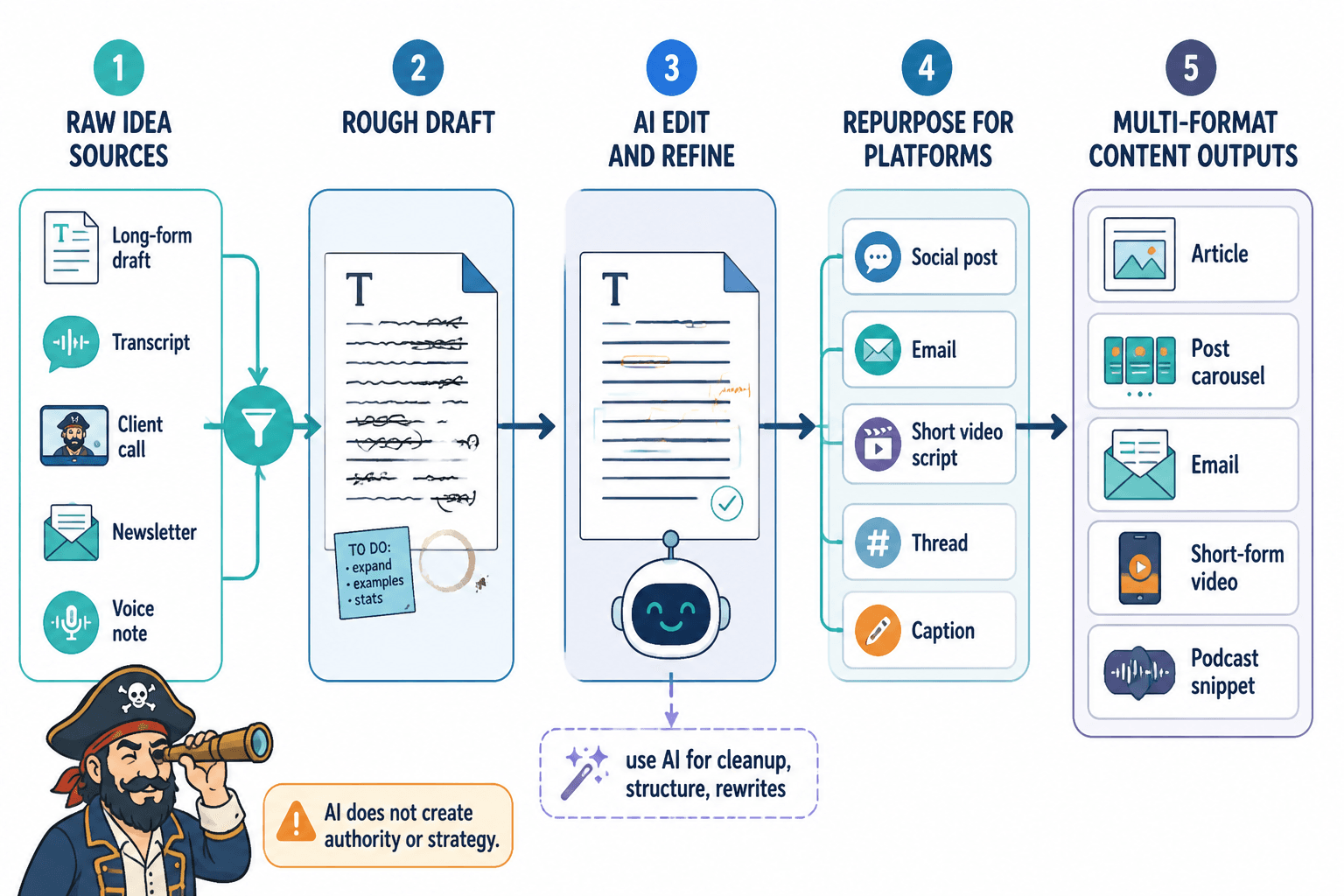
It means making more useful versions of the right stuff.
The point is not to turn every idea into every possible format. The point is to take material with real value and make it easier for the right person to encounter, understand, remember, trust, and act on.
AI is useful when it helps you:
- clarify the main idea hiding inside a messy draft
- find the strongest hook or opening
- remove repetition without removing personality
- identify examples, claims, objections, and useful fragments
- adapt a long piece into format-specific assets
- update old material with better structure and sharper positioning
- create several angle options before you choose one
- test whether a piece is clear to someone who is not already inside your head
If your source material includes audio or video, this work also overlaps with accessibility. Captions and transcripts do more than feed repurposing workflows. The W3C guidance on captions and media accessibility is a useful reminder that clearer media assets help more people use the content in the first place.
AI is less useful when you ask it to:
- invent authority you have not earned
- replace your taste
- make weak ideas sound profound
- generate endless posts from thin material
- summarize everything into lifeless “key takeaways”
- mimic your voice from two samples and call it a brand
The difference is simple: good AI editing improves judgment. Bad AI editing avoids it.
Google’s guidance on helpful, reliable, people-first content is a useful standard here. Whether you care about search or not, the underlying question is the right one: does the content actually help the reader, or does it mainly exist because a publishing machine needed another output?
Why creator AI repurposing gets generic so fast
AI repurposing gets generic because creators often start with the wrong instruction:
“Turn this into a LinkedIn post, a Twitter thread, an email, and a short video script.”
That sounds practical. It is usually too early.
Before format, you need decisions:
- What is the main claim?
- Who is this for?
- What does the reader already believe?
- What should they believe or do after reading?
- What is the sharpest example?
- What part is original, useful, or hard-earned?
- What should be cut because it is filler?
- Which format actually fits this idea?
If you skip those decisions, AI fills the gaps with the internet’s average voice. That is why so much AI-assisted creator content sounds like a motivational memo written by a committee.
The other reason it gets generic: creators ask for “repurposing” when they really need editing first.
A vague essay does not become a strong thread by being split into numbered points. A soft podcast answer does not become a compelling clip just because AI found a 45-second segment. A boring article does not become a good newsletter because the tool added “Hey friends” at the top.
Repurposing works best after the source material has been clarified.
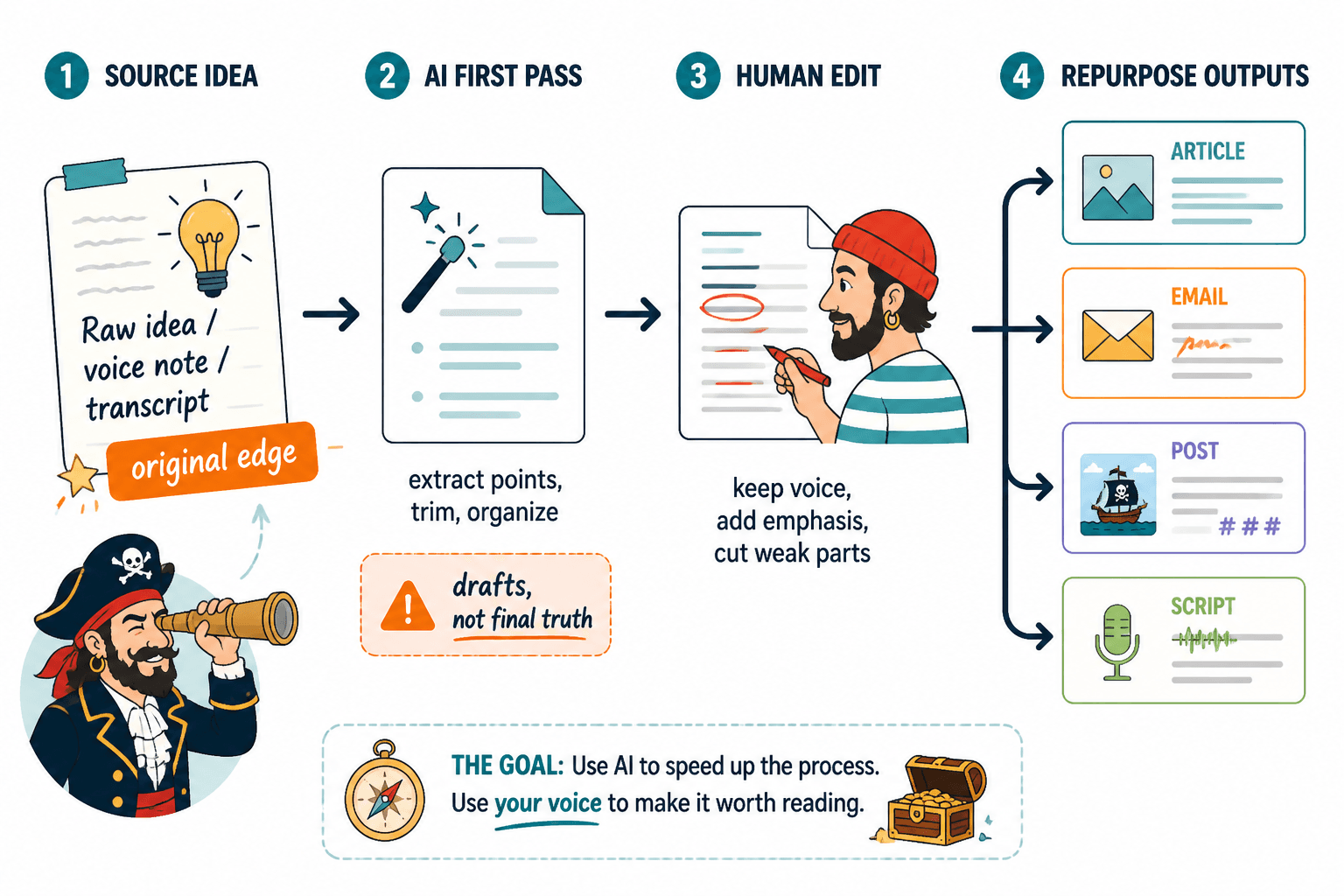
Start by choosing source material worth repurposing
Most creator AI editing and repurposing falls apart before the workflow even starts.
Not everything deserves to be repurposed. Some ideas are notes. Some are placeholders. Some are half-interesting but not ready. Some are good for one format and weak everywhere else.
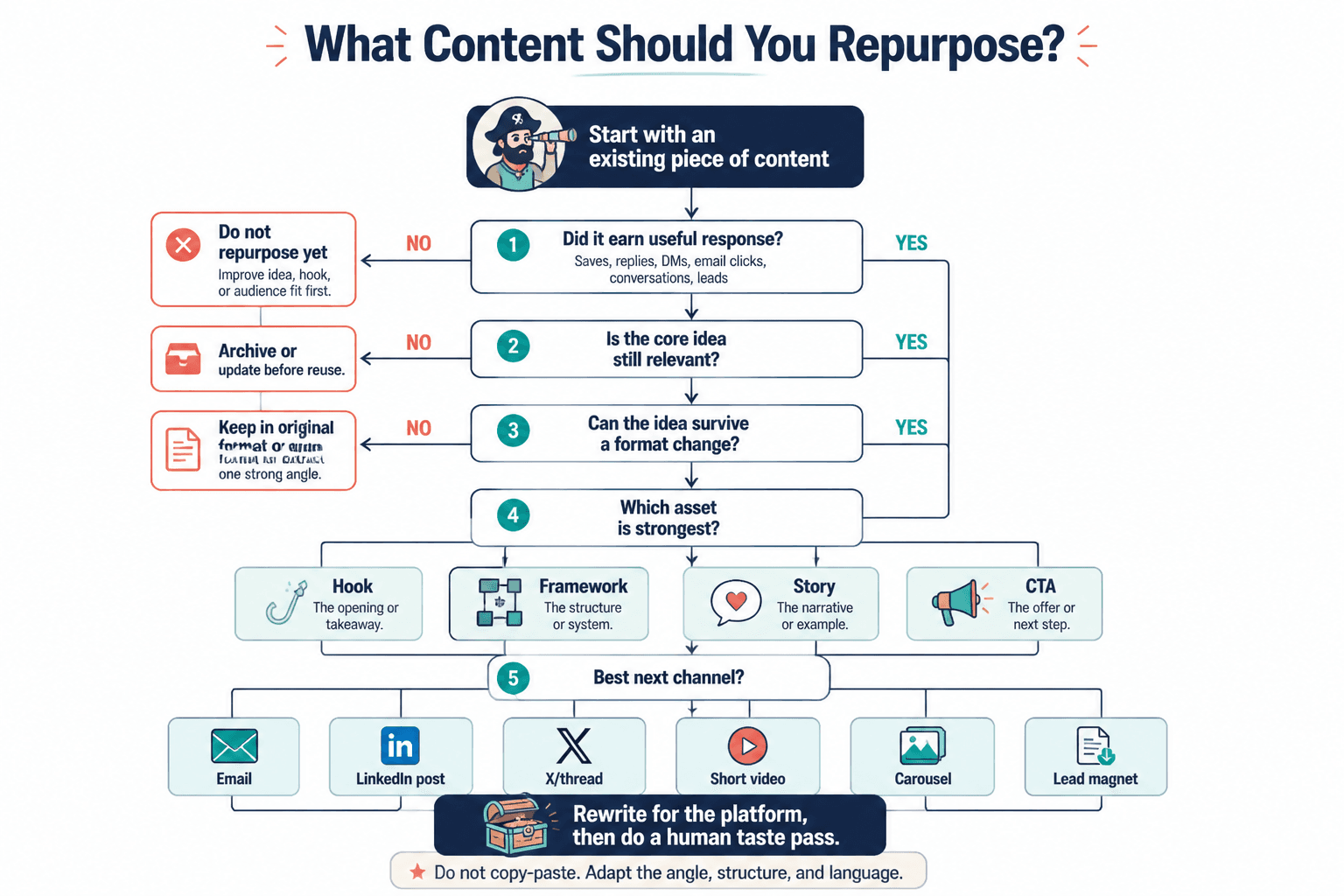
Before you ask AI to multiply a piece, decide whether the source has enough signal.
Good source material usually has at least one of these:
- a clear argument
- a useful framework
- a strong personal story
- a specific lesson from experience
- a surprising contrast
- a common mistake your audience makes
- a process people can follow
- a strong example or case study
- a question your audience already cares about
- evidence of traction from earlier publishing
Weak source material usually has signs like:
- the point could apply to anyone
- the advice is mostly abstract
- there are no examples
- the voice sounds borrowed
- the piece repeats one idea in five ways
- the hook promises more than the body delivers
- the lesson is true but obvious
- the material exists only because you needed to post
A useful rule: repurpose the pieces that already contain judgment, not just words.
If an old article, newsletter, podcast, or script made people reply, save, click, buy, argue, or ask follow-up questions, it probably has something worth extracting. If it quietly disappeared but you still believe the idea is good, it may need re-editing before repurposing.
This is where old content becomes valuable. Your archive is not a graveyard. It is raw material.
An article from two years ago may have a strong idea buried under a weak intro. A video may contain one excellent answer surrounded by ten minutes of setup. A newsletter may have a paragraph that deserves to become the center of a new sales page.
If you are trying to improve older written content specifically, the guide on how to increase article views by improving clarity and usefulness pairs well with this process.
Build your AI repurposing flow around decisions, not formats
A lot of creators build workflows like this:
- Paste content into AI.
- Ask for ten formats.
- Copy the outputs.
- Lightly edit.
- Publish.
That is fast. It is also how you get clones.
A better workflow looks like this:
- Choose source material with real value.
- Extract the core idea, claims, examples, and audience problem.
- Edit the source for clarity.
- Decide which formats actually fit.
- Generate format-specific drafts.
- Human-edit for voice, specificity, and usefulness.
- Publish selectively.
- Track what worked.
- Feed those results back into future edits.
The important shift is that AI does not decide what deserves to exist. You do.
AI can give you options. You choose the direction.
AI can suggest hooks. You decide which one sounds like you and serves the reader.
AI can compress a long piece. You decide what cannot be lost.
AI can adapt an idea for short-form video. You decide whether the idea has visual or spoken energy.
This is what separates useful repurposing from content confetti.
Editing in passes beats one giant magic prompt
Most creator AI summary prompts do not fail because the tool is bad. They fail because the prompt is lazy, vague, overloaded, or trying to get one paragraph to do the work of an actual strategy.
The same is true for editing and repurposing prompts.
Creators often ask one giant prompt to do everything:
“Improve this, keep my voice, make it more engaging, shorten it, add hooks, make it persuasive, turn it into a newsletter, five tweets, a video script, and a carousel.”
That is not a workflow. That is a panic attack with instructions.
Editing in passes works better because each pass has a job.
Pass 1: Diagnose
Ask AI what is working, what is unclear, what feels repetitive, and where the reader may lose interest.
Useful prompt:
“Analyze this draft for clarity, structure, specificity, and reader interest. Do not rewrite it yet. Tell me the strongest idea, the weakest section, where the argument gets vague, and what should be cut.”
The “do not rewrite it yet” part matters. You want diagnosis before polish.
Pass 2: Clarify the core
Once you know what the piece is trying to do, ask for a sharper articulation.
Useful prompt:
“Based on this draft, identify the core claim in one sentence. Then list the supporting points, examples, objections, and missing context. Separate what is essential from what is optional.”
Now you have a map.
Pass 3: Strengthen the opening
Weak openings wreck creator AI editing and repurposing because the rest of the workflow inherits the wrong frame.
If the opening is vague, every repurposed asset will start vague. If the opening promises the wrong thing, the thread, email, and script all carry that mismatch forward.
For more on this, the guide to writing better hooks and openings is worth reading before you mass-produce variations.
Useful prompt:
“Give me five opening options for this piece. Each should use a different approach: direct claim, common mistake, tension, story setup, and counterintuitive observation. Avoid hype and generic motivational language.”
Pass 4: Cut and tighten
Only now should you ask for line-level compression.
Useful prompt:
“Edit this draft to remove repetition, filler, throat-clearing, and abstract phrasing. Keep the meaning and voice. Do not make it sound more corporate. Preserve specific examples and strong sentences.”
Pass 5: Repurpose by format
After the idea is clear, you can adapt it.
Useful prompt:
“Using the edited version below, create a LinkedIn post for experienced solo creators. Keep the main claim, use one concrete example, and end with a useful takeaway rather than a generic question.”
Then do a separate prompt for the newsletter. Another for the video script. Another for the short post.
One format per pass gives you better control.
What a good AI editing prompt actually includes
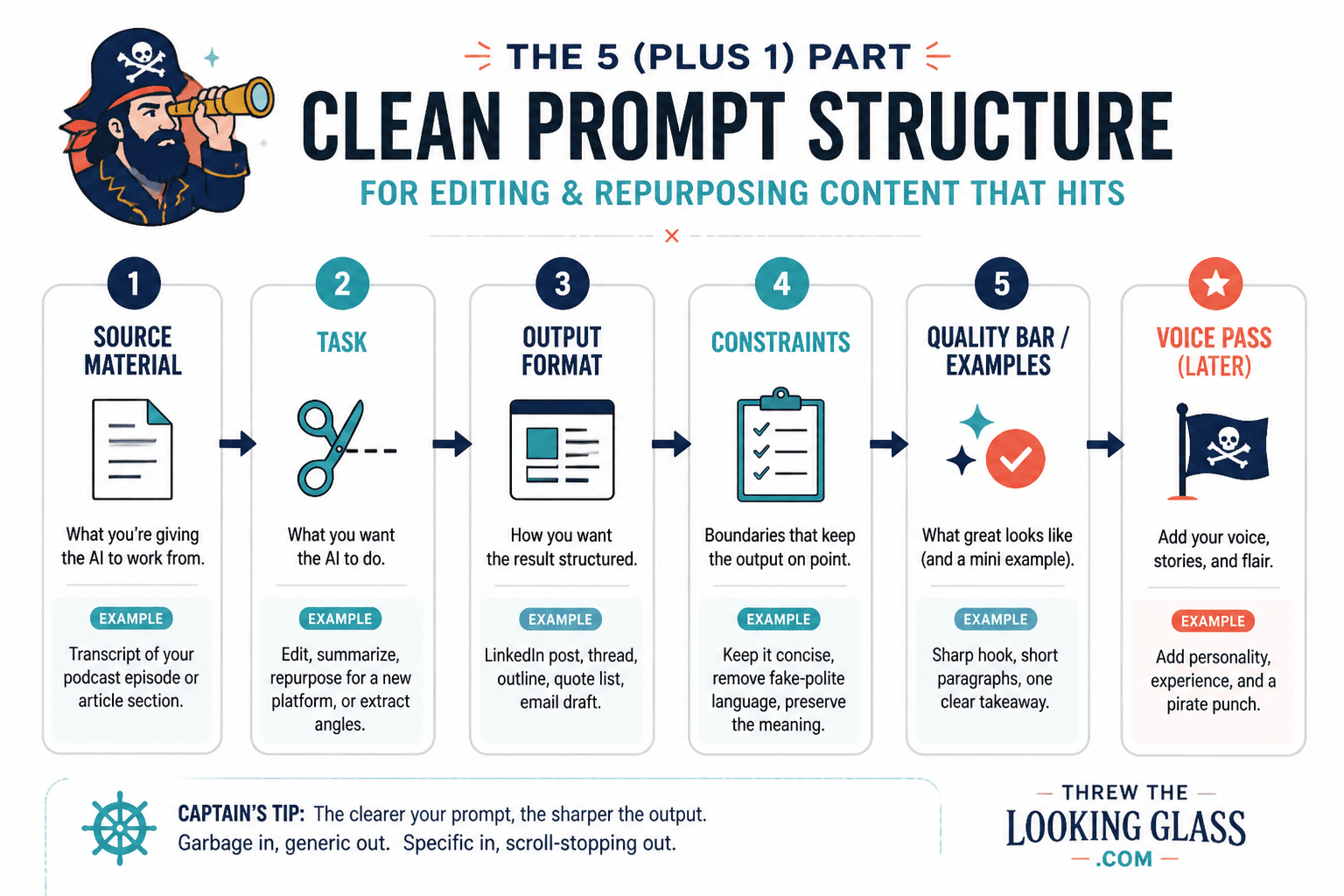
A strong prompt is not long because it is fancy. It is useful because it gives the model the missing context.
At minimum, include:
- the role of the content
- the target reader
- the desired action or effect
- the source material
- what to preserve
- what to avoid
- the format constraints
- the editing task for this pass
For example:
“Edit this newsletter draft for independent consultants who sell expertise online. The goal is to make the argument clearer and more useful, not more dramatic. Preserve my direct tone and the client example in the middle. Remove repetition, vague business language, and unnecessary setup. Do not add claims I did not make. Return a revised draft and a short list of what changed.”
That is much better than:
“Make this better.”
The more specific prompt gives AI boundaries. Boundaries are what protect voice.
Protect your voice by protecting your choices
Creators worry that AI will flatten their voice. That is a fair concern, but the real danger is not that AI touches the draft. The danger is that you accept AI’s default choices.
Voice is not just sentence rhythm. It is what you notice, what you refuse to exaggerate, what examples you choose, what you cut, what you joke about, what you consider obvious, and what you think deserves attention.
To protect your voice, preserve these things:
- your actual opinions
- your original examples
- your preferred level of bluntness
- your vocabulary
- your pacing
- your sense of proportion
- your skepticism
- your lived details
- your audience’s real language
Do not ask AI to “make this sound more professional” unless you want it to sand off the interesting edges.
Better instructions:
- “Keep the dry humor.”
- “Do not replace plain phrases with business jargon.”
- “Preserve the blunt first sentence.”
- “Do not add inspirational language.”
- “Keep the example about the failed webinar.”
- “Make the structure clearer, but keep the conversational tone.”
Your job is not to defend every original sentence. Some of them should go. Your job is to defend the specific choices that make the piece yours.
Adapt one idea across formats without creating clones
Repurposing is not duplication with different line breaks.
A newsletter, short video, search article, LinkedIn post, sales email, and carousel are different experiences. They can share the same core idea, but they should not feel like the same object wearing different clothes.
Here is the practical distinction:
- A newsletter can build trust through context and reflection.
- A LinkedIn post usually needs a clear angle and fast relevance.
- A short video needs spoken momentum and a visual or emotional beat.
- A search article needs completeness, structure, and direct usefulness.
- A sales email needs tension, specificity, and a reason to act.
- A carousel needs compression and visual sequencing.
- A podcast segment can explore nuance and story.
So instead of asking, “How do I turn this into every format?” ask:
“What is the best job this idea can do in each format?”
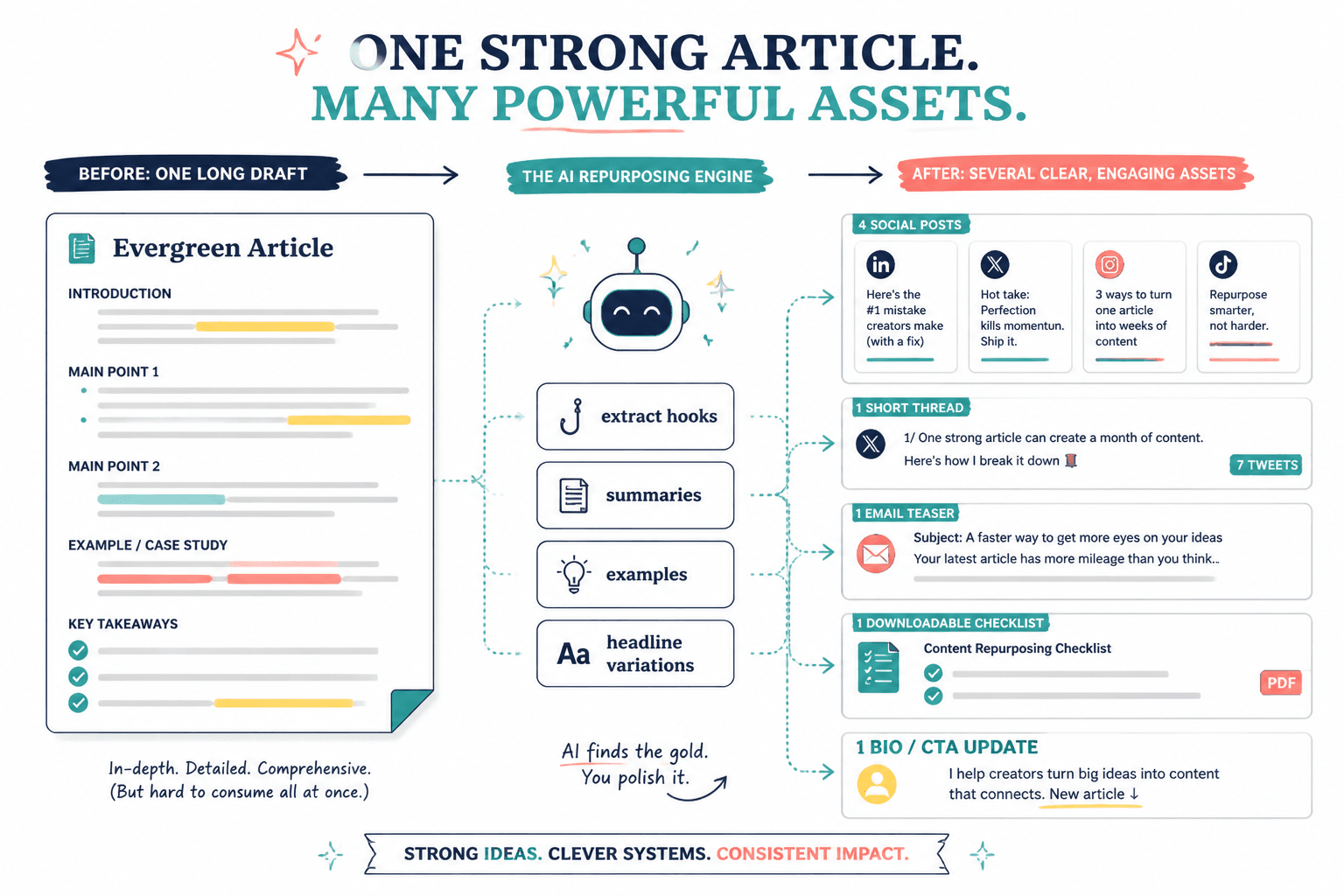
A single idea might become:
- a long article explaining the full framework
- a newsletter about the mistake that led you to the framework
- a short video focused on one vivid example
- a LinkedIn post arguing against the common bad advice
- a sales email showing why the problem costs money
- a lead magnet checklist that helps people apply the idea
Those are siblings, not clones.
If you want to see how this looks in practice, the companion page on creator AI editing and repurposing examples shows concrete before-and-after transformations.
Do not ask the wrong length question
Most creators ask the wrong length question.
They ask, “How long should this be?”
A better question is, “How much does the reader need here?”
There is no magic length, but there are clear limits.
A short post should not carry a full strategy. A long article should not be padded with obvious throat-clearing. A video script should not include paragraphs that only work on the page. A newsletter should not become a dumping ground for every related thought.
AI often makes length problems worse because it is good at producing smooth filler. If you ask for 1,500 words when the idea needs 700, it will usually comply. If you ask for “a punchy post” without defining the point, it may give you shallow compression.
Use length as a constraint, not a goal.
Try prompts like:
- “Cut this by 30% without removing examples.”
- “Compress this into a 150-word post that preserves the main tension.”
- “Expand this only where the reader needs context.”
- “Tell me whether this idea is too thin for a long article.”
- “Identify which sections deserve more detail and which should be cut.”
The best length is earned by the job of the piece.
Nielsen Norman Group’s research on how people read on the web is a useful reminder: readers scan, judge quickly, and look for structure. That does not mean all content must be short. It means every section has to justify itself.
Use old content as raw material instead of starting from scratch
Why old content is usually more valuable than your next fresh idea:
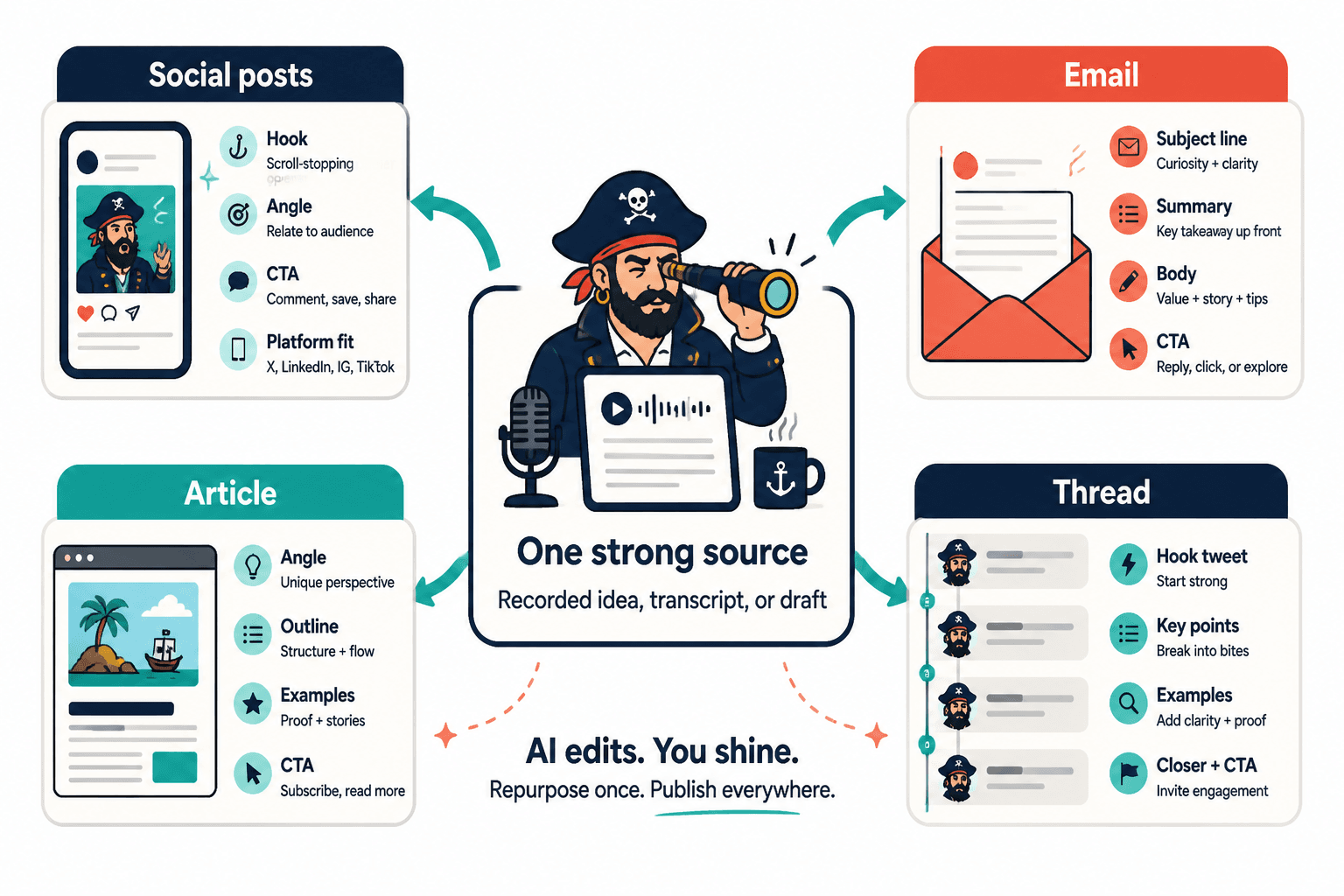
It already has evidence.
Maybe the evidence is traffic. Maybe replies. Maybe comments. Maybe sales conversations. Maybe the fact that people keep asking you the same follow-up question. Maybe the piece failed publicly, but you now know exactly why.
Old content gives AI something better than a blank page. It gives it history.
Good candidates for repurposing include:
- articles with steady search traffic
- newsletters that got replies
- podcast episodes with strong moments
- workshop transcripts
- old lead magnets
- sales pages with useful explanations
- client onboarding documents
- social posts that sparked conversation
- drafts you abandoned because the structure was wrong
- FAQs from buyers or subscribers
The trick is to treat old content as material, not scripture.
You are allowed to cut the weak parts. You are allowed to change the frame. You are allowed to extract one section and ignore the rest. You are allowed to update your opinion.
A strong old-content prompt:
“Analyze this old article as raw material. Identify the strongest ideas, outdated sections, unclear claims, useful examples, and parts that could become separate assets. Do not rewrite yet. Recommend three repurposing directions and explain which one has the most value for my current audience.”
That prompt gives you options before output.
Rewrite boring AI-assisted content like an editor, not a prompt collector
Most creator AI editing and repurposing content is not bad because AI touched it. It is bad because nobody bothered to rewrite it into something a real person would want to read.
Boring AI-assisted content has recognizable symptoms:
- it opens with a broad statement nobody disagrees with
- it uses phrases like “in today’s fast-paced digital landscape”
- it explains obvious things as if they are insights
- it avoids naming real situations
- it ends with a generic question
- it has no friction, surprise, story, or specificity
- it sounds equally plausible coming from any creator in the niche
The fix is not always another prompt. Sometimes the fix is editorial taste.
Ask:
- What is the most specific sentence here?
- What sentence could only I have written?
- Where does the piece become vague?
- What example would make this real?
- What would my audience disagree with?
- What am I refusing to say plainly?
- What can I cut from the first 20%?
- Where does the reader get a reward for continuing?
AI can help you answer those questions, but you should make the final call.
If you want more reader pull, the piece on transportation theory and writing is useful because it explains why people keep reading when a piece creates movement, curiosity, and immersion.
Where creators get better results with AI
AI works especially well in the middle of the creative process.
Not always at the very beginning. Not always at the very end. The middle.
At the beginning, your taste and experience matter most. You need to know what is worth saying.
At the end, your judgment matters most. You need to decide what is publishable.
In the middle, AI can help you see options faster.
Useful AI jobs include:
Extracting angles
Give AI a transcript, article, or messy draft and ask for possible angles. Then choose the one with the most tension or usefulness.
Finding hidden structure
AI is good at spotting repeated themes and grouping related ideas. This is especially helpful when turning a rambling transcript into a coherent article or newsletter.
Creating format drafts
Once the source is clear, AI can help produce first versions for different platforms. These should be treated as drafts, not finished assets.
Tightening language
AI can cut repetition, simplify syntax, and identify confusing sections. This is useful when your draft is strong but bloated.
Generating variations
AI can give you ten hooks, five endings, or three different frames. The point is not to use all of them. The point is to make choosing easier.
Updating old assets
AI can compare an old piece against your current positioning and suggest what to revise, remove, or expand.
For tool selection, use the companion guide to the best AI tools for creator AI editing and repurposing. The tool matters less than the workflow, but the right tool can reduce friction.
When a short workflow beats a long one
Not every piece needs a full editing machine.
A long workflow is useful when:
- the source material is important
- the content supports sales
- the idea will be reused many times
- the piece is evergreen
- the topic is nuanced
- the draft is messy but valuable
- the output will become a lead magnet, article, or campaign
A short workflow is better when:
- the idea is simple
- the risk is low
- the format is short
- the source is already clear
- you are testing an angle
- the asset is timely
- the piece does not need deep transformation
A short workflow might be:
- Paste the source.
- Ask for the core claim and best angle.
- Ask for one format-specific draft.
- Edit manually.
- Publish.
That is enough for a simple post.
A long workflow might include diagnosis, restructuring, hook development, line editing, format adaptation, sales alignment, and final review.
The mistake is using the same workflow for every asset. That either creates unnecessary drag or lazy output.
Your workflow should match the value and risk of the piece.
Also, protect the conditions that let you edit well. AI can speed up mechanical work, but it cannot give you concentration. If you are constantly switching tabs, half-listening to something, and approving drafts while distracted, your quality control drops. The article on why music can hurt writing productivity is really about that larger constraint: editing requires attention.
A practical creator AI editing and repurposing workflow
Here is a usable workflow you can run on articles, newsletters, transcripts, podcast episodes, workshop notes, or long social posts.
Step 1: Pick the source
Choose one piece of source material.
Before using AI, answer:
- Why is this worth repurposing?
- Who is it for?
- What evidence do I have that the idea matters?
- What business or audience goal could it support?
If you cannot answer those, do not repurpose it yet.
Step 2: Extract the value
Prompt:
“Read this source material and extract the core claim, supporting ideas, strongest examples, audience problem, implied objections, and possible repurposing angles. Do not rewrite yet.”
Review the output. Correct it. Add missing context.
Step 3: Decide the content job
Choose one primary job:
- teach
- persuade
- build trust
- generate leads
- support sales
- spark conversation
- answer a common objection
- deepen audience belief
- drive traffic
- explain a framework
One piece can do more than one thing, but one job should lead.
If the content supports revenue, read the companion guide on creator AI editing and repurposing for leads and sales. Sales assets need more precision than general audience content.
Step 4: Edit the source
Before creating new formats, improve the base material.
Prompt:
“Edit this for clarity and structure. Keep the author’s voice. Remove repetition and vague phrasing. Preserve the strongest examples. Flag any claims that need more evidence or specificity.”
Do not blindly accept the rewrite. Compare it to the original. Restore anything important that got flattened.
Step 5: Choose formats deliberately
Do not choose formats because a template told you to.
Choose based on fit:
- If the idea needs depth, make an article or newsletter.
- If it has one sharp contrast, make a short post.
- If it has a visual moment, make a video.
- If it answers a buyer objection, make a sales email.
- If it is procedural, make a checklist.
- If it has steps, make a carousel or tutorial.
- If it has nuance, make a podcast segment or long essay.
Step 6: Create one format at a time
Prompt for one output, not ten.
Example:
“Turn the edited source into a newsletter for creators who feel pressure to publish daily. Use a direct opening, include one concrete example, keep a conversational but unsentimental tone, and end with a practical next step.”
Then revise.
Then move to the next format.
Step 7: Human-edit for voice and specificity
Before publishing, check:
- Did AI add claims I would not make?
- Did it remove the strongest sentence?
- Did it make the tone too polished?
- Did it preserve the real example?
- Does the opening create actual interest?
- Is the piece useful without the source context?
- Is the ending specific enough?
- Would I say this out loud?
If not, edit.
Step 8: Track results
Track more than likes.
Look for:
- saves
- replies
- clicks
- watch time
- newsletter replies
- lead magnet conversions
- sales calls booked
- objections raised
- comments that reveal confusion
- follow-up questions
Those signals tell you which ideas deserve more investment.
Step 9: Feed results back into the archive
If a short post performs well, expand it.
If a newsletter gets replies, turn it into a guide.
If a sales email answers an objection, turn it into a public article.
If a clip resonates, turn the idea into a deeper asset.
The workflow becomes stronger when publishing creates new source material.
The creator AI editing checklist
Use this before publishing any AI-assisted repurposed asset.
Source quality
- Is the original idea strong enough to reuse?
- Does it contain a clear claim, example, or useful framework?
- Do I know who this is for?
- Is there evidence that the audience cares?
Editing quality
- Is the main point clear?
- Is the opening specific?
- Did I remove repetition?
- Did I keep the best examples?
- Did I cut generic AI phrasing?
- Are any claims unsupported?
Voice protection
- Does this sound like me?
- Did AI flatten my opinion?
- Did it add jargon?
- Did it preserve my level of bluntness, humor, or skepticism?
- Are there sentences only I would write?
Format fit
- Does this format suit the idea?
- Is the asset adapted, not cloned?
- Does the length match the job?
- Does the ending make sense for the platform?
Business fit
- Does this support trust, traffic, leads, sales, or audience learning?
- Is the call to action appropriate?
- Does it help the reader before asking for anything?
- Should this become part of a larger sequence or campaign?
If a repurposed asset includes affiliate mentions, sponsorships, endorsements, or client-result claims, make sure the disclosure is still clear in the new format. The FTC’s guidance on clear disclosures for online creators is a useful baseline.
Better creator AI editing is mostly better judgment
The creators who win with AI repurposing will not be the ones who generate the most assets from one prompt.
They will be the ones who choose better source material, ask sharper questions, edit in passes, protect their voice, and understand what each format is supposed to do.
AI can help you move faster. It can help you see your own material from new angles. It can turn old content into useful new assets. It can make editing less lonely and repurposing less wasteful.
But it cannot care on your behalf.
It cannot know which sentence matters because you lived it.
It cannot decide that a piece should be shorter because the reader has already gotten the point.
It cannot feel when a polished paragraph has lost the original spark.
That is still your job.
Use AI for transformation, not personality replacement. Use it to sharpen your ideas, not bury them under smooth filler. Use it to waste less of the good work you have already done.
That is how creator AI editing and repurposing becomes a real advantage instead of another machine for making forgettable content.