
A creator workflow often clogs at the same point: the source asset is finished, but the useful follow-on assets never get made. The podcast is published, the video is uploaded, the newsletter goes out, and then the best fragments sit there because turning them into clips, posts, outlines, and emails takes another round of manual work.
That bottleneck is not solved by downloading every new AI app with a promising demo. The real decision is which parts of your content operation need support: transcription, extraction, editing, formatting, design, scheduling, analysis, or quality control.
The best AI tools for creator editing and repurposing are the ones that fit into a system you can actually run. They should reduce friction without removing judgment, speed up production without lowering the bar, and help one strong source asset become several useful pieces of content.
This article focuses on choosing a lean tool stack for that job: what each category does, where AI is genuinely useful, where it still needs human direction, and how to avoid building a shiny collection of apps instead of a dependable repurposing workflow.
What AI editing and repurposing tools are actually good for
The best AI tools for creator editing and repurposing are not magic content machines. They are workflow accelerators.
They are useful for tasks like:
- turning transcripts into clean summaries
- extracting hooks, quotes, and key ideas from long-form content
- rewriting rough drafts into clearer formats
- creating platform-specific versions of the same idea
- finding clip candidates inside long videos or podcasts
- removing filler, repetition, and structural clutter
- organizing repeatable prompts, templates, and content systems
- drafting captions, email blurbs, post variations, and show notes
They are not good at deciding what your audience should care about, what your point of view is, or whether a piece of content deserves to exist. Those decisions still need a human creator.
A good AI repurposing stack should make your best ideas easier to reuse. It should not flood your channels with generic variations that sound like everyone else.
The best AI editing and repurposing stack starts with one source asset
The most important tool in the workflow is not an app. It is the source asset.
A source asset is the original piece of content you repurpose from. It might be:
- a YouTube video
- a podcast episode
- a webinar
- a newsletter
- a blog post
- a livestream
- a customer call
- a workshop or presentation
- a voice memo with a clear idea
If the source asset is weak, AI will only help you make weak content faster. If the source asset is specific, useful, opinionated, or story-rich, AI can help you extract a lot of value from it.
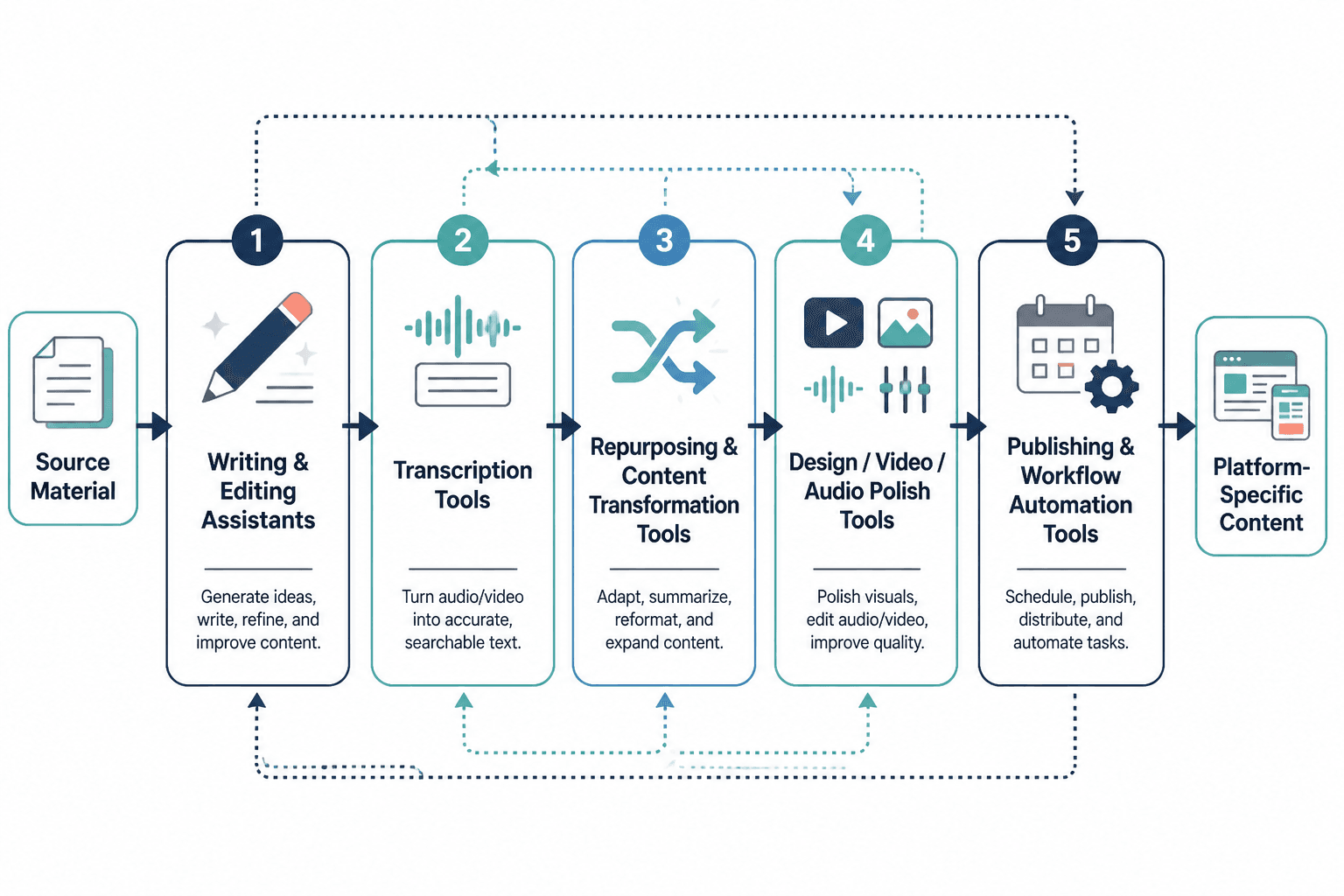
The simplest model is this:
- Start with one strong source. Do not ask AI to invent the entire content strategy from nothing.
- Extract the useful pieces. Pull out claims, stories, frameworks, hooks, quotes, examples, and objections.
- Transform those pieces for specific channels. A LinkedIn post, YouTube Short, email, and blog intro should not all sound identical.
- Edit for human clarity. Remove generic phrasing, add your point of view, and check whether the piece still sounds like you.
- Publish with intent. Each asset should have a job: reach, trust, education, lead capture, or sales support.
This is also why “best AI tool” lists can be misleading. The right tool depends less on hype and more on your bottleneck. A creator who records weekly videos needs different support than a writer repurposing essays into social posts.
The five tool categories that matter most
You do not need twenty AI tools to repurpose content well. Most creators need a small stack that covers five jobs.
1. Writing and editing assistants
Writing and editing assistants help convert rough material into cleaner language. These include tools like ChatGPT, Claude, Gemini, Grammarly, LanguageTool, and similar writing-focused assistants.
Use them for:
- rewriting rough transcripts into readable drafts
- tightening intros and conclusions
- creating alternate hooks
- summarizing long material
- turning notes into outlines
- simplifying dense explanations
- checking tone consistency
The best use is not “write me a post about this topic.” A better prompt is more specific:
Using the transcript below, extract the five strongest arguments. For each one, create a short social post draft in my voice. Keep the original point of view. Do not add claims that are not in the transcript.
Writing assistants are strongest when they are constrained by source material. They become weaker when they are asked to guess your audience, invent examples, or manufacture expertise.
If you publish blog content from repurposed material, pair AI drafting with real editorial judgment. Google’s guidance on helpful, reliable, people-first content is a useful reminder: the goal is not simply to produce more pages, but to publish material that actually helps readers.
2. Transcription and media editing tools
For video and audio creators, transcription is the bridge between recorded content and written repurposing. Once you have a transcript, you can create posts, summaries, newsletters, blog outlines, clips, titles, descriptions, and email sequences from the same source.
Tools in this category include Descript, Otter, Riverside, Adobe Premiere Pro, CapCut, DaVinci Resolve, and platform-native captioning tools.
Use them for:
- generating transcripts from video or audio
- removing filler words and long pauses
- creating captions
- finding usable sections inside long recordings
- editing short clips for vertical platforms
- cleaning audio
- creating rough cuts before manual polish
Captions are not just a convenience. They make video easier to consume in silent environments and more accessible to viewers who need text support. The W3C’s guidance on captions and audio/video accessibility is worth reviewing if video is a major part of your content system.
AI can help you identify possible clips, but it cannot always tell which clip carries the most context, emotional tension, or strategic value. A clip that gets attention but misrepresents the original point may hurt trust. Use AI to surface options, then choose manually.
3. Repurposing and content extraction tools
Repurposing tools sit between raw content and finished assets. They pull ideas out of a source piece and help convert them into channel-specific formats.
These may include tools built specifically for short-form clips, tools that generate social post variations, or custom workflows using a general AI assistant and templates.
Use them for:
- extracting short-form clip ideas from long videos
- turning one essay into multiple social posts
- creating quote cards or carousel outlines
- drafting newsletter summaries from podcasts
- turning a webinar into follow-up emails
- creating platform-specific captions
- identifying recurring themes across content
The key is to repurpose the idea, not just resize the asset.
A strong idea may become:
- a 45-second vertical clip
- a LinkedIn post
- a newsletter section
- a blog subsection
- a carousel
- a sales email
- a short quote
- a talking point for a future video
Each format should be adapted to how the audience uses that channel. YouTube Shorts, for example, have their own format expectations and creation rules, which YouTube explains in its official Shorts help documentation. A blog section, a short video, and an email teaser should not be treated as interchangeable containers.
4. Knowledge management and template systems
This is the category many creators skip, and it is one of the most important.
AI tools are much more useful when your ideas, prompts, examples, voice notes, templates, and finished assets are organized. Without a storage system, every repurposing session becomes a new improvisation.
Tools in this category include Notion, Airtable, Google Drive, Dropbox, Obsidian, ClickUp, Trello, and simple spreadsheet systems.
Use them for:
- storing source assets
- saving transcripts
- organizing prompts by use case
- tracking repurposed outputs
- building reusable editing checklists
- saving approved examples of your voice
- maintaining a content idea bank
- recording which assets were published where
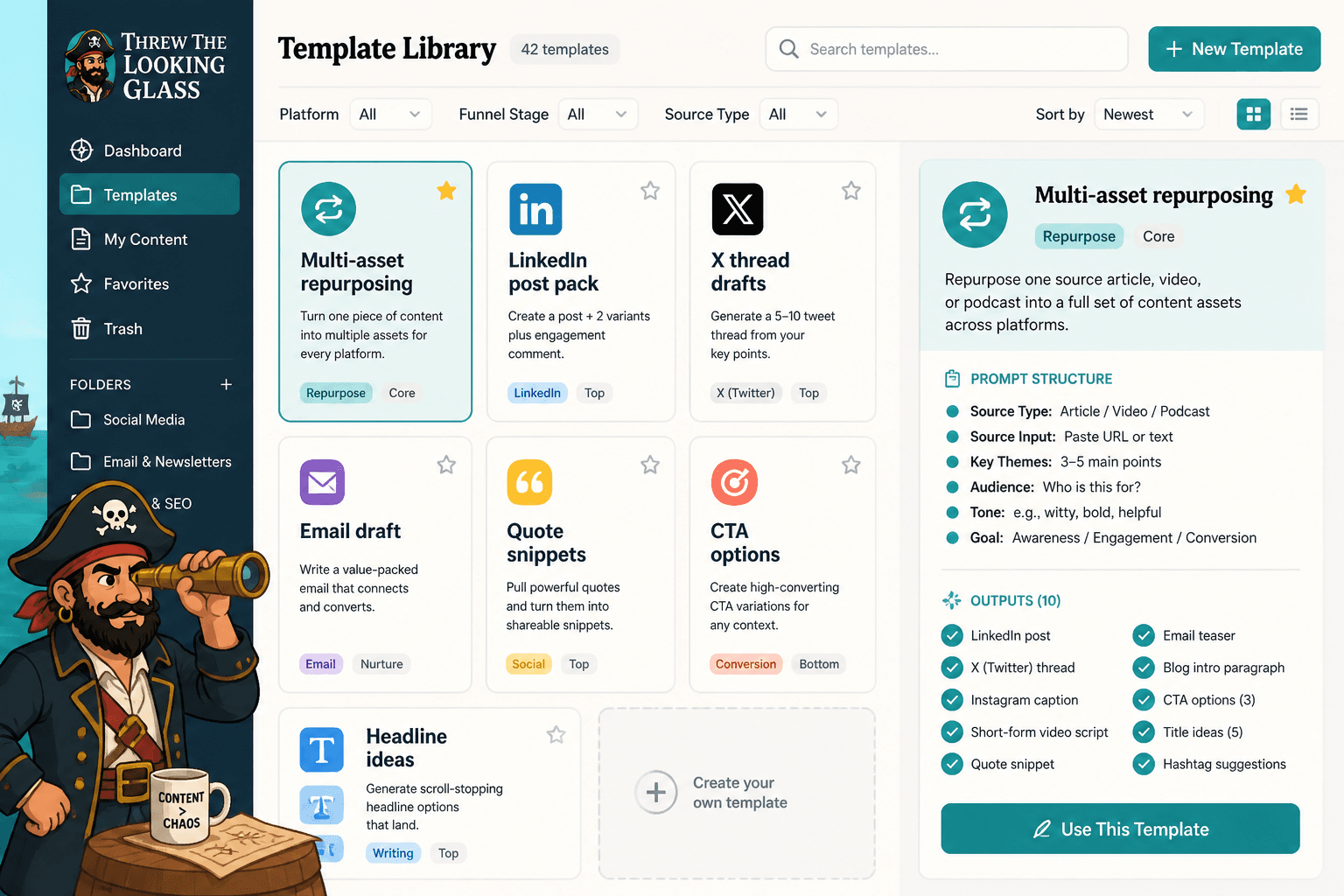
A useful creator template library might include:
- Transcript cleanup prompts for turning spoken language into readable drafts
- Hook prompts for creating openings without clickbait
- Clip selection prompts for finding moments with tension, contrast, or usefulness
- Newsletter prompts for converting source material into email sections
- Social post prompts for turning one idea into multiple formats
- Blog expansion prompts for developing short ideas into searchable articles
- Sales support prompts for turning educational content into objections, FAQs, and offer angles
If you write long-form articles, it also helps to keep a record of which topics and structures have historically performed. The older TLG guide on how to increase article views can help you think beyond simple republishing and toward better distribution.
5. Scheduling and workflow tools
Scheduling tools do not make the content better, but they make the system easier to sustain. Once content is edited and approved, you need a way to move it through publishing without losing track of what is ready, what needs review, and what has already gone live.
Tools in this category include Buffer, Later, Hootsuite, Metricool, Sprout Social, ConvertKit, Mailchimp, Beehiiv, WordPress, Webflow, and native platform schedulers.
Use them for:
- planning publishing dates
- queuing social posts
- scheduling newsletters
- tracking channel coverage
- coordinating launches
- preventing accidental duplication
- checking whether one source asset was fully repurposed
The simplest version is a content board with columns like:
- Source recorded
- Transcript ready
- Assets drafted
- Human edit needed
- Scheduled
- Published
- Repurpose later
This matters because AI can create more drafts than you can reasonably publish. A workflow tool helps you control output instead of drowning in it.
The lean tool stack that makes sense for most creators
A common mistake is building a stack for an imaginary media company when you are still one creator, one small team, or one founder with limited editing time.
Start lean. Add complexity only when a real bottleneck appears.
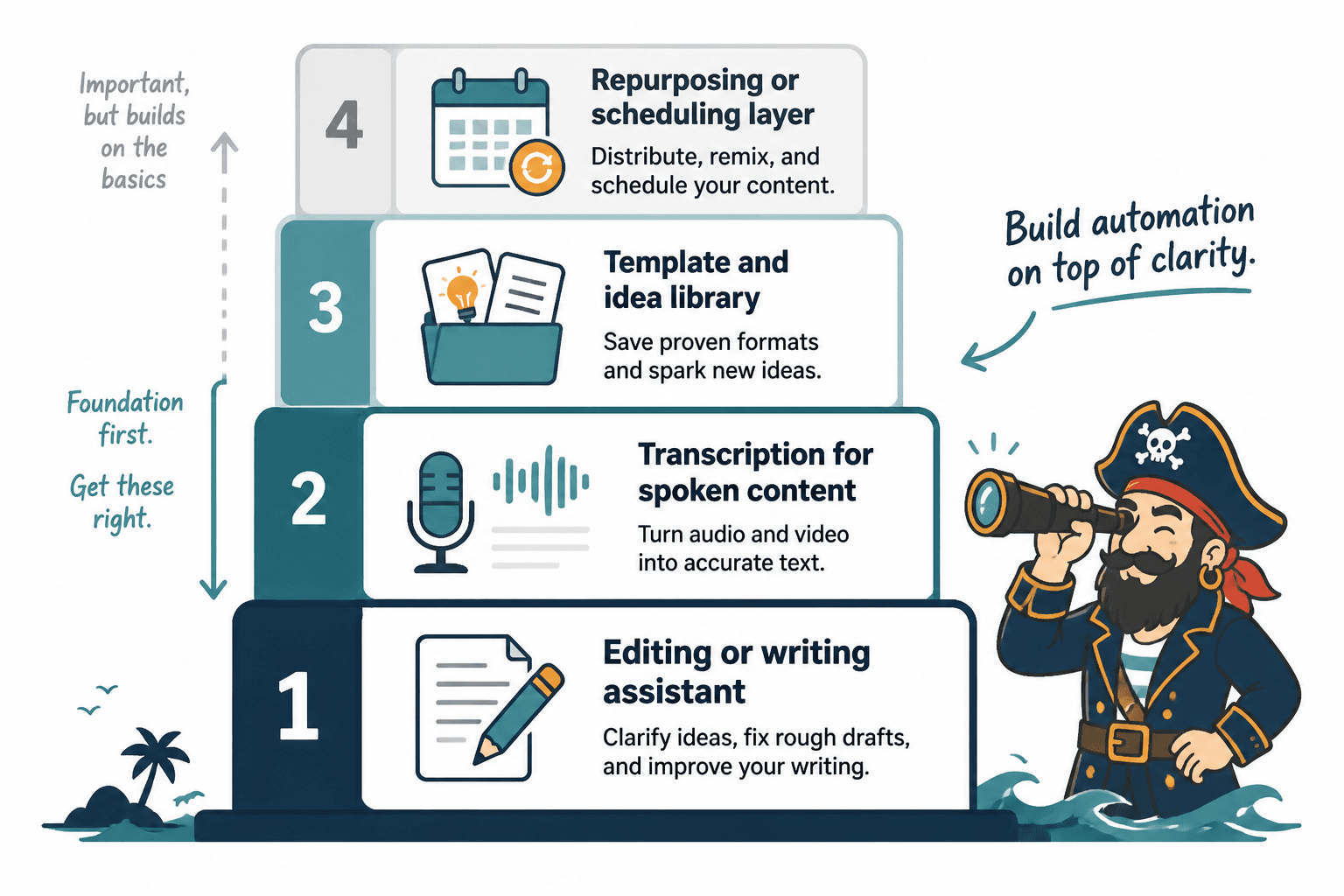
For most creators, a practical starter stack looks like this:
- One capture tool: camera, microphone, screen recorder, podcast platform, or writing app
- One transcription tool: enough to turn audio or video into usable text
- One AI writing assistant: for extraction, rewriting, summarizing, and variations
- One editing tool: for video, audio, writing, or whichever format you publish most
- One storage system: for source assets, templates, and drafts
- One scheduling system: for publishing and follow-up
That is enough to run a serious repurposing workflow.
You can always add specialized tools later: an AI clip finder, a carousel design tool, an advanced social scheduler, a CRM, a podcast production tool, or a sales automation platform. But adding them too early often creates more work instead of less.
The templates that save the most time
Templates are what turn AI from a novelty into a repeatable workflow. Without templates, you are forced to explain the same task again every time.
The best templates are not huge prompt libraries full of vague commands. They are specific instructions tied to recurring creator jobs.
Transcript cleanup template
Use this when you want to turn spoken material into readable text without losing the original meaning.
Clean up this transcript for readability. Remove filler words, repeated phrases, and false starts. Keep the original meaning, examples, and point of view. Do not add new claims. Break the result into clear sections with descriptive headings.
Short-form clip extraction template
Use this after a podcast, webinar, or long video.
Review this transcript and identify 10 possible short-form clips. For each clip, include the start idea, end idea, why it works, the emotional hook, and a suggested caption. Prioritize clips with contrast, useful advice, strong opinions, or surprising examples.
Social post variation template
Use this when one strong idea deserves several platform-specific versions.
Turn the core idea below into five social post drafts: one story-driven, one contrarian, one tactical, one reflective, and one short punchy version. Keep the tone direct and specific. Avoid generic motivational language.
Email repurposing template
Use this when a source asset should become a newsletter or nurture email.
Using the source material below, draft an email that teaches one useful idea. Start with a specific problem, explain the insight, give one example, and end with a soft call to action. Do not make it sound like a sales page.
Blog expansion template
Use this when a podcast, video, or newsletter section has enough substance to become a searchable article.
Convert this source material into a blog outline. Include the search intent, reader problem, proposed H2 sections, key examples to preserve, and places where human expertise or data should be added before publication.
If you struggle with openings, the TLG guide on how to write hooks with examples is useful beyond essays. The same principles apply to social posts, emails, video intros, and repurposed blog sections.
How to choose the right AI tools by bottleneck
The easiest way to choose tools is to identify the slowest part of your current workflow.
If your bottleneck is getting ideas out of your head, prioritize capture and transcription. Record voice memos. Save notes. Turn calls, lessons, and explanations into text.
If your bottleneck is cleaning up rough material, prioritize writing assistants and editing tools. You need better draft transformation, not more publishing platforms.
If your bottleneck is finding reusable moments, prioritize extraction tools. Long videos and podcasts often contain many assets, but they need to be surfaced.
If your bottleneck is staying organized, prioritize a storage and template system. A messy workflow will make even the best AI tool feel frustrating.
If your bottleneck is publishing consistently, prioritize scheduling and workflow tools. Your content may already be good enough; it just is not moving through the pipeline.
If your bottleneck is turning content into business outcomes, connect the stack to lead capture, offers, and follow-up. That is covered more directly in creator AI editing and repurposing for leads and sales.
Recommended starter stacks by creator type
Different creators need different stacks. Here are practical starting points.
For video creators
- Capture: camera, livestream tool, or recording software
- Transcription: Descript, Riverside, Otter, or platform transcript tools
- Editing: CapCut, Premiere Pro, DaVinci Resolve, Descript, or Final Cut
- AI assistant: ChatGPT, Claude, Gemini, or another writing assistant
- Storage: Notion, Airtable, Google Drive, or Dropbox
- Scheduling: native platform schedulers, Buffer, Later, Metricool, or similar
The goal is to turn each long-form video into clips, titles, descriptions, captions, email blurbs, and post variations.
For podcasters
- Capture: podcast recording platform
- Transcription: Otter, Descript, Riverside, or podcast-host transcript tools
- Editing: Descript, Audition, GarageBand, or another audio editor
- AI assistant: for show notes, summaries, quote extraction, and newsletter drafts
- Storage: episode database with guest info, topics, links, and repurposed assets
- Scheduling: podcast host, newsletter platform, and social scheduler
The goal is to turn each episode into show notes, short posts, guest quote assets, email summaries, and future topic ideas.
For writers and newsletter creators
- Capture: notes app, Google Docs, Ulysses, Obsidian, Notion, or WordPress
- AI assistant: for outlines, rewrites, summaries, and post variations
- Editing: Grammarly, LanguageTool, Hemingway-style editors, or manual editorial checklists
- Storage: idea bank, draft archive, and template library
- Scheduling: newsletter platform, CMS, and social scheduler
The goal is to turn essays and newsletters into social threads, short posts, article updates, lead magnet ideas, and future outlines.
For coaches, consultants, and experts
- Capture: call recordings, workshops, webinars, voice notes, and client questions
- Transcription: meeting transcript tools or recording platforms
- AI assistant: for extracting objections, FAQs, examples, and teaching points
- Storage: content library organized by client problem
- Scheduling: email platform, CRM, and social scheduler
The goal is to turn real conversations into educational content, sales enablement assets, FAQs, and follow-up material while protecting privacy and removing sensitive details.
Mistakes to avoid when adding AI tools
Using too many tools too soon
Every tool adds a new place to store assets, manage drafts, and check work. If the tool does not remove a real bottleneck, it may create one.
Repurposing everything
Not every source asset deserves a full repurposing workflow. Some pieces should be published once and left alone. Save the full workflow for strong ideas, evergreen lessons, launches, frameworks, and content that supports your positioning.
Letting AI flatten your voice
AI often smooths out the very things that make a creator interesting: sharp opinions, unusual phrasing, lived experience, humor, and specificity. Use AI to clean the draft, not sterilize it.
Publishing platform duplicates
Repurposing is not copying and pasting the same caption everywhere. A good stack helps you adapt the idea for the channel. A bad stack creates identical posts in different boxes.
Skipping human review
AI can misquote, overstate, invent context, or remove nuance. Human review is not optional if the content represents your expertise, brand, or business.
Ignoring the work environment
Editing and repurposing still require focus. A noisy, interruption-heavy workflow can make even good tools feel inefficient. If your editing sessions feel scattered, it may be worth revisiting how your environment affects your attention; this older TLG piece on how music can hurt writing productivity is relevant to deep editing work too.
What the best AI repurposing workflow looks like in practice
A simple weekly workflow might look like this:
- Record or publish one source asset. For example, a 20-minute video, podcast episode, or newsletter.
- Generate a transcript or source document. Clean it enough that AI can work with it.
- Extract the core ideas. Ask AI for claims, examples, stories, frameworks, and useful moments.
- Choose the strongest assets manually. Do not publish everything AI suggests.
- Create platform-specific drafts. Turn the source into clips, posts, email sections, blog outlines, or captions.
- Edit for voice and accuracy. Add specificity, remove filler, check claims, and preserve context.
- Store the outputs. Save the source, transcript, prompts, and finished assets in your system.
- Schedule and track performance. Note which formats worked and which ideas deserve reuse.
Over time, this creates a content library instead of a content treadmill. Each strong idea becomes easier to find, reuse, expand, and connect to future campaigns.
The real goal: fewer better tools, more useful assets
The best AI tools for creator editing and repurposing are the ones that help you move from raw material to useful assets with less friction.
You do not need the most complicated stack. You need a stack that helps you:
- capture strong source material
- extract the best ideas
- edit without losing your voice
- adapt content for the right channels
- store reusable templates and examples
- publish consistently without creating chaos
Start with one source asset, one AI assistant, one editing process, one storage system, and one publishing workflow. Then improve the stack only when the workflow proves where the real bottleneck is.
That is the difference between using AI to make more noise and using AI to build a creator system that compounds.