
Repurposed content gets expensive when it fills the calendar but never moves a buyer. A clip can get views, a carousel can get saves, and a newsletter can get polite replies while still doing almost nothing to create demand, qualify interest, or help someone take the next step.
More output is only useful when the content has a job. Some pieces should build trust. Some should answer objections. Some should make a problem visible. Some should invite a reply, a download, a booking, a purchase, or a serious conversation.
That shift changes how you use AI editing and repurposing. Instead of asking only how many assets can come from one video, call, article, or transcript, you ask what each asset is meant to do for the buyer and where it belongs in the path from attention to action.
This guide shows how to turn creator AI editing and repurposing into a conversion-aware system: sharper source selection, clearer calls to action, stronger offer alignment, and content that earns leads or sales without feeling like recycled promotion.
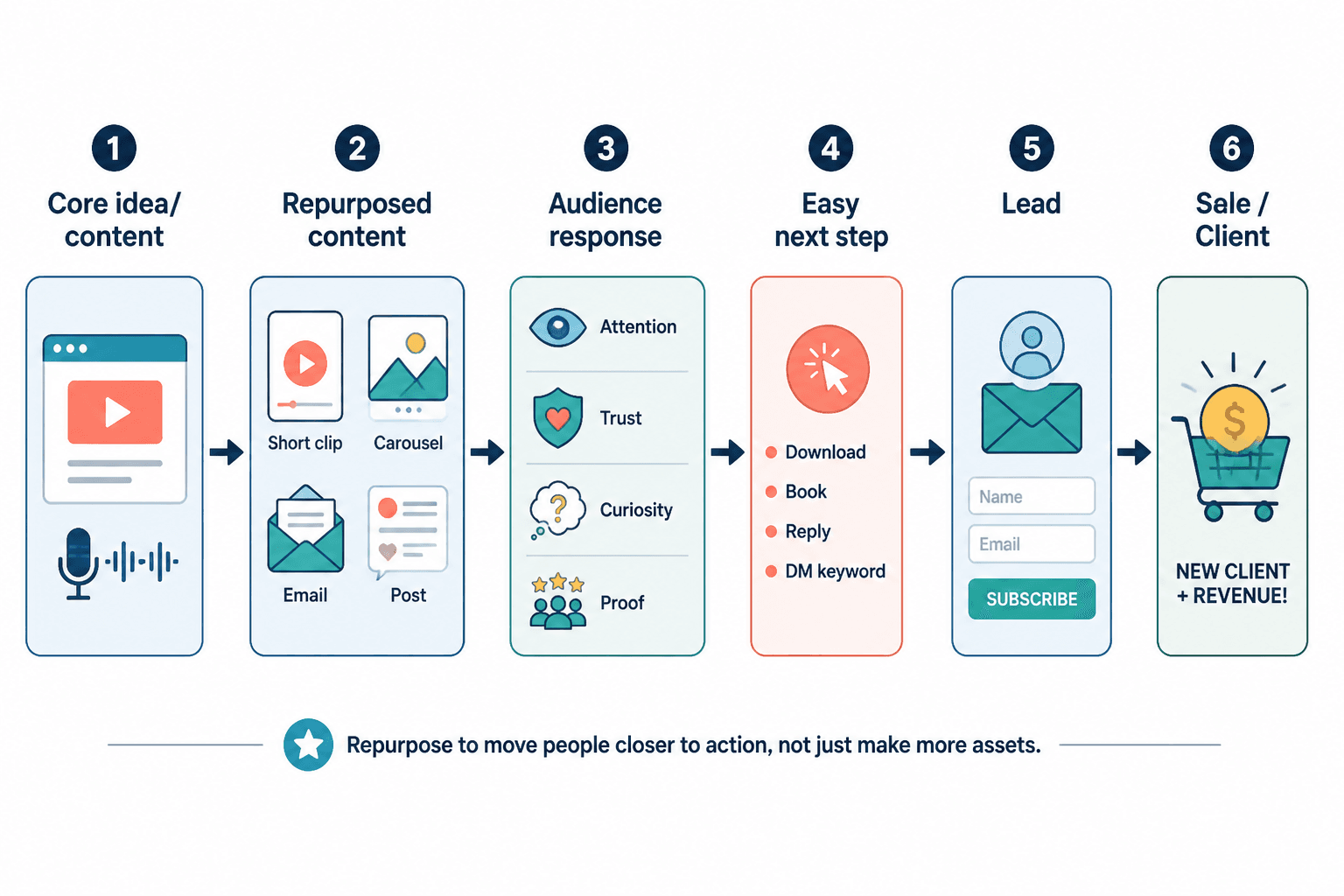
The Real Job: Turn Attention Into a Useful Next Step
AI editing and repurposing can create more surface area for your ideas. It can turn one strong source asset into clips, posts, email drafts, short articles, quote graphics, scripts, carousels, and summaries.
But the business value is not “more assets.” The business value is that more of the right people encounter a useful idea at the right time and know what to do next.
That means every repurposed asset should answer three questions:
- Who is this for? A beginner, buyer, client, subscriber, fan, peer, or existing customer?
- What moment are they in? Curious, problem-aware, comparing options, stuck, ready to buy, or needing reassurance?
- What next step makes sense? Read the full guide, join the list, download a checklist, watch the demo, book a call, reply with a question, or buy the product?
If you skip those questions, AI repurposing often creates a louder version of the same problem: scattered content with no conversion path.
If you are still building the operating system behind your content, start with the broader creator AI editing and repurposing guide. This article assumes you already understand the basics and want to turn the workflow into revenue or qualified leads.
Why Funnels Matter More Once AI Editing and Repurposing Enter the Picture
Before AI, many creators were constrained by production. They could only make so many posts, newsletters, clips, or articles in a week.
AI changes that constraint. Now the bigger risk is not “I cannot make enough content.” It is “I can publish too much content without enough intent.”
That is why funnels matter more once AI editing and repurposing enter the picture. A funnel does not have to be complicated. It is simply the path from first contact to a more meaningful action.
For a creator, that path might look like this:
- A short clip introduces a problem.
- A caption or comment points to a deeper resource.
- The resource offers a checklist, newsletter, template, consultation, course, product, or service.
- The follow-up content answers objections and builds confidence.
- The offer appears when the audience has enough context to evaluate it.
Without that path, repurposed content can create attention but lose intent. With the path, the same content becomes a system for attracting, educating, qualifying, and converting the right people.
What AI Editing and Repurposing Can Do Well in a Funnel
AI is especially useful in the middle of a creator funnel, where raw ideas need to become specific assets for specific contexts.
Used well, AI can help you:
- Extract strong hooks from a video, podcast, webinar, article, or livestream.
- Turn one core idea into multiple platform-specific angles.
- Summarize long-form content into email drafts or lead magnet outlines.
- Identify recurring objections, questions, or pain points from transcripts and comments.
- Create first drafts of nurturing emails from a larger piece of content.
- Adapt a teaching point into a short post, checklist, sales page section, or FAQ.
- Build a repeatable workflow so each core asset points to one conversion destination.
What AI cannot do is decide what your audience should trust you for. It cannot replace your positioning, your lived experience, your proof, or your judgment about when to make an offer.
That matters because Google’s guidance on helpful content emphasizes creating people-first material rather than content made mainly for search systems. The same idea applies to AI-assisted creator content: use AI to clarify, structure, and distribute useful work, not to manufacture empty volume. See Google Search Central’s guidance on creating helpful, reliable, people-first content.
Five Funnel Ideas to Pair With Creator AI Editing and Repurposing
The best funnel for your repurposed content depends on what you sell, how much trust the purchase requires, and how your audience prefers to engage. These five are simple enough for solo creators but strong enough to support real monetization.
1. Post to Lead Magnet to Email Nurture
This is one of the cleanest funnels for creators who sell services, courses, templates, memberships, coaching, workshops, or digital products.
The flow is straightforward:
- Start with a core piece of content that solves a painful problem.
- Use AI to repurpose it into short posts, clips, carousels, or threads.
- Point the best-performing assets to a related lead magnet.
- Use email to deepen the relationship and introduce the offer naturally.
Example: a creator publishes a video on “five mistakes that make your sales page confusing.” AI helps turn that video into short clips, a LinkedIn post, an X thread, and a carousel. Each asset points to a free sales page checklist. The checklist leads into a short email sequence that explains the creator’s paid sales page audit.
This works because the lead magnet is not random. It extends the same problem the content introduced.
If email is still new to you, these older TLG guides can help with the foundation: building email lists for blogs, how to start an email, and how to end an email.
Also remember that email monetization comes with compliance obligations. The FTC’s CAN-SPAM Act compliance guide explains requirements such as accurate header information, clear identification, a physical mailing address, and an unsubscribe mechanism.
2. Post to Profile to Booking Page
This funnel is useful for consultants, freelancers, coaches, agencies, and service-based creators.
The repurposed content does not need to sell the service directly. Its first job is to make a qualified person think, “This creator understands my problem.”
The profile then does the next job. It should make the offer obvious:
- Who you help.
- What outcome you help them reach.
- What proof or credibility supports the claim.
- What action they should take next.
AI can help adapt your core ideas into posts for different stages of awareness. For example, one source video about “why your content is not converting” could become:
- A short diagnostic post for people who know something is wrong.
- A clip explaining one common mistake.
- A carousel showing before-and-after positioning examples.
- A profile-featured post that points to a booking page.
The key is not to make every post a sales pitch. Let the content diagnose and teach. Let the profile and booking page carry the conversion step.
3. Article or Video to Related Offer
If you publish long-form content, AI can help you build better bridges between the main asset and a related product or service.
For example:
- A tutorial article can point to a template.
- A comparison video can point to a consultation.
- A case study can point to a service package.
- A guide can point to a course, community, or paid workshop.
The mistake is adding an unrelated offer because “we need a CTA.” The offer should be the logical next step for someone who found the article or video useful.
If the content teaches “how to repurpose a podcast into a month of posts,” the related offer might be a repurposing template, editing service, or workshop. It probably should not be a random productivity app affiliate link unless that tool is genuinely central to the workflow.
4. Thread or Short-Post Series to Newsletter
Short-form content can be excellent for discovery, but it is fragile. Algorithms change, feeds move quickly, and casual followers often forget who helped them.
A newsletter gives you a more durable relationship.
AI can help turn one pillar idea into a short-post series where each post explores one angle, objection, example, or mistake. At the end of the series, invite people to subscribe for the complete framework, deeper examples, or weekly implementation notes.
This funnel is especially useful for creators monetizing through sponsorships, paid newsletters, courses, community, consulting, or affiliate recommendations. If you are evaluating newsletter monetization specifically, the TLG guide on whether you can make money on Substack may be useful.
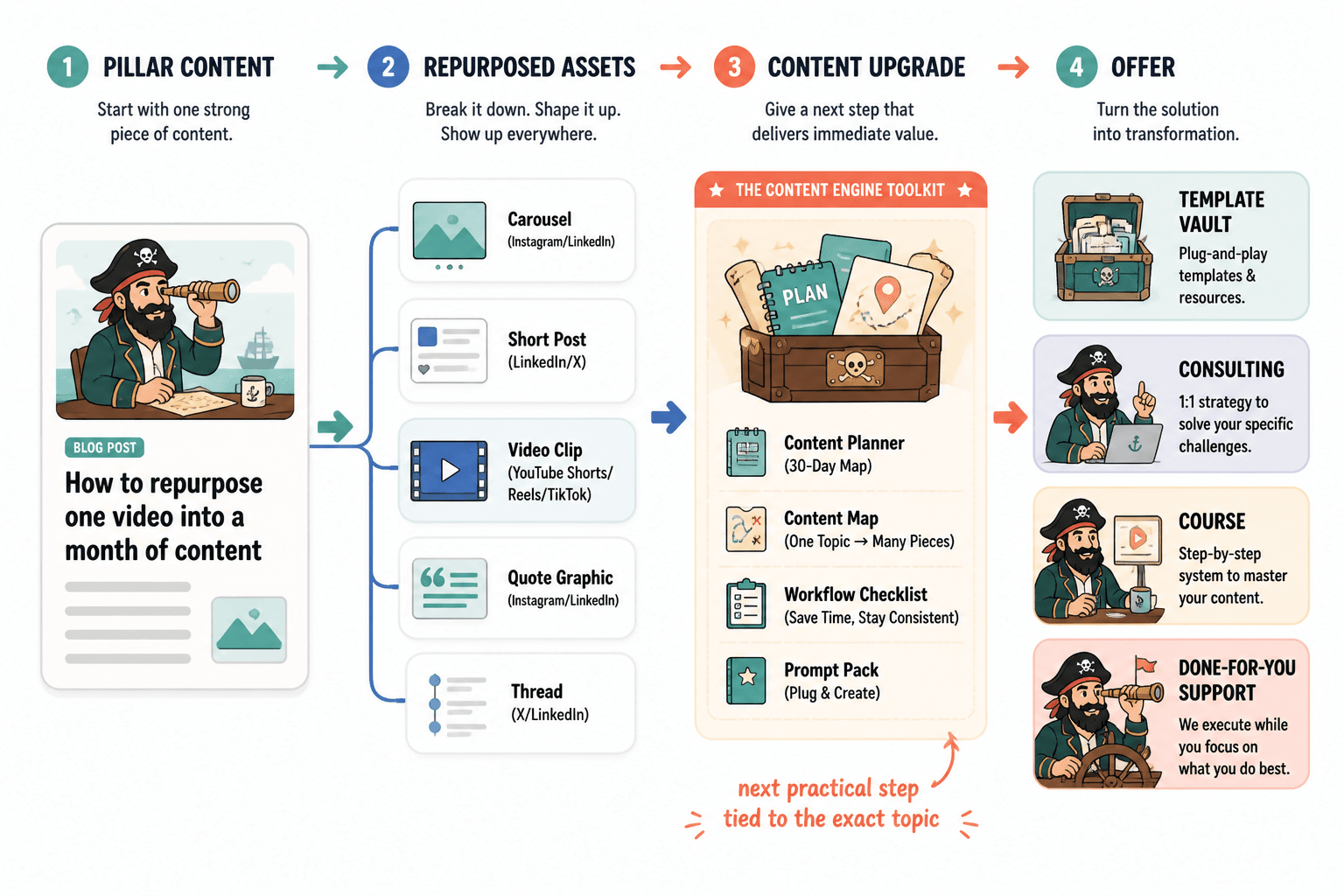
5. Content Upgrade Funnel From Core Pillar Content
A content upgrade is a bonus resource tied directly to a specific article, video, podcast, or guide.
For creator AI editing and repurposing, this might look like:
- A prompt pack that matches the guide.
- A checklist that helps implement the workflow.
- A spreadsheet for tracking repurposed assets.
- A swipe file of CTAs, hooks, or email angles.
- A short worksheet that helps the reader apply the lesson to their own business.
This works because the upgrade is contextually relevant. The audience does not have to make a mental leap. They are already reading or watching the main asset, and the upgrade helps them act on it.
Monetize Without Wrecking Trust
Most creators do not have a monetization problem. They have a trust problem wearing a monetization hat.
AI editing and repurposing can make this worse if you use it to increase pressure instead of usefulness. When every clip, caption, post, and email feels like a disguised pitch, the audience starts discounting everything you publish.
The safest monetization rule is simple:
Sell the transformation, show the process, and do not worship the tool.
AI editing and repurposing are not the product. The outcome is. Your audience usually does not care that you used AI to cut clips, summarize transcripts, or draft email variations. They care whether your work helps them save time, make a better decision, solve a problem, feel understood, or get a result.
What Wrecks Trust When Creators Monetize AI-Assisted Content
These mistakes are common because AI makes them easier to commit at scale.
1. Pretending the Output Is More Human Than It Is
You do not need to announce every internal workflow detail. But if AI is materially involved in something people are buying, relying on, or judging as your personal work, be careful with how you represent it.
If a product includes AI-generated templates, AI-assisted summaries, synthetic voice, generated images, or outsourced editing, describe the value honestly. Do not imply handcrafted human attention where there was none.
2. Selling Speed as if Speed Automatically Means Value
“I can make 100 posts in an hour” is not a strong offer by itself. More content can be useful, but only if the content is relevant, accurate, differentiated, and connected to a strategy.
Sell the result: clearer messaging, consistent publishing, faster testing, better education, more qualified inquiries, or a smoother content-to-email workflow.
3. Flooding Every Platform With Slightly Altered Copies
Repurposing is not the same as duplication. A LinkedIn post, YouTube Short, newsletter intro, and Instagram carousel may come from the same source idea, but they should respect the context of each platform.
If everything feels like the same recycled caption with a different wrapper, your audience will notice.
4. Pitching Too Early
AI makes it easy to add a CTA to everything. That does not mean every asset should push the sale.
Some content should create recognition. Some should teach. Some should compare options. Some should answer objections. Some should invite a next step. If every piece asks for a purchase before trust exists, you train people to ignore the ask.
5. Acting Like AI Removes the Need for Strategy
AI can help with drafts, variations, summaries, edits, and formats. It cannot decide your positioning, your offer economics, your audience’s real objections, or the proof required to support a claim.
The creator still owns the strategy.
Disclosure Is Part of the Trust System
If you use repurposed content to promote affiliate products, sponsored offers, endorsements, or partnerships, disclosure is not optional. It is part of the trust system.
The FTC’s guidance for creators and influencers says material connections should be clearly and conspicuously disclosed. If you are paid, receive free products, earn affiliate commissions, or have another relationship that could affect how people evaluate your recommendation, make that relationship easy to understand. See the FTC’s Disclosures 101 for Social Media Influencers.
In practical terms:
- Do not hide affiliate disclosures at the bottom of a page where most people will miss them.
- Do not use vague phrases that ordinary readers may not understand.
- Do not let AI-generated captions remove or soften required disclosures.
- Do not recommend tools only because the commission is attractive.
If your monetization model depends on recommendations, your reputation is the asset. Protect it.
A Trust-Safe Ladder From Attention to Sale
A useful way to think about repurposed content is as a ladder. Each rung earns the next action.
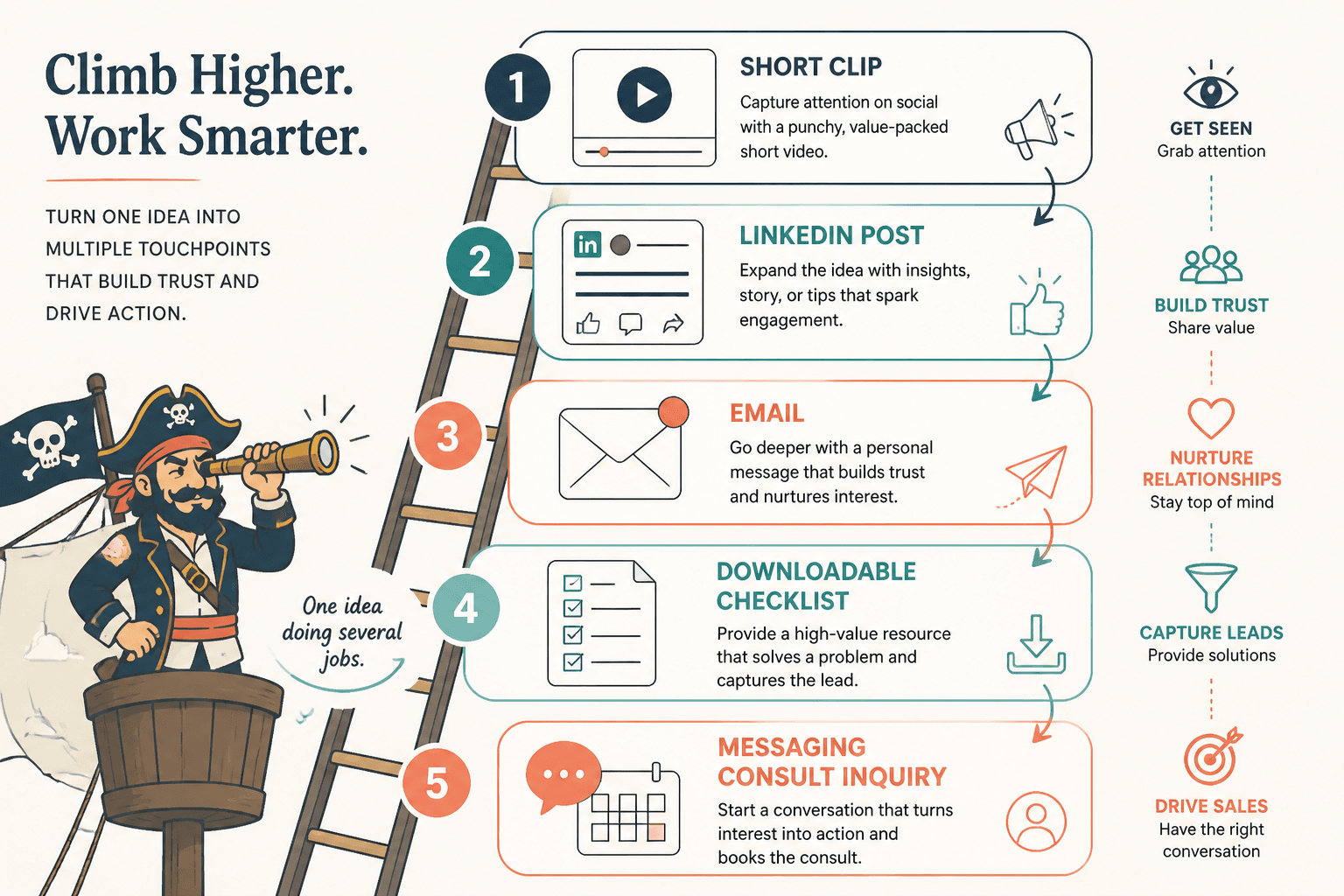
Rung 1: Attention
This is where short clips, hooks, quotes, and punchy posts work well. The goal is not to explain everything. The goal is to make the right person recognize a relevant problem or opportunity.
Example CTA: “If this sounds familiar, I broke down the full workflow here.”
Rung 2: Resonance
This is where you show that you understand the audience’s situation. Use examples, mistakes, mini-frameworks, and specific language from your market.
Example CTA: “Save this if you are rebuilding your content workflow this month.”
Rung 3: Education
This is where longer posts, newsletters, videos, articles, and carousels help. The audience should leave with a clearer understanding of the problem and a better way to think about it.
Example CTA: “I put the checklist version of this in a free download.”
Rung 4: Qualification
This is where you help people decide whether the next step is actually for them. Qualification content can include FAQs, comparison posts, case studies, pricing context, “who this is for” sections, and common objections.
Example CTA: “If you already have a weekly long-form asset and want help turning it into a lead system, the audit page explains the fit.”
Rung 5: Conversion
This is the offer. It can be a product, consultation, membership, service package, course, paid newsletter, affiliate recommendation, or sponsored action.
The conversion step works best when the previous rungs have done their job. By the time the offer appears, the audience should understand the problem, trust your perspective, and see why the next step is relevant.
A Weekly Workflow for Turning One Core Idea Into Leads
You do not need a huge content operation to make this work. A simple weekly system is enough.
Step 1: Choose One Core Piece of Content
Start with something substantial: a video, podcast, article, livestream, case study, newsletter, webinar, or recorded client teaching session.
The source asset should contain a real idea, not just a vague prompt. AI performs better when the input has substance.
Step 2: Pick One Conversion Destination
Before repurposing, decide where the week’s content should point.
Choose one:
- A lead magnet.
- A newsletter signup.
- A booking page.
- A product page.
- A workshop registration.
- A waitlist.
- A related article or guide.
This prevents the scattered CTA problem where every asset points somewhere different and no path gets enough momentum.
Step 3: Extract Angles, Not Just Clips
Ask AI to identify:
- The strongest claims.
- The most useful examples.
- The clearest objections.
- The most emotionally specific moments.
- The parts that could become standalone posts.
- The parts that naturally connect to the conversion destination.
This is where many creators go wrong. They use AI to slice content mechanically instead of finding the angles that create interest and intent.
Step 4: Repurpose by Funnel Stage
Create a mix of assets for different jobs:
- Discovery: short clips, hooks, quote posts, short-form videos.
- Education: carousel, newsletter, mini-guide, long caption, article section.
- Trust: case example, behind-the-scenes note, personal lesson, proof point.
- Conversion: offer post, FAQ, booking prompt, lead magnet CTA, product explanation.
If you want more practical inspiration for this stage, see the companion article on creator AI editing and repurposing examples.
Step 5: Add Human Judgment Before Publishing
Do not publish AI-assisted assets just because they are ready. Review for accuracy, tone, originality, platform fit, disclosure, and whether the CTA matches the audience’s likely level of trust.
Ask:
- Would I say this in my own voice?
- Is the claim specific and defensible?
- Does this help the audience even if they do not buy?
- Is the next step relevant to the content?
- Have I disclosed any sponsorship, affiliate, or material relationship clearly?
Step 6: Track the Path, Not Just the Post
A post with lots of likes but no qualified action may be less valuable than a quieter post that drives five serious replies or two sales calls.
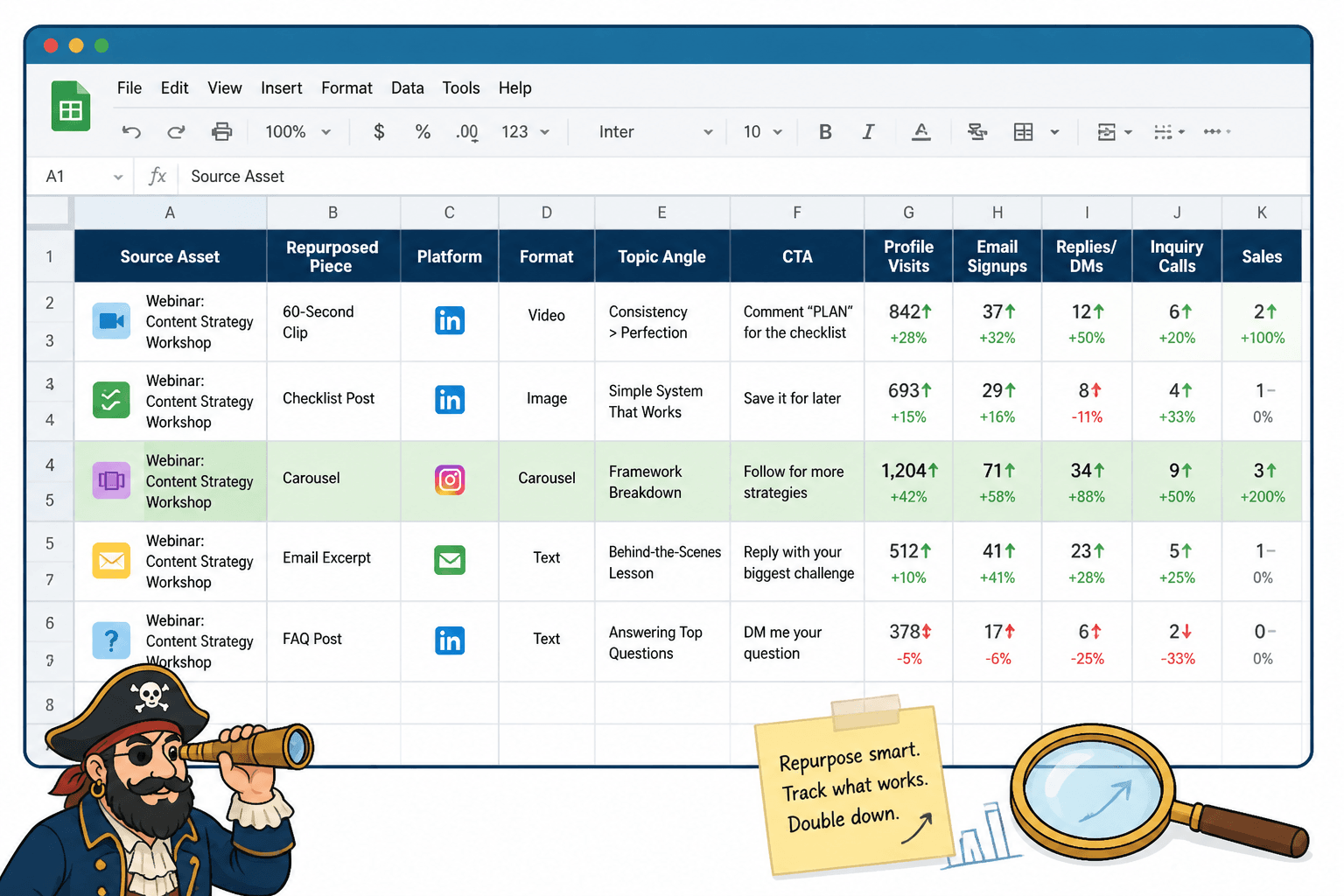
At minimum, track:
- Source asset.
- Repurposed format.
- Platform.
- CTA used.
- Destination page or offer.
- Clicks, replies, saves, signups, bookings, purchases, or qualified inquiries.
- Notes on audience response.
This gives you a feedback loop. Over time, you will see which source topics create trust, which formats create discovery, and which CTAs produce serious next steps.
Calls to Action That Do Not Feel Spammy
A good CTA feels like a helpful continuation of the content. A bad CTA feels like the creator stapled a sales pitch onto an unrelated post.
Here are several trust-safe CTA patterns.
The Deeper Resource CTA
Use this when the asset introduces a problem but cannot cover the full solution.
“I wrote the full breakdown here if you want the step-by-step version.”
The Checklist CTA
Use this when the audience needs implementation help.
“I turned this into a one-page checklist if you want to apply it to your own workflow.”
The Reply CTA
Use this when conversation is more appropriate than a hard pitch.
“If you are stuck on this part, reply with the asset you are trying to repurpose and I will point you in the right direction.”
The Booking CTA
Use this when the content clearly relates to a service or consultation.
“If you already have long-form content and want help turning it into a lead system, the audit page explains what I look for.”
The Product CTA
Use this when the product is a natural implementation shortcut.
“If you want the templates I use for this workflow, they are included in the repurposing kit.”
The Newsletter CTA
Use this when the content is part of an ongoing idea stream.
“I send one practical creator workflow like this each week. You can join here.”
The CTA should match the trust level. A cold audience may be ready for a free resource. A warm audience may be ready for a consultation. A buyer who has consumed multiple proof assets may be ready for the offer.
Metrics That Actually Matter
AI repurposing can flood you with metrics. Not all of them matter equally.
| Metric | What It Tells You | What to Watch For |
|---|---|---|
| Views or impressions | Discovery and reach | High reach with no next-step behavior may mean the topic is broad but not qualified. |
| Saves or shares | Perceived usefulness | Useful educational content can become a strong lead magnet or email topic. |
| Comments and replies | Resonance and objections | Look for repeated questions you can turn into follow-up content. |
| Click-through rate | CTA relevance | Weak clicks may mean the CTA is unclear or the offer does not match the asset. |
| Email signups | Lead capture | Track which topics produce subscribers who later engage. |
| Bookings or inquiries | Qualified intent | Measure quality, not only quantity. |
| Sales | Revenue conversion | Connect sales back to source topics, formats, and follow-up sequences when possible. |
The goal is not to turn every post into a sale. The goal is to understand which repurposed assets create which kind of movement.
Where Tools Fit in the Monetization Workflow
Tools matter, but they should not drive the strategy.
A practical stack may include:
- A transcription tool for videos, podcasts, and calls.
- An AI writing tool for summaries, drafts, hooks, and variations.
- A video editing or clipping tool for short-form assets.
- An email platform for lead capture and nurture.
- A landing page or booking tool for conversion.
- A spreadsheet, analytics tool, or CRM for tracking outcomes.
The mistake is buying tools before defining the path. First decide what content you create, what offer you are supporting, and what next step you want the audience to take. Then choose tools that reduce friction in that system.
For tool selection, see the companion guide to the best AI tools for creator AI editing and repurposing.
A Trust-Safe Offer Checklist
Before using AI-repurposed content to promote an offer, run through this checklist.
- The offer matches the content. The CTA feels like a natural continuation, not a random insertion.
- The promise is specific. You are not hiding behind vague transformation language.
- The proof is appropriate. You have examples, experience, testimonials, data, or process clarity to support the claim.
- The audience has enough context. You are not asking for a high-trust purchase from a low-context asset.
- The AI role is not misrepresented. You are not implying manual human work, original research, or personal use where that is not true.
- Disclosures are clear. Affiliate, sponsorship, endorsement, and material relationships are easy to see and understand.
- The content is still useful without the sale. Even people who do not buy should feel that the asset respected their attention.
- You are tracking meaningful next steps. You know whether the content produced qualified behavior, not only impressions.
Simple Example: One Video Into a Lead and Sales System
Suppose a creator records a 20-minute video called “How to Turn One Webinar Into Two Weeks of Content.”
A weak repurposing workflow would create ten clips and post them everywhere with the same “DM me to work together” CTA.
A stronger monetization workflow would look like this:
- Core video: Full tutorial published on YouTube or embedded in an article.
- Discovery assets: Five short clips, each focused on one mistake or tip.
- Education asset: A carousel showing the webinar-to-content map.
- Lead magnet: A free webinar repurposing checklist.
- Email nurture: Three emails explaining planning, editing, and distribution.
- Offer: A paid repurposing template pack or done-with-you content workflow audit.
- Trust content: A case study showing how one webinar became posts, emails, and qualified inquiries.
The content is still repurposed from one source. But now it has a destination, a sequence, and a reason for the audience to move forward.
The Bottom Line
Creator AI editing and repurposing can help you publish faster, but faster is not the business model.
The business model is trust plus a relevant next step.
Use AI to turn your strongest ideas into platform-fit assets. Connect those assets to simple funnels. Make offers when the audience has enough context. Disclose material relationships clearly. Track leads and sales instead of worshiping impressions.
If you do that, repurposing stops being a content treadmill and becomes a compounding system: one good idea creates attention, education, trust, leads, and revenue without making your audience feel like they are being chased by recycled pitches.