
The transcript is open in one tab, a voice memo is sitting on your phone, three client questions are buried in email, and the half-written newsletter draft still has a note that says come back to this later. Somewhere in that pile is a strong post, a useful clip, and probably an article angle worth developing.
Generic advice does not help much at that point. Telling a creator to repurpose more content is easy. Showing how a rough source turns into a better hook, a tighter structure, a cleaner social post, or a more useful newsletter section is where the workflow becomes real.
That is why examples matter. They reveal the decisions between the raw material and the finished asset: what to cut, what to keep, what to reframe, what to ask AI to do, and where human taste needs to override a smooth but empty output.
This article gives you practical before-and-after creator AI editing and repurposing workflows you can adapt across articles, newsletters, videos, calls, transcripts, and social posts without flattening everything into the same generic voice.
What these examples are for
Use these examples when you already have raw material but do not know what to do with it next.
That raw material could be:
- A rough draft that feels too long or too vague
- A podcast or video transcript
- A client call or coaching session transcript
- An old article that still has useful ideas
- A newsletter that could become posts, scripts, or lead magnet sections
- A strong point buried inside a messy note
- A headline that is accurate but not interesting
The goal is not to create ten generic versions of the same thing. The goal is to make one source idea work in several useful ways while keeping the point, voice, and context intact.
A practical repurposing workflow before the examples
Before asking AI to turn one thing into many things, slow down and decide what the source is actually worth.
A useful creator repurposing workflow has four steps:
- Start with a source worth repurposing. A sharp client insight, useful tutorial, opinionated article, or specific story works better than a generic draft.
- Extract the strongest angles. Ask AI to find claims, examples, objections, frameworks, mistakes, stories, and practical steps.
- Match each angle to the right format. Not every idea should become a thread, email, video script, or lead magnet. Choose the format based on what the idea needs.
- Edit for voice, not just grammar. The final version should sound like you after a good editing pass, not like AI after a prompt.
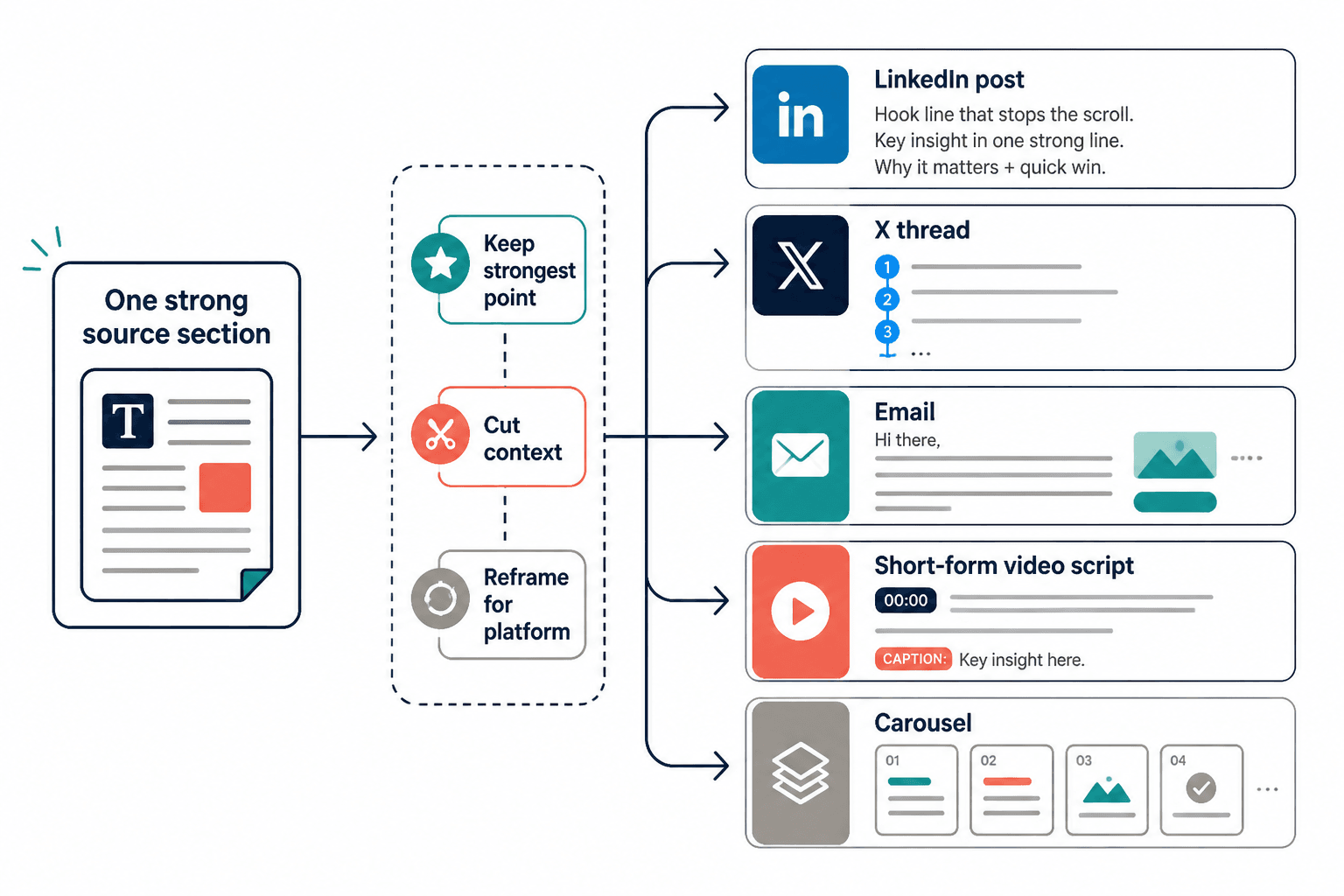
This matters because most AI repurposing falls apart when creators ask for outputs too early. If you paste in a transcript and ask for “10 posts,” the model will usually summarize, flatten, and repeat. If you first ask it to identify the strongest angles, the outputs become easier to shape.
For web content especially, structure matters. Nielsen Norman Group’s research on how people read on the web has long shown that users tend to scan rather than read every word. That means AI-assisted repurposing should not just preserve information. It should improve hierarchy, headings, openings, transitions, and payoff.
Example 1: Turn one rough idea into a LinkedIn post, email, FAQ, and lead magnet section
Here is a simple source idea:
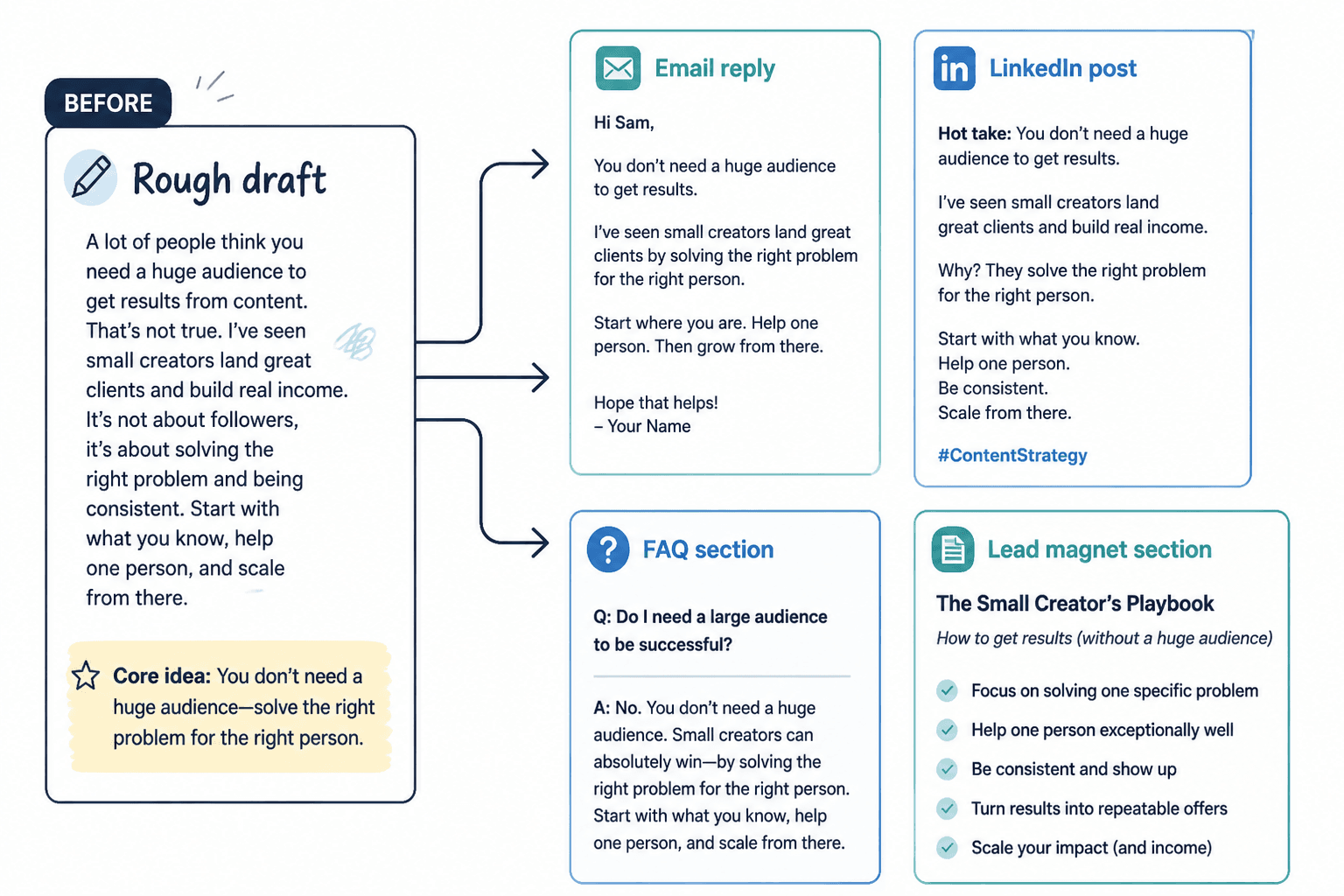
Rough source note: A lot of creators think repurposing means copying the same post to every platform. But the better version is turning one idea into different jobs. LinkedIn can make the argument. Email can add the story. A lead magnet can turn it into a checklist. A FAQ can answer objections. The core idea stays the same, but the format changes the job.
That note is useful, but it is not yet a finished asset. Instead of asking AI to “make this better,” give it a specific transformation task.
Prompt:
Take this rough source note and turn it into four different assets: a LinkedIn post, a short newsletter email, a FAQ section, and a lead magnet section. Keep the same core idea, but make each format do a different job. Do not reuse the same opening sentence in every version. After each output, explain what changed and why.
Output A: LinkedIn post
Before:
A lot of creators think repurposing means copying the same post to every platform. But the better version is turning one idea into different jobs.
After:
Repurposing does not mean pasting the same post everywhere.
That is how you get content that technically shows up on five platforms but feels native to none of them.
A better approach:
- Use LinkedIn to make the argument
- Use email to add the story
- Use a lead magnet to turn the idea into a checklist
- Use a FAQ to handle objections
Same idea. Different job.
The point of repurposing is not duplication. It is translation.
What changed: The LinkedIn version became opinion-led and scannable. It uses short lines, a clear contrast, and a memorable closing sentence.
Output B: Newsletter email
After:
Subject: Repurposing is not copying
I used to think repurposing meant taking one finished piece and distributing it everywhere.
Same idea. Same wording. Different platforms.
But that usually creates weak content because each format wants something different.
A LinkedIn post needs a clear argument. An email can carry more story and context. A lead magnet needs a useful checklist or framework. A FAQ needs to remove friction.
So now I think of repurposing as translation, not duplication.
The source idea stays the same. The job changes.
What changed: The email adds a personal reflection and allows slightly longer rhythm. It feels less like a public post and more like a note to the reader.
Output C: FAQ section
After:
Is repurposing the same as reposting?
No. Reposting means sharing the same asset again. Repurposing means adapting the idea for a new format, audience moment, or content job.
Can one idea really become several pieces of content?
Yes, if the idea has enough substance. A strong idea can become a post, email, checklist, script, article section, or sales page objection answer.
What should stay the same?
The core point, useful insight, and voice.
What should change?
The structure, length, examples, hook, and call to action.
What changed: The FAQ version answers objections directly. This is useful for articles, landing pages, lead magnets, and sales enablement content.
Output D: Lead magnet section
After:
Mini-checklist: Give each repurposed asset a job
- Argument: Does this format need to change the reader’s mind?
- Story: Does this format need a personal example or case study?
- Action: Does this format need a checklist, template, or next step?
- Objection: Does this format need to answer a concern before the reader moves forward?
- Conversion: Does this format need to invite a reply, signup, call, or purchase?
What changed: The lead magnet version becomes a practical tool. It is no longer just content to consume; it is content the reader can use.
Example 2: Use six focused editing passes instead of “make this better”
“Make this better” is one of the weakest AI editing prompts because it gives the model no editorial standard. Better how? Clearer? Shorter? More persuasive? More specific? More like your voice?
Focused editing passes work better because each pass has one job.
The rough draft
AI can help creators edit and repurpose content. It can take a draft and improve it, and it can also turn it into other formats. This is useful because creators are busy and need to make more content without spending too much time. But you still need to review the output because AI can make mistakes or make things sound generic.
Pass 1: The point pass
Prompt:
Read this draft and identify the main point. If the point is too generic, suggest three sharper versions. Do not rewrite the full draft yet.
Sharper point options:
- AI repurposing works best when it changes the job of the content, not just the format.
- The fastest creator workflow is not more drafting. It is better extraction and editing.
- AI can speed up repurposing, but human review is what keeps the content trustworthy and recognizable.
Why this helps: The draft cannot become strong until the central point is clear.
Pass 2: The structure pass
Prompt:
Reorganize this draft around the point: “AI repurposing works best when it changes the job of the content, not just the format.” Use a stronger opening, a contrast, and a practical takeaway.
After:
AI repurposing is weakest when it simply changes the container.
A blog post becomes a thread. A thread becomes an email. An email becomes a caption.
That sounds efficient, but it often produces content that feels copied instead of adapted.
The better workflow is to change the job of the content. Use one version to make the argument, another to tell the story, another to answer objections, and another to give the reader a tool.
AI can help with the first transformation. You still need to decide whether the final version is accurate, useful, and recognizably yours.
Pass 3: The voice pass
Prompt:
Revise this so it sounds more like a practical creator explaining a workflow to another creator. Keep it plainspoken. Remove generic phrases. Do not add hype.
After:
AI repurposing gets weak when it only changes the container.
You start with a blog post. Then you ask for a thread, an email, and a caption. Technically, you now have four assets. But they all make the same point in the same way.
That is not much of a workflow.
A stronger version gives each asset a different job. Let the post make the argument. Let the email add the story. Let the FAQ handle the objection. Let the checklist help the reader act.
AI can draft those versions quickly. Your job is to make sure the idea still sounds like you and still helps the reader.
Pass 4: The proof pass
Prompt:
Find claims in this draft that need support, examples, or qualification. Suggest where to add proof without making the piece longer than necessary.
Possible proof additions:
- Add a mini-example showing one source idea turned into four assets.
- Add a sentence explaining that different platforms reward different structures.
- Qualify “AI can draft those versions quickly” with “if the source material is specific enough.”
Pass 5: The platform pass
Prompt:
Adapt this into a LinkedIn version. Keep the core argument, but make the rhythm more suitable for a feed post. Use short paragraphs and a clear closing line.
After:
AI repurposing gets weak when it only changes the container.
Blog post → thread → email → caption.
That looks efficient.
But if every version makes the same point in the same way, you do not have a content system. You have duplicates.
A better workflow gives each asset a job:
- The post makes the argument
- The email adds the story
- The FAQ handles the objection
- The checklist helps the reader act
Same idea. Different job.
Pass 6: The conversion pass
Prompt:
Add a soft CTA for creators who want to turn existing content into a lead magnet or sales asset. Keep it natural and non-pushy.
After CTA:
If you already have useful posts, calls, or newsletters sitting around, you may not need more ideas. You may need a better reuse workflow.
For deeper monetization examples, use the companion guide on creator AI editing and repurposing for leads and sales.
Example 3: Rewrite weak headlines with point, audience, payoff, and texture
Most headline problems are not actually headline problems. They are clarity problems.
If the point is vague, the audience is unclear, or the payoff is missing, AI will usually generate a pile of polished but forgettable headlines.
A better headline rewrite framework uses four inputs:
- Point: What is the piece really saying?
- Audience: Who is it for?
- Payoff: What will the reader get?
- Texture: Should it feel practical, contrarian, urgent, calm, beginner-friendly, advanced, personal, or analytical?
Weak headline
How to Use AI for Content
AI prompt
Rewrite this headline for independent creators who already have drafts, transcripts, or newsletters and want to turn them into better content assets. Give me 12 options in four categories: clear benefit, busy-person, mistake-and-fix, and outcome-with-constraint. Avoid hype and vague words like “ultimate” or “game-changing.”
Better headline options
Clear benefit:
- How to Turn One Creator Draft Into Five Useful Content Assets
- A Practical AI Repurposing Workflow for Creators With Too Many Half-Finished Ideas
- How to Use AI to Edit, Reshape, and Reuse Your Existing Content
Busy-person:
- A 30-Minute AI Repurposing Workflow for Busy Creators
- How to Repurpose a Draft When You Do Not Have Time to Start Over
- The Fastest Way to Turn One Good Idea Into a Week of Content
Mission-and-fix:
- Stop Asking AI for More Content. Use It to Edit What You Already Have
- Your Repurposed Content Sounds Repetitive Because Every Format Has the Same Job
- The AI Repurposing Mistake That Makes Creator Content Feel Generic
Outcome-with-constraint:
- How to Repurpose One Draft Without Losing Your Voice
- How to Turn a Transcript Into Social Posts Without Sounding Like Everyone Else
- How to Get More From Old Content Without Publishing Filler
Final edited headline
How to Turn One Creator Draft Into Five Useful Content Assets Without Losing Your Voice
Why it works: The final version names the source, the outcome, and the constraint. It is more specific than “How to Use AI for Content,” and it promises a practical transformation.
If you want to improve the opening after the headline, the examples in Hook Essay: How to Write, With Examples can help you test whether the first few lines actually earn attention.
Example 4: Shift one idea across LinkedIn, X, email, and article formats
Most creators do not have an AI problem. They have a format problem.
They ask AI to turn one idea into multiple formats, but they do not tell it how those formats should differ. The result is content that looks reformatted rather than rethought.
Here is the core idea:
AI editing works better when you assign one editing job at a time instead of asking for a general improvement.
LinkedIn post: make it useful and opinion-led
“Make this better” is not an editing prompt.
It is a wish.
If you want better AI edits, give the model one job at a time:
- Find the main point
- Improve the structure
- Remove generic phrasing
- Adapt the rhythm for the platform
- Check for unsupported claims
- Add or sharpen the CTA
One pass per job.
That is how you get editing help instead of decorative rewriting.
X thread: compress harder and create movement
1/ “Make this better” is a weak AI editing prompt.
It gives the model no standard.
Better for whom? Better how?
2/ Use editing passes instead.
One job at a time:
• point
• structure
• voice
• proof
• platform
• conversion3/ The point pass asks: what is this really saying?
The structure pass asks: does the idea unfold in the right order?
The voice pass asks: does this sound like me?
4/ AI is much more useful when you stop asking for magic and start assigning editorial tasks.
Email: add context and reader identification
Subject: The AI editing prompt I stopped using
I used to paste a draft into AI and ask it to “make this better.”
Sometimes the result looked cleaner. But cleaner was not always better.
The model would smooth out the rough edges, remove specific phrasing, and make the piece sound like it could have been written by anyone.
Now I use editing passes.
First, I ask it to find the point. Then structure. Then voice. Then proof. Then platform fit. Then conversion.
It takes a few extra prompts, but the result is much closer to actual editing.
Article section: expand the idea with proof and structure
A general improvement prompt usually produces general improvement. The draft may become cleaner, shorter, or more polished, but the model has to guess what kind of edit matters most.
Focused editing passes remove that guesswork. A point pass tests whether the draft has a clear claim. A structure pass tests whether the reader receives information in the right order. A voice pass removes phrasing that sounds generic or unlike the creator. A proof pass looks for unsupported claims. A platform pass adapts the rhythm and format. A conversion pass clarifies what the reader should do next.
The process is slower than one prompt, but it produces more controlled edits.
Notice that the article version does not simply stretch the LinkedIn post. It adds definitions, sequence, and explanation. The email version adds personal context. The thread version compresses. The LinkedIn version creates a strong public takeaway.
Example 5: Turn a client call transcript into a LinkedIn post series
Coaches, consultants, freelancers, and advisors often have excellent content hidden inside client conversations. The key is to protect confidentiality while extracting general lessons.
Do not paste sensitive client information into tools without permission, and remove names, company details, financials, personal data, and anything that could identify the person. If your repurposed content includes endorsements, testimonials, or sales claims, review the FTC’s guidance on endorsements, influencers, and reviews.
Source transcript excerpt
Client: I keep trying to post more, but it feels like I’m just repeating myself. I have a newsletter, a webinar, and a few long posts, but I don’t know how to turn them into anything else.
Coach: You may not need more content. You may need to separate your ideas by job. Some ideas are for trust. Some are for teaching. Some are for objection handling. Some are for conversion. Right now, you’re treating them all like posts.
Prompt
Extract 8 general content lessons from this anonymized coaching transcript. Do not include client-identifying details. Group the lessons into LinkedIn post ideas for coaches, consultants, and personal brands. For each post idea, include the angle, hook, supporting points, and soft CTA.
AI-assisted extraction
- Angle 1: Posting more does not fix unclear content strategy.
- Angle 2: Repetition often means your formats have the same job.
- Angle 3: A newsletter can become trust content, teaching content, and objection content.
- Angle 4: A webinar is not one asset; it is a source library.
- Angle 5: Content should be sorted by buyer readiness, not just topic.
- Angle 6: Your strongest post may be hidden inside a client objection.
- Angle 7: A content system starts with extraction, not scheduling.
- Angle 8: Repurposing works best when it keeps the insight but changes the format.
Finished LinkedIn post example
Posting more will not fix a content system where every asset has the same job.
This is where many consultants get stuck.
They have a newsletter. A webinar. A few long posts. Maybe a podcast or two.
But when they repurpose, everything becomes another awareness post.
A better question is:
What job should this idea do?
- Build trust?
- Teach a process?
- Handle an objection?
- Show proof?
- Invite a sales conversation?
You may not need a bigger content calendar.
You may need to give your existing ideas better jobs.
This is the difference between using AI to summarize a call and using AI to extract reusable thought leadership from it.
Example 6: Turn a podcast, webinar, or video into article and newsletter assets
Long-form audio and video are often better source material than polished posts because they contain examples, tangents, stories, and natural phrasing. The problem is that transcripts are messy.
Do not ask AI to turn a transcript directly into a finished article. First, ask for an editorial map.
Prompt 1: Extract the map
Read this transcript and create an editorial map. Identify the main thesis, supporting points, strongest examples, quotable lines, objections answered, weak sections to cut, and possible article structure. Do not write the article yet.
Prompt 2: Choose the article angle
Based on the editorial map, suggest five article angles. Rank them by usefulness for independent creators who want to repurpose existing content. Explain which angle has the clearest reader payoff.
Prompt 3: Draft the article section
Write the first draft of an article section based only on the strongest angle. Use the transcript’s best examples, but remove filler, repetition, and speaker backtracking. Keep the tone practical and specific.
Prompt 4: Create the newsletter version
Turn the article section into a short newsletter. Start with a personal observation, keep one practical takeaway, and end with a question readers can reply to.
Example newsletter output
Subject: Your transcript is not the asset yet
A transcript can feel like content because there are so many words on the page.
But most transcripts are not ready to publish. They have repeated points, half-finished sentences, side comments, and useful ideas buried under conversation.
The first job is not drafting. It is extraction.
Ask: What is the strongest claim? Which example proves it? What should be cut? What would the reader actually use?
Once you have that map, the article, posts, and newsletter become much easier to create.
What transcript or recording do you already have that might be more useful than you think?
If you rely heavily on AI tools for transcription, editing, and asset generation, compare options in Best AI Tools for Creator AI Editing and Repurposing.
Example 7: Refresh an old article without flattening the original voice
Old articles are often better repurposing candidates than new drafts because they already have search intent, reader context, and a proven idea. But AI can ruin them if the instruction is too broad.
Google Search Central’s guidance on creating helpful, reliable, people-first content is a useful standard here: do not refresh an article just to make it longer or more search-shaped. Refresh it because you can make it more accurate, useful, current, specific, or easier to navigate.
Weak refresh prompt
Update this article and make it SEO-friendly.
Better refresh prompt
Audit this article for usefulness. Identify outdated sections, thin explanations, missing examples, unclear headings, unsupported claims, redundant paragraphs, and places where a visual, checklist, or internal link would help. Do not rewrite yet. Return a prioritized edit plan.
Before section
To get more article views, you should share your article on social media, improve the headline, and make sure the content is good. You can also update old articles so they perform better.
After section
More article views usually come from three separate improvements: a stronger promise before the click, a better reading experience after the click, and a distribution loop that gives the piece more chances to be discovered.
Start with the promise. Does the headline name a specific reader outcome? Then check the article itself. Are the first few sections useful enough to keep a scanning reader moving? Finally, look at distribution. Can the article become a newsletter segment, a LinkedIn post, a short checklist, or a follow-up email?
A refresh is not just a grammar pass. It is a second chance to make the article easier to choose, easier to read, and easier to reuse.
For a broader view of improving content performance after publication, see How to Increase Article Views.
Prompt examples creators can reuse
Use these prompts as starting points. The more specific your source material and standards are, the better the output will be.
Angle extraction prompt
Read this source material and extract the strongest reusable angles. Group them into claims, stories, examples, objections, frameworks, mistakes, and practical steps. For each angle, suggest the best format: LinkedIn post, email, article section, video script, FAQ, lead magnet section, or sales page block.
Editing pass prompt
Edit this draft using only one pass: [point / structure / voice / proof / platform / conversion]. Explain what you changed and why. Do not perform other editing passes unless I ask.
Voice preservation prompt
Revise this draft without making it sound generic. Preserve my sentence rhythm, plainspoken phrasing, and point of view. Remove filler, but do not over-polish. List any lines that sound too AI-generated.
Format-shift prompt
Turn this idea into three formats: a LinkedIn post, a newsletter email, and an article section. Make each format do a different job. The LinkedIn post should make the argument, the email should add context or story, and the article section should explain the idea with structure and examples.
Headline rewrite prompt
Rewrite this headline using the framework: point, audience, payoff, texture. Give me options in four categories: clear benefit, mistake-and-fix, outcome-with-constraint, and contrarian. Avoid vague hype. After the list, recommend the strongest headline and explain why.
Repurposing quality-control prompt
Review these repurposed assets and identify repetition, weak hooks, mismatched format choices, generic phrasing, unsupported claims, and places where the original idea became distorted. Suggest specific edits for each issue.
AI editing and human review checklist
AI can speed up the editorial process, but it should not be the final reviewer. Human review is where accuracy, judgment, voice, ethics, and reader empathy come back into the work.
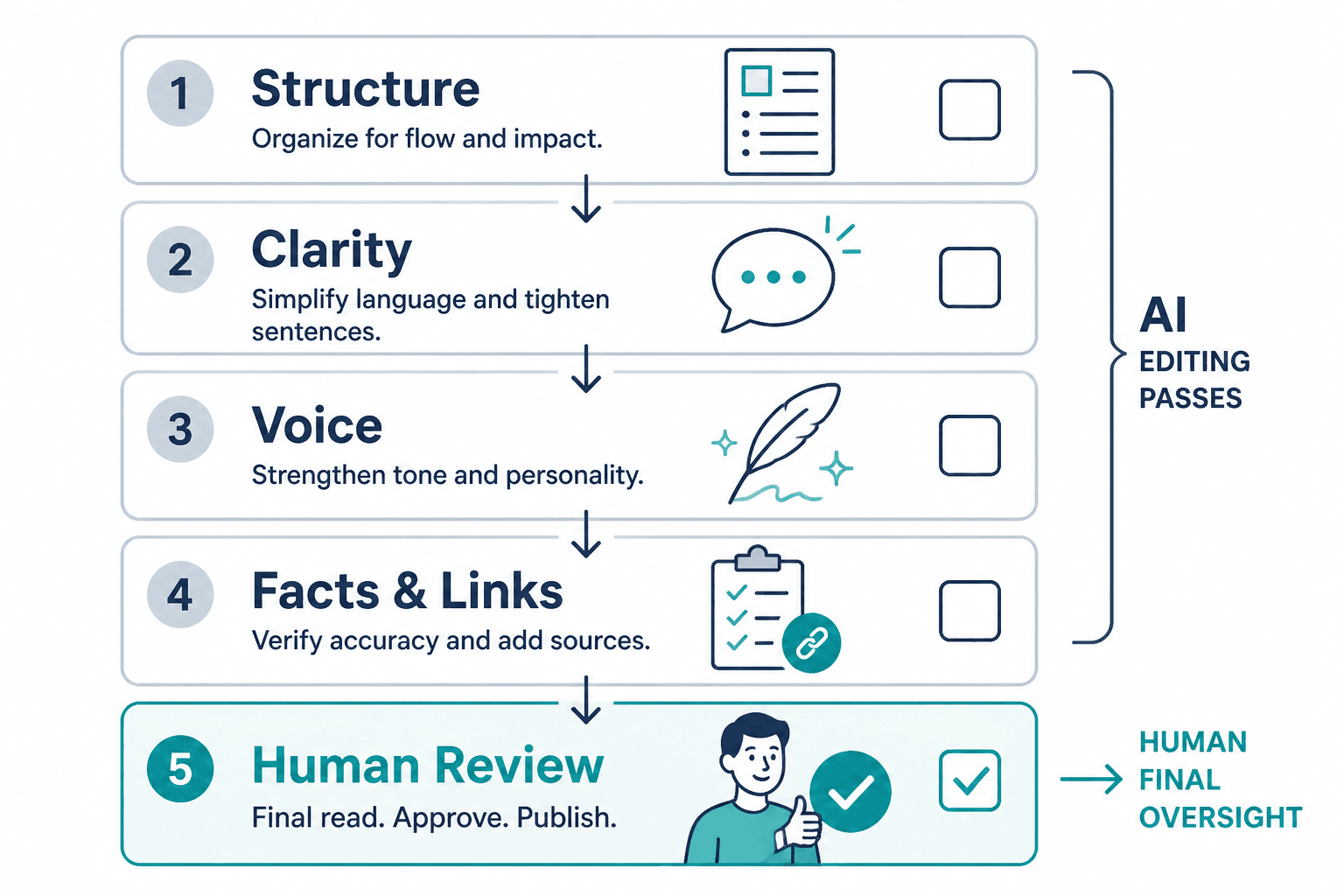
Before publishing, check:
- Point: Can a reader summarize the main idea in one sentence?
- Specificity: Are there examples, details, or proof points?
- Voice: Does it sound like you, or like a generic creator account?
- Format fit: Does the asset match the platform’s reading behavior?
- Accuracy: Are claims, numbers, names, and links correct?
- Confidentiality: Did you remove private or client-identifying information?
- Accessibility: Do visuals, captions, headings, and alt text help people understand the content? The W3C’s Web Content Accessibility Guidelines are a useful reference for accessible publishing.
- Conversion: Is the next step clear without being forced?
- Redundancy: Are the repurposed pieces actually different, or just duplicated?
What not to repurpose
Not every piece of source material deserves a full repurposing workflow.
Be careful with:
- Thin ideas: If the source has no real point, AI will mostly add polish and filler.
- Private client material: Anonymize aggressively or do not use it.
- Unverified claims: Do not turn unsupported claims into more assets.
- Personal stories that need nuance: AI can flatten emotional context or over-explain sensitive material.
- Platform mismatches: A dense article section may not belong in a short post without serious compression.
- Content that only exists to feed the calendar: More assets are not useful if they do not help the reader.
Repurposing works best when the original source has substance: a useful lesson, strong opinion, memorable story, practical framework, or real reader problem.
Where to go next
If you want the full system behind these examples, start with the Creator AI Editing and Repurposing Guide.
If you are choosing software for transcription, editing, rewriting, clipping, or content operations, see Best AI Tools for Creator AI Editing and Repurposing.
If your goal is to turn existing content into opt-ins, nurture emails, sales assets, or buyer-ready content, use Creator AI Editing and Repurposing for Leads and Sales.
The simplest useful takeaway is this: do not ask AI to make more content until you have asked it to find the better version of what you already have.