
Most AI image use case writing sounds like it was assembled by a committee of product marketers and an overhelpful bot. It is technically fine. It is also painfully dead.
You have probably seen the usual version: “AI images can streamline workflows, enhance creativity, and drive business outcomes across multiple industries.” That sentence contains words. It does not contain a pulse.
If you want to write AI image use cases without sounding salesy or robotic, the fix is not to sprinkle in a few casual phrases and call it human. The real fix is to stop writing about the tool like it is the hero and start writing about the moment where a real person is stuck, behind, rushed, under-resourced, or trying to make something good faster.
That is what makes use case writing work. Specific context. Clear stakes. Practical payoff. Language that sounds like a person who has actually seen the problem before.
Here’s how to do that so your AI image use cases feel believable, useful, and worth reading instead of like polished beige fog.
To see how this fits into the wider strategy, open the parent guide.
Why most AI image use cases sound fake
Most bad use case writing breaks in one of three places.
- It starts too broad.
- It describes features instead of situations.
- It pushes the value too hard, too early.
That is how you end up with lines like “AI image generation empowers brands to create compelling visuals at scale.” Nobody talks like that unless they are trying to survive a keynote panel.
A strong use case does not just say what the tool can do. It shows where it fits, who it helps, what friction it removes, and what tradeoff still exists. That last part matters more than people think. If every use case sounds frictionless, readers stop trusting you. Fast.
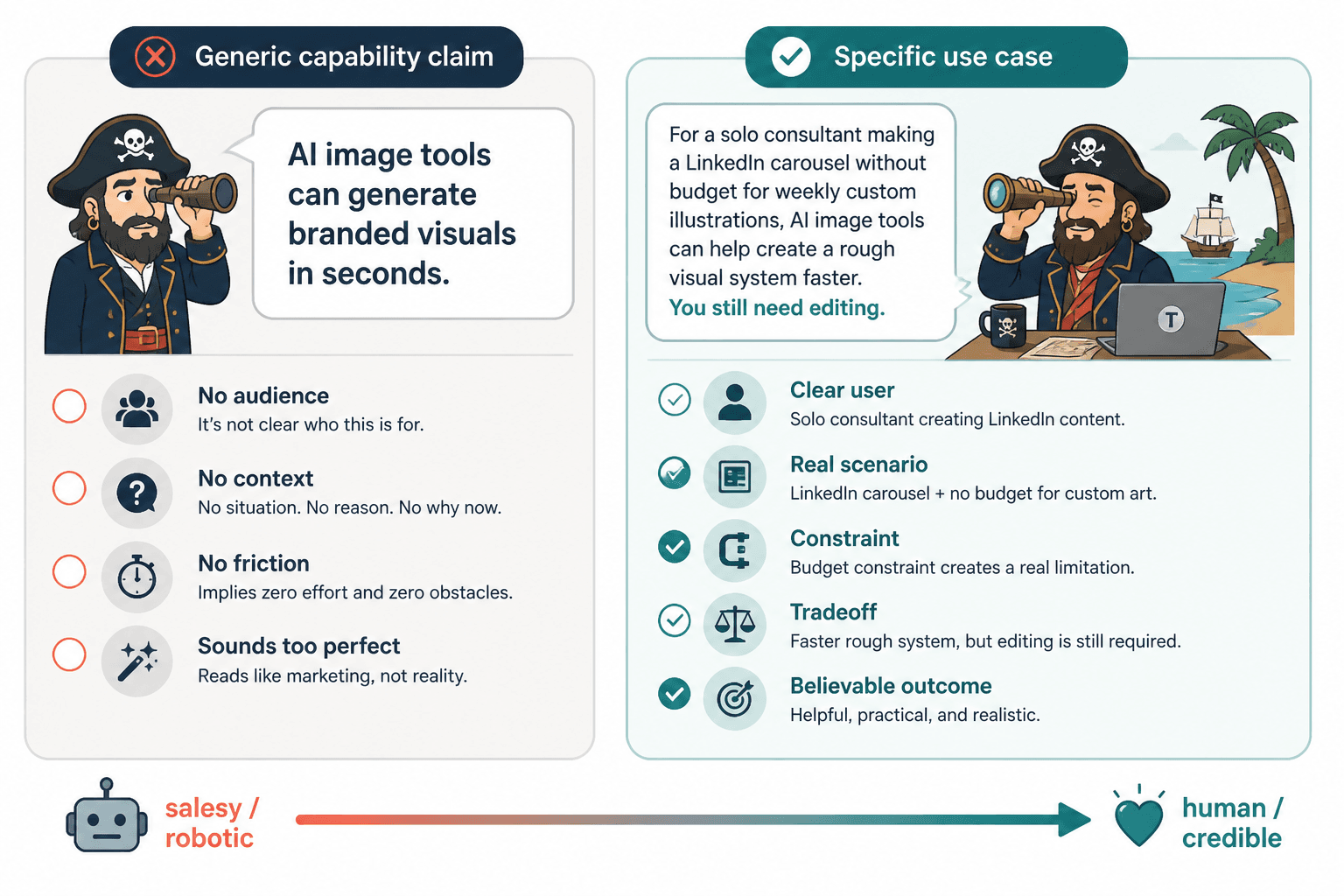
Useful writing about AI image tools should feel like this: “If you are a solo consultant building a LinkedIn carousel and do not have the budget for custom illustrations every week, AI image tools can help you create a rough visual system faster. You still need taste. You still need editing. But you do not have to start from a blank page.”
That sounds human because it admits reality. Tools help. They do not perform miracles. They also do not fix bad strategy, vague messaging, or ugly judgment.
Start with the use case, not the capability
If you are trying to figure out how to write AI image use cases without sounding salesy or robotic, this is the shift that matters most.
Do not start with:
“AI image tools can generate branded visuals in seconds.”
Start with:
“When a coach needs a quick visual for a lead magnet but does not want another stock photo of a smiling laptop meeting, AI image tools can help create a more distinct concept draft.”
The second version works because it starts in the reader’s world. It names the scenario. It implies the frustration. It gives the tool a job. That is what use cases are for.
A simple use case structure that does not sound corporate
- Name the person or role.
- Name the situation they are in.
- Name the friction or constraint.
- Show how the AI image tool helps.
- Add the limit, caution, or human role still required.
That structure gives you enough shape to stay clear without drifting into pitch mode.
For example:
- Weak: “AI images improve content creation efficiency for marketers.”
- Better: “For marketers turning one article into five social assets, AI image tools can help generate first-pass visuals for quote cards, thumbnails, and carousel slides. The win is speed. The catch is that someone still needs to choose the strongest concept and clean up the weird bits.”
Write like you have met the user before
One reason use cases feel robotic is that they are written for “users” in the abstract. Users do not exist. Designers exist. Coaches exist. Small ecommerce founders exist. Newsletter writers exist. Consultants trying to finish a client deck at 11:40 p.m. definitely exist.
The more generic the subject, the more generic the writing. If you want stronger use cases, narrow the person.
Instead of audience blur, use audience reality
- Not “businesses”
- But “small agencies pitching campaign concepts before full design production”
- Not “creators”
- But “LinkedIn creators who need visual hooks for carousels and do not want every post to look like a Canva template had a midlife crisis”
- Not “brands”
- But “solo founders testing product page image styles before paying for custom assets”
This is also why niche examples tend to outperform broad claims. Specificity signals that you understand how the tool is actually used, not just how the landing page describes it.
If you need help sharpening the opening of these pieces, this guide on how to start AI image use cases without a weak opening pairs well with the approach here.
Cut the feature fog and show the job
A lot of use case writing is secretly feature writing in a trench coat.
It says things like:
- high-quality outputs
- style consistency
- fast generation
- customizable prompts
- scalable asset production
Fine. But none of that means much until it is attached to a job.
Translate features into actual use
| Feature language | Use case language |
|---|---|
| Fast image generation | Create rough concept visuals for tomorrow’s presentation without waiting on a full design cycle |
| Style variation | Test three visual directions for a carousel before committing to one look |
| Prompt control | Adjust image mood and composition to better match a brand voice or campaign angle |
| Bulk output | Generate multiple thumbnail options for a content series instead of reusing the same tired layout |
That translation matters because readers do not buy “capabilities.” They care about getting a task done with less friction and better results.
If your draft reads like a product sheet, ask one question: what is the person actually trying to make, fix, test, publish, or ship?
Use grounded examples, not glowing claims
The fastest route to salesy writing is overclaiming. The second fastest route is pretending every use case ends in amazing brand transformation.
It usually does not. Sometimes the win is smaller and much more believable. A faster mockup. A decent placeholder image. A better starting point for collaboration. A way to publish consistently without draining your budget.
That may sound less dramatic. Good. Drama is cheap. Credibility is harder to earn.
Example rewrites
- Salesy: “AI image tools revolutionize product marketing by delivering stunning branded assets instantly.”
- Grounded: “For small product teams, AI image tools can help create rough campaign visuals early in the planning stage so ideas are easier to present and compare before design production starts.”
- Robotic: “Users can leverage AI to enhance visual storytelling across channels.”
- Grounded: “If you are turning a newsletter issue into LinkedIn posts, a carousel, and a header image, AI tools can help you keep the visual idea consistent instead of inventing a new style every time.”
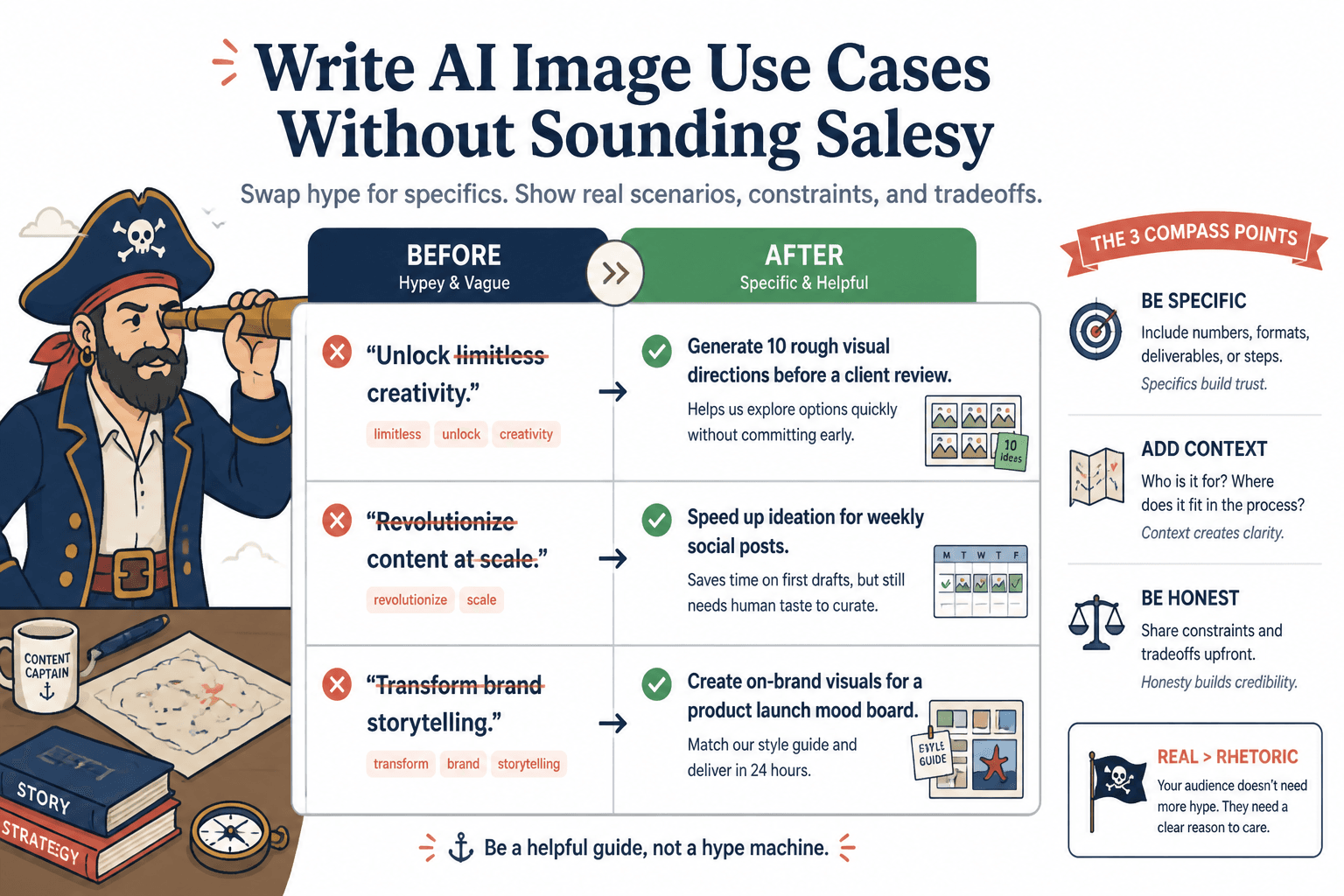
- Overcooked: “Brands can unlock limitless creativity while optimizing asset pipelines.”
- Grounded: “When a small team needs ten visual directions before the client review, AI images can speed up ideation. You still need someone with taste to filter out the nonsense.”
If your use case sounds a little less impressive after rewriting it, that is often a good sign. It probably sounds more true.
And if your current drafts are loaded with vague filler, this piece on how to rewrite boring AI image use cases will help you strip out the sludge.
Sound less robotic by admitting tradeoffs
Here is a trick that instantly makes AI writing sound more human: say what the tool cannot do well.
Not in a dramatic anti-AI way. Just honestly.
Readers trust your use cases more when you mention the boundaries. AI image tools can help with concepting, speed, iteration, and first-pass production. They can also produce visual weirdness, off-brand details, repetitive aesthetics, and the occasional cursed hand situation we all pretend not to notice.
That honesty does two useful things. First, it makes your writing feel less like a pitch. Second, it helps the reader understand when the tool fits and when it does not. That is what good use case writing should do.
Good tradeoff lines you can actually use
- “This works best for concept drafts, not final brand-critical campaign assets.”
- “It is useful when speed matters more than perfection.”
- “You can get to a strong starting point faster, but editing still matters.”
- “This helps reduce blank-page friction. It does not replace taste.”
- “Good prompts help, but good judgment matters more.”
Those lines do not weaken the use case. They make it believable.
Use plain language instead of synthetic enthusiasm
Robotic writing often has a very specific smell. It is full of pumped-up verbs, generic upside, and zero friction. It tries so hard to sound valuable that it stops sounding human.
When in doubt, downgrade the hype and upgrade the clarity.
Phrases to cut
- unlock creativity
- revolutionize workflows
- supercharge visual content
- empower teams
- transform your brand storytelling
- seamlessly generate high-quality assets
What to say instead
- create faster first drafts
- test visual ideas before paying for final design
- build content assets more consistently
- find a visual direction when you are stuck
- generate rough options for review and iteration
- save time on lower-stakes production tasks
There is nothing wrong with sounding useful. There is a lot wrong with sounding like a brochure trying to hit quota.
Make the use case specific to the format
One reason AI image use cases stay vague is that the writing never lands on an actual output. It talks about “content,” “visuals,” or “assets” as if those are precise categories. They are not.
Use cases get sharper when you name the format the reader is trying to produce.
- LinkedIn carousel illustrations
- blog header concepts
- lead magnet mockups
- workshop slides
- pitch deck concept frames
- thumbnail variations
- product page lifestyle scenes
- newsletter cover images
- ad creative drafts
That one move changes the whole tone. It moves the writing from “AI can help with visual content” to “here is where this is useful in the real world.”
For example, if you are writing for social creators, use case writing around carousel visuals should sound different from writing about ecommerce product mockups. Different outputs. Different stakes. Different review standards.
If that is your lane, this article on improving AI image use cases for LinkedIn carousels is worth reading next.
A simple template for writing stronger AI image use cases
Here is a clean template you can adapt without sounding like you copied it from a content machine.
For [specific person] who needs to [specific output], AI image tools can help with [specific job] when [specific constraint or condition]. The main benefit is [practical payoff], but it still requires [human role, editing, review, or limitation].
Now fill it in like a person.
Template examples
- “For newsletter writers who need simple header visuals every week, AI image tools can help generate concept directions when stock libraries feel repetitive. The main benefit is speed and variety, but someone still needs to choose images that actually match the tone of the issue.”
- “For coaches building downloadable PDFs, AI image tools can help create cleaner custom visuals than random stock photos when budget is tight. The benefit is a more distinct first draft, but brand consistency still depends on editing and restraint.”
- “For solo founders testing landing page direction, AI image tools can help mock up visual concepts before committing to a full design round. That makes feedback easier early on, but final production usually still needs a human designer.”
The bigger point is simple: clearer structure and clearer writing make the piece more useful. That is usually what makes the ending land better too.