
Most AI image use case content does not have an idea problem. It has an opening problem.
People sit down to write about AI image tools and start with something like, “AI images are transforming content creation for businesses.” Which is technically a sentence, sure. It is also a reliable way to make readers feel absolutely nothing.
If you want to know how to start AI image use cases without a weak opening, the fix is not “be more creative.” It is much simpler than that. Start with the actual tension: what the reader is trying to make, what keeps going wrong, what takes too long, what looks cheap, what feels repetitive, or what needs to perform better.
Good openings do not warm up politely. They point at the friction fast. Then they make the use case feel relevant enough to keep reading.
This matters even more with AI image use cases because the topic is dangerously easy to flatten into bland tool talk. Readers do not care that AI image generation exists. They care that they need better blog graphics, cleaner ad concepts, faster client mockups, sharper carousel visuals, or a way to stop publishing visuals that look like they came from a free template graveyard.
Here is how to open stronger, make the value obvious earlier, and stop introducing AI image use cases like a sleepy software brochure.
For the main guide behind this topic, visit the parent guide.
Why most openings for AI image use cases fall flat
Weak openings usually fail in one of four ways.
- They start too broad.
- They describe the category instead of the use case.
- They sound like generic AI marketing copy.
- They hide the practical payoff until way too late.
That is why you get intros like:
AI-generated images are becoming increasingly popular across industries and offer many benefits for brands and marketers.
Nothing is technically wrong with that line. It is just useless as an opener. It says a trend is happening. Great. Your reader still has no reason to care.
A stronger opening does at least one of these quickly:
- Names a real content problem
- Shows where time or money gets wasted
- Calls out a quality issue the reader already recognizes
- Makes the use case concrete
- Frames the tool as support, not magic
If you start there, the rest of the piece has something to stand on.
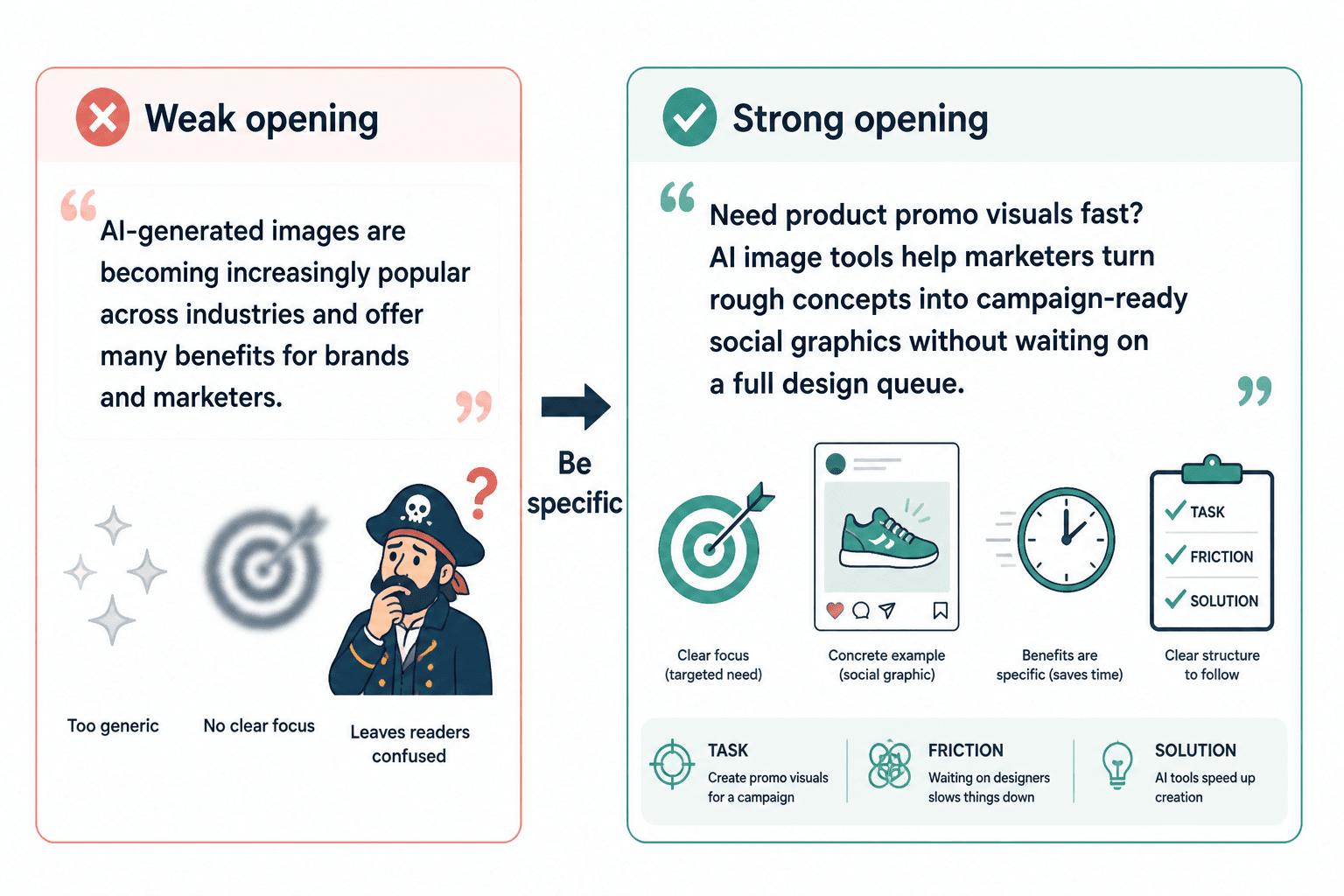
What a strong opening for AI image use cases actually needs to do
You do not need a dramatic hook. You need a useful one.
For this kind of article, intro, landing page section, carousel slide, or product explanation, a strong opening should usually do three things:
- Name the task or output the reader cares about
- Highlight the friction around creating it manually
- Introduce the AI image use case as a practical solution, not a miracle
That structure works because it respects reader intent. People looking at AI image use cases are not usually browsing for philosophical thoughts about visual automation. They are trying to make something and save time without lowering quality.
A simple opening formula that works
Use this:
If you need to create [specific visual output], [common manual problem] can slow everything down. AI image tools can help by [practical use case], especially when you need [speed, volume, variation, or concept testing].
That is not poetry. It is not supposed to be. It is structure. Once you have the structure, you can make it sound better.
How to start AI image use cases without a weak opening
If you want the short version: stop opening with “AI is changing everything” and start opening with what the reader is trying to make.
Here is the practical process.
1. Start with the output, not the technology
The output is what anchors relevance.
Bad opening:
AI image generators are helping brands create visual content more efficiently.
Better opening:
Creating fresh blog graphics every week gets old fast, especially when every stock image starts to look like it escaped the same beige meeting room. AI image tools can help you generate custom visuals faster without designing every asset from scratch.
The second one works because it gives the reader a recognizable job to be done. Blog graphics. Weekly cadence. Stock photo fatigue. Now we are in the real world.
2. Name the friction clearly
The friction is what creates momentum. Without it, the opening just sits there smiling politely.
Useful friction points for AI image use cases include:
- Slow turnaround
- Repetitive design work
- Expensive custom visuals
- Weak stock imagery
- Creative bottlenecks
- Need for multiple variations
- Low consistency across content
- Difficulty visualizing abstract ideas
Be specific. “Content creation is challenging” is fluff. “You need five visual directions for a landing page before lunch” is a situation.
3. Make the use case concrete early
Do not make readers wait six paragraphs to find out what the AI image tool is actually helping with.
Weak:
There are many ways businesses can leverage AI-generated images in their workflows.
Stronger:
One useful AI image use case is building quick concept visuals for social posts, blog headers, and lead magnet graphics before sending anything to a designer or publishing it yourself.
Now the reader has something solid. Social posts. Blog headers. Lead magnets. That is usable.
4. Skip the fake revolution language
You do not need to announce that AI is revolutionizing, transforming, reshaping, redefining, or disrupting visual content. Everybody has heard that song already, and nobody was asking for a remix.
Instead, say what the tool helps someone do better, faster, cheaper, or more clearly.
Good use case writing usually beats dramatic language with plain utility.
5. Match the opening to the reader’s actual context
An opening for a designer is different from an opening for a coach. An opening for an agency is different from one for a solo creator.
If the audience is creators, say creators. If the audience is consultants making lead magnets, say that. If the audience is marketers producing ad variations, open there.
Specificity is doing most of the work here. General intros are usually weak because they are trying not to exclude anyone. In practice, they end up connecting with no one in particular.
Before-and-after opening rewrites
Here is where this gets easier. Once you see the pattern, weak intros get very obvious very fast.
Example 1: Blog graphics
Weak opening:
AI image generation is becoming a valuable tool for content marketers who want to improve their visual strategy.
Stronger opening:
If your blog posts are useful but the visuals look forgettable, that is a problem. AI image tools can help you create custom blog graphics faster, test different visual styles, and stop leaning so hard on stock images that scream “default settings.”
Example 2: Social media visuals
Weak opening:
Businesses are increasingly using AI images for social media because of the efficiency they provide.
Stronger opening:
Creating original visuals for every social post can eat hours fast, especially if you are posting consistently and do not have a full design team behind you. AI image tools are useful here because they let you generate concept visuals, background assets, and style variations without rebuilding every post from zero.
Example 3: Client mockups
Weak opening:
AI-powered images can support agencies and freelancers in many creative processes.
Stronger opening:
When a client wants to “see a direction” before approving a concept, rough visual mockups matter. AI image tools can help agencies and freelancers generate fast concept visuals for campaigns, landing pages, and ad ideas before anyone burns half a day in full production mode.
Example 4: Lead magnets and course visuals
Weak opening:
AI image technology offers creators new opportunities to improve branding assets.
Stronger opening:
If you create lead magnets, mini courses, or PDF resources, the visuals need to look intentional without turning into a full design project every time. AI image tools can help you build branded illustrations, section graphics, and cover concepts faster so the asset feels more polished and less slapped together at 11:48 p.m.
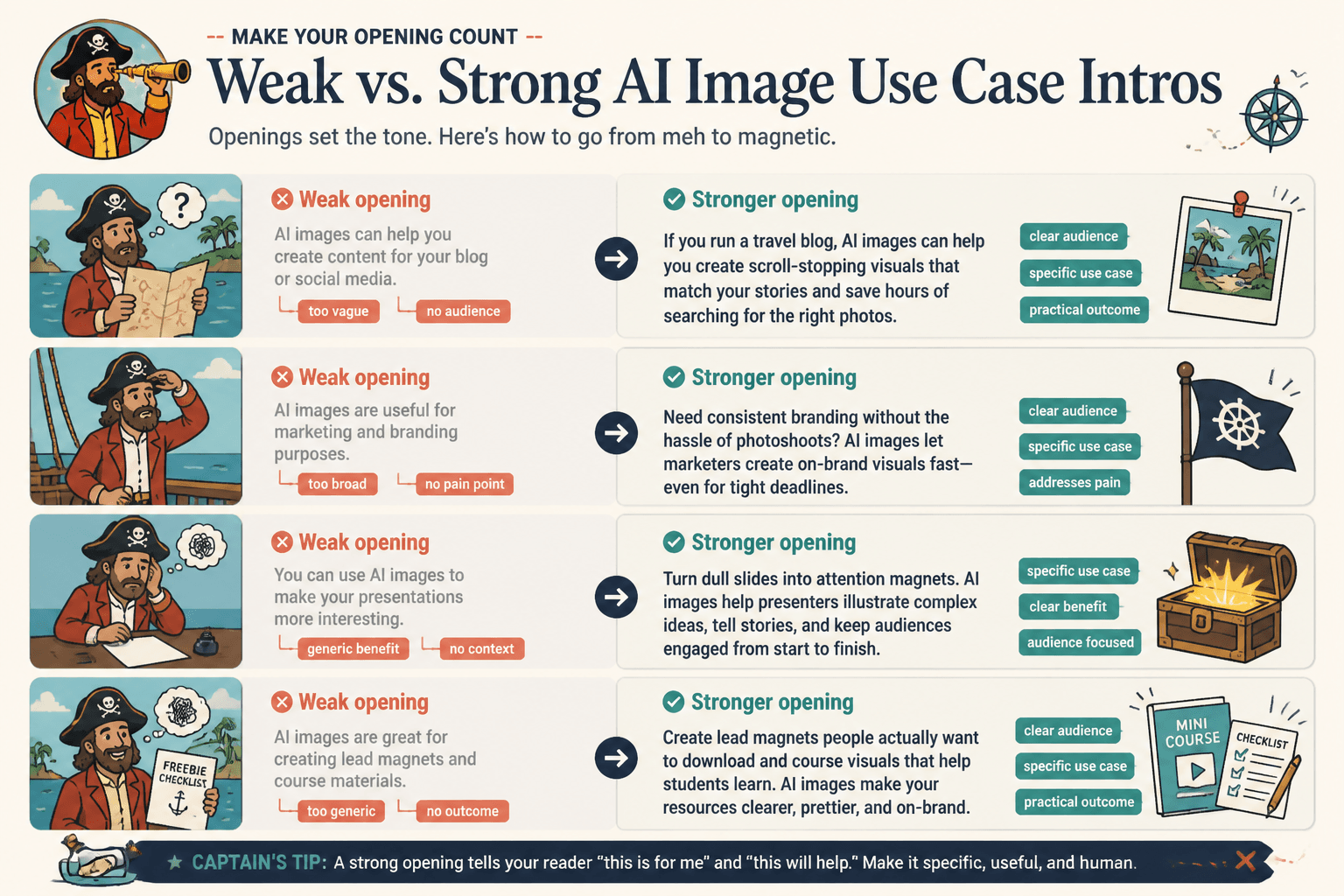
Opening angles that work better than generic intros
If you write AI image use cases often, it helps to have a few reliable opening angles you can rotate through.
The inefficiency angle
Use this when the pain is slow production.
Creating custom visuals from scratch for every campaign is slow, especially when you need multiple directions fast. AI image tools can shorten that early concept phase and help teams move from blank page to usable idea much quicker.
The quality gap angle
Use this when the pain is mediocre visuals.
If your content is solid but the visuals feel generic, the whole thing lands weaker than it should. AI image tools can help generate more distinctive graphics for posts, pages, and downloads without requiring a full custom illustration budget.
The variation angle
Use this when testing matters.
When you need several visual directions for the same campaign, producing them manually can get expensive fast. AI image tools are useful for exploring variations early, so you can compare styles, concepts, and layouts before committing to one path.
The accessibility angle
Use this for solo creators and smaller teams.
Not every creator has a designer on standby, but the content still needs visuals that do not look thrown together. AI image tools can help solo businesses create cleaner, more custom-looking assets for blogs, social posts, and downloads with less production friction.
A practical template for writing stronger AI image use case openings
Here is a fill-in structure you can actually use.
[Creating specific asset] often becomes a bottleneck because [specific problem]. AI image tools can help by [specific use case], which is especially useful when [context or constraint].
Filled example:
Creating fresh illustrations for newsletter headers often becomes a bottleneck because custom visuals take time and stock images usually feel off-brand. AI image tools can help by generating fast concept artwork or branded image directions, which is especially useful when you publish often and need consistent visual variety.
Another version with a slightly punchier style:
Need custom visuals but not a five-day design process? That is where AI image tools can be genuinely useful. They help you create faster concept graphics, post visuals, and campaign assets when speed matters and “just use another stock photo” is clearly not solving it.
Use the first version when you want clean and professional. Use the second when the brand voice allows a bit more bite.
What to avoid in the first paragraph
- Category throat-clearing: “AI image generation is an emerging technology…”
- Trend-report language: “Many industries are adopting…”
- Meaningless benefits: “It offers innovation and efficiency…”
- Overclaiming: “It completely replaces traditional design…”
- Generic audience labels: “Businesses of all sizes can benefit…”
- Tool worship: “With the rise of powerful AI platforms…”
These all create distance. They talk around the reader instead of talking to them.
A useful opening should sound like it understands the workflow, not like it is trying to impress a conference panel.
How the opening should change by format
The bigger point is simple: clearer structure and clearer writing make the piece more useful. That is usually what makes the ending land better too.
The bigger point is simple: clearer structure and clearer writing make the piece more useful. That is usually what makes the ending land better too.