Most AI image use cases are not too short or too long because of some sacred content law. They fail because the writer picked a length that does not match the job.
Some use cases need 120 words and a clean example. Some need 700 words because there are actual constraints, risks, workflows, approvals, and edge cases involved. What does not work in 2026 is the mushy middle: vague, padded, over-explained copy that says “AI images can help businesses create visuals faster” for five paragraphs and still tells you nothing useful.
If you are trying to figure out how long should AI image use cases be in 2026, the real answer is this: long enough to make the use case clear, credible, and actionable; short enough that a busy reader does not regret clicking.
This article will help you choose the right length based on purpose, audience, complexity, and format. We will also cover what short use cases do well, when longer ones earn their keep, and how to avoid the common mistake of stuffing every use case with fluff because it feels more “complete.” More words do not make an example stronger. Usually they just make it slower.
If you want the bigger picture, start with the parent guide.
There is no magic number, but there are useful ranges
If you came here hoping for one tidy number, sorry, no. That is not how this works.
The ideal length depends on four things:
- How complex the use case is
- Who the reader is
- What the use case is trying to do
- Where it appears
Still, practical ranges help. Here is the version you can actually use.
| Use case type | Recommended length | Best for |
|---|---|---|
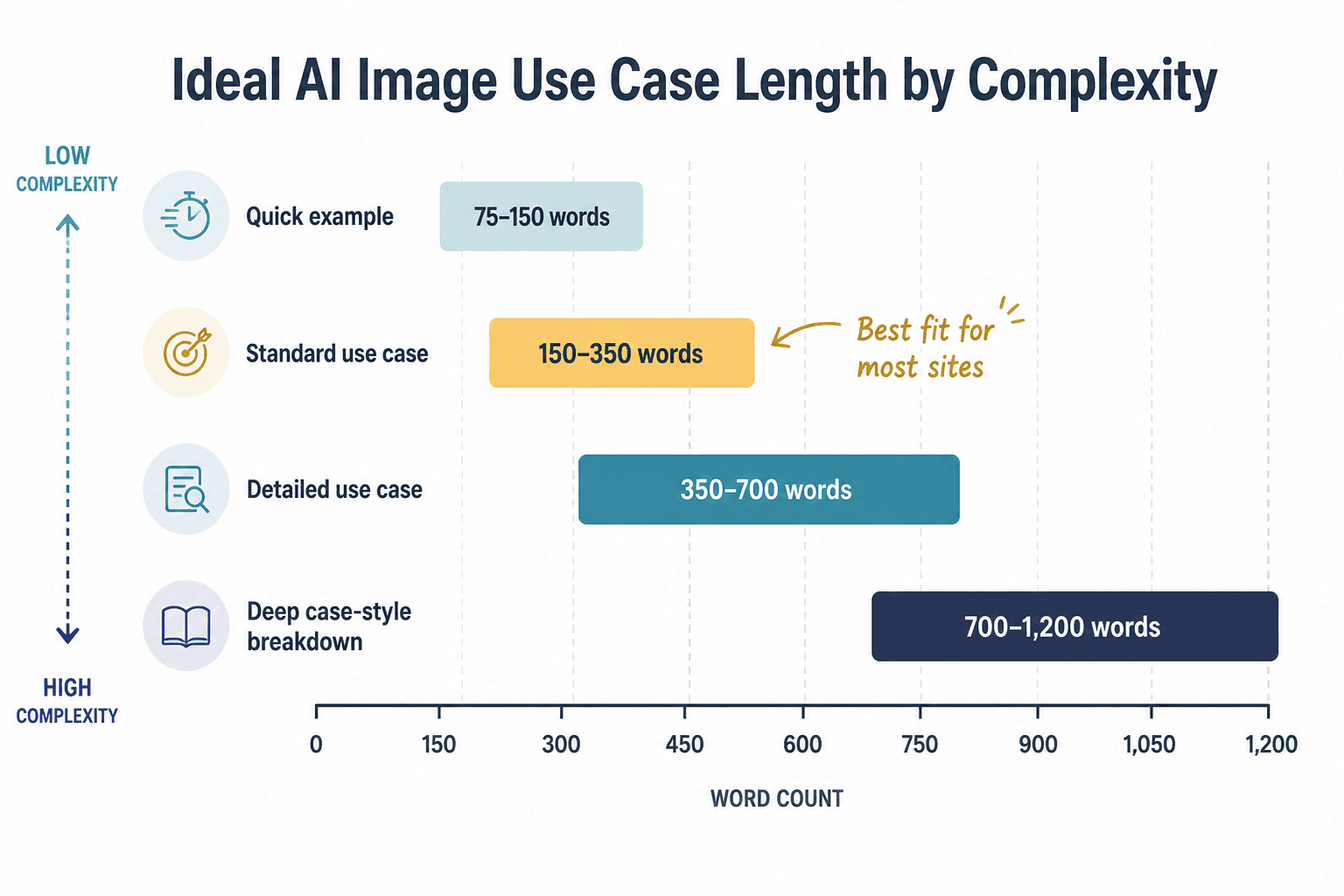
| Short example | 75–150 words | Lists, comparison pages, quick inspiration, landing page support |
| Standard practical use case | 150–350 words | Most blog posts, category pages, tool pages, internal docs |
| Detailed use case | 350–700 words | B2B workflows, team adoption, compliance-heavy contexts, serious buyer research |
| Deep case-style breakdown | 700–1,200 words | Strategic guides, pillar content, enterprise evaluation, advanced implementation |
For most websites, creators, consultants, and AI tool publishers, the sweet spot is 150 to 350 words per use case. That is enough room to explain the scenario, the workflow, the output, and the result without drifting into corporate wallpaper.
Once you go beyond that, the extra length needs to earn itself. It should add detail, proof, nuance, constraints, or implementation guidance. If it just repeats the obvious in fancier phrasing, cut it.
What an AI image use case actually needs to include
Before talking about length, it helps to get clear on structure. A strong AI image use case does not exist to vaguely announce that AI image tools can do things. Riveting. It exists to show a real scenario, a believable workflow, and a useful outcome.
At minimum, most AI image use cases should answer these questions:
- Who is using the AI image tool?
- What are they trying to create?
- Why are they using AI instead of a manual process?
- How does the workflow roughly work?
- What is the result or benefit?
- What should the reader understand or do next?
If your use case covers all of that clearly, it is probably long enough. If it skips most of that and replaces it with broad claims about “streamlining visual ideation,” it is probably not.
A simple structure that keeps use cases useful
- Scenario: name the user and need
- Process: explain how AI images help
- Output: show what gets created
- Value: explain the practical benefit
- Constraint or note: mention limits if relevant
That structure alone will save you from writing use cases that sound polished but empty. It also helps you judge length more honestly. If the use case feels thin, add a missing part. Do not just stretch the same sentence into three versions of itself.
When short AI image use cases work best
Short use cases work beautifully when the reader mainly needs fast understanding. Not a seminar. Not a grand theory of visual generation. Just a crisp example that helps them see the point.
This is especially true for top-of-funnel content, list pages, feature pages, and articles that include many examples. If every use case turns into a mini-essay, the page gets heavy fast and readers start skimming like they are trying to escape a conference breakout session.
Short use cases are ideal when:
- The use case is familiar and easy to grasp
- The reader wants examples, not implementation detail
- You are showing multiple industries or scenarios on one page
- The goal is quick scanning and idea generation
- The page already explains the broader context elsewhere
Example of a short use case that works
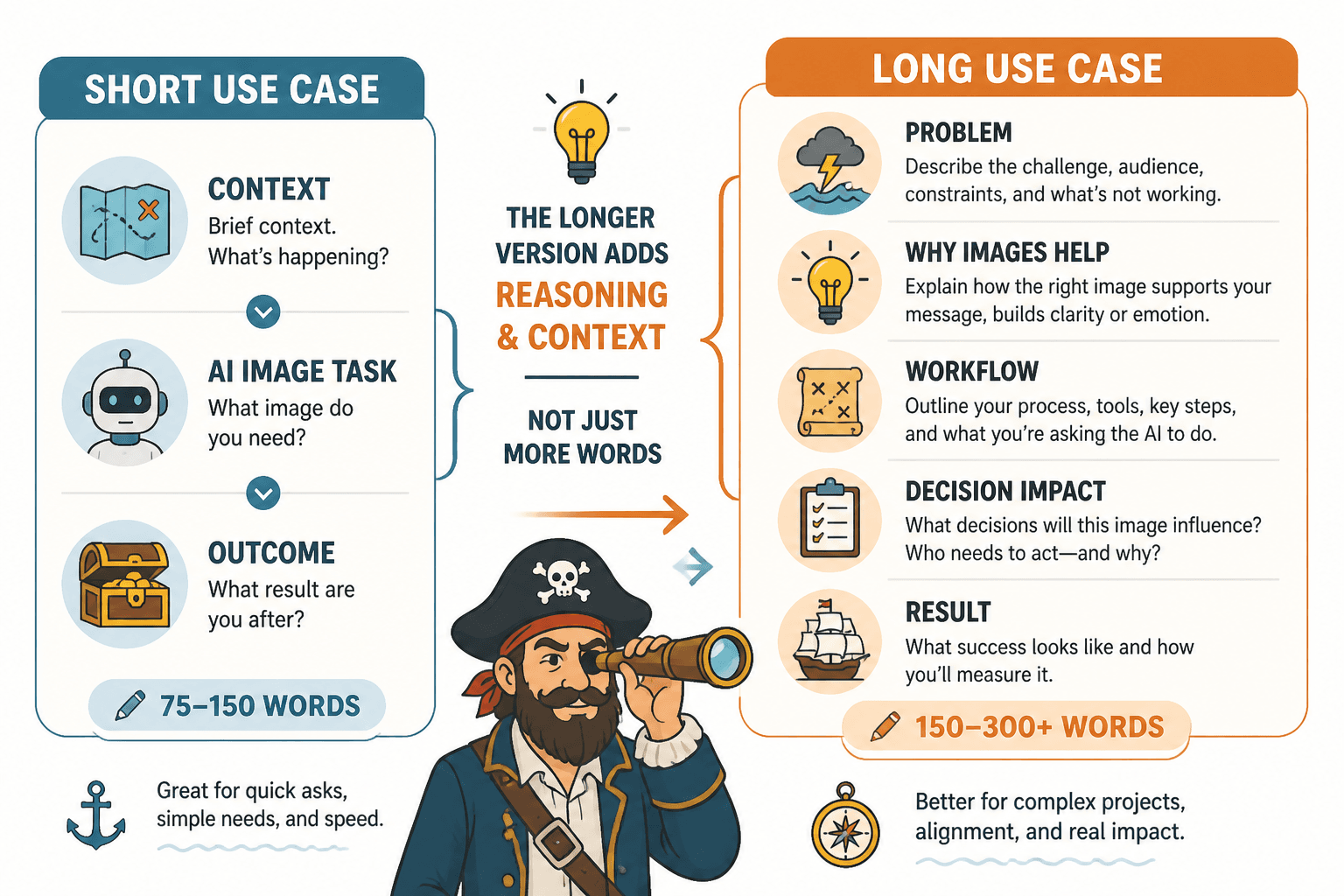
Product mockups for small ecommerce brands: A solo brand owner can use AI image tools to generate early-stage product scene ideas before paying for a full shoot. They might test packaging styles, seasonal backgrounds, or promotional concepts for landing pages and ads. The value is speed and lower creative risk during the exploration phase, not perfect final photography.
That is around the right size for a simple, obvious, high-utility use case. It gives the reader enough to understand who it is for, what it does, and where the limits are.
If you want more on this, this piece on when short AI image use cases beat long ones goes deeper into where brevity helps and where it starts hiding useful detail.
When longer AI image use cases are worth it
Longer use cases earn their length when the scenario has friction. That friction might be legal, operational, strategic, technical, or brand-related. In those cases, short copy can actually make the use case worse because it makes the work sound easier and cleaner than it is.
For example, if you are writing about AI image workflows for marketing teams, publishers, educators, course creators, or in-house brand teams, readers often need more than “generate assets faster.” They need to understand approvals, consistency, editing, review loops, prompt iteration, style control, and where human review still matters.
Longer use cases make sense when:
- The workflow has several steps
- The output affects brand trust or public messaging
- The use case involves collaboration across roles
- The reader is closer to evaluating or adopting a process
- You need to explain what AI can do and what still requires human judgment
Example of a longer use case that earns the space
Visual concept development for course launches: A course creator planning a new program can use AI image tools during the concept stage to explore thumbnail directions, workbook covers, lesson graphics, and promotional image styles before handing final assets to a designer. Instead of briefing from scratch, they generate several visual routes tied to different audience angles, such as premium, practical, or beginner-friendly positioning. Those drafts help clarify brand direction earlier, reduce revision loops, and make feedback more specific. The AI output is not the final brand system. It is a faster way to pressure-test visual positioning before production resources get spent.
That one needs more room because the real value is not just “AI makes graphics.” It is that AI helps reduce ambiguity in the decision-making phase. That is a more useful point, and it needs a little breathing room.
If your use cases are sounding stiff or weirdly over-polished, read this guide on writing AI image use cases without sounding salesy or robotic. A lot of length problems are really tone problems wearing a fake mustache.
Choose length based on reader intent, not your urge to sound comprehensive
This is the part people miss. They decide length based on what feels impressive to publish, not what the reader actually came for.
A founder browsing use cases for inspiration does not want a 900-word process memo on every example. A team lead trying to justify a new workflow may absolutely want more detail. Same topic. Different intent. Different length.
Here is a cleaner way to think about it:
| Reader intent | Best length | What to prioritize |
|---|---|---|
| Quick inspiration | 75–150 words | Clarity, variety, speed |
| Practical understanding | 150–350 words | Scenario, process, result |
| Evaluation | 350–700 words | Workflow, constraints, tradeoffs |
| Strategic adoption | 700+ words | Context, implementation, caveats, examples |
If the page is part of a broader AI image use cases hub, it often makes sense to keep each individual use case tighter and let supporting articles handle the deeper questions. That way the core page stays useful instead of bloated.
You can also support the topic naturally with related resources from the broader AI writing tools and workflows section and the AI image tools category when readers need more context.
The biggest length mistakes people make
Most weak AI image use cases are not ruined by being short. They are ruined by being vague. And when writers notice the vagueness, they often try to solve it by adding more words instead of adding better information. That is how you end up with 400 words of content that says less than a decent 120-word example.
1. Padding benefits instead of showing the scenario
“AI images save time and improve creativity” is not a use case. It is a brochure sentence. Readers need to know who is doing what.
2. Explaining the tool before the use case
Do not spend half the section introducing AI image generation as a concept. If someone is reading use cases, they are already in the neighborhood.
3. Treating every use case like a mini thought-leadership essay
You are not writing a TED Talk. You are trying to make the use clear.
4. Leaving out constraints
Sometimes a use case needs one extra sentence about review, editing, rights, or brand control. That sentence can make the difference between credible and naive.
5. Using the same length for every use case on the page
This one is sneaky. Writers often force every example into the same shape because it looks tidy. But a simple social media mockup example and a multi-step content production workflow do not deserve identical treatment. Uniformity is not always clarity.
A practical way to decide the right length before you write
If you want a cleaner workflow, use this quick filter before drafting each use case.
- Name the user. If you cannot name the user in one line, the use case is too fuzzy.
- Name the output. What image or asset is being created?
- Name the actual gain. Faster ideation? Lower production risk? More variants? Better internal alignment?
- Check the complexity. Is this one-step, multi-step, or team-based?
- Add one constraint if needed. For example: not final-brand ready, requires editing, or needs human review.
- Stop when the reader gets it. This is the hard part. Most people write two extra paragraphs out of insecurity.
If your draft still feels weak, the issue may be the opening, not the total length. This guide on how to start AI image use cases without a weak opening can help you fix that fast.
Before and after: same use case, better length control
Too short to be useful
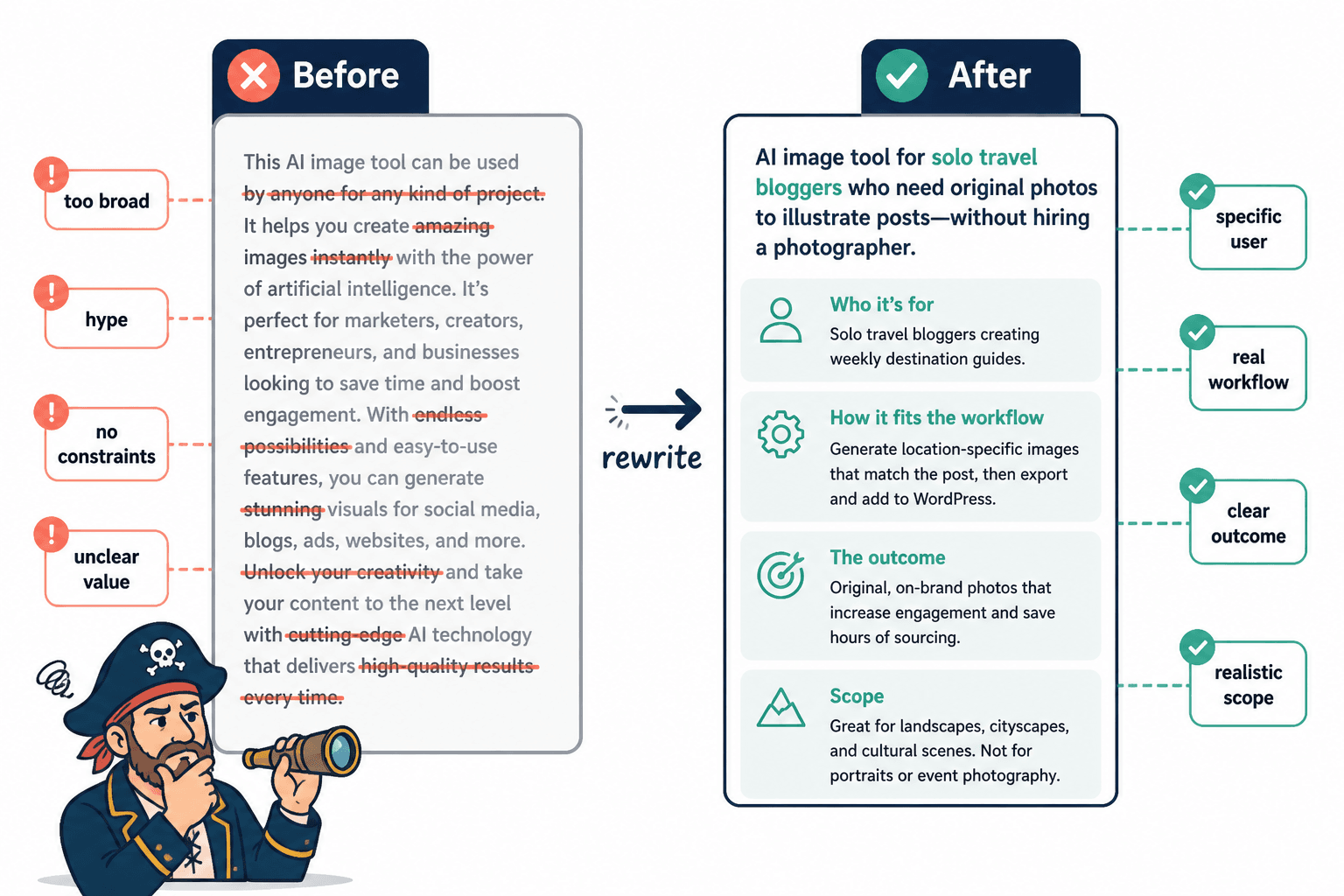
AI images can help marketers create ad creatives faster and improve campaign performance.
Technically true. Practically useless.
Too long and padded
In the fast-moving world of digital advertising, marketers are increasingly turning to AI image solutions to help them streamline and enhance the production of visual advertising creatives in a variety of formats and contexts. These solutions can offer support in conceptualizing, drafting, iterating, and refining image assets that can then be leveraged across numerous paid media channels in order to improve efficiency, optimize resource allocation, and potentially create stronger campaign outcomes over time.
That is not a use case. That is a fog machine.
Right-sized version
Ad creative testing for lean marketing teams: A small marketing team can use AI image tools to generate multiple visual directions for paid social campaigns before investing in full production. They might test background styles, product framing, seasonal themes, or promotional layouts to see which concepts deserve real budget. The value is not instant high-converting ads from a prompt. It is faster concept testing, more creative options, and less wasted time on weak directions.
That lands because it is specific, realistic, and controlled. It gives enough detail to be useful and stops before it starts congratulating itself.
If you have existing drafts that feel stale, this rewrite guide for boring AI image use cases will help you tighten them without stripping out the good parts.
How length changes by format
The same use case may need different lengths depending on where it lives.
- Category pages: keep use cases tighter so readers can scan multiple examples quickly
- Blog posts: use medium-length examples with explanation and context
- Tool landing pages: focus on concise examples tied to outcomes and credibility
- Pillar guides: expand only where deeper process or nuance helps
- Sales or buyer-enablement content: include more workflow detail, risks, and implementation notes
This is why “how long should AI image use cases be in 2026” is really a formatting and intent question disguised as a writing question. Length is not the goal. Fit is.
FAQ
The bigger point is simple: clearer structure and clearer writing make the piece more useful. That is usually what makes the ending land better too.
The bigger point is simple: clearer structure and clearer writing make the piece more useful. That is usually what makes the ending land better too.