
Most people do not need more LinkedIn post ideas.
They need better packaging.
You can have a smart point, real expertise, and a decent offer, then ruin the whole thing with a limp first line and formatting that reads like a tax document. That is why the best writing tools and scheduler tools for LinkedIn Hooks & Formatting are not the ones that promise magic. They are the ones that help you think more clearly, write more sharply, and publish more consistently without sanding off your personality.
This matters because LinkedIn is brutally unforgiving at the top of the post. If the hook is vague, people scroll. If the formatting is messy, people skip. If the scheduler mangles spacing or posts at the wrong cadence, your “strategy” starts looking suspiciously like hope with a content calendar.
Here’s how to choose tools that actually help with LinkedIn hooks and formatting, what each type is good for, what they cannot do, and how to build a setup that makes your posts cleaner, faster, and less painfully generic.
For a broader foundation on how hooks and formatting work on the platform, it’s worth pairing this with the main LinkedIn hooks and formatting guide and the more practical guide for creators who want better results.
To see how this fits into the wider strategy, open the parent guide.
What the best tools actually help with
Good LinkedIn tools do not write brilliance into existence. Annoying, but true.
What they can do is reduce friction in the parts that usually go wrong:
- Turning rough ideas into sharper hooks
- Testing multiple opening lines quickly
- Cleaning up clunky phrasing
- Previewing readability and spacing
- Saving hook formulas and post frameworks
- Scheduling consistently without losing format
- Tracking which types of hooks actually perform
- Building a repeatable workflow instead of improvising every post at 8:43 a.m.
The best setup usually is not one tool. It is a small stack: one for drafting, one for organizing ideas, one for scheduling, and maybe one for analytics or swipe storage if you create content regularly.
That is the part people skip. They go shopping for a “LinkedIn growth tool” when the real issue is that their process is chaotic. The tool is not the strategy. It just helps the strategy stop tripping over its own shoelaces.
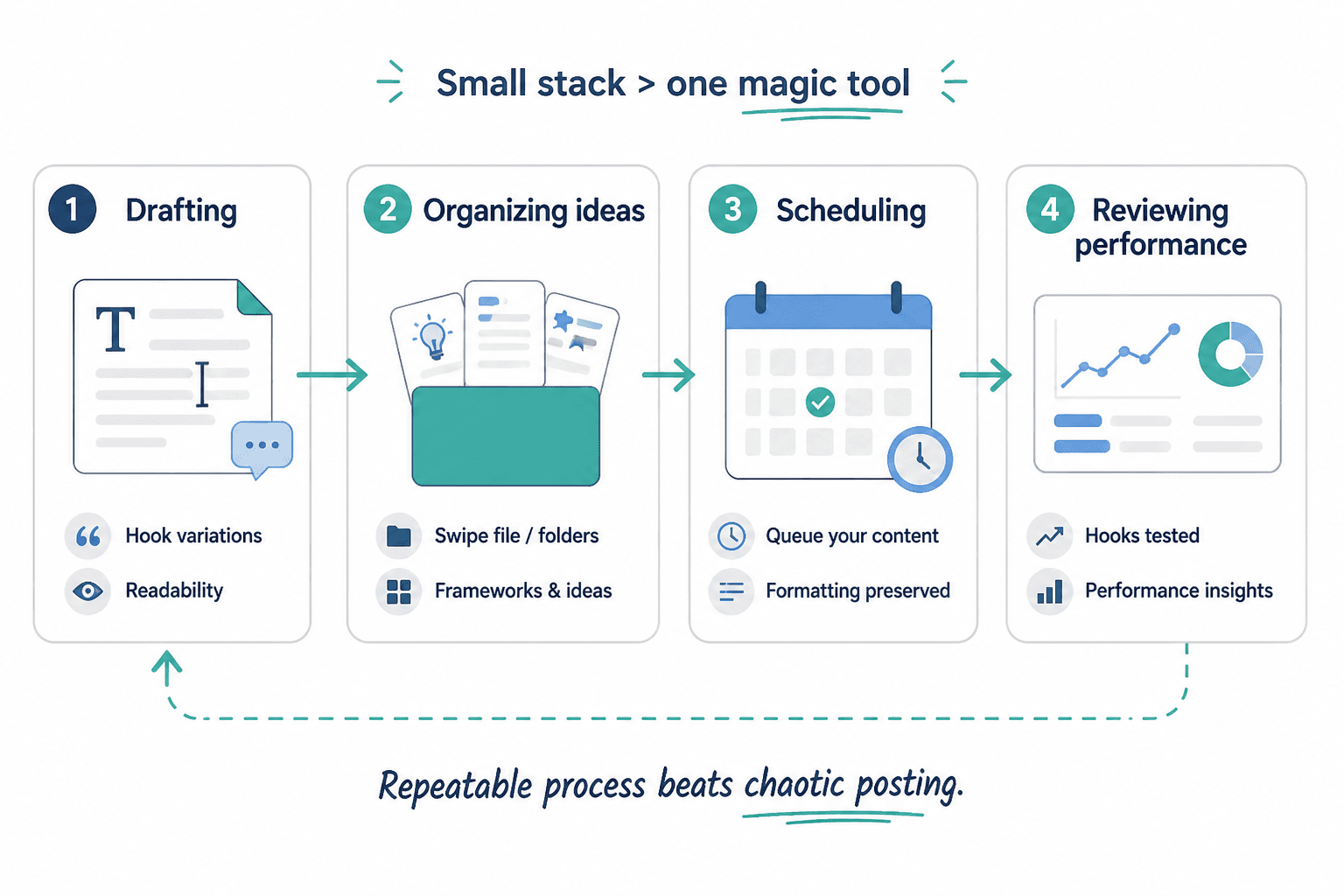
The 4 tool categories that matter most for LinkedIn hooks and formatting
1. Writing and rewriting tools
These help you tighten hooks, generate alternatives, cut fluff, and improve readability. They are useful when you already have an idea but the wording is weak, padded, or weirdly corporate.
Best for:
- Hook variations
- Post rewrites
- Tightening first lines
- Shortening long-winded paragraphs
- Adjusting tone so the post sounds more human
Not good for:
- Creating actual opinions for you
- Knowing what your audience cares about without context
- Fixing a boring point
- Making generic advice feel original
2. Idea storage and template tools
If you write often, your real bottleneck is usually not creativity. It is retrieval. You had three sharp hooks in the shower, one decent post angle in your notes app, and a strong CTA buried inside a client doc from last month. Great system.
Template and storage tools help you save:
- Hook formulas
- Before/after rewrites
- Post structures that worked
- Category-specific ideas
- Proof points, stories, examples, and objections
3. Scheduler tools
Schedulers are useful when they make publishing easier, not when they turn your content into a robotic assembly line.
Good scheduler tools for LinkedIn hooks and formatting should help you:
- Queue posts in advance
- Preserve line breaks and spacing
- Review posts before publishing
- Manage cadence without overposting
- Repurpose variations cleanly
- Track performance across post types
If a scheduler constantly breaks formatting, trims your post oddly, or makes it hard to edit, it is not saving time. It is creating cleanup work in a blazer.
4. Analytics and testing tools
You do not need a ridiculous dashboard with seventeen charts and a fake sense of control. You do need some way to see which hooks, structures, and formatting styles are getting attention from the right people.
The useful question is not just “Which post got likes?” It is:
- Which hooks earned stops?
- Which formats led to comments from relevant people?
- Which post types brought profile visits?
- Which posts created leads, replies, or inbound interest?
Best writing tools for LinkedIn hooks and formatting
The best writing tools and scheduler tools for LinkedIn Hooks & Formatting usually start with the writing side, because no scheduler can rescue a weak hook. Here are the tool types worth using.
AI drafting and rewrite tools
These are useful when you treat them like assistants, not substitute brains.
A good AI writing tool can help you:
- Generate 10 hook variations from one core idea
- Rewrite a bland first line into sharper options
- Shorten bloated paragraphs
- Turn a long note into a cleaner post draft
- Match a more natural, direct tone
But there is one very common failure mode here: people ask the tool for a “high-performing LinkedIn post,” then wonder why the output sounds like a sales coach trapped in a webinar from 2021.
The fix is simple. Give better inputs. Feed the tool your actual point, your audience, your tone, and your desired structure. Then use it for variation and cleanup, not for outsourced personality.
If you want a deeper look at the AI side specifically, see best AI tools for LinkedIn hooks and formatting.
Grammar and clarity tools
These are less glamorous, but often more useful. A clarity tool can catch:
- Awkward phrasing
- Accidental repetition
- Sentences that are trying too hard
- Wordy transitions
- Overly formal language that makes your post sound processed
This matters on LinkedIn because the platform rewards readability. Not because the algorithm likes “clarity scores” or some other made-up nonsense, but because humans keep reading things that are easy to read.
A clarity tool is especially useful for creators who know their subject well and therefore tend to overexplain it. Expertise often creates extra words. The reader does not need all of them.
Headline and hook variation tools
Some tools are specifically good for generating alternate openings, headlines, and angle shifts. These can be surprisingly helpful when your first line is technically fine but emotionally dead.
Say your original hook is:
I want to share three lessons I learned about LinkedIn content strategy.
That is not a hook. That is an announcement that a hook failed to attend.
A variation tool might help you move toward something like:
- Most LinkedIn content underperforms before the second line.
- If your posts are useful but ignored, the hook is probably the problem.
- Good LinkedIn posts do not start with “I want to share.”
Notice the difference. More tension. More specificity. Less throat-clearing.
For more examples of what stronger openings look like in practice, read these LinkedIn hooks and formatting ideas and examples.
Readability preview tools
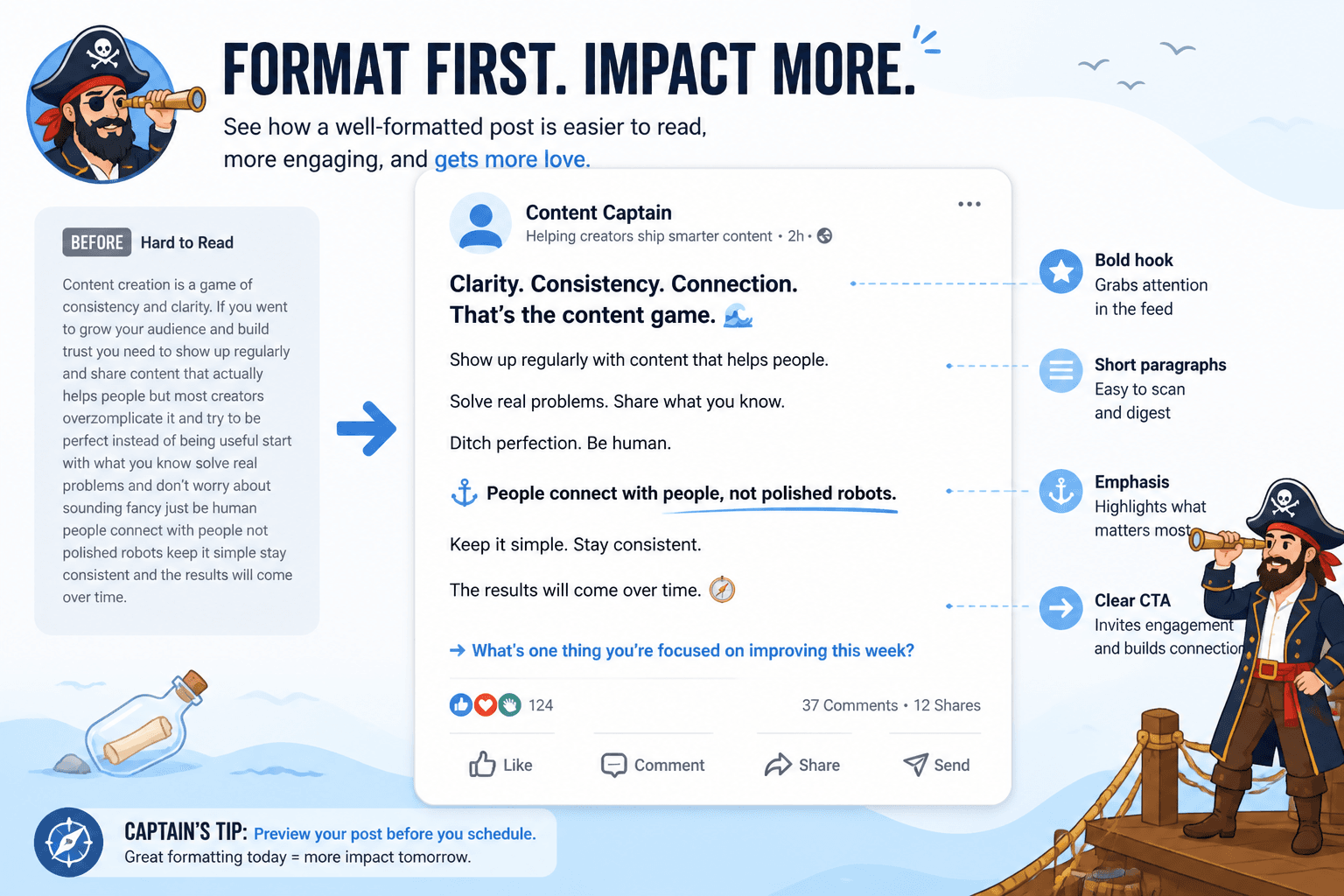
These help you preview line breaks, spacing, paragraph rhythm, and visual flow before posting.
That sounds small until you remember how many LinkedIn posts fail because they look annoying. People do judge formatting instantly. If the post feels dense, chaotic, or bizarrely over-spaced, they bail.
A good preview tool helps you catch two common formatting mistakes:
- Wall-of-text syndrome: useful post, unreadable block
- Artificial breathlessness: every sentence broken into its own line like the post is recovering from a sprint
The sweet spot is simple: clean spacing, short paragraphs, deliberate emphasis, and enough rhythm to keep the post moving.
Best scheduler tools for LinkedIn hooks and formatting
Now the scheduler side. A lot of people choose scheduler tools based on dashboards, bulk posting, and calendar views. Fine. But for LinkedIn hooks and formatting, a scheduler lives or dies on one very boring feature:
Does it preserve the post properly?
If your spacing gets mangled, your hook line shifts awkwardly, or your CTA appears as one ugly block, the tool is not helping. It is vandalizing the draft.
What to look for in a LinkedIn scheduler
- Reliable line break preservation
- Easy post editing before publish
- Draft storage and approval workflow if you work with a team
- Visual calendar for pacing content
- Analytics tied to specific posts
- Ability to save post variations
- Support for reposting or repurposing with edits, not lazy duplication
That last point matters. Reposting the same post word-for-word is usually a lazy move unless it has been heavily updated or reused intentionally. Better schedulers help you duplicate a draft, revise the hook, tighten the body, and test a stronger version later.
When scheduling helps
- You create content in batches
- You want a steadier posting rhythm
- You need space to review posts before publishing
- You repurpose ideas across formats
- You are tired of writing from scratch every morning
When scheduling hurts
- You stop checking how posts actually look once published
- You queue 30 generic posts and call it strategy
- You ignore topical opportunities because the calendar is “full”
- You post mechanically without replying to comments or joining conversations
Scheduling should support consistency, not replace presence. LinkedIn is still a social platform, not a graveyard of queued “value posts.”
Features that matter more than brand names
You do not need me pretending there is one perfect tool for everyone. There is not. What matters more is choosing tools based on workflow and output quality.
| Need | Best tool type | What to check |
|---|---|---|
| Write better hooks | AI rewrite or hook variation tool | Can it generate multiple useful first lines without sounding canned? |
| Clean up awkward drafts | Grammar and clarity tool | Does it improve readability without flattening your voice? |
| Save repeatable formats | Template or note system | Can you organize hooks, structures, CTAs, and examples fast? |
| Publish consistently | Scheduler tool | Does it preserve line breaks and allow quick edits? |
| See what works | Analytics tool | Can you compare hook styles, post types, and engagement quality? |
If a tool looks impressive but does not clearly improve one of those jobs, skip it.
A practical tool stack for different kinds of LinkedIn creators
Solo creator or consultant
- One writing or rewrite tool
- One simple note or template system
- One scheduler with decent preview and analytics
Keep this lightweight. You do not need enterprise software to publish three strong posts a week.
Coach or personal brand with frequent content
- AI drafting tool for hook variations and post rewrites
- Swipe file or content database for ideas and frameworks
- Scheduler with calendar and performance tracking
- Optional analytics layer for measuring lead quality and profile visits
This setup works well if you post often and want to systemize content without sounding systemized.
Small team or agency-supported founder
- Collaborative drafting tool
- Shared template library
- Approval-friendly scheduler
- Reporting tool to review what is driving attention and conversions
The priority here is handoff clarity. If multiple people touch the content, your systems need to protect voice and formatting. Otherwise the founder’s posts start sounding like five committee members fighting over a caption.
What these tools cannot do for you
This part is important because tool roundups usually drift into hype. So here is the less glamorous truth.
Tools cannot:
- Create a sharp point if your idea is mushy
- Fix weak positioning
- Make your audience trust you without proof
- Turn generic advice into memorable content by force
- Replace actual judgment about what is worth posting
- Know the difference between polished and painfully fake unless you do
This is why some people use excellent tools and still publish beige sludge. Their workflow got faster, but their thinking did not get better.
If your hook says nothing, no tool can save it. If your formatting is clean but the post is bland, people will simply enjoy your neat mediocrity for half a second and keep scrolling.
How to use tools without sounding like a robot with a networking problem
There is a sane way to use writing tools and scheduler tools for LinkedIn. It looks like this:
- Start with a real point. Not a topic. A point.
- Draft the hook manually first if possible.
- Use a writing tool to generate variations, not identity.
- Choose the strongest version based on clarity and tension.
- Run the body through a clarity pass to cut bloat.
- Preview formatting on mobile-style spacing.
- Schedule the post if that helps consistency.
- Review after publishing to make sure the formatting held.
- Track which hook style led to useful engagement.
- Save winners as templates, not sacred scripture.
That last point matters more than it seems. Templates are starting points, not costumes. If every post uses the same rhythm, same CTA, same dramatic setup, and same sentence shape, readers notice. And not in a flattering way.
If you want more reusable structures, these templates and tools for LinkedIn hooks and formatting are a useful companion.
Simple tests to know if your tool stack is actually working
You picked some tools. Fine. Here is how to tell if they are genuinely helping.
Test 1: Hook improvement
Are your first lines getting sharper, more specific, and easier to understand in one glance?
If not, the writing tool may be generating volume without quality.
Test 2: Formatting quality
Do your posts look cleaner on-platform after scheduling than they did before? Or are you constantly fixing spacing manually?
If the scheduler keeps creating cleanup work, replace it.
Test 3: Speed without sloppiness
Can you go from idea to publish faster without sounding more generic?
If speed increases but quality drops, your workflow is over-automated.
Test 4: Better engagement from the right people
Are more relevant people commenting, messaging, visiting your profile, or asking about your work?
Vanity metrics are nice. Revenue-adjacent signals are nicer.
For broader context around platform-specific content strategy, the main social media writing and LinkedIn writing resources can help you connect these tool decisions to a stronger overall publishing system.
Common mistakes when choosing LinkedIn writing and scheduler tools
The bigger point is simple: clearer structure and clearer writing make the piece more useful. That is usually what makes the ending land better too.
The bigger point is simple: clearer structure and clearer writing make the piece more useful. That is usually what makes the ending land better too.