A draft sits open with three possible hooks, one version that sounds too polished, and another that sounds like it was written during a caffeine argument. The post is technically “done,” but it still feels like it needs a map and a flashlight. That is where examples help: they turn vague advice into something a creator can actually use without wandering around in content fog.
On LinkedIn, the first line has a job, and the formatting has a job. The hook earns the next sentence. The layout keeps the reader from bailing before the point lands. LinkedIn’s own guidance leans hard toward clarity and useful, readable content, which is not exactly scandalous advice, but it is usually the part people skip when trying to sound clever. See the LinkedIn help on creating posts and the LinkedIn help on articles for the platform’s basic publishing features and posting options.
If you want the broader strategy layer behind this, start with the parent guide: LinkedIn hooks and formatting. This page is the examples-and-templates layer: the part you can steal from, reshape, and ship.
What a good LinkedIn hook and format actually do
A good hook does not need to be dramatic. It needs to create a reason to keep reading. A good format does not need to be fancy. It needs to make the post easy to scan without turning it into a wall of corporate oatmeal.
At a practical level, the best hooks usually do one of three things:
- name a problem the reader recognizes,
- promise a useful payoff, or
- set up a contrast that makes the next line feel worth it.
Formatting then carries the load after the hook. Short paragraphs, clean breaks, and selective emphasis help the reader find the point before their brain files the post under “later.”
The 5 best types of LinkedIn hooks for creators
These are not the only hook types that work, but they are the ones that tend to be easiest to adapt without sounding like you copied a motivational poster.
1. The sharp problem hook
Use this when the reader already feels the friction and you want to name it fast.
Template: The problem is not X. It is Y.
Examples:
- The problem is not that your LinkedIn post is too short. It is that it does not give the reader a reason to care.
- Your hook is not weak because it lacks ideas. It is weak because it hides the idea in sentence four.
2. The unpopular truth hook
Use this when you want to challenge a common habit without sounding like you are auditioning for comment-section warfare.
Template: The thing people get wrong about X is Y.
Examples:
- The thing people get wrong about LinkedIn hooks is thinking cleverness beats clarity.
- The thing people get wrong about formatting is assuming more structure always means more polish.
3. The specific payoff hook
Use this when the reader wants a clear outcome and you can promise one without stretching the truth into a yoga pose.
Template: Here is how to get X without Y.
Examples:
- Here is how to write LinkedIn hooks that feel human without sounding vague.
- Here is how to make a LinkedIn post easier to read without adding more words.
4. The contrast hook
Use this when you want to show the difference between a common mistake and a better option.
Template: Not this. This.
Examples:
- Not a wall of text. A post with a point.
- Not “Here’s a thought.” A hook that gives the thought somewhere useful to go.
5. The mini-proof hook
Use this when the post includes a small result, observed pattern, or useful takeaway that deserves a fast lead-in.
Template: I noticed X, so I tried Y.
Examples:
- I kept seeing the same weak opening in LinkedIn drafts, so I started rewriting the first line before anything else.
- When the format got cleaner, the post became easier to read without changing the core idea.
For more hook pattern variations, the related sibling page LinkedIn Scroll-Stopper Examples Creators Can Adapt Fast is a useful companion. It leans more into attention-grabbing openings; this page leans more into practical structure.
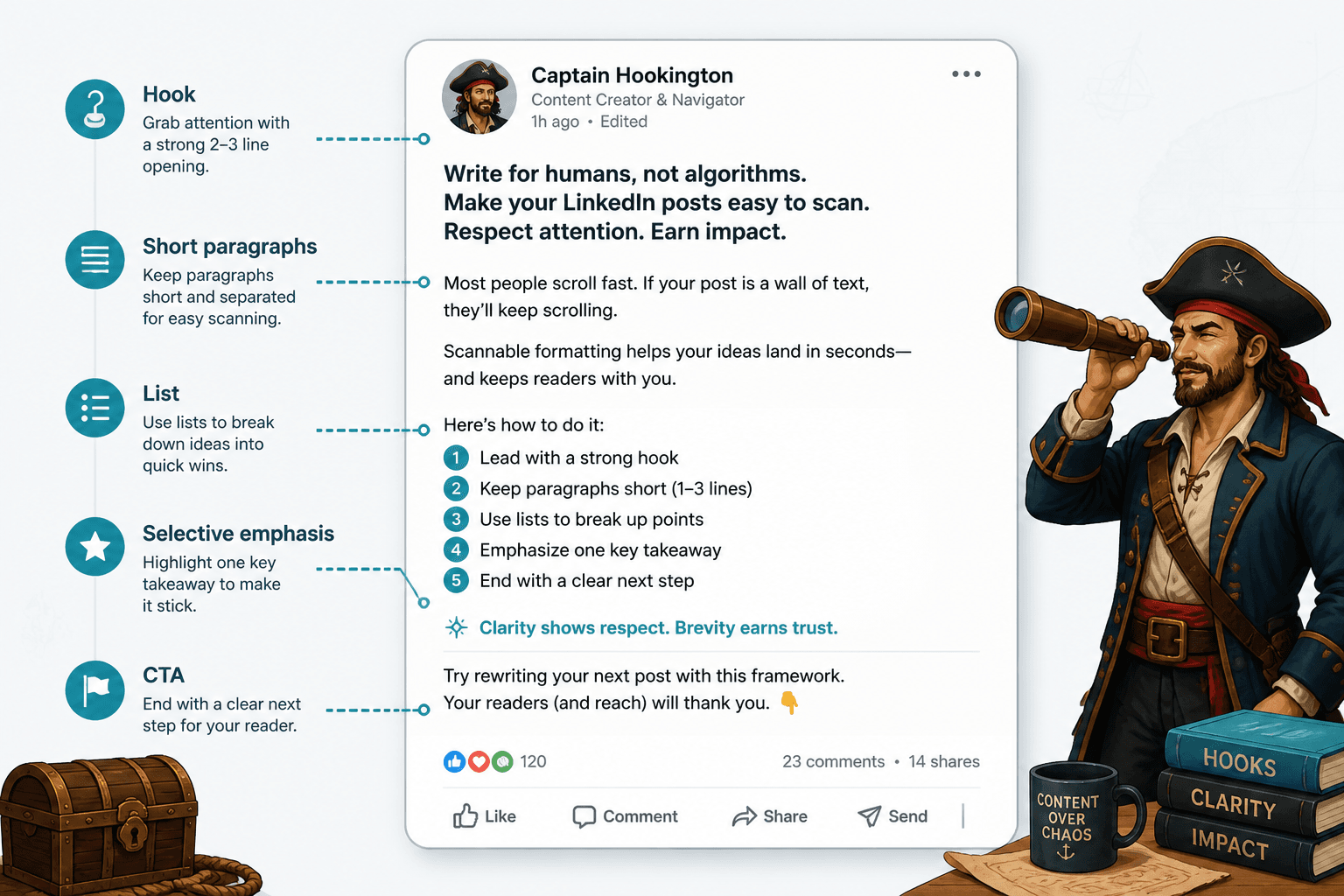
Formatting ideas that make LinkedIn posts easier to read
Formatting is not decoration here. It is reader support. The goal is to reduce friction, not to make the post look like a lab report wearing a scarf.
1. Use short paragraphs
One to three lines is usually enough. If every paragraph starts to feel like a mini-essay, the reader has to work too hard just to find the next idea.
2. Break up dense thoughts
If a paragraph contains multiple ideas, split it. LinkedIn posts are often read in motion, between tasks, while attention is doing something else entirely. Keep the structure forgiving.
3. Use lists when the post is teaching
Lists are useful when you are naming steps, examples, mistakes, or options. They help the eye track the shape of the argument.
4. Put the payoff near the top
Do not make the reader dig for the point. If the post teaches something, say what it teaches early, then support it.
5. Use emphasis sparingly
A single standout line can help. So can a short line break before the key takeaway. But if every sentence is trying to be the main character, nothing wins.
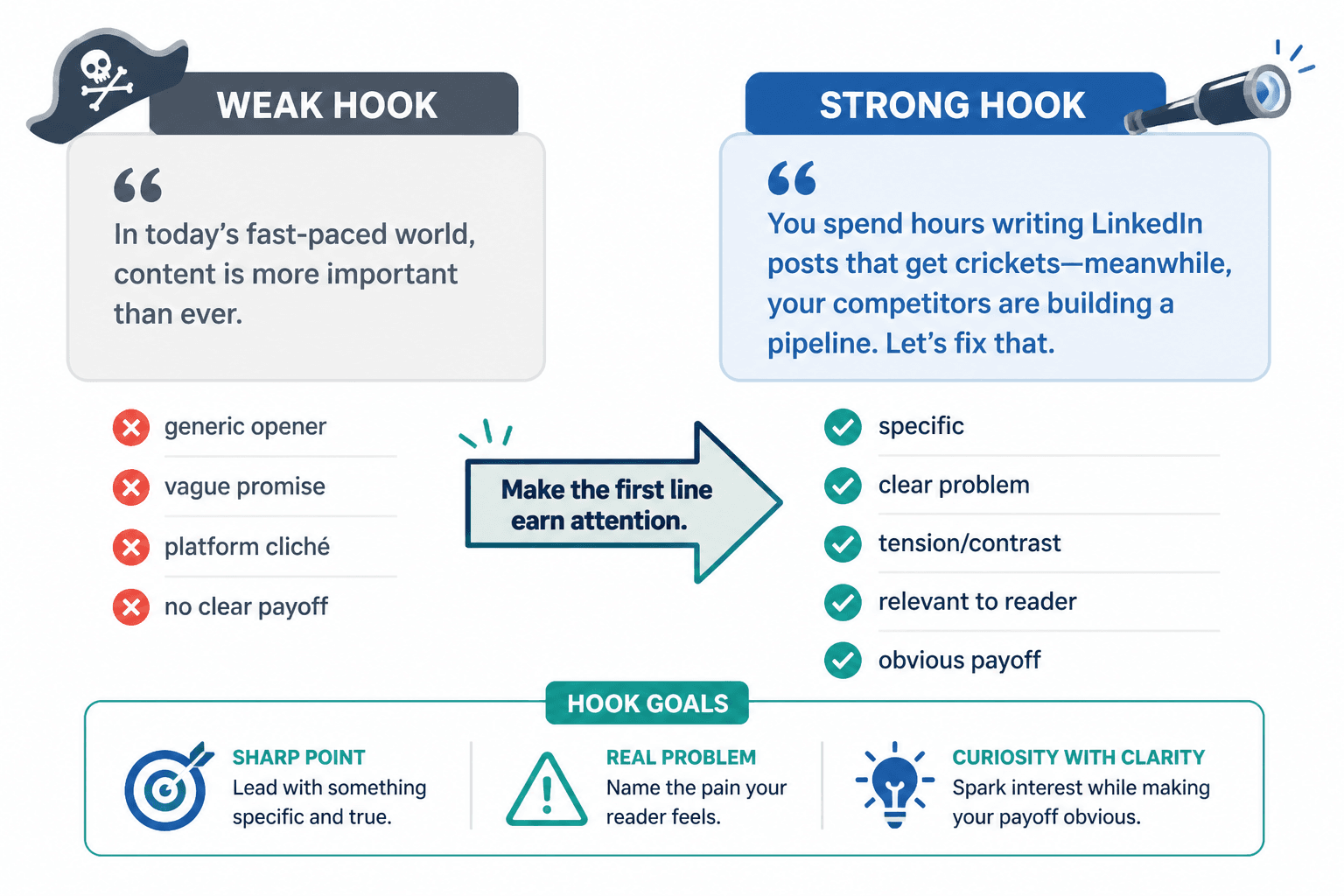
Weak LinkedIn hook vs better LinkedIn hook
Here is the basic difference in practice.
Weak
I have been thinking about content lately and wanted to share a few thoughts on posting.
Better
Most LinkedIn posts do not fail because the idea is bad. They fail because the opening is too vague to reward another sentence.
The second version works better because it does three things at once: it names the problem, creates tension, and points toward a fix. The reader has a reason to keep going.
Another example:
Weak
Here are some thoughts on formatting.
Better
Formatting is not the garnish. On LinkedIn, it is part of the delivery system.
The better version gives the reader a stance. It is shorter, sharper, and easier to trust because it knows what it is saying.
Quick templates creators can adapt fast
These are meant to be reworked, not copied blindly. A template that stays too obvious starts sounding like a template, which is always the point where the spell breaks.
Problem hook template
The problem is not [surface issue]. It is [real issue].
Truth hook template
The thing people get wrong about [topic] is [misbelief].
Payoff hook template
Here is how to [result] without [pain point].
Contrast hook template
Not [bad version]. [Better version].
Mini-proof hook template
I noticed [pattern], so I changed [approach].
If your drafts need help turning these into stronger openings, the companion page Simple LinkedIn First-Line Hook Templates for Busy Creators is a practical next stop. For a broader tool-assisted workflow, see Best AI Tools for LinkedIn Hooks & Formatting.
When short LinkedIn hooks beat longer ones
Short hooks work best when the idea is already simple, the audience already has context, or the post is making one clean point. In those cases, extra wording does not add value; it adds drag.
Short formatting also helps when:
- the post is meant to be skimmed quickly,
- the takeaway is obvious enough to land fast, or
- the structure needs to do some of the persuasion work.
That does not mean every strong post should be tiny. It means the post should be as long as the point needs, and not one breath longer.
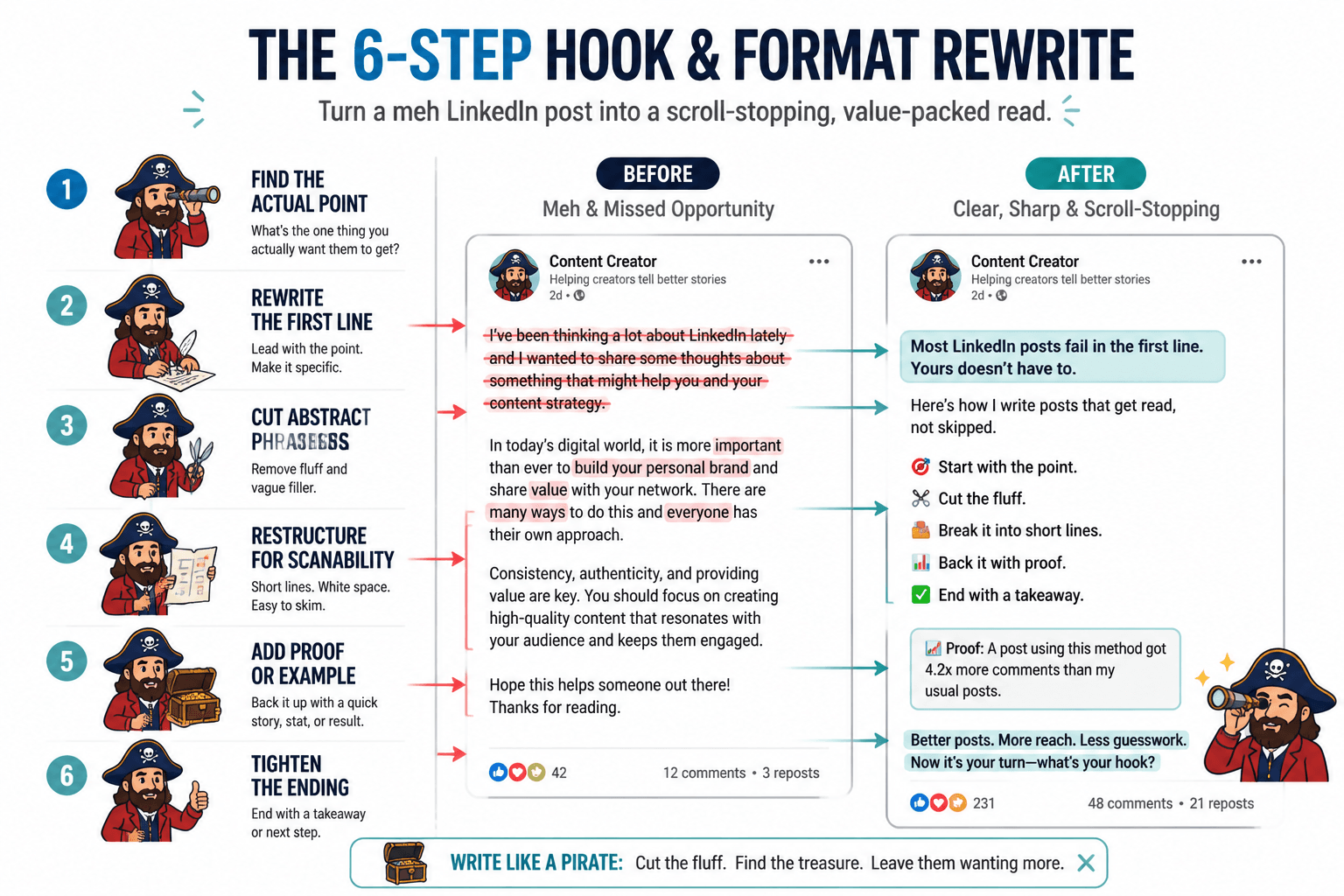
A fast checklist before you publish
- Does the first line create a reason to continue?
- Can the reader understand the point without decoding a dense block of text?
- Does the formatting support the idea, instead of hiding it?
- Is there one clear takeaway?
- Would this still work if someone skimmed it in ten seconds?
If the answer to most of those is yes, the post is probably in decent shape. If not, the fix is usually smaller than it feels: tighten the hook, split the paragraph, remove one extra idea, and let the post breathe.
For the strategy side of what happens after the click, the sibling guide How to Turn LinkedIn Hooks and Formatting Into More Leads or Sales connects the writing to the business outcome.
Wrap-up
Good LinkedIn hooks do not need to sound profound. Good formatting does not need to look artistic. The real win is simpler: make the first line worth reading, then make the rest easy to follow.
That is why examples matter. They take the foggy “write better LinkedIn posts” advice and turn it into something you can actually revise, publish, and reuse without treating every caption like a sacred artifact.
For the full framework, go back to the parent guide on LinkedIn hooks and formatting. If you want more angle-specific examples, the related pages on scroll stoppers, first-line templates, and AI tools can fill in the gaps without making the process feel like content archaeology.