
Wasted trust is expensive. A LinkedIn post that gets attention but never moves a reader toward a next step burns time, creates busywork, and leaves sales looking like a separate job you have to do later. The fix is not to make the post louder. It is to make the hook worth following and the formatting easy to trust.
That sounds obvious until a post starts doing the usual LinkedIn circus act: strong first line, cluttered middle, vague payoff, and a CTA that appears like a trap door. Better conversion starts earlier than most people think. It starts in the way the post earns attention, keeps it, and points it somewhere useful.
If you want the broader writing system behind this, start with the parent guide on LinkedIn hooks and formatting. This article focuses on the monetization part: how to turn that writing into leads or sales without turning the post into a cheap brochure in a blazer.

Why hooks and formatting matter for conversion
On LinkedIn, the hook is not just a clever opener. It is the first filter. It tells the reader whether this post is about them, whether the topic has practical value, and whether the next few lines are worth their time.
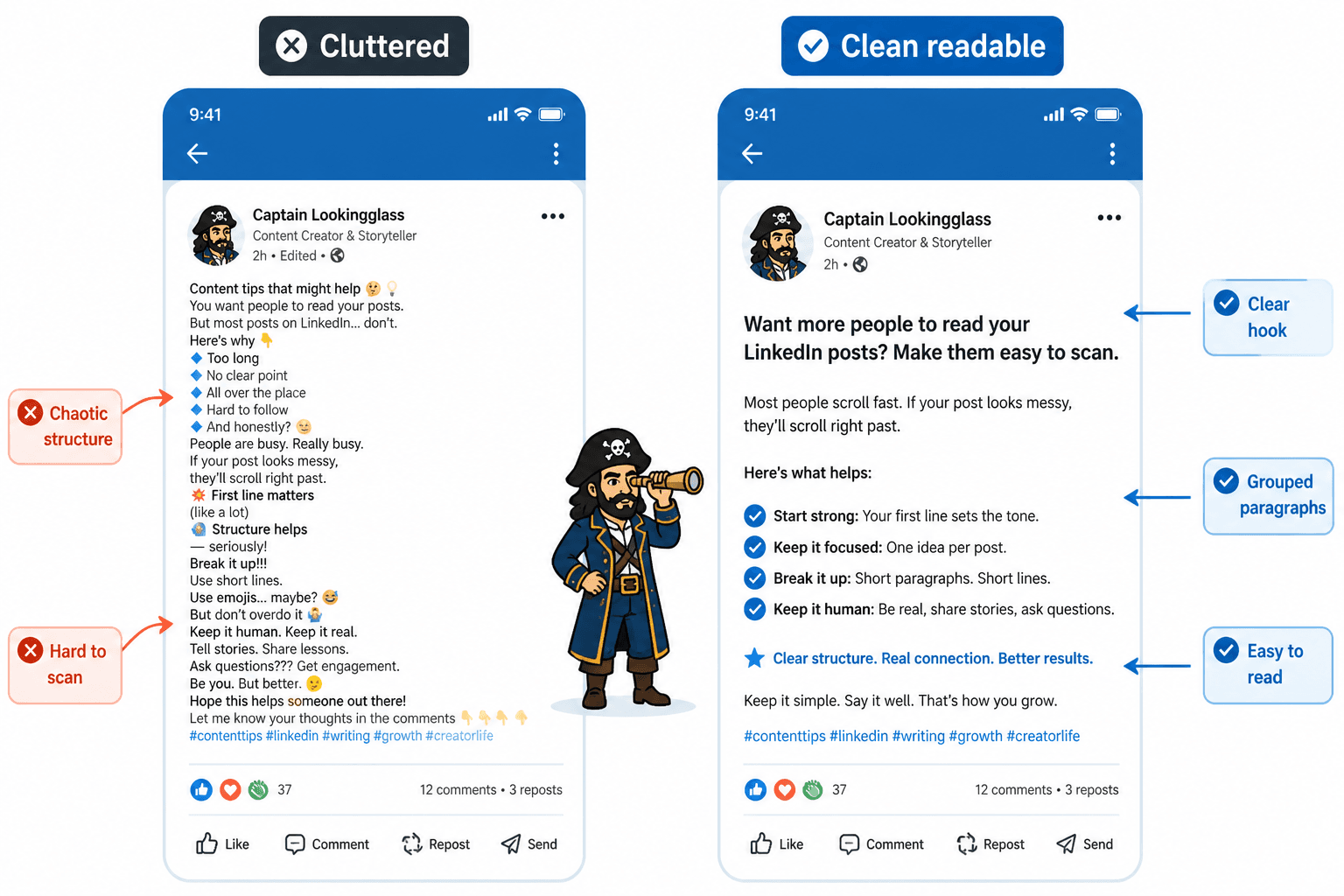
Formatting does the second job. It decides whether the reader can scan the post without effort. A post can have a decent idea and still lose the lead because it looks like a wall of text that forgot to breathe.
LinkedIn’s own guidance on quality and relevance consistently points toward content that is useful, clear, and made for people rather than algorithms. That is the standard to aim for here: readable, specific, and worth the scroll. See LinkedIn’s help resources on post quality and feed relevance for the platform’s own framing of what performs well. LinkedIn Help.
What a monetized LinkedIn post is actually trying to do
A converting post is not trying to sell too early. It is trying to move someone one step closer to a decision.
That step might be:
- visiting your profile
- reading a lead magnet
- joining a newsletter
- sending a DM
- booking a call
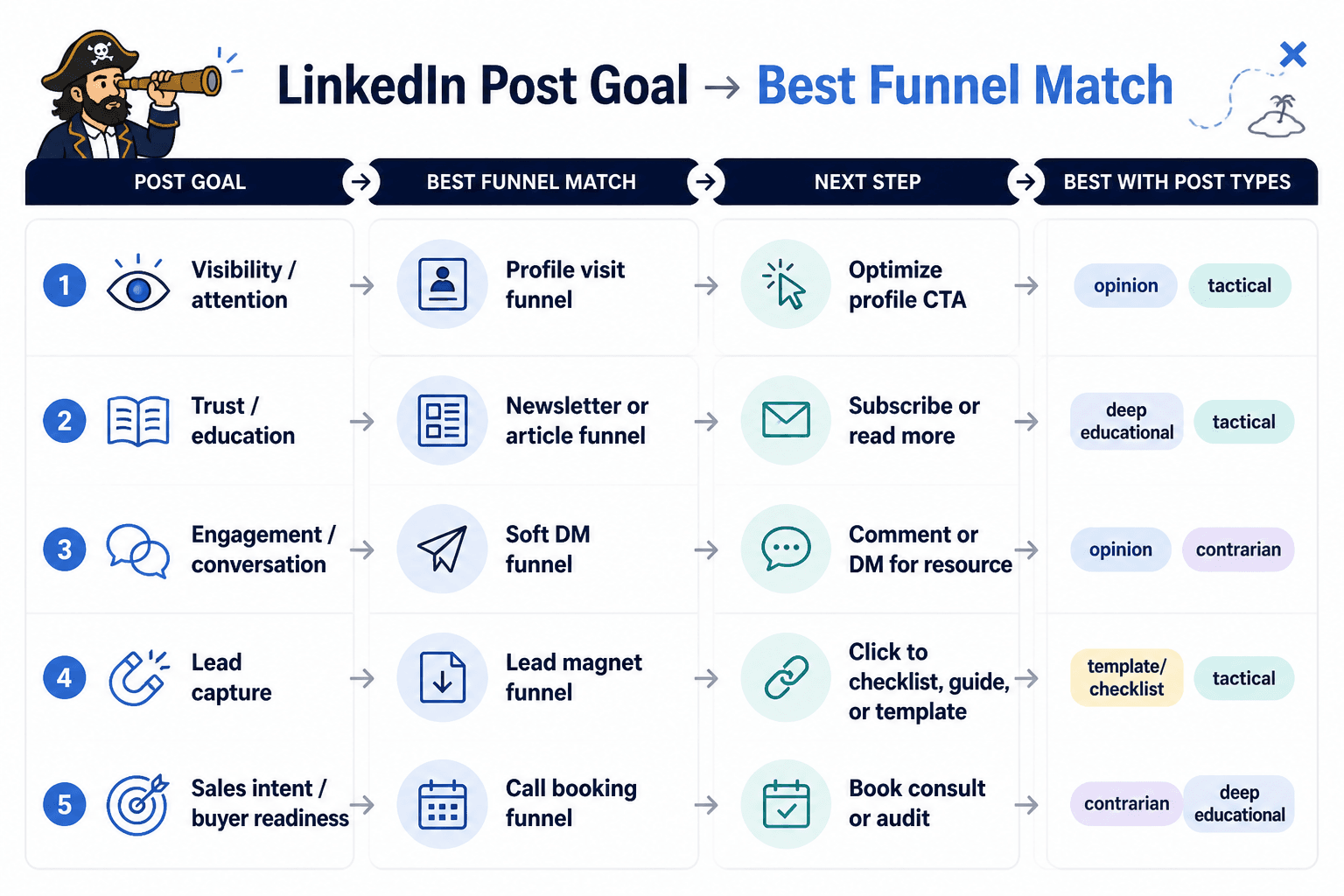
Each of those requires a different level of pressure. A post that asks for a booking call too soon can feel pushy. A post that asks for nothing can attract applause and produce exactly nothing useful. The job is to match the post to the next step, not pretend every post is the final boss of revenue.
If you want help choosing the right next step, the companion guide on best funnel ideas to pair with LinkedIn hooks and formatting is the natural follow-up.
The simple trust flow behind a converting post
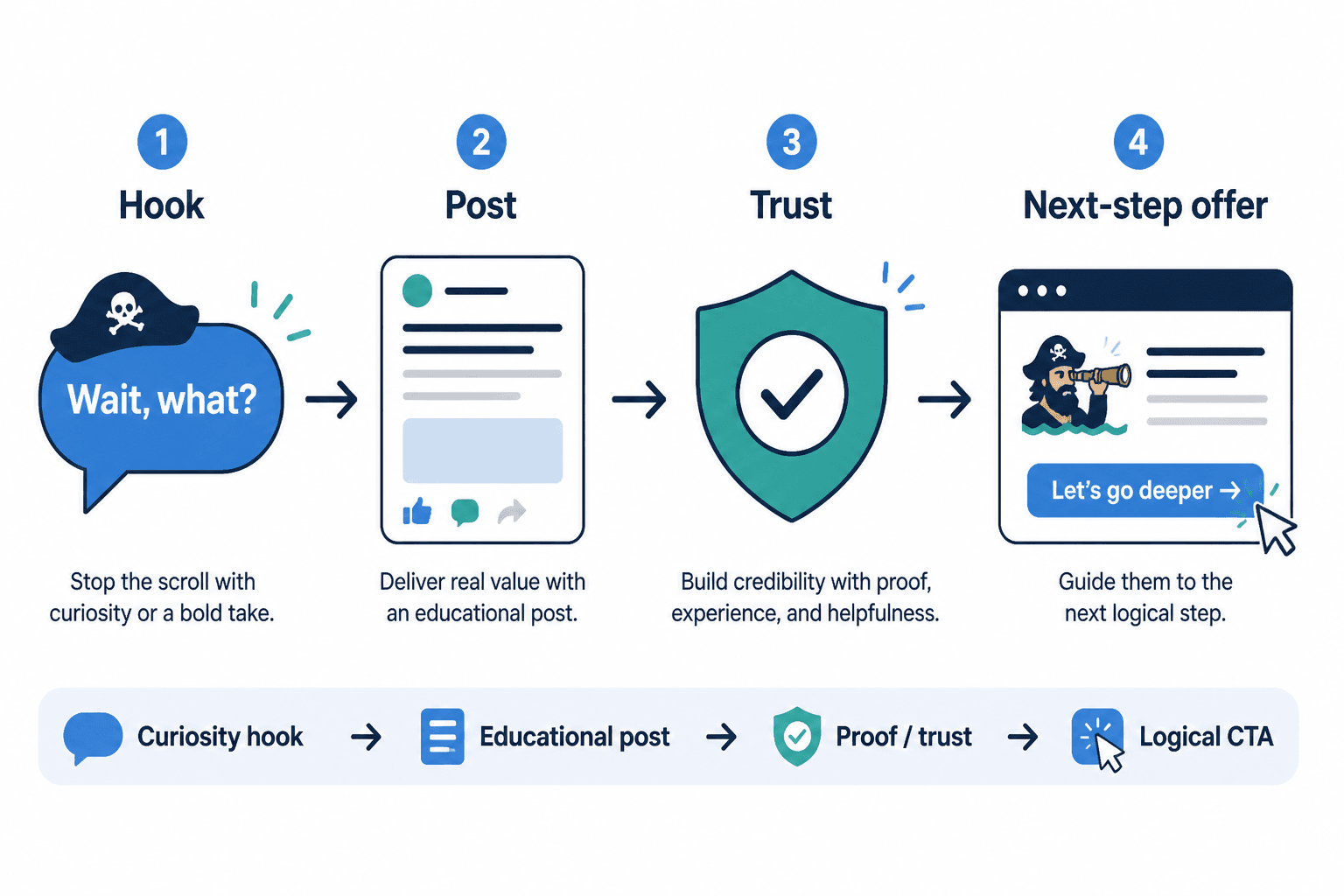
Think of a strong post as moving through four beats:
- Attention – the hook earns the next line.
- Clarity – the body explains the point without clutter.
- Proof – the post shows why the claim should be believed.
- Exit – the CTA gives a sensible next step.
That is the whole game. Not magic. Not “viral energy.” Just a post that knows where it is going.
What trust-wrecking monetization looks like
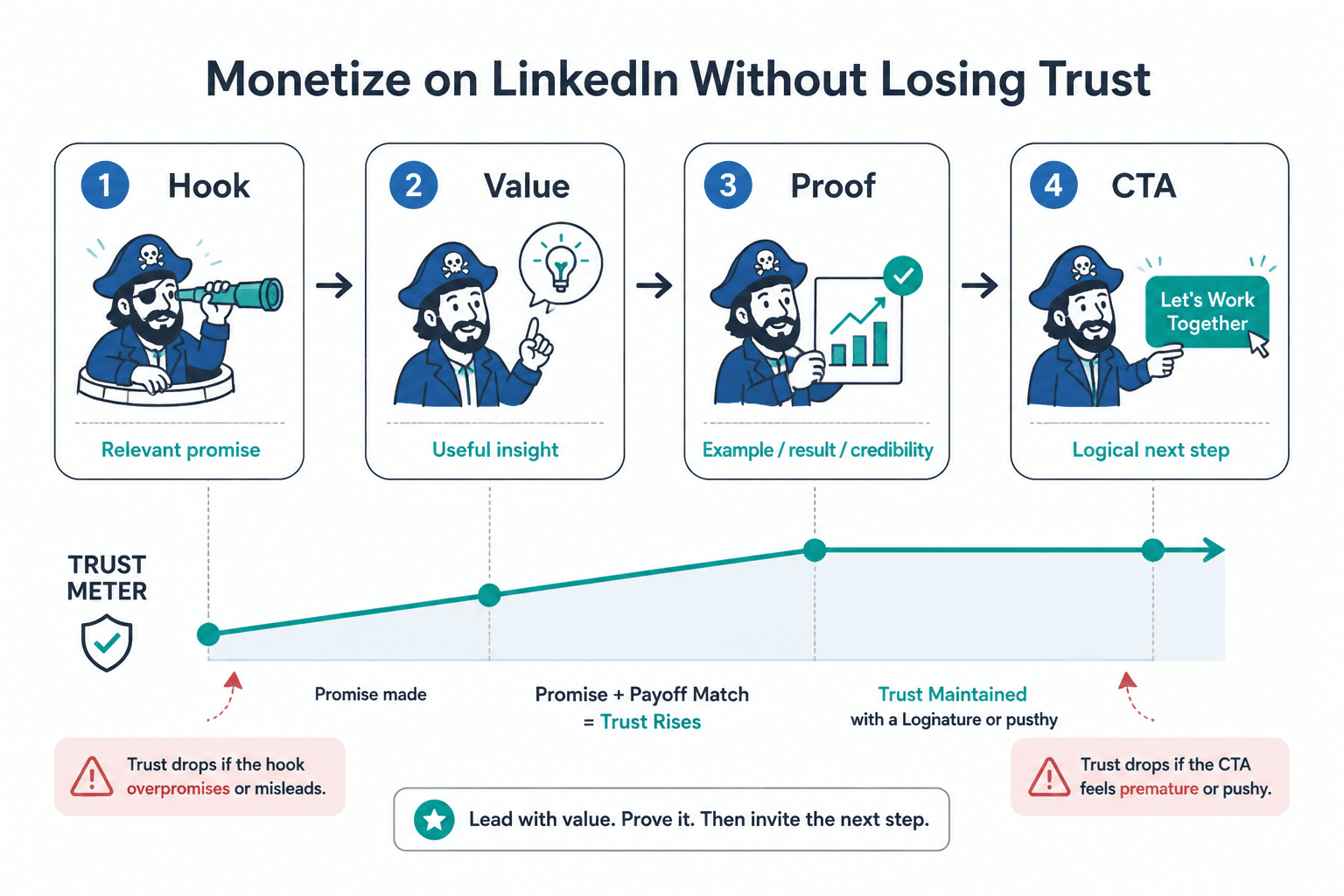
Most trust gets damaged in small, annoying ways. That is why it is so easy to miss.
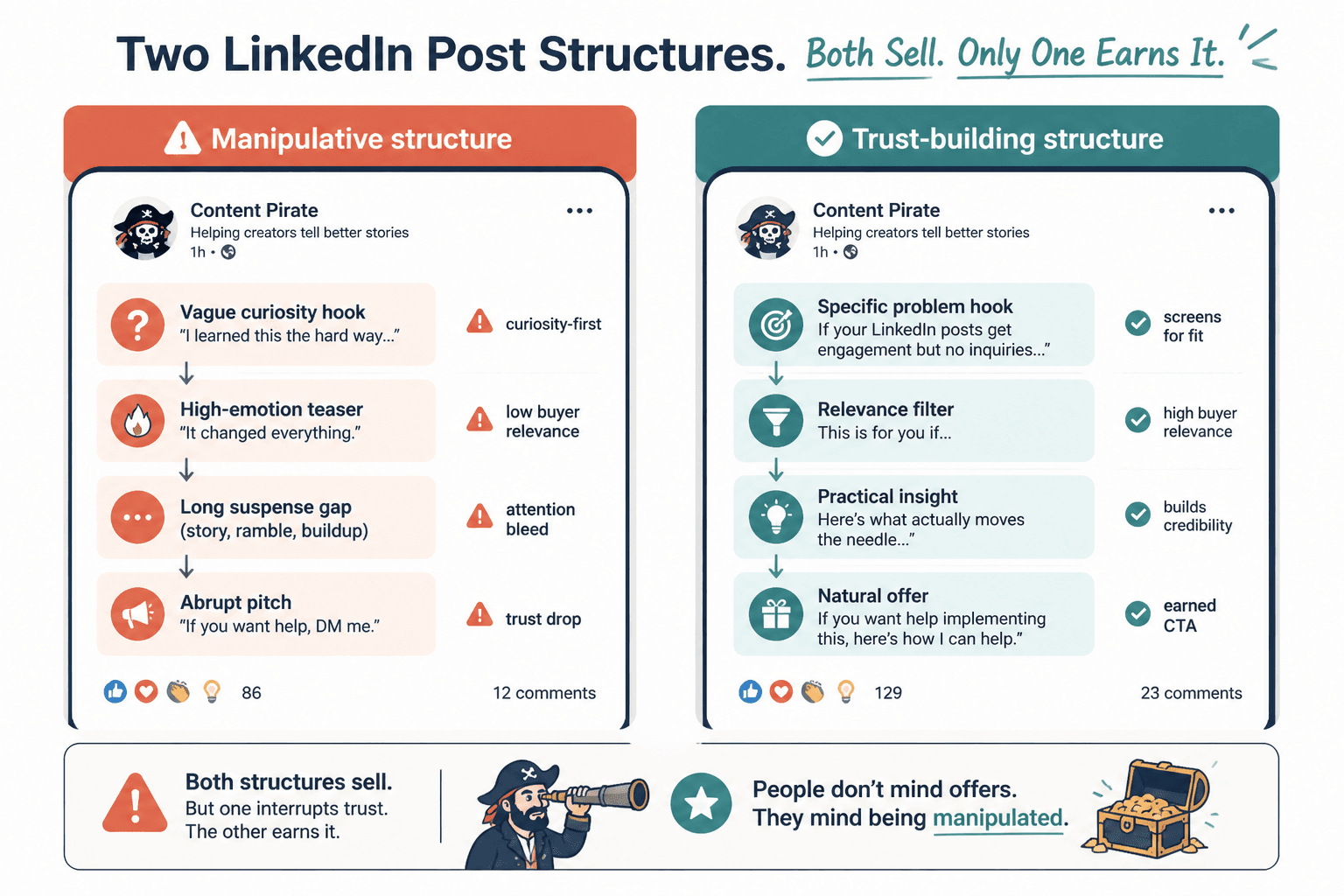
- The hook is bait, not relevance. It promises outrage, drama, or mystery that the post never pays off.
- The formatting creates fake tension. Every line break is doing emotional labor that the idea cannot support.
- The CTA was clearly the whole point. The post spends 90% of its time walking toward the sales pitch it should have been upfront about.
- The post promises insight but delivers self-promotion. Readers feel the turn, and trust exits stage left.
If you want a deeper breakdown of what not to do, the companion article How to Monetize LinkedIn Hooks & Formatting Without Wrecking Trust covers the common failure modes in more detail.
How to write hooks that earn the next line
A converting hook does not need to be dramatic. It needs to create useful tension.
Good hooks tend to do one of these things:
- call out a painful situation
- challenge a common assumption
- show a specific result
- set up a practical promise
- name a mistake the reader is probably making
For example, instead of writing:
Here are my thoughts on LinkedIn growth.
write something more useful, like:
A good LinkedIn post can get attention and still fail at the only part that matters: moving a reader toward a next step.
That second version is not trying to be adorable. It is trying to be relevant.
LinkedIn’s own advice on writing and content discovery also rewards clarity and specificity over fuzzy positioning. That is boring advice, which is how you know it is usually correct. LinkedIn Help.
How formatting helps conversion instead of just readability
Formatting is not decoration. It is pacing.
Good formatting helps the reader:
- spot the point quickly
- understand where one idea ends and the next begins
- notice proof and examples
- reach the CTA without feeling ambushed
Useful formatting usually means shorter paragraphs, meaningful line breaks, and structure that mirrors the logic of the post. If a post has three reasons, give it three reasons. If it has a before/after comparison, make that comparison visible. Do not make the reader excavate the point like they are on a tiny archaeological dig between tabs.
A clean format can also make a CTA feel natural. When the body has done its work, the next step does not need to shout.
The best post structure for leads and sales
For most business posts, this structure is a strong default:
- Hook – one or two lines that create a reason to continue.
- Problem frame – why this matters in a real business context.
- Useful explanation – the practical point or framework.
- Proof or example – a small scenario, data point, or comparison.
- Next step – a low-friction CTA that fits the reader’s likely readiness.
That structure works because it does not confuse attention with intent. It respects the reader’s time, then gives them a path forward.
For a broader set of post patterns and examples, see best LinkedIn hooks and formatting ideas and examples for creators.
How to match the CTA to the post
The CTA should match the temperature of the post. Not every post needs the same ask.
- Warm educational post: invite the reader to follow, save, or read a related guide.
- Problem-aware post: point them to a lead magnet or resource.
- High-intent post: offer a booking page, demo, or direct conversation.
- Relationship-building post: encourage a thoughtful DM or profile visit.
A post about common mistakes in LinkedIn hooks should not always end with “Book a call now.” That is how useful content gets dragged into a sales alley and mugged by its own ambition.
Instead, keep the CTA proportionate. If the post is useful but early-stage, send people to a resource. If the post is clearly about a pain point you solve, then a booking page can make sense.
Practical examples of converting hook + format + CTA combinations
Here are a few simple patterns that work without pretending every reader is ready to buy immediately.
Example 1: Problem-aware post
Hook: A lot of LinkedIn posts get attention because they sound sharp, then lose the lead because they never say what the reader should do next.
Body: Use short paragraphs. Explain the mistake. Show a cleaner structure. Give one example of a next step that matches the topic.
CTA: Read the parent guide on hooks and formatting if you want the full framework.
Example 2: Soft conversion post
Hook: If a LinkedIn post has no clear next step, it is usually working for the feed instead of the business.
Body: Break down profile handoff, lead magnet fit, and the role of a low-friction CTA.
CTA: Visit the profile or download the resource linked from the post.
Example 3: Higher-intent post
Hook: When someone is already looking for help, clarity converts better than cleverness.
Body: State the result, show a quick proof point, and explain the process in plain language.
CTA: Book a call or send a direct message if the fit is right.
Where to send readers after the post
A post becomes more valuable when the next step is obvious. That next step can be one of four common paths:
- Profile visit – good when the post is designed to warm interest.
- Lead magnet – good when the reader needs more context before buying.
- Newsletter – good when you want longer-term relationship building.
- Booking page – good when the post is aimed at ready buyers.
The post itself should point to one path, not all four. Otherwise the reader has the digital equivalent of being handed a menu, a map, and a small panic attack.
If you want to build that path more intentionally, the companion guide on funnel ideas for LinkedIn hooks and formatting is the right next read.
A quick publishing checklist
Before you publish, check the post against this list:
- Does the hook create a real reason to keep reading?
- Does the body stay focused on one useful point?
- Is the formatting easy to scan on mobile?
- Does the post include proof, an example, or a concrete explanation?
- Does the CTA match the reader’s likely readiness?
- Is the next step clear enough that the reader does not have to guess?
If the answer to any of those is no, fix that part before worrying about “better engagement.” Conversion usually improves when the post becomes easier to understand and easier to trust.
Bring the hook, the format, and the funnel together
The best LinkedIn posts do not treat hooks, formatting, and monetization as separate tasks. They work together.
The hook earns attention. The formatting keeps it. The body delivers value. The CTA points to the next sensible step. That is what turns a post from content into a business asset.
For the full writing system behind this topic, go back to the parent guide on LinkedIn hooks and formatting. If you want examples and variations, use the ideas and examples guide. If you are choosing the offer path, use the funnel companion. If you want to keep trust intact while selling, read the monetization guide.
That is the clean version: write for attention, format for trust, and point toward a next step that makes sense. No theatrics required.