
Most audience-to-offer journeys do not fail because the creator lacks ambition. They fail because the path is messy, vague, and stitched together with five tools that barely tolerate each other.
People see your post, maybe click your profile, maybe grab your free thing, maybe join your email list, maybe forget you exist by Wednesday. Then you wonder why your content is “working” but sales are still doing a very convincing impression of death.
The fix is not building some giant funnel monster with 27 tags and a welcome sequence that sounds like it was written by a caffeinated webinar ghost. It is building a cleaner audience-to-offer journey with the right templates, the right tools, and fewer moving parts doing interpretive dance.
This guide will help you choose the best templates and tools for audience-to-offer journeys, based on what actually matters: clarity, speed, trust, and conversion. You will get practical template types, tool categories, what each one is good for, what people overcomplicate, and a few simple stack ideas depending on how you sell.
If you need the bigger strategy first, start with audience-to-offer journeys. If you want examples after this, read best audience-to-offer journey ideas and examples for creators. If you mostly need a simpler planning system, these journey mapping templates for busy creators will help.
For the main guide behind this topic, visit the parent guide.
What an audience-to-offer journey actually needs
Before picking tools, get honest about what your journey needs to do.
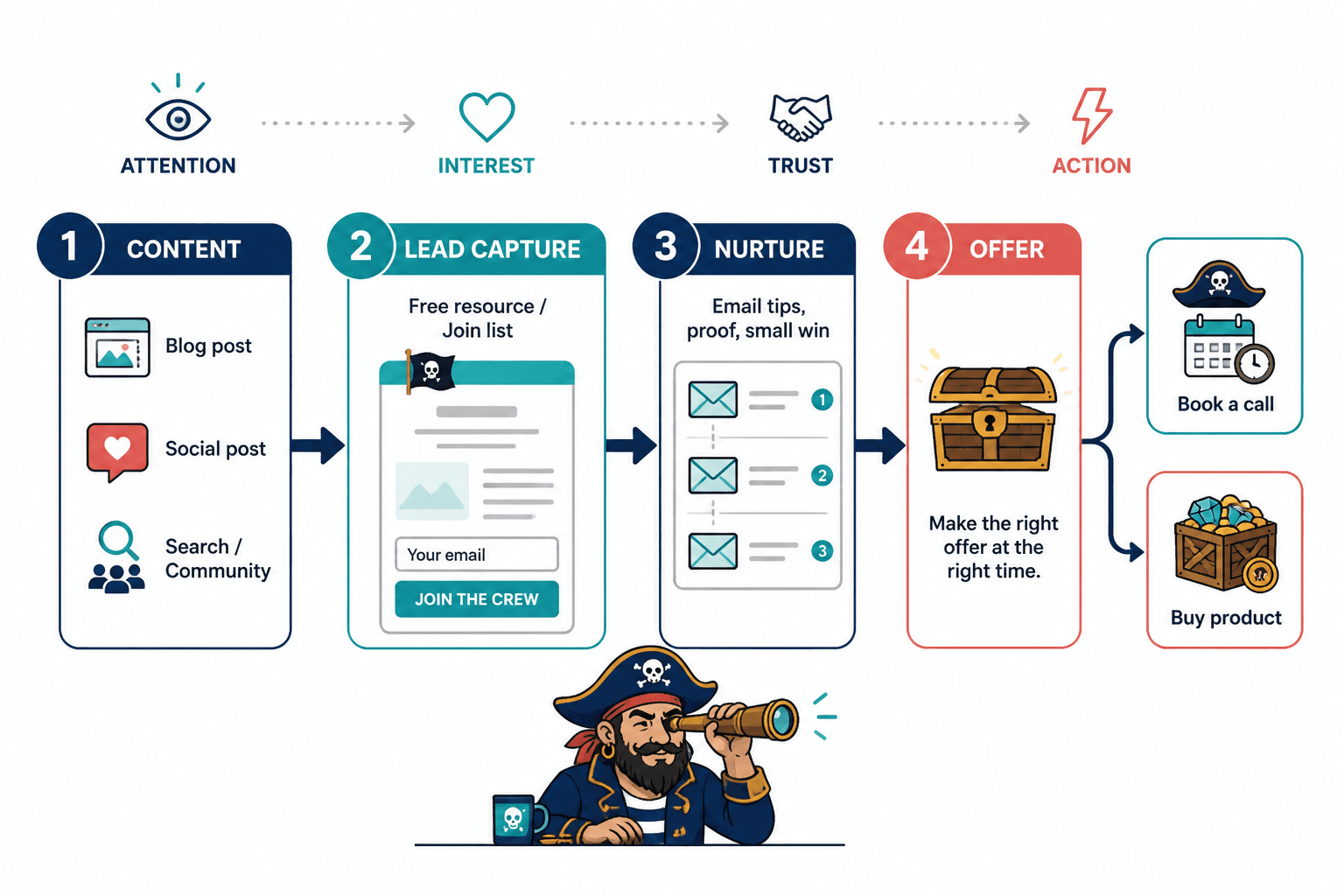
At minimum, an audience-to-offer journey should move someone through four basic stages:
- Attention: they find you through content, referrals, search, or community
- Interest: they understand what you help with and why it matters
- Trust: they see proof, useful ideas, specificity, or a small win
- Action: they take the next step toward your offer
That next step could be joining your list, replying to a post, booking a call, downloading a resource, applying, or buying directly. Different business models need different paths. A coach selling high-ticket work does not need the same stack as a creator selling a $29 product.
That is why the best templates and tools for audience-to-offer journeys are not the most advanced ones. They are the ones that make the path obvious and easy to manage.
The core templates worth using
Templates are useful when they reduce friction. They are useless when they become a substitute for thinking. So do not collect 64 funnel templates just to feel organized. Pick a few that help you make decisions faster.
1. Journey mapping template
This is the foundational one. It shows the path from first touch to offer, with each step, action, and handoff clearly mapped.
A solid journey map should include:
- Traffic source or content source
- First conversion point
- Nurture step
- Offer entry point
- Main CTA
- Follow-up step
- Success metric
Example:
- LinkedIn post
- Profile CTA to free guide
- Email welcome sequence
- Case study email
- Book strategy call
- Reminder email
- Calls booked per 100 leads
If your journey map looks like a subway map designed by a stressed octopus, simplify it. Most creators need one main path, not seven backup labyrinths.
2. Content-to-CTA template
This template matches content types to specific next actions. It keeps you from ending every post with the same tired “DM me if you need help” line.
A simple version looks like this:
- Awareness post → follow for more or visit profile
- Problem-aware post → download guide
- Proof post → read case study
- Objection post → book call or reply with question
- Offer post → sales page or checkout
This is small, but it matters. A lot. Weak audience-to-offer journeys often break because the content and CTA are not matched. You are trying to make cold readers buy before they even know what you do. Bit aggressive.
3. Lead magnet delivery template
This defines what happens after someone opts in. Not just the asset itself, but the delivery logic and follow-up.
Include:
- Opt-in page headline
- Confirmation message
- Delivery email
- Next recommended step
- Follow-up sequence
- Segmentation tag if relevant
A lead magnet without a follow-up path is just a nice PDF floating in the void.
4. Welcome sequence template
If someone joins your list and gets one “here’s your freebie” email followed by silence, that is not nurturing. That is abandonment with branding.
A simple welcome sequence template might include:
- Email 1: deliver the promised resource and set expectations
- Email 2: explain the main problem you solve
- Email 3: share a practical win or useful lesson
- Email 4: offer proof, example, or case study
- Email 5: introduce the paid next step
You do not need ten emails unless your sales cycle genuinely requires it. For many creators and consultants, three to five good emails beat a long sequence full of puffed-up “value.”
5. Offer bridge template
This is one of the most useful and most neglected templates.
An offer bridge connects the free value someone just consumed to the paid outcome you help them get. It answers the question: why should this person take the next step now?
A simple structure:
- You have now seen or learned X
- That helps with Y, but it does not solve Z on its own
- If you want help doing the full version, here is the next step
Example:
You have the messaging framework now. Good. But a framework is not positioning, proof, or a full conversion path. If you want help turning this into a client-ready funnel, book a strategy session here.
6. Follow-up and re-engagement template
Most people do not buy on first contact. Or second. Or while skimming your email at 11:43 p.m. while half-watching a crime show. You need a follow-up system.
This template should track:
- Who clicked but did not book
- Who joined but did not open
- Who replied but did not convert
- Who bought entry-level but did not move up
- Who went cold and needs reactivation
This is where decent CRM and automation tools become less “nice to have” and more “please stop losing warm leads in your notes app.”
The main tool categories that support audience-to-offer journeys
You do not need one giant all-in-one platform unless your business truly benefits from one. In many cases, a small clean stack works better. What matters is covering the core functions without creating a workflow that annoys you into inconsistency.
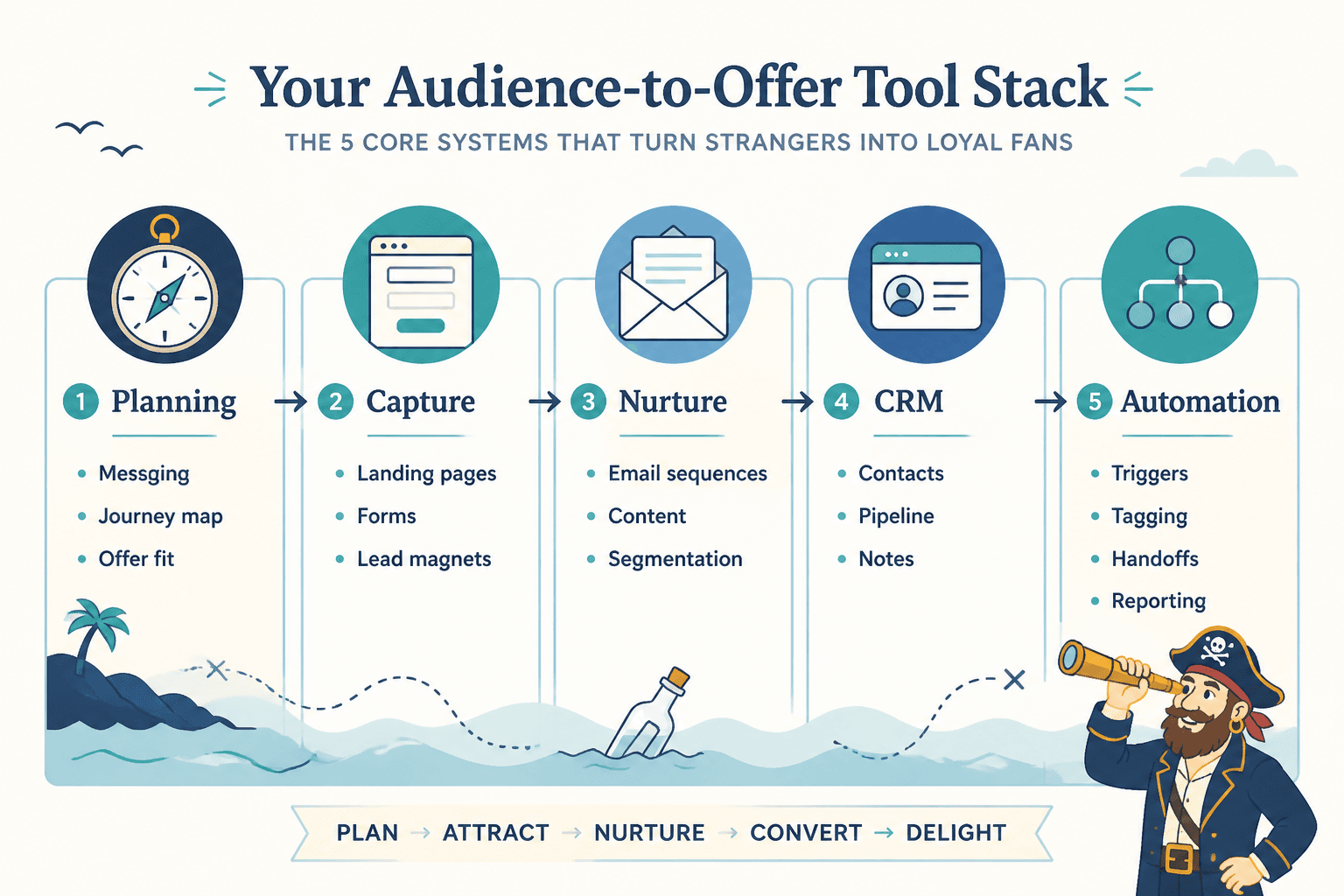
1. Planning and mapping tools
These help you design the journey before you build it.
Good for:
- Visual journey maps
- Offer flow planning
- CTA mapping
- Content sequence planning
- Team visibility if you are not solo
Look for tools that make it easy to:
- Create simple flowcharts
- Track journey stages
- Attach notes or assets
- Duplicate templates
- See the whole path at a glance
If a planning tool is so elaborate that planning becomes its own part-time job, skip it.
2. Lead capture tools
These include opt-in forms, landing pages, booking forms, pop-ups, and simple application forms.
Good for:
- Capturing email subscribers
- Booking consultations
- Collecting lead details
- Routing people to the right offer
What matters most here is not flashy design. It is friction. If your form asks for life history before they can download a checklist, that is not qualification. That is punishment.
3. Email and nurture tools
These manage welcome sequences, nurture emails, broadcasts, segmentation, and lightweight automation.
Good for:
- Delivering lead magnets
- Warming leads over time
- Sending offer-related campaigns
- Segmenting readers by action or interest
- Re-engaging quiet subscribers
You do not need advanced automation if your audience is small and your offer is simple. But you do need consistency. An ugly but clear sequence beats a beautiful funnel you never finish.
4. CRM and pipeline tools
If your journey includes calls, conversations, applications, partnerships, or a service sale, CRM matters.
Good for:
- Tracking leads by stage
- Logging follow-ups
- Managing pipelines
- Recording notes from calls or replies
- Preventing warm prospects from disappearing into chaos
For a deeper look, read best CRM tools and funnel builders for audience-to-offer journeys.
5. Automation tools
Automation is helpful when it removes repetitive admin. It is not helpful when it creates weird robotic sequences nobody asked for.
Good use cases:
- Tagging leads by source
- Sending forms to CRM
- Triggering welcome emails
- Moving contacts between stages
- Alerting you to manual follow-ups
Bad use cases:
- Auto-DMing everyone who likes a post
- Sending ten sales emails because someone clicked once
- Pretending automation is personalization
6. AI and content support tools
AI tools can help with drafting, repurposing, sequencing ideas, CTA variations, and summarizing research. They cannot rescue weak positioning or invent trust on your behalf.
Use them for:
- Email draft variations
- Lead magnet outlines
- CTA rewrites
- Content repurposing
- FAQ generation from your own source material
Do not use them to produce sterile funnel copy that sounds like your business was raised by pop-ups. For more on this, see best AI tools for audience-to-offer journeys.
How to choose the right tools without building a bloated mess
Here is the practical way to choose.
Start with your offer model
The offer decides the journey. The journey decides the tools.
| Offer type | Likely journey | Tools that matter most |
|---|---|---|
| Low-ticket digital product | Content → lead magnet or direct sales page → checkout | Landing pages, email, checkout, basic automation |
| Course or cohort program | Content → list → nurture → webinar or sales page | Email, landing pages, event or launch support, segmentation |
| Consulting or coaching | Content → profile or lead magnet → nurture → booking page → call | CRM, booking tool, email, lightweight automation |
| Membership or subscription | Content → free resource or trial → onboarding → recurring value | Email, onboarding flows, retention tracking |
| Service business | Content → inquiry → qualification → call → proposal | Forms, CRM, pipeline management, follow-up system |
Choose for friction, not features
Creators often buy software like they are shopping for a future version of themselves. The highly organized version. The one who uses every dashboard and sets up every automation and color-codes every lead stage.
That version of you may exist. But your current system still needs to work on a random Tuesday when you are busy, mildly tired, and have actual client work to do.
So choose tools based on:
- How quickly you can set them up
- How likely you are to keep using them
- How easily they connect to the rest of your stack
- How clearly they support one specific stage in the journey
Prefer one clean path over multiple fancy ones
If you are still validating your offer, build one journey well before creating three versions for cold leads, warm leads, webinar leads, referral leads, and moon-cycle-aligned leads.
A basic audience-to-offer journey that works is more valuable than a complex one you never maintain.
Simple tool stacks that make sense for different creators
You do not need exact brand recommendations in every case. What you need is stack logic.
Stack 1: Solo creator selling a digital product
- Planning tool for simple journey map
- Landing page or checkout tool
- Email platform with a short welcome sequence
- Optional AI writing support for drafts and CTA testing
Best for: guides, templates, mini products, low-ticket offers.
Main goal: reduce clicks between content and checkout, while still giving people a reason to trust you first.
Stack 2: Consultant or coach booking calls
- Content planning or idea tracker
- Lead magnet or profile CTA
- Email nurture sequence
- Booking page
- CRM or pipeline tracker
- Light automation for reminders and follow-up
Best for: higher-ticket services, strategy work, coaching packages.
Main goal: build trust before the call and avoid losing serious leads after they raise their hand.
Stack 3: Personal brand selling a course or cohort
- Journey map and launch planning template
- Lead capture page
- Email nurture and sales sequence
- Event or waitlist support
- Checkout and onboarding flow
Best for: launches, waitlists, evergreen course funnels, cohort programs.
Main goal: move people from interest to conviction without writing a sequence that feels like a hostage negotiation.
The templates and tools most people actually need first
If your audience-to-offer journey is still early, start here before getting fancy:
- A one-page journey map
- A content-to-CTA template
- A simple lead capture page or booking flow
- A 3-to-5 email welcome sequence
- A basic CRM or lead tracker if you sell via conversation or calls
That setup can carry a surprising amount of business. Not forever, maybe. But far longer than people think.
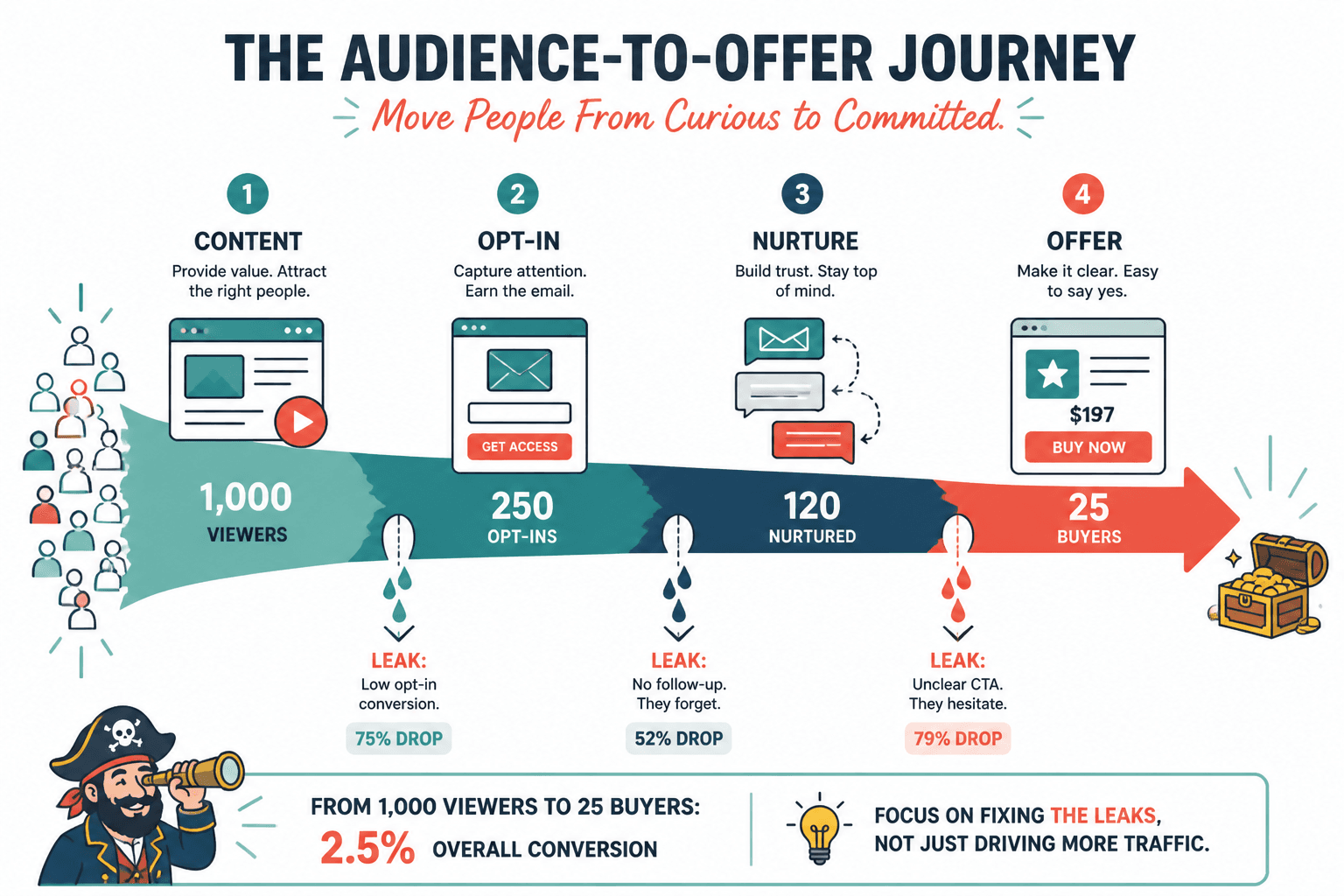
What usually matters more than adding another tool is improving the handoff between steps. Is the CTA clear? Does the lead magnet connect to the offer? Does the welcome email set up the next move? Does your booking page make sense? Are you following up after interest?
That is where revenue tends to leak. Not because you chose the wrong icon set in your software dashboard.
Common mistakes when building audience-to-offer systems
Using tools before defining the journey
Software is not strategy. If you do not know the path, the tools just make the confusion more expensive.
Collecting templates and never implementing them
A folder full of templates is not a funnel. It is stationery.
Over-automating too early
If you have not had enough real conversations with buyers, you probably should not be automating half your messaging yet. Learn the objections first. Then automate what is stable.
Creating a disconnect between content and offer
If your content teaches productivity tips but your paid offer is brand strategy, people will be confused. Attention without relevance is not a funnel. It is a crowd.
Ignoring follow-up
A lot of creators are not short on leads. They are short on systems for staying in touch with people who already showed interest.
A practical build order for busy creators
If you want to build this without disappearing into a three-week software hole, use this order:
- Define the offer and next-step CTA
- Map one simple audience-to-offer journey
- Create or refine the lead capture point
- Write the welcome and bridge sequence
- Add tracking or CRM if the journey includes sales conversations
- Layer in automation only where it clearly saves time
- Review weak points after real traffic moves through it
This order keeps you focused on movement, not decoration.
If you want more category-level guidance, you can also browse the broader monetization funnels and funnel systems resources.
How to know your setup is working
You do not need twelve dashboards. You need a few useful signals.
Track metrics like:
- Profile clicks or landing page visits from content
- Opt-in rate or booking rate
- Email open and click patterns
- Reply rate on nurture emails
- Call bookings from lead sources
- Sales by journey entry point
Then ask simpler questions than most people do:
- Are the right people entering?
- Do they understand the next step?
- Do they trust the offer enough to act?
- Where are they dropping off?
That is usually enough to improve an audience-to-offer journey without pretending you are running a Fortune 500 sales ops department from your laptop.
FAQ
What is the best template for an audience-to-offer journey?
A one-page journey map is usually the best place to start. It shows the path from content or traffic source to lead capture, nurture, offer, and follow-up.
Do I need a CRM for audience-to-offer journeys?
Only if your journey includes conversations, applications, sales calls, or ongoing follow-up. If you sell simple digital products, email and checkout tools may be enough.
The bigger point is simple: clearer structure and clearer writing make the piece more useful. That is usually what makes the ending land better too.