
Most people looking for the best templates and tools for Facebook posts are usually hoping for one of two things: faster writing or better results.
Fair. But a lot of Facebook content tools promise both, then hand you polished nonsense that sounds like a motivational fridge magnet trying to sell a workshop.
The real job of a template or tool is simpler than that. It should help you say something worth reading, shape it clearly, and make posting less annoying. That is it. It cannot invent taste. It cannot create trust out of thin air. And it definitely cannot rescue a boring point wrapped in “authentic storytelling.”
So this guide on the Best Templates and Tools for Facebook Posts is built around what actually helps: post structures that fit how Facebook works, plus tools that make ideation, drafting, repurposing, and community management easier without flattening your voice into AI oatmeal.
If you are a creator, coach, consultant, freelancer, or personal brand trying to write Facebook posts that get comments, build familiarity, and occasionally lead to business, this will help you work faster and post better.
And if you have been copying your LinkedIn style onto Facebook and wondering why it lands like a damp sock, we should fix that first.
To see how this fits into the wider strategy, open the parent guide.
What makes a good Facebook post template actually useful
A good Facebook post template does not force every idea into the same sterile structure. It gives you enough shape to write faster while leaving room for personality, timing, and actual human rhythm.
Facebook posts tend to work better when they feel conversational, specific, and easy to respond to. Not over-optimized. Not weirdly corporate. Not written like you are auditioning for “thought leader of the month.”
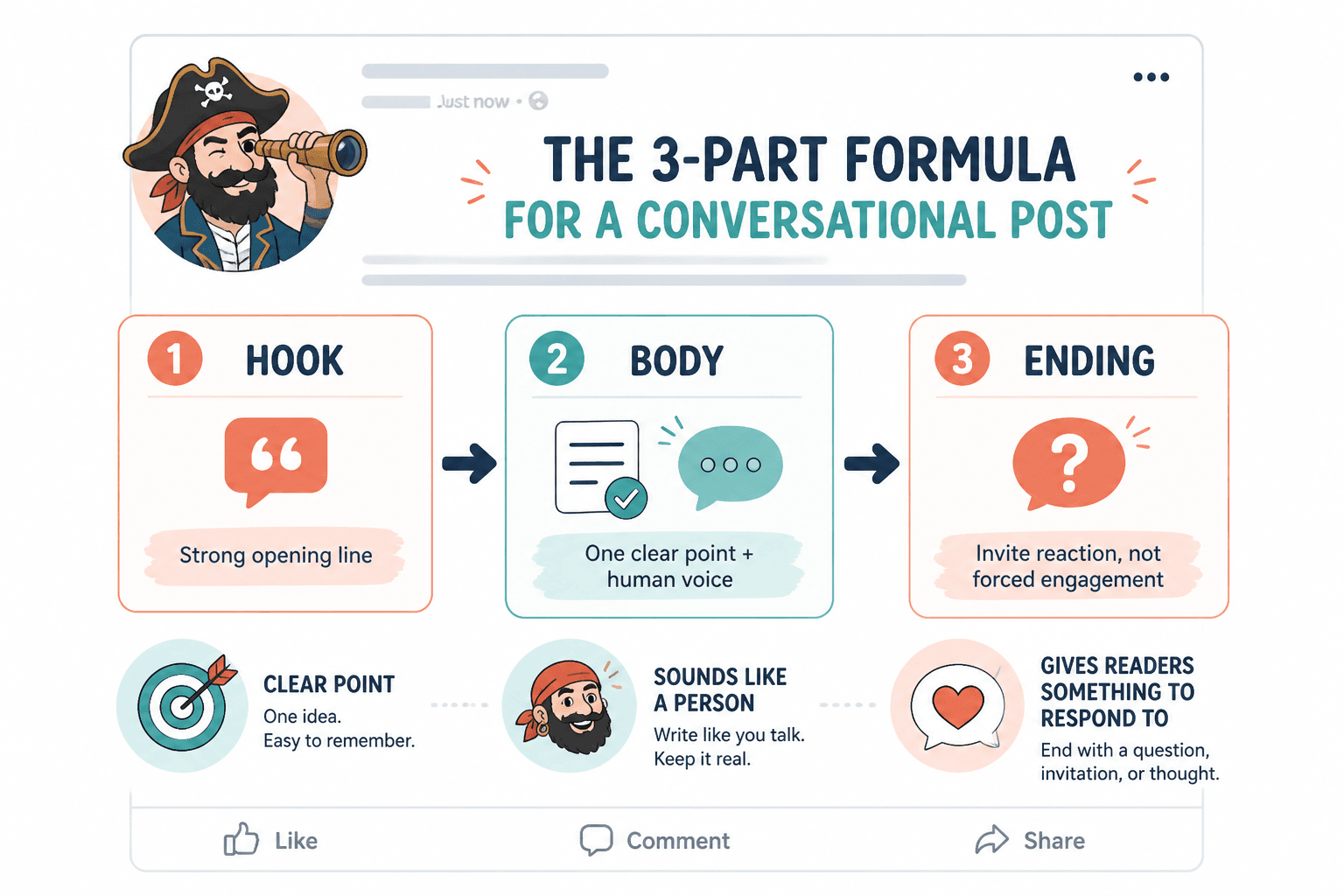
That means your templates should help you do a few things well:
- Start with a strong opening line
- Make one clear point
- Sound like a person, not a content machine
- Give readers something to react to, agree with, challenge, or add to
- End in a way that invites conversation without begging for engagement
If a template makes your post feel generic, it is not saving time. It is just helping you publish mediocrity faster.
For broader strategy around platform fit and style, this guide to Facebook posts is worth keeping nearby.
The best Facebook post templates to keep in your content stack
You do not need fifty templates. You need a small set that matches the kinds of posts you actually publish.
Here are the ones most creators and service-based businesses can use on repeat without sounding repetitive.
1. The sharp observation post
Use this when you have a strong, useful opinion about something people in your space keep doing badly.
- Open with the observation
- Explain why it matters
- Add a practical takeaway
- End with a clean question or closing line
Template:
One thing I keep noticing:
[specific behavior or mistake]
The problem is not just that it looks bad.
It also leads to [specific consequence].
A better approach is [practical alternative].
[Optional closing question]
Example:
One thing I keep noticing:
People write Facebook posts like they are submitting a panel application.
Everything is polished. Nothing feels alive.
The problem is not just that it sounds stiff.
It gives people nothing to respond to.
A better approach is to make one clear point, add one real example, and leave enough room for conversation.
2. The mini story with a point
This works well when you want to share something that happened, but you still want it to serve the reader instead of becoming diary sludge.
- Set up the moment fast
- Introduce the tension or surprise
- Explain what it showed you
- Turn it into a useful takeaway
Template:
[Short setup]
Then [what changed / what happened].
That reminded me of something useful:
[lesson]
If you are trying to [goal], focus more on [better approach] than [common wrong approach].
This template is especially helpful on Facebook because people tend to respond well to posts that feel personal enough to read but structured enough to reward the read.
3. The contrarian-but-not-obnoxious post
Useful when you want to challenge a common idea without sounding like you are performing disagreement for sport.
- Name the common belief
- Explain what is incomplete or wrong about it
- Offer a more accurate version
- Back it with reasoning or example
Template:
I do not think [popular advice] is the real issue.
I think the real issue is [better diagnosis].
Because when [context], what matters most is [key factor].
That changes how you should approach [topic].
Used well, this gets comments. Used badly, it turns into cheap hot takes from people who confuse tone with insight.
4. The useful list post
Simple. Reliable. Great for saving ideas that would otherwise become shapeless blur.
Template:
If your [content / posts / offers] are not landing, check these first:
1. [specific issue]
2. [specific issue]
3. [specific issue]
4. [specific issue]
Most of the time, it is not a visibility problem.
It is a clarity problem.
The trick is keeping the list sharp. If every bullet is vague, the whole post reads like filler in numbered form.
5. The audience callout post
This template works because people pay attention when they feel accurately seen.
Template:
If you are a [specific audience] who keeps [specific struggle], this may be the actual problem:
[diagnosis]
What usually helps instead:
[practical advice]
[Optional invitation to share or message]
Specificity matters here. “Entrepreneurs” is weak. “Consultants with a decent offer and confusing content” is stronger.
6. The conversation starter that does not feel needy
Facebook is still one of the better platforms for comments and back-and-forth. But “Thoughts?” is not a conversation strategy. It is a shrug with punctuation.
Template:
I have a bias toward [approach].
Mostly because [reason].
But I know smart people prefer [alternative].
If you work in [space], where do you land on this?
This gives people something real to answer. It creates a lane for responses instead of tossing a bland question into the void.
The best tool categories for Facebook post creation
When people ask for the best tools for Facebook posts, they often mean one app. One perfect dashboard. One beautiful machine that plans, writes, edits, schedules, tracks, and somehow also gives them a personality.
That machine does not exist.
What does exist is a useful stack. Different tools help with different parts of the job. If you know what each tool category is actually for, you can build a lean setup instead of collecting subscriptions like decorative guilt.
Idea capture and planning tools
These are for storing post ideas before they evaporate in the shower, on a walk, or halfway through replying to a client.
- Simple notes apps
- Content databases
- Editorial calendar tools
- Swipe file systems
What they are good for:
- Saving raw observations
- Tagging ideas by theme or offer
- Keeping recurring post formats handy
- Planning weekly or monthly posting themes
What they will not do:
- Turn weak ideas into strong posts
- Tell you what your audience actually cares about without your input
AI drafting and rewriting tools
These can be genuinely useful if you use them like an assistant, not a ghostwriter with bad instincts.
Good use cases include:
- Generating angle variations from one idea
- Turning rough notes into a first draft
- Testing multiple hooks
- Condensing rambling drafts
- Rewriting for more conversational tone
Bad use cases include:
- Asking it to “write a viral Facebook post” with zero source material
- Publishing the first output untouched
- Using it to mass-produce generic posts that sound like every other AI-fed page
If you want a more focused breakdown, see best AI tools for Facebook posts and best AI writing tools and community tools for Facebook posts.
Editing tools
Editing tools are less glamorous, but often more valuable than drafting tools.
The best ones help you catch:
- Clunky phrasing
- Repeated words
- Overlong sentences
- Flat openings
- Tone mismatches
They are especially useful if your first drafts tend to be too formal, too long, or weirdly stiff. Which, to be fair, happens to a lot of smart people once they try to “write content.”
Scheduling and publishing tools
These matter if consistency is your problem, not quality.
A scheduler can help you batch and publish on time. It cannot save a boring post. But it can reduce friction, especially if you post across platforms and want a more predictable workflow.
Use scheduling tools for:
- Batching a week of posts
- Keeping recurring content rhythms
- Repurposing content at a sane pace
- Reducing last-minute publishing chaos
Do not use them as an excuse to fully automate your presence and disappear. Facebook still rewards actual interaction more than ghost-town scheduling habits.
Community and response management tools
If Facebook is part of your lead generation or trust-building strategy, the comments matter almost as much as the post itself.
Community tools can help you:
- Track comments and replies
- Organize conversations
- Save response snippets
- Spot recurring questions worth turning into future posts
This is especially useful for coaches, consultants, and service businesses where conversations often become discovery paths.
A simple Facebook post tool stack that actually makes sense
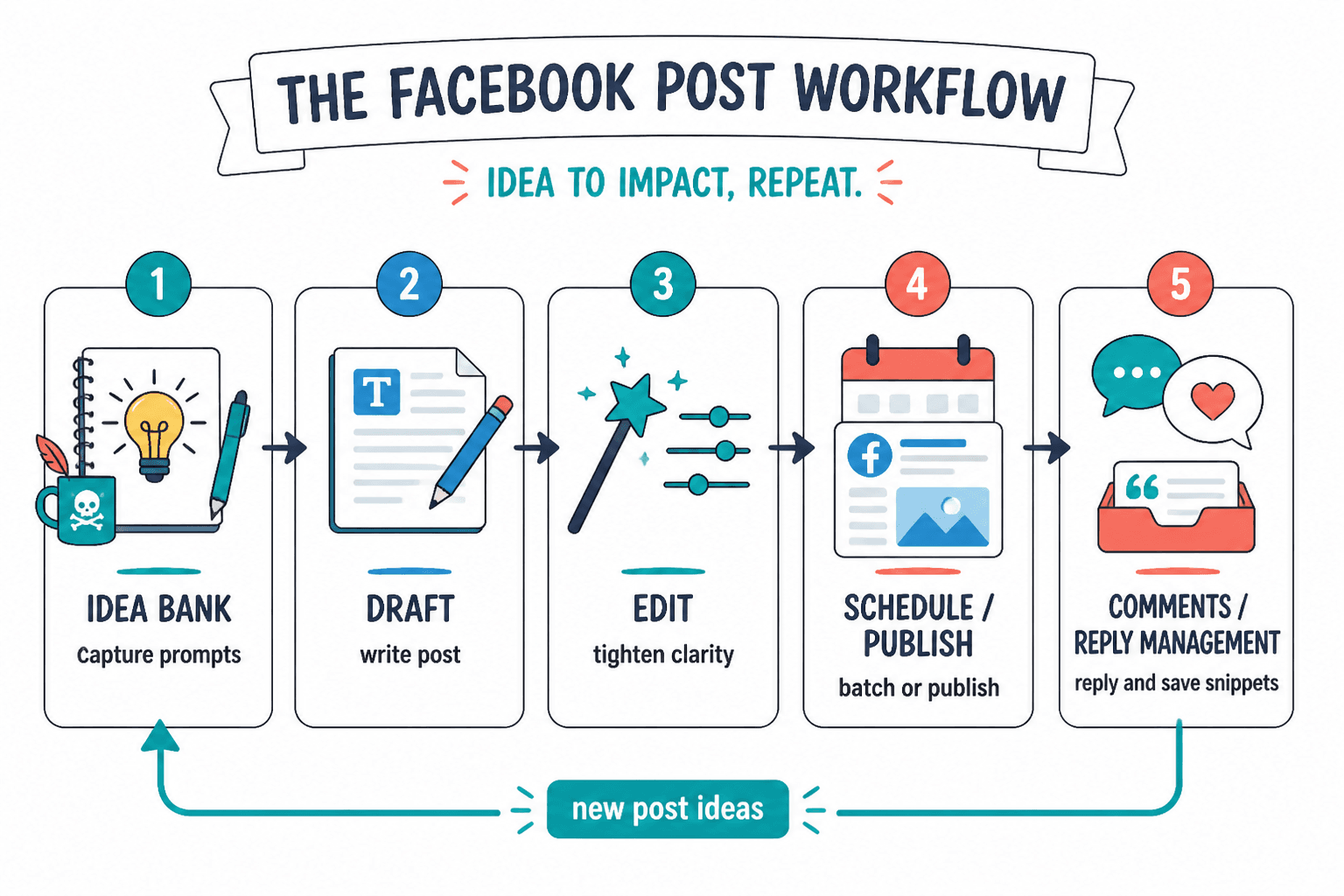
You do not need an elaborate setup. For most people, a solid Facebook content workflow can be built from four parts:
- Idea bank: a place to store observations, prompts, stories, and post concepts
- Drafting tool: something to write and revise posts quickly
- Editing layer: a way to tighten tone, clarity, and structure
- Publishing or scheduling tool: optional, but useful if you batch content
That is enough for most creators.
If your business depends heavily on Facebook conversations, add a fifth layer for comment and community management. But do not overcomplicate this. A tidy workflow beats a fancy one you avoid using.
How to use templates and tools without sounding templated
This is where a lot of Facebook content goes wrong.
People find a decent framework, pair it with an AI drafting tool, and then publish posts that are technically structured but spiritually dead. Everything is neat. Nothing is memorable.
To avoid that, do three things.
Start with a raw point, not a format
Before choosing a template, ask: what am I actually trying to say?
If you cannot answer that in one sentence, the template will not save you. It will just hide the confusion under nice formatting.
Keep your phrasing a little uneven
Human writing has rhythm changes. It has plain lines next to sharper ones. It occasionally sounds like someone had an opinion before they had a content calendar.
If every sentence feels evenly polished, your post may read like generated brand paste. Clean it up, sure. But leave some texture.
Use the tool for speed, then add judgment
AI can give you ten hooks. Great. Pick the one that sounds most like you, then rewrite it so it says something specific.
A scheduler can queue a week of posts. Great. Check them before publishing so you do not sound detached from reality on the day they go live.
Templates and tools are best when they reduce friction but do not replace thought.
Common mistakes people make with Facebook post templates and tools
Some of the biggest problems are not about bad writing. They are about lazy use of good systems.
- Using one template for every post: Your audience can feel the repetition even if they cannot explain it.
- Over-automating: Consistency matters. So does seeming alive.
- Copying LinkedIn structures directly: Facebook usually wants more warmth, more personality, and less polished posture.
- Asking AI for finished posts instead of useful raw material: This is how you end up posting beige mush.
- Choosing tools before building a point of view: The software is not the strategy.
- Saving time on writing but wasting the gain with weak comments and no follow-up: The conversation layer matters.
If your posts already feel stiff or underpowered, browse best Facebook posts ideas and examples for creators for stronger angles and more adaptable formats.
When to use a short post template versus a longer one
Not every Facebook post needs to be a mini essay. And not every idea should be compressed into three lines just because short-form looks easier.
Use a short template when:
- The point is sharp and easy to grasp fast
- You want to spark comments
- The observation itself carries the post
- You are testing an idea or angle
Use a longer template when:
- The idea needs setup or context
- You are telling a story with a lesson
- You are making an argument
- You want readers to sit with a bigger idea before responding
For deeper opinion pieces and stronger narrative posts, this guide on best templates and tools for Facebook long-form and rants can help you structure them without rambling into the bushes.
A practical workflow for creating better Facebook posts faster
If you want a repeatable process, use this.
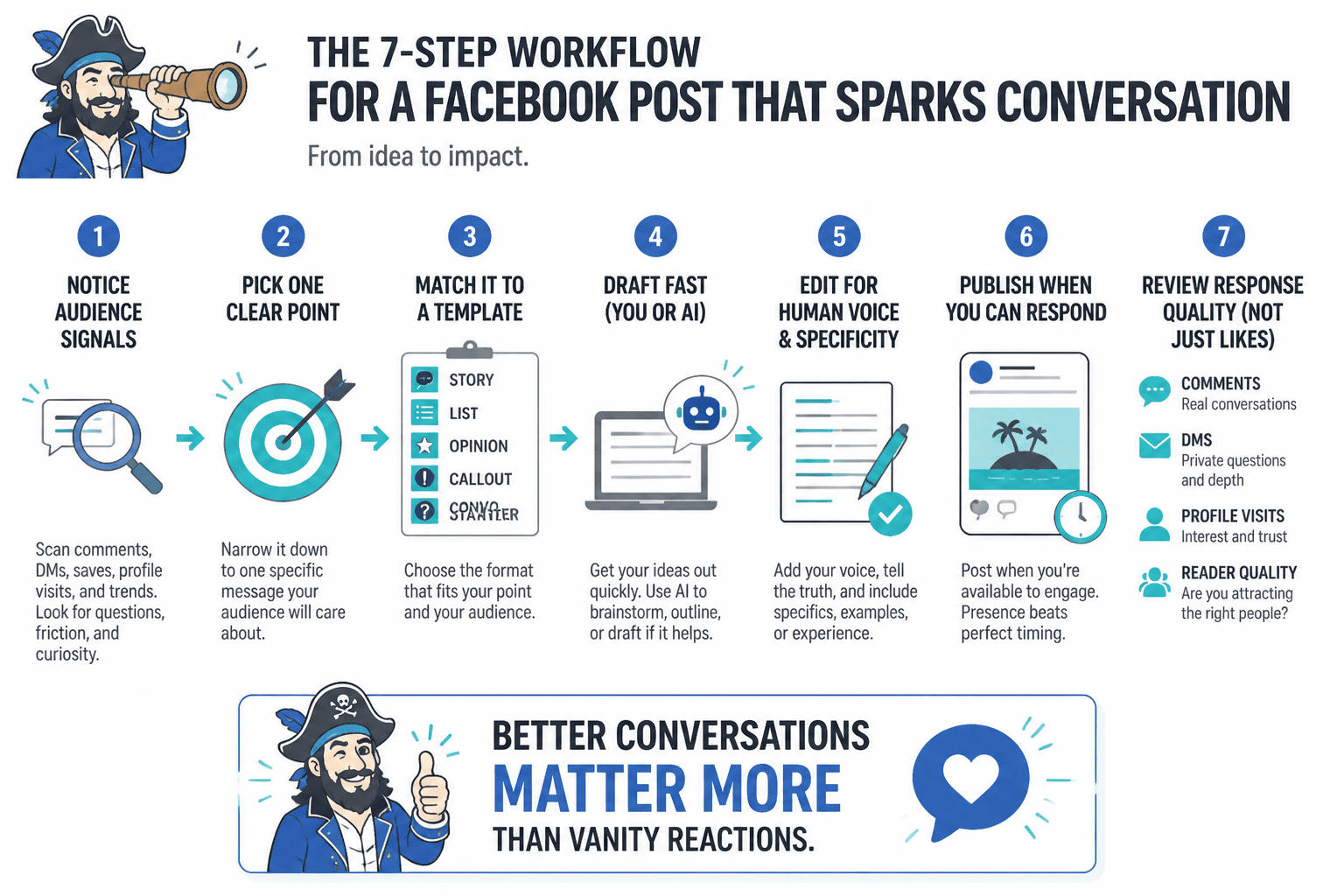
- Capture ideas daily. Save observations, client questions, hot takes, objections, stories, and phrases people actually use.
- Pick the point. Choose one idea worth saying now.
- Match it to a template. Story, list, opinion, callout, or conversation starter.
- Draft fast. Use a writing or AI tool to get momentum, not perfection.
- Edit for voice. Cut stiffness. Add specificity. Remove anything that sounds auto-generated.
- Publish with intent. Post when you can still be around to respond if comments come in.
- Review response quality. Not just likes. Look at comments, DMs, profile visits, and what kinds of readers engage.
That last point matters more than people think. A post that gets fewer reactions but better conversations can be wildly more useful than a “performing” post full of drive-by emojis.
What to look for if you are choosing between Facebook post tools
If you are comparing tools, do not ask which one is best in general. Ask which one removes the most friction in your current bottleneck.
Use this table as a sanity check.
The bigger point is simple: clearer structure and clearer writing make the piece more useful. That is usually what makes the ending land better too.