
A draft sits open in one tab, the hook ideas are scattered across notes in another, the scheduler wants copy in a slightly different format, and the “final” version keeps shedding useful lines every time someone tries to make it cleaner. That is not a creativity problem. It is a toolchain problem. The useful question is not which AI tool looks smartest in a demo, but which one helps you move from idea to post without turning every handoff into a small administrative tragedy.
This guide keeps the stack lean. It focuses on tools that help with the actual work of LinkedIn posting: finding a usable angle, drafting faster, tightening the writing, formatting for the feed, and getting the post out the door. If you want broader strategy first, the parent guide on LinkedIn posts gives the bigger picture.
What the best AI tools for LinkedIn posts actually need to do
“Best” is not about the flashiest interface or the longest feature list. For LinkedIn posts, the tool has to reduce friction in one of a few specific places:
- Idea capture: turn half-formed thoughts into workable post angles.
- Drafting: get a first version on the page without freezing up.
- Editing: trim ramble, sharpen hooks, and remove weak claims.
- Formatting: make the post easy to scan on mobile.
- Repurposing: adapt one idea into several versions without making each one feel cloned from the same beige copier.
That is why the best setup is usually not one magical app. It is a small system with one tool for thinking, one for writing, and one for checking the final shape.
The main bottlenecks AI should solve
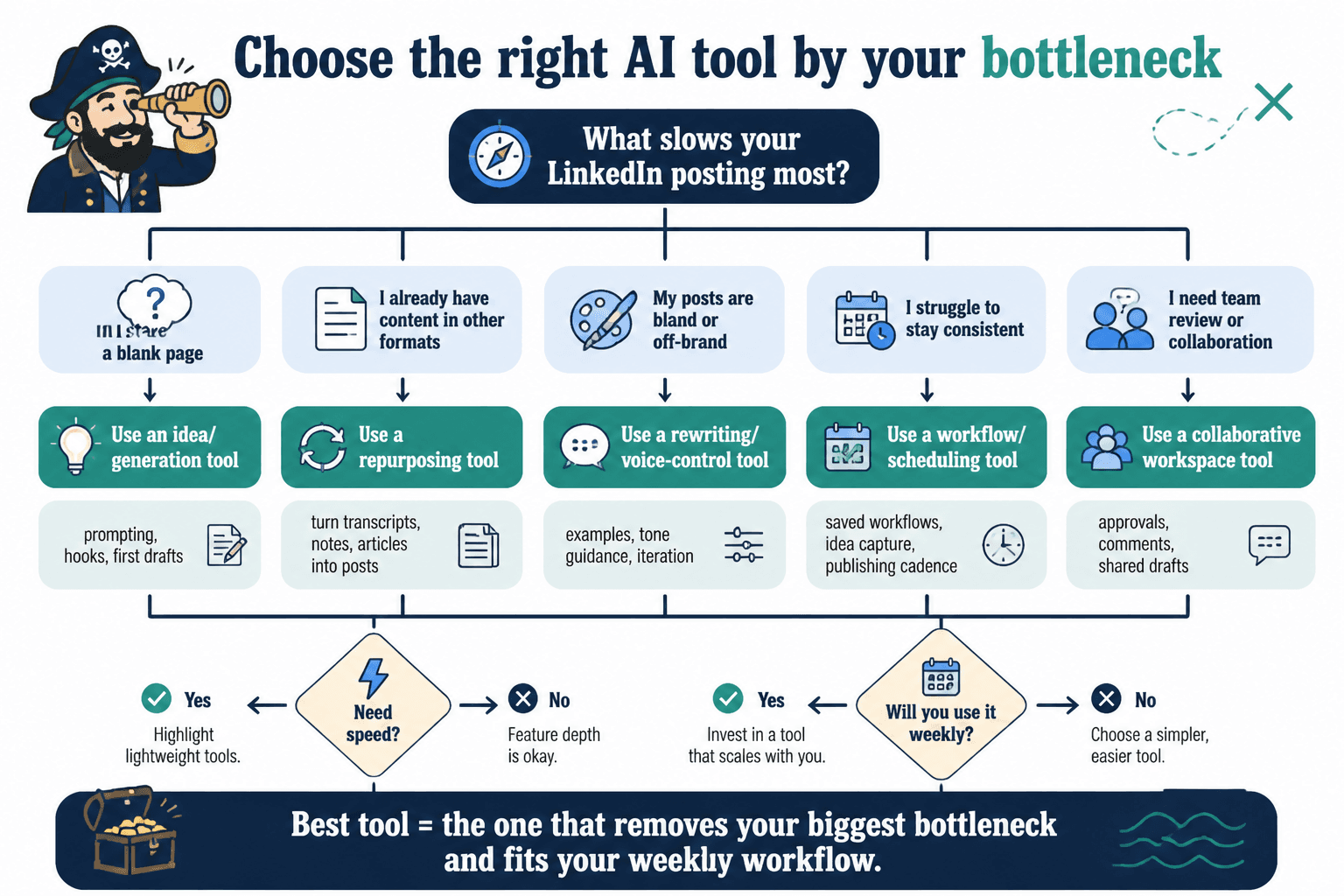
1. You have ideas, but they are not post-shaped yet
This is where a general AI writing assistant earns its keep. You bring it a rough premise, a customer question, a lesson learned, or a point of view, and it helps turn that into a hook, outline, or post draft. The value is not originality-by-automation. The value is compression.
2. You have a draft, but it is too long or too soft
Most LinkedIn drafts do not need more words. They need fewer weak words. AI editing tools are useful here because they can spot passive phrasing, vague transitions, and repetitive sentences faster than a human who has been staring at the same draft for 40 minutes.
3. You have a good idea, but the post is visually tiring
LinkedIn is not a long-form essay platform in disguise. Breaks, line spacing, and simple structure matter. Tools that help rewrite for readability or reformat text can save a post from becoming a wall of respectable but unreadable paragraphs.
4. You want consistency without making every post sound identical
Templates and prompt-based tools help with repetition, but only if they support judgment instead of replacing it. A good template gives the post a spine. A bad one gives you a cardboard skeleton and a headache.
Best AI tools for LinkedIn posts, by use case
There are a lot of tools that can technically help. The ones worth paying attention to usually fall into a few practical buckets.
General-purpose AI writing assistants
These are the most flexible tools for LinkedIn post writing. Use them for:
- brainstorming hooks
- turning notes into a draft
- rewriting for tone
- shortening or sharpening copy
- testing alternate openings
Best for: creators who want one adaptable tool instead of a specialized stack.
Watch for: generic output, inflated language, and hooks that sound confident without saying much.
Useful move: prompt the tool with a specific goal, not “write a LinkedIn post.” Better inputs sound more like “turn these notes into a punchy post with a practical takeaway and a soft CTA.”
LinkedIn-specific post tools
These tools are built around the platform’s format and tone. Some are good at post generation, some at hooks, and some at rewriting content for LinkedIn-style readability.
Best for: people who publish often and want speed without rebuilding the same post structure from scratch every time.
Watch for: sameness. If every output sounds like “thought leadership” wearing a name tag, the tool is helping too much in the wrong direction.
For more hands-on writing structure, the companion guide on how to write better LinkedIn posts is the better place to start if the issue is craft rather than tooling.
Template and swipe-file tools
Templates are not glamorous, but they are reliable. A tool that helps you store and reuse proven post structures can save a lot of wheel-spinning, especially when the goal is to publish consistently.
This is where a good template system can be more useful than another round of AI generation. If you need structure before style, start with a template and let AI help fill it in later. The related guide on best templates and tools for LinkedIn posts goes deeper on that workflow.
Best for: creators who want repeatable post formats, not endless novelty.
Editing and clarity tools
These are the tools that clean up what the first draft got wrong. They help with grammar, clarity, tone, and sentence-level flow. They are especially useful when the draft is good enough to keep but rough enough to embarrass you in public.
Best for: polishing language before publishing.
Watch for: overcorrection. Overly “clean” writing can lose personality fast.
Workflow and repurposing tools
Some tools are less about writing the post and more about getting the post through the rest of the process: storing ideas, organizing drafts, adapting formats, or tracking follow-up. Those matter if your bottleneck is not writing itself but everything around it.
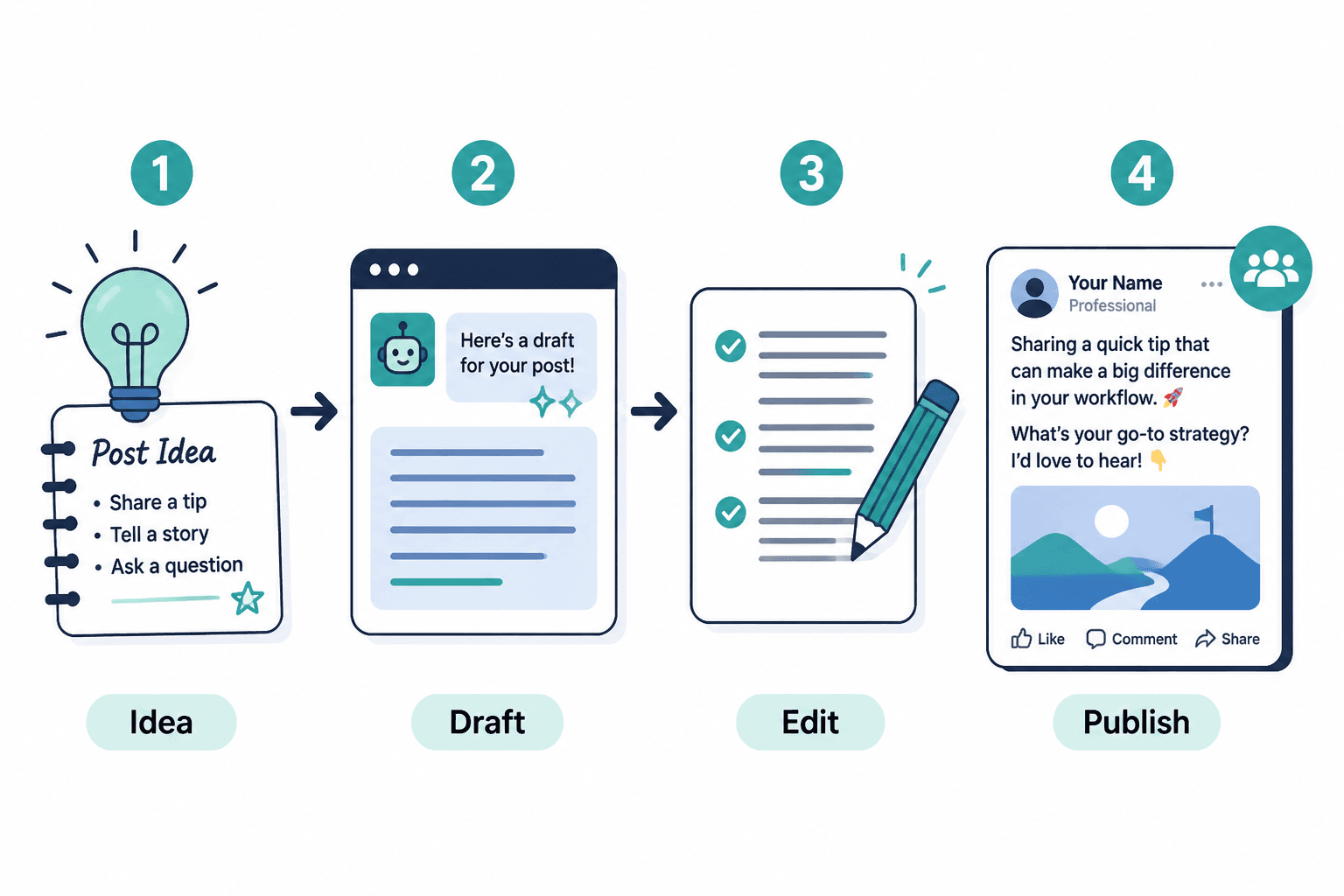
That workflow becomes especially useful when one idea needs to become multiple assets: a short post, a longer version, a comment reply, or a follow-up message. A good system keeps those versions related without letting them blur into one overcooked block of copy.
If the real goal is to turn attention into action, the companion guide on how to turn LinkedIn posts into more leads or sales is the next logical stop.
How to choose a lean setup
The simplest setup is often the best one. Pick tools based on the bottleneck, not the marketing page.
- If you need ideas: choose a brainstorming-friendly writing assistant.
- If you need speed: choose a draft generator that handles short-form social copy well.
- If you need quality: choose a strong editor or rewriter.
- If you need consistency: use templates plus one AI writer.
- If you need follow-through: add a lightweight workflow or CRM layer only when it genuinely helps.
A useful test: if a tool does not save time, improve clarity, or reduce decision fatigue, it is probably decorative. Decorative software is expensive wallpaper.
A simple workflow that actually stays usable
- Capture the idea. Save the lesson, question, or opinion before it evaporates.
- Shape the angle. Use AI to turn the rough thought into a post premise.
- Draft fast. Generate a first version, but do not treat it as finished.
- Edit for voice and clarity. Remove filler, flatten jargon, and tighten the first lines.
- Format for scanning. Break up dense sections and make the rhythm easy on the eye.
- Publish and reuse. Pull one good post into future variants instead of starting from zero every time.
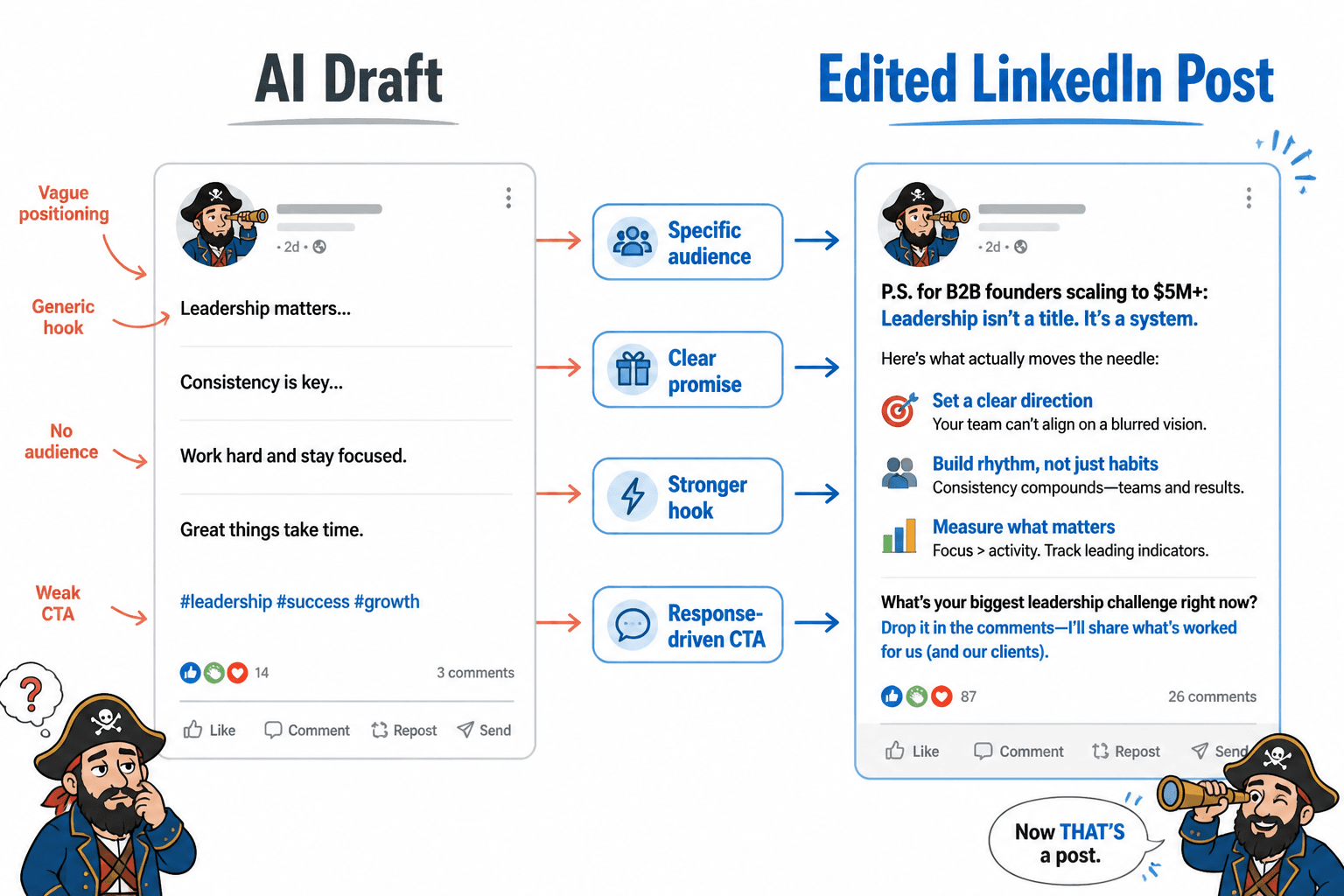
The point is not to automate judgment. It is to keep judgment focused on the parts that matter: angle, clarity, and whether the post actually earns the scroll stop.
Common mistakes to avoid
- Using AI for the whole post and skipping editing. The first draft is a starting point, not a signed affidavit.
- Buying too many tools. Three decent tools usually beat seven overlapping ones.
- Letting templates flatten the voice. Structure should support the point, not replace it.
- Confusing polished with effective. A clean sentence that says nothing is still a clean sentence that says nothing.
- Ignoring distribution and follow-up. A post is part of a system, not a ceremonial object.
The short version
The best AI tools for LinkedIn posts are the ones that remove the right bottleneck. For some writers, that means idea generation. For others, it means faster drafting, better editing, or a cleaner workflow between rough notes and published posts. Start with the problem you actually have, not the tool that looks clever in a demo.
If you want to keep building the system around this, the most useful next reads are how to write better LinkedIn posts, best LinkedIn post ideas and examples for creators, and best templates and tools for LinkedIn posts.
Outbound citations
For platform context and posting conventions, these primary sources are useful:
- LinkedIn Help: creating and sharing posts
- LinkedIn Marketing Blog
- HubSpot Marketing Blog for broader content workflow references