
Most people looking for the best templates and tools for LinkedIn posts are trying to solve the wrong problem.
They think they need a better prompt, a smarter generator, or a spreadsheet full of viral post formulas. What they usually need is a cleaner idea, a sharper structure, and a tool stack that does not turn their voice into polished corporate soup.
That is the actual job here: make LinkedIn posting faster and easier without sounding like someone pasted “thought leadership” into a blender and hit puree.
This guide covers the best templates and tools for LinkedIn posts if you want to create content that feels useful, credible, readable, and human. We’ll cover what templates are actually worth keeping, which tools help versus which ones just add noise, and how to build a simple workflow you will still use next month.
If you want broader platform guidance first, start with social media writing, LinkedIn writing, or the main guide to LinkedIn posts.
To see how this fits into the wider strategy, open the parent guide.
What good LinkedIn post templates actually do
A template should help you think more clearly. It should not do the thinking for you.
Good LinkedIn post templates give your idea shape. They help you open faster, organize the point, add proof, and land with a decent CTA. Bad templates make every post sound suspiciously similar, which is how people end up publishing content that looks “professional” and gets ignored by everyone with a pulse.
So before grabbing a pile of formulas, use a simple standard:
- Does this template help me say something useful?
- Does it leave room for my actual voice and perspective?
- Does it fit LinkedIn’s style of short, scannable, expertise-driven content?
- Can I adapt it without sounding like I copied a swipe file from 2021?
If not, it is not a template. It is a content costume.
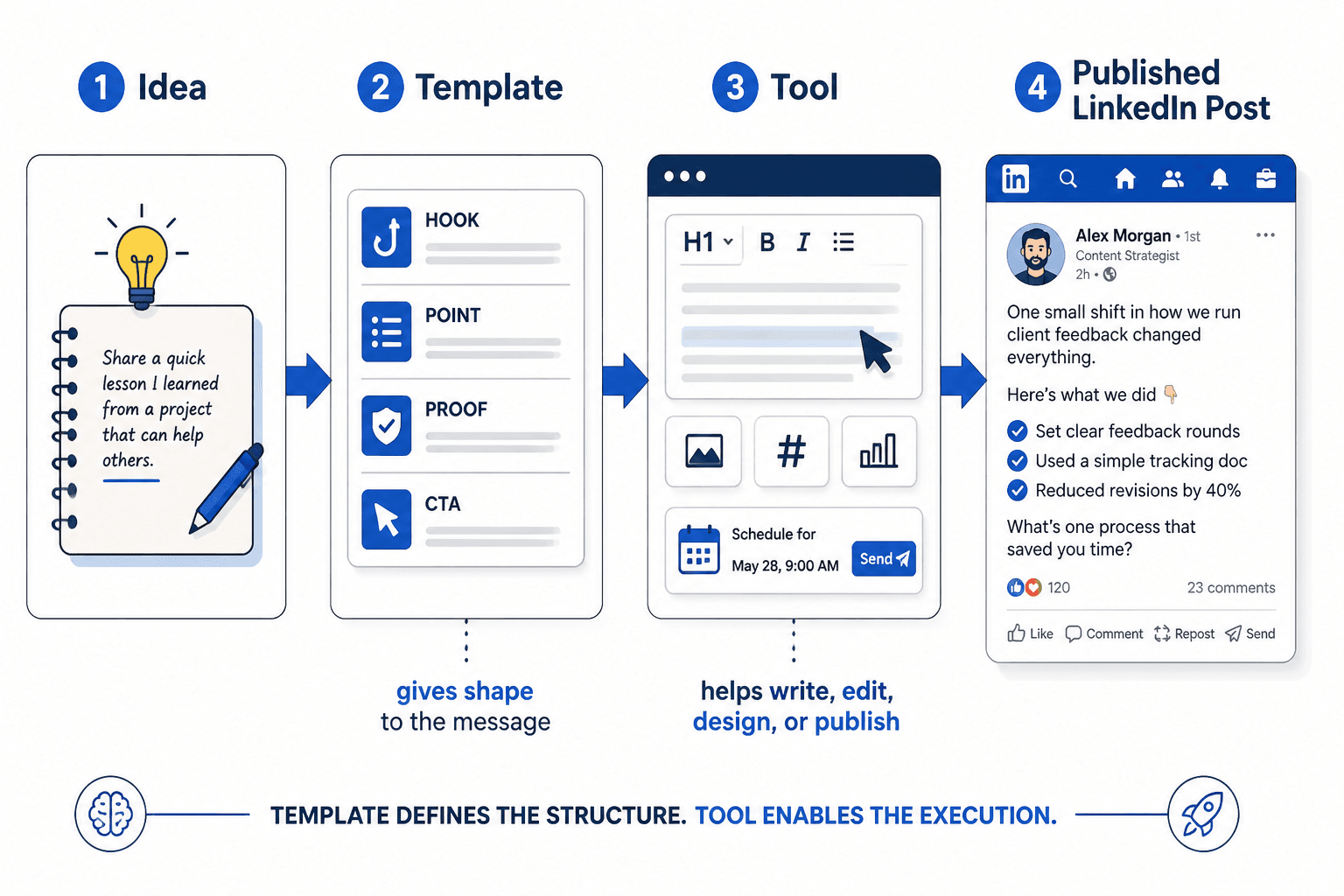
The best LinkedIn post templates to keep in rotation
You do not need 47 templates. You need a handful that match the kinds of things you actually know, believe, and sell.
1. The opinion plus explanation template
This works well when you have a clear point of view about how people approach content, sales, branding, consulting, client work, or growth.
- Lead with the opinion
- Explain why most people get this wrong
- Add a practical example or consequence
- Close with a takeaway or invitation
Template:
Most people think [common belief].
I think that is wrong.
Here is what actually matters: [principle].
For example: [specific situation].
If you want better results, focus on [practical action].
Example:
Most people think consistency is the main reason LinkedIn content fails.
I don’t.
A lot of “consistent” posting is just repeating forgettable advice on schedule.
What actually matters is publishing clear ideas people can repeat, remember, or act on.
If your posts are getting polite silence, the problem might not be frequency. It might be blandness.
2. The mistake and fix template
This is one of the most reliable LinkedIn formats because it gives readers immediate value and gives you a clean way to show expertise without sounding preachy.
Template:
A common mistake in [topic] is [mistake].
It usually leads to [bad outcome].
A better way is [better approach].
Try this instead: [steps, framework, example].
Example:
A common mistake in LinkedIn posts is saving the actual point for paragraph six.
That usually leads to people leaving before they find out why they should care.
A better way is to put the sharpest part up top.
Try this instead: lead with the point, then explain it, then add proof, then end cleanly.
3. The mini case study template
Useful if you are a coach, consultant, freelancer, service provider, or founder who wants to show evidence instead of making airy claims.
- Name the problem
- Show the change made
- Share the result or lesson
- Pull out the transferable insight
Template:
We noticed [problem].
So we changed [action].
The result was [outcome].
The bigger lesson: [principle readers can apply].
You do not need massive revenue screenshots or chest-thumping wins here. In fact, smaller, more believable examples often work better. “We clarified the first line and got more qualified replies” is more useful than “We 10x’d everything” anyway.
4. The lesson from experience template
This one works when you have earned insight from doing the work, not just reading about it.
Template:
After [time, number of clients, number of projects, repeated experience], here is something I have learned:
[lesson]
Most people focus on [surface thing].
What matters more is [deeper thing].
If I were starting again, I would [practical action].
This format is strong because it blends authority with usefulness. Just don’t turn it into one of those vague “10 things I learned about leadership” posts that somehow say nothing at all.
5. The breakdown template
Perfect for teaching. Great for writers, marketers, strategists, coaches, and consultants.
Template:
Here is how I approach [specific task]:
1. [step]
2. [step]
3. [step]
The part most people skip is [important detail].
That is usually where the result comes from.
This gives structure without forcing fake storytelling. If you are naturally more instructional than inspirational, use that. There is no prize for pretending every post is a cinematic journey.
6. The before-and-after rewrite template
One of the best templates for LinkedIn posts if your audience values clarity, messaging, copy, positioning, or communication.
Template:
Before: [weak version]
After: [stronger version]
Why the second works better: [brief analysis]
Example:
Before: “I help businesses grow through strategic content solutions.”
After: “I help consultants turn their expertise into LinkedIn posts that attract leads without sounding needy.”
Why it works better: it gives a real audience, a real outcome, and a clearer sense of what the service actually is.
If you want more examples to work from, pair this article with best LinkedIn posts ideas and examples for creators and best templates and tools for LinkedIn hooks and formatting.
How to choose the right template for the post
Here is where people make it harder than it needs to be. They pick a template because it looks proven, then try to shove a bad idea into it. Start with the type of message first.
| If your post is trying to… | Use this template |
|---|---|
| Show expertise | Breakdown, mistake-and-fix, mini case study |
| Show point of view | Opinion plus explanation |
| Show credibility | Lesson from experience, mini case study |
| Teach something quickly | Breakdown, before-and-after rewrite |
| Start conversation | Opinion plus explanation with a clean question at the end |
| Lead into an offer softly | Mistake-and-fix or case study with a relevant CTA |
A template should match the job. If you use a story-based template for a tiny tactical point, the post can feel overbuilt. If you use a dry list format for something emotional or nuanced, it can feel flat. The best templates and tools for LinkedIn posts help you match format to purpose, not just churn out content faster.
The best tools for LinkedIn posts, by job
Tools matter, but not in the way people often hope.
No tool is going to hand you taste, positioning, or a personality people trust. What good tools can do is reduce friction. They can help you capture ideas, draft faster, refine hooks, organize content, store templates, schedule posts, and keep your lead flow from turning into digital laundry.
1. Idea capture tools
You need somewhere to catch ideas before they vanish. This can be a notes app, a simple doc, or a lightweight database. The exact tool matters less than the habit.
- Use a notes app for quick observations, hooks, client questions, mistakes you keep seeing, and phrases worth reusing
- Use tags or folders like: hooks, case studies, objections, client language, CTAs, post ideas
- Keep it ugly if needed. Pretty systems are overrated if you stop using them after four days
One of the smartest things you can do is collect audience language. Save the way clients describe their problems. Save the boring words they use. Save the exact messy phrasing. That is often better post material than any “viral framework” you’ll find online.
2. Drafting and AI writing tools
AI tools are useful for speed, brainstorming, rewrites, and variation testing. They are not good judges of quality by default. If you hand them a weak thought, they will often return a shinier weak thought.
Use AI writing tools for things like:
- Generating hook variations
- Turning notes into rough post structures
- Compressing long ideas into shorter drafts
- Rewriting stiff paragraphs into plainer language
- Creating multiple CTA options
- Repurposing an article, voice note, or transcript into LinkedIn-ready material
Do not use them as your final taste filter. That is how posts end up sounding “clean” but weirdly lifeless.
For deeper tool recommendations, see best AI tools for LinkedIn posts and best AI writing tools and creator CRM tools for LinkedIn posts.
3. Editing tools
Good editing tools help you tighten wording, spot clunky phrasing, and clean up readability. They are especially useful if you tend to overwrite, stack too many qualifiers into a sentence, or accidentally sound like an HR memo.
What they are good for:
- Shortening long sentences
- Removing repetition
- Improving rhythm and scannability
- Catching grammar slips before you publish
What they are not good for:
- Knowing if your idea is interesting
- Understanding audience nuance on their own
- Fixing weak positioning
- Adding real-world proof you never included
4. Scheduling tools
Scheduling can be helpful if it reduces decision fatigue. It becomes unhelpful when it turns your content into an assembly line of dead-eyed posts no one is around to support.
A scheduler is useful if you:
- Batch content once or twice a week
- Want a cleaner publishing rhythm
- Need visibility into upcoming themes or campaigns
- Work across several platforms and need coordination
A scheduler is less useful if you are still figuring out your voice, experimenting with formats, or learning from real-time feedback. In that stage, a little mess is often healthier than pretending you run a media company out of a spreadsheet.
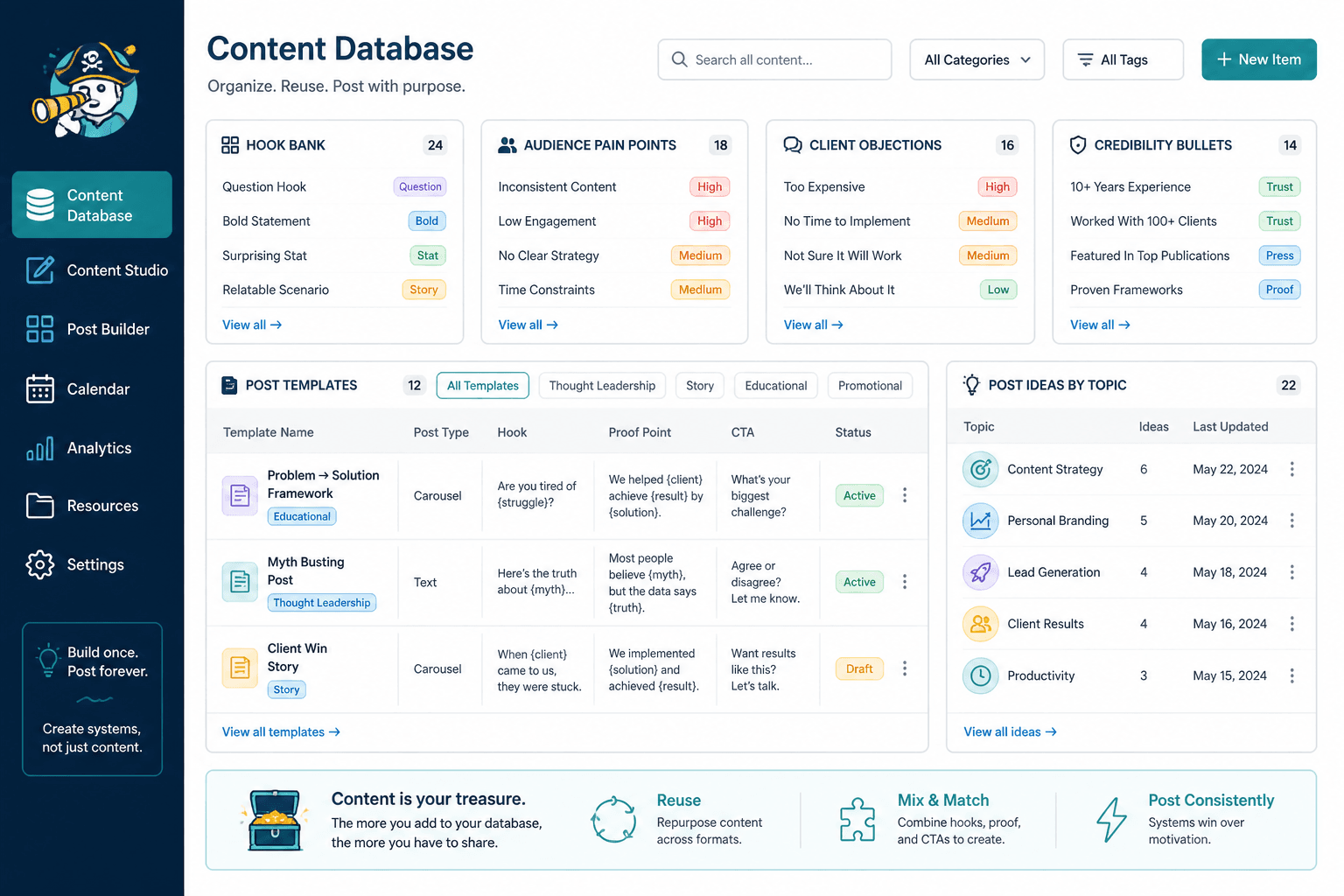
5. Content database and template storage tools
This is where your system starts paying off. Store your best-performing hooks, post templates, proof points, CTA variations, objections, stories, and examples in one place. Then reuse intelligently.
Your content database can include:
- Templates by post type
- Hook bank
- CTA bank
- Audience pain points
- Client objections
- Case study snippets
- Credibility bullets
- Post ideas sorted by topic
This is boring in the best possible way. Boring systems are often what make content sustainable.
6. Creator CRM tools
If LinkedIn is part of your lead generation process, you need a way to track conversations, warm leads, follow-ups, and source context. Otherwise everything disappears into your inbox and your memory, which is not a strategy.
A creator CRM is useful for:
- Tracking who engaged repeatedly
- Remembering who downloaded a resource or asked about your offer
- Following up without feeling random
- Connecting content performance to actual conversations and sales opportunities
This is especially relevant for consultants, coaches, and service businesses. If your content is meant to support trust and sales, the “post” is not the full system.
A simple tool stack that is actually enough
You do not need a fancy content operating system held together by seven subscriptions and blind optimism.
For most creators and service businesses, this is enough:
- Notes tool: capture ideas, client language, observations
- Writing tool: draft posts and store working versions
- AI assistant: generate options, compress drafts, test angles
- Template bank: keep repeatable post structures and CTAs
- Scheduler: optional, if it helps consistency
- CRM or tracking system: if LinkedIn supports leads or sales
That is it. Build the smallest system that makes publishing easier. A lot of people build a complex system because it feels productive. Then they avoid posting because maintaining the system becomes its own weird side hustle.
How to use templates and tools without sounding templated
This is the trap. Templates save time, then people overuse them, and every post starts feeling suspiciously identical.
To avoid that, keep these rules:
- Start from a real idea, not the template
- Rewrite the opening until it sounds like something you would actually say
- Use specific examples, not generic claims
- Vary the pacing and sentence length
- Change how you close posts so every CTA does not feel copy-pasted
- Strip out AI-sounding filler like “it is important to note” and “when it comes to”
A good test is to read the draft out loud. If it sounds like you suddenly became a formal networking brochure, fix it.
Also, stop worshipping consistency at the expense of quality. Five mediocre templated posts are not automatically better than two sharp ones. LinkedIn rewards clarity, relevance, and perspective more than “I showed up every day with a bland paragraph and a dream.”
A practical workflow for LinkedIn posts
If you want the best templates and tools for LinkedIn posts to actually help, they need to fit a workflow you can repeat.
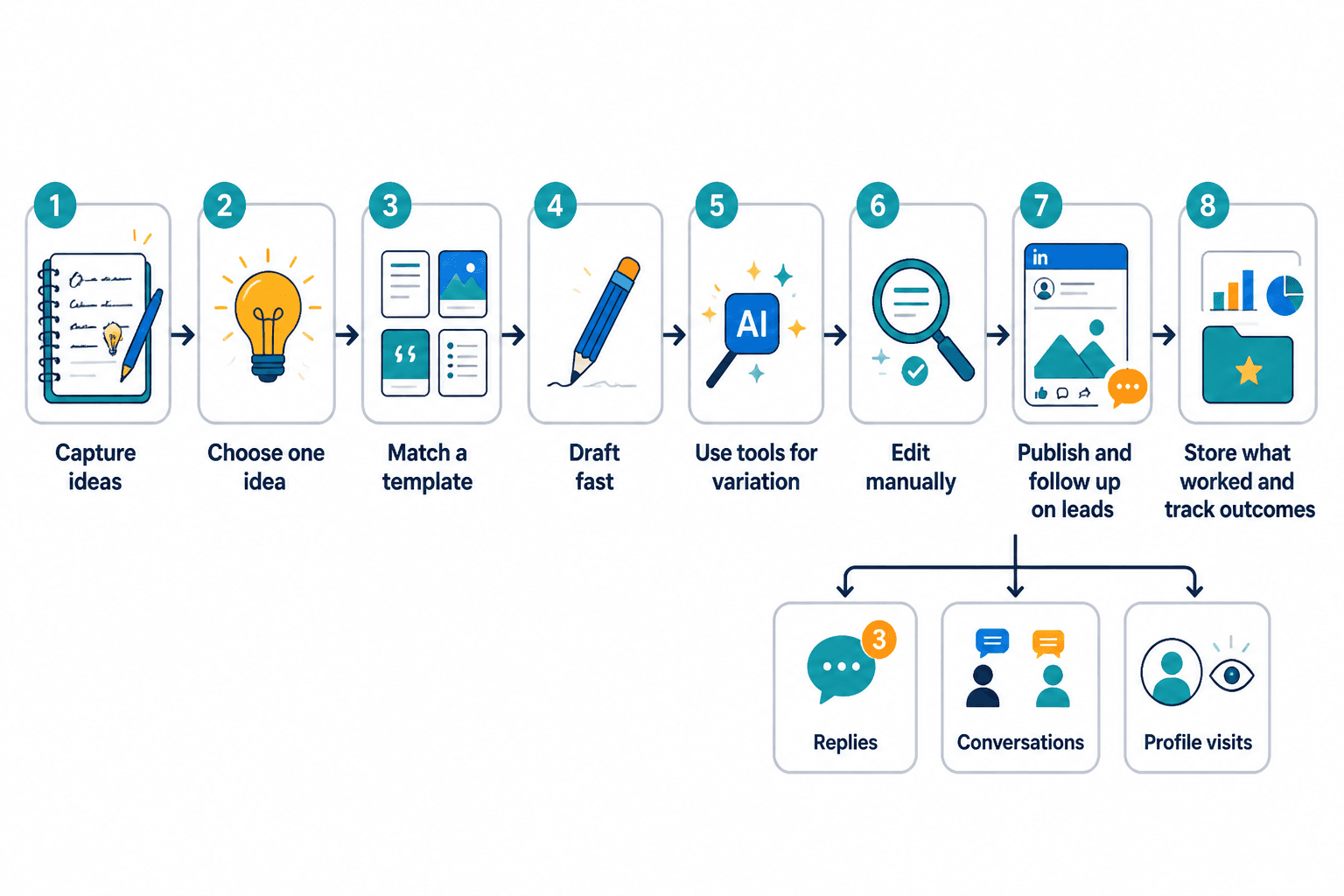
- Capture raw ideas daily. Save client questions, opinions, mistakes, lessons, examples, and screenshots of phrases worth using.
- Choose one idea. Do not try to say five things in one post. Pick the strongest point.
- Match a template to the point. Opinion, breakdown, case study, lesson, mistake-and-fix, or rewrite.
- Draft fast. Get the bones down before polishing.
- Use tools for variation. Test better hooks, shorten bloated sections, generate CTA options.
- Edit manually. Tighten, humanize, remove fluff, add specifics.
- Store what worked. Save strong hooks, structures, and comments that reveal audience interest.
- Track useful outcomes. Not just likes. Look at profile visits, replies, conversations, and qualified interest.
What most people get wrong with LinkedIn post tools
A few recurring mistakes are worth calling out because they quietly wreck a lot of otherwise decent content.
They use tools to avoid thinking
If your source material is vague, your output will be vague too. The tool did not fail you. You fed it mush.
They keep asking AI for “viral LinkedIn posts”
This usually produces inflated nonsense, fake certainty, and hooks that sound like they were assembled in a growth-marketing basement. Ask for clearer things: stronger first lines, simpler rewrites, sharper examples, shorter versions, alternate structures.
They rely on templates with no proof or specificity
Frameworks are not a substitute for substance. “Here are three lessons” is not useful if the lessons are obvious and unsupported.
The bigger point is simple: clearer structure and clearer writing make the piece more useful. That is usually what makes the ending land better too.