
A Facebook long-form draft can get stuck in six different places before it ever reaches the timeline: notes in one app, a half-formed opener in another, an overconfident rewrite in a third, and a final version that somehow sounds like it was ironed. The problem is rarely a lack of ideas. It is the handoff between tools. The useful move is not collecting more software. It is building a lean system that helps you capture the thought, shape the rant, tighten the prose, and ship the post without turning the process into a small administrative hobby.
This guide focuses on the AI tools that actually help with that workflow. Not every shiny platform with “content intelligence” in the name. Just the ones that can move a Facebook long-form post from chaotic to readable without stripping out the point.
If you want the structure before the tools, start with the parent guide on Facebook long-form and rants. For examples of what the final post should feel like, the companion page on ideas and examples is the better next stop.
What Facebook long-form writers actually need from AI tools
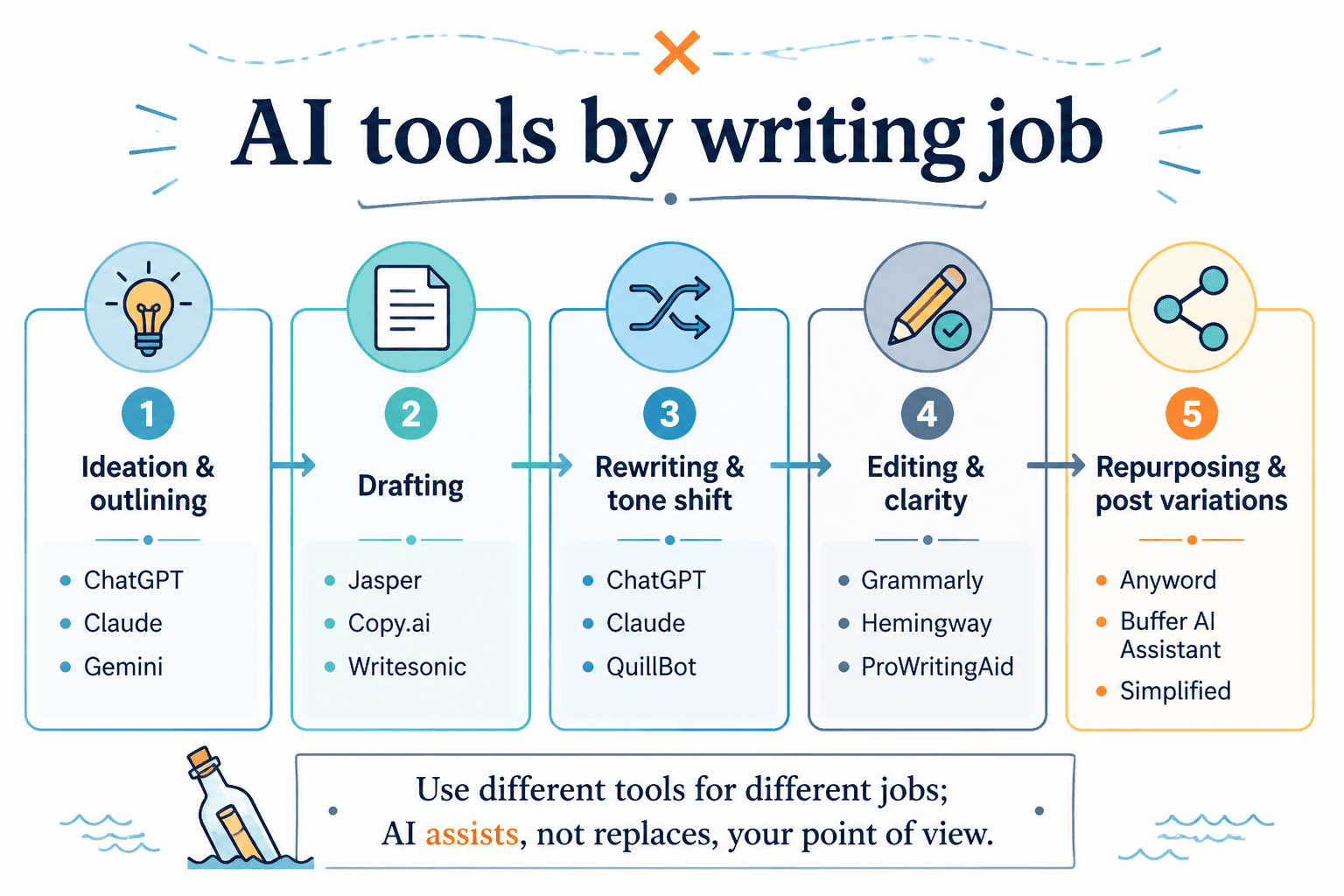
AI helps most when it fixes a specific bottleneck. For Facebook long-form and rant posts, that usually means one of four jobs:
- Getting the thought out without losing the useful edge.
- Turning rough notes into a draft with a readable shape.
- Editing the draft so it is clearer, shorter, and less self-indulgent.
- Adapting tone so the post sounds sharp instead of accidentally combative.
The mistake is using one tool to do all of that equally badly. A lean stack usually works better: one tool for capture, one for drafting, one for editing. Anything beyond that should earn its keep.
If you are already deep in the writing stage, the sibling guide on how to write better Facebook long-form and rants pairs well with this one because it covers the craft side, not just the software side.
The best AI tools for Facebook long-form and rants, by job
1. ChatGPT: best for shaping messy thoughts into a usable draft
ChatGPT is the most straightforward “get me from notes to something readable” option. It works best when you already know the point and need help turning that point into a post with a beginning, a middle, and an ending that does not wander off into the bushes.
Use it for:
- turning bullet points into a draft
- testing different hooks
- compressing a too-long rant into something readers can follow
- reframing a hot take so it sounds intentional rather than accidental
Best for: writers who already have the argument and just need the first pass.
Weak spot: it can smooth away the grit if you let it. That is not always a virtue.
2. Claude: best for longer rewrites and better reading flow
Claude is especially useful when the draft is too loose, too repetitive, or too fond of its own adjectives. It tends to do well with longer passages and can help a Facebook post feel less like a transcription of every thought you had in the shower.
Use it for:
- rewriting long drafts into cleaner sequences
- tightening meandering paragraphs
- reducing repetition without flattening tone
- making a rant easier to read on a phone, which is where most of them live anyway
Best for: drafts that already exist but need real editing, not just a polish pass.
Weak spot: it can still sound a little too composed if you do not push back.
3. Jasper: best for repeatable content workflows
Jasper makes more sense if you want a repeatable system around social content rather than a one-off writing session. It is less about improvising the perfect rant and more about keeping a consistent production rhythm when Facebook long-form is one format in a bigger content plan.
Use it for:
- framework-based drafting
- team workflows
- reusable content templates
- turning a core idea into several post variants
Best for: creators who publish often and want consistency.
Weak spot: it can feel like extra machinery if you only post long-form occasionally.
4. Notion AI: best for capture, sorting, and rough planning
Notion AI is useful when the issue is not writing, exactly, but catching the thought before it goes extinct. It works well for storing hooks, rough arguments, and post outlines in one place, especially if you already keep your content planning there.
Use it for:
- capturing raw ideas
- organizing post notes
- turning scattered thoughts into a simple outline
- keeping a running bank of arguments and examples
Best for: writers who need order before polish.
Weak spot: it is more helpful as a workspace than as a dramatic writing engine.
5. Grammarly: best for clarity, sentence cleanup, and final sanity checks
Grammarly is not there to invent your voice. It is there to catch the small, annoying things that make a post feel less sharp than it should: awkward phrasing, wordiness, passive construction, and the occasional sentence that arrives already exhausted.
Use it for:
- final clarity checks
- grammar and punctuation cleanup
- shortening overbuilt sentences
- spotting tone that lands more harshly than intended
Best for: the final pass before publishing.
Weak spot: it will not rescue a weak argument. It just makes a weak argument more grammatical.

6. Hemingway Editor: best for trimming the fluff
Hemingway is blunt in the useful way. It helps expose where a draft is bloated, overly complex, or trying too hard to sound important. That is a common failure mode in Facebook long-form writing, especially when the subject is personal, opinionated, or both.
Use it for:
- finding dense sentences
- spotting passive or overcomplicated phrasing
- improving readability for mobile readers
- forcing the draft to say what it means without a warm-up act
Best for: editing a post down to something people can actually finish.
Weak spot: it is a cleanup tool, not a thinking tool.
7. Perplexity or research-assisted AI: best for checking claims before you post
For posts that lean on facts, platform behavior, or public examples, a research-first tool can help you verify before you publish. That matters when a rant starts making claims as if confidence alone counts as evidence.
Use it for:
- checking facts and definitions
- finding recent support for a claim
- pulling together source material for a stronger argument
- avoiding posts that sound certain but are actually vague
Best for: fact-supported Facebook long-form posts.
Weak spot: it is only useful if you check the underlying sources and do not outsource judgment.
A lean AI stack that actually makes sense
You do not need all seven tools. For most Facebook long-form work, a lean stack looks like this:
- Capture: Notion AI or a plain notes app
- Draft: ChatGPT or Claude
- Edit: Grammarly or Hemingway
That is enough for most writing jobs. More tools can help if they solve a real process problem, but they should not be invited just because they have a better landing page.
If your workflow also includes replies, moderation, or lead follow-up, the sibling guide on writing tools and community management tools fills in that part of the picture.
How to choose based on your bottleneck
- Too many ideas, not enough structure: use Notion AI or a simple outline-first workflow.
- Good thought, bad first draft: use ChatGPT.
- Draft is long but unfocused: use Claude.
- Draft is readable but messy: use Grammarly or Hemingway.
- You publish often and need repeatability: use Jasper or another template-driven system.
- You need to verify a claim: use a research tool before you post.
The simplest test is this: does the tool help the post move forward, or does it just make the workflow feel technologically moisturized?
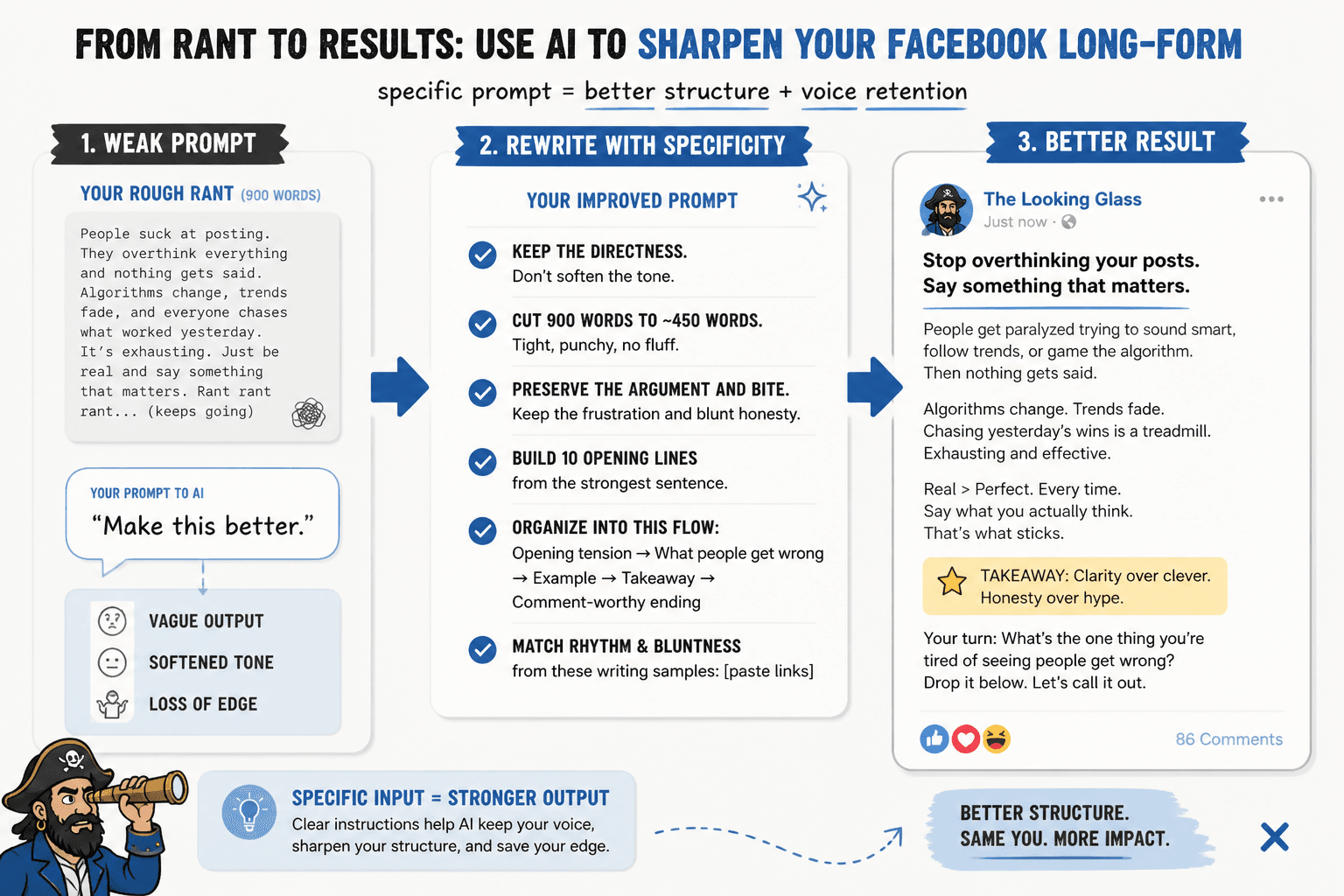
A simple workflow for publishing without the mush
- Capture the raw point. Write the complaint, observation, or argument in plain language.
- Identify the actual claim. What is the post really saying?
- Draft the post. Use an AI writing tool to turn the rough notes into a full first pass.
- Cut the fat. Run the draft through an editor and delete the decorative parts.
- Check the tone. Make sure the post sounds sharp, not sloppy or accidentally hostile.
- Publish and monitor. If comments matter for your workflow, hand that off to your community management process.
That sequence works because it separates creation from cleanup. Most bad long-form posts are simply drafts that were never forced to become posts.
Where this fits in the cluster
This page is the tools-and-workflow layer of the Facebook long-form & rants cluster. The parent guide explains the overall format. The ideas page helps when the post itself is still missing. This page is for the moment when the thought exists, the draft is ugly, and the right tool would save you from overediting it into oatmeal.
For a fuller system view, move between the writing guide, this tools page, and the templates/examples page as needed. That is the difference between a workflow and a pile of tabs.
Bottom line
The best AI tool for Facebook long-form and rants is the one that solves your current bottleneck without creating three new ones. ChatGPT and Claude are the strongest drafting options. Notion AI helps with capture and planning. Grammarly and Hemingway are useful for cleanup. Jasper makes sense when consistency matters more than improvisation.
Pick the smallest stack that gets the post from raw thought to readable final copy. Anything else is just extra scenery.