
People love to assume that longer AI image workflows are automatically more impressive, more strategic, or more “serious.” Usually, they are just slower.
That matters because a lot of creators and marketers are using AI image tools for jobs that do not need a cinematic production pipeline. They need a visual for a post, a rough concept for a client deck, a cleaner thumbnail idea, a quick mockup, a simple lead magnet graphic, or a better-looking asset than the one they were about to make badly in Canva while mildly resenting their own afternoon.
When Short AI Image Use Cases Beat Long Ones comes down to one thing: the job. If the goal is speed, clarity, testing, iteration, or supporting content that moves fast, the short version often wins by a mile.
Here’s how to know when a shorter AI image use case is the smarter move, where longer workflows still earn their keep, and how to stop overbuilding visuals for tasks that really just need to get done well enough to work.
Want the broader roadmap? Start with the parent guide.
Short does not mean lazy. It means proportionate.
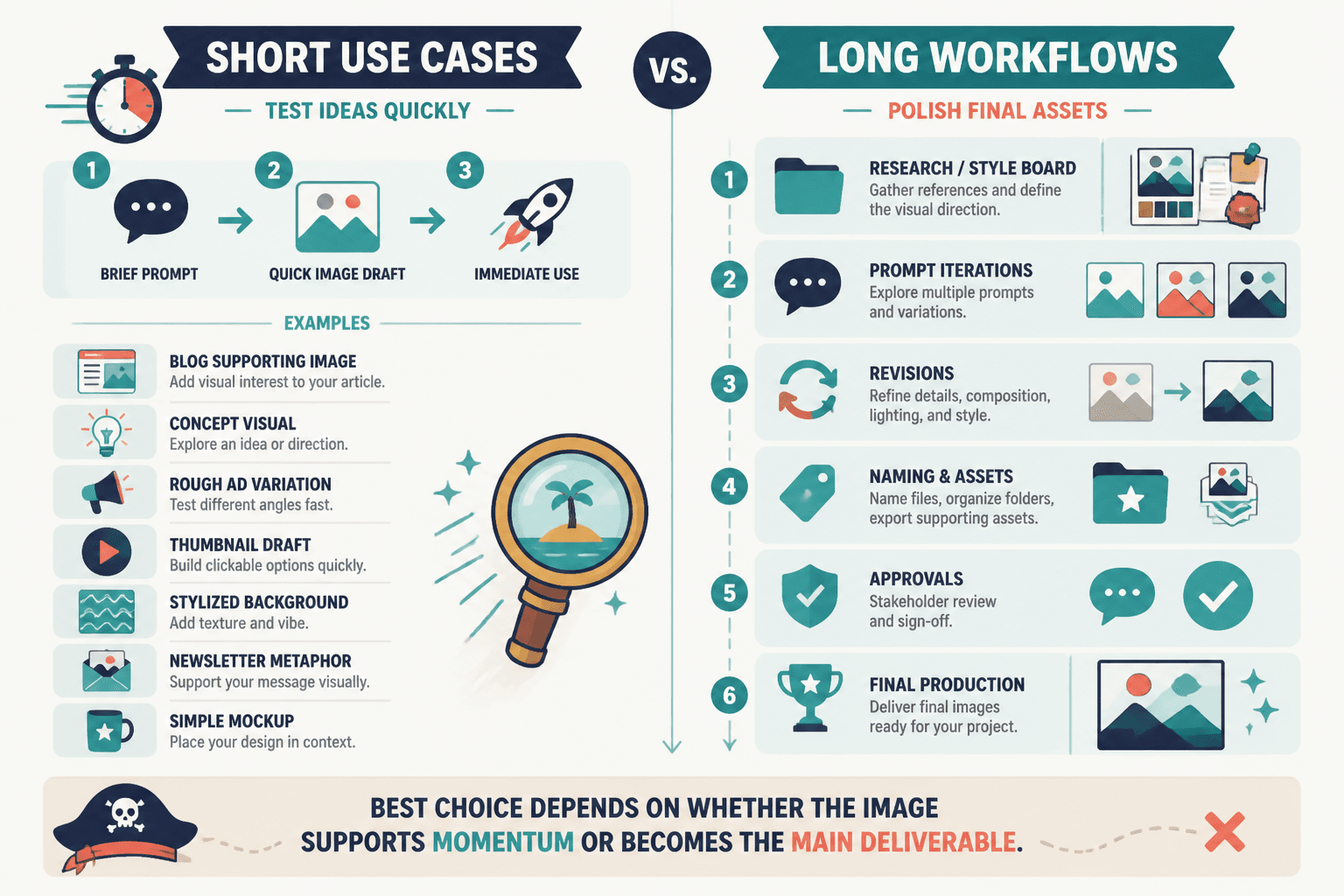
A short AI image use case is any workflow where the image job is tight, focused, and limited in scope. You are not building a whole visual campaign system. You are solving a specific need quickly.
That might mean:
- one supporting image for a post
- a concept visual for an idea you are testing
- a rough ad variation to compare directions
- a thumbnail draft
- a stylized background image
- a simple visual metaphor for a newsletter or article
- a mockup to help sell the idea before fully producing it
The mistake is treating all of those like they need a long prompt chain, multiple revision stages, naming conventions, style-board references, asset folders, and a dramatic internal creative process. Sometimes that is good craft. Sometimes it is just procrastination with better branding.
Short use cases win when the image is there to support momentum, not become the entire event.
When short AI image use cases beat long ones
1. When you are testing ideas, not polishing final assets
If you are still figuring out the angle, offer, message, or concept, speed matters more than polish.
This is one of the biggest reasons short AI image use cases beat long ones. Early-stage testing is supposed to be messy. You are learning what the idea wants to become. Spending 90 minutes perfecting visuals for a concept that might be dead by tomorrow is not strategy. It is attachment.
Use a short workflow when you need to test:
- headline directions for a lead magnet cover
- thumbnail concepts for a video or article
- different visual angles for a social campaign
- post graphics tied to several content hooks
- mood or style direction before committing to production
At this stage, “clear enough to compare” beats “beautiful enough to frame.”
2. When the image is supporting content, not carrying it
A lot of creator visuals are not the product. They are support beams.
If your post, thread, article, carousel, or email is doing the heavy lifting, the image only needs to help the content get noticed, understood, or remembered. It does not need its own origin story.
Think of things like:
- a header image for an article
- a simple visual metaphor for a LinkedIn post
- a rough branded image for a newsletter section
- a content companion graphic for X or Facebook
- a lightweight visual for a landing page section draft
In those cases, the image should be useful, on-brand enough, and fast to produce. That is it. Making the support graphic more elaborate than the content itself is how people end up with very pretty assets attached to weak ideas.
3. When the platform rewards speed and iteration
Short-form content channels move quickly. That does not mean quality does not matter. It means overproduction gets punished if it kills consistency.
If you publish often, you need repeatable visual workflows that do not eat your whole week. A faster image process helps you stay responsive, test more angles, and keep publishing without turning every post into a mini agency project.
This is especially true for:
- social post visuals
- quick content repurposing
- timely commentary graphics
- thread and article companion images
- community updates and promo assets
If the content shelf life is short, the image workflow probably should be too.
That is also why it helps to pair this with a broader workflow strategy. If you are building a more practical system around AI visuals, this AI writing tools and workflows hub and the AI image tools section are useful places to keep the bigger picture straight.
4. When your real bottleneck is decision-making
Sometimes the problem is not production quality. It is that you keep lingering over visual choices because the image task has quietly turned into a substitute for making content decisions.
Short AI image use cases can force a healthier constraint. You pick the point. You generate a direction. You choose the strongest option. You move.
That kind of speed is useful when you tend to get stuck in:
- endless prompt tweaks
- style indecision
- too many variations
- unnecessary refinement
- visual perfectionism on low-stakes assets
A short workflow is not just faster. It can also be a guardrail against overthinking.
5. When you need volume with decent quality
There are content systems where one perfect image matters a lot less than ten solid ones.
That includes things like building article headers for a content library, making multiple visual concepts for social posts, generating draft mockups for client presentations, or creating starter images for a batch of lead magnets or resources.
In that environment, long workflows can wreck output. Short workflows make batching possible.
And batching matters because consistency often beats occasional brilliance. Not always. But often enough that creators should stop pretending every asset needs a grand artistic pilgrimage.
Where longer AI image workflows still make sense
Short use cases are not always better. They are better when the visual job is narrow and speed matters. Long workflows still earn their keep when the image has to do more than simply support a piece of content.
Longer AI image use cases make sense when:
- the asset is central to the offer or campaign
- brand consistency is critical
- the visual needs multiple rounds of review
- you are producing hero assets, ad creatives, or sales-page visuals
- the image must fit a broader design system
- you are creating client-facing work with higher quality expectations
- the image needs compositing, editing, or platform-specific adaptation
That is the key distinction: importance and complexity. If the image has real strategic weight, longer workflows can be worth the extra time. If not, they are often just expensive ways to avoid publishing.
A simple rule: match the image process to the image job
This is the part people keep making harder than it needs to be.
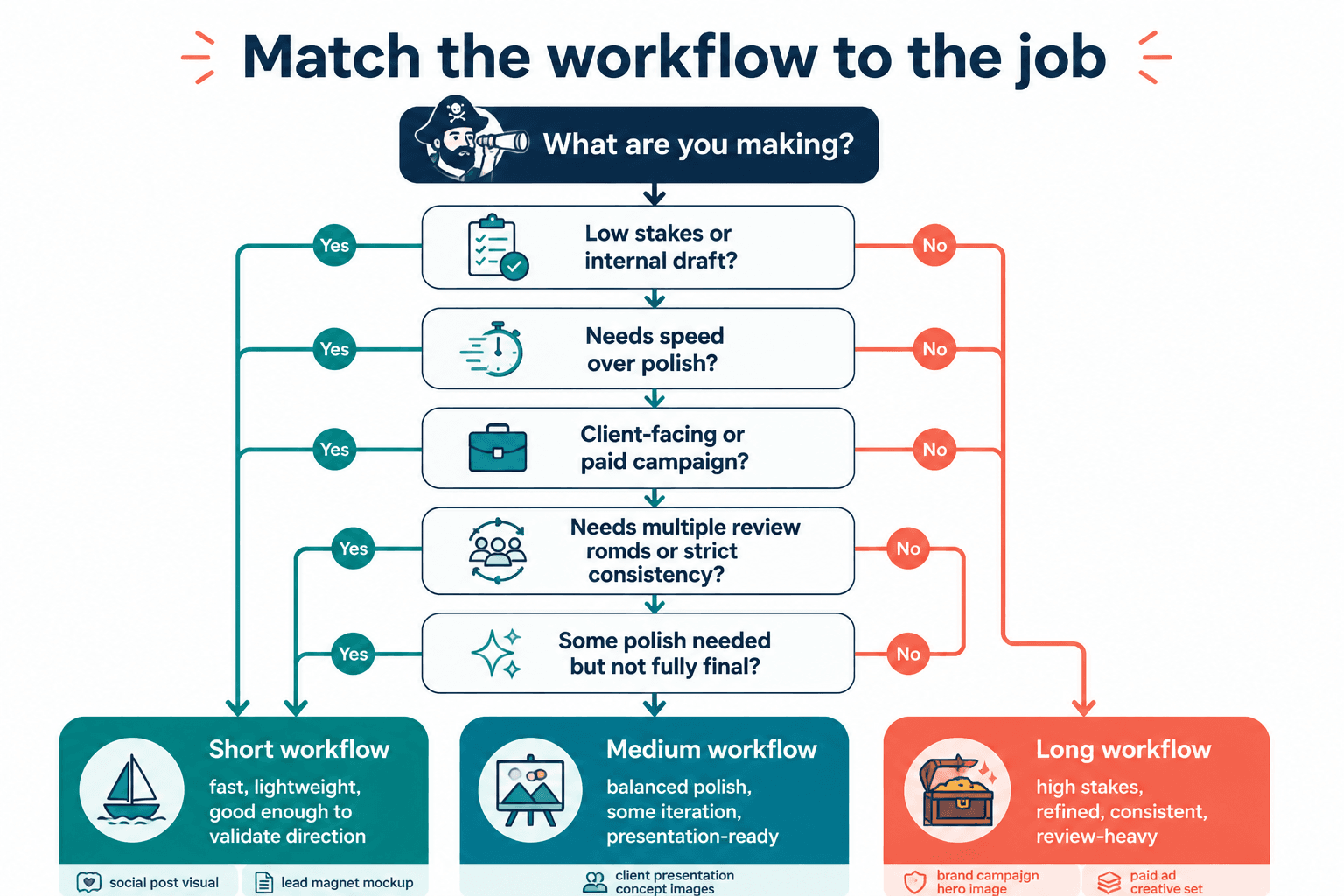
You do not need one universal workflow for AI image creation. You need a few useful lanes. The right question is not “Should I use a short or long process?” It is “What is this image actually supposed to do?”
| Image job | Better fit | Why |
|---|---|---|
| Quick post visual | Short | Fast support, low complexity |
| Thumbnail concept testing | Short | Need multiple options quickly |
| Newsletter header draft | Short | Useful, lightweight, repeatable |
| Lead magnet mockup | Short | Good enough to validate direction |
| Brand campaign hero image | Long | Higher stakes, more review |
| Ad creative set for paid campaigns | Long | Needs refinement and consistency |
| Client presentation concept images | Short or medium | Depends on how final they need to feel |
If you want a broader set of examples for where these kinds of visuals actually help, the main AI image use cases guide and these AI image use case ideas that save time and look better are worth keeping nearby.
What short AI image use cases are especially good at
Rapid concept generation
When you need to explore visual directions fast, short workflows are excellent. You can test metaphors, color directions, scene types, framing ideas, and composition styles without investing too much in any one route.
Content repurposing
If you are turning one article, post, or idea into multiple assets, short AI image workflows fit the pace better. They help you create supporting visuals without slowing the whole repurposing machine down.
This pairs well with the logic behind when short creator AI editing and repurposing beat long ones. Same underlying principle: if the asset exists to keep a useful idea moving across formats, the process should usually stay lean.
Low-risk experimentation
Short workflows make it easier to try things you would otherwise overthink. Different styles. Strange metaphors. Bolder concepts. More variation. You are more likely to discover something good when each test does not feel like a commitment ceremony.
Drafting before human refinement
Short AI image use cases work brilliantly as draft engines. Generate the starting point quickly, then improve only the few assets that prove worth keeping. That sequence is often smarter than trying to perfect everything at generation stage.
What people get wrong about short workflows
The backlash against short workflows usually comes from people using them badly.
They assume “short” means sloppy prompting, random style choices, no quality control, and no editorial judgment. Then they get bland output and decide the whole idea is broken. Not quite.
A good short AI image workflow still needs:
- a clear purpose for the image
- a defined format or use context
- basic taste
- fast but real selection standards
- some consistency with your content or brand
- a willingness to reject weak outputs instead of posting them because the machine made them
Short does not remove judgment. It just cuts the unnecessary ceremony around simpler tasks.
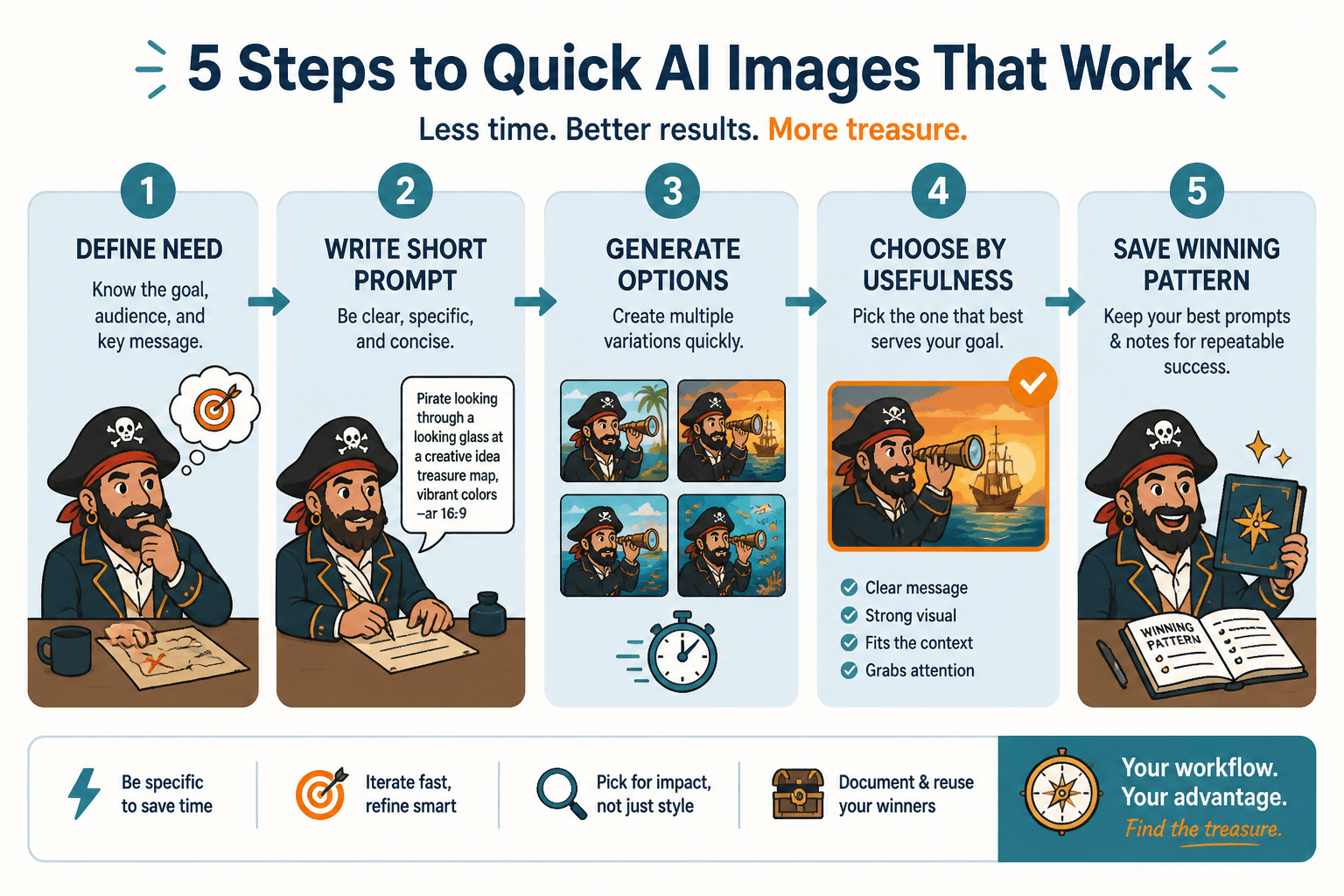
How to build a short AI image workflow that actually works
If you want the speed benefits without getting generic junk, keep the workflow tight and repeatable.
1. Define the image job in one sentence
Example: “I need a clean visual metaphor for a newsletter about content burnout.”
That is better than vaguely asking for “a cool image about creativity” and then acting surprised when the results look like stock-art fever dreams.
2. Limit the prompt variables
Do not change ten things at once. Keep a stable base and vary only the part you are testing, like composition, subject, mood, or style.
3. Generate a small batch
You usually do not need 40 versions. Start with a few strong attempts. If nothing lands, adjust direction instead of brute-forcing volume.
4. Choose based on usefulness, not novelty
The weirdest image is not always the best one. Pick the version that serves the content, fits the platform, and is easy for people to understand quickly.
5. Save winning patterns
If a prompt structure or visual approach works repeatedly, keep it. Short workflows get much better when you stop reinventing every asset from scratch.
For more practical ways to use that kind of system, these best ways to use AI image use cases as a creator can help you build a workflow that stays useful instead of becoming a toy box.
Short vs long is really about cost, not just length
Here is the part that gets overlooked: every longer image workflow has a cost. Time, attention, decision fatigue, editing overhead, and the opportunity cost of not finishing other work.
That cost can be justified. But it should be justified by the outcome, not by the vague feeling that “serious content” must involve more effort.
If a short workflow gives you a strong enough result in ten minutes, and the long version gives you a slightly better result in ninety, the long version is not automatically smarter. It may just be fancier inefficiency.
The bigger point is simple: clearer structure and clearer writing make the piece more useful. That is usually what makes the ending land better too.