Most people using AI images for their business are doing one of two things: making cheesy fake-art nonsense nobody trusts, or avoiding the tools completely because they assume all AI visuals look cheap, weird, or ethically radioactive.
Both takes are a little lazy.
AI image use cases for coaches, consultants, and personal brands are not really about replacing good design, brand thinking, or real photography. They are about speeding up useful visual work that normally gets ignored, delayed, or done badly at the last minute. Things like lead magnet covers, post graphics, article illustrations, workshop visuals, concept mockups, and branded idea graphics.
If you use them well, AI images can help you publish faster, explain ideas better, and make your content look more intentional without turning your brand into a haunted Canva experiment. That is the bar. Not “make everything with AI.” Just use it where it genuinely helps.
This guide will show you practical AI image use case examples for coaches, consultants, and personal brands, where they work best, where they absolutely do not, and how to use them without making your content feel synthetic and vaguely embarrassing.
For the main guide behind this topic, visit the parent guide.
What AI images are actually good for
AI image tools are strongest when you need visuals that support an idea, not when you need documentary truth.
That distinction matters more than people think. If you need a real client photo, a real event shot, a real team image, or a real behind-the-scenes moment, use a real image. Trust is fragile enough already. Do not fake evidence.
But if you need a visual to make an abstract point clearer, make a PDF feel more polished, create a branded concept graphic, or speed up rough design production, AI can be extremely useful.
- Explaining abstract ideas visually
- Creating concept art for articles, posts, and presentations
- Making simple branded assets faster
- Turning content themes into repeatable visual formats
- Supporting lead magnets, funnels, and educational content
- Generating rough creative directions before final design
It is a workflow tool, not a personality transplant.
If you want the broader strategic picture first, it also helps to read our guide to AI image use cases and the wider AI writing tools and workflows category if you are building this into a bigger content system.
Where AI images make the most sense for personal brands
The best use cases usually sit in the middle: not mission-critical proof assets, not random decorative fluff, but visuals that make your ideas easier to package, publish, and reuse.
Here are the ones that tend to be worth it.
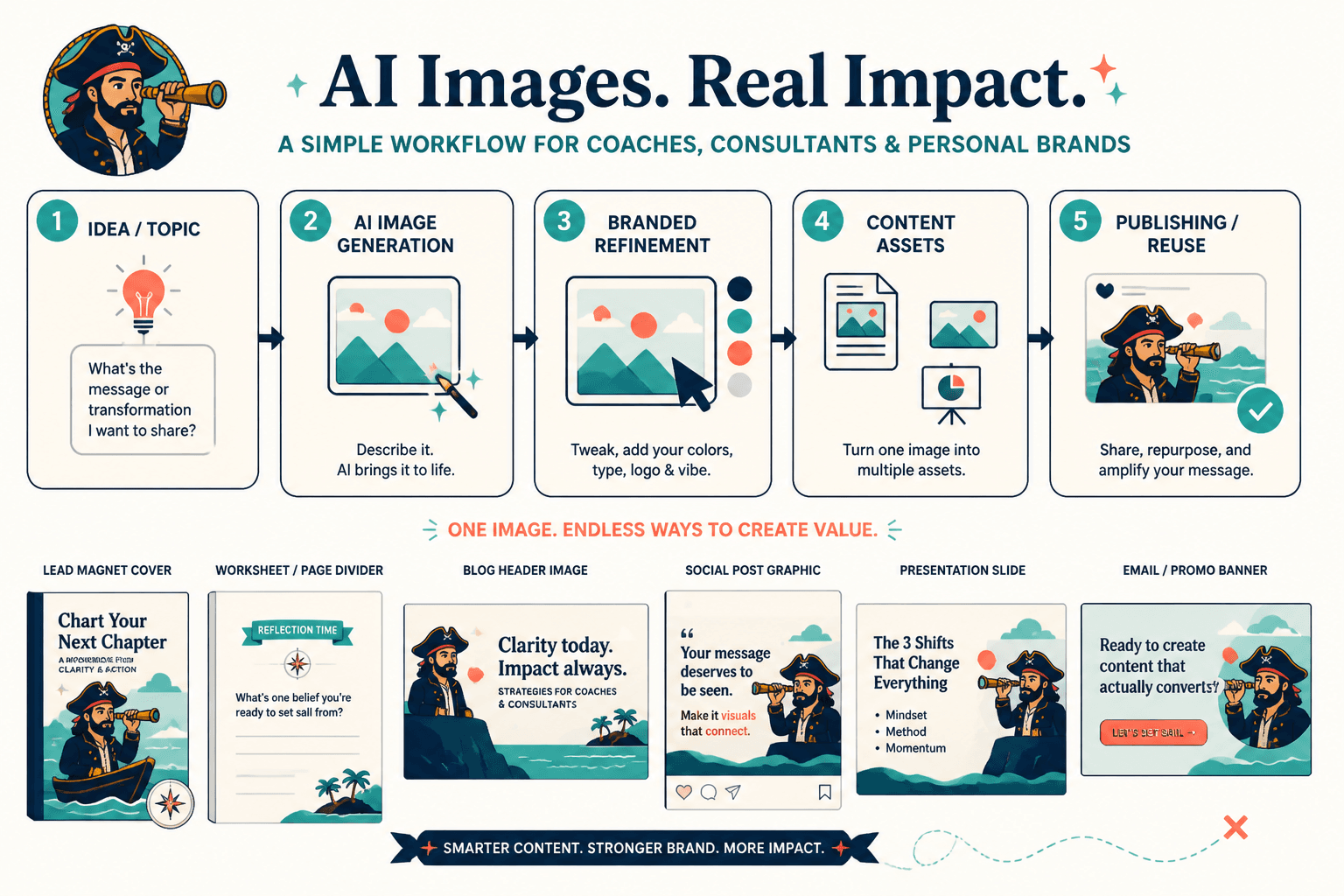
1. Lead magnet covers and worksheets
If you are giving away a guide, checklist, mini workbook, swipe file, or short PDF, AI can help create cover art or interior visual elements that make the resource feel deliberate instead of slapped together in twelve distracted minutes.
That does not mean “generate a fantasy castle for your pricing guide.” It means creating clean conceptual backgrounds, symbolic illustrations, branded textures, or supporting icons that match the topic.
- A business coach creates a bold, minimal cover visual for a “90-Day Offer Clarity Workbook”
- A consultant adds AI-generated conceptual illustrations to section divider pages in a strategy PDF
- A personal brand creates a branded visual motif for all free resources so they feel like a coherent library
If that is a priority for you, this related piece on lead magnet art for personal brands goes deeper.
2. Article header visuals for blog posts and LinkedIn articles
Writers, consultants, and solo experts often publish strong written content with painfully forgettable visuals. Not because they lack ideas. Because making custom graphics for every article is annoying, expensive, or easy to postpone forever.
AI helps by giving you a fast way to generate article headers built around the actual concept of the piece. That is useful when the topic is abstract and stock photography would make it worse.
For example:
- An article on audience trust could use a clean conceptual illustration about signal versus noise
- A post about offer positioning could use a simple visual metaphor around clarity and confusion
- A newsletter essay on creator burnout could use a restrained, symbolic image instead of the usual laptop-and-coffee cliché
The image does not need to be profound. It just needs to support the idea and feel on-brand.
3. Carousel and slide backgrounds
Carousel posts, workshop decks, and slide-based content often need visual support that is light, consistent, and reusable. AI can help you build a small set of branded backgrounds, concept scenes, or section visuals that stop your slides from looking like generic corporate wallpaper.
This is especially useful for:
- Instagram or LinkedIn carousels
- Webinar decks
- Masterclass slides
- Short educational PDFs
- Sales presentation visuals
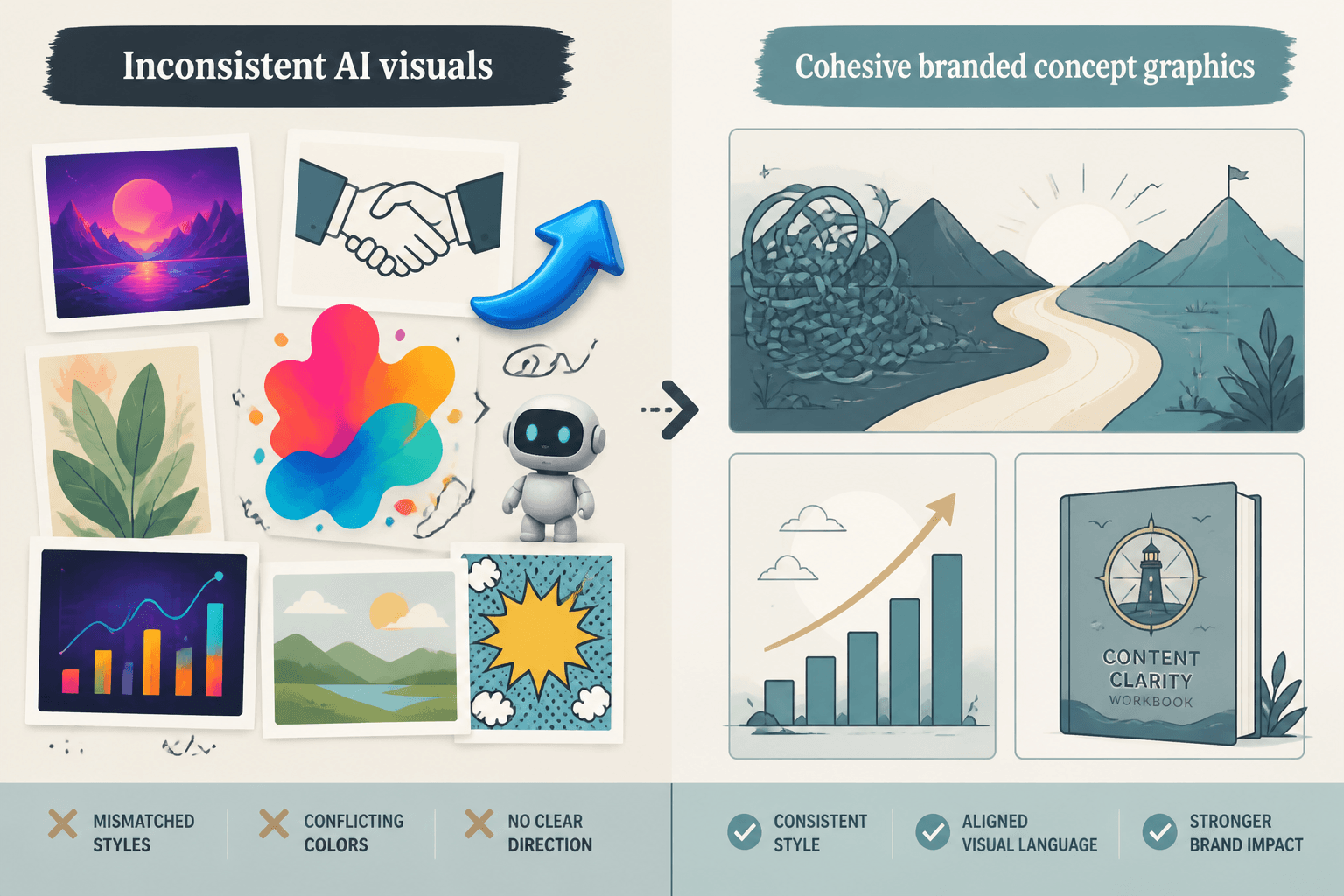
The trick is consistency. Generate in batches. Use similar prompts, color direction, aspect ratios, and composition rules. Otherwise your slide deck ends up looking like six different brands had an argument.
4. Visual metaphors for abstract expertise
This is one of the strongest AI image use case examples for coaches, consultants, and personal brands because so much expert content is abstract by nature. Strategy, positioning, messaging, trust, systems, confidence, clarity, differentiation, decision-making, audience fit. Useful ideas, visually annoying topics.
AI is good at helping you translate those invisible ideas into visual metaphors you can use across articles, decks, and posts.
- Messaging clarity as a spotlight versus fog
- Offer sprawl as too many doors in a hallway
- Brand focus as one strong signal cutting through static
- Content strategy as pathways converging into one destination
Done well, these visuals help readers grasp your point faster. Done badly, they look like rejected startup wallpaper from 2021. Taste still matters.
5. Branded quote cards and idea graphics
You do not need AI for every quote card. Frankly, many quote cards should just be text on a clean background. But if your brand publishes a lot of punchy ideas, frameworks, or short lessons, AI can help generate distinctive backdrops or visual systems that make those posts feel recognizably yours.
Good use:
- A repeating visual style for “myths versus reality” content
- Background textures for thought-leadership quote posts
- Simple illustration sets for recurring weekly content themes
- Concept-driven backdrops for core brand messages
Bad use:
- Unreadable busy art behind tiny text
- Completely different styles every week
- Using surreal visuals because the tool can, not because the content needs it
- Trying to disguise weak ideas with shinier graphics
6. Mockups for products, offers, and digital assets
If you sell digital products, templates, guides, mini-courses, or consulting packages, AI images can help create polished mockups and promotional visuals before you invest in custom design. That gives you a faster way to package offers without waiting on a full asset library.
For example, a coach launching a new workshop might use AI-assisted scenes showing a workbook on a desk, branded slides on a tablet, or a bundle layout for a resource pack. A consultant selling templates might create cleaner concept visuals around deliverables rather than pretending to photograph paperwork dramatically on reclaimed wood.
Again, support the offer. Do not manufacture fake proof. Product mockup, yes. Fake client result screenshot, absolutely not.
7. Content upgrades and funnel assets
AI images can quietly improve the boring but important parts of your content funnel: downloadable assets, landing page support graphics, nurture email visuals, thank-you page illustrations, and simple resource previews.
This matters because a lot of funnels break not from technical problems, but from weak packaging. The post is decent. The offer is decent. The visual presentation looks half-finished, so trust drops.
You can pair AI image work with smart content paths like:
- Post to lead magnet
- Article to downloadable worksheet
- Thread to email signup
- Bio link to resource library
- Case study to consultation page
If that side of the system needs work too, read funnel ideas to pair with AI image use cases.
What coaches, consultants, and personal brands should not use AI images for
This part is important because people get a little intoxicated by speed and forget that trust is the real asset.
- Do not use AI to fake client events, team photos, or behind-the-scenes moments
- Do not use AI-generated people as if they are real customers or audience members
- Do not create fake social proof visuals, fake screenshots, or fake media features
- Do not replace every real brand photo with synthetic imagery if your business depends on your face, presence, or lived credibility
- Do not use weirdly polished AI portraits that make you look like a crypto motivational speaker from an alternate timeline
For personal brands especially, realness is part of the product. Not fake authenticity. Actual recognizability. If people hire you, trust you, or buy because they believe in your expertise, then your visuals should not create quiet suspicion.
A simple rule helps here: use AI for concept support, not credibility fraud.
How to choose the right AI image use cases for your brand
You do not need a giant visual system on day one. You need a few high-leverage uses that actually save time or improve quality.
Start with these three questions:
- What visual tasks keep slowing you down?
Article headers, lead magnet covers, social graphics, slide visuals, product mockups? - Which of those tasks do not require photographic truth?
Those are strong AI candidates. - Where would better visuals improve trust, clarity, or conversions?
That is where AI becomes practical instead of decorative.
For many creators, the first three worthwhile use cases are:
- Lead magnet visuals
- Article or newsletter headers
- Carousel or slide support graphics
That is enough to build momentum without turning your workflow into a prompt-writing side quest.
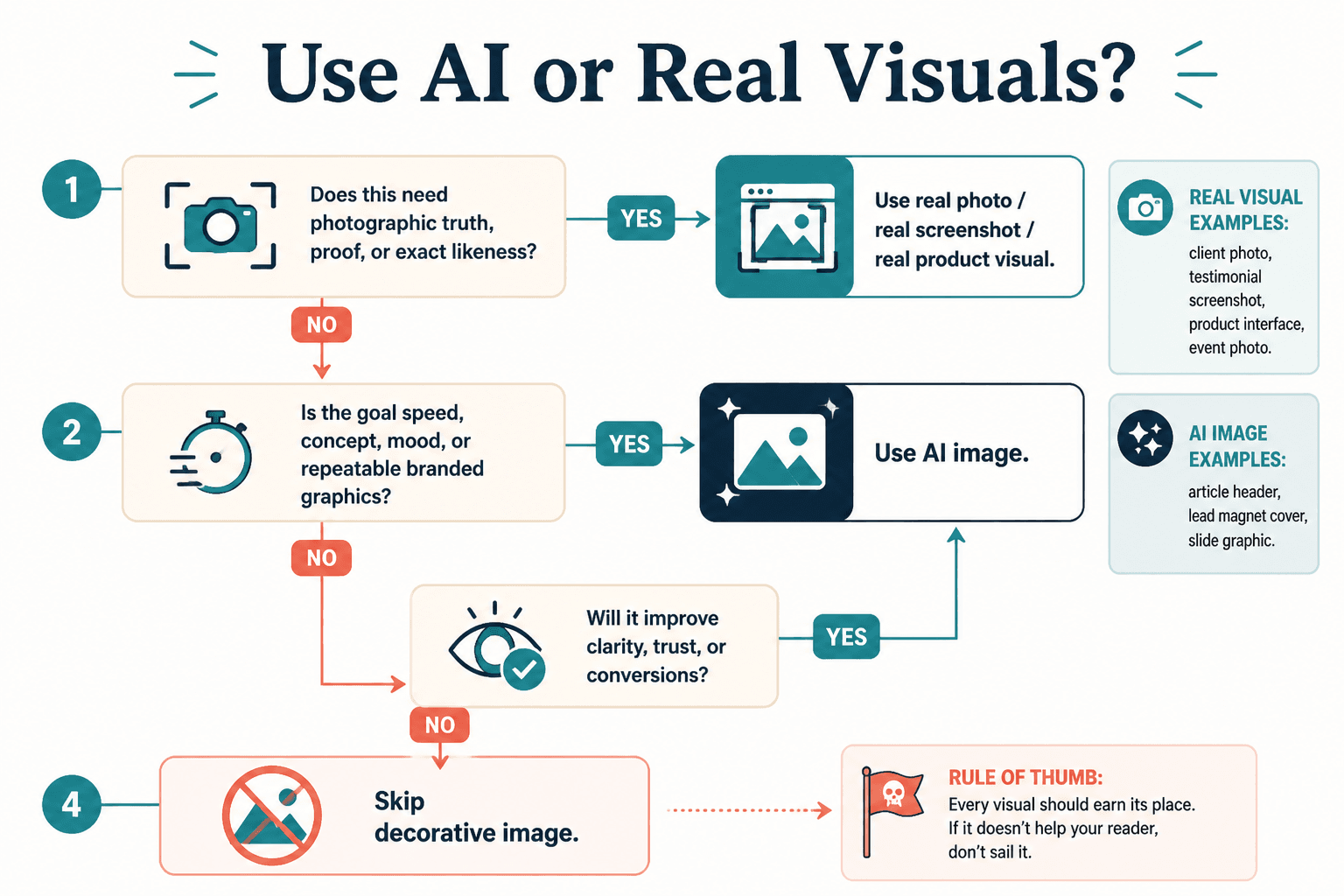
A practical workflow for using AI images without making a mess
The easiest way to get mediocre results is to generate random one-off images with no visual standards, no brand constraints, and no plan for reuse. You will move fast for a week and then wonder why your brand suddenly looks like it was assembled from ten unrelated Pinterest boards.
A better workflow is boring in the best possible way.
- Pick 2 to 4 repeatable use cases
For example: article headers, lead magnet covers, and carousel backgrounds. - Define visual guardrails
Color palette, mood, texture level, realism level, composition preferences, typography pairing. - Create prompt patterns, not random prompts
Build a reusable structure so outputs stay consistent. - Edit the results
Add text, crop correctly, clean layouts, and refine in your design tool. - Save the winners into a brand library
Do not regenerate from scratch every time if a style already works.
This is where many people get confused. AI image tools are not the whole workflow. They are one input. You still need judgment, selection, editing, and brand discipline. Same as with writing tools, honestly.
If you want platform and tool suggestions, this guide to AI image tools and design tools is a useful next stop.
Examples by business type
Business coach
- Offer audit workbook cover art
- Visual metaphors for content about clarity, pricing, and business growth
- Masterclass slides and resource previews
- Branded quote graphics for recurring insights
Consultant
- Article header visuals for thought-leadership pieces
- Presentation graphics for strategic frameworks
- Landing page illustrations for service offers
- Concept mockups for downloadable diagnostics or reports
Personal brand creator
- Newsletter issue artwork
- Digital product mockups
- Carousel design assets
- Visual systems for repeatable content series
Notice the pattern: these are all packaging and communication uses. Not fake-life uses. That difference keeps your brand on the right side of helpful.
Common mistakes that make AI visuals look cheap
- Using AI because it is available, not because the asset needs it
- Mixing five different visual styles across one brand
- Publishing raw generations without design cleanup
- Choosing overly literal or overly dramatic imagery
- Replacing all brand photography with synthetic visuals
- Using cluttered backgrounds behind important text
- Confusing “high detail” with “good taste”
That last one gets people a lot. More detail is not automatically more premium. Sometimes it just looks busy and desperate. Clean usually wins.
Simple prompt thinking that works better than random guessing
You do not need to become a prompt poet. You need to describe the function of the asset clearly.
A decent prompt usually covers:
- What the image is for
- The concept or metaphor
- The style direction
- The brand mood
- The composition needs
- The color direction
- What to avoid
For example, instead of prompting “business growth image,” you might prompt for a clean conceptual illustration showing one clear path emerging from complexity, minimal composition, modern editorial style, muted brand colors, negative space for headline text, no people, no cheesy corporate elements.
That is not glamorous. It is just specific. Specific tends to beat vague every time.
For more applied examples, these creator-focused AI image use ideas should help.
When AI images are worth it and when they are not
The bigger point is simple: clearer structure and clearer writing make the piece more useful. That is usually what makes the ending land better too.
The bigger point is simple: clearer structure and clearer writing make the piece more useful. That is usually what makes the ending land better too.