Most creators use AI images in one of two bad ways: they either treat them like a magic content machine, or they avoid them completely because too much AI art looks like glossy nonsense made for people who enjoy generic inspiration posters.
The useful middle is where the real value lives.
The best ways to use AI images as a creator have very little to do with making random pretty pictures. They’re about speeding up ideation, improving packaging, supporting your written content, and creating visual assets that make your work easier to notice, understand, and remember. That is a very different goal from “make cool art because the tool exists.”
If you’re a writer, coach, consultant, marketer, solo founder, or personal brand, AI images work best when they support clarity and workflow. Not when they try to fake taste you have not developed yet. In this guide, I’ll show you where AI visuals are genuinely useful, where they’re overrated, and how to use them without making your brand look like a confused tech demo.
To see how this fits into the wider strategy, open the parent guide.
What AI images are actually good for
AI image tools are good at speed, variation, concepting, and rough asset creation.
They are not automatically good at brand strategy, visual taste, audience trust, or making average ideas feel premium. That part is still your job. Slightly rude, but true.
As a creator, the most useful mindset is this: use AI images to support communication, not to replace it.
- Need a visual concept for a post? Useful.
- Need a fast mockup for a lead magnet or workshop? Useful.
- Need a thumbnail direction before hiring a designer? Useful.
- Need visual consistency for content repurposing? Useful.
- Need a fake lifestyle image of yourself looking profound in impossible lighting? Usually not useful.
If you want a broader framework for where these fit in your workflow, it’s worth exploring the main AI writing tools and workflows section along with the larger AI image use cases hub.
The best ways to use AI images as a creator
Here’s where AI images pull their weight.
1. Create supporting visuals for social posts
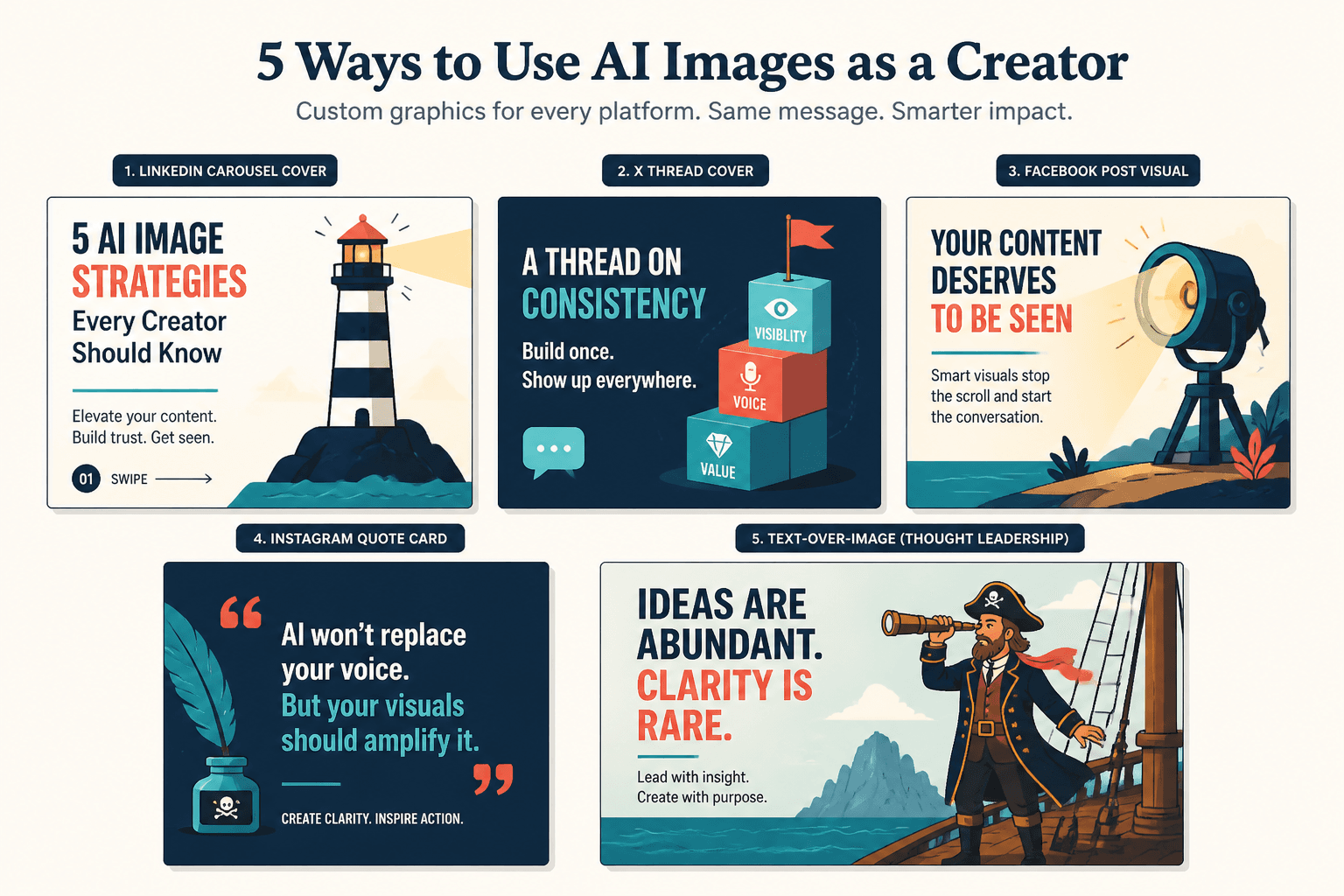
If your content is thoughtful but visually forgettable, AI images can help you package it better. This works especially well for carousels, quote graphics, concept illustrations, simple post covers, and background visuals for text-led content.
The key is that the image should reinforce the point of the post, not compete with it. If you wrote a post about audience trust, the visual should make that idea easier to grasp. A clean conceptual image about credibility, consistency, or visibility is more useful than a hyper-stylized sci-fi portrait because the prompt generator got carried away.
- LinkedIn carousel covers
- X thread cover graphics
- Facebook post visuals
- Instagram quote cards
- Text-over-image thought leadership graphics
Good use: pairing a sharp opinion with a simple visual metaphor.
Bad use: posting an elaborate AI image with no clear point, then wondering why nobody cares.
People rarely engage because an image is technically impressive. They engage because the image helps package a relevant idea.
2. Mock up lead magnets, offers, and digital products
This is one of the most practical use cases and one of the least discussed.
If you sell a guide, workshop, swipe file, mini-course, template pack, or audit, AI images can help you create polished mockups fast. Not fake substance. Just better presentation. A simple 3D guide cover, worksheet preview, or branded workbook mockup can make an offer feel more concrete and easier to understand.
That matters because people often do not buy offers they cannot picture.
- Ebook cover concepts
- Notion template previews
- Checklist and workbook mockups
- Mini-course slide cover art
- Lead magnet promo graphics
This works especially well when paired with a simple content funnel. A post gets attention, the profile points to the resource, and the landing page uses a visual that makes the resource feel tangible. If you want ideas on that side of things, read best funnel ideas to pair with AI image use cases.
3. Generate concept art for article and newsletter packaging
Writers and newsletter creators can use AI images to package long-form content without relying on stale stock photos of hands on laptops. That genre needs to rest.
A good article image does one of three things:
- Visualizes the core argument
- Sets the tone
- Makes the piece easier to remember
If you wrote about burnout, positioning, content systems, AI prompts, funnels, or trust, you can create a simple conceptual visual style around those themes. Not every article needs bespoke illustration, but when your content library starts to look visually consistent, your work feels more intentional.
This is one reason AI image tools are useful inside broader content operations. They help bridge the awkward gap between “I have strong written ideas” and “my visuals all look like random leftovers from five different Canva moods.”
4. Build better thumbnails and cover image drafts
You do not need AI to finalize every thumbnail. But it can help you get to better directions faster.
If you publish on YouTube, use webinar replays, host workshops, or turn articles into video, AI image tools can generate visual concepts for:
- Thumbnail compositions
- Background scenes
- Object-based visual metaphors
- Color and contrast directions
- Mood references for a designer
The smart move here is often to use AI as a draft partner, not the final designer. Generate options, figure out what visual framing gets the point across, then refine manually. That tends to produce better results than publishing the first uncanny image the tool spits out.
5. Turn abstract ideas into visual metaphors
Creators traffic in abstract ideas all the time: trust, authority, positioning, friction, momentum, clarity, burnout, consistency, scale. Those are useful words, but they are slippery. AI images can help turn them into visual metaphors people can process faster.
For example:
- Positioning as a spotlight in a crowded room
- Content consistency as a trail of signposts
- Weak offers as an empty storefront with bright signage
- Audience trust as a bridge under construction
- Funnel leaks as a bucket with visible holes
These visuals make content more teachable. They also make workshops, slides, guides, and social posts easier to follow.
Just do not get too clever. If the metaphor takes longer to decode than the original idea, you have built decorative confusion. Which is still confusion.
6. Speed up branded content production
If you publish often, you already know the problem is not always idea generation. Sometimes it is asset fatigue. You need one more visual. One more background. One more header image. One more promo variation that does not look completely disconnected from the rest of your brand.
AI images can help you build a repeatable visual system for recurring content.
- Weekly article headers in one style
- Podcast episode cover variants
- Series graphics for recurring themes
- Backgrounds for text posts and quote cards
- Email banner images
- Visual motifs for launches or campaigns
This is where prompts, references, and templates matter. The goal is not infinite randomness. The goal is controlled consistency.
If you want more practical examples, AI image use cases ideas that save time and look better goes deeper on repeatable creator-friendly applications.
7. Create illustrations for courses, workshops, and presentations
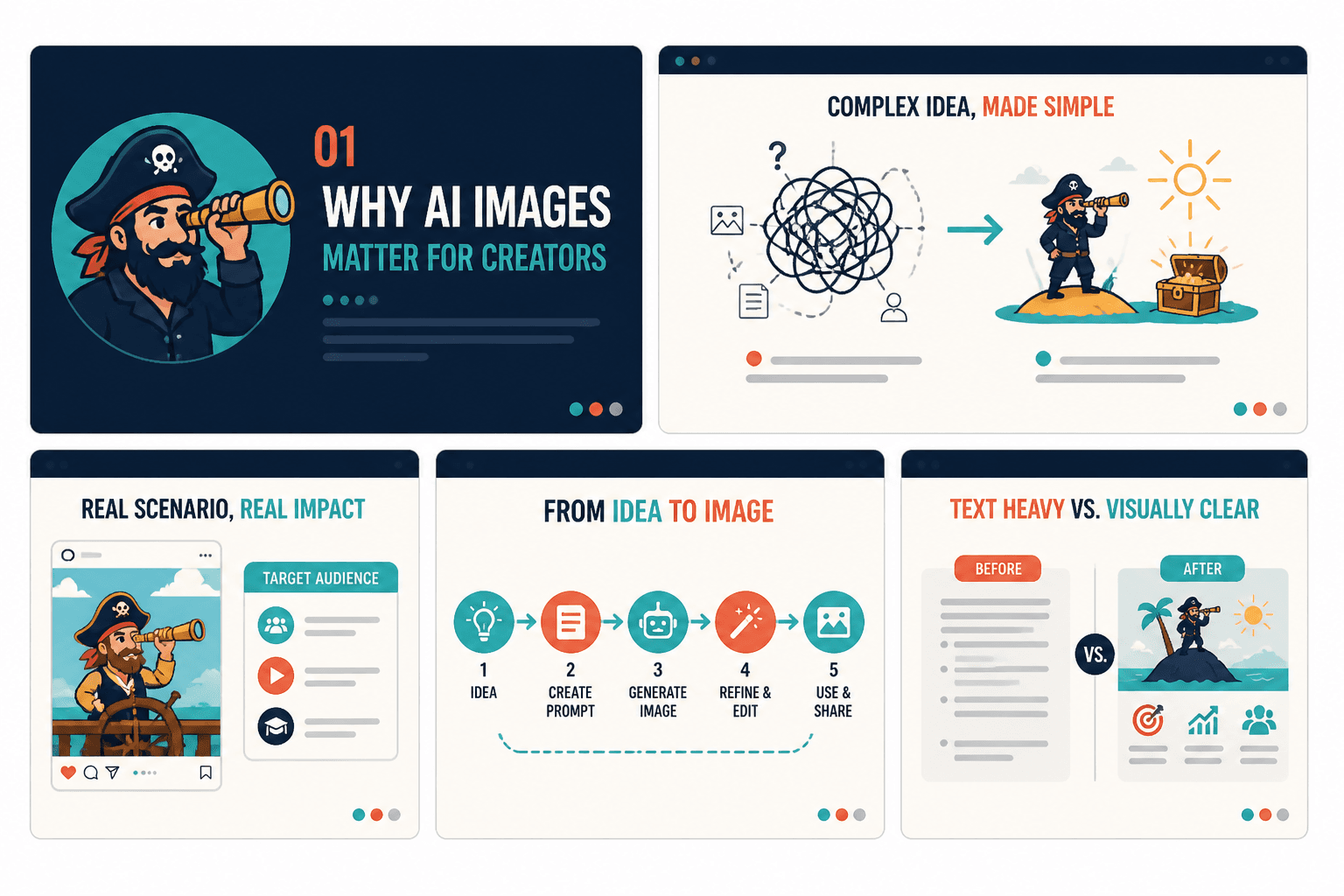
Most presentations are too text-heavy because the creator knows the topic well and assumes everyone else can follow dense slides without visual support. They cannot. Or at least not happily.
AI images can help you create custom visual aids for workshops, slide decks, webinar sessions, and training materials. Not to decorate every slide into oblivion, but to break up complexity and improve retention.
- Section divider visuals
- Concept illustrations
- Scenario mockups
- Process diagrams turned into styled visuals
- Audience-specific examples
One image that makes the argument clearer is worth more than six slides of “key takeaways” in a safe corporate font.
8. Prototype ad creatives and campaign concepts
If you run paid ads, launch promotions, or test different lead magnet angles, AI images can help you prototype creative concepts before spending a lot of design time.
This is useful for testing:
- Different visual directions for the same offer
- Different audience angles
- Different emotional tones
- Different color and composition choices
You still need copy that works. You still need an offer people want. But AI can shorten the path between idea and test. That makes it easier to iterate without turning every campaign asset into a whole production.
9. Create visual assets for your profile, site, and brand touchpoints
AI images can support your broader creator presence, not just your posts.
- Website header concept art
- About page visuals
- Profile banner drafts
- Section backgrounds for landing pages
- Resource library cover images
- Branded illustrations for testimonials or case studies
This is especially useful if your brand does not rely on personal photography for every touchpoint. Some creators need a face-forward brand. Others do better with a more conceptual visual identity. AI images can help with the second category if you use them with restraint and consistency.
Where creators get AI images wrong
Most bad AI image use is not a tool problem. It is a judgment problem.
Using AI images with no content strategy behind them
If the visual has no job, it becomes clutter. A nice-looking image does not fix a weak idea, vague positioning, or a boring offer.
Before generating anything, ask:
- What is this image helping someone understand?
- Where will it be used?
- What action should it support?
- Does it match my tone and audience?
Choosing “impressive” over useful
Many creators chase images that look advanced instead of images that communicate clearly. The result is visual peacocking. High effort, low usefulness.
Usually, simpler wins:
- Cleaner composition
- Fewer visual elements
- Stronger focal point
- More obvious connection to the message
- Less surreal nonsense unless your brand genuinely suits it
Publishing inconsistent visual styles
If every image looks like it belongs to a different business, your content starts to feel scattered. And scattered content rarely feels trustworthy.
Pick a visual direction:
- Minimal conceptual illustration
- Clean editorial graphics
- Muted textured backgrounds
- Bold geometric metaphors
- Stylized but consistent brand art
Then stay close to it. Not rigidly. Just enough that people feel continuity across your work.
Using AI images when real screenshots or real photos would be better
This is the part some people skip because they want one tool to solve every visual need.
Sometimes the best image is not AI-generated at all. If you are teaching a workflow, showing a product, walking through analytics, or building trust around real results, screenshots and real examples usually beat generated visuals.
Use AI when it improves understanding, speed, or consistency. Do not use it when it creates distance from reality.
A simple framework for choosing the right AI image use case
If you are not sure when to use AI images, this simple filter helps.
| Question | If yes | If no |
|---|---|---|
| Does the image support a clear content goal? | Proceed | Skip it |
| Would a visual make the idea easier to grasp? | Use concept imagery | Keep it text-led |
| Do you need speed or volume? | AI can help | Manual design may be fine |
| Do you need realism or proof? | Use screenshots or real media | AI may work well |
| Can you keep style consistent? | Build a repeatable system | Refine before publishing |
That framework alone will save you from a lot of unnecessary prompt-happy chaos.
How to use AI images without making your brand look cheap
The difference between useful AI visuals and cheap-looking AI visuals is rarely the tool. It is usually the process.
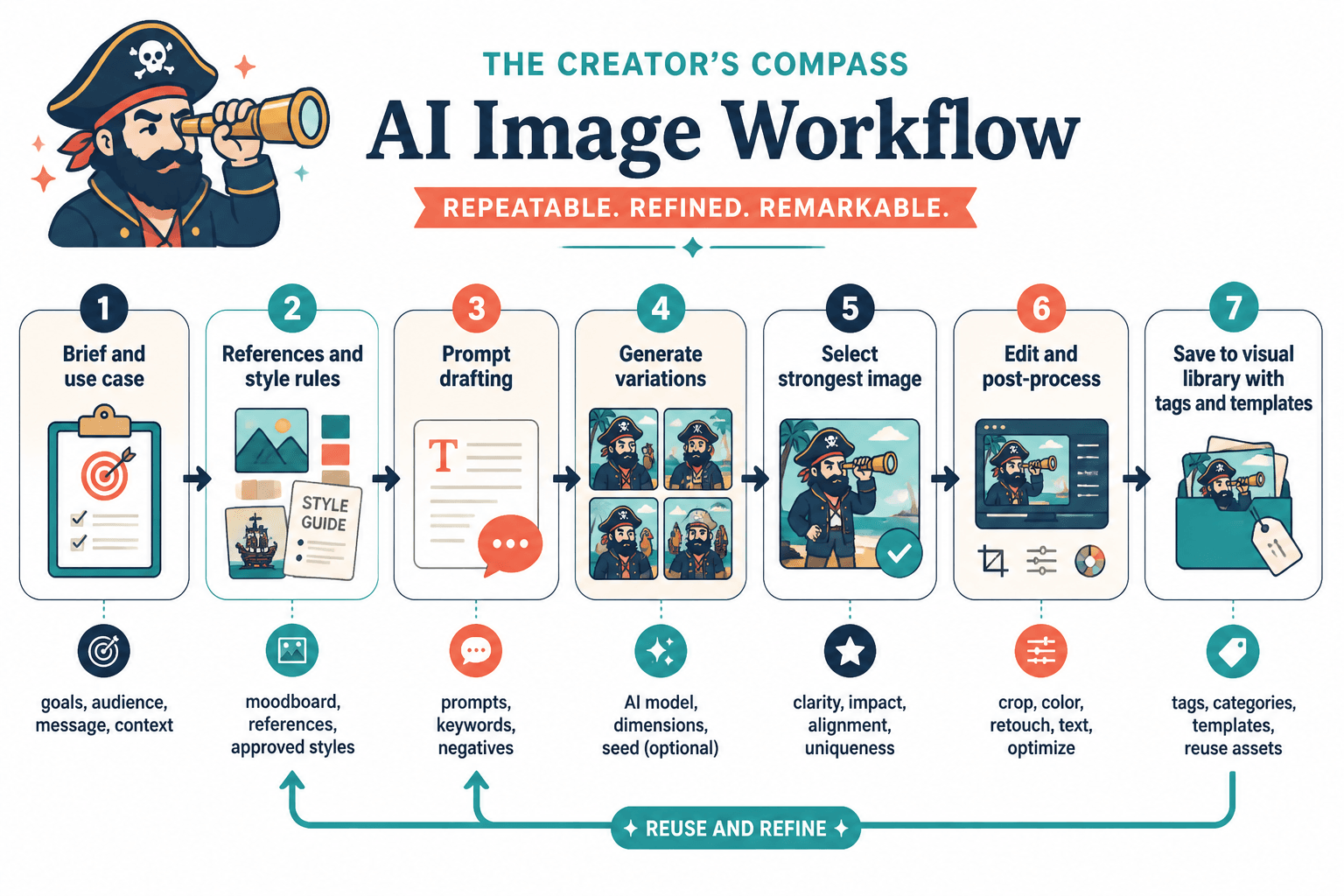
Start with the message, not the prompt
Write down the point first. Then define the visual role.
- Explain a concept
- Support a CTA
- Package a post
- Create a mockup
- Build a recurring content asset
Once the role is clear, the prompt gets better automatically because it has a job.
Use references and constraints
Open-ended prompting often creates messy results. Give the model boundaries:
- Color palette
- Composition style
- Lighting direction
- Level of realism
- Brand tone
- Use context
“Minimal editorial-style conceptual illustration in muted blue and charcoal, clean background, modern professional tone, designed for a creator marketing article header” will usually get you closer than “make a cool image about marketing.”
Edit aggressively
Do not publish first drafts by default. Crop them. simplify them. Add text properly. Remove weird details. Adjust contrast. Tighten colors. If you are using AI images professionally, post-production is not optional.
Think of AI output as raw material. Sometimes decent raw material. Sometimes cursed raw material. Either way, raw.
Build a visual library, not one-off chaos
Save prompts, image references, approved styles, recurring dimensions, and use-case templates. That is how AI image workflows become genuinely useful over time.
If you want a stronger system for that, check best templates and tools for AI image use cases and AI image use cases guide for creators who want better results.
Best use cases by creator type
Writers and newsletter creators
- Article headers
- Newsletter banners
- Concept visuals for essays
- Quote card backgrounds
- Lead magnet mockups
Coaches and consultants
- Framework visuals
- Workshop slides
- Client resource mockups
- Landing page visuals
- Trust-building branded content assets
Solo founders and marketers
- Campaign concepts
- Ad creative drafts
- Resource cover images
- Product storytelling visuals
- Visual assets for funnels and launches
Personal brands
- Profile banner concepts
- Series graphics
- Platform-specific post visuals
- Branded thought leadership images
- Visual consistency across channels
What AI images cannot do for you
This part matters because too many creators expect tools to solve strategic problems.
- They cannot fix weak positioning.
- They cannot make a boring offer compelling.
- They cannot create trust from nothing.
- They cannot replace audience understanding.
- They cannot give you taste by force.
What they can do is help a thoughtful creator move faster, package ideas better, test more directions, and build a stronger visual system without needing a full design team for every task.
That is already plenty. You do not need magical claims. You need a useful workflow.
Quick FAQ
Should creators use AI images for every post?
Not even close. Use them when they improve clarity, packaging, or consistency. Text-only posts and real screenshots still matter.
Are AI images good for selling digital products?
Yes, especially for mockups, covers, previews, and promo visuals. Just make sure the offer itself is clear and useful.
Do AI images hurt trust?
Only if they feel deceptive, lazy, or disconnected from your brand. Used well, they simply support communication.
What is the best style for creator brands?
Usually a simple, consistent style that supports your message. Clean beats chaotic most of the time.
Should I use AI images instead of hiring a designer?
For drafts, routine assets, and fast production, maybe. For high-stakes brand work, a strong designer is still worth it.
Use AI images like a creator, not like a kid who found the special effects button
The best ways to use AI images as a creator are practical, not theatrical.
Use them to package ideas better. Use them to mock up offers faster. Use them to build more consistent content systems. Use them to make abstract ideas easier to understand. Use them where they save time without making your work feel fake.
That is the standard.
If an AI image helps your audience get the point faster, trust the offer more easily, or move through your content with less friction, good. Keep it. If it just looks flashy and says nothing, toss it. Your brand does not need more decorative confusion.
For more support on building a smarter system around visuals, browse the broader AI image tools and AI image use cases resources.
The bigger point is simple: clearer structure and clearer writing make the piece more useful. That is usually what makes the ending land better too.