
When people hear “ChatGPT memory,” they often imagine a chatbot that quietly stores everything you say and remembers it forever.
That’s the wrong mental model.
ChatGPT memory is less like a perfect notebook and more like a small, editable set of helpful preferences and facts that can carry across chats. It can make the tool feel more consistent over time, especially if you use it for recurring creator work. But it does not replace clear prompts, project briefs, or your own content system.
If you create content, edit drafts, research topics, or manage repeatable workflows, memory can be useful. If you assume it is full recall, you will probably overtrust it.
This guide explains what ChatGPT memory actually does, what it tends to remember, what it doesn’t, and how creators can use it without letting it become a crutch.
What ChatGPT memory actually is
ChatGPT memory is a feature that can save certain useful details from your conversations so future chats can be more relevant. Think of it as a lightweight layer of persistent context.
It may remember things like:
- your preferred tone or writing style
- recurring project goals
- format preferences, like bullets vs. paragraphs
- things you explicitly ask it to remember
OpenAI describes memory as a way to make ChatGPT more personalized across chats, with controls for viewing and managing what’s stored. See the official overview in the OpenAI Memory FAQ and the broader OpenAI Help Center.
For creators, the important point is simple: memory helps ChatGPT carry forward some useful context. It does not magically understand your business, your audience, or your brand unless you teach those things clearly.
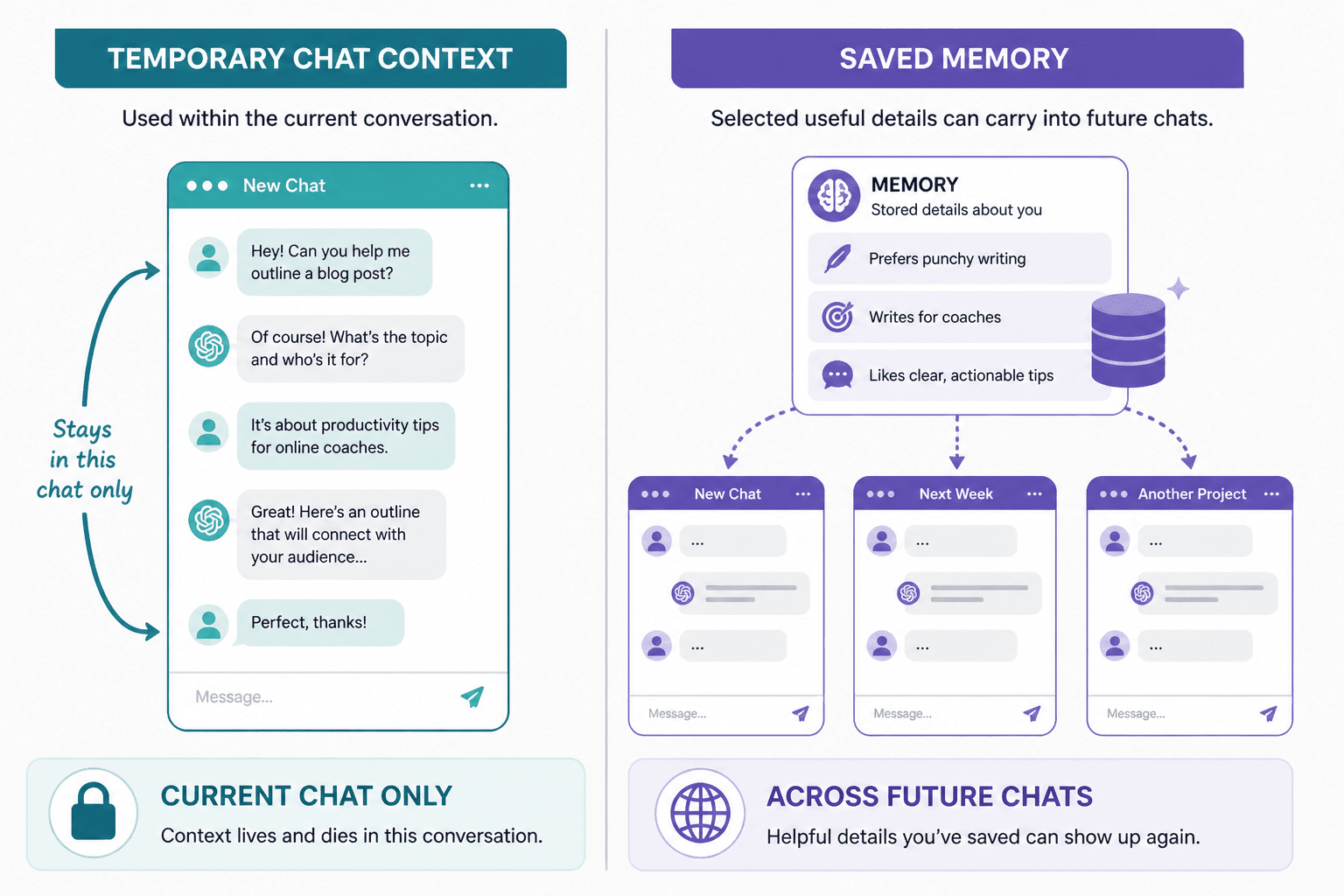
Memory vs. temporary chat context
ChatGPT uses two different kinds of context:
- Temporary chat context – what’s inside the current conversation
- Saved memory – useful details carried into future chats, if memory is enabled and the system stores them
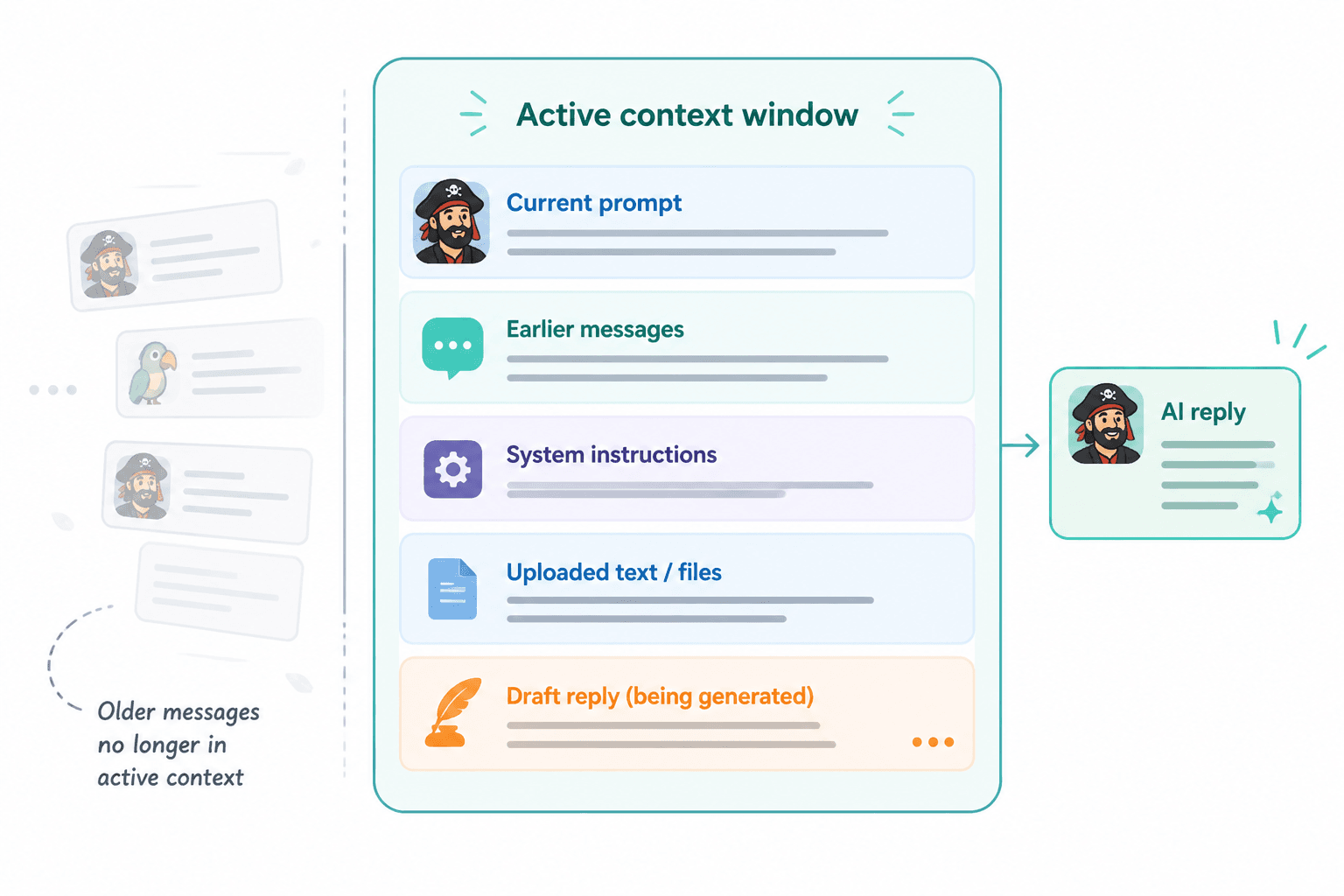
Temporary context is like a working whiteboard. While the chat is open, ChatGPT can use the details you’ve already shared in that thread. Once the conversation gets long or ends, that context may stop being available in the same way.
Saved memory is more like a sticky note that can follow you into later chats.
That difference matters for creators because a lot of workflow frustration comes from mixing these two ideas up. If you assume the model “already knows” a project because you explained it last week, but that context only lived in one chat, you may get generic output. If you assume memory stores everything, you may say too little and lose control of the result.
For a useful glossary of AI writing terms, see Beginner Terms in AI Writing Tools.
What ChatGPT memory tends to remember
Memory is designed to keep track of helpful, repeated, or explicitly requested details. The exact behavior can change as OpenAI updates the product, but in practical terms it tends to remember things that improve future responses without requiring you to repeat yourself constantly.
Examples that may be useful for creators:
- “I write in a clear, non-hypey tone.”
- “I prefer outlines before full drafts.”
- “I create SEO content for creators and small teams.”
- “When I ask for an edit, keep my voice conversational.”
- “I often work on YouTube scripts, newsletters, and blog posts.”
In other words, memory is strongest when it helps establish defaults.
If you want the model to carry a stable creative preference forward, memory can help. If you want a detailed understanding of a one-off campaign, a product launch, or a specific source pack, you still need to provide that material in the relevant chat.
OpenAI also documents related personalization controls such as saved preferences and temporary chat behavior in its Help Center. If you want to understand the product’s control surface more fully, start with the official help pages around memory and settings. A good entry point is the Memory FAQ.
What ChatGPT memory does not reliably do
Here is the part creators need to internalize: memory is not a perfect archive.
It does not reliably store every exchange, every source, or every project detail. It is not designed to function like your personal knowledge base or a searchable transcript of your entire work history.
It also does not guarantee:
- exact wording from prior chats
- complete project history
- accurate recall of all past files or links
- consistent understanding of changing brand rules
- real-time awareness of every active task you have
That’s why memory should never replace a proper creator workflow. A good prompt still beats a vague one. A current brief still beats “you already know my style.” And a project note or brand guide still beats hoping the model remembers the right version.
OpenAI’s public docs also explain that you can manage, delete, or turn off memory depending on your account and product experience. See the help docs in the OpenAI Help Center for the latest controls.
When ChatGPT memory is genuinely useful for creators
Memory is most useful when you have repeatable work and want fewer repeated setup steps.
That makes it especially helpful for:
- Content drafting – keeping tone, audience, and format preferences consistent
- Editing – remembering your preferred edit style, like concise, friendly, or more direct
- Ideation – reusing your niche, audience, and content pillars without re-explaining them every time
- Repurposing – adapting one idea into posts, scripts, emails, and outlines with fewer setup prompts
- Research workflows – remembering your default angle or target reader for topic exploration
For example, if you regularly create educational content for creators, memory can help ChatGPT stay aligned with that audience. Instead of starting from zero every time, it can pick up some of the basics faster.
This works especially well when combined with a broader creator system. If you are building repeatable workflows, see AI Writing Tools Workflows for a bigger-picture view of how prompts, templates, editing steps, and tools fit together.
Memory becomes more useful when it supports a system you already have, rather than replacing that system.
When to turn ChatGPT memory off
There are situations where memory is not the right choice.
Consider disabling it, or switching to temporary chat, when you are working on:
- highly sensitive material
- client work with strict confidentiality requirements
- one-off projects that should not influence future chats
- test prompts or experiments you do not want shaping future outputs
- topics where stale context could create confusion
It is also worth turning memory off if you notice the model starting to lean too hard on old assumptions. Sometimes a stored preference becomes a bad default. Maybe your brand voice changed. Maybe your audience changed. Maybe the product launch is different from the evergreen content you normally make.
In those cases, a clean chat with fresh instructions is often better than a remembered shortcut.
Privacy and control: the creator caution that matters
Memory is meant to be useful, but usefulness and privacy should be treated as separate questions.
If you use ChatGPT for client work, personal projects, or anything involving sensitive business context, take the time to understand the controls. OpenAI provides options for managing memory, including viewing and deleting saved items and adjusting whether memory is enabled. The current details are covered in the official Memory FAQ.
A few practical habits help here:
- Do not rely on memory for private facts you would not want surfaced again later.
- Keep sensitive client notes in your own system, not only in chat.
- Review stored memories periodically if you use the feature heavily.
- Use temporary chat for exploratory work, especially when a project is not meant to persist.
If you are building a creator stack and want to compare tools that fit different privacy and workflow needs, see Best ChatGPT Apps and GPTs for Creators.
Practical risks and workflow mistakes
Memory can improve convenience, but convenience creates a few predictable mistakes.
1. Assuming memory can infer your current goal
It can’t.
If you need a specific deliverable, say so. “Write a 90-second YouTube intro for beginner creators” is better than “use my usual style.”
2. Letting old preferences override the current project
Your past work may not match today’s task. Memory should support your current brief, not compete with it.
3. Forgetting that different chats have different context
A long conversation can give the illusion of continuity. A new chat won’t automatically have all that same working context unless it was saved as memory.
4. Treating memory like a source of truth
It is not your source of truth. Your source of truth should be your notes, docs, outlines, source material, and final instructions.
5. Not updating stale preferences
If your niche, tone, format, or offers change, update your instructions and review what memory is holding onto.
For creators who use AI heavily in research and brainstorming, it helps to keep the distinction clear between remembered preferences and active project data. See Creator AI Research and Ideation Guide for workflows that keep ideas organized before drafting begins.
A simple best-practices checklist
- Use memory for stable preferences, not fragile project details.
- Give clear instructions in every new task anyway.
- Keep a separate brand brief or style guide for important work.
- Use temporary chat for sensitive or one-off experiments.
- Review saved memories occasionally and delete stale ones.
- Assume memory helps with continuity, not completeness.
- Write prompts as if memory might be missing or outdated.
A good rule: if the task would still need to be correct without memory, then your prompt is probably strong enough. If the task depends on memory alone, it is too fragile.
Conclusion: memory is a support layer, not a strategy
ChatGPT memory can make creator workflows smoother. It can reduce repetitive setup, reinforce preferred tone, and help ChatGPT act a little more like a long-term assistant.
But the best way to use it is not to trust it blindly. It works best when it sits underneath a real creator system: clear briefs, reusable prompts, organized notes, and an editing process that does not depend on the model “just knowing.”
If you want to build that system, start with AI Writing Tools Workflows, then refine your terminology with Beginner Terms in AI Writing Tools. From there, you can decide where memory fits into your own process, and where a fresh prompt is still the better move.
For creators, that is the real takeaway: ChatGPT memory is useful persistent context, not spooky full recall.