Most creators are not really looking for “the best ChatGPT app.” They are trying to solve a narrower problem:
- How do I draft faster without sounding generic?
- How do I turn one idea into a post, script, email, and short-form version?
- How do I keep research, notes, and references from scattering everywhere?
- How do I build a repeatable workflow instead of prompting from scratch every time?
That is why roundup posts can be frustrating. They often list every app with an AI badge and call it “useful for creators,” even when the tool does almost nothing for the actual work. A better question is not which app is the flashiest, but which kind of tool fits a specific part of a creator’s workflow.
This guide takes that approach. It is not a giant app directory. It is a practical map of the ChatGPT apps and GPT setups that genuinely help creators with drafting, editing, repurposing, ideation, research, and handoffs between tools. It also keeps the skeptical view in mind: AI can save time, but it cannot reliably replace judgment, voice, or context.
What “best” should mean for creators
Before choosing apps or custom GPTs, define “best” by workflow fit, not feature count.
A useful ChatGPT app or GPT setup should do most of the following:
- Reduce friction: fewer steps between idea and usable output
- Respect your source material: can it work from outlines, transcripts, docs, or notes without mangling them?
- Match your format: posts, scripts, newsletters, threads, briefs, or content calendars
- Support repetition: can you reuse it across projects instead of rebuilding prompts every time?
- Handle handoffs: can it move cleanly from research to drafting to editing to repurposing?
- Stay editable: does it give you something you can shape, not just a polished-sounding answer?
OpenAI’s own guidance on ChatGPT custom GPTs makes the core point well: custom instructions and attached knowledge are most useful when they create a repeatable behavior, not when they merely add novelty. Likewise, the OpenAI GPTs page frames GPTs as task-specific assistants, which is exactly how creators should think about them: narrow, reusable, workflow-aware.
If you want a broader framework for how these tools fit together, see TLG’s AI writing tools workflows guide.
The main categories that are actually useful
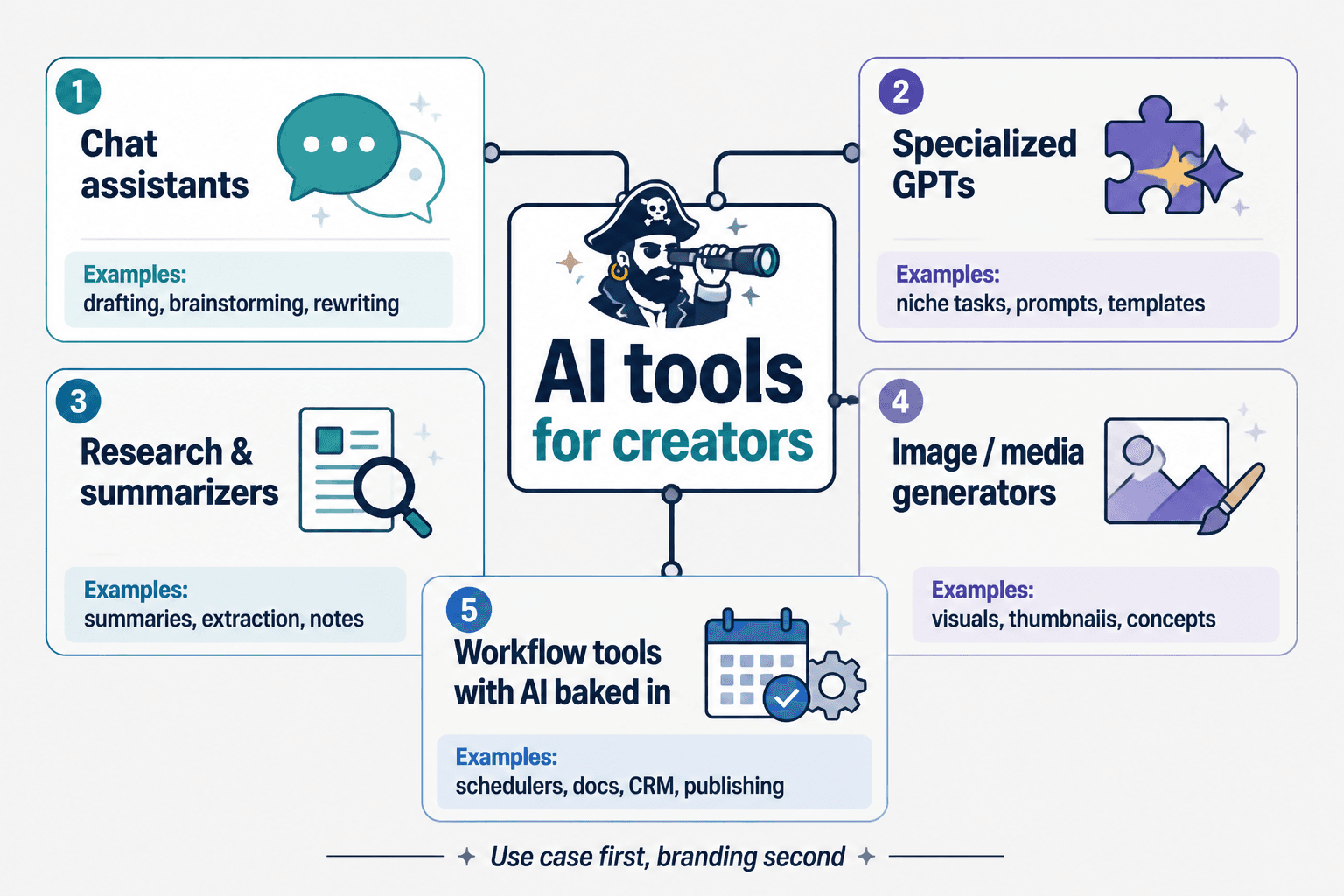
1) General writing assistants for drafting and rewriting
This is the base layer. For most creators, the most useful ChatGPT setup is still the simplest one: a strong general writing assistant that can help with drafting, restructuring, summarizing, and tone shifting.
Useful jobs include:
- turning rough notes into a first draft
- tightening long sections
- changing tone for different channels
- generating variants of a headline, intro, or CTA
- creating a cleaner version of a transcript or brainstorm
What to look for:
- strong instruction following
- the ability to work from pasted source material
- useful revision control rather than overconfident “final” copy
- easy iteration on tone, length, and format
What it is bad at:
- faithfully preserving your exact voice without editing
- making strategic content decisions for you
- knowing when a line feels too salesy, vague, or off-brand
For creators, this category is less about “magic writing” and more about getting from messy input to editable output faster. That is still valuable, but only if you stay in control of the final draft.
2) Custom GPTs for recurring tasks
Custom GPTs are often more useful than people expect, but only when the task is narrow. A creator usually does not need a GPT that does everything. They need a GPT that does one or two repeated jobs well.
Good examples:
- a brand voice GPT that rewrites drafts in a consistent tone
- a content brief GPT that turns a topic into a structured outline
- a repurposing GPT that converts one long-form piece into short-form variants
- an editorial QA GPT that checks for clarity, repetition, missing links, or weak transitions
- a research synthesis GPT that turns sources into a summary with angles, objections, and next steps
Why they matter:
- they reduce prompt fatigue
- they standardize repetitive work
- they make handoffs smoother when you work across formats or collaborators
What they should not do:
- replace your editorial standards
- “lock in” bad assumptions from your own instructions
- produce a false sense of consistency when the underlying source material is weak
If you are new to the terminology around prompt design, memory, and custom behavior, TLG’s beginner terms in AI writing tools and what is ChatGPT memory are useful foundations.
3) Repurposing tools for turning one asset into many
Repurposing is one of the clearest wins for creators. A strong AI stack should help you move from one “source asset” into multiple usable formats:
- article to newsletter
- podcast transcript to social clips
- webinar to summary thread
- video script to blog post
- research notes to content outline
This is where many creators get the most immediate ROI, because repurposing is structured but repetitive. AI is often good at that middle layer.
What to look for in repurposing tools:
- accurate extraction of key points
- format awareness for different channels
- concise variant generation without inventing new claims
- easy editing after the first pass
- support for source material like transcripts, docs, or outlines
What still needs human judgment:
- which angle is actually worth promoting
- what should be omitted for a given audience
- what tone fits the channel
- whether the repurposed version still feels like your work
For a deeper breakdown of this category, see TLG’s best AI tools for creator editing and repurposing.
4) Research and organization tools with AI built in
Creators do not just need writing help. They need a way to collect, sort, and reuse information without losing the thread.
Research-oriented apps and AI-assisted organization tools are useful for:
- summarizing source material
- clustering notes by theme
- pulling out key claims or quotes
- keeping links, references, and evidence in one place
- turning scattered inputs into a usable content plan
This category matters because many content workflows fail before the draft begins. The issue is not “writing speed.” The issue is that ideas, sources, and decisions live in different places.
What helps most:
- tools that preserve context
- clear source links or references
- structured summaries
- searchable notes
- a way to move from research to outline without retyping everything
What to be careful about:
- summaries that flatten nuance
- source notes that lose attribution
- tools that create a false sense of certainty
- AI-generated research that is not checked against the original material
If your content process depends on original research or synthesis, TLG’s creator AI research ideation guide and best AI tools for creator research and ideation are better next reads than a generic “top tools” list.
5) Workflow tools with AI built in
Some of the most valuable AI tools are not “AI writing tools” at all. They are workflow tools that happen to include AI features.
Examples include:
- project management tools that summarize tasks or notes
- docs and collaboration tools that help draft or clean up text
- meeting and transcript tools that turn conversations into action items
- content systems that support briefs, approvals, and handoffs
These tools matter because creators rarely work in a single document. They move from idea capture to outline to draft to review to publishing. AI can help at every step, but only if the workflow is designed around real handoffs.
What to look for:
- useful summaries of meetings or notes
- task extraction from text
- clean handoff from one stage to another
- integration with the tools you already use
- low setup overhead
What to avoid:
- AI features that are convenient but shallow
- “smart” functions that create extra cleanup work
- tools that scatter your content across too many systems
How different creators need different setups
A creator’s best ChatGPT app stack depends on the kind of output they make most often.
Writers
Writers usually benefit most from:
- drafting assistants
- editing and clarity tools
- outline and structure GPTs
- source-to-draft workflows
Writers tend to care about voice, flow, and argument quality. That means the best tools are the ones that improve the draft without flattening the writing into corporate copy.
Marketers
Marketers often need:
- repurposing tools
- variant generation
- headline and CTA testing support
- workflow tools that connect briefs, assets, and approvals
Marketers tend to care about volume, consistency, and channel fit. They often get more value from systems that speed up adaptation than from one perfect long-form draft.
Multiformat creators
If you publish across video, newsletters, social, and blog content, your biggest gains usually come from:
- transcript and repurposing workflows
- custom GPTs for format conversion
- organization tools for source material and content libraries
- handoff-friendly workflow apps
The key difference is not talent or platform. It is where the bottleneck sits: ideation, drafting, editing, or distribution.
A practical way to choose tools
When evaluating a ChatGPT app or GPT, use this simple filter.
1) What exact step does it improve?
If the answer is “writing” in general, that is too vague. Better answers are:
- creating outlines from notes
- rewriting long passages for clarity
- converting transcripts into posts
- organizing source material
- turning one asset into three formats
2) Can it use your real inputs?
A useful tool should work with the materials you already create:
- notes
- links
- transcripts
- docs
- briefs
- prior drafts
If it only works when you feed it a perfect prompt, it is probably not a workflow tool. It is a demo.
3) Does it save time after the first use?
The best tools are not just fast once. They are repeatable.
- Can you reuse the same setup weekly?
- Can you standardize the output?
- Can teammates or collaborators use it without rethinking the process?
4) Does it improve the output, or only the convenience?
Some tools feel efficient but create more cleanup later. A good tool should reduce total effort, not just compress the first five minutes.
5) Does it preserve judgment?
This is the most important test. If a tool pushes you toward generic ideas, flat tone, or unsupported claims, it may save time but damage the work.
What these tools are good at, and what they are not
Good at
- first drafts from rough inputs
- summaries and structure
- rewriting for length or tone
- extracting themes from notes
- repackaging content into multiple formats
- standardizing repetitive tasks
- helping you move faster from idea to usable draft
Not good at
- understanding your audience deeply without context
- making strategic decisions for your brand
- checking facts automatically
- preserving nuance without review
- replacing editorial taste
- knowing when silence is better than explanation
A useful rule: AI should handle the mechanical part of the process. You should handle the judgment part.
Common mistakes when building an AI tool stack
Choosing too many tools
Creators often end up with one app for drafting, one for research, one for repurposing, one for notes, one for meeting summaries, and another for content planning. The result is usually more fragmentation, not more speed.
Start with a small stack:
- one core writing assistant
- one repurposing workflow
- one research/organization layer
- one system for handoffs
Using tools before defining the workflow
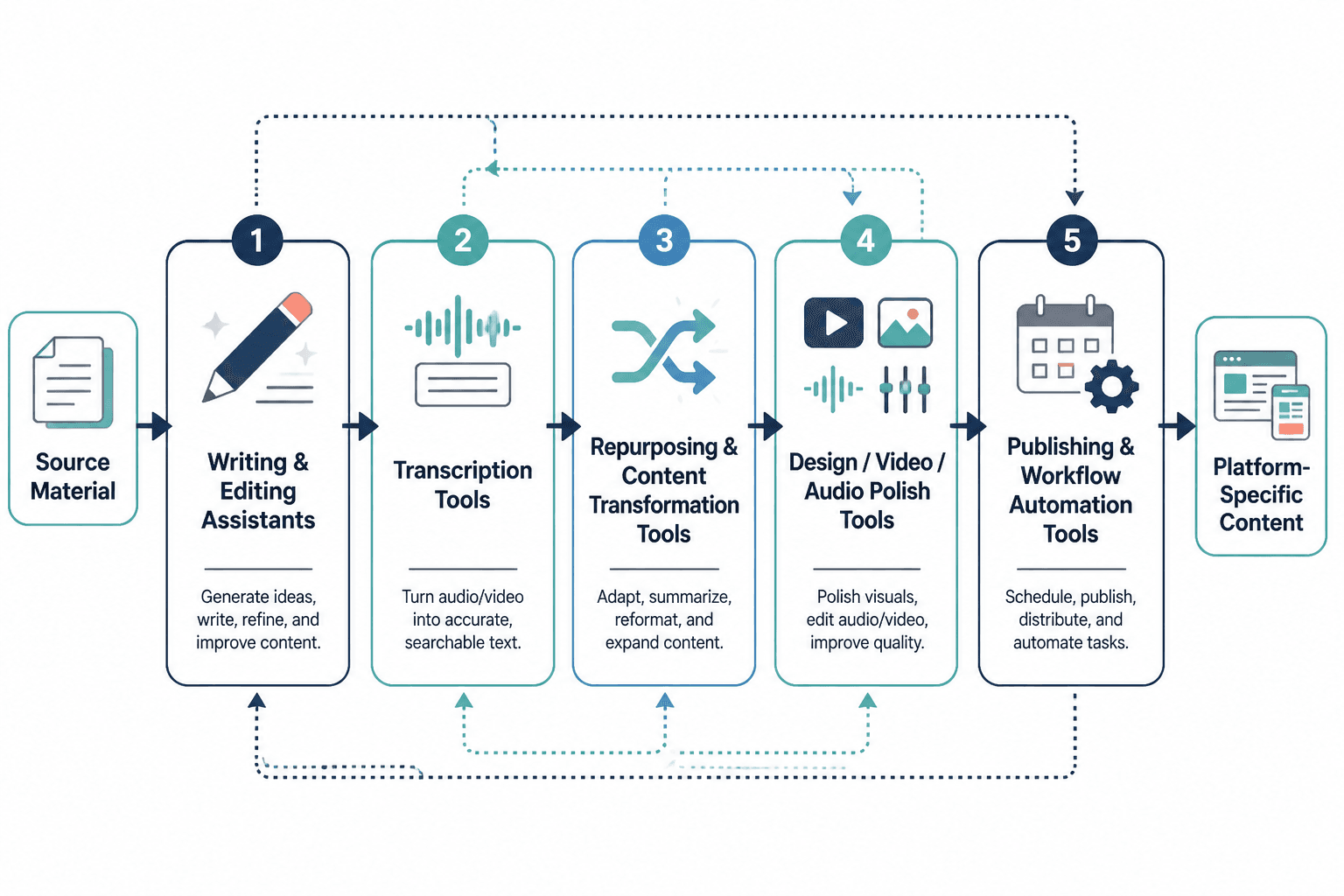
If you do not know your process, AI just makes the mess happen faster. Define the sequence first: idea → research → outline → draft → edit → repurpose → publish
Then choose tools that support the sequence.
Expecting one app to do everything
No single app is best at drafting, research, repurposing, and project management. Creator workflows are modular. Your tools should be too.
Letting AI flatten your voice
This is one of the most common failure modes. A tool that produces “clean” copy is not necessarily producing your copy.
Trusting AI output without source checking
Especially in research-heavy content, AI should not be the final authority. It should help you move faster through evidence, not replace the evidence.
The practical takeaway
For creators, the best ChatGPT apps and GPTs are not the ones with the most features. They are the ones that fit a real workflow:
- general writing assistants for drafts and rewrites
- custom GPTs for narrow, repeatable jobs
- repurposing tools for turning one asset into many
- research and organization tools for keeping context intact
- workflow tools with AI for handoffs, summaries, and task flow
If your content process is built well, AI can shorten the distance between idea and publishable draft. If your process is unclear, AI mostly adds noise.
The right choice is usually not “Which app is best overall?” It is “Which tool removes the most friction from the next step I actually need to do?”
For next steps, you may also want: