
Most people treat internal linking like a tiny SEO chore they will “clean up later,” which is usually code for never. Then they wonder why their best articles sit there like abandoned office plants: technically alive, not doing much.
The same thing happens with examples. A coach publishes a solid article in 2022, leaves in references that already feel dusty, and quietly turns a useful piece into a credibility leak. Not a dramatic one. Just enough to make readers think, “This seems fine, but is this person still paying attention?”
Internal Linking and Updating Examples for Coaches, Consultants, and Personal Brands is not glamorous work. It is, however, some of the highest-leverage maintenance you can do if you want your content library to actually behave like a system instead of a pile of disconnected thoughts.
Done well, internal links help readers keep going, help search engines understand what matters on your site, and help your older articles continue pulling their weight. Updating examples does something just as important: it makes your content feel current, credible, and worth trusting.
Here’s how to do both without turning your week into a spreadsheet-based hostage situation.
To see how this fits into the wider strategy, open the parent guide.
Why internal linking matters more than most personal brands think
If you are a coach, consultant, or personal brand, your site usually is not competing on sheer volume. You do not have 8,000 articles and a content team named after project management software. You have a smaller library, tighter expertise, and a bigger need for every piece to do real work.
That is exactly why internal linking matters.
- It keeps readers moving from one useful article to the next.
- It helps related articles support each other instead of cannibalizing attention.
- It points people toward service pages, newsletters, lead magnets, and core offers naturally.
- It reinforces your authority around a topic cluster.
- It gives older posts another shot at relevance instead of letting them rot politely in the archive.
Good internal linking is not “add three random links and call it strategy.” It is structure. It tells readers, “If this helped, here is the next thing you should read.” That tiny bit of guidance matters because most readers will not hunt around your site like they are on a treasure quest. If the next step is not obvious, they leave.
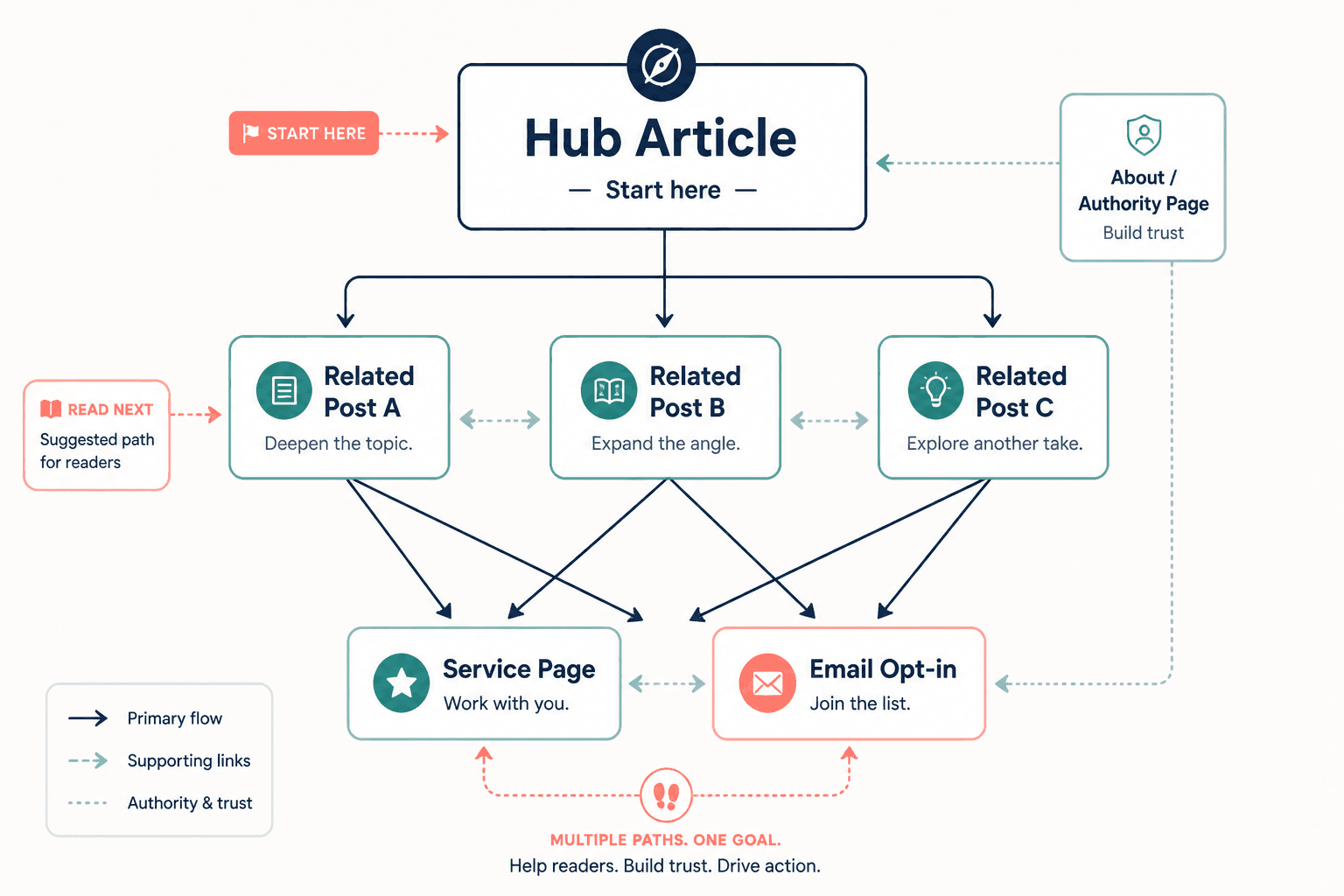
If you want a broader foundation for building those content relationships, the internal linking and updating hub is the obvious place to start.
Why updating examples is not optional
Examples are trust signals. They show that you know what you are talking about, can make ideas practical, and understand how things look in the real world.
But examples age faster than most evergreen advice.
- Platform norms change.
- Audience language changes.
- Offers evolve.
- Tools get replaced.
- Screenshots get old.
- References start sounding like they wandered in from a different internet.
You can have an article with solid principles and still lose trust because the examples feel stale, generic, or no longer fit how people buy, post, or position themselves now.
This matters even more for coaches and consultants because your content is often doing double duty. It is not just informing. It is selling your thinking. A dated example does not just weaken the article. It weakens the sense that you are sharp, current, and worth hiring.
Readers can forgive a plain website. They are less forgiving of content that sounds accidentally archived.
What strong internal linking actually looks like
A strong internal linking system is simple enough to maintain and intentional enough to matter. You do not need some labyrinth where every article links to eleven others in a cloud of anchor text chaos.
You do need a clear idea of which pages play which roles.
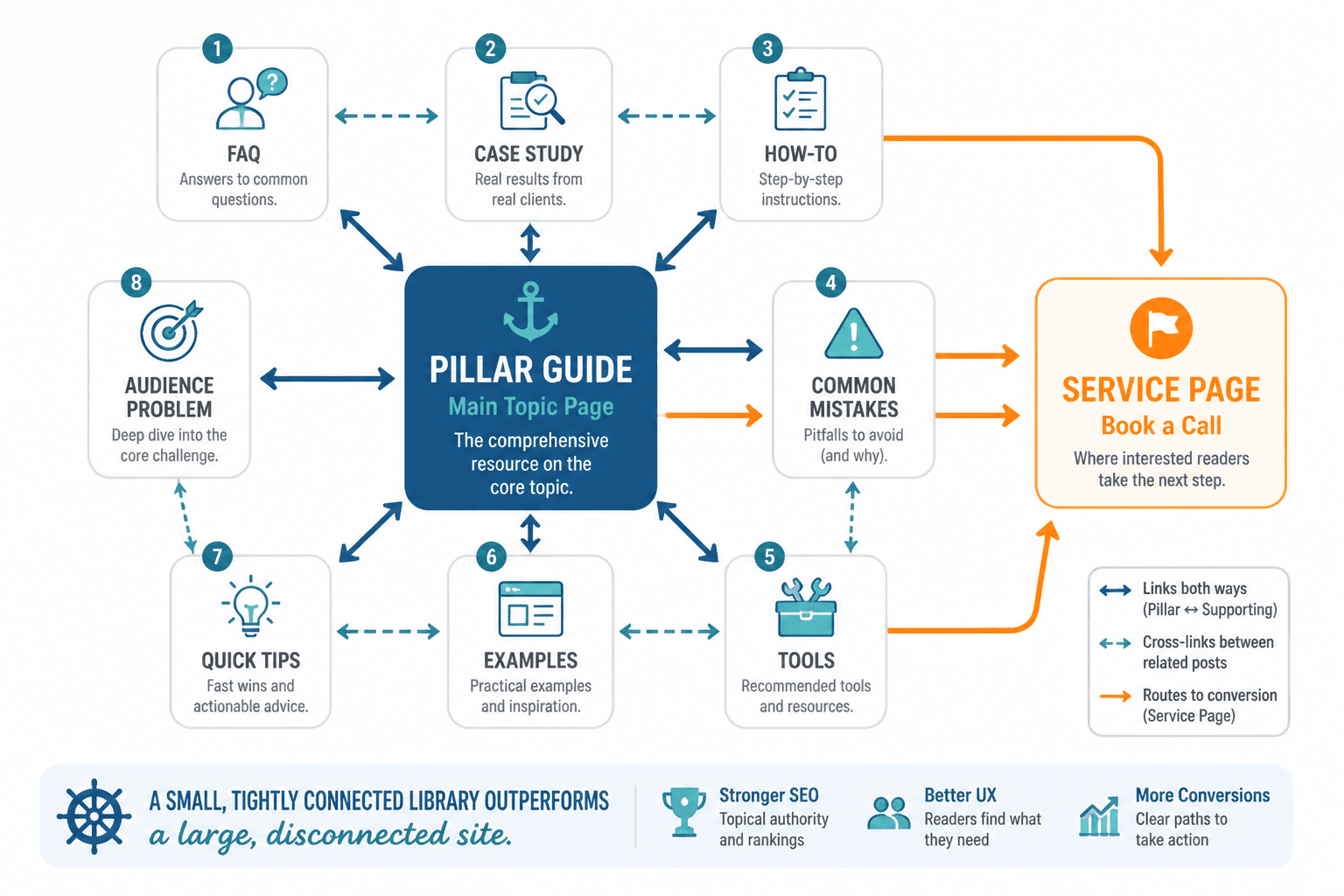
1. Pillar pages
These are your main topic hubs. They cover a broad subject and connect out to more specific supporting articles. In this case, your pillar is the internal linking and updating topic area.
Pillar pages help orient readers and tell search engines, “This topic matters here.”
2. Supporting articles
These go narrower. They answer specific questions, tackle one angle, or solve one sub-problem. This article is one of those. Others might focus on anchor text, examples for creators, small-audience strategy, or practical implementation.
Supporting articles should link up to the pillar and sideways to closely related pieces where it actually helps the reader.
3. Conversion pages
These are pages that move readers toward business action: contact pages, service pages, newsletter signups, resource pages, booking pages, or offer pages. Not every article needs to hammer these links. But your overall site should make it easy for a reader to go from “useful article” to “I want help.”
4. Contextual links inside the article body
These are usually your best links because they appear right where the reader needs them. They are more useful than dumping a giant “related posts” block at the bottom and hoping for the best.
For example, if you are talking about wording links clearly, it makes sense to point readers to better internal linking and updating anchor text for personal brands. If you mention article refresh ideas, it makes sense to point them to internal linking and updating ideas and examples for creators.
A simple internal linking structure for coaches, consultants, and personal brands
You do not need enterprise complexity. You need a clean, repeatable structure you will actually use.
Here is a practical model:
- Create one main pillar page for each core topic you want to be known for.
- Publish supporting articles that answer narrower questions inside that topic.
- Link every supporting article back to the relevant pillar page.
- Link supporting articles to 2–5 other relevant supporting articles where useful.
- Add a natural next-step link to a related resource, service, or offer when it fits.
- Review older posts every few months and add links to newer, better material.
That is enough to create real structure. Most personal sites never even get this far, which is part of why their content feels like a drawer full of unmatched socks.
How to choose which articles should link to each other
The answer is not “anything vaguely related.” Relevance should be practical, not philosophical.
Ask these questions:
- Would a reader naturally want this next?
- Does the linked article deepen, clarify, or extend the current point?
- Is the linked piece more specific, more strategic, or more actionable than what I can cover here?
- Does the link reduce friction by saving the reader from searching around?
If the answer is yes, link it. If not, skip it. Random internal links are not strategy. They are decoration.
For example, in an article like this, these are useful relationships:
- A guide-level article for readers who want the larger framework: internal linking and updating guide for creators who want better results
- An article focused on examples and content ideas: best internal linking and updating ideas and examples for creators
- An article tailored to smaller sites and lower traffic: internal linking and updating for creators with small audiences
- An article focused on anchor text decisions: better internal linking and updating anchor text for personal brands
See the pattern? Same topic family, different reader need.
How to update examples without rewriting your whole site
This is where people make the job bigger than it needs to be. Updating examples does not mean rebuilding every article from scratch in a haze of editorial guilt.
Usually, you are looking for leverage points.
Start with high-value pages
Do not begin with some random post that gets five visits a year. Start with the pages that matter most:
- Articles that already get traffic
- Articles that support offers or lead generation
- Articles ranking for useful search terms
- Articles you actively share
- Articles with strong ideas but stale references
Look for the obvious aging points
- Outdated platform references
- Old screenshots or UI descriptions
- Examples that no longer reflect your audience
- Generic examples that were never very good
- Mentions of tools you no longer recommend
- Weak “for example” sections that explain nothing
A surprising amount of updating is simply replacing limp examples with sharper ones.
Refresh for relevance, not novelty
You do not need trendy references just to prove you are awake. You need examples that feel believable and current enough to help the reader act.
That means this:
- Use examples your audience would actually recognize.
- Match examples to the buyer stage or creator stage you serve.
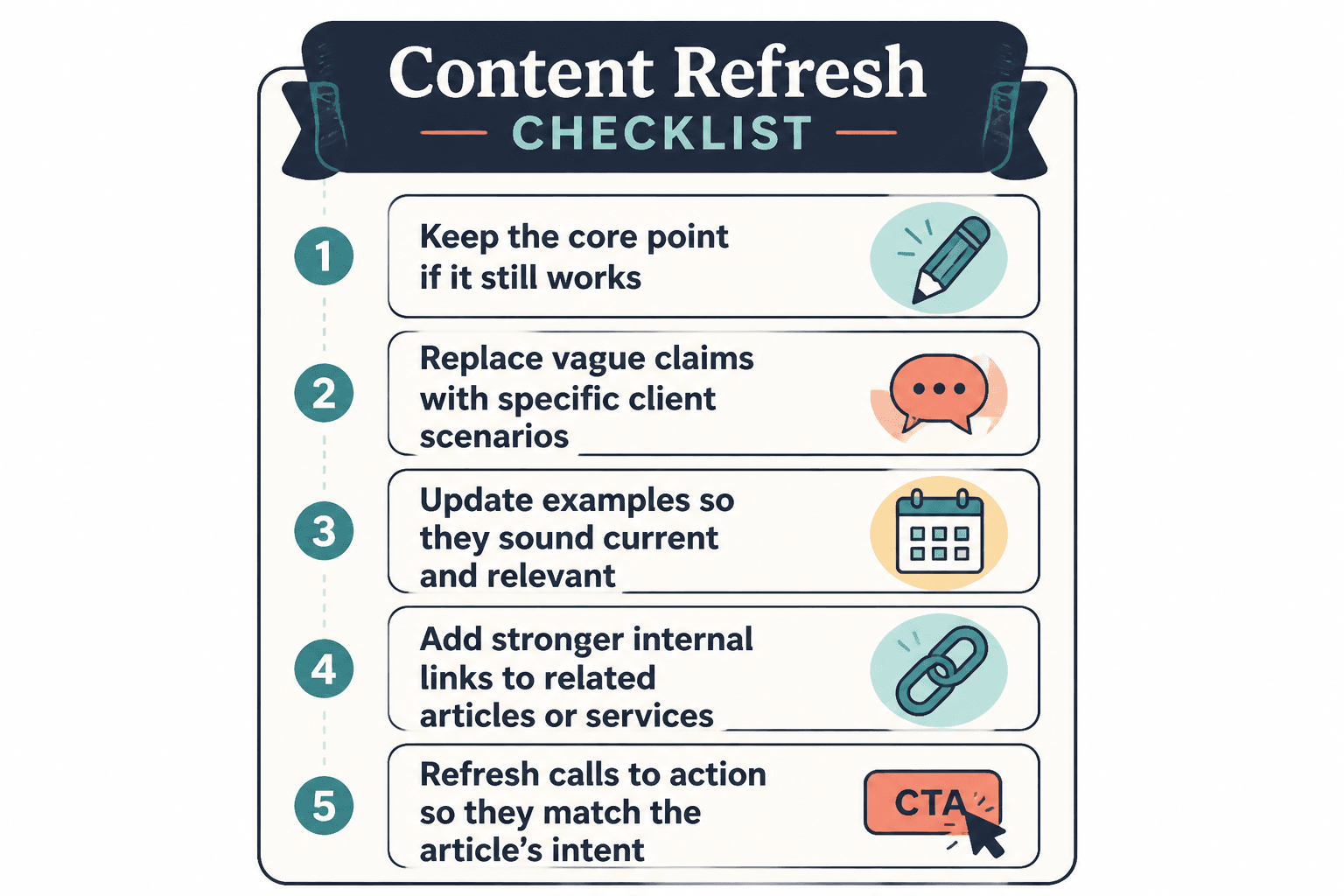
- Replace broad claims with specific scenarios.
- Show how the advice applies now, not just in theory.
If you help consultants fix weak website messaging, an updated example should sound like a consultant’s actual problem. Not “Business owner improves online presence.” That says nothing and wastes everyone’s time.
Keep the original point if it still works
You are not trying to erase every old article and rebirth it as a trend-chasing content goblin. If the core principle still works, keep it. Update the wrapper around it.
A lot of evergreen content does not need new ideas. It needs fresher proof, clearer examples, and stronger internal links.
Before-and-after example updates
Here is what this looks like in practice.
Example 1: vague example becomes useful
Before: “For example, many entrepreneurs can improve their branding by posting more consistently and engaging their audience.”
After: “A leadership coach with a tiny audience will usually get more traction from one sharp weekly post that answers a client objection than from posting bland daily motivation and begging the algorithm for a personality.”
The second version is better because it is specific, relevant, and built around an actual decision the reader can make.
Example 2: old platform reference gets modernized
Before: “Use your blog and Google+ strategy together for stronger content visibility.”
After: “Use your articles, email list, and platform posts together so one useful idea can build authority in search, trust in inboxes, and attention on social without forcing you to invent new thoughts every morning.”
One of these belongs in the current internet. The other belongs in a museum gift shop.
Example 3: weak internal linking mention becomes a real next step
Before: “You can also read our other content articles for more help.”
After: “If your links are technically there but still not helping readers move through your site, start with this guide to better internal linking and updating anchor text for personal brands. The wording of the link matters more than people think.”
The second version does three things well: it names the problem, sets up the value, and gives the reader a clear reason to click.
Anchor text: the part people either ignore or mangle
Bad anchor text usually falls into one of two camps:
- Generic and useless: “click here,” “read more,” “this post”
- Overstuffed and awkward: a keyword brick shoved into the sentence with all the grace of a filing cabinet rolling downstairs
Good anchor text is clear, natural, and descriptive enough to help both readers and search engines understand what they are about to get.
Compare these:
- Weak: “Read more here”
- Better: “see how to improve internal linking and updating anchor text”
Compare these:
- Weak: “Our article”
- Better: “internal linking and updating for creators with small audiences”
The point is not to force exact-match keywords into every sentence until the article starts wheezing. The point is to make the link useful. If you want to go deeper on this, this anchor text article is the next logical stop.
A practical updating workflow you can actually maintain
You do not need an elaborate content operations manual with seventeen statuses and color-coded trauma. You need a repeatable review cycle.
Try this every quarter.
Quarterly content refresh process
- Pull your top-performing articles by traffic, leads, or business relevance.
- Scan each one for stale examples, weak links, and outdated language.
- Add links to any strong newer articles that were published after the original post.
- Replace at least one weak example with a more specific and current one.
- Check that the CTA still matches your current offer or next step.
- Update the publish date only if the refresh is substantial and your site practice supports that.
That is manageable. And over time, it compounds.
One useful article linked well into five others becomes a small topic network. Ten refreshed articles become a content system. This is the boring middle layer most people skip because it does not feel as fun as publishing something new. It is also where a lot of the real gains live.
What to update besides examples and links
While you are already in the article, check the rest of the content for friction.
- Intro: Does it get to the point fast enough?
- Subheads: Are they clear, useful, and still aligned with search intent?
- CTA: Does it point to a real next step?
- Terminology: Does it still match how your audience talks?
- Offer mentions: Are they current?
- Formatting: Is the article easy to scan?
Sometimes the example is not the only stale part. Sometimes the whole article is carrying a weirdly formal tone from an earlier phase of your business when you thought sounding “professional” meant writing like a legal memo with a Canva subscription.
Special note for smaller sites and smaller audiences
If your site is small, internal linking still matters. In some ways, it matters more, because you have fewer assets and each one needs to work harder.
You do not need 100 articles to benefit. If you have 10 strong pieces on related topics, linking them properly can make your site feel far more intentional and useful.
That is especially true if your audience is niche. A small site with clear topic relationships can outperform a much larger site full of broad, disconnected content. Bigger is not always better. Bigger and sloppy is just more pages to ignore.
If that is your situation, read internal linking and updating for creators with small audiences. It is a better fit than copying enterprise-style content advice that assumes you have a team, a budget, and a mild addiction to dashboards.
Common mistakes that quietly weaken your content library
- Only linking from new posts to old posts: You also need to go back and add links from old posts to new ones.
- Using the same anchor text every time: Repetitive linking can feel forced and unhelpful.
- Linking for SEO instead of reader flow: If it interrupts the article, it is not helping.
- Leaving outdated examples in “evergreen” posts: Evergreen does not mean frozen in amber.
- Treating every article equally: Prioritize the pages closest to revenue, authority, and search opportunity.
- Adding links with no context: Give the reader a reason to care.
- Never checking old CTAs: Nothing says “well-maintained website” like a dead-end next step. And by “well-maintained,” I mean the opposite.
A neat, practical checklist
Internal linking improves when each update makes the next useful step clearer. Cleaner structure usually does more work than a bigger pile of links ever will.
Internal linking improves when each update makes the next useful step clearer. Cleaner structure usually does more work than a bigger pile of links ever will.