
Most creators treat internal linking and content updates like admin work. Something you do later, when you are feeling unusually responsible and mildly dead behind the eyes.
That is a mistake.
If you already publish useful content, internal linking and updating are two of the fastest ways to get better results without creating everything from scratch again. More traffic. Better page depth. Cleaner reader journeys. More chances for someone to go from “this was helpful” to “I should probably stick around.”
The good news is this does not require some giant enterprise SEO ritual involving seven dashboards and a spreadsheet that looks like tax fraud. You need a sane system. A clear way to connect related content, refresh what is aging badly, and stop letting decent articles sit around doing nothing.
This Internal Linking and Updating Guide for Creators Who Want Better Results will show you how to do exactly that: build smarter links between your articles, spot pages worth updating, and turn your existing content library into something that actually helps readers and your business at the same time.
To see how this fits into the wider strategy, open the parent guide.
Why internal linking and updating matter more than most creators think
A lot of creators are obsessed with publishing volume. New post. New article. New thread. New idea. Fine. Publishing matters.
But publishing without maintenance creates a content graveyard. You end up with useful ideas scattered across your site with no structure, no clear next step, and no easy way for readers to keep going. It is like opening a shop and then hiding half the aisles behind a curtain.
Internal linking fixes discoverability. Updating fixes decay.
Together, they help you:
- keep readers moving through related content
- show search engines how your content connects
- strengthen older articles instead of constantly starting over
- support pillar pages and topic clusters
- improve trust by keeping advice current and sharp
- create better paths to offers, lead magnets, services, or next actions
Also, bluntly: a lot of traffic problems are not really traffic problems. They are structure problems. You do not just need more eyeballs. You need to stop losing the ones you already earned.
What internal linking actually is, minus the jargon perfume
Internal links are simply links from one page on your site to another page on your site.
That sounds painfully obvious, but people still manage to overcomplicate it. Internal linking is not about stuffing every article with random links like you are hiding Easter eggs for Google. It is about helping the reader move logically through your ideas.
A good internal link answers one of these questions:
- What should the reader understand next?
- What related article would help them go deeper?
- What supporting concept needs explaining?
- What example, template, or walkthrough would make this more useful?
- What page should they visit if they are ready for the next step?
If the link helps with one of those, good. If not, it is probably decorative SEO confetti.
For a broader view of how these article systems fit together, it makes sense to connect this process to your blog SEO and writing structure and your wider blog article systems. Internal linking works best when it is part of the system, not an afterthought you remember once every four months.
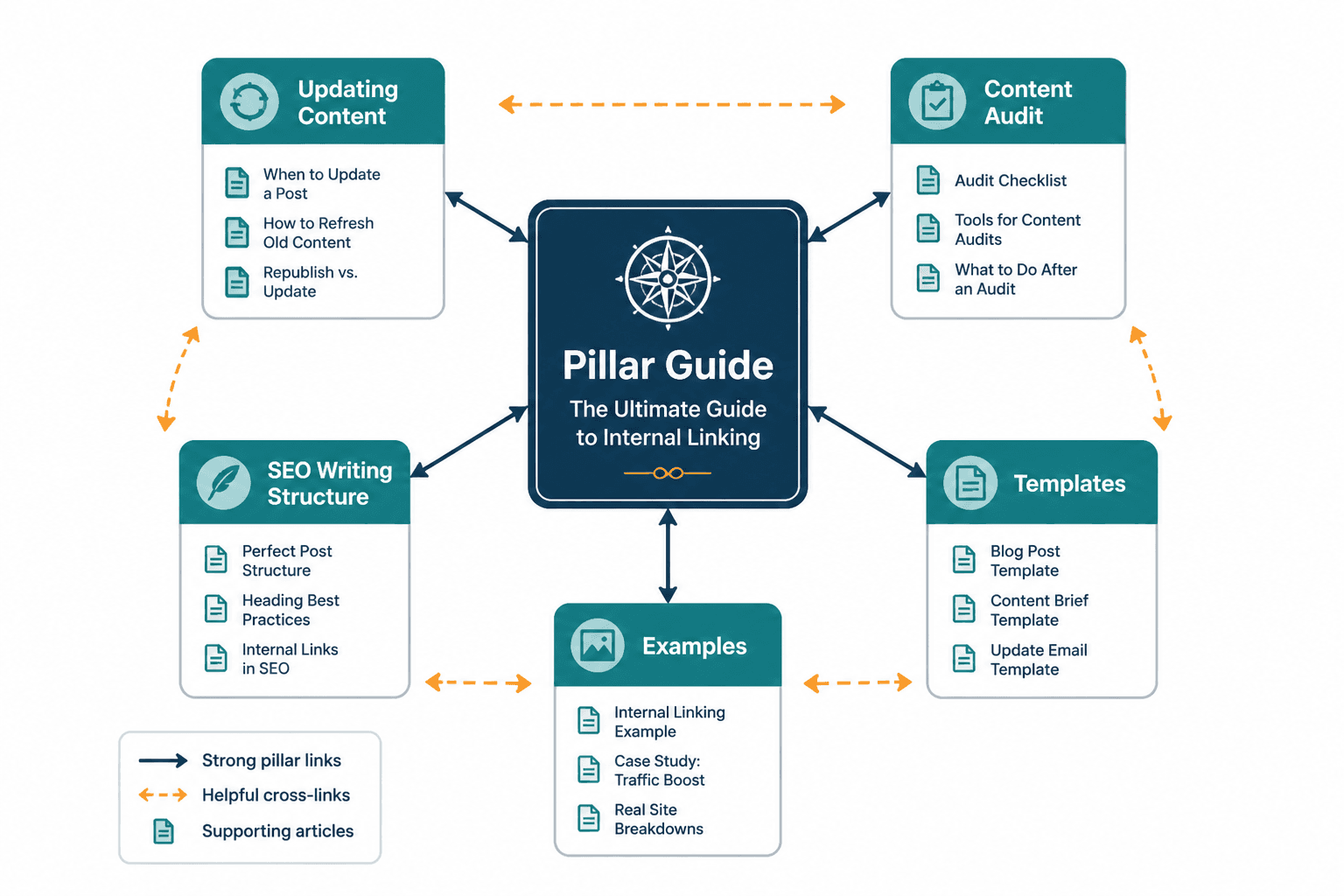
The two jobs your internal links need to do
1. Help the reader
This is the first job. Not the second. Not the optional one.
If someone lands on an article about updating content, they may also need examples, a process, or a way to map related pages. Internal links should reduce friction. They should make the next click feel obvious, useful, and well-timed.
2. Help your content architecture
Links also show topical relationships. They help reinforce which pages are broad guides, which ones are practical spinoffs, and which ones support the bigger theme. This matters for search, yes, but it also matters for human clarity. A well-linked site feels more trustworthy because it feels intentional.
If you have a central guide on the topic, link to it where relevant. In this case, your pillar page is internal linking and updating. That page should not sit there like the unloved parent at a school recital. It should receive links from related supporting articles and send readers toward more specific breakdowns.
What good internal linking looks like in practice
Here is the simplest version: every article should know what role it plays.
- Pillar page: broad, strategic, central topic page
- Supporting guides: narrower how-to articles, examples, tools, mistakes, templates
- Conversion pages: newsletter, service, resource, consultation, product
A solid article usually links in more than one direction:
- upward to the broader pillar page
- sideways to related supporting articles
- forward to the next useful action
For example, this article naturally connects to:
- best internal linking and updating ideas and examples for creators
- how to write better internal linking and updating
- internal linking and updating for creators with small audiences
- internal linking and updating link maps examples creators can adapt fast
Those are not random extras. They serve different reader needs. One wants examples. One wants better writing. One has a small audience and needs realistic advice. One needs a map. That is the point. Internal links should match intent, not just keyword similarity.
Common internal linking mistakes creators keep making
There are a few repeat offenders here.
Linking only when publishing something new
This leaves older content isolated. When you publish a new article, yes, add links out from it. But also go back and add links into it from older relevant articles. Otherwise your new page is basically standing in a field waving at passing cars.
Using vague anchor text
“Click here” is lazy. “Read more” is not much better. Your anchor text should tell the reader what they will get.
| Weak anchor | Better anchor |
| click here | internal linking and updating link maps examples creators can adapt fast |
| read this post | how to write better internal linking and updating |
| learn more | internal linking and updating for creators with small audiences |
Forcing links where they do not belong
If the paragraph is about updating stale statistics, do not jam in a link to an examples article just because it exists. Relevance first. Always.
Only linking to the same one or two pages
This usually happens when creators remember their homepage and one popular article, then forget the rest of their library exists. You want your site to feel interconnected, not weirdly obsessed with one page.
Ignoring old posts that still get traffic
This one hurts. If an old article still gets visits, it is one of your best opportunities for updated links, stronger CTAs, fresher examples, and better reader flow. Do not leave working assets underfed.
How to build a simple internal linking system without losing the will to live
You do not need a giant content operations department. You need a repeatable workflow.
Step 1: Identify your topic clusters
Group your content by topic. In this case, one cluster is internal linking and updating. Inside that cluster, you may have:
- main guide or pillar page
- how-to process article
- examples article
- small audience angle
- link map or structure article
When you know the cluster, linking gets easier because you are no longer guessing what belongs together.
Step 2: Assign each article a role
Ask:
- Is this a broad overview?
- Is this a tactical how-to?
- Is this examples and inspiration?
- Is this for a specific reader type?
- Is this a bridge toward a conversion page?
Articles with unclear roles tend to get weak links because nobody knows what job they are supposed to do.
Step 3: Add three types of links
- Context links: inside paragraphs where the related page genuinely helps
- Progression links: near the end, guiding the next logical read
- Pillar links: pointing back to the main cluster guide where useful
Step 4: Update old articles when new related ones are published
This should be part of publishing, not a someday task. New article goes live. Then you update two to five older relevant pages to point to it. That one habit alone will make your content library feel much less chaotic.
Step 5: Review top pages quarterly
You do not need to audit every page every week like a stressed raccoon with analytics access. Review the important ones on a schedule. Traffic pages. Conversion pages. Pillar pages. Posts with outdated screenshots, stale wording, or weak next steps.
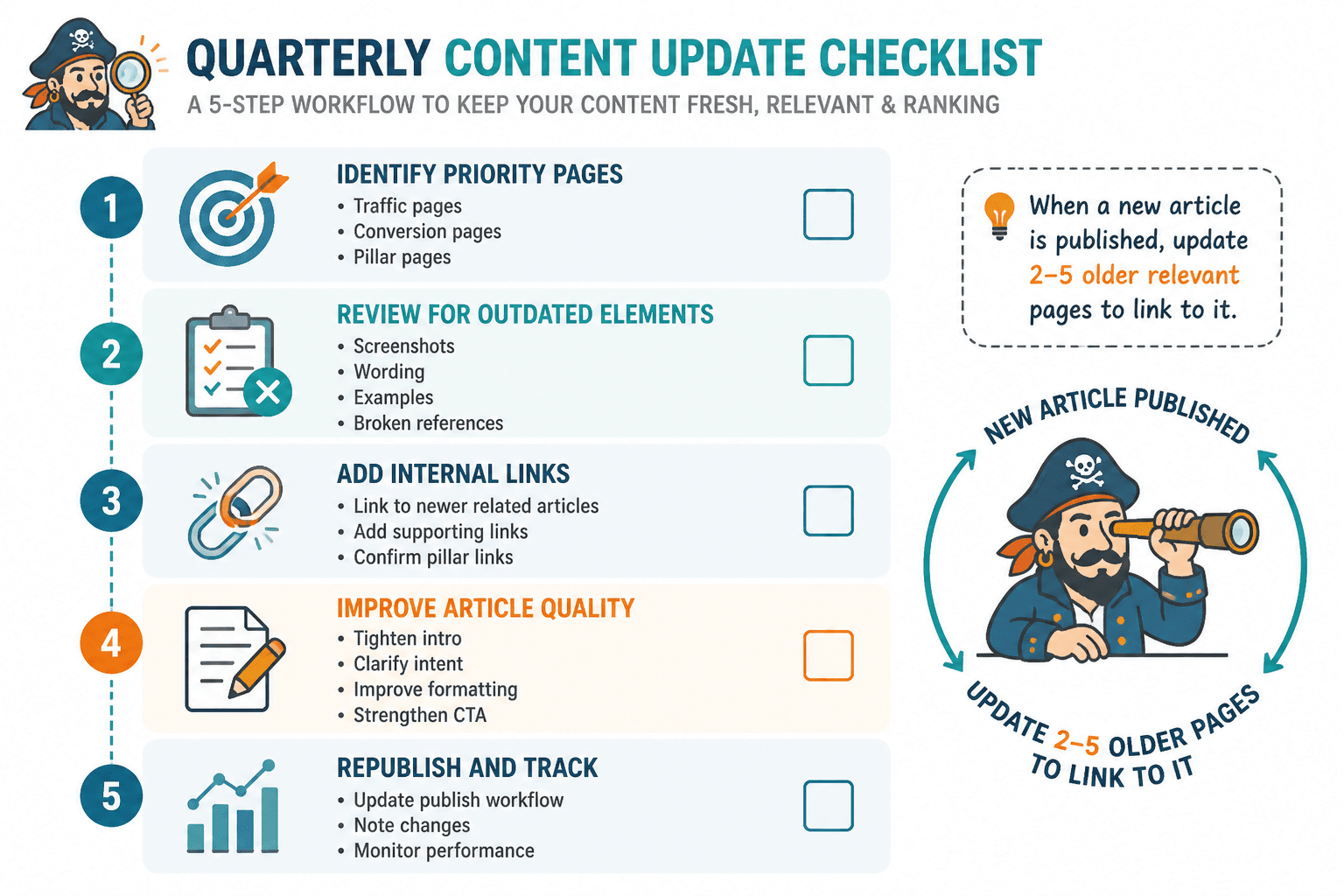
What to update in an older article besides the obvious
When people hear “content update,” they often think it just means changing the year in the title and pretending that counts as strategy. Adorable. No.
A real update improves usefulness. That can mean several things.
- refresh outdated examples
- tighten weak intros
- replace vague claims with clearer specifics
- add links to newer relevant articles
- remove broken or irrelevant references
- improve formatting and readability
- strengthen the CTA or next step
- add FAQs if they solve actual reader friction
- clarify search intent if the article drifted
Sometimes the best update is structural, not cosmetic. If an article rambles, buries the answer, or no longer matches the keyword intent, changing a few sentences will not save it. It needs a sharper frame.
This is where creators often hesitate because rewriting feels heavier than publishing new stuff. Fair. But a solid update to an existing article can outperform a brand-new one because the page may already have history, links, and traffic signals on its side.
How to decide which content to update first
Do not update randomly. Prioritize pages with leverage.
| Priority page type | Why it matters | What to update |
| Pages already getting traffic | Small gains here can multiply results | Links, CTA, examples, freshness |
| Pillar pages | They support the whole cluster | Structure, links out, links in, completeness |
| Posts ranking but slipping | They may need freshness or better alignment | Search intent, intro, examples, headings |
| Articles with no next step | You are wasting attention | Internal links, CTA, reader path |
| Thin but relevant posts | Often easier to improve than replace | Depth, examples, structure, links |
If you are a smaller creator, this matters even more. You probably do not have endless traffic to burn, so every article needs to work a little harder. The advice in internal linking and updating for creators with small audiences is especially useful if your library is still compact and every click counts.
A simple update checklist creators can actually use
- Read the article like a first-time visitor.
- Check whether the intro still matches what the reader came for.
- Look for stale examples, old phrasing, or dated references.
- Add internal links to newer related articles.
- Make sure the article links back to the relevant pillar page.
- Tighten any bloated sections or weak subheads.
- Improve the CTA or next recommended read.
- Check that anchor text is clear and useful.
- Confirm the page still fits your current positioning and offers.
- Republish or refresh it only once the article is genuinely better.
That last point matters. Updating is not just touching the page so you can feel productive. It should improve the experience. If the page is not better, the update is theater.
How many internal links should an article have?
There is no magic number, and anyone pretending otherwise is trying to sell certainty in a place where judgment matters more.
A short article might only need three to five relevant internal links. A long guide might support eight to fifteen. The better question is this: does the article link to the most helpful next pages without becoming cluttered or weirdly desperate?
If your article has one lonely internal link in 2,000 words, that is probably too few. If every second paragraph points somewhere, calm down.
Anchor text: write it like a human, not a compliance bot
Anchor text should be descriptive, readable, and natural in the sentence.
Bad anchor text either says nothing or sounds painfully engineered. Good anchor text helps the reader predict the click.
Good anchor text feels like guidance. Bad anchor text feels like you stapled a keyword to a sentence and hoped nobody would notice.
If you want to improve this specifically, the article on how to write better internal linking and updating is the natural next read. This is one of those small skills that affects almost every article you publish, so it is worth getting right.
Use link maps if your content is starting to sprawl
Once your site grows past a handful of articles, it helps to map relationships visually or at least structurally. Not because you are trying to impress anyone with your very serious content operations maturity, but because it becomes harder to remember what should connect to what.
A link map can be simple:
- one pillar page in the center
- supporting articles around it
- arrows showing which pages link up, across, and forward
This helps you spot holes fast. Missing examples article. No beginner entry point. No bridge to conversion. Too many pages isolated from the main topic. A lopsided cluster often reveals itself immediately once you bother to map it.
If you want practical models, read internal linking and updating link maps examples creators can adapt fast. It is easier to build these when you can see what a sane version looks like.
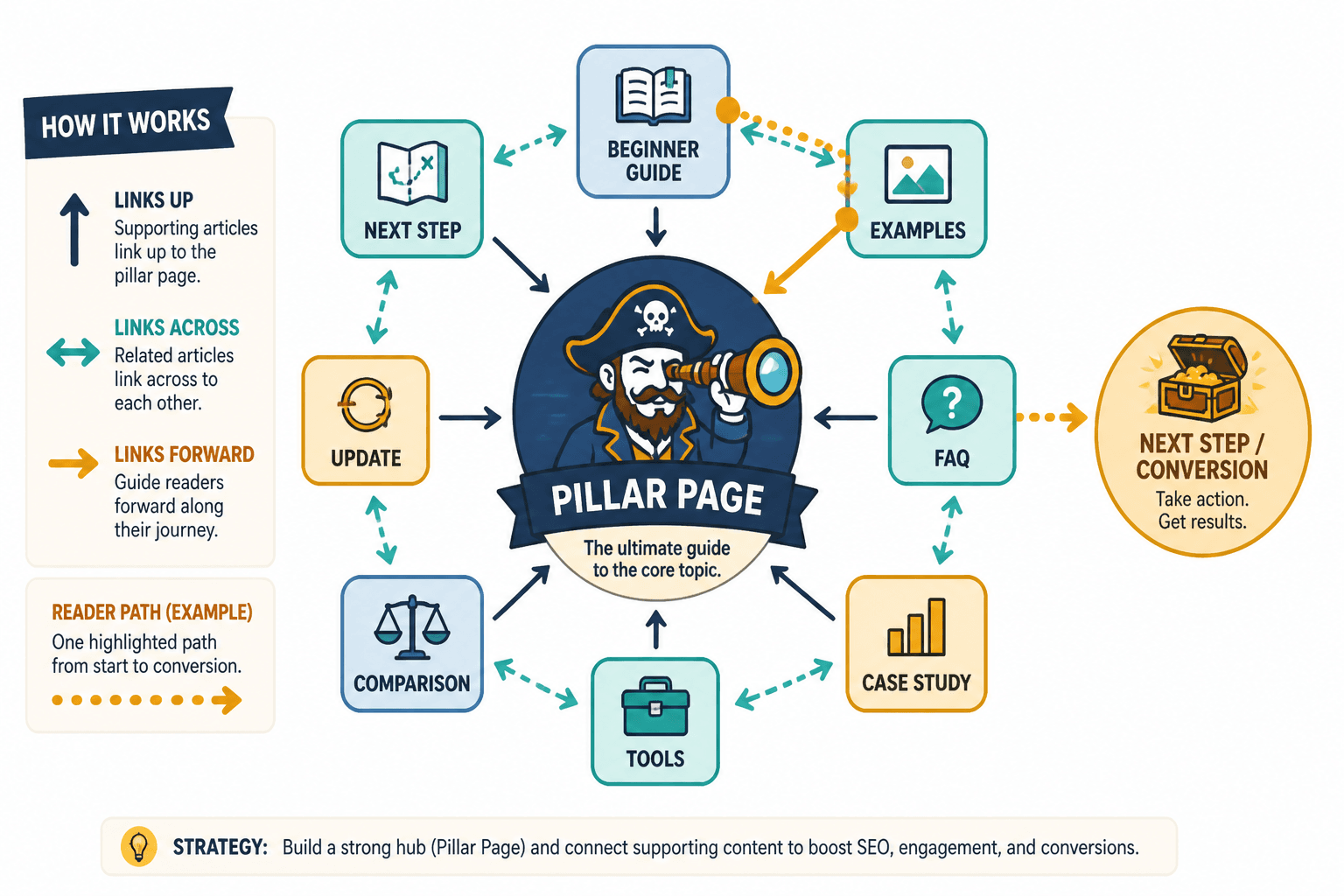
Examples of useful internal linking moves inside a creator article
Here are a few patterns that work well.
Move 1: Define, then direct
If you mention link maps briefly in a broad guide, link to the deeper article for readers who want implementation.
Move 2: General idea, then example bank
After explaining the principle, link to a page full of examples. That is exactly where best internal linking and updating ideas and examples for creators becomes useful.
Move 3: Broad article, then niche version
A general guide can send smaller creators to a more specific article tailored to their situation. This reduces bounce because the reader feels seen instead of lumped into generic advice.
Move 4: Strategic guide, then tactical writing help
Some readers understand the strategy but still need help writing the actual links and transitions. Send them to the writing-specific article instead of pretending one post needs to do every job itself.
How internal linking supports better conversions without getting gross
This part matters because creators often make one of two mistakes.
- They never guide readers anywhere, so attention dies on the page.
- They force every article to shove readers toward a sale, which feels clingy and cheap.
Internal linking gives you the middle path.
You can move readers from broad interest to deeper trust. From broad guide to examples. From examples to process. From process to service page or lead magnet. That sequence feels natural because it respects readiness. Not everyone who reads one article wants to book a call with you by paragraph six. Shocking, I know.
Good linking helps the reader move naturally from curiosity to trust to action. That is why the best updates improve structure, not just surface-level freshness.