Most creators do internal linking like an afterthought.
They publish a post, maybe toss in one random link near the end, and call it “good for SEO.” It is not good for SEO. It is not great for readers either. It is basically leaving little content islands floating around your site and hoping Google feels generous.
If you want your content library to do more than just exist politely on the internet, you need a link map. Not a giant enterprise spreadsheet that makes you question your life choices. Just a simple, usable system that shows which pages support which topics, where links should go, and what needs updating.
This guide will show you how to build internal linking link map examples creators can adapt fast, without turning your content workflow into admin cosplay. We’ll cover simple structures, real page relationships, update routines, and practical templates you can steal with minimal drama.
If you need the broader strategy behind this before getting into examples, start with the internal linking and updating hub. If you want the shorter version afterward, the guide for creators who want better results is a good companion.
For the main guide behind this topic, visit the parent guide.
What a link map actually is
A link map is just a plan for how your articles connect.
That’s it. Nothing mystical. You are deciding:
- which page is the main page for a topic
- which supporting posts should link to it
- which related posts should link sideways to each other
- which older posts need to be updated when new content goes live
- which pages are currently isolated and wasting their potential
The reason this matters is simple. Internal links help readers move through your ideas in a logical way. They also help search engines understand which pages matter, how topics relate, and where authority should flow. Fancy phrase, basic point: good links make your site easier to understand.
For creators, this is especially useful because most content libraries are uneven. A few good posts get all the love, while dozens of perfectly decent articles sit in the archive like forgotten leftovers. A link map gives those posts jobs.

Why most internal linking setups fail
The usual problem is not a lack of content. It is a lack of structure.
Here is what creators often do wrong:
- link only from new posts to old ones, but never update old posts to point back
- use vague anchor text like “click here” or “read more”
- publish several articles on the same topic with no clear primary page
- forget to connect related articles across categories
- treat internal linking as a one-time task instead of an update habit
- build clusters that make sense to them but not to readers
The result is a messy archive where content competes with itself, readers hit dead ends, and your better pages do not get enough support.
A good link map fixes that by making your site behave more like a guided path and less like a garage full of unlabeled boxes.
The simplest link map model that works
You do not need a complicated taxonomy lecture. For most creators, this three-part model is enough:
- Pillar page: the main page on a topic
- Support posts: narrower articles that answer related subtopics
- Bridge links: contextual links between related support posts
Think of it like this. The pillar is the main room. Support posts are smaller rooms connected to it. Bridge links are the doors between those rooms, so readers do not have to keep going back into the hallway every time.
For this topic, your pillar page might be the internal linking and updating section. Then support posts handle examples, small-audience adaptations, creator-specific workflows, and niche use cases.
A clean creator-friendly structure
- Pillar: Internal linking and updating overview
- Support: best internal linking ideas and examples
- Support: examples for coaches, consultants, and personal brands
- Support: internal linking for creators with small audiences
- Support: guide for better results
- Support: this article on link map examples
Each support post should link back to the pillar where it helps. The pillar should link out to all major support posts. Relevant support posts should also link sideways to each other when a reader would realistically want the next step.
Internal Linking Link Map Examples Creators Can Adapt Fast
Now for the useful bit. Here are practical link map examples you can adapt quickly depending on your content model.
Example 1: The solo creator topic cluster
This works well if you publish educational content around one broad area, like content strategy, personal branding, copywriting, fitness coaching, design, or consulting.
| Page type | Example topic | Links to |
|---|---|---|
| Pillar page | Internal linking and updating | All support posts |
| Support post | Best internal linking ideas and examples | Pillar + related support posts |
| Support post | Examples for coaches, consultants, and personal brands | Pillar + guide + small audience post |
| Support post | Internal linking for creators with small audiences | Pillar + examples + guide |
| Support post | Guide for creators who want better results | Pillar + all practical support posts |
| Support post | Link map examples creators can adapt fast | Pillar + examples + guide |
This model is simple because every page knows its role. No article is just sitting there hoping someone stumbles onto it. It either acts as the main authority page, a specialist support page, or a bridge to another useful piece.
On this site, that could look like linking this article to best internal linking and updating ideas and examples for creators when readers want more tactical examples, and to internal linking and updating for creators with small audiences when the issue is not scale but relevance.
Example 2: The service business trust path
If you are a coach, consultant, freelancer, or strategist, your content usually has to do two jobs at once: attract search traffic and build trust. Your link map should reflect that.
Instead of connecting pages only by topic, connect them by decision stage too.
- Awareness page: broad educational article
- Consideration page: niche examples or common mistakes
- Trust page: guide, framework, or case-study-style teaching
- Conversion page: service page, contact page, or lead asset
For example:
- A reader lands on a broad internal linking article
- They click to a niche article for their business type, like internal linking and updating examples for coaches, consultants, and personal brands
- From there, they move to a broader implementation article like the guide for creators who want better results
- Then they reach your service or offer page
This is where internal linking quietly helps conversions without turning every article into a needy pitch. You are not shoving people down a funnel with a megaphone. You are helping them progress naturally because the next useful thing is right there.
Example 3: The update-first archive rescue map
This one is for creators with a pile of older content and no clue how to make it work together.
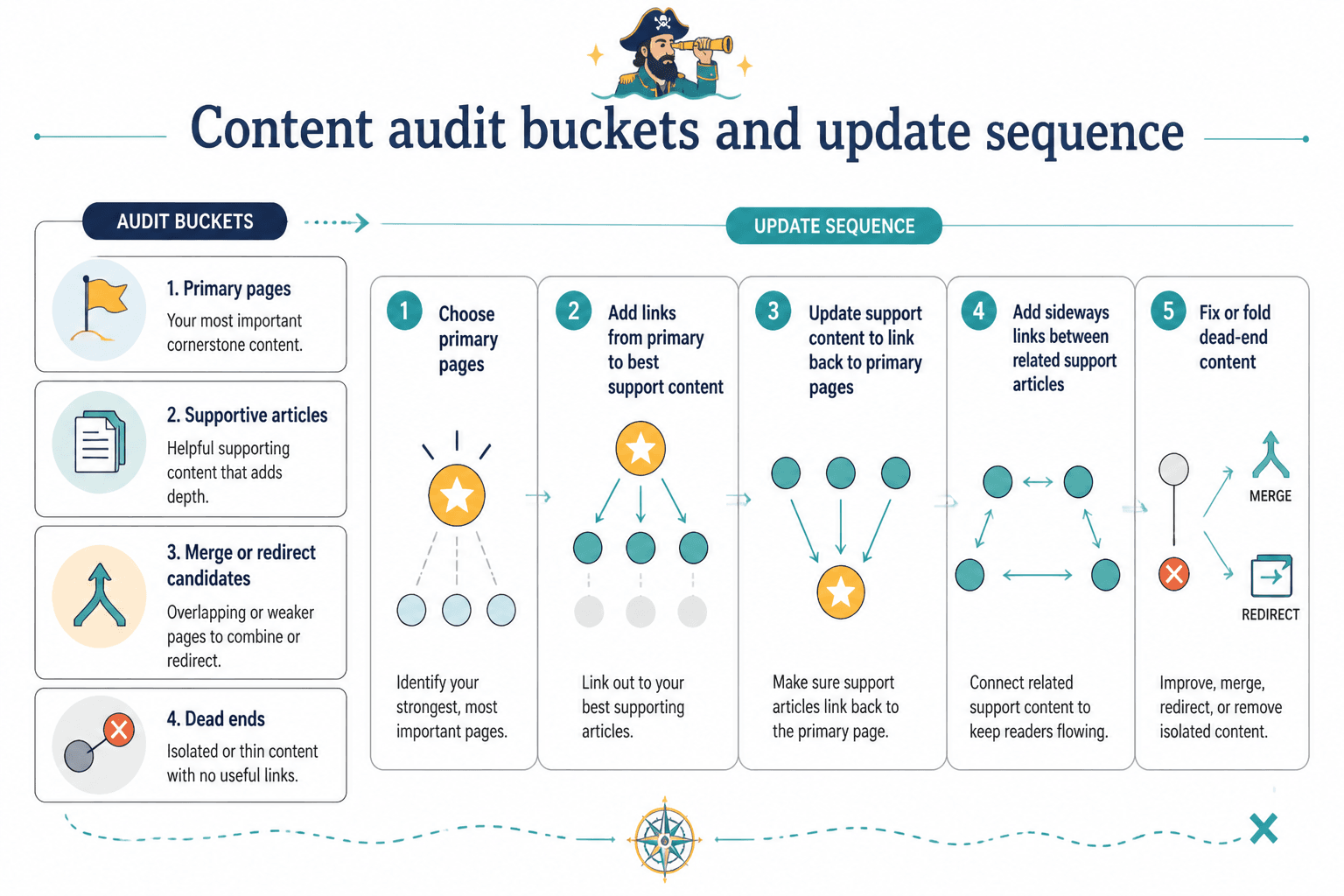
Start by sorting posts into four buckets:
- Primary: your strongest pages on core topics
- Supportive: useful related articles that can feed into primary pages
- Merge or redirect candidates: thin, overlapping, or outdated pieces
- Dead ends: articles with no meaningful links in or out
Then update in this order:
- Choose your primary pages
- Add links from primary pages to the best support content
- Update support content to link back to the primary pages
- Add sideways links between genuinely related support articles
- Fix or fold dead-end content
This method is boring in the best possible way. It works because it gives your archive a hierarchy instead of a shrug.
How to build a link map without a giant spreadsheet meltdown
You can do this in a spreadsheet if you want. You can also use a doc, Notion table, Airtable base, or whatever does not make you instantly annoyed. The tool matters less than the fields.
At minimum, track these columns:
| Column | What it does |
|---|---|
| URL | Identifies the page |
| Primary topic | Shows what the page is mainly about |
| Page role | Pillar, support, bridge, service, or conversion page |
| Links to | Pages this article should point readers toward |
| Needs links from | Articles that should link back to this page |
| Update status | Not started, updated, or needs review |
| Notes | Anchor text ideas, merge notes, or CTA notes |
That is enough to create a useful map for most creator sites.
A very simple process
- List your important pages
- Assign each page one primary topic
- Choose one main page per topic cluster
- Add 3 to 5 support pages underneath it
- Mark natural cross-links between related support pages
- Update those pages in batches
- Repeat monthly or when publishing new content
The key is one main page per topic. Not five “sort of pillar” posts all competing politely like awkward dinner guests. Pick the page you want to win, then support it properly.
What good internal links actually look like
A link map is not just about where links go. It is also about how they are written.
Bad internal links are vague, forced, or dumped into a random “related posts” area with zero context. Good internal links feel like the natural next step in the reader’s thought process.
Weak vs stronger internal linking moves
- Weak: “Read more here.”
- Stronger: “If your archive already has dozens of loose posts, this guide on internal linking and updating for better results will help you organize them without rebuilding your whole site.”
- Weak: linking unrelated pages just because they share a category
- Stronger: linking pages because the reader would logically want that next answer
- Weak: using the same anchor text every time
- Stronger: varying anchors naturally while keeping the topic clear
If you are writing for humans first, most internal linking problems clean themselves up. The reader should never feel ambushed by a link. It should feel helpful, not stuffed in there because some SEO checklist said so.
A practical link map template for creators
Here is a lean template you can copy into your content system.
| Topic cluster | Main page | Support pages | Cross-links to add | Update trigger |
|---|---|---|---|---|
| Internal linking and updating | Pillar page | Examples, small audience, creator guide, niche examples | Between examples and implementation guides | Any new article on structure or updating |
| Content strategy | Main strategy guide | Hooks, repurposing, editorial workflow, CTA articles | Hooks to CTA, workflow to repurposing | Any new framework or template article |
| Creator SEO | Main SEO guide | Keyword research, article structure, on-page updates | Keyword piece to article structure, structure to updates | Any new search-focused article |
This kind of map does two useful things. First, it keeps each cluster focused. Second, it makes future updates much easier because you already know which pages should be revisited when a new article goes live.
How often to update your link map
Not every week. You have a business to run.
For most creators, these checkpoints are enough:
- When publishing a new article: add links from the new page to existing relevant pages, then update 2 to 5 older pages to link back
- Monthly: review one topic cluster for gaps, weak links, and dead-end posts
- Quarterly: audit primary pages to make sure they still deserve to be the main authority pages
- After a service or offer shift: update links that guide readers toward your current positioning and offers
This matters because internal linking and updating are not separate jobs. They belong together. Every new piece of content should trigger at least a small update cycle. Otherwise, your site just gets bigger, not better.
If you want more ideas on what to update first, the piece on best internal linking and updating ideas and examples for creators pairs nicely with this one.
Link map examples by creator type
For coaches and consultants
Your map should move readers from insight to trust.
- Broad educational post
- Niche example post
- Framework or methodology post
- Offer or contact page
That is why a page like internal linking and updating examples for coaches, consultants, and personal brands matters. It bridges general advice and specific application.
For creators with small audiences
Your goal is not to build a giant content empire before lunch. Your goal is to make a small library feel coherent and useful.
- Choose 1 to 2 core topics only
- Build one solid main page for each
- Create 3 to 4 support posts around real audience questions
- Link them tightly and update them often
Small sites often benefit more from internal linking than big sites because every page carries more weight. Here, relevance beats volume. The article on internal linking and updating for creators with small audiences goes deeper on that approach.
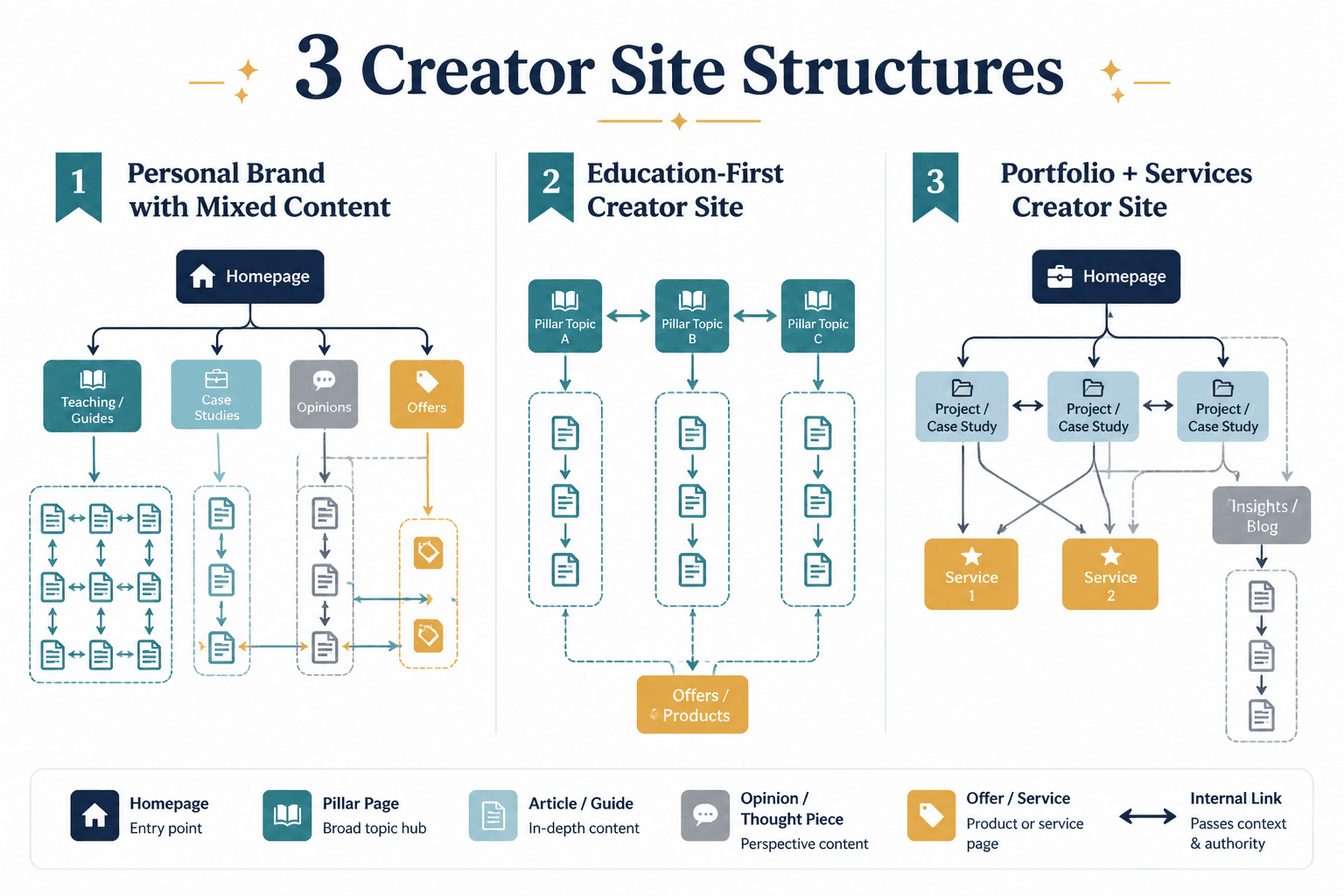
For personal brands with mixed content
If your site includes thoughts, teaching, case studies, and offer pages, your link map needs discipline. Otherwise everything links to everything and the whole structure becomes mush.
Use topic clusters for educational content, and separate those from opinion pieces unless the opinion article genuinely supports the same topic. Not every smart thought deserves a permanent seat in your SEO structure.
That sounds harsh. It is also how you avoid building a site that reads like three different businesses sharing one domain out of spite.
Common mistakes when adapting a link map
- Making clusters too broad: “marketing” is not a useful cluster for a small creator site. Pick something tighter.
- Creating too many pillars: if everything is a pillar, nothing is.
- Forcing links where no real connection exists: readers can smell this.
- Ignoring older posts: new content should trigger updates to old pages, not just stand there alone.
- Using robotic anchor text every time: natural variation is fine. You are writing articles, not labeling storage bins.
- Never retiring weak content: some posts need improving, merging, or quietly stepping aside.
The biggest mistake, though, is treating the map as theory. The only useful link map is one you actually use while publishing and updating content.
A fast workflow you can use this week
If you want a practical starting point, do this:
- Pick one topic cluster on your site
- Choose the main page for that topic
- List 3 to 5 supporting pages
- Add links from the main page to each support page
- Update each support page to link back to the main page
- Add 1 to 2 sideways links between support pages where useful
- Note this cluster in your content tracker so future posts get linked in properly
That alone will put you ahead of a lot of sites that technically have “content strategy” but in practice are just publishing and praying.
If you need a broader overview of the site structure these articles live in, the bigger lesson is simple: map the cluster clearly, keep the links purposeful, and make sure each page knows what supporting job it plays.