
If your audience is small, you do not need more abandoned posts rotting quietly on your site. You need your existing content to actually help the next piece of content do its job.
That is where internal linking and updating for creators with small audiences starts to matter a lot more than people think. Not because it is glamorous. It is not. But because when you do not have huge traffic, every visit, every article, and every decent idea needs to pull a little more weight.
Big sites can get away with content chaos for a while. Small creators usually cannot. If someone lands on one useful article and then hits a dead end, that is not just a missed pageview. It is a missed subscriber, missed inquiry, missed sale, or missed chance to build trust.
So this is about building a tighter system. One where your posts support each other, older content stays useful, and your tiny-but-relevant audience does not have to work hard to find the next thing worth reading.
If you want the broader structure behind this, start with the main internal linking and updating hub. If you want the practical version for small creators, keep reading.
To see how this fits into the wider strategy, open the parent guide.
Why small-audience creators should care more about this, not less
A lot of creators treat internal linking and updating like “real SEO stuff” they will deal with later, once traffic shows up. Backwards.
When your audience is small, you are not trying to manage a giant library yet. You are trying to make a modest body of work feel coherent, useful, and trustworthy. That means helping readers move naturally from one article to the next, and making sure what they find is still sharp enough to earn confidence.
Think about what usually happens instead. Someone finds one article. It is decent. Then they click around and hit:
- a vague older post that no longer matches your current offer
- three articles on almost the same topic with no clear relationship
- a useful post with zero links to anything deeper
- an outdated CTA pointing to something you do not even use anymore
That mess hurts small creators more because you do not have traffic to waste. Internal linking and updating helps you squeeze more value from the attention you already earn.
It also helps search engines understand your site better, yes. But the human benefit comes first. Better navigation. Better flow. Better trust. Better chances that one solid article turns into a relationship instead of a quick bounce.
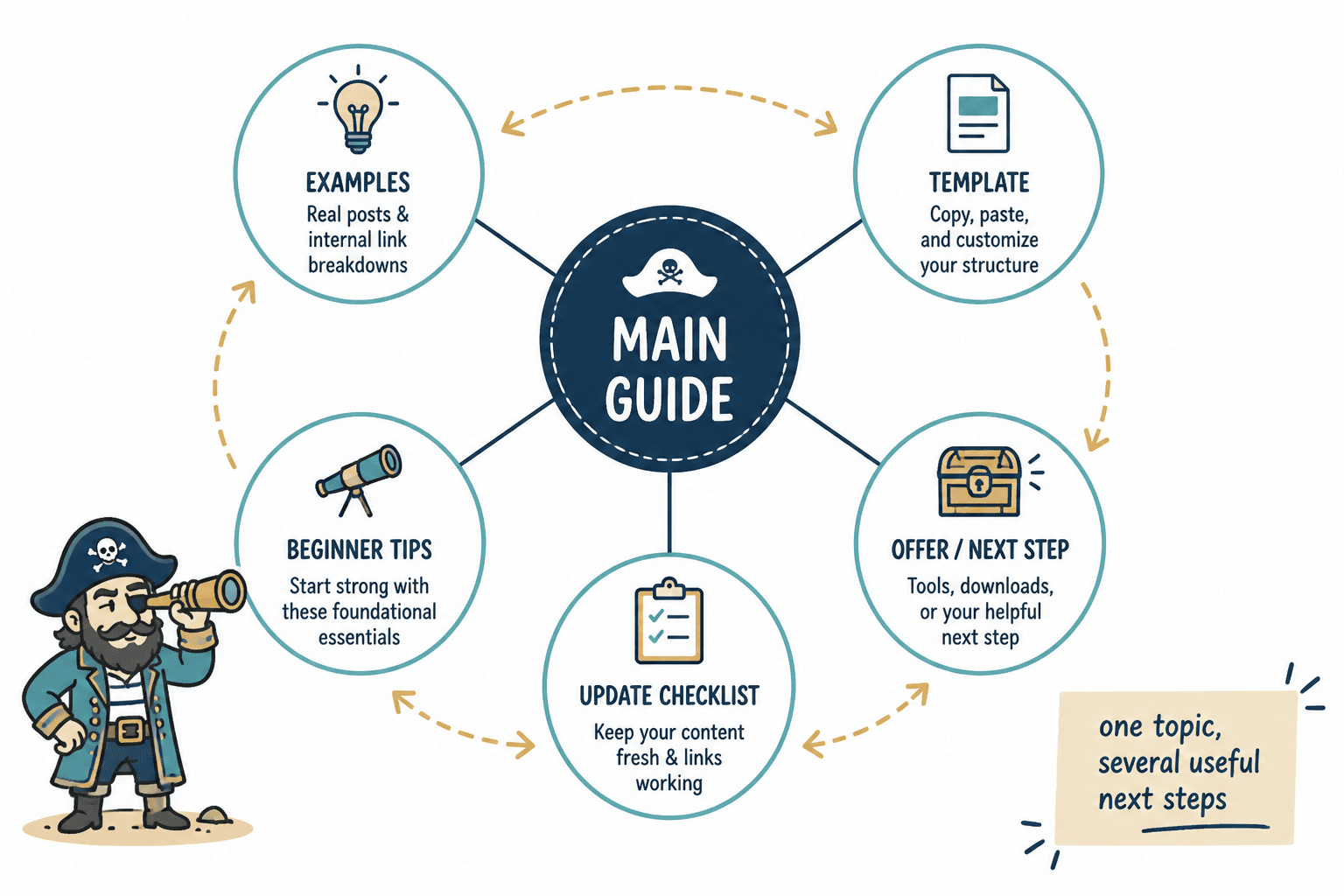
What internal linking and updating actually does for a small creator site
Here is the useful version, without the SEO cosplay.
Internal linking helps readers keep going
A good internal link gives the reader the next logical step. Not a random “related post” guess. The next thing that makes the current article more useful.
If you write about content strategy, and someone reads your article on updating old content, they probably do not need a hard pivot into some unrelated rant about productivity. They may need examples, templates, a guide, or a piece on turning that work into leads.
Updating helps older content stay credible
Old content can still work beautifully if the core idea is solid. But if stats are stale, examples are weak, recommendations no longer fit your business, or the article sounds like a draft from your “figuring it out” era, it quietly lowers trust.
You do not need to rewrite everything every month. You do need to stop treating published content like a museum exhibit.
Together, they create compounding value
This is the part people miss. Updating one article is useful. Adding one internal link is useful. But when you update a post and link it properly into a small cluster of related articles, each page becomes more helpful and more likely to support the others.
That is how a smaller site starts to feel bigger, smarter, and better organized than it actually is. Which, frankly, is a good trick.
The real mistake: publishing isolated content
Most small creators do not have a traffic problem first. They have an isolation problem.
They publish one article about topic A, one article about topic B, one article kind of related to topic A again six months later, and maybe a checklist somewhere in the middle. Nothing connects. Nothing builds. Every article has to earn trust from scratch.
That is exhausting for you and confusing for readers.
A better approach is to treat each article like part of a small system:
- A main topic or pillar article
- Supporting articles that answer narrower questions
- Examples, templates, or tactical pieces linked from those articles
- A clear path to a next step, like an email signup, offer, or related resource
If you want a stronger overview of that structure, you can explore the broader blog SEO writing and article systems section. But the practical version is simple: stop publishing content that has no neighbors.
How to build a small but useful internal linking system
You do not need enterprise software and a spreadsheet that looks like it belongs in a NASA basement. You need a repeatable system you will actually maintain.
1. Pick 3 to 5 topic clusters that match your real work
Start with the topics that are closest to your expertise, offers, or audience problems. For example:
- content strategy
- SEO writing
- creator funnels
- LinkedIn content
- personal brand messaging
Do not create fifteen clusters because your brain enjoys chaos with ambition. Keep it tight.
2. Identify one stronger “hub” article for each cluster
This is usually your broader guide or overview post. In this case, the hub is the internal linking and updating overview. Supporting pieces should point back to it where relevant, and the hub should also point out to useful supporting articles.
The hub is not there to be impressive. It is there to orient the reader and help search engines understand the topic relationship on your site.
3. Add supporting articles that do one specific job each
Good support articles are narrower and more actionable. For this topic, that could include:
- ideas and examples
- a practical guide for better results
- templates for content decay and updates
- turning the system into leads or sales
That set gives the reader options depending on what they need next. Examples. Process. Templates. Monetization. Much better than “read more blogs, I guess.”
4. Link contextually, not mechanically
The best internal links appear where the reader naturally wants the next piece of information.
Bad internal linking looks like this:
We also have many other articles you may enjoy.
That is not a path. That is shrugging in hyperlink form.
Better internal linking sounds more like this:
- “If you want actual examples of what this looks like in practice, see these internal linking and updating ideas and examples for creators.”
- “If your older posts are decaying quietly, this template set for busy creators will save you time.”
- “If you are trying to connect content work to revenue, here is how to turn internal linking and updating into more leads or sales.”
The link should answer a likely next question. That is the whole job.
5. Revisit older articles every time you publish something relevant
This one habit fixes a shocking amount.
When you publish a new article, do not just hit publish and wander off. Ask:
- Which older articles should link to this?
- Does this new piece replace or improve an old section elsewhere?
- Is there a stale article that now deserves an update because this topic is active again?
- Can this new article create a clearer content path toward my offer or newsletter?
That is how your site becomes a living system instead of a pile of timestamps.
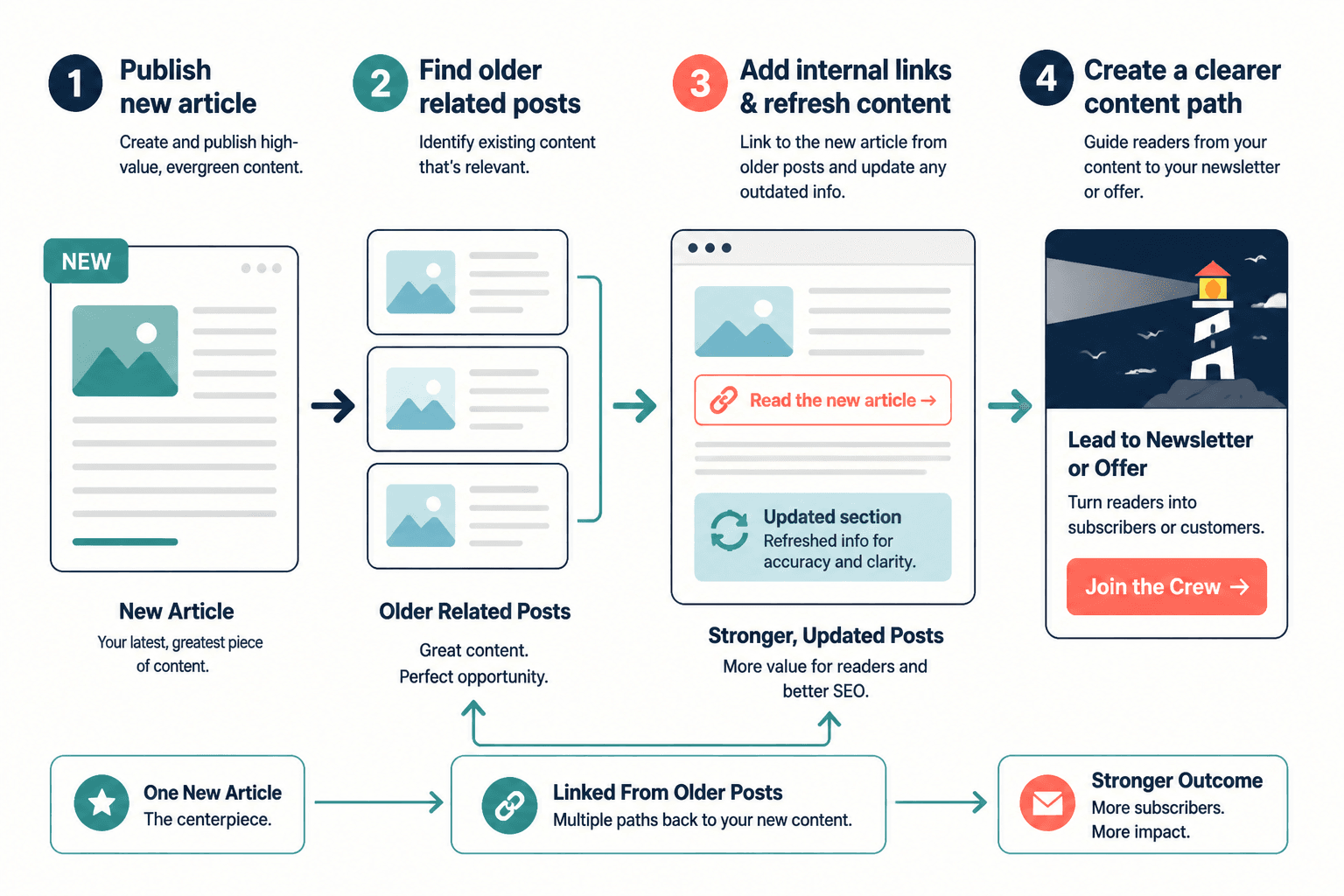
A simple updating workflow for busy creators
You do not need a full content audit every week. You need a lightweight routine that keeps your best pieces from getting stale and your neglected pieces from dragging the whole site down.
Here is a practical workflow you can use quarterly or monthly, depending on how often you publish.
Step 1: Start with your most important articles
Not the oldest. Not the ones you feel weirdly sentimental about. The most important.
Usually that means articles that:
- align closely with your services or offers
- already get some traffic or shares
- rank for useful search terms
- support a key topic cluster
- regularly get linked from other pieces
Step 2: Check for three kinds of decay
- relevance decay: the advice no longer matches what your audience needs now
- accuracy decay: examples, tools, screenshots, or claims are outdated
- conversion decay: the article still teaches well, but the CTA or next step is weak, missing, or old
Some articles only need a few line edits and fresh links. Others need a stronger intro, better examples, and a cleanup of sections that ramble like they were paid by the word.
Step 3: Improve the article before you add more links
Do not use internal links to prop up a mediocre post. Fix the post first.
That may include:
- rewriting a weak opening
- removing repetitive filler
- adding a clearer example
- updating the CTA
- improving headings so the article scans better
Step 4: Add 2 to 5 genuinely relevant internal links
You do not need to carpet-bomb every paragraph with links. Add the ones that help.
For a small creator site, a good rule is simple:
- link to the main hub if it helps orient the topic
- link to one or two supporting tactical articles
- link to one relevant next-step article tied to trust, leads, or action
Step 5: Make sure the links go both ways where appropriate
If article A links to article B because B expands on the point, ask whether B should also reference A for context, background, or next steps. Not every pair needs reciprocal links, but a lot of content systems get stronger when the relationship is clear in both directions.
Step 6: Track updates in one embarrassingly simple document
No need for complexity. A small table is enough.
| Article | Last updated | Main topic cluster | Links added or fixed | Next action |
|---|---|---|---|---|
| Pillar article | May 2026 | Internal linking | Added 3 support links | Refresh CTA |
| Template article | May 2026 | Updating workflow | Linked from 2 older posts | Add example screenshot |
| Leads article | May 2026 | Monetization | Updated anchor text | Improve intro |
Glamorous? No. Useful? Very.
What to link on a small site when you do not have much content yet
This is where newer creators get stuck. They hear “build internal links” and think, great, to what exactly, my six articles and one about mindset from last year?
Fair. But even a small site can create useful content paths if you are intentional.
Here is what to link when your library is still modest:
- link broad guides to narrower examples
- link examples back to broader strategy pieces
- link tactical posts to templates or checklists
- link educational content to one soft commercial next step
- link newer content into older traffic-bearing articles
If you only have a few articles, that actually makes the job easier. You can be more deliberate. Every post can have a role.
And if one article no longer belongs because it is off-topic, weak, or confusing, do not keep it just because it exists. Small sites benefit from sharper curation. More is not automatically better. Sometimes more is just louder clutter.
Common internal linking mistakes small creators keep making
Linking only from new posts to old posts
That leaves your old content frozen in time. Go back and add links from older relevant articles into new ones too.
Using vague anchor text
“Click here” is lazy. “Read this post” is barely better. Use anchor text that tells the reader what they will get.
For example, “see these internal linking and updating ideas and examples for creators” is clearer than “check this out.”
Adding links with no strategic path
If your links do not help the reader understand the topic better, go deeper, or move toward a useful action, they are just decorative SEO confetti.
Ignoring outdated articles because they still get a trickle of traffic
Traffic does not mean the page is doing its job well. A post can attract visitors and still waste them with stale advice, weak positioning, or no next step.
Trying to update everything at once
Classic overachiever mistake. Pick the articles closest to your business goals and best topic clusters first. The point is momentum, not martyrdom.
Treating all content as equal
It is not. Some articles deserve more links, more updates, and more care because they are central to your authority or conversion path. Others can remain supporting players. That is fine.
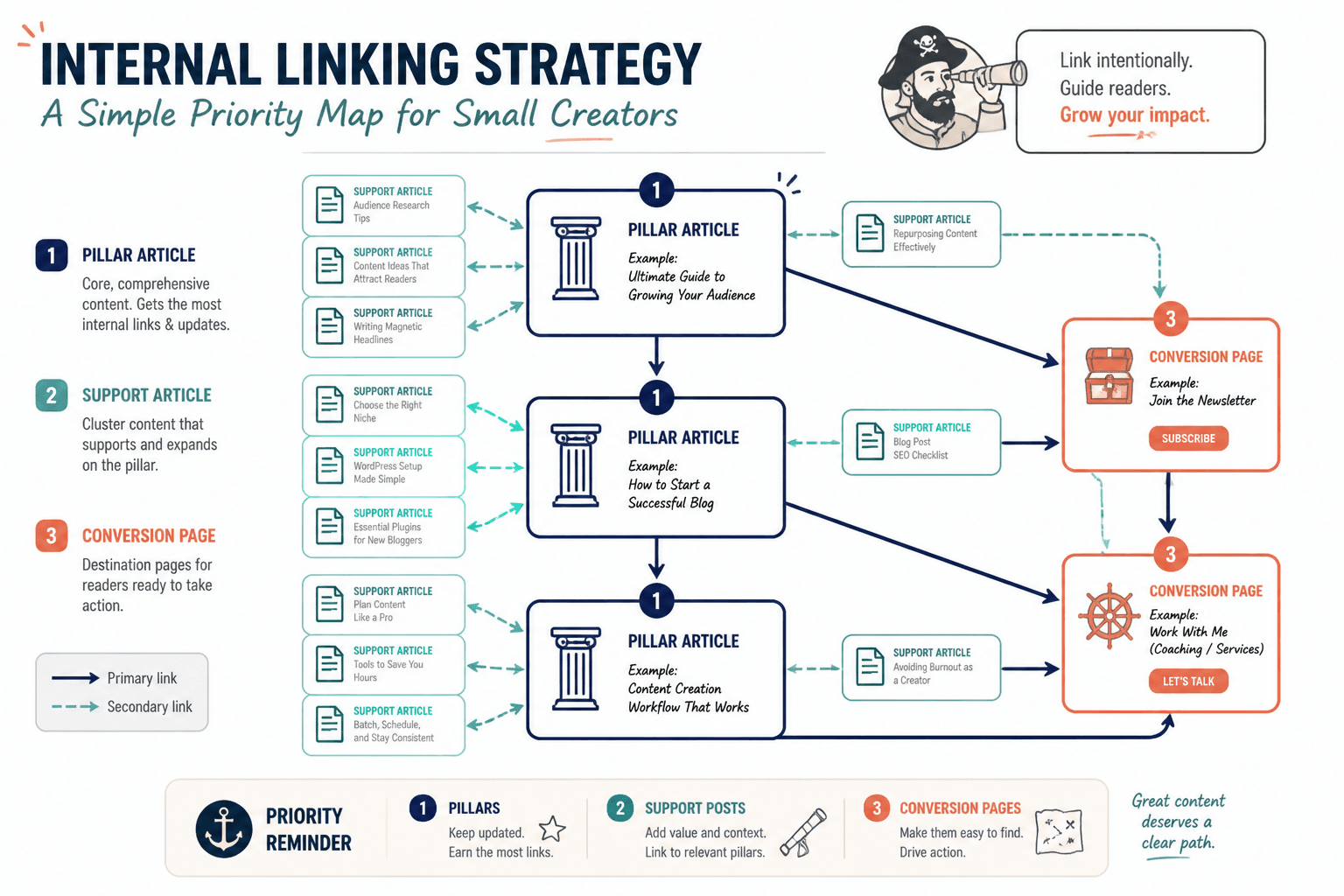
How internal linking and updating can quietly improve leads and sales
This part matters because creators often stop at “better SEO,” which is nice but incomplete.
When your internal links are useful and your content is updated, readers are more likely to:
- read more than one page
- understand your expertise faster
- see your offer in the right context
- trust that you know what you are doing
- take a next step without feeling shoved
That means your content can support simple funnels like:
- article to related article to newsletter signup
- article to case-study-style post to consultation page
- pillar guide to template article to low-ticket offer
- educational post to service page through a trust-building path
If that is the part you care about most, read how to turn internal linking and updating into more leads or sales. The short version is this: a good link structure makes selling feel more natural because the reader gets context before the ask.
And that matters a lot when your audience is small. You cannot afford to burn trust by pitching too early or making people dig for the obvious next step.
A practical weekly or monthly routine
If you want this to actually happen, give it a rhythm.
Weekly version
- publish or update one article
- add links from that article to 2 to 3 relevant existing pages
- edit 1 older article to link back to the new one
- check whether the CTA still makes sense
Internal linking improves when each update makes the next useful step clearer. Cleaner structure usually does more work than a bigger pile of links ever will.