
Most content does not “stop working” because the internet moved on. It stops working because nobody touched it again.
That is the annoying part. Busy creators keep publishing new stuff while older posts quietly rot in the corner like a forgotten salad. Traffic dips. Leads slow down. Internal links point to outdated pages. Calls to action age badly. And then people assume they need more content, when what they often need is five decent updates and a few smarter links.
If you have ever stared at your archive and thought, “I should really update this stuff someday,” this is for you. These simple content decay templates for busy creators will help you spot what is slipping, fix it without turning it into a week-long project, and use internal linking more deliberately while you are there.
The goal is not to create a precious editorial ritual with twelve tabs and a color-coded dashboard. The goal is to make maintenance light enough that you will actually do it.
To see how this fits into the wider strategy, open the parent guide.
What content decay actually looks like
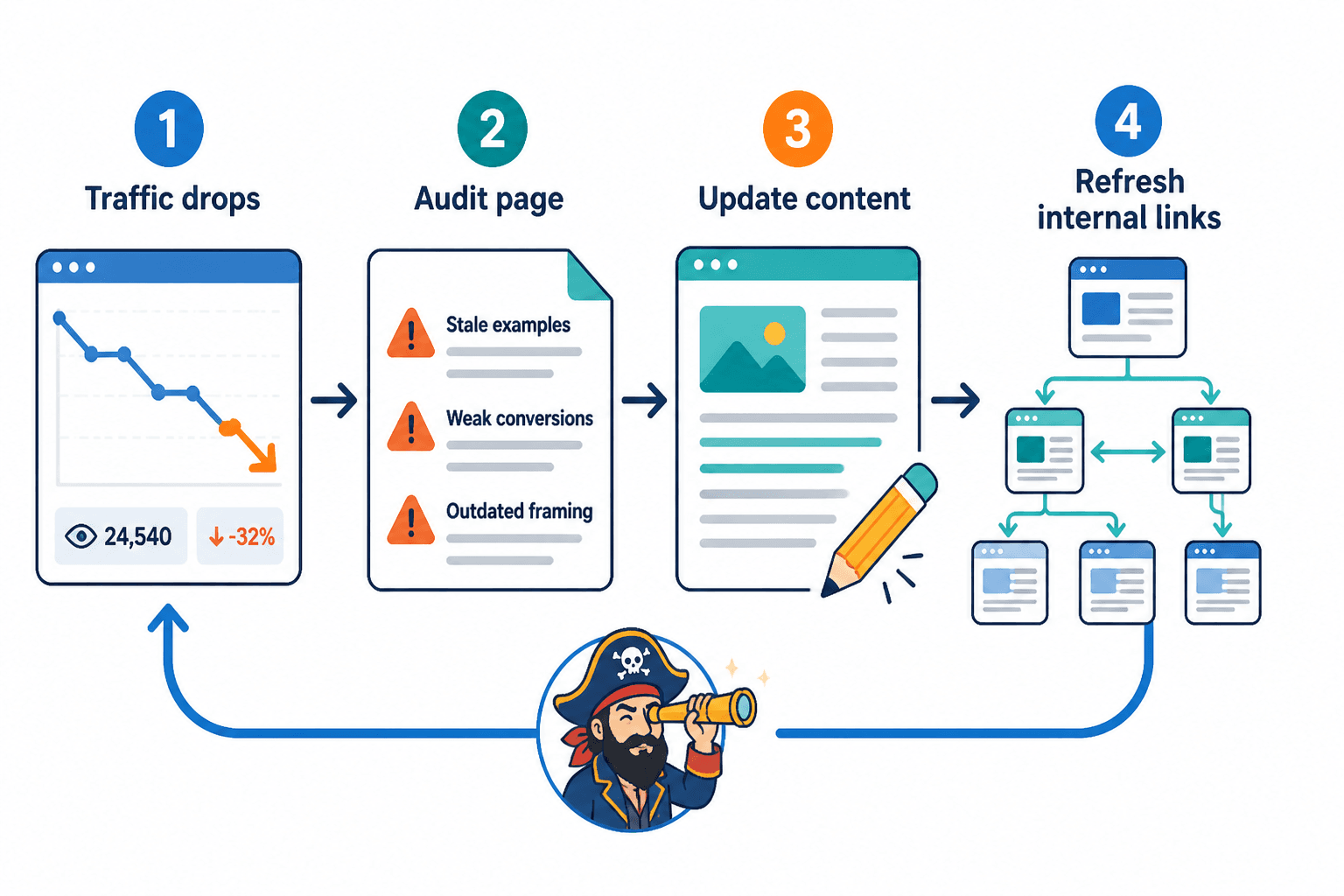
Content decay sounds dramatic, but it usually shows up in boring ways first.
- Your once-steady article loses traffic month by month.
- A post still ranks or gets visits, but converts worse than it used to.
- The examples feel old.
- The links inside it point nowhere useful.
- The topic is still relevant, but the framing feels stale.
- Newer articles on your site are not connected to it at all.
This is why updating and internal linking belong together. If you refresh an article but leave it disconnected from the rest of your site, you are only doing half the job. And if you add internal links without improving weak pages, you are just sending people to slightly dusty rooms faster.
If you want the bigger system behind this, read the internal linking and updating guide for creators who want better results. For now, we are keeping this practical.
Why busy creators need templates, not good intentions
A lot of creators do know they should maintain old content. They just do not have a repeatable way to do it.
Without a template, every update session starts from scratch. What should you check first? Which links matter? How much rewriting is enough? Should you republish, expand, merge, redirect, or leave it alone? That friction is exactly why maintenance keeps sliding down the list.
Templates reduce decision fatigue. They also stop you from doing the creator version of cleaning your kitchen by reorganizing one drawer for three hours. You want a short process that gets useful work done.
If you are still building your broader article system, the resources in this internal linking and updating hub and the wider blog SEO writing section can help. But let’s get into the templates first.
The 15-minute content decay check template
Use this when you need a fast decision on whether an older piece deserves an update.
Template
- Open one older post that used to matter or still gets some attention.
- Check performance quickly: Is traffic, engagement, or conversion down compared with its better period?
- Check relevance: Is the topic still useful to your audience right now?
- Check accuracy: Are any examples, screenshots, claims, tools, or steps out of date?
- Check internal links: Does it link to newer, better, related pieces on your site?
- Check next step: Does it still have a clear CTA or path forward?
- Decide: update, expand, merge, redirect, or leave alone.
Quick decision rules
- Update if the topic still matters and the piece is mostly good.
- Expand if the piece is thin but promising.
- Merge if you have several overlapping weak posts.
- Redirect if the post is obsolete and another page covers it better.
- Leave it alone if it is still useful and not worth tinkering with.
This sounds obvious, but most people skip the “leave it alone” option and over-edit healthy content. Not every post needs a makeover. Some just need one better internal link and a fresher CTA.
The simple update template for aging posts
When a post deserves an update, do not begin by rewriting random sentences because they suddenly offend your current taste level. Start with what changes usefulness.
Template
- Keep the core angle if it still works.
- Rewrite the opening if it is slow, vague, or generic.
- Refresh stale examples with current, clearer ones.
- Add missing sections based on what the topic now needs.
- Cut fluff, repeated ideas, and old filler.
- Add 2 to 5 internal links to relevant newer or stronger articles.
- Update the CTA so it points somewhere useful now.
- Scan headings for clarity and search intent.
- Republish or note the update if that fits your workflow.
That is usually enough. You do not need to rebuild the piece from raw materials every time. If the skeleton is good, just stop the page from sounding like it was last checked when everyone still thought every post needed a “top 10 hacks” headline.
A fast before-and-after example
Before: “Internal linking is an important part of SEO strategy for businesses looking to improve visibility online.”
After: “Most creators do not have an internal linking problem because they lack content. They have one because old articles sit unconnected, and newer ones never send readers anywhere useful.”
Same general topic. Very different level of usefulness. One line sounds like beige wallpaper. The other actually says something.
The internal linking refresh template
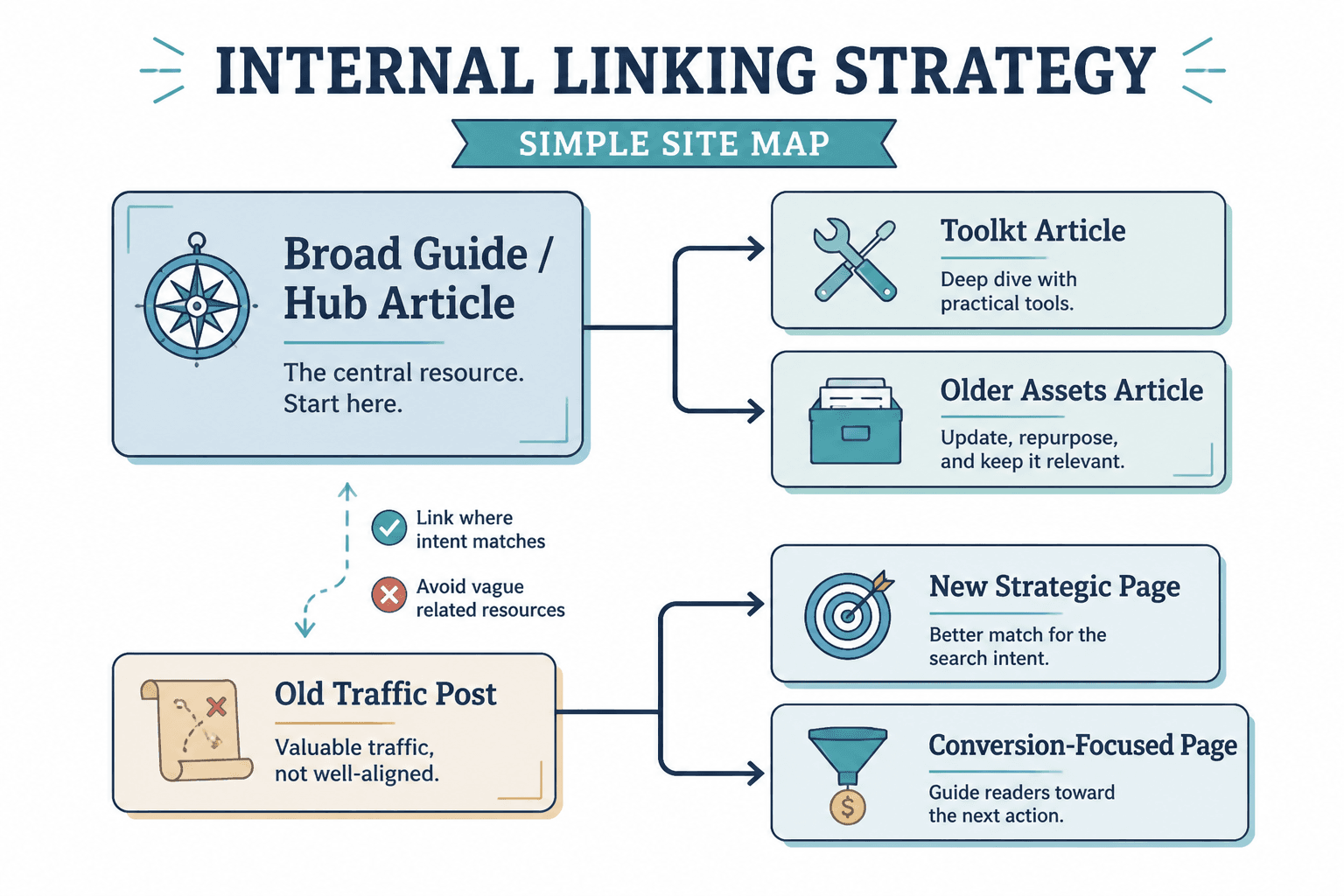
Internal linking gets weirdly overcomplicated. For most creators, the job is simple: connect related pages in ways that help the reader continue naturally.
That means no random “learn more here” stuffed into awkward sentences just because you remembered SEO exists. Links should make the next step easier, not just more searchable.
Template
- Pick one article to refresh.
- Find 3 kinds of related pages: broader guide, adjacent tactic, deeper supporting article.
- Add links where the reader would naturally want more context.
- Use anchor text that tells the truth about what is on the next page.
- Check newer articles and link them back to this refreshed piece where relevant.
- Make sure the CTA path still makes sense after the new links are added.
Easy internal linking pattern
| Page type | What to link to | Why it helps |
|---|---|---|
| Broad guide | Supporting how-to articles | Moves readers deeper into the topic |
| How-to article | Broader guide + tool/template article | Adds context and practical help |
| Template article | Guide + examples article | Makes the advice easier to use |
| Old traffic post | Newer strategic pages | Turns stale traffic into better journeys |
For example, in an article like this one, it makes sense to link readers to best templates and tools for internal linking and updating if they want a broader toolkit, and to how to turn old content into better internal linking and updating if they are specifically working with older assets.
That is a much better experience than dumping three vague “related resources” at the bottom and hoping people click out of politeness.
The monthly content decay review template
If you publish regularly, do this once a month. Not because spreadsheets are fun. Because content compounds better when you stop treating published work like disposable packaging.
Template
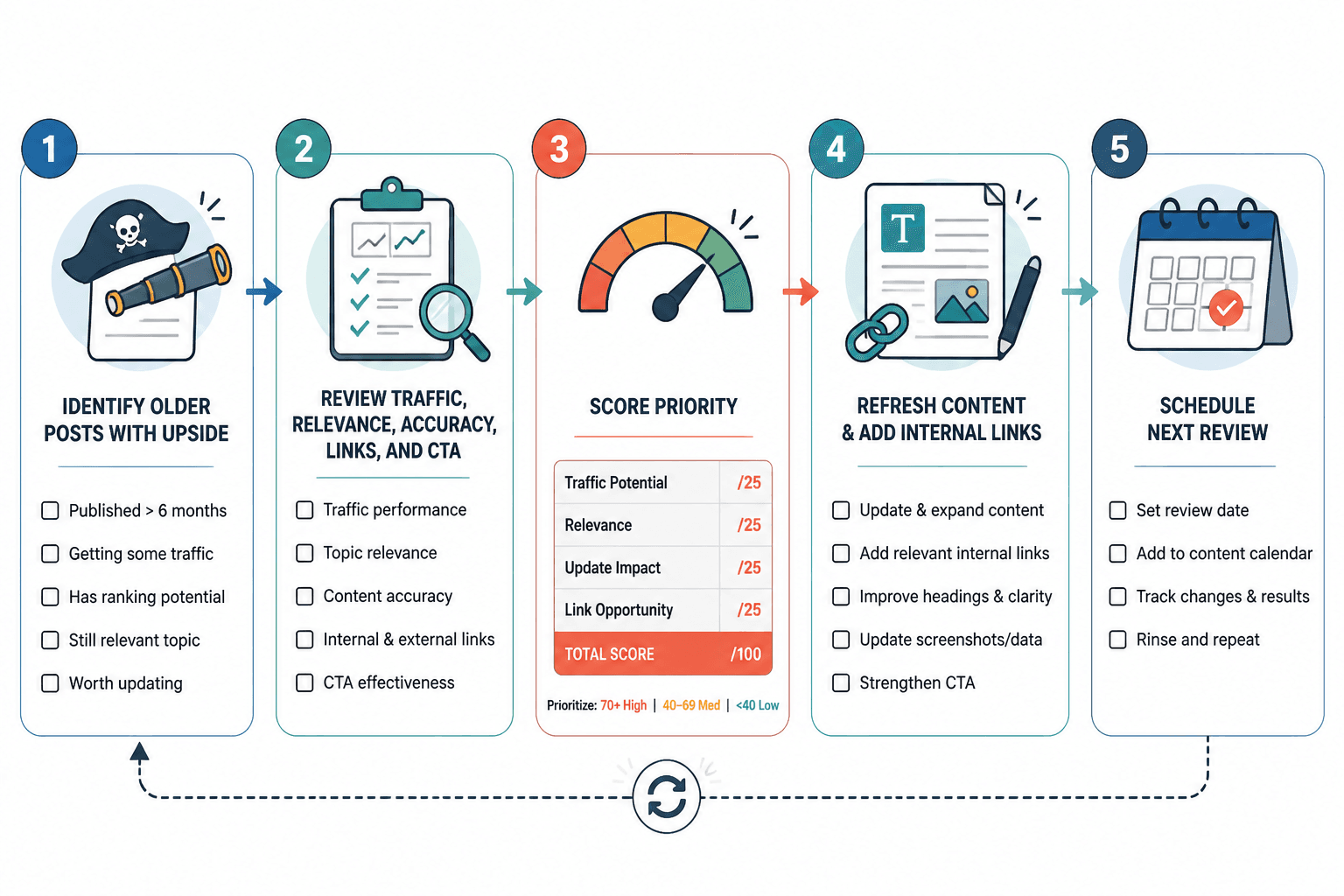
- Pull a list of older posts from the last 6 to 24 months.
- Mark which ones once performed well.
- Spot traffic drops, weaker conversions, outdated references, or missing internal links.
- Choose the top 3 to 5 pieces worth refreshing.
- Assign one small action to each: update intro, refresh examples, add links, improve CTA, merge content.
- Complete those actions before publishing a bunch of new stuff.
Use this simple scoring method
| Factor | Score 1 | Score 2 | Score 3 |
|---|---|---|---|
| Topic relevance | Mostly outdated | Still somewhat useful | Clearly still important |
| Past performance | Never mattered much | Some traction | Strong past traction |
| Update effort | Major rewrite needed | Moderate cleanup | Light refresh |
| Internal linking potential | Few relevant pages | Some good opportunities | Strong hub/supporting-page fit |
Prioritize posts that score high on relevance, past performance, and internal linking potential, especially if update effort is low. In other words: easy wins first. You are busy, not auditioning to become the guardian of a content museum.
The “update without overthinking it” rewrite template
Sometimes the hard part is not the work. It is the overthinking. You open an old post, decide the whole thing is embarrassing, then either rewrite every sentence or close the tab and go make coffee.
Use this lighter method instead.
Template
- Keep: any section that is still clear, accurate, and useful.
- Cut: weak intros, padded transitions, old references, repetitive bullets.
- Replace: vague claims with better examples, stronger wording, or clearer steps.
- Add: one updated insight, one internal link to a newer piece, and one stronger next step.
That simple keep-cut-replace-add pattern is enough for a surprising number of articles. You do not need a dramatic “content relaunch strategy” every time a post gets dusty.
The stale CTA refresh template
A lot of content decay is not traffic decay. It is conversion decay. The article still gets seen, but the call to action is weak, irrelevant, or weirdly aggressive.
This happens all the time when older posts point to old offers, dead lead magnets, or a generic “contact me” line that asks the reader to do all the work.
Template
- Check the current reader intent. What would they likely want next?
- Match the CTA to that intent. Guide to guide, article to template, post to email list, service page to consultation.
- Make the CTA specific. Say what they get.
- Keep the tone human. Do not turn the last paragraph into a mini funnel tantrum.
Weak CTA vs stronger CTA
Weak: “Contact us today to learn more about our services.”
Stronger: “If you are cleaning up older articles right now, start with this guide to turning old content into better internal linking and updating. It will help you decide what to fix first instead of randomly poking at your archive.”
Specific beats formal almost every time.
A simple weekly workflow for creators who do not have time for this
You probably do not need a giant maintenance sprint. You probably need a boring weekly routine that prevents build-up.
- Monday: publish or draft new content.
- Wednesday: update one older article using the 15-minute check.
- Friday: add internal links between one new piece and two older ones.
That is it. One update session. One linking session. Enough to improve your archive over time without making content maintenance your whole personality.
If you are unsure how much effort a piece really deserves, this guide on how long internal linking and updating should be in 2026 can help you avoid both undercooking and overbuilding.
Common mistakes that make content updates less useful
There are a few easy ways to waste time here.
- Updating wording but not usefulness. Fresh adjectives do not fix a thin article.
- Adding links with no strategy. Internal linking should guide, not clutter.
- Ignoring old winners. Your best old content often deserves attention first.
- Only chasing traffic. Update for conversions, trust, and reader journey too.
- Keeping dead sections alive. If a section no longer helps, cut it.
- Treating every post equally. Some are worth fixing. Some are compost.
That last one matters. Creators often cling to old content because they made it, not because it still earns its keep. Sentimental editing is not a strategy.
How to know which old content to update first
If you have a lot of old material, start here:
- Articles that used to perform well.
- Articles tied to services, leads, or important offers.
- Articles on evergreen topics your audience still cares about.
- Articles with obvious internal linking opportunities.
- Articles that are close to good and only need a light refresh.
This is one of those times when “strategic” should actually mean something. You are looking for posts with the best upside, not just the ones you happen to notice first.
And if your older archive is especially messy, start with the broader framework in the internal linking and updating pillar guide, then use the templates here to keep the work lighter.
Simple Content Decay Templates for Busy Creators in one place
Here is the short version you can actually use:
- 15-minute decay check: review traffic, relevance, accuracy, links, CTA, then decide.
- Update template: keep angle, refresh intro, replace stale examples, add missing sections, improve links and CTA.
- Internal linking template: connect broad guides, supporting posts, and newer articles naturally.
- Monthly review template: score older posts and refresh the highest-value ones first.
- Rewrite template: keep, cut, replace, add.
- CTA refresh template: match next step to reader intent, not to your oldest funnel artifact.
If you want a companion piece focused more on tools and reusable systems, go to best templates and tools for internal linking and updating. It pairs nicely with this one.
FAQ
How often should I check for content decay?
Once a month is enough for most creators. If you publish heavily, every two weeks may make sense.
Should I update old posts or write new ones?
Both, but not blindly. Update old posts when they still have relevance, past traction, or conversion value.
How many internal links should I add when updating a post?
Usually 2 to 5 useful ones is plenty. More is not automatically better.
What if an old article is too far gone?
Merge it into a stronger piece, redirect it if needed, or leave it buried. Not every old post deserves CPR.
Do small sites need internal linking strategies too?
Yes. Even a small site benefits from clearer paths between related pages, especially if you want readers to trust you and keep going.
Final thought
Publishing is only half the job. If your archive is full of decent ideas with stale links, tired examples, and forgotten CTAs, you do not have a content volume problem. You have a maintenance problem.
These simple content decay templates for busy creators are meant to fix that without eating your week. Pick one older article. Run the 15-minute check. Refresh the links. Tighten the next step. Then do it again next week.
That is how old content starts pulling its weight again. Not through a grand reinvention. Through regular, useful maintenance that readers can actually feel.