
“AI agent” is one of those phrases that got popular fast and useful slowly.
A lot of creators hear it and picture either a magic robot employee or some overcaffeinated tech bro fantasy about fully automated businesses. Neither version is especially helpful. If you make content, run a personal brand, sell services, or manage a small creator workflow, you do not need sci-fi. You need to know what an AI agent actually is, what it can do, and where it tends to fall on its face.
So here is What Is an AI Agent? A Plain-English Guide for Creators, without the beige jargon. By the end, you should be able to tell the difference between a normal AI tool, an AI assistant, and an AI agent, and you’ll have a clearer sense of when an agent is useful for your work and when it is just expensive automation cosplay.
If you want the bigger picture, start with the parent guide.
What an AI agent is, in plain English
An AI agent is a system that can take a goal, make decisions about how to pursue that goal, and carry out multiple steps with limited human input.
That is the simple version.
A regular AI tool usually waits for one prompt, gives one response, and stops. An AI agent is closer to: “Here is the job. Figure out the steps, use the tools you have access to, and keep going until the task is done or you get stuck.”
For creators, that might look like an AI system that:
- researches a topic
- pulls notes from your content library
- drafts a post
- rewrites it for LinkedIn and X
- schedules it
- logs the content in your workflow tracker
Not perfectly, to be clear. But that is the shape of it.
The easiest way to understand it: tool vs assistant vs agent
| Type | What it does | How much initiative it has | Creator example |
|---|---|---|---|
| AI tool | Completes one task from one prompt | Very little | “Write 10 hook ideas for this post” |
| AI assistant | Helps interactively across tasks | Some | Brainstorms, revises, summarizes, answers questions |
| AI agent | Pursues a goal through multiple steps and tools | More | Plans, drafts, reformats, files, and updates a workflow automatically |
If you want the non-technical version, here it is:
- An AI tool is like a microwave.
- An AI assistant is like a helpful intern you still need to direct.
- An AI agent is like an intern who can handle a process, not just a single instruction.
The catch is that many “AI agents” still need more supervision than the marketing suggests. So yes, they can reduce manual work. No, they do not suddenly have taste, judgment, or your business instincts.
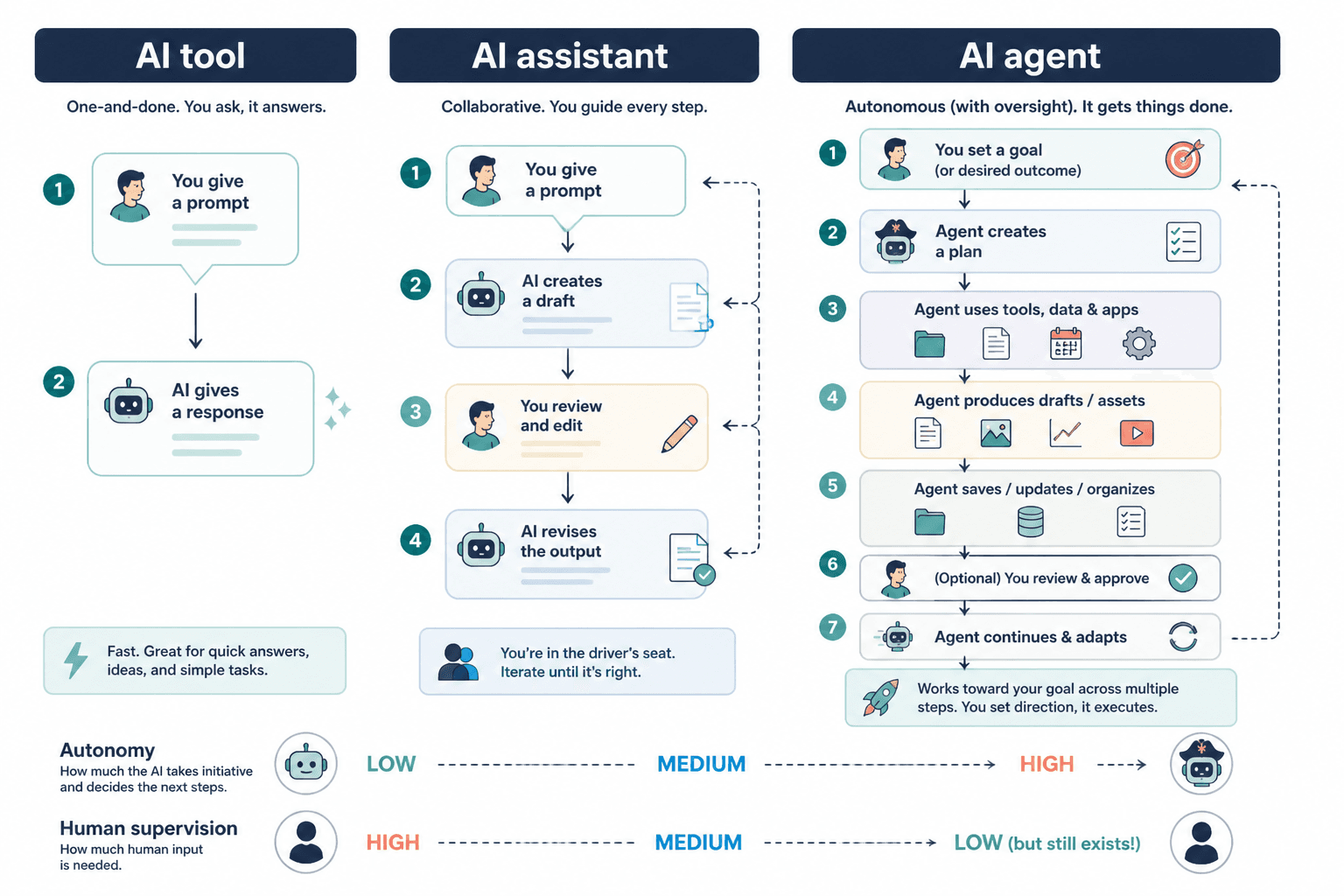
How AI agents actually work
You do not need a computer science degree for this part. The useful version is just understanding the moving pieces.
1. They start with a goal
Instead of just answering a prompt, an agent gets a broader objective.
Example: “Turn this webinar transcript into three LinkedIn posts, one email, and one short article draft, then save them in the content folder and add them to the publishing queue.”
2. They break the goal into steps
The agent decides what has to happen first, next, and last. That might include extracting key ideas, choosing the best angle, rewriting for different formats, and organizing the outputs.
3. They use tools or connected systems
This is the part people miss. A real agent usually works with tools, not just text generation. It might connect to your notes app, content calendar, CRM, scheduler, or knowledge base. That is what makes it feel more “active” than a normal chatbot.
4. They check progress and adjust
If one step fails, the agent may try a different route, ask for clarification, or stop and report the issue. In stronger setups, it can review its own output against a brief before moving on.
5. They return a result or complete the workflow
The end result is not just “here is some text.” It is “the task was handled,” at least in theory.
That is the promise, anyway. Reality is usually messier, which is why creators should care less about the buzzword and more about the workflow design.
What makes an AI agent different from ChatGPT or a writing tool?
ChatGPT, Claude, Gemini, and similar tools can behave like part of an agent system. But on their own, they are usually still acting more like assistants than full agents.
If you paste in a prompt and get back a response, that is not really an agent. That is AI-assisted output.
An AI agent usually includes some combination of these:
- a goal it is trying to complete
- memory or stored context
- access to tools or other apps
- the ability to choose next steps
- some logic for checking results
That difference matters because creators keep buying “agentic” products expecting strategic thinking. What they often get is a prompt wrapper with nicer branding.
What AI agents are actually useful for creators
This is where things get practical. If you are a writer, coach, consultant, solo founder, marketer, or personal brand, AI agents are most useful when they reduce repeatable workflow friction.
Not everything in your business should be agent-powered. But some things absolutely can be.
Content repurposing
One of the better uses.
An agent can take one source asset, like a podcast transcript, article, Loom video, or newsletter, and turn it into multiple content drafts for different platforms. It can also organize those drafts in the right folders or project boards.
Useful? Yes. Fully publish-ready? Usually not. It still needs a human to make sure the angles are not bland and the voice has not been replaced with recycled oatmeal.
Research and idea collection
Agents can gather source material, summarize trends, cluster recurring questions, and build rough idea banks from your existing notes, comments, emails, and transcripts.
That can save real time, especially if your content ideas currently live across six tabs, three docs, and one cursed Notes app folder.
Admin-heavy creator workflows
This is less glamorous and more valuable.
Think of tasks like:
- categorizing leads from inquiry forms
- logging content assets in a tracker
- summarizing client calls
- turning meeting notes into action items
- updating a CRM after audience conversations
These are good agent jobs because they are repetitive, structured, and annoying. Which is exactly the kind of work you should be trying to automate first.
Basic audience support
For some creators, agents can help answer common questions, guide people to resources, qualify inbound leads, or recommend the right offer based on simple inputs.
Again, simple is the key word. If your audience questions require nuance, emotional intelligence, or strategic judgment, keep a human in the loop.
What AI agents are bad at
Here is where a lot of the hype quietly falls apart.
AI agents are not great at high-context brand judgment, subtle persuasion, original taste, or knowing when something technically correct still sounds painfully off. They can complete steps. That does not mean they understand what makes something good.
They tend to struggle with:
- strong positioning
- sharp opinions
- voice consistency without heavy guidance
- reading audience mood correctly
- making tradeoff decisions between speed, quality, and brand fit
- catching when a “fine” draft is also forgettable
This is why creators should not hand over the core of their message and hope software develops taste through vibes.
If your content works because it sounds distinct, earns trust, and reflects actual expertise, the AI should support the process around that value, not replace it.
Signs you might benefit from using an AI agent
You probably do not need an AI agent just because you are busy. Busy people buy plenty of nonsense.
You might benefit from one if:
- you repeat the same multi-step workflow every week
- you lose time moving content between tools
- you have clear processes but hate doing the admin
- you already know your voice, audience, and offer
- you want speed, not fully automated genius
You probably should wait if:
- your workflow is still chaotic
- you have not defined your content strategy
- your messaging changes every three days
- you are hoping AI will fix weak positioning
- you do not yet know what “good” output looks like
An agent can help scale a decent system. It cannot rescue a mess you have not bothered to define.
A simple creator example
Say you run a consulting business and publish weekly content.
A normal AI prompt might be:
“Summarize this client workshop transcript into five content ideas.”
An AI agent workflow might be:
- Pull the transcript from your meeting folder.
- Extract recurring pain points.
- Match those pain points to your core content pillars.
- Draft three LinkedIn posts, one email, and one article outline.
- Save them in your content database.
- Tag each draft by funnel stage.
That is the difference between a one-off answer and a system that can carry work forward. A real agent is useful when it helps you move through several steps with less manual babysitting, not when it is just a flashy new label for a normal prompt.