
Most people use ChatGPT like they are meeting it for the first time every single day.
They open a new chat, type a vague prompt, get a half-decent answer, then wonder why the output feels generic, off-brand, too formal, too fluffy, or weirdly eager. Then they start stuffing every prompt with backstory, tone notes, audience details, formatting rules, and five reminders not to sound like a motivational toaster.
That is exactly the mess ChatGPT custom instructions are supposed to reduce.
ChatGPT Custom Instructions Explained: What They Do and How to Use Them is really about one thing: giving the tool a better default starting point so you do not have to repeat yourself constantly. Used well, custom instructions can save time, improve consistency, and make the output sound a lot more like something you would actually publish. Used badly, they turn into a bloated rule swamp that makes everything stiff.
Here is how they work, what they are good for, what they are not good for, and how to set them up without creating a tiny bureaucratic nightmare inside your AI tool.
If you want the bigger picture, start with the parent guide.
What ChatGPT custom instructions actually do
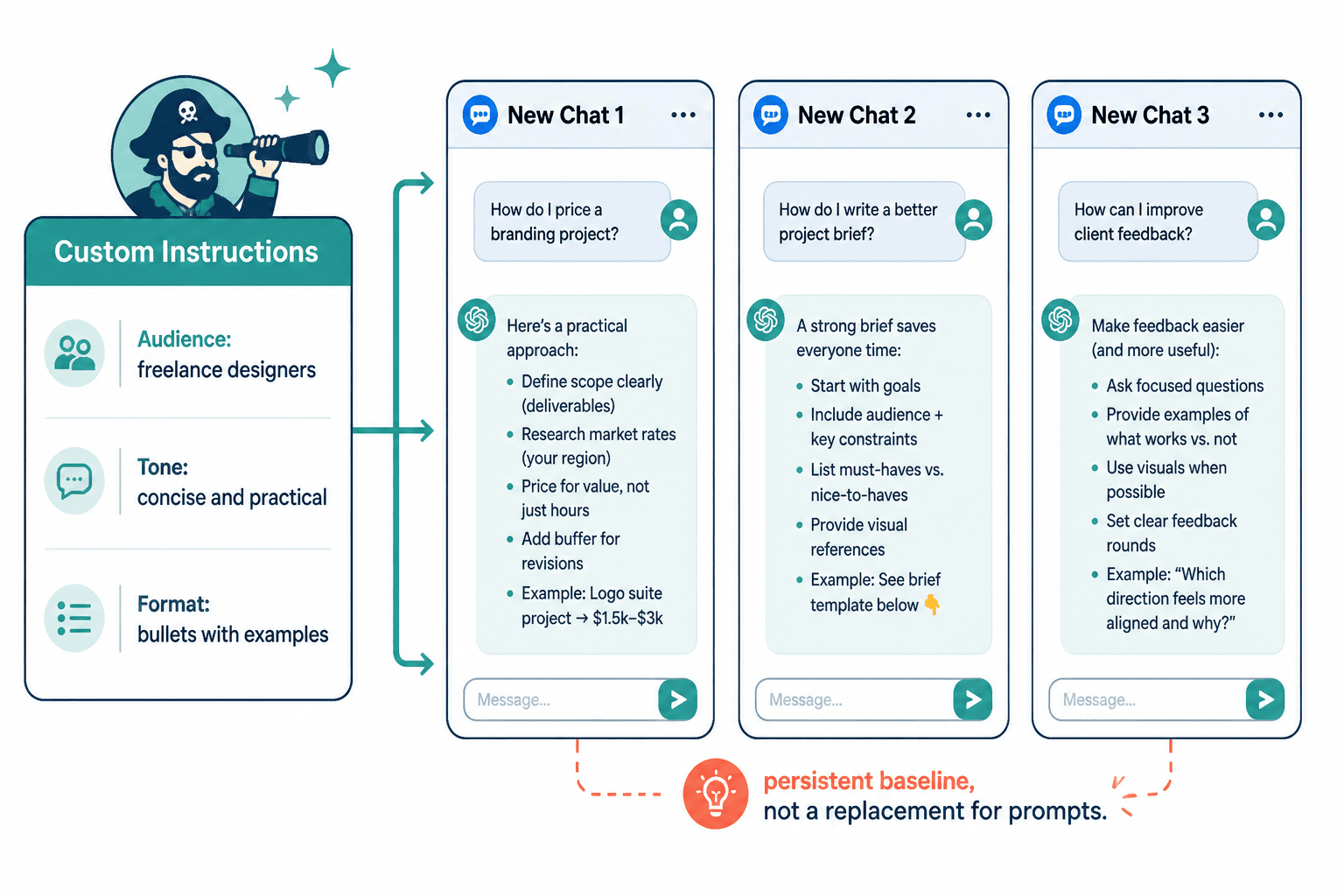
Custom instructions are persistent preferences you give ChatGPT so it has context before you even type the prompt.
Think of them as your default settings, not your full strategy.
They usually cover things like:
- Who you are
- What kind of work you do
- Who your audience is
- What tone you prefer
- How you want answers structured
- What the model should avoid
- What kind of help you typically want
So instead of retyping “Write clearly, skip buzzwords, use short paragraphs, and assume I am writing for creators and consultants” every time, you set that once in your custom instructions.
That does not mean every response will be perfect. It means the model starts closer to useful.
Custom instructions are not magic. They are just preloaded context. Useful context, yes. Magic, no.
What custom instructions are good for
This is where they earn their keep. They are especially useful when you do recurring work inside ChatGPT and want less repetitive setup.
1. Keeping tone more consistent
If you are tired of ChatGPT sounding like it just graduated from the University of Beige Corporate Messaging, custom instructions help a lot.
You can tell it things like:
- Use plain English
- Avoid hype language
- Be direct and practical
- Use short paragraphs
- Do not sound overly formal
- Prefer clear examples over abstract advice
That will not replace editing, but it can dramatically reduce how often you get that polished-but-empty AI oatmeal.
2. Reducing prompt repetition
If you regularly ask for similar tasks, custom instructions save a lot of friction.
Examples:
- A coach creating LinkedIn posts for founders
- A consultant drafting client emails and workshop outlines
- A writer developing article structures and rewrites
- A solo founder using ChatGPT for content, offers, and customer research
Without custom instructions, every prompt starts with a scene-setting monologue. With them, you can get to the actual request faster.
3. Getting more relevant formatting
You can ask ChatGPT to default to formats you actually use.
For example:
- Bullet points for quick workflows
- Tables only when comparison matters
- HTML for publishing workflows
- Short summaries first, details second
- Examples included when advice gets abstract
This is small, but it adds up. Formatting friction is still friction.
4. Tailoring responses to your audience
One of the best uses of custom instructions is audience context.
If your audience is freelance designers, startup founders, therapists, authors, or B2B consultants, say so. ChatGPT tends to be more useful when it knows who the writing is for and what level of knowledge to assume.
This matters because the same advice lands very differently depending on the reader. “Improve your positioning” means one thing for a ghostwriter and something else for a local service business. Vague audience context creates vague output. Predictably.
What custom instructions do not do
This part matters because people overestimate them, then blame the feature when their results are still mediocre.
- They do not replace a good prompt
- They do not give ChatGPT real taste or judgment
- They do not fix weak ideas
- They do not know your current project unless you tell it
- They do not guarantee perfect consistency across every response
- They do not replace editing for publish-ready work
If your prompt is vague, your idea is thin, or your offer is boring, custom instructions will not rescue that. They help the model start from a better baseline. They do not inject strategy into a bad request.
This is the same mistake people make with AI tools in general. They want the software to compensate for unclear thinking. It usually cannot. Or it can only fake it for a paragraph or two before the cracks show.
How to use ChatGPT custom instructions well
The best setup is usually shorter and more practical than people expect.
You do not need a 900-word constitution for the machine. You need useful defaults.
Start with four things
- Your role: what you do and what kind of work you use ChatGPT for
- Your audience: who you are trying to reach or help
- Your style preferences: tone, clarity, structure, and what to avoid
- Your output preferences: examples, formatting, brevity level, and practical emphasis
That gets you most of the benefit without making the instructions rigid.
A simple custom instructions template
Here is a clean version you can adapt:
I am a [role] who uses ChatGPT for [main tasks]. My audience is [audience], and they care about [goals/problems]. Write in a [tone] style using [formatting preferences]. Prioritize [usefulness, clarity, examples, speed, depth]. Avoid [buzzwords, fluff, excessive formality, weak caveats, overexplaining]. When helpful, include [examples, frameworks, rewrite options, checklists].
That is enough to improve a lot of outputs immediately.
Example: creator or consultant setup
I am a consultant and content strategist creating articles, posts, lead magnets, and messaging for creators, solo founders, and service businesses. My audience wants practical marketing advice that is clear, specific, and not full of hype. Write in plain English with short paragraphs and varied sentence length. Be direct, useful, and occasionally sharp, but not cheesy or overly casual. Avoid generic marketing clichés, buzzwords, fake excitement, and filler. Prefer concrete examples, step-by-step guidance, and strong rewrites over abstract theory.
Notice what this does well:
- It gives role context
- It defines the audience
- It sets tone
- It names what to avoid
- It asks for practical output
Notice what it does not do: micromanage every sentence. Good.
Mistakes people make with custom instructions
This is where the feature goes from helpful to annoying.
Making them too long
More rules do not automatically produce better output. Sometimes they just create muddy priorities.
If your instructions are trying to control tone, audience, sentence rhythm, reading level, platform style, conversion strategy, formatting, taboo words, emotional intensity, and seventeen niche preferences all at once, the model may follow some of them and blur the rest.
Shorter, clearer instructions usually work better.
Using them to solve prompt-specific needs
Custom instructions are for defaults, not one-off details.
Bad use:
- Explaining your current launch
- Describing a temporary project
- Adding context that only matters for one article
That stuff belongs in the prompt itself.
Writing vague preferences
Saying “make it better” or “sound professional” is not useful. Better according to what? Professional in what way?
Specific beats vague every time.
Weak:
Write high-quality professional content.
Better:
Write clearly and confidently for business owners. Avoid jargon, filler, and corporate phrasing. Use practical examples and keep paragraphs short.
Expecting them to fix bad source material
If you feed ChatGPT a bland idea, a weak offer, or an unclear argument, custom instructions cannot turn that into sharp thinking. They can make it sound tidier. That is not the same thing.
Sometimes the real problem is not the instructions. It is that the input has no spine.
What to put in custom instructions for different kinds of users
| User type | Useful instruction focus |
|---|---|
| Writer | Tone, clarity, examples, structure, rewrite style |
| Coach | Audience pain points, supportive but direct tone, practical guidance |
| Consultant | Authority, concision, frameworks, client-friendly language |
| Solo founder | Speed, prioritization, marketing usefulness, tactical outputs |
The point is not to build a perfect permanent setup on day one. It is to give the model enough steady context that your drafts stop sounding random and start sounding more like your actual thinking.