
Picking an AI chatbot as a creator is annoyingly easy to overcomplicate.
People compare benchmark charts, argue about model intelligence like they are scouting quarterbacks, and then still use the tool to write a sleepy LinkedIn post that sounds like it was approved by legal. The real question is not which model won a lab test. It is which one helps you think faster, write better, research cleaner, and produce useful work without turning your voice into beige soup.
If you are comparing ChatGPT vs Claude vs Gemini vs Perplexity vs Grok, here is the short version: they are not all best at the same job, and trying to force one tool to do everything is usually where the disappointment starts.
This guide will help you choose based on creator reality: drafting, outlining, ideation, repurposing, research, summarizing, voice preservation, speed, and general “can I actually use this every day without wanting to throw my laptop” energy.
To see how this fits into the wider strategy, open the parent guide.
Quick answer: which AI chatbot is best for creators?
If you want the cleanest quick take, here it is:
- ChatGPT: best all-around choice for most creators
- Claude: best for thoughtful long-form writing, tone control, and working through ideas
- Gemini: best if you already live inside Google’s ecosystem
- Perplexity: best for fast research, source-led discovery, and sanity-checking claims
- Grok: best for people who specifically want a more current, X-adjacent, looser-feeling assistant
That does not mean one is “smart” and the others are toys. It means creators usually need different things at different moments.
A strategist writing a newsletter, a coach drafting client-facing content, and a founder researching market language are all doing different jobs. Same category of tool. Different actual use case.
How creators should actually judge AI chatbots
Most comparison articles get stuck on features. Creators should care more about working style.
What matters is not just what the chatbot can do. It is how reliably it helps you do the kind of work you already do: think, shape, refine, test, and publish.
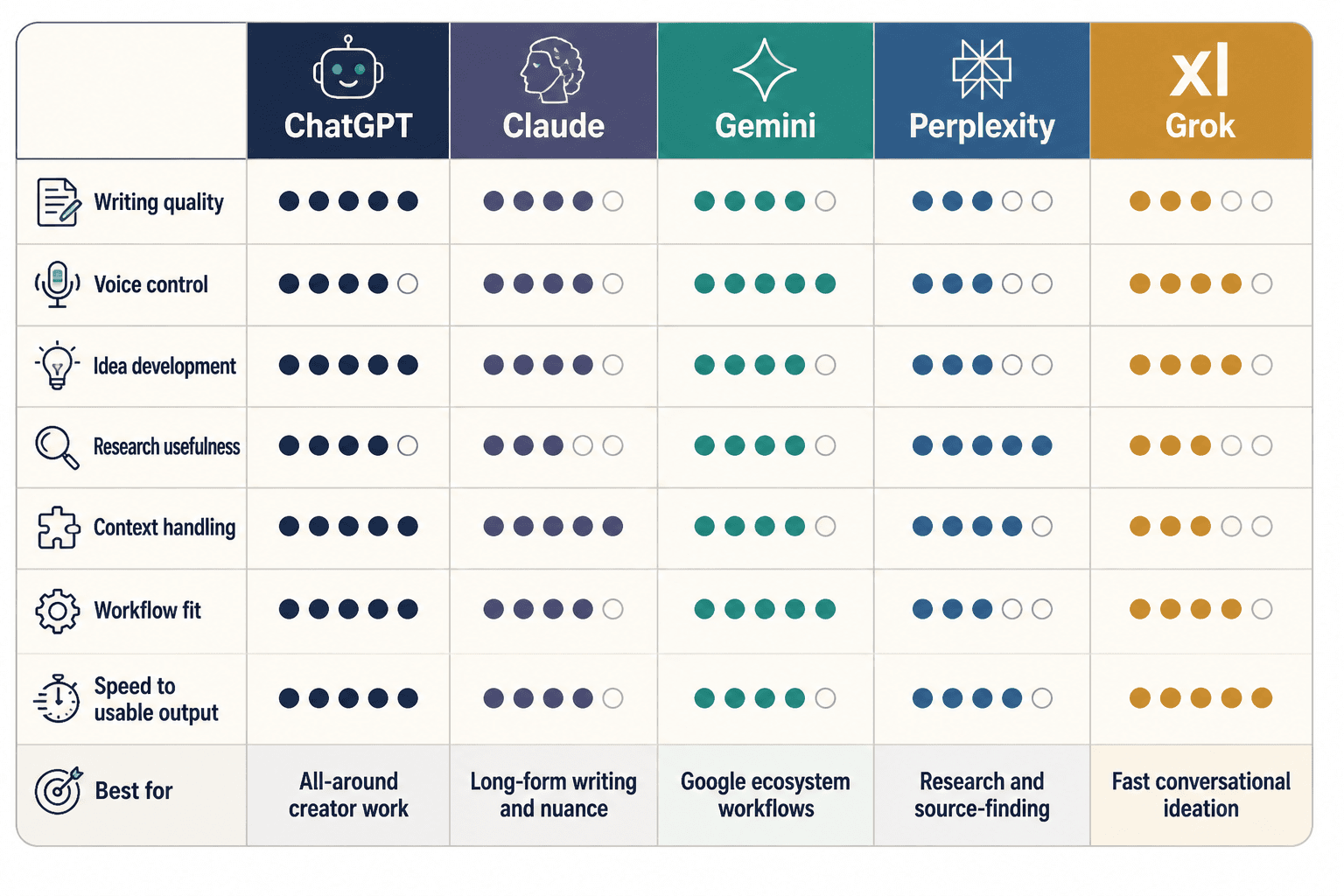
- Draft quality: Does it produce usable first drafts or just polished mush?
- Voice control: Can you get something that sounds like you, not generic “helpful assistant” sludge?
- Idea development: Is it good at sharpening angles, arguments, and structure?
- Research usefulness: Can it help you find facts, examples, and source-backed material without bluffing?
- Context handling: Does it stay coherent across a long brief, strategy doc, transcript, or article draft?
- Workflow fit: Does it integrate well with the tools and habits you already have?
- Speed to usable output: Not just speed. Useful speed.
That last one matters more than people admit. A chatbot can be wildly impressive and still annoying in practice if every answer needs a rescue mission.
ChatGPT: best all-around for most creators
For most creators, ChatGPT is still the safest default pick because it is flexible, widely useful, and pretty good at most of the things creators need every week.
It handles brainstorming, outlining, rewrites, content repurposing, headline generation, email drafting, post variations, prompt iteration, and general workflow support well enough that it earns its place. It is not perfect, but it is the easiest tool to build habits around.
Where ChatGPT is strong
- Flexible for many content formats
- Strong at back-and-forth iteration
- Useful for rewriting and restructuring
- Good for turning raw notes into organized drafts
- Often the best “one tool if I only keep one” option
Where ChatGPT can annoy you
- Can default to polished but generic writing
- Sometimes overexplains simple things
- Needs firmer prompting if you want sharp voice and stronger opinions
In other words, ChatGPT is a strong generalist. If you know how to steer it, it can cover a lot of ground. If you do not, it will cheerfully hand you AI oatmeal and act like it helped.
Best for: creators who want one tool for writing, planning, repurposing, ideation, and workflow support.
Claude: best for long-form writing and thoughtful collaboration
Claude tends to be a favorite among writers, strategists, and creators who care a lot about tone, nuance, and structure. It often feels a bit calmer and more deliberate when you are working through long documents or trying to refine an idea without flattening it.
If ChatGPT often feels like a smart operator, Claude often feels like a patient editor. Not always better, but often nicer for certain kinds of work.
Where Claude is strong
- Handling long inputs and long drafts
- Maintaining more natural flow in long-form writing
- Summarizing messy material without wrecking the meaning
- Helping shape essays, newsletters, guides, and strategic documents
- Often better at sounding less stiff out of the gate
Where Claude can annoy you
- Can be a bit cautious or soft when you want harder-edged output
- May need extra prompting for punchier hooks or tighter social content
- Not always the fastest-feeling option for rapid-fire content production
For long-form creators, Claude is often excellent at helping you think on the page. That matters. A lot of creators do not need “more content.” They need better shape, cleaner argument, and less rambling. Claude is often strong there.
Best for: writers, consultants, educators, and experts creating articles, newsletters, scripts, strategic docs, and nuanced brand content.
Gemini: best for creators already deep in Google tools
Gemini makes the most sense when your work already runs through Google Docs, Gmail, Drive, and the rest of Google’s ecosystem. If your creator business lives there, the convenience can be the deciding factor.
That does not automatically make it the best writer in the group. It means its workflow fit can be very practical, especially for people who value speed and context across their existing stack.
Where Gemini is strong
- Google ecosystem integration
- Helpful for document-based workflows
- Useful for summarizing, organizing, and drafting inside familiar tools
- Convenient for creators managing lots of notes, emails, and working docs
Where Gemini can annoy you
- Writing output can feel less distinctive
- May not be the first choice for voice-heavy brand content
- Sometimes feels more practical than creatively sharp
If your priority is seamlessness, Gemini can be a very sensible pick. If your priority is sharp positioning, stronger voice, and better editorial help, many creators still prefer ChatGPT or Claude.
Best for: creators and teams who already work heavily in Google tools and want an AI assistant that fits that environment.
Perplexity: best for research, not your final brand voice
Perplexity is the one a lot of creators should use more, even if it is not the one they use for final drafts.
Why? Because many creators use chatbots for research in a way that is way too trusting. They ask for facts, trends, examples, statistics, or competitor insight from a general chatbot, get a smooth answer, and then move on as if smoothness equals truth. It does not.
Perplexity is especially useful when you want source-led exploration, quick discovery, follow-up questions, and a cleaner path from question to cited material.
Where Perplexity is strong
- Research and source discovery
- Fast topic scanning
- Finding supporting material for articles, threads, and scripts
- Helping validate claims before you publish them
Where Perplexity can annoy you
- Less ideal as your main drafting partner
- Not usually the best for voice-driven content creation
- Better for finding information than shaping a memorable final piece
This is the key distinction: Perplexity is often a better research assistant than a writerly collaborator. That is not a weakness. It is just a different job.
Best for: creators doing article research, market scanning, source gathering, fact-checking, and idea validation.
Grok: best for real-time flavor and X-native context
Grok tends to attract people who want a looser, more current-feeling assistant, especially if their content world overlaps heavily with X. Depending on your workflow, that can be useful. It can feel more tuned to fast-moving conversation, internet-native tone, and current discourse.
That said, not every creator needs “more timeline energy” in their writing process. For some people, that is a plus. For others, it is how their content gets more reactive and less durable.
Where Grok is strong
- Fast, topical exploration
- A more internet-native tone
- Helpful for creators posting around current conversations
- Potentially useful for X-focused content workflows
Where Grok can annoy you
- May not be the best fit for polished brand writing
- Can feel more novelty-driven depending on your needs
- Less of a default choice for evergreen content systems
Best for: creators active on X, commentary-driven brands, and people who want a more current, conversational assistant.
Side-by-side: which tool wins for common creator tasks?
| Task | Best pick | Why |
|---|---|---|
| All-purpose content creation | ChatGPT | Most balanced across drafting, ideation, and rewriting |
| Long-form articles and newsletters | Claude | Often stronger with nuance, flow, and long-context work |
| Research and source gathering | Perplexity | Better for finding and checking information |
| Google-based workflows | Gemini | Best fit if your work already lives in Google tools |
| Fast-moving commentary and X-native tone | Grok | Best fit if you want a more current, conversational voice |
The right tool depends less on brand hype and more on the kind of work you actually do all week. If you know whether you need research, long-form drafting, Google integration, or sharper everyday ideation, the choice gets much easier.