Most LinkedIn formatting advice is weirdly bad.
It usually swings between two extremes: giant walls of text nobody wants to read, or line breaks so dramatic the post looks like it is wheezing its way through a hostage statement.
If you want to know how to improve LinkedIn line breaks without sounding generic, the answer is not “add more white space” and call it strategy. Better formatting helps, sure. But formatting only works when the words themselves have shape, rhythm, and an actual point.
The good news is this is fixable. You do not need to become a copywriter in a turtleneck. You need to learn how to make your first lines clearer, your paragraphs easier to scan, and your post structure feel natural instead of artificially “engaging.”
This will help you do exactly that: write LinkedIn posts that are easier to read, sharper in the opening, and formatted in a way that supports the idea instead of trying to distract from a weak one.
For the main guide behind this topic, visit the parent guide.
Why most LinkedIn line breaks make posts worse
Line breaks are supposed to improve readability.
Instead, a lot of people use them like stage fog. The post is vague, padded, and saying very little, so they break every sentence into its own line and hope the empty space creates importance.
It does not.
It just makes the writing feel forced. Readers can smell formatting tricks from a mile away, especially on LinkedIn where half the feed already sounds like someone fed a keynote speaker three cold emails and a protein shake.
Bad line breaks usually come from one of these habits:
- Breaking after every sentence, even when the thought belongs together
- Using spacing to fake tension instead of writing with actual tension
- Starting too vaguely, then trying to create drama through formatting
- Copying “high-performing” creators without noticing their posts work because of specificity, not because they hit return 19 times
- Formatting before clarifying the message
Good formatting does one simple job: it helps the reader move through the idea with less friction. That is it. It is support structure, not personality.
How to improve LinkedIn line breaks without sounding generic
If your formatting feels stale, robotic, or suspiciously like everyone else in your niche, the fix is not purely visual. It starts with how you build the post.
Strong LinkedIn formatting comes from strong sequencing:
- Open with a clear first line
- Group related thoughts together
- Break where the reader naturally needs a pause
- Use short paragraphs to control pace, not to perform intensity
- End with a clean payoff or next step
In other words, your line breaks should follow meaning. Not vibes.
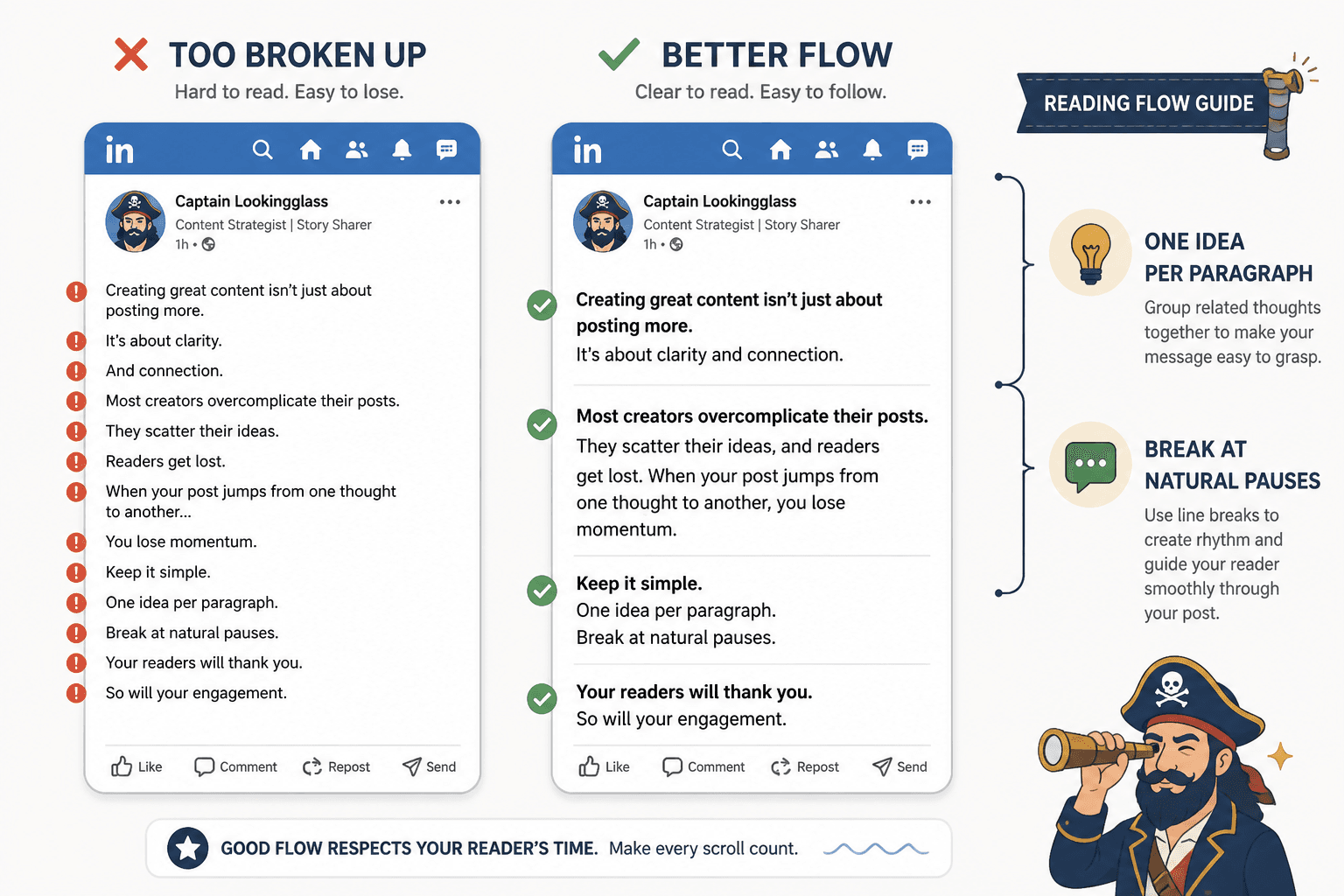
Use line breaks to separate ideas, not decorate them
A useful rule: if two sentences belong to the same micro-point, they can usually stay in the same paragraph.
People often split too aggressively because they think every sentence needs its own stage entrance. It does not. Sometimes keeping two or three sentences together makes the writing feel more grounded and less performative.
For example:
Too broken up:
I wrote every day for 6 months.
Nothing happened.
Then I changed one thing.
I stopped writing for everyone.
Better:
I wrote every day for 6 months and got almost nothing from it.
I was posting consistently. I was not posting specifically.
Everything changed when I stopped writing for everyone.
The second version still breathes, but it sounds like a person with a brain, not a suspense trailer.
Keep paragraphs short, but not absurdly short
On LinkedIn, short paragraphs are good. Mobile reading is real. Dense blocks get skipped.
But “short” does not mean every line should stand alone like it just got dumped. A strong rhythm usually looks more like this:
- 1 sentence for emphasis
- 2 to 3 sentences for development
- 1 sentence for contrast or punch
- A short list when the structure genuinely helps
If every paragraph is one sentence long, the pattern gets tiring fast. And once readers notice the pattern, they stop feeling the effect.
Break before the shift, not after every thought
One of the best uses of a line break is to mark a change in direction.
That could be:
- problem to insight
- mistake to fix
- claim to example
- story to lesson
- observation to CTA
When you break at the shift, the post feels easier to follow. The spacing creates structure the reader can actually use.
When you break randomly, it just feels like formatting cosplay.
Your first line matters more than your spacing
A lot of formatting problems are really hook problems in a trench coat.
If the opening is weak, vague, or stuffed with throat-clearing, people start “fixing” it with spacing tricks. They break lines. Add suspense. Manufacture drama. Suddenly the post has all the visual flair in the world and still says nothing worth reading.
If you want cleaner formatting, start by improving the first line.
A good LinkedIn first line should usually do at least one of these:
- make a clear claim
- name a familiar mistake
- create useful tension
- signal relevance to the right audience
- earn curiosity without acting mysterious for no reason
If you want more help on that part, this guide on how to start LinkedIn hooks and formatting without a weak opening is worth reading next.
Weak hooks vs stronger hooks
Weak: I used to think formatting did not matter on LinkedIn.
This is not illegal. It is just boring. It sounds like the opening sentence of 400,000 posts that all end in “here are 3 lessons.”
Stronger: Most LinkedIn posts do not have a writing problem. They have a readability problem.
Weak: Here’s what nobody tells you about line breaks on LinkedIn.
People tell us things about line breaks constantly, unfortunately.
Stronger: If your LinkedIn post needs 14 line breaks to hold attention, the formatting is not the hero.
Weak: Formatting can make a huge difference.
Stronger: Better LinkedIn formatting will not save a dull idea, but it will stop a strong one from getting buried.
Notice what the stronger versions do. They make a point quickly. They sound specific. They create direction. That gives your formatting something to support.
For more examples, you can also read simple LinkedIn hooks and formatting first-line hooks templates for busy creators.
A simple formatting structure that works on LinkedIn
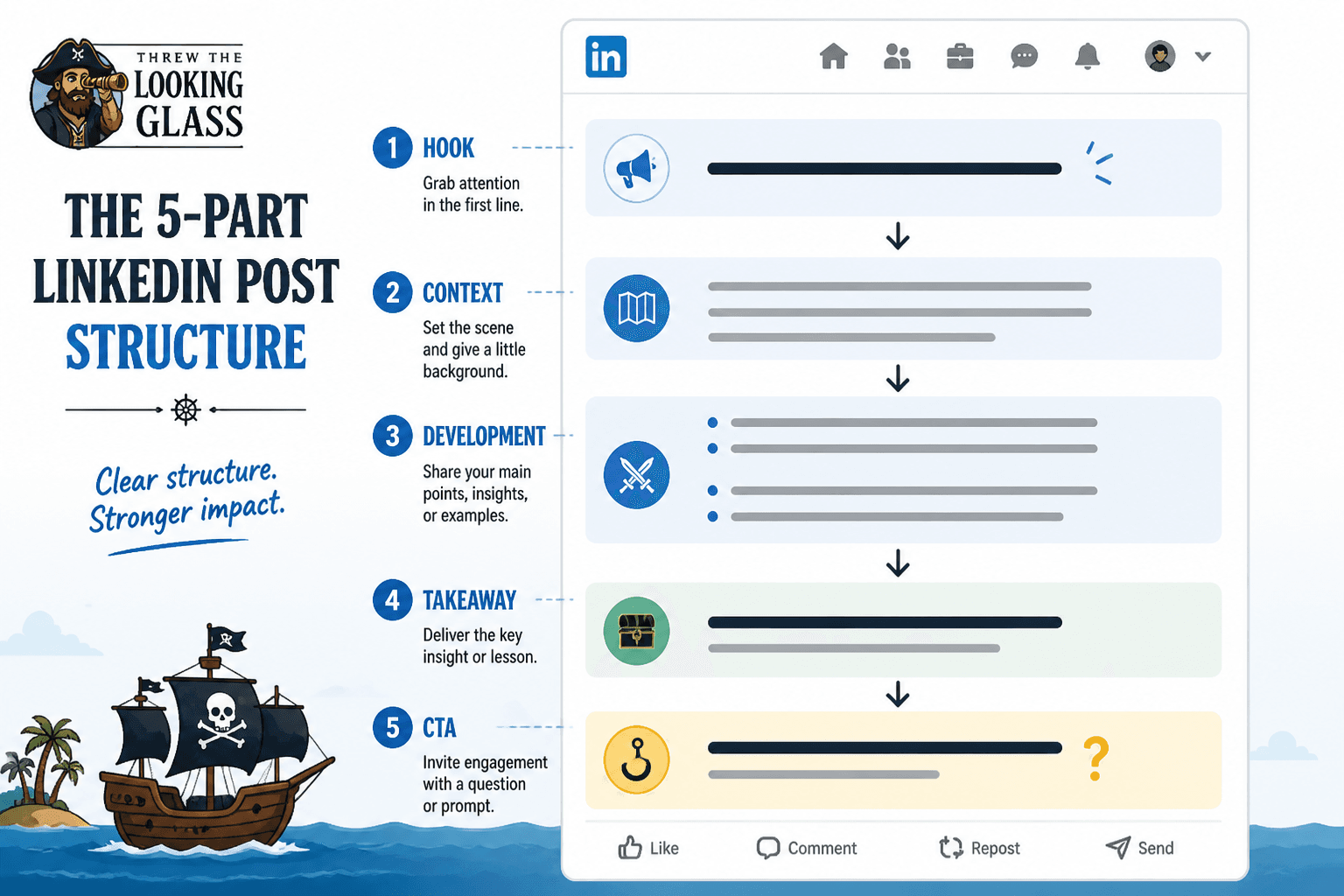
You do not need a complicated post architecture. Most useful LinkedIn posts can follow a structure like this:
- Hook: one strong opening line
- Context: one short paragraph that clarifies the problem or point
- Development: two to four short paragraphs, examples, or bullets
- Shift or takeaway: the lesson, insight, or practical recommendation
- CTA: a natural final line, question, or next step
That structure gives you enough room to sound thoughtful without turning your post into a hallway of one-line dramatic pauses.
Example: before and after formatting rewrite
Before:
I want to talk about something important.
Formatting on LinkedIn.
It matters a lot.
Many people ignore it.
But it can improve readability.
And engagement.
And performance.
So here are some thoughts.
Nothing here is technically wrong. It is just padded, generic, and trying to create importance through fragmentation.
After:
Most LinkedIn formatting advice confuses readability with theatrics.
Yes, line breaks matter. But not because they make a post feel “high performing.” They matter because bad spacing makes decent ideas harder to read than they need to be.
If your post looks dramatic but still feels vague, the issue is not formatting. It is structure.
Same topic. Very different result. The rewrite has actual substance, and the line breaks now support a real progression.
How to make formatting feel natural instead of generic
Generic formatting usually comes from generic thinking. The post follows a template too closely, copies familiar creator rhythms, and loses any sense of actual voice.
If you want your LinkedIn posts to feel more natural, these are the upgrades that matter.
Write the point before you format the post
Before touching line breaks, force yourself to answer this in one sentence:
What is the actual point I want the reader to leave with?
If you cannot answer that clearly, formatting will not save you.
This matters more than people think. A lot of “content optimization” starts too late in the process. People obsess over line spacing, hook formulas, and post length before they have a clean central idea. Then the draft gets bloated because the writer is discovering the point in public.
Figure out the point first. Then structure around it. Then format for readability.
Use contrast, not fluff
If you want your post to feel sharper, contrast helps more than empty drama.
Examples:
- what people think vs what actually works
- what looks polished vs what earns trust
- what gets attention vs what gets qualified attention
- what sounds smart vs what reads clearly
Contrast creates movement inside the writing. That means you need fewer formatting tricks to keep people reading.
Vary paragraph length on purpose
Monotony is part of what makes posts sound generic.
If every paragraph has one sentence, your post starts to feel mechanically optimized. If every paragraph has four dense sentences, it starts to feel like homework. A better rhythm mixes short and slightly longer sections depending on what the reader needs in that moment.
That variation makes the writing feel more human. It also gives emphasis to the right parts without shouting for it.
Keep lists for clarity, not laziness
Lists are useful when you are naming steps, examples, mistakes, or criteria.
They are less useful when they become a crutch for underdeveloped thinking. Not every post needs “3 lessons” or “5 things I learned.” Sometimes a compact argument in paragraphs is stronger, more credible, and less predictable.
If you want a broader guide to this balance, how to write better LinkedIn hooks and formatting goes deeper on the writing side, not just the visual side.
Common LinkedIn formatting mistakes to stop making
The bigger point is simple: clearer structure and clearer writing make the piece more useful. That is usually what makes the ending land better too.
The bigger point is simple: clearer structure and clearer writing make the piece more useful. That is usually what makes the ending land better too.