
Most people do not waste money on tools because they picked a terrible product.
They waste money because they scored the wrong things.
That is the real problem behind most tool review buying mistakes. The review looks “thorough.” There is a nice feature checklist. Maybe there is a clean score out of 10. Maybe somebody even built a comparison table with suspicious confidence. But if the scoring model does not reflect the actual use case, the final recommendation is basically dressed-up guessing.
Tool Review Use-Case Scoring Mistakes That Waste Money usually come down to this: buyers rate tools like they are judging a decathlon, when they actually need one thing done well. You do not need the most impressive all-around platform if you only need a simple way to capture leads, schedule content, manage outreach, or repurpose articles without creating workflow chaos.
Here is how to spot the scoring mistakes that quietly wreck tool decisions, inflate budgets, and leave you paying for complexity you did not need in the first place.
Want the broader roadmap? Start with the parent guide.
Why use-case scoring goes wrong so often
A lot of tool reviews pretend to be objective by scoring the same categories every time:
- features
- pricing
- design
- integrations
- support
- ease of use
That looks neat. It also breaks fast.
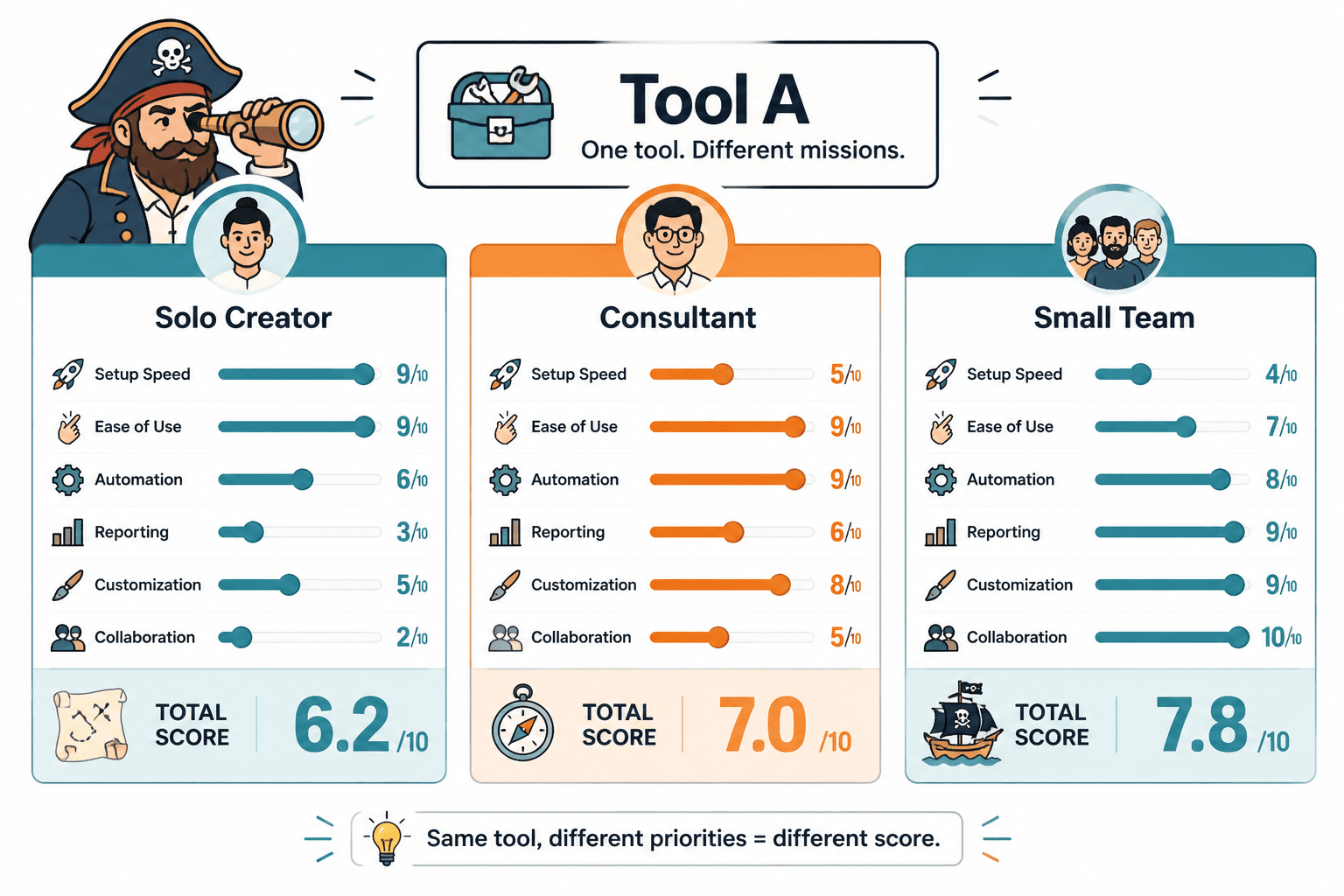
A creator picking a writing tool, a consultant choosing a CRM, and a small team buying an automation platform do not care about those categories in the same proportions. Not even close. A solo founder may care more about setup speed and workflow friction than deep reporting. A coach might value client-facing simplicity over customization. A content team may happily trade ease for power because they have enough volume to justify the extra complexity.
When reviews ignore that, they produce ratings that are technically structured and practically useless. Very polished. Very organized. Very capable of helping you buy the wrong thing.
The most common tool review use-case scoring mistakes
1. Giving every category equal weight
This is one of the biggest offenders.
If you score pricing, features, onboarding, support, integrations, and reporting all equally, you are acting like each category matters the same. It does not. Not for anyone with a real workflow.
Say you are reviewing a tool for a solo consultant who needs to capture inbound leads and follow up quickly. In that case, deep analytics may matter far less than:
- ease of setup
- speed of daily use
- basic automation
- contact organization
- reliability
If analytics gets the same weight as daily usability, the score gets distorted. The buyer ends up paying for capabilities they will never use while ignoring the friction they will feel every single week.
Equal weighting feels fair. It usually is not. It is just lazy math with a nice haircut.
2. Scoring for maximum capability instead of actual fit
More capability is not automatically better. Sometimes it is just more menu items between you and the thing you were trying to do.
A tool can be incredibly powerful and still be a bad buy for your situation. Reviews often reward products for having advanced features, enterprise controls, custom workflows, or endless integrations. Fine. But if the buyer only needs a lean setup and fast execution, all that “power” may create more cost than value.
A smart review should ask: does this tool fit the buyer’s use case cleanly? Not: can this tool theoretically do 48 other things if you spend two weekends configuring it?
3. Treating low price like high value
Cheap tools get overrated all the time because reviewers confuse affordability with value.
A lower monthly cost can still be expensive if the tool creates manual work, misses key functions, or forces you to bolt on three other products. On the other side, a more expensive tool can be the better buy if it saves real time, reduces errors, and replaces multiple subscriptions.
Good scoring should look at cost in context:
- What work does the tool remove?
- What extra tools does it eliminate?
- How long does setup take?
- What is the learning curve?
- Will the user outgrow it quickly?
Price matters. Of course it does. But price without context is how people end up “saving money” into a bloated stack and a worse workflow.
4. Ignoring the cost of implementation
A tool review that scores features and price but skips implementation cost is missing a huge part of the buying decision.
Implementation cost includes things like:
- time to set up
- migration hassle
- training time
- workflow redesign
- integration cleanup
- team adoption friction
This matters even more for creators, consultants, and small operators because time is not some abstract corporate resource. It is your actual week. If a tool saves money but takes 12 hours to configure properly, that cost belongs in the score.
And no, “easy once you get used to it” is not a serious evaluation framework.
5. Using vague scoring categories that hide important tradeoffs
Some reviews score categories like “usability,” “performance,” or “overall value” without explaining what those words actually mean. That makes the score look authoritative while hiding the real decision criteria.
For example, “usability” could mean:
- easy to learn in one sitting
- fast to use every day
- clean interface
- logical navigation
- low error risk
- simple for clients or teammates
Those are not identical. A tool may be easy to learn but annoying in daily use. It may be visually clean but poor for collaboration. It may be simple for one person and clumsy for a team.
If the scoring labels are too vague, buyers cannot tell what is actually being judged. Which means they cannot tell whether the review matches their needs.
6. Scoring the tool without scoring the workflow around it
This is a sneaky one.
A tool does not live in isolation. It sits inside a workflow. If the review scores the app but ignores how it fits into the user’s actual process, the recommendation can be wildly misleading.
For example, a content repurposing tool might look strong on paper. But if the exports are messy, if editing takes forever, or if publishing still requires a separate manual process, then the tool is not really saving the user much. It is just moving the mess to another stage.
Use-case scoring should ask:
- Where does this tool sit in the workflow?
- What happens before it?
- What happens after it?
- Does it remove friction or relocate it?
- Does it simplify the full job or just one step?
7. Letting feature count overpower core job performance
A tool can have 30 features and still be mediocre at its main job.
This is where buyers get distracted. The review says the tool has templates, dashboards, AI helpers, automations, custom views, collaboration options, and reporting layers. Great. But does it do the main thing reliably and cleanly?
If you are reviewing an email tool, score deliverability, segmentation practicality, writing flow, and automation usability before rewarding bonus fluff. If you are reviewing a scheduling tool, score queue management, publishing reliability, content organization, and approval flow before getting dazzled by decorative extras.
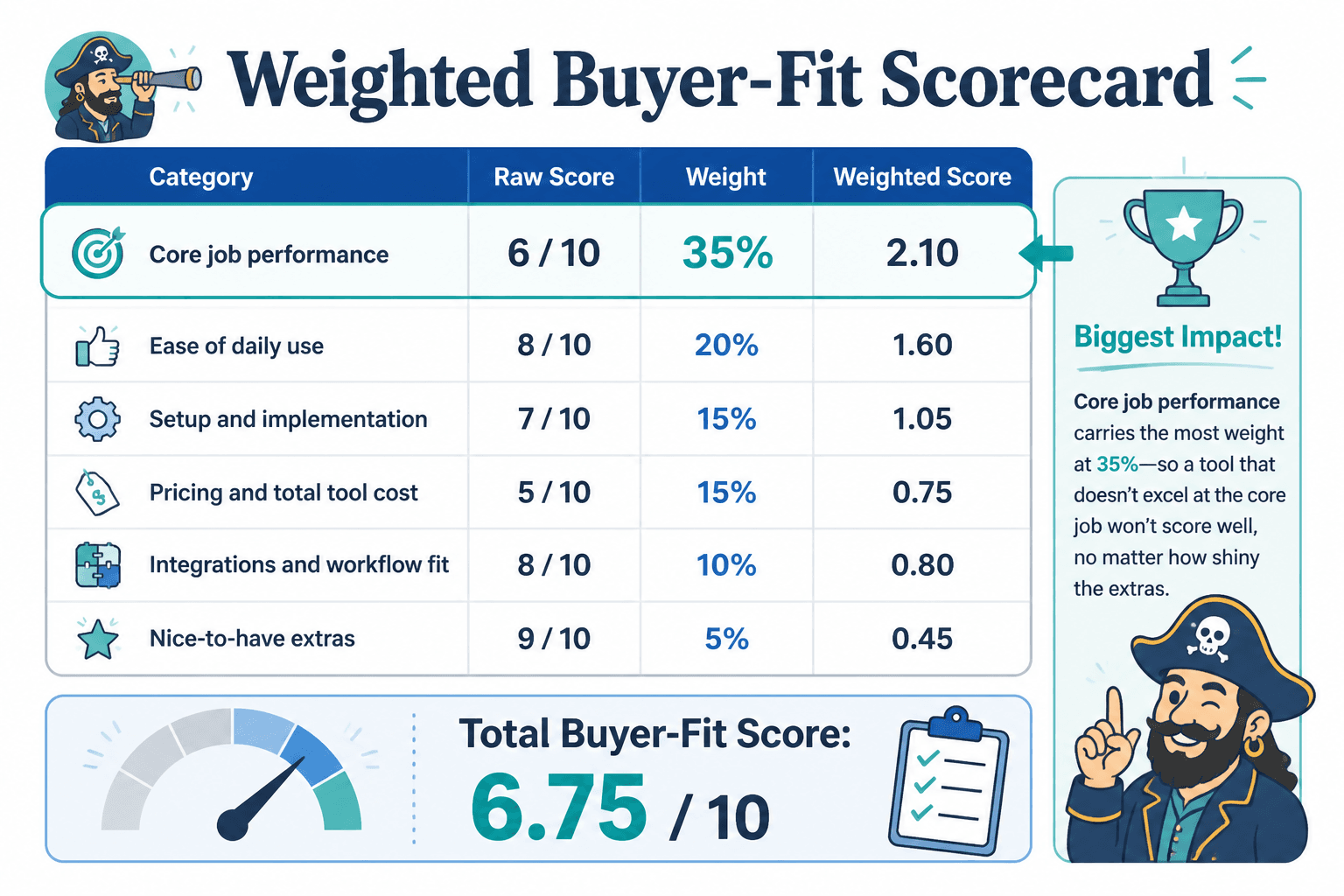
Core job performance should dominate the score. Everything else is garnish.
8. Building scoring models around reviewer preferences instead of buyer goals
Some reviews are really just taste masquerading as structure.
The reviewer likes minimalist design, so sleek tools score higher. The reviewer loves customization, so flexible tools win. The reviewer values analytics, so reporting gets boosted. None of that is automatically wrong. It becomes wrong when those preferences are treated like universal buying criteria.
Good tool review scoring separates:
- reviewer preference
- use-case requirement
- nice-to-have bonuses
That distinction sounds obvious. It is not common enough.
What better use-case scoring actually looks like
If you want a review to help someone buy well, the scoring needs to start with the job, not the product category.
Here is a simpler and much more useful way to score a tool review.
Step 1: Define the actual buyer scenario
Before scoring anything, define who the tool is for and what they need done.
Example buyer scenarios:
- solo creator who needs fast content planning and scheduling
- consultant who wants a lightweight CRM for leads and follow-up
- small team that needs collaborative approval and reporting
- coach who wants simple landing pages and email capture without a full funnel stack
If the scenario is fuzzy, the score will be fuzzy too. Start there.
Step 2: List the critical jobs the tool must do well
Not every capability belongs in the score. Focus first on the key jobs that matter most for that buyer.
For a solo lead management tool, the critical jobs might be:
- capture inbound leads
- organize contacts clearly
- follow up quickly
- track conversations without confusion
- stay simple enough to use consistently
Step 3: Weight the categories based on importance
Now assign weight based on actual importance, not cosmetic symmetry.
| Category | Example Weight |
|---|---|
| Core job performance | 35% |
| Ease of daily use | 20% |
| Setup and implementation | 15% |
| Pricing and total tool cost | 15% |
| Integrations and workflow fit | 10% |
| Nice-to-have extras | 5% |
This kind of weighting is far more honest because it reflects consequences. If a tool is weak at the main job, it should be hard for it to recover with bonus features and shiny extras.
Step 4: Separate must-haves from nice-to-haves
This one saves a lot of bad purchases.
A must-have is a requirement. If the tool fails here, the score should drop hard. A nice-to-have is useful, but not essential. If the review treats those as comparable, the recommendation gets warped.
For example:
- Must-have: reliable publishing
- Must-have: easy content organization
- Nice-to-have: advanced analytics dashboard
- Nice-to-have: extra collaboration permissions
You would be amazed how many reviews act like a pretty dashboard makes up for the core workflow being annoying. It does not.
Step 5: Include failure costs, not just benefit scores
Some tools look decent until you ask what happens when they fail.
If a scheduling tool misses posts, if a CRM makes follow-up messy, if a writing tool creates cleanup work, those failure costs matter. Good scoring should account for downside risk, not just upside appeal.
That is especially important when the buyer is small and lean. A missed publish date or lost lead hurts more when there is no giant team smoothing it out behind the scenes.
A quick before-and-after scoring example
Here is how weak scoring often looks:
- Features: 9/10
- Pricing: 8/10
- Design: 9/10
- Support: 7/10
- Integrations: 9/10
- Overall: 8.4/10
Looks impressive. Tells you almost nothing.
Now here is a more useful version for a solo creator choosing a content workflow tool:
- Fast idea capture and organization: 8/10
- Ease of weekly planning: 9/10
- Publishing workflow reliability: 7/10
- Editing and reuse efficiency: 6/10
- Setup speed: 9/10
- Total cost for solo use: 8/10
- Best for: creators who want simplicity over deep team features
- Bad fit for: teams needing layered approvals and advanced reporting
That second version is not just scoring the tool. It is helping the buyer decide. Big difference.
How to tell when a tool review score is about to waste your money
If you are reading reviews, watch for these red flags:
- The review never names the buyer type clearly
- The scoring categories are broad and vague
- Every category has equal weight
- Feature depth gets rewarded more than practical fit
- Low price is treated like automatic value
- Implementation cost is ignored
- The workflow around the tool is never discussed
- The conclusion recommends one “best” tool for everyone
That last one is especially useful. When a review acts like there is one obvious winner for all buyers, your skepticism should wake up immediately. Different use cases should produce different winners. If they do not, the review is probably flattening the problem into nonsense.
If you want a better framework for evaluating review quality itself, this guide on how to evaluate review structure pairs well with this one. And if you are still earlier in the process, how to choose tool reviews without wasting money will help you filter out weak review sources before you even get to the scorecards.
A practical scoring template you can steal
If you are comparing tools yourself, use this basic model.
- Buyer scenario: Who is this for?
- Main job: What must the tool help them do?
- Must-have criteria: What cannot fail?
- Nice-to-have criteria: What would be useful but not essential?
- Weighting: What matters most?
- Implementation cost: How hard is setup and adoption?
- Workflow fit: Does it simplify the full process?
- Failure risk: What happens if the tool underperforms?
- Total cost: What is the true monthly and operational cost?
- Best-fit recommendation: Who should actually buy it?
This works far better than generic “best tool” scoring because it forces the decision back into real life. Which is where the money gets spent.
You can also pair this with buyer questions for comparing tool reviews without bias and examples of tool reviews that actually help a buyer decide if you want stronger comparison criteria and cleaner examples of what useful evaluation looks like.
For broader context, the tool reviews hub and the related monetization and money-content path can help you place tool decisions inside the bigger business picture, not just the product comparison bubble.