
Most explanations of RAG in AI are written like they are trying to impress an engineer in a dark room with six monitors. That is not helpful if you are a creator, coach, consultant, or solo business owner who just wants to know what the thing actually does and whether it is useful.
So here is the plain-English version: RAG helps an AI tool look up the right information before it answers. Instead of relying only on whatever it learned during training, it can pull in relevant material from your documents, notes, knowledge base, transcripts, PDFs, or website content and use that to generate a better response.
That matters because most AI outputs go weird for one of three reasons: the model does not know your specific information, it guesses when it should not, or it gives you a polished answer that is technically fluent and quietly wrong. RAG is one of the main ways people try to reduce that mess.
If you have been wondering what is RAG in AI? A Simple Explanation for Non-Technical Creators starts here: it is basically AI with a lookup step.
To see how this fits into the wider strategy, open the parent guide.
What RAG actually stands for
RAG stands for Retrieval-Augmented Generation.
- Retrieval = the system goes and fetches relevant information
- Augmented = that information is added to the AI’s context
- Generation = the AI creates a response using that extra material
That is the whole trick.
Without RAG, an AI model answers from its general training and whatever prompt you gave it. With RAG, it can first pull in source material that is more specific to your business, your audience, your offers, your knowledge, or your files.
RAG does not make AI smarter in some mystical way. It makes AI better informed at the moment it answers.
A simple example for non-technical creators
Say you are a coach and you upload these into an AI system:
- Your service descriptions
- Client FAQs
- Past podcast transcripts
- Your newsletter archive
- A document explaining your framework
Then you ask:
Write a LinkedIn post explaining my framework in a simple way for founders who feel stuck.
A normal AI tool might give you a decent-sounding post based on generic internet patterns. It may sound polished, but it could miss your language, your process, your audience nuance, and the details that make your work yours.
A RAG-powered system can first search your uploaded material, pull relevant bits about your framework and audience, and then write the post using that source material. The result is usually more accurate, more on-brand, and less suspiciously generic.
Not perfect. Just better grounded in reality, which is more than you can say for a lot of AI copy floating around right now.
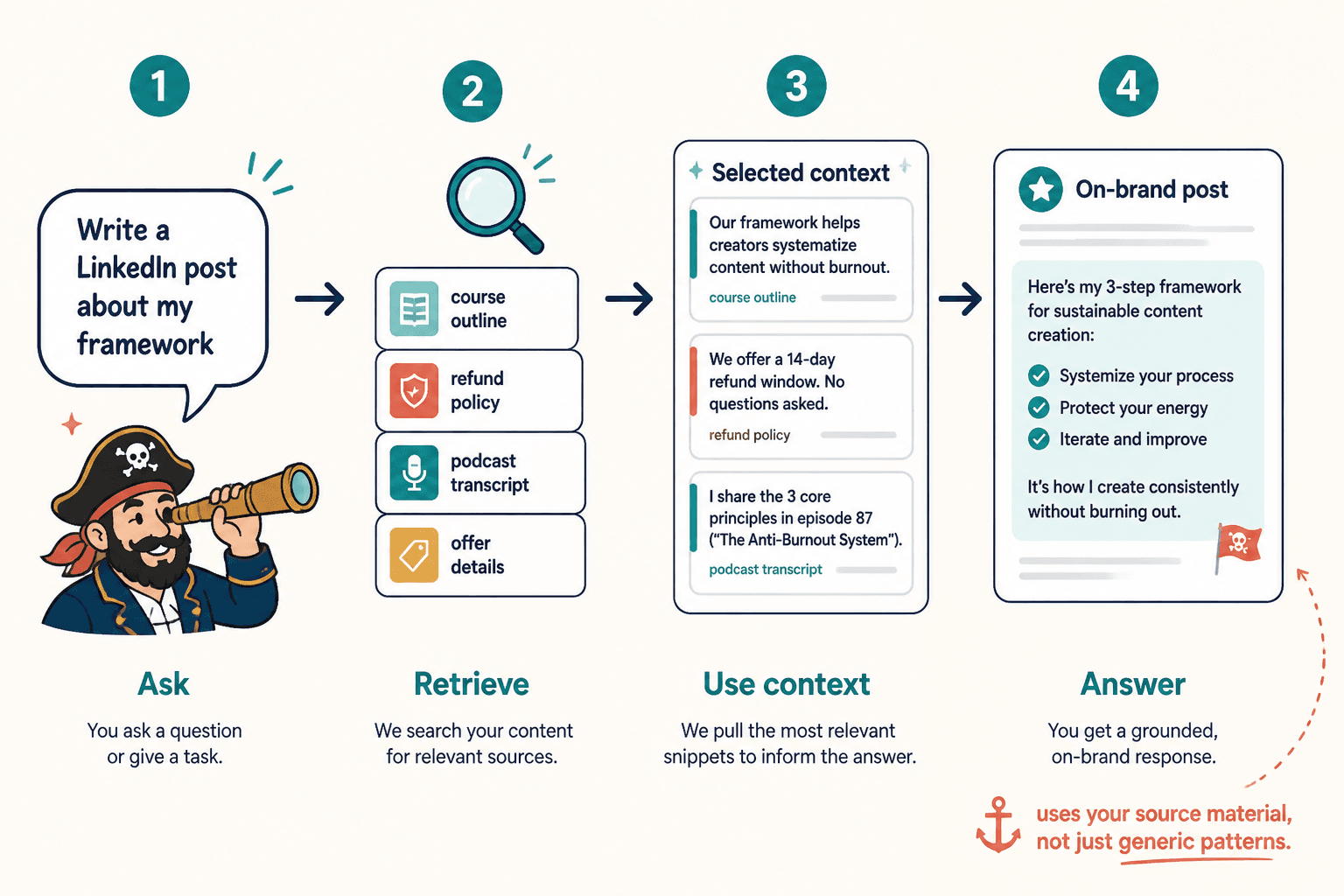
How RAG works in normal human terms
You do not need the full technical architecture to understand the value. Here is the practical version.
1. You ask a question or give a task
This could be something like:
- Write an email based on my course outline
- Answer this customer support question using my refund policy
- Summarize my podcast transcript into three post ideas
- Create a sales page FAQ using my offer details
2. The system searches the relevant source material
It looks through the documents, notes, pages, or files connected to the tool and tries to find the most relevant pieces.
This is the retrieval part. Think of it like an assistant scanning your files before speaking, rather than just winging it from memory.
3. The useful bits get attached to the prompt
The AI is then given those retrieved snippets as context. Now it has actual source material to work with, not just vibes and sentence patterns.
4. The AI writes the answer using that context
That is the generation part. The final response is still generated by the model, but it is doing so with more relevant information in front of it.
So if you want the shortest possible explanation, here it is:
RAG = search first, answer second.
Why RAG matters for creators and personal brands
If you are not building enterprise software, it is fair to ask why you should care. The answer is simple: because generic AI is usually strongest at sounding competent, not being specifically useful to your business.
Creators and service businesses often have a pile of valuable source material already:
- Old posts that performed well
- Sales calls and client questions
- Offer docs and onboarding materials
- Voice notes and workshop transcripts
- Testimonials and case studies
- Email newsletters
- Internal messaging guides
- Course lessons and frameworks
RAG helps AI use that material instead of ignoring it.
That makes it useful for things like content repurposing, support responses, internal knowledge assistants, research summaries, and writing drafts that actually reflect your business rather than sounding like a content intern who binge-read startup posts for two hours.
What RAG is good at
RAG tends to shine when you need AI to work from specific information, not broad general knowledge.
- Using your own documents: great for turning your existing material into drafts, summaries, FAQs, and support content
- Improving accuracy: better than asking a model to guess your policies, frameworks, or product details
- Keeping outputs more grounded: useful when trust matters and you cannot afford made-up details
- Repurposing content: helps pull from transcripts, posts, or newsletters instead of starting from zero every time
- Handling repeated questions: good for support assistants, knowledge bots, and internal team helpers
- Saving time: especially when your information lives across too many docs, folders, and tabs
If your work involves repeatable expertise, RAG can be practical. You already have the ingredients. It just helps the AI find them before it starts talking.
What RAG is not good at
This is the part people skip when they are trying to sell software.
RAG is useful, but it is not magic. It does not suddenly give an AI taste, judgment, or strategic clarity. It just improves access to relevant information.
- It does not fix bad source material. If your docs are vague, outdated, or messy, the output may still be vague, outdated, or messy.
- It does not guarantee truth. The AI can still misread, overstate, or phrase things badly.
- It does not replace positioning. If your offer is unclear, no amount of retrieval will save the message.
- It does not create personality from nothing. It can use your words, but it still needs good inputs and editing.
- It does not understand your audience as deeply as you do. Unless you give it strong audience material, it will still fill gaps with generic assumptions.
So yes, RAG can improve AI output. No, it does not turn a boring idea into a good one. That part is still on you.
RAG vs regular AI: the easier comparison
| Regular AI | RAG-powered AI |
|---|---|
| Answers mostly from training data and your prompt | Answers using your prompt plus retrieved source material |
| Can sound fluent but generic | Usually more specific and grounded |
| More likely to guess details | More likely to reference actual documents |
| Works fine for brainstorming and drafts | Better for business-specific tasks and knowledge-based answers |
| Needs you to paste context manually | Can fetch context automatically |
If you have ever copied and pasted giant chunks of notes into a prompt just to get a half-decent answer, you already understand why RAG exists.
Common use cases for non-technical creators
You do not need a fancy app to imagine the possibilities. Here are some grounded use cases that actually make sense.
Content creation from your existing material
Feed in transcripts, newsletters, client calls, workshop notes, or article drafts. Then ask the AI to create:
- LinkedIn posts
- Email drafts
- Thread outlines
- FAQs
- Lead magnet ideas
- Article summaries
Internal knowledge assistant
If you have a small team, a RAG setup can help people find answers across SOPs, offer docs, onboarding notes, messaging guidelines, and training materials.
Client support and repeated questions
If people ask the same things over and over, RAG can help generate consistent answers using your real policies and documentation.
Offer messaging and sales enablement
It can pull from testimonials, case studies, objections, and offer details to help draft pages, replies, or sales support material that is rooted in your actual proof.
That last part matters. AI is much more useful when it is fed evidence instead of just asked to sound persuasive. The internet already has enough confident nonsense.
What you need for RAG to work well
The quality of a RAG system depends a lot less on buzzwords and a lot more on what you feed it.
- Clean source material: updated, relevant docs beat random folder chaos
- Useful structure: files should be organized enough that the system can find the right material
- Specific prompts: “write something good” is still a bad instruction, even with better retrieval
- Clear use cases: start with one problem, like content repurposing or FAQs, not ten
- Human review: especially for client-facing content, sales claims, or anything where accuracy matters
In other words, RAG rewards businesses that have at least some order to their knowledge. If your information is scattered, outdated, or vague, retrieval will surface confusion faster, not fix it for you.
That is why the boring foundation work matters so much here. Cleaner documents, clearer structure, and narrower use cases usually improve results more than another round of AI buzzwords ever will.