
Most internal linking and updating advice is weirdly split into two bad camps.
Camp one treats it like technical SEO cosplay: giant audits, complicated scoring systems, spreadsheets that look like they were built to punish interns. Camp two gives you useless fluff like “just keep content fresh” and “add relevant links naturally,” which is true in the same way “eat better” is true. Not wrong. Not helpful either.
If you are trying to keep a content library useful, searchable, and not slowly rotting in public, you need something simpler: a few solid templates, a sane updating workflow, and tools that speed up the boring parts without pretending to be strategy.
This guide breaks down the best templates and tools for internal linking and updating, especially if you are a creator, consultant, solo founder, or small brand without an SEO team lurking in a dark room somewhere. You will see what to track, what to ignore, which tools actually help, and how to build a process you might genuinely keep using.
If you want the broader framework behind this topic, start with the main internal linking and updating system here. If you want examples and plug-and-play ideas after this, the companion pieces on simple templates and practical examples are worth bookmarking.
To see how this fits into the wider strategy, open the parent guide.
What good internal linking and updating systems actually do
Before tools and templates, get the point straight.
A good internal linking and updating system is not just there to make Google slightly happier. It helps readers find the next relevant thing, helps older articles keep earning attention, helps newer articles get discovered faster, and helps your site feel like an actual body of work instead of a pile of disconnected posts.
That matters more than people think. A decent article with strong internal links and regular updates can outperform a better-written article that has been left alone to die quietly in page-seven obscurity.
Internal linking does three practical jobs:
- It distributes attention across your site.
- It gives readers a clearer path from curiosity to trust.
- It tells search engines which pages matter, how topics connect, and where deeper context lives.
Updating does three more:
- It fixes outdated advice, examples, screenshots, and claims.
- It improves weak intros, structure, calls to action, and relevance.
- It helps solid content stay competitive instead of decaying quietly.
Put those together and you get a content library that compounds. Not magically. Just consistently. Which is usually better.
The best templates for internal linking and updating
Templates matter because they reduce decision fatigue. If every content update starts with “hmm, what should I even check,” you will avoid it until the article is old enough to vote.
You do not need fifty templates. You need a few that match how content actually gets maintained.
1. The article update checklist template
This is the most useful one for most creators. It gives you a repeatable review process every time you revisit a post.
| Check | What to review | Action |
|---|---|---|
| Search intent | Does the article still match what readers want? | Adjust angle, examples, or structure |
| Intro | Is the opening sharp or sleepy? | Rewrite first 2–4 paragraphs |
| Accuracy | Any outdated claims, tools, or examples? | Replace, remove, or clarify |
| Internal links in | Are there links from related articles pointing here? | Add links from relevant pages |
| Internal links out | Does this article send readers to useful next steps? | Add supporting and next-step links |
| Structure | Are headings, lists, and examples easy to scan? | Tighten formatting |
| CTA | Is the next action clear and relevant? | Improve or simplify CTA |
| Performance notes | Traffic, rankings, conversions, engagement | Log what changed and why |
This works because it keeps you from “updating” an article by changing one sentence and calling it a day. That is not updating. That is tidying.
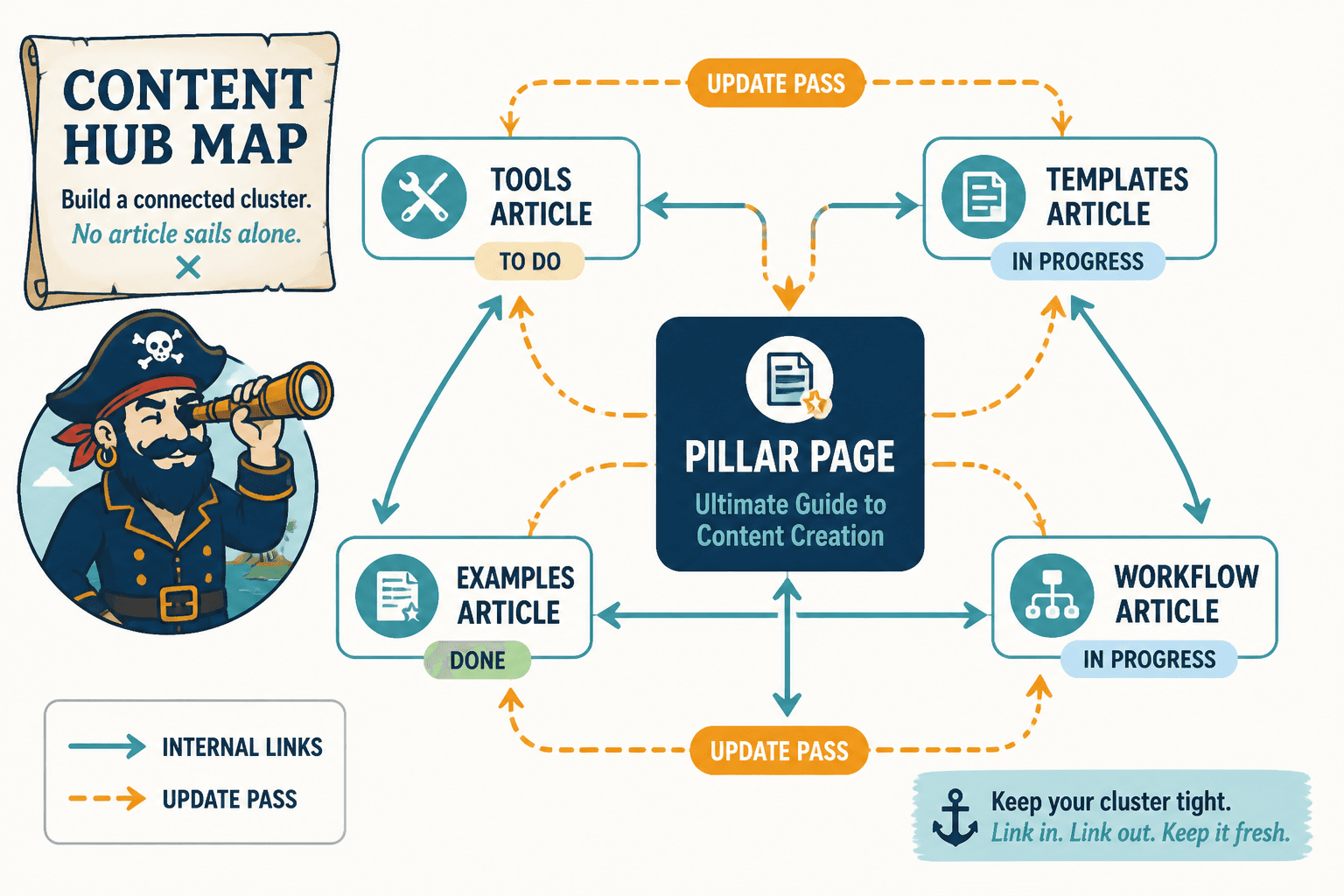
2. The internal linking opportunity template
This one helps you spot pages that should be connected but currently are not.
| Target page | Main topic | Related pages to link from | Suggested anchor angle | Status |
|---|---|---|---|---|
| Pillar page | Internal linking systems | Related tools article, templates article, examples article | system, workflow, internal linking process | To do |
| Tools article | AI tools for updating | Pillar page, SEO tools article | AI tools, automation support, content update tools | In progress |
| Templates article | Update checklists | Pillar page, examples article | templates, simple workflows, checklists | Done |
This is especially useful when you publish in clusters. If you are building around a topic like content systems, LinkedIn content, creator SEO, or email funnels, this template stops you from publishing sibling articles that never speak to each other.
That is a common mistake, by the way. People build “content hubs” that are basically cousins who have never met.
3. The content decay tracker template
Not every article needs constant attention. Some do. This template helps you find which ones are slipping.
| Article | Last updated | Traffic trend | Ranking trend | Decay signs | Priority |
|---|---|---|---|---|---|
| Article A | 8 months ago | Down 28% | Dropped from page 1 to 2 | Outdated examples, weak links | High |
| Article B | 3 months ago | Flat | Stable | No major issues | Low |
| Article C | 14 months ago | Down 45% | Lost rich results | Thin sections, stale screenshots | High |
This is where updating gets strategic instead of random. You stop asking “what should I refresh?” and start asking “which pages are worth rescuing first?”
If your content library is not huge, you can track this in a spreadsheet. If your site is larger, you may want an audit tool involved. More on that in a minute.
4. The anchor text planning template
Internal linking gets sloppy fast when anchor text is an afterthought.
You do not need to force-match exact keywords like it is 2011. But you do want anchors that tell people, and search engines, what is on the other side of the click.
| Target page | Bad anchor | Better anchor |
|---|---|---|
| Internal linking system page | click here | internal linking and updating system |
| AI tools article | this post | AI tools for internal linking and updating |
| Templates article | read more | simple internal linking and updating templates |
The goal is clarity, not awkward over-optimization. If the anchor sounds like it was smuggled in by a keyword plugin, rewrite it.
5. The quarterly update planning template
This one is less glamorous and more useful. A quarterly plan keeps your update process from depending on mood, guilt, or vague optimism.
- Top 5 traffic pages: review for freshness and conversion paths
- Top 5 money pages: check links in, links out, proof, and CTA clarity
- Top 5 declining pages: prioritize structural updates and new internal links
- New content cluster pages: connect them to pillar and sibling content
- Broken or weak paths: fix orphaned pages and stale “related article” sections
That is enough for most smaller sites. You do not need a content operations department. You need a rhythm.
Best tool categories for internal linking and updating
Now the tools. Not specific brand hype. Just the categories that actually help and what they are good for.
The best templates and tools for internal linking and updating are usually a mix, not one magical platform with suspiciously dramatic landing page copy.
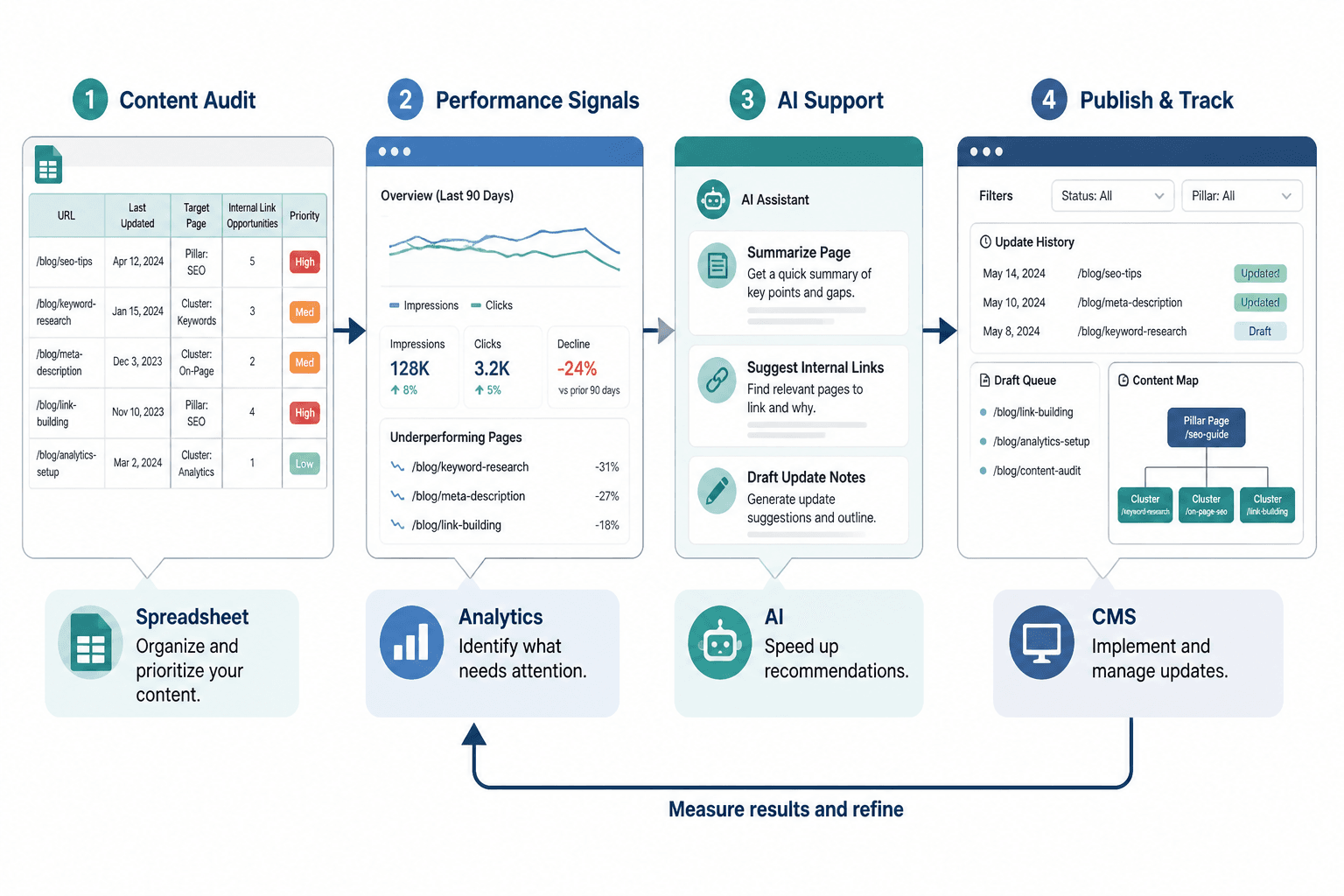
1. Spreadsheets and project trackers
Still underrated. Very boring. Very effective.
A spreadsheet or simple project board is often enough if you have under a few hundred articles. It is ideal for:
- Tracking article URLs, topics, and update dates
- Logging internal link opportunities
- Prioritizing decaying pages
- Assigning status like to do, in progress, done
- Keeping a record of what changed
Use this if you want control and clarity without paying for software you will use twice and then resent.
2. Site crawling and auditing tools
This category helps when your site is getting too large to check manually, or when you need to spot structural issues faster.
These tools are useful for:
- Finding orphaned pages
- Spotting broken internal links
- Reviewing click depth and crawl structure
- Identifying redirect chains and weak link architecture
- Flagging pages with thin linking or outdated metadata
This is where serious auditing gets practical rather than theoretical. If you want a deeper breakdown of that category, read the guide to SEO tools and site auditing tools for internal linking and updating.
3. AI-assisted internal linking and update tools
AI can help here. It just should not be driving the bus.
Good uses:
- Suggesting related articles based on topic overlap
- Drafting update checklists from existing content
- Summarizing old articles before a refresh
- Generating candidate anchor text variations
- Helping identify sections that feel thin or outdated
Bad uses:
- Blindly inserting links without context
- Rewriting your article into generic oatmeal
- Guessing at search intent with fake confidence
- Adding keyword-stuffed anchors that sound mildly cursed
If you want a fuller look at what AI can and cannot do here, see the guide to AI tools for internal linking and updating.
4. Analytics and search performance tools
These are your “is this page quietly dying?” tools.
You need some way to see:
- Traffic trends over time
- Search queries and impressions
- Ranking changes on important pages
- Pages losing clicks
- Pages earning impressions but underperforming
Without that, updating turns into random housekeeping. With it, you can make better choices about where to invest effort.
5. Content inventory and CMS support tools
If your site is active, even a simple content inventory inside your CMS can save you a lot of time. This category helps with:
- Filtering content by date, category, author, or tag
- Reviewing update history
- Managing drafts and refresh queues
- Keeping pillar pages and cluster pages visibly connected
This is less about sexy tooling and more about reducing friction. Which, honestly, is usually the real work.
How to choose the right tools without building a nonsense stack
People love over-stacking tools because software feels productive even when no useful work is happening.
Here is the simpler way to choose.
If you are a solo creator or very small team
- Use a spreadsheet or Notion-style tracker for updates
- Use basic analytics and search data to spot declines
- Use one AI assistant for summaries, link suggestions, or rewrite support
- Add a crawler only if your site is large enough to justify it
This setup covers most needs without turning your workflow into software admin.
If you have a growing content library
- Add a proper site audit tool
- Track orphaned pages and internal link gaps monthly
- Build update queues by priority, not by oldest date alone
- Use templates so different writers or editors work from the same checklist
This is where systems start to matter more than raw output. Publishing more without maintaining anything is how sites become cluttered little graveyards.
If you publish in topic clusters or pillar systems
You need tools and templates that support relationships between pages, not just page-by-page editing.
- Map pillar pages to support articles
- Track reciprocal links where they are useful
- Review cluster completeness during updates
- Spot missing bridge content between related topics
That is one reason the broader blog SEO writing and article systems section is useful to explore alongside this article. Internal linking works best when it is part of a publishing system, not a random afterthought pasted in during editing.
A practical workflow for internal linking and updating
Here is a clean workflow you can actually use.
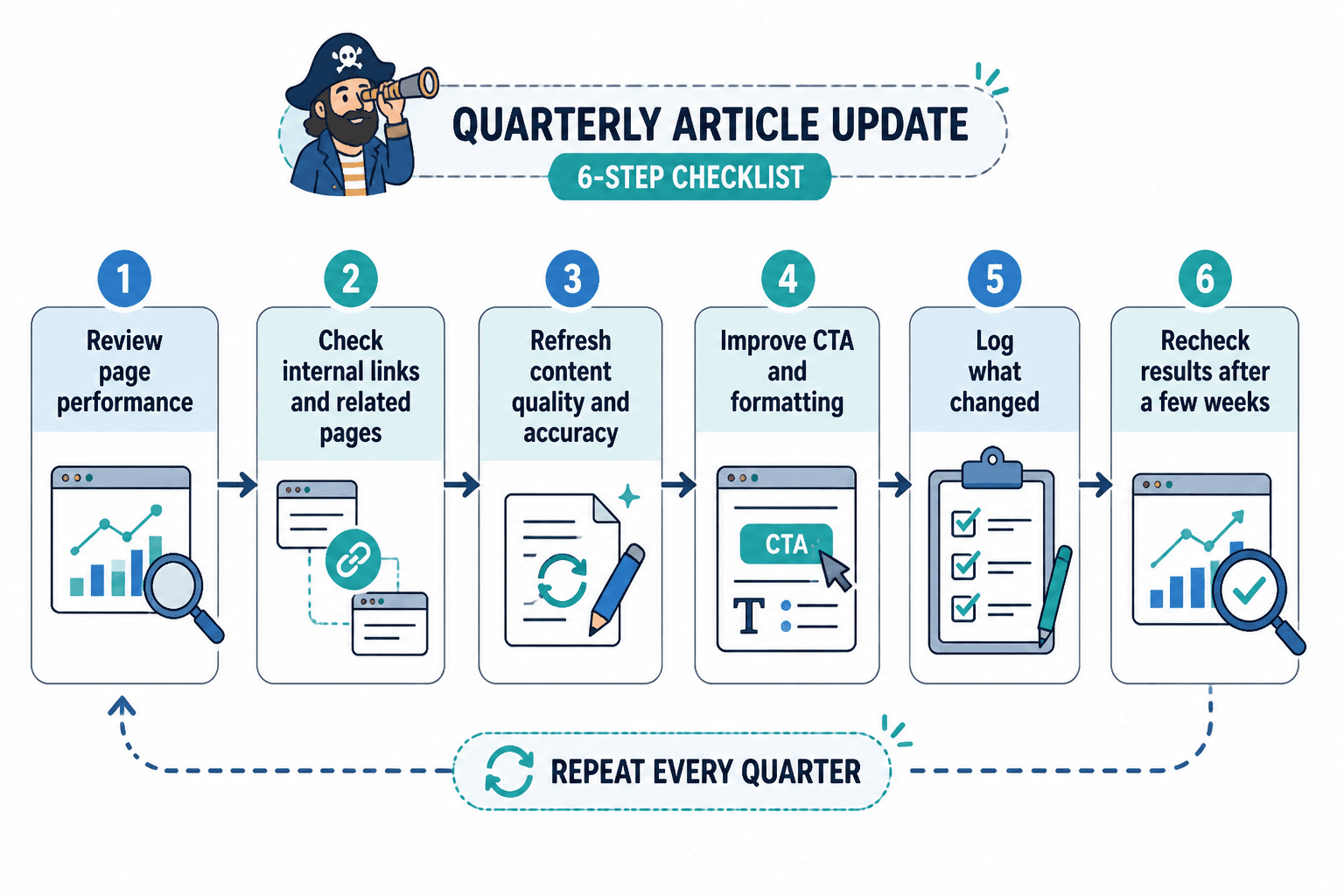
Step 1: Build or clean your content inventory
List your articles, URLs, topics, publish dates, last updated dates, and key business value. If you skip this, you are trying to organize a library by squinting at it.
Step 2: Identify high-value pages
Mark:
- Pages with strong traffic
- Pages tied to offers or lead generation
- Pages ranking but slipping
- Pages central to a content cluster
These deserve the first wave of updates and internal link attention.
Step 3: Review link gaps
For each priority page, ask:
- Which existing articles should link to this?
- Which related pages should this link out to?
- Are there any orphaned or underlinked pieces in this cluster?
This is where the internal linking opportunity template earns its keep.
Step 4: Update the article itself
Do not just bolt on links and leave. Review the article properly:
- Improve the intro
- Tighten structure
- Add better examples
- Remove stale references
- Strengthen the CTA
- Fix formatting that makes the article harder to read
A weak article with more internal links is still a weak article. It is just better connected now.
Step 5: Log what changed
Track the date, what you updated, and why. This helps you avoid repeating work and makes it easier to connect future performance changes to actual edits.
Step 6: Recheck after a few weeks
You are looking for movement in impressions, clicks, rankings, engagement, or conversions. Not every update will produce fireworks. Some will simply stop the bleeding. That still counts.
What a simple internal linking and updating stack can look like
If you want a sane starting point, this is enough for many creators and small brands:
- Spreadsheet or tracker: content inventory, update queue, internal link map
- Search and analytics data: traffic trends, query changes, declining pages
- Site audit tool: orphan pages, broken links, structure issues
- AI assistant: summarize, suggest, speed up repetitive checks
- CMS workflow: publish updates, review related posts, maintain consistency
That is a stack. Not a circus.
And if you are still building your process, the wider blog SEO writing section is useful context for how this fits into content strategy overall.
Common mistakes people make with internal linking and updates
Some of these are technical. Most are judgment problems.
Internal linking improves when each update makes the next useful step clearer. Cleaner structure usually does more work than a bigger pile of links ever will.