Most people do not have an internal linking problem because they lack links.
They have an internal linking problem because their site is a mildly haunted attic of old posts, overlapping topics, broken opportunities, and forgotten pages that never got woven back into the rest of the content.
And updating content is not much better. A lot of sites “update” articles by changing the year, swapping one sentence, and calling it strategy. That is not updating. That is light cosmetic fraud.
If you are looking for the best SEO tools and site auditing tools for internal linking and updating, the real question is not “Which tool is best?” It is “Which tool helps me find useful opportunities fast, without making me drown in reports I will never act on?”
This guide will help you choose the right mix of tools for finding internal link gaps, spotting pages that need refreshing, identifying orphaned or weak pages, and building a cleaner updating workflow. Not magic buttons. Actual useful tools for actual content maintenance.
To see how this fits into the wider strategy, open the parent guide.
What good internal linking and updating tools should actually help you do
A tool is only useful here if it helps you answer questions like these:
- Which pages on my site are important but underlinked?
- Which older posts still get impressions or traffic and deserve updates?
- Which articles overlap and should link to each other?
- Which pages are orphaned or buried too deep?
- Which anchor text patterns are sloppy, repetitive, or useless?
- Which posts are decaying and need stronger links, fresher examples, or clearer calls to action?
That is the standard. If a tool gives you pretty dashboards but does not help you decide what to update next, it is mostly office decor.
If you want the broader strategy behind this work, start with internal linking and updating. This article is the tool stack piece: what to use, what each category is good for, and where people waste time.
The tool categories that matter most
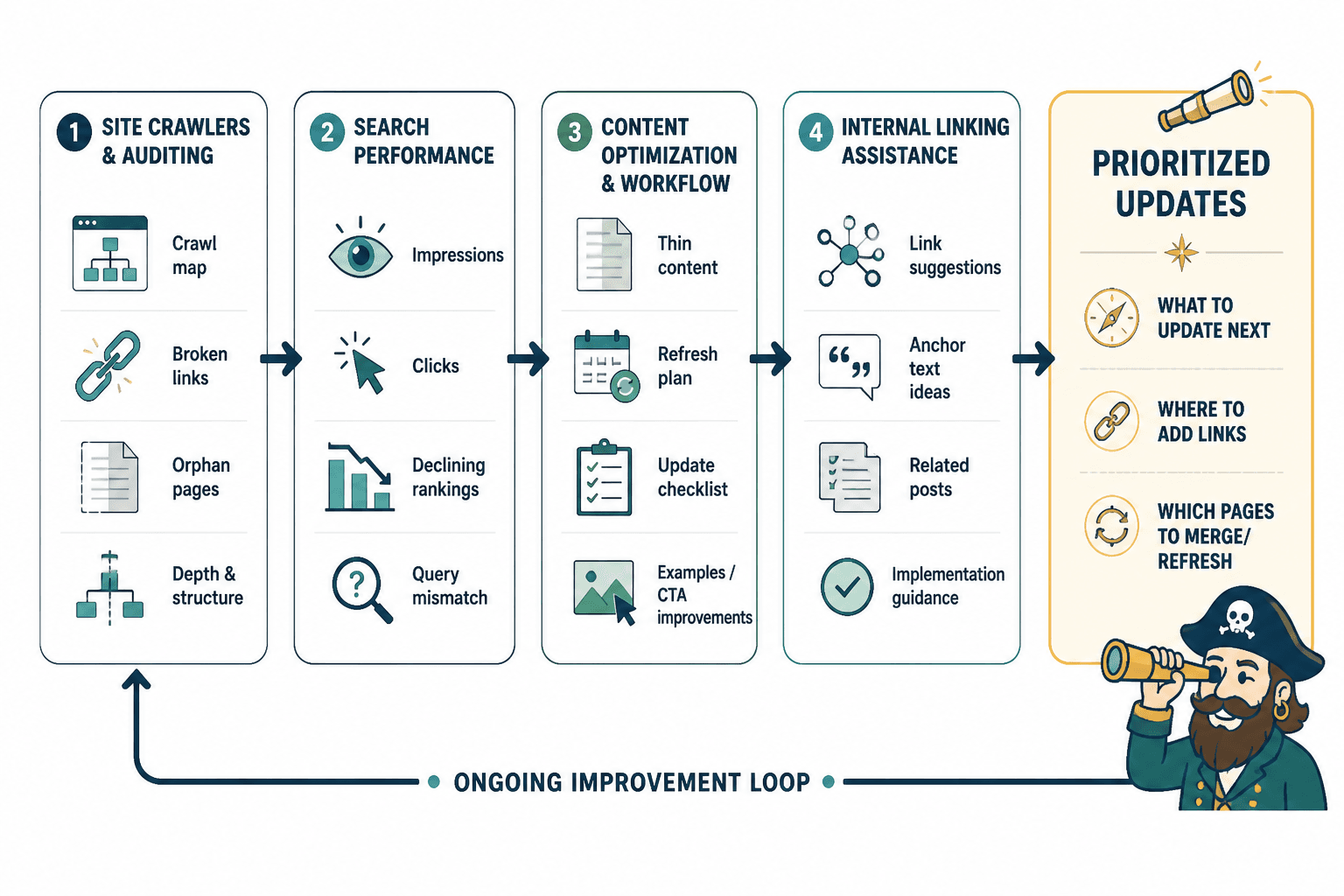
You do not need one tool that does everything. In most cases, the best setup is a small stack across four categories:
- Site crawlers and auditing tools for structure, orphan pages, broken links, redirect issues, and internal link depth
- Search performance tools for finding pages worth updating based on impressions, clicks, declining rankings, or query mismatch
- Content optimization and workflow tools for spotting thin areas, tracking updates, and planning refreshes
- Internal linking assistance tools for surfacing link opportunities and speeding up implementation
That means the “best SEO tools and site auditing tools for internal linking and updating” are usually not one product. They are a useful combination.
Best site auditing tools for internal linking structure
If you want to understand how your site is connected, what is broken, and which pages are getting ignored, crawler-style auditing tools are the first stop.
Screaming Frog
Screaming Frog is still one of the most useful tools for serious internal linking audits because it lets you crawl your site like a search engine would, then sort through the mess.
It is not glamorous. It is not trying to be your content bestie. It is a proper site crawler, which means it can surface things most people do not notice until rankings or user experience start slipping.
Best for: technical and structural audits, larger content libraries, finding internal link issues at scale
- Find orphan pages
- Review inlinks and outlinks per URL
- Spot redirect chains and broken internal links
- Check crawl depth and click depth
- See anchor text usage patterns
- Export data for update prioritization
Where it shines: when your site has enough content that guessing is no longer cute.
Where it gets annoying: it has a learning curve. If you want instant hand-holding and colorful encouragement, this is not that.
Sitebulb
Sitebulb is often easier to work with than Screaming Frog for people who want stronger visual reporting and more guided analysis. It still does deep site auditing, but it is a bit friendlier about it.
Best for: people who want actionable audit summaries without manually assembling every insight
- Visualizes internal linking structure
- Highlights weakly linked pages
- Surfaces crawl depth issues
- Helps find duplicate or thin content candidates for consolidation
- Useful for update planning across clusters
Where it shines: seeing the shape of your site, not just rows in a spreadsheet.
Where it gets annoying: still more audit-heavy than many creators need if your site is small.
Ahrefs Site Audit
Ahrefs is often known for backlinks and keyword research, but its Site Audit features are also useful for internal linking and update work. Especially if you already use Ahrefs for content research, keeping more of this work in one place can make your workflow cleaner.
- Find internal linking issues
- Identify broken pages and outgoing internal links
- Review orphan pages depending on setup
- Combine audit data with ranking and traffic insights
- Pair page-level SEO opportunity data with update candidates
Best for: marketers and content teams who want research and audit work under one roof
Watch out for: using it only for keywords and ignoring the site audit side. That is common. Also slightly wasteful.
Semrush Site Audit
Semrush plays a similar role if it is already part of your stack. Its site audit features can help you track internal link problems, crawlability issues, and structural weaknesses while connecting those findings back to broader SEO work.
- Internal linking issue reports
- Crawlability and technical issue detection
- Content performance context
- Project-based monitoring for recurring audits
Best for: teams already using Semrush for keyword, content, or domain research
Watch out for: report overload. Semrush can hand you a lot. Not all of it deserves your emotional energy.
Best tools for finding pages worth updating
Internal linking and updating belong together because the best pages to refresh are often the same pages that need better support from the rest of your site.
A good update tool helps you spot pages that are close to winning, slipping slowly, or attracting the wrong search intent. This is where performance data matters more than abstract SEO theory.
Google Search Console
Yes, it is the obvious answer. It is also the correct one.
Google Search Console is one of the best tools for finding update candidates because it shows you what pages are already earning impressions, where rankings are weak but promising, and which queries your content almost matches but does not quite satisfy.
- Find pages with high impressions and low clicks
- Spot posts ranking on page two or low page one
- See declining queries or fading pages
- Identify mismatched search intent
- Prioritize updates based on existing traction
Best for: deciding what to update first based on reality, not vibes
What it will not do: tell you exactly how to fix the page. It gives clues, not a full rewrite plan.
Google Analytics
Analytics helps when you want user behavior context. Search Console tells you how pages perform in search. Analytics helps you see what happens after people arrive.
- Spot older posts still bringing in traffic
- Find pages with strong entrances but weak conversions
- Identify content with decent traffic but poor engagement
- Compare update candidates by business value, not just clicks
Best for: deciding not just what gets traffic, but what deserves refresh effort
This matters because not every decaying post is worth saving. Some pages should be updated. Some should be merged. Some should be redirected and gently escorted off the premises.
Ahrefs and Semrush for decay and opportunity analysis
Both Ahrefs and Semrush can help identify articles losing rankings, pages with keyword overlap, and clusters with update potential. This becomes especially useful if your site has enough content that manually checking each article would take half your life.
- Track declining rankings
- Surface pages with keyword cannibalization risk
- Compare multiple URLs competing on similar terms
- Find adjacent topics that should be linked into older posts
Best for: larger editorial inventories and proactive update scheduling
If you are building a stronger process, pair these tools with a repeatable update system rather than random touch-ups. The broader blog article systems approach makes that much easier to maintain.
Best tools for internal linking opportunities inside content
Site crawlers tell you what exists. Internal linking tools help you connect things faster and more intelligently.
These tools matter because once your site grows, manually remembering every relevant article becomes unrealistic. You know you wrote something related two years ago. You just cannot remember what it was called, where it lives, or if it still deserves traffic.
Link suggestion tools in SEO platforms
Some SEO suites now include internal link suggestion features or content recommendations that point you toward related pages. These can save time when you are updating existing articles or publishing new ones.
- Suggest relevant existing pages to link to
- Surface underlinked pages
- Highlight internal link opportunities based on topic overlap
- Speed up update workflows for content teams
Best for: reducing manual hunting during content updates
Watch out for: bad suggestions. Not every semantically related page is actually useful to readers. Relevance still needs a human brain.
WordPress internal linking plugins and assistants
If your site runs on WordPress, some internal linking tools work directly inside the editor and can suggest posts while you write or update. These are useful for solo site owners who want faster implementation without exporting spreadsheets every five minutes.
Best for: quick in-editor linking, smaller to medium sites, reducing publishing friction
Watch out for: over-automation. If a plugin starts stuffing awkward links into every paragraph like a desperate networking event, rein it in.
For AI-assisted options, see best AI tools for internal linking and updating. Just do not expect AI to understand your content architecture perfectly without guidance. It is an assistant, not your editorial director.
Best tools for managing the updating workflow
This is the boring part people skip, which is exactly why their updating process collapses into “we should really refresh that someday.”
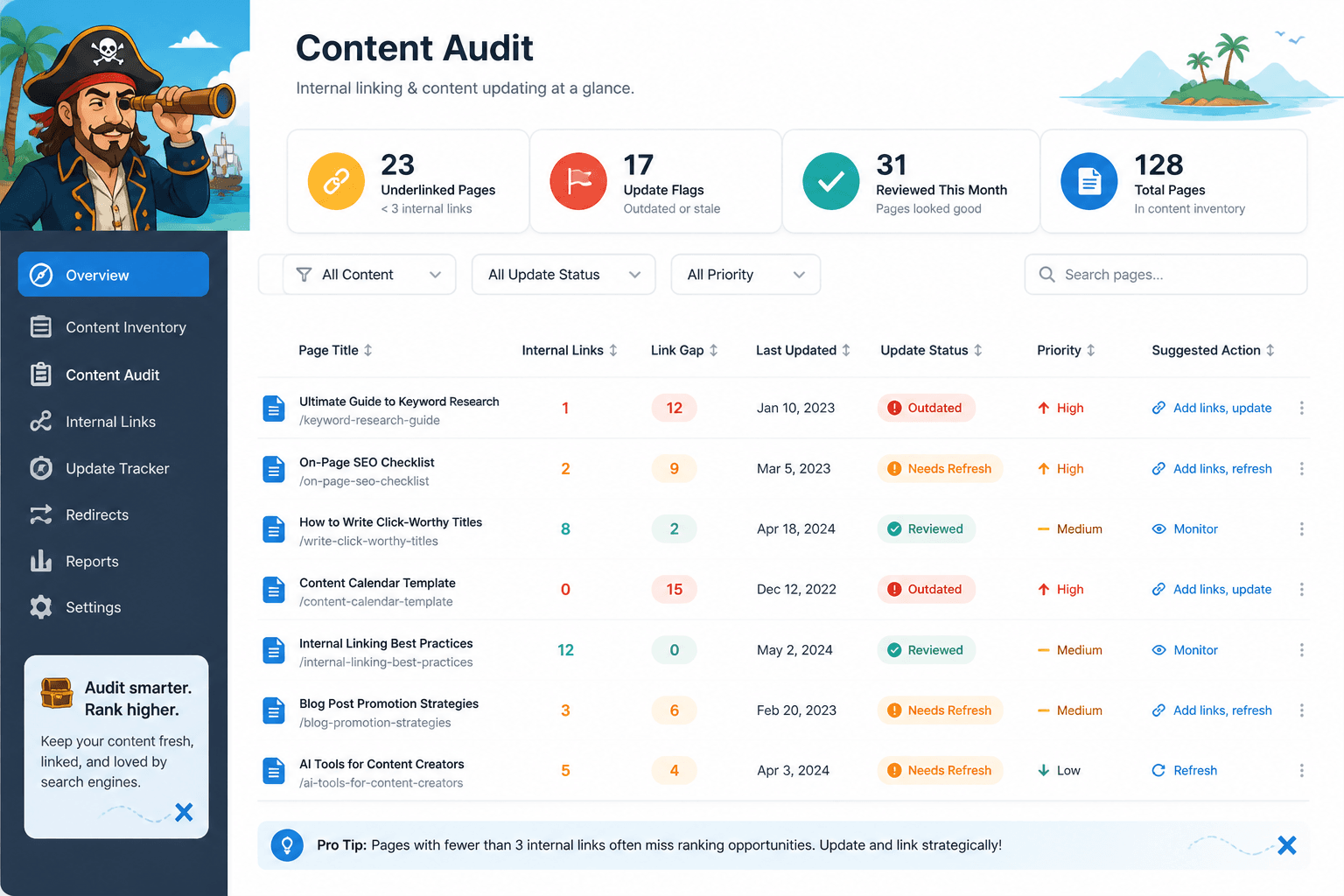
You need a simple system for tracking:
- Which pages were reviewed
- Which pages need updates
- What kind of update is needed
- Which pages got new internal links
- What happened after the update
Spreadsheets and lightweight tracking systems
Yes, a spreadsheet still works. In many cases, it works better than trying to duct-tape everything into a bloated project management setup.
Useful columns include:
- URL
- Topic cluster
- Content type
- Last updated date
- Traffic trend
- Ranking trend
- Internal links in
- Internal links out
- Update priority
- Update notes
- Status
Best for: solo creators, consultants, content leads, and anyone who wants control without extra software drama
Content inventory and template systems
If your issue is not just auditing but consistency, templates help. A lot. They turn updating from a vague intention into a repeatable checklist.
Useful templates might include:
- Article refresh checklist
- Internal linking review checklist
- Topic cluster map
- Content consolidation tracker
- Before and after update log
For that side of the process, see best templates and tools for internal linking and updating. Templates do not sound exciting, but neither does repeatedly forgetting what “done” is supposed to look like.
How to choose the right tool stack for your site size
Tool choice depends less on industry and more on how big your site is, how often you publish, and how much complexity you can realistically maintain.
| Site situation | Recommended stack | Main goal |
|---|---|---|
| Small site with under 50 posts | Search Console + Analytics + spreadsheet + light linking plugin | Find quick update wins and obvious link gaps |
| Growing site with 50 to 300 posts | Search Console + crawler tool + spreadsheet or template system | Audit structure and build a repeatable refresh process |
| Larger content library | Search Console + Analytics + Screaming Frog or Sitebulb + Ahrefs or Semrush | Prioritize updates and fix structural inefficiencies at scale |
| Team-based content operation | Full audit tool + performance tools + workflow templates + internal linking assistance | Standardize updates across multiple writers or editors |
If you are a creator or solo founder, do not copy an enterprise stack just because it looks sophisticated. You do not need six dashboards and a recurring headache. You need enough visibility to make better decisions consistently.
What the best SEO tools still cannot do for you
This part matters.
The best SEO tools and site auditing tools for internal linking and updating can show you patterns, gaps, decay, and opportunities. They cannot decide what deserves attention most unless you bring judgment to the process.
- They cannot tell you which article is strategically most important to your business
- They cannot fix weak positioning
- They cannot make a dull article worth saving
- They cannot create a smarter content architecture from thin air
- They cannot choose the best anchor text in context every time
- They cannot replace editorial taste
This is where people get weirdly lazy. They want the audit report to become the strategy. It is not. It is a map. You still have to decide where to walk.
A practical workflow for using these tools without drowning in them
If your current approach is “run a giant audit, panic briefly, then do nothing for four months,” try this instead.
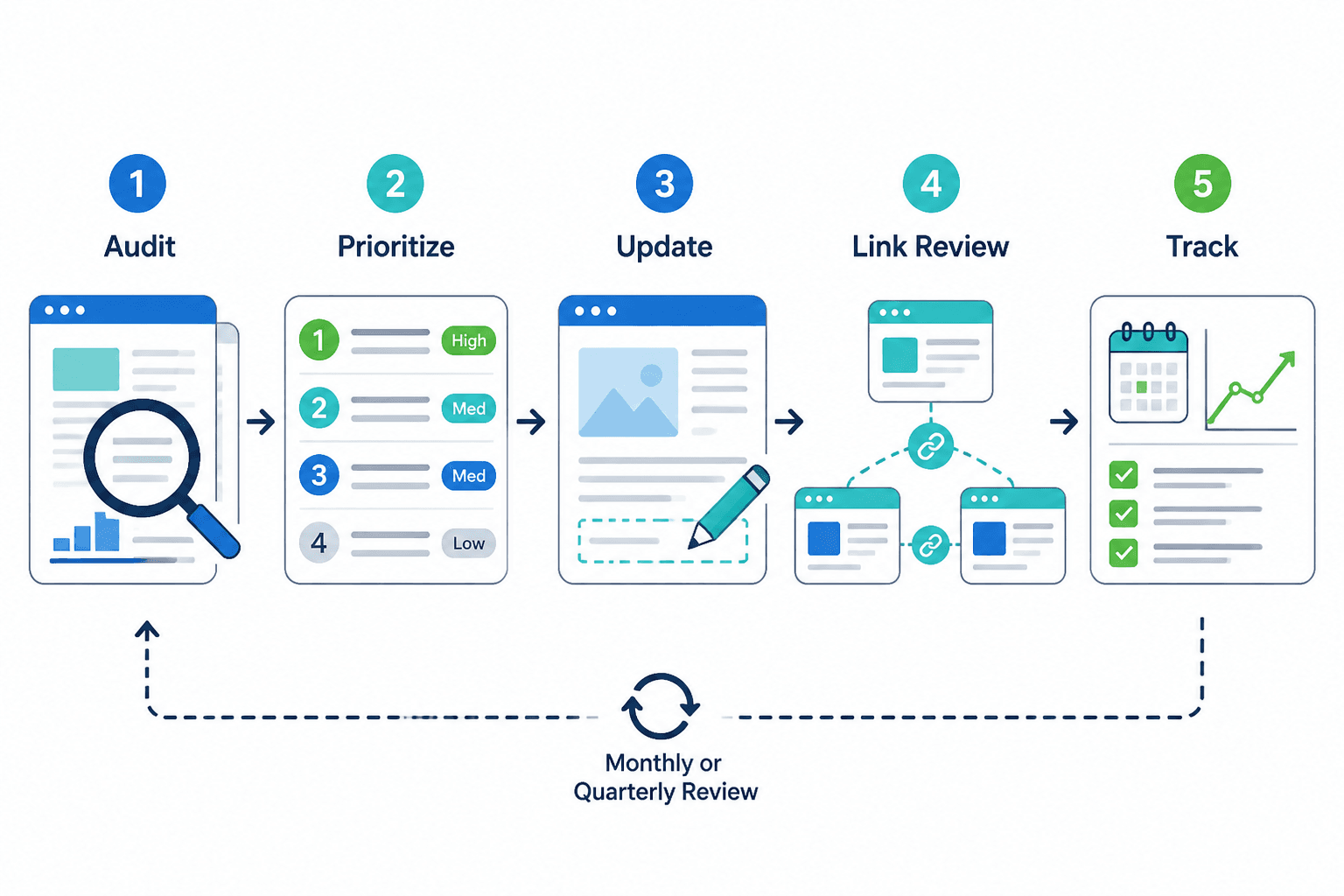
- Pull performance data first. Use Search Console and Analytics to identify pages with traffic, impressions, decay, or conversion potential.
- Run a crawl. Use Screaming Frog, Sitebulb, Ahrefs, or Semrush to check internal link depth, orphan pages, broken links, and weakly connected content.
- Group pages by cluster. Do not update random single posts in isolation if they belong to a topic group.
- Prioritize by business value. Start with pages that are close to ranking well, support offers, or connect to important topic hubs.
- Refresh the content properly. Improve clarity, examples, structure, freshness, and intent match.
- Add internal links both ways. Link from older relevant posts into the refreshed page, and from the refreshed page into related supporting content.
- Track what changed. Log updates, dates, and key actions so you can measure what actually helped.
- Review monthly or quarterly. Not every week. You are maintaining a site, not performing emergency surgery on a tomato.
If you want examples of how to structure these links and refreshes more naturally, see best internal linking and updating ideas and examples for creators and how to write better internal linking and updating.
Common mistakes when using internal linking and update tools
A lot of people buy good tools and then use them in deeply unhelpful ways. Classic.
- Auditing everything before fixing anything. You do not need perfect visibility before making obvious improvements.
- Chasing low-value pages. Not every post deserves a rescue mission.
- Adding links without context. A link should help the reader, not just satisfy your spreadsheet.
- Ignoring anchor text quality. “Click here” and repeated exact-match anchors are both clumsy in different ways.
- Only adding links from new posts. Older relevant articles are often your best internal linking assets.
- Treating updating like proofreading. Real updates improve usefulness, intent match, structure, examples, and conversion path.
- Using AI or plugins with no review. Fast nonsense is still nonsense.
The best tool setup for most creators and small content sites
Internal linking improves when each update makes the next useful step clearer. Cleaner structure usually does more work than a bigger pile of links ever will.