
Useful ideas are usually hiding in places that look inconvenient: a frustrated comment, a repeated sales-call objection, a customer email, a search query, a podcast aside, a support question, an old note with one sharp sentence in it. The work is less about inventing from nothing and more about noticing what is already leaving tracks.
That is where many AI ideation workflows go thin. A vague prompt asks the tool to guess the audience, the market, the offer, and the creator’s point of view all at once. The result may be tidy, but it rarely contains the texture of real demand.
Examples make the extraction process easier to see. They show how to bring raw signals into AI, ask better research questions, separate weak topics from stronger angles, and turn scattered evidence into prompts, outlines, content themes, and format ideas.
This article gives you practical creator AI research and ideation examples you can adapt for comments, DMs, calls, analytics, transcripts, search data, and draft libraries, so your next idea starts with evidence instead of a blank-box guess.
The goal is not to let AI replace your taste. The goal is to use AI as a research assistant that helps you notice patterns faster, turn raw material into usable options, and choose sharper ideas before you start writing, recording, filming, or selling.
What creator AI research and ideation should actually do
Good AI-assisted ideation does not start with “give me ideas.” It starts with context.
For creators, AI research and ideation should help you:
- Organize messy source material from comments, calls, notes, reviews, transcripts, and analytics.
- Find repeated audience problems instead of guessing what people care about.
- Surface tension points: confusion, objections, desires, mistakes, false beliefs, and tradeoffs.
- Turn patterns into angles that fit your voice, offer, and audience stage.
- Expand one strong insight into posts, emails, videos, essays, carousels, podcast episodes, lead magnets, or sales content.
- Stress-test ideas before you spend hours producing them.
If you are still choosing tools, see the companion list of the best AI tools for creator AI research and ideation. The examples below work with most capable AI writing or research tools, but the quality of the output depends less on the tool and more on the source material you give it.
Example 1: Mine ideas from real audience signals
The simplest way to make AI ideation better is to stop asking it to invent ideas from nothing.
Start with real audience signals. These can include:
- Comments on your posts
- Replies to your emails
- Questions from sales calls or discovery calls
- Client onboarding notes
- Podcast transcript excerpts
- YouTube comments
- Community discussions
- Search queries from your site or analytics tools
- Reviews of books, courses, apps, or services in your niche
- Competitor comment sections, used for pattern analysis rather than copying
This is closer to lightweight audience research than brainstorming. If you need a reminder of why direct audience signals matter, Nielsen Norman Group’s overview of user research methods is useful because it shows how different research inputs reveal different kinds of user needs.
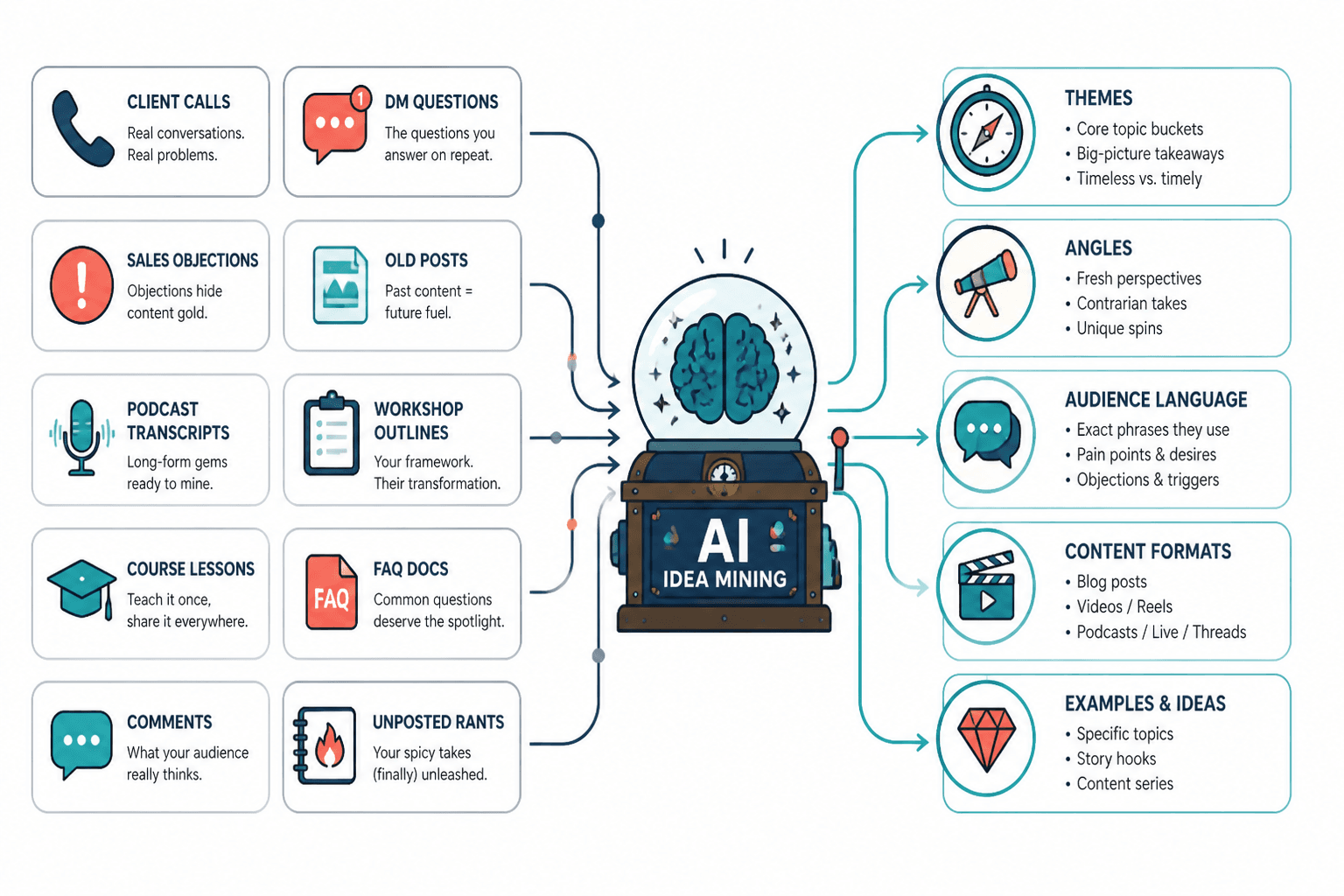
Idea mining prompt example
Use a prompt like this after you paste in a batch of raw audience material:
Prompt: I am a creator who helps [audience] achieve [outcome] without [common frustration]. Below are raw audience signals from comments, DMs, calls, reviews, and notes. Do not write final content yet. First, cluster these inputs into recurring themes. For each theme, identify the audience problem, the emotional tension, the likely false belief, and 3 possible content angles. Use the audience’s wording where possible.
Then paste the raw material below the prompt.
What the AI should return
A useful output might look like this:
| Theme | Audience signal | Tension point | Possible angle | Best format |
|---|---|---|---|---|
| Too many ideas, no system | “I have notes everywhere but never know what to post.” | They feel creative but disorganized. | You do not need more ideas. You need an idea retrieval system. | Newsletter, carousel, short video |
| Fear of sounding generic with AI | “Everything ChatGPT gives me sounds like LinkedIn soup.” | They want speed without losing voice. | AI should organize your thinking, not replace your taste. | Essay, tutorial, workshop clip |
| Confusion about what counts as research | “I don’t have time to do audience research before every post.” | They assume research must be slow and formal. | Your comment section is already a research database. | How-to post, email, lead magnet section |
The important move is that AI is not creating the strategy from thin air. It is sorting raw evidence into usable patterns.
Example 2: Turn one source into themes, angles, and formats
A strong creator workflow does not require a giant research database. Sometimes one good source can produce a week of useful content if you know how to mine it.
For example, you might start with:
- A podcast transcript
- A client call summary
- A long-form essay
- A newsletter reply thread
- A YouTube video transcript
- A high-performing social post
- A messy note from your own thinking
The mistake is asking AI to “repurpose this into posts” too early. First, ask it to find the underlying insight.
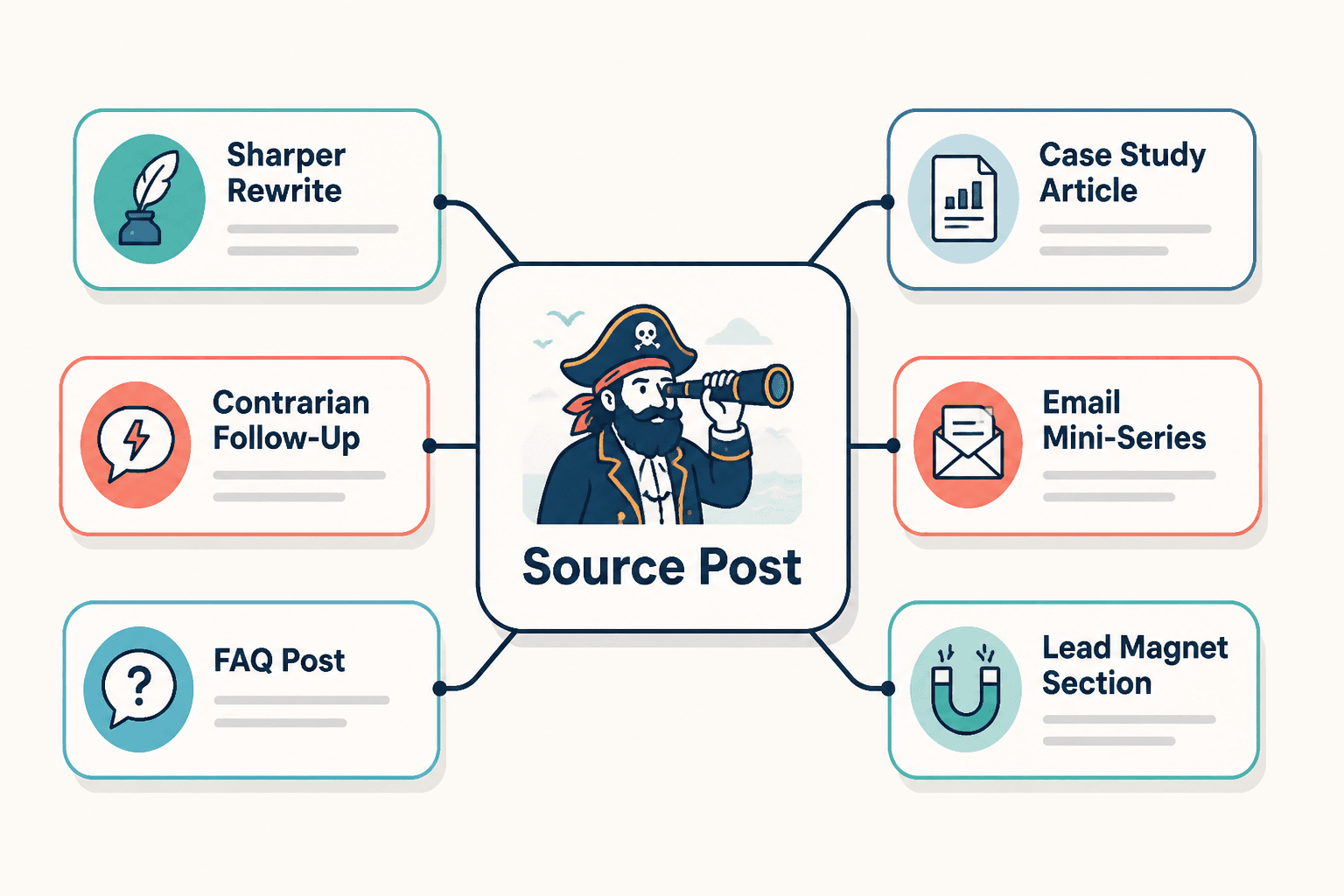
Source expansion prompt example
Prompt: Analyze the source material below. Do not summarize it only. Identify the core insight, the supporting subpoints, the strongest tension, the audience question behind it, and the formats this idea could become. Then turn the source into 6 content options: one short post, one newsletter idea, one video outline, one carousel outline, one lead magnet section, and one sales-support angle.
Example output from one insight
Suppose the core insight is:
Creators do not need more AI prompts. They need better source material.
That insight can become:
- Short post: “Your AI output sounds generic because your input is generic.”
- Newsletter: “The 20-minute audience-signal sweep I do before asking AI for ideas.”
- Video: “Stop asking AI for content ideas. Do this instead.”
- Carousel: “Bad prompt vs useful research prompt.”
- Lead magnet section: “Where to find audience language before writing.”
- Sales-support content: “Why your content calendar is not converting even though you post consistently.”
This is also where older writing frameworks can support the ideation process. If you are developing longer-form angles, the guides to essay topics and essay hooks can help you sharpen a raw idea into something with a stronger entry point.
Example 3: Seven simple creator AI topic research templates
Most creators do not have a research problem. They have a time problem, a focus problem, and an “I opened the AI tool and now I’m staring at 47 bad angles” problem.
Templates help because they constrain the task. Instead of asking AI to do everything, each prompt gives it one job.
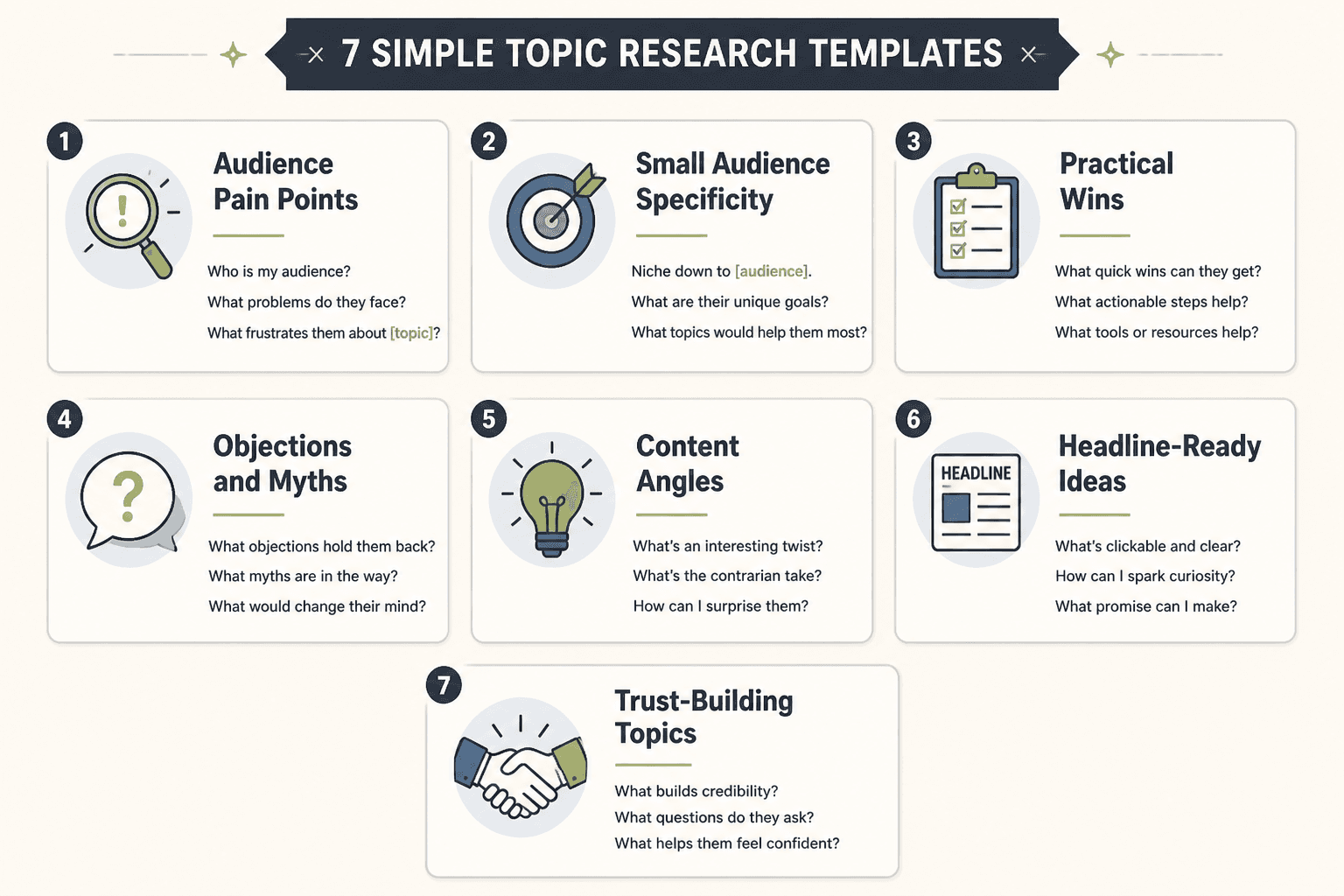
1. The audience pain point template
Prompt: I create content for [audience] who want [desired outcome]. Based on the notes below, identify the most repeated pain points. For each one, give me the practical problem, the emotional problem, the words the audience uses, and one content angle that would feel specific rather than generic.
Use this when you have comments, call notes, survey responses, or DM excerpts.
2. The subtopic expansion template
Prompt: My main topic is [topic]. Break it into subtopics a creator could cover over the next 30 days. Organize the subtopics by beginner, intermediate, and advanced audience needs. Avoid obvious filler. For each subtopic, include one specific question my audience might ask.
Use this when your topic feels too broad, such as “AI for creators,” “personal branding,” “productivity,” or “email marketing.”
3. The audience question mining template
Prompt: Review the source material below and extract every explicit or implied audience question. Sort the questions into awareness stages: just curious, problem-aware, solution-aware, comparing options, and ready to act. Then suggest one content idea for each stage.
This is especially useful for creators who sell coaching, consulting, courses, templates, memberships, or services.
4. The angle finder template
Prompt: Here is a topic I want to cover: [topic]. Generate 12 distinct angles for this topic. Include contrarian, beginner-friendly, advanced, myth-busting, personal story, tactical, strategic, mistake-based, comparison, checklist, case-study, and sales-support angles. Make each angle specific to [audience] and [offer/context].
This helps you avoid writing the same post in slightly different words.
5. The misconception template
Prompt: What does my audience likely misunderstand about [topic]? List the misconceptions, why each one is appealing, what problem it creates, and how I could reframe it in a useful content piece. Keep the tone practical, not smug.
Misconceptions are useful because they create natural tension. They let you teach without simply listing tips.
6. The proof gap template
Prompt: I want to create content that supports this claim: [claim]. What proof would make this claim more believable? Suggest examples, data points, stories, demonstrations, screenshots, comparisons, or client situations I could use. Also identify where the claim might sound exaggerated or unsupported.
This is a useful bridge between ideation and credibility. It keeps content from becoming motivational vapor.
7. The search and trend check template
Prompt: I am considering creating content about [topic]. Help me identify related search intents, adjacent phrases, beginner questions, comparison queries, and timely trend angles. Separate durable evergreen ideas from short-lived trend ideas.
You can pair this with tools like Google Trends to check whether a topic is seasonal, rising, declining, or tied to a temporary news cycle. Search data should not dictate every idea, but it can help you understand how people phrase a problem when they are actively looking for help.
Example 4: Build a question ladder for coaches, consultants, and personal brands
Coaches, consultants, and personal brands often make the same ideation mistake: they create only top-of-funnel educational content, then wonder why their audience likes the posts but does not move toward buying.
A better approach is to build a question ladder.
A question ladder maps the questions your audience asks as they move from mild curiosity to serious buying consideration.
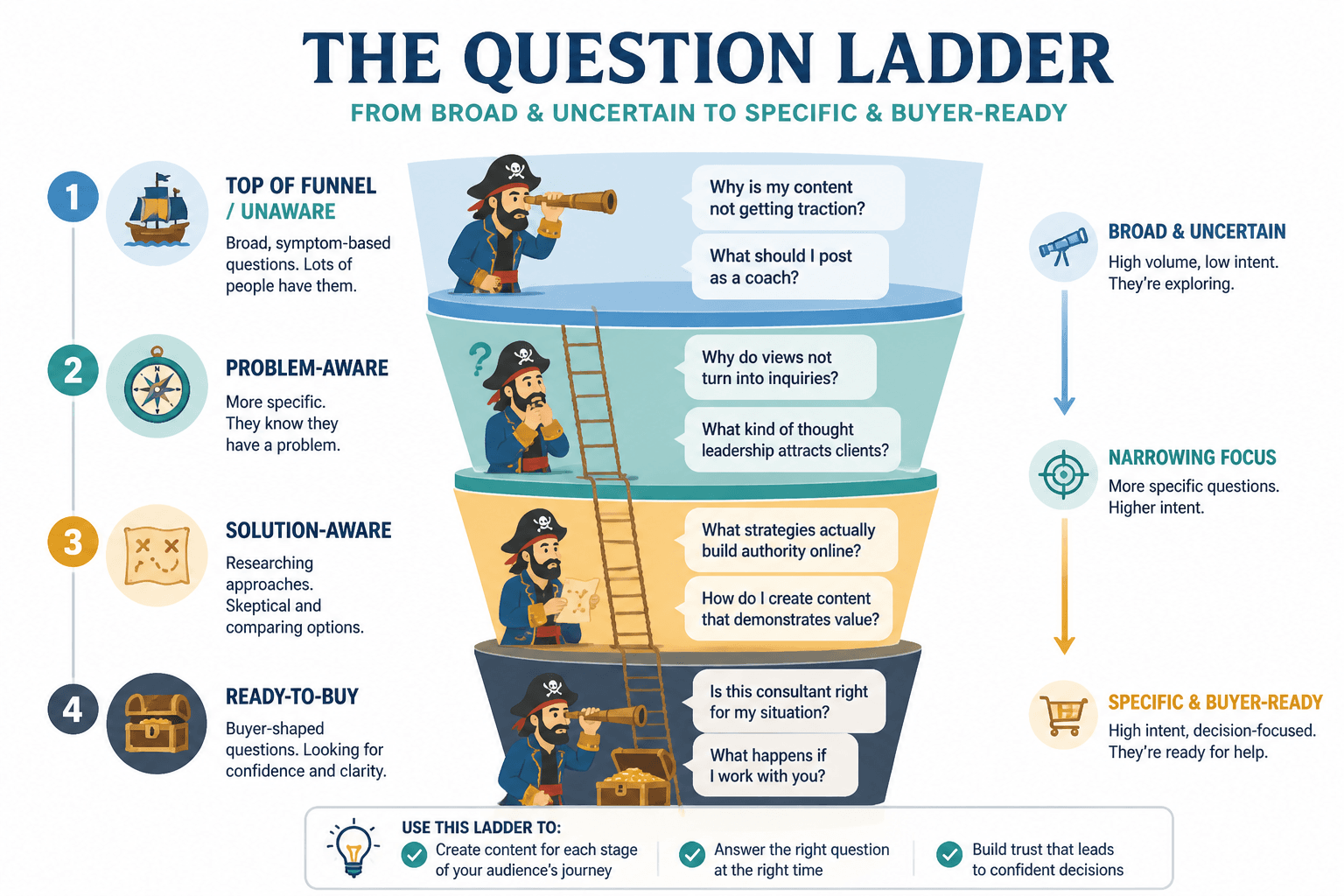
Question ladder example
For a consultant who helps service businesses improve their sales process, the ladder might look like this:
| Audience stage | Audience question | Content example |
|---|---|---|
| Problem unaware | Why do prospects keep disappearing after good calls? | “The hidden reason your best sales calls still go nowhere” |
| Problem aware | Is my follow-up process too weak? | “5 signs your follow-up system is leaking deals” |
| Solution aware | What should a better sales process include? | “The simple sales pipeline every solo consultant needs” |
| Comparison | Should I fix my offer, my messaging, or my sales calls first? | “Offer problem, messaging problem, or sales process problem?” |
| Ready to act | What would it look like to get help with this? | “What happens inside a sales process audit” |
Question ladder prompt
Prompt: I help [audience] achieve [outcome] through [offer or expertise]. Build a question ladder for this audience from early curiosity to ready-to-buy. Include the questions they ask at each stage, the fear or objection underneath each question, and 3 content ideas for each stage. Make sure the ideas do not all sound like beginner education.
This kind of ideation is especially useful if your content needs to support lead generation or sales conversations. For more on that side of the workflow, see creator AI research and ideation for leads and sales.
Example 5: Vague prompt vs context-rich prompt
The core mistake in AI ideation is asking AI for answers before you give it context.
A vague prompt looks like this:
Give me 50 content ideas about productivity for entrepreneurs.
This might produce a long list, but most of it will be predictable:
- Morning routines
- Time blocking
- Goal setting
- Avoiding distractions
- Productivity apps
Those topics are not automatically bad. They are just unspecific. They do not know your audience, your point of view, your offer, your proof, your lived experience, or the exact problem your audience is trying to solve.
A context-rich prompt gives AI something to work with:
Prompt: I create content for solo consultants who are good at client delivery but struggle to protect deep work time because they are constantly switching between sales calls, client messages, proposals, and admin. My point of view is that most productivity advice fails them because it assumes they control their calendar more than they actually do. Generate 15 content angles about productivity for this audience. Avoid generic morning routine advice. Focus on tradeoffs, client boundaries, calendar design, energy management, and business model constraints.
Now the AI can return ideas with sharper edges:
- “Your calendar problem is actually a business model problem.”
- “Why time blocking fails when clients can interrupt your entire day.”
- “The deep work boundary every solo consultant needs before they hire help.”
- “Stop optimizing your morning routine. Fix your response-time expectations.”
- “The hidden productivity cost of selling custom work.”
The second list is more useful because the prompt includes audience, context, point of view, exclusions, and tensions.
Example 6: A weekly workflow from raw notes to approved content ideas
If you only use AI when you feel stuck, it will feel random. A weekly research and ideation workflow makes it repeatable.
Here is a simple version creators can actually use:
- Collect raw signals during the week. Save comments, DMs, questions, objections, good phrases, sales call notes, and article ideas in one place.
- Run a clustering prompt. Ask AI to group the raw inputs into themes, not final content.
- Pull out tension points. Look for confusion, frustration, desire, skepticism, tradeoffs, and false beliefs.
- Turn each theme into multiple angles. Ask for educational, contrarian, story-based, tactical, and sales-support angles.
- Choose based on strategy. Do not publish everything AI suggests. Pick the ideas that match your audience, offer, season, and energy.
- Rewrite in your actual voice. AI can help organize the idea, but your examples, phrasing, judgment, and taste make it worth reading.
Weekly workflow prompt
Prompt: Here are my raw audience and content notes from this week. Create a weekly ideation report. Include: recurring audience problems, exact phrases worth reusing, tension points, possible content angles, sales-support ideas, and 5 recommended ideas to create next week. For each recommendation, explain why it is worth creating now.
This workflow is also a good place to apply Google’s guidance on creating helpful, reliable, people-first content. The point is not to manufacture more posts. The point is to create content that reflects real audience needs and adds something useful.
Creator-specific idea mining examples
The same research and ideation method works differently depending on the creator’s business model. Here are a few concrete examples.
Coach example: mine client resistance
A coach might paste in anonymized client notes and ask AI to find repeated resistance patterns.
Prompt: Review these anonymized coaching notes. Identify the repeated resistance patterns clients show before making progress. For each pattern, name the surface excuse, the deeper fear, the belief that keeps them stuck, and a content angle that would help them feel seen without feeling attacked.
Possible ideas:
- “You are not procrastinating. You are protecting an old identity.”
- “The real reason your goals stop feeling exciting after week two.”
- “Why smart people keep negotiating with the habits they said they wanted to change.”
Consultant example: mine sales call objections
A consultant can use AI to organize objections from discovery calls.
Prompt: These are objections and questions I hear on sales calls. Group them by theme. For each theme, identify whether the issue is trust, timing, budget, priority, clarity, authority, or perceived risk. Then suggest content ideas that would answer the objection before the sales call.
Possible ideas:
- “When a marketing problem is really an offer clarity problem.”
- “How to know whether your business is ready for outside help.”
- “The cost of waiting until your pipeline is empty to fix positioning.”
Personal brand example: mine your own notes
Personal brands often sit on the best material because their ideas are scattered across journals, voice notes, old drafts, and unfinished threads.
Prompt: Review these personal notes and unfinished ideas. Identify the strongest recurring beliefs, stories, lessons, and contradictions. Then suggest content angles that sound like a person with a point of view, not a generic educational brand.
Possible ideas:
- “The career advice I had to unlearn after working for myself.”
- “What I used to think consistency meant, and what I think it means now.”
- “The hidden cost of building a personal brand around being helpful.”
Newsletter creator example: mine replies and clicks
A newsletter creator can combine qualitative replies with quantitative behavior.
Prompt: Here are reader replies, top-clicked links, and subject lines from recent newsletters. Identify what readers seem most interested in, what they are confused about, what they trust me for, and what topics deserve a deeper follow-up essay.
Possible ideas:
- “The reader question I got three times this week.”
- “Why everyone clicked the boring link.”
- “The topic I thought was obvious that readers clearly wanted explained.”
YouTuber or podcaster example: mine transcripts
Long-form creators can use AI to find hidden clips, follow-up topics, and recurring themes in transcripts.
Prompt: Analyze this transcript. Identify the strongest standalone ideas, the moments that could become short clips, the questions that deserve a follow-up episode, and the points where I made a claim that needs more proof or a better example.
Possible ideas:
- A short clip from the strongest 45-second explanation
- A follow-up episode answering an unresolved question
- A newsletter expanding the most controversial claim
- A carousel summarizing the framework from the conversation
How to keep AI-generated ideas from becoming generic
AI can cluster, compare, summarize, reframe, and expand. It is good at pattern work. But it does not automatically know what is true, tasteful, useful, differentiated, or strategically right for you.
Before approving an AI-generated idea, ask:
- Is this based on a real audience signal? Or did the AI invent a generic problem?
- Does this fit my actual audience? Or could any creator in my niche post it?
- Is there tension? Is there a problem, tradeoff, contradiction, objection, or belief shift?
- Do I have proof? Can I support the idea with a story, example, data point, demonstration, or client pattern?
- Does this connect to my offer or body of work? Not every post has to sell, but your content should not drift forever.
- Can I say this in my own voice? If you would never naturally phrase it that way, rewrite it.
- Is the format right? Some ideas need a short post. Some need a long essay, video, workshop, or email sequence.
If you want to get better at prompting without turning every ideation session into prompt engineering homework, the broader guide to writing prompts for fiction and nonfiction can help you think more clearly about task design, constraints, and output expectations.
A practical rule: ask AI for patterns before posts
The fastest way to improve creator AI research and ideation is to change the order of operations.
Do not start with:
Write me content ideas.
Start with:
Find the patterns in this source material.
Then ask:
- What keeps coming up?
- What does my audience repeat in their own words?
- Where are they confused?
- What do they believe that is not quite right?
- What are they afraid will happen?
- What do they want but feel embarrassed to say?
- Which ideas support my larger body of work?
Only after that should you ask for formats, hooks, outlines, scripts, or drafts.
That is the difference between using AI as a slot machine and using it as a research assistant.
Final takeaway
Creator AI research and ideation works best when you bring the raw material and let AI help with the sorting.
Give it audience signals. Give it transcripts. Give it objections. Give it notes. Give it your point of view. Give it examples of what you do and do not want.
Then use it to cluster, question, reframe, expand, and pressure-test the ideas.
The best creators will not be the ones who ask AI for the most ideas. They will be the ones who use AI to notice better patterns, ask better questions, and turn real audience problems into content only they could make.