Most people do not struggle with About page copy because they cannot write. They struggle because they are trying to write one of the most important pages on their website with no planning, no structure, and a deeply unhelpful inner monologue saying, “Just make it sound professional.”
That is how you end up with About pages full of vague origin stories, floppy mission statements, and the digital equivalent of a limp handshake.
The best website tools and copy-planning tools for About Page Copy are not the ones that magically spit out a finished page in 14 seconds. They are the ones that help you think clearly, organize the right proof, sharpen your positioning, and actually write a page that makes a stranger trust you faster.
If you want your About page to do more than just exist politely in your site navigation, this guide will help you choose tools that make the page clearer, stronger, and easier to write without turning your voice into generic AI oatmeal.
If you want the bigger picture, start with the parent guide.
What the best About page tools actually help you do
Before talking tools, it helps to get the job right.
An About page is not just a biography. It is a trust page. It helps readers answer a few basic questions fast:
- Who are you?
- Who do you help?
- What do you help them do?
- Why should they believe you?
- What should they do next?
So the best website tools and copy-planning tools for About Page Copy usually support one or more of these jobs:
- Clarifying your positioning
- Organizing your ideas before writing
- Collecting proof, examples, and credibility points
- Structuring the page in a way people can actually follow
- Drafting and rewriting faster
- Improving readability and flow
- Spotting weak, vague, or bloated language
- Turning a decent page into one that actually converts
If a tool does not help with one of those things, it may still be nice. But nice is not the same as useful.
The main categories of tools worth using
You do not need 19 tabs open and a Notion dashboard that looks like it should require onboarding. For most creators, coaches, consultants, and solo business owners, the most useful tools fall into five categories.
1. Positioning and messaging tools
These help you figure out what the page should say before you start fussing over wording.
- Brand messaging worksheets
- Offer-positioning frameworks
- Voice-of-customer note repositories
- Audience research docs
- Simple one-liner planning tools
If your About page feels bland, the problem often is not the sentence styling. It is that your positioning is still fuzzy.
2. Planning and outlining tools
These help you shape the page before writing full paragraphs.
- Docs tools like Google Docs
- Notion or similar workspace tools
- Outline templates
- Sticky-note style whiteboards
- Content planners for section mapping
Good About pages are usually planned, not improvised. There is a reason some pages feel calm and credible while others feel like somebody dumped their life story into a blender.
3. Drafting and rewrite tools
These help you move from rough notes to actual copy.
- Writing apps
- AI drafting tools
- Rewrite assistants
- Readability and grammar tools
- Tone checkers
Useful, yes. Magical, no. If your input is vague and your positioning is mushy, the output will still be mushy. Just more grammatically tidy.
4. Proof and research tools
Your About page gets stronger when it includes proof instead of polished fog.
- Testimonial banks
- Case study notes
- Client win trackers
- Survey response collections
- Past content archives you can mine for strong language
Proof is often what separates “I help people grow” from “I know what I’m doing.” That is not a small difference.
5. Conversion and page-building tools
Once the copy is written, you still need to place it well on the page.
- Website builders
- Landing page tools
- Heatmap and behavior tools
- A/B testing tools
- Form and CTA tools
Great copy can still underperform if the page design buries the proof, hides the CTA, or makes everything look like an afterthought.
Best website tools and copy-planning tools for About Page Copy by job
Here is the cleaner way to choose tools: not by hype, but by what job you need done.
| Job | Best tool type | What it helps with |
|---|---|---|
| Clarify your message | Messaging worksheets, audience research docs | Positioning, audience fit, promise |
| Organize the page | Outliners, docs, planning templates | Structure, section flow, priorities |
| Draft faster | Writing apps, AI drafting tools | First drafts, rewrites, variations |
| Make copy cleaner | Editing and readability tools | Clarity, sentence flow, trimming fluff |
| Add trust | Proof trackers, testimonial banks | Credibility, examples, evidence |
| Improve conversions | Page builders, heatmaps, CTA tools | Layout, user flow, next steps |
If you are trying to write your page from scratch, you probably need one tool from each of the first three categories, not every shiny thing on the market.
The most useful practical tool stack for most people
If you want a simple, sane setup, this is usually enough:
- A planning doc or workspace for your messaging and outline
- A writing tool for drafting the copy
- An AI assistant for idea expansion or rewrites, used carefully
- An editing tool for readability and cleanup
- A proof bank with testimonials, client results, and credibility notes
- Your website builder or CMS for layout and CTA placement
That stack covers most About page needs without becoming an elaborate productivity cosplay routine.
Best tools for planning your About page before you write
This part matters more than people think. A lot more.
When people say they hate writing their About page, they are often really saying they hate making decisions about what matters most. Planning tools help with that. They create enough distance between “my whole career” and “the useful parts a reader needs.”
Docs and workspace tools
Simple docs tools are still excellent for About page planning because they are flexible and low-friction. You can create sections like:
- Audience
- Main promise
- What makes your approach different
- Proof points
- Origin story notes
- CTA options
This is where rough thinking belongs. Not on the live website. Your About page should look composed, not like a public brainstorm.
Whiteboard and mapping tools
If your thoughts are all over the place, visual mapping tools can help you sort sections before drafting. These are useful when you are choosing between several angles, like:
- Lead with the audience problem
- Lead with your approach
- Lead with your story
- Lead with your proof
That kind of planning is especially useful for multi-offer businesses, consultants with messy career histories, and creators whose work spans more than one format.
About page templates and planning frameworks
Templates are helpful when you need a decision-making shortcut, not when you want to sound like everyone else. A good framework gives you section logic. It should not trap you in stale copy.
If you want a stronger starting structure, this guide to About page templates and tools can help you choose a format without building the page out of clichés.
Best tools for drafting and rewriting About page copy
Once the strategy is clear enough, drafting tools become useful. Not before.
Writing tools
A clean writing environment still does a lot of heavy lifting. You want somewhere to draft multiple versions of:
- Your opening section
- Your positioning statement
- Your short story or founder background
- Your proof section
- Your CTA
Good writing tools make it easy to compare drafts side by side, cut repetition, and test shorter alternatives. Because About pages often improve when they get tighter, not longer.
AI drafting and rewrite tools
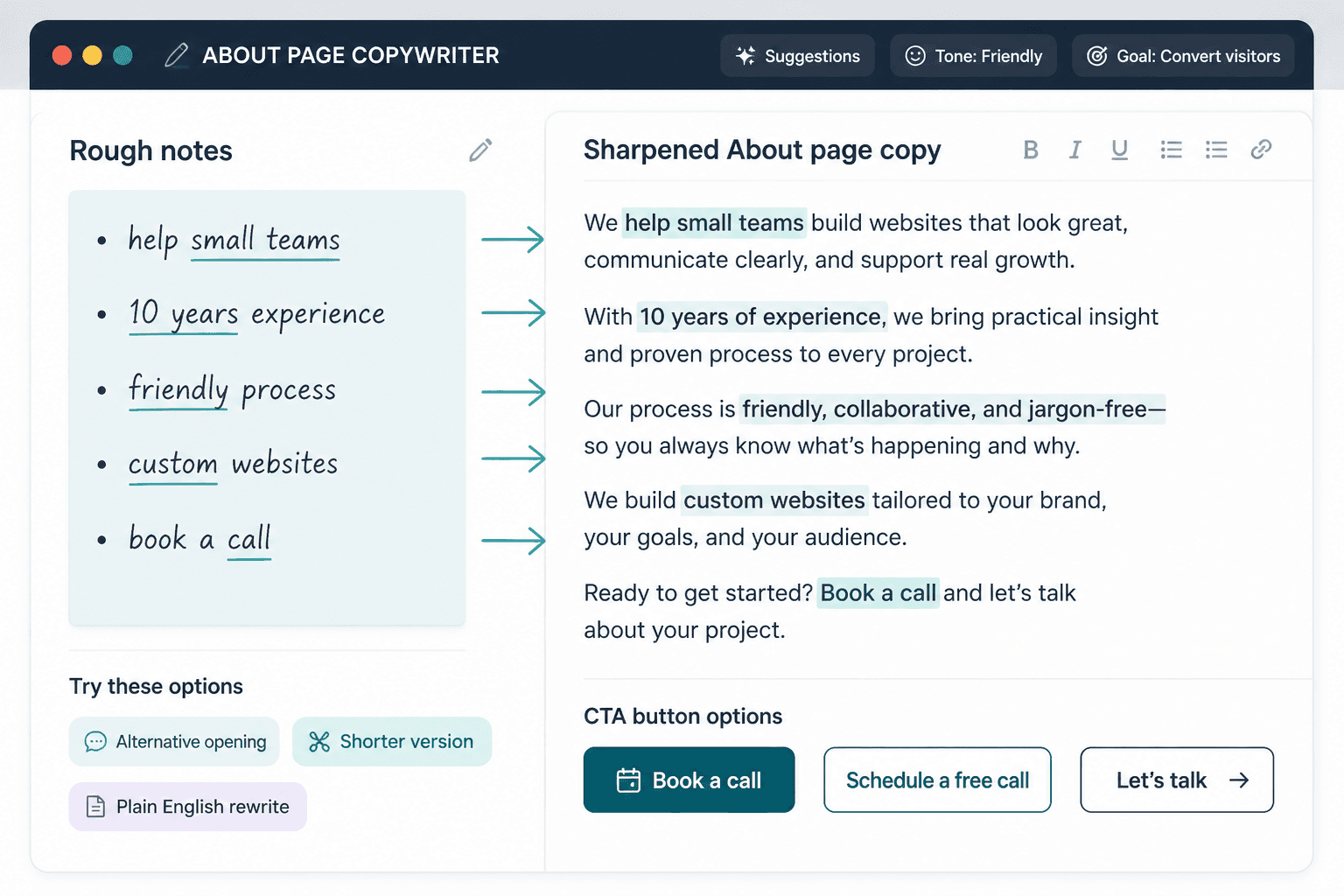
AI tools can absolutely help with About page copy. They are especially useful for:
- Turning rough bullet points into draft paragraphs
- Generating alternative openings
- Compressing long paragraphs
- Rewriting robotic lines in plainer English
- Creating several CTA options
- Surfacing angles you forgot to include
But they are not good at knowing what actually matters on your page unless you tell them. They also love vague sincerity and polished nonsense if you do not guide them properly. So use them like an assistant, not like a ghostwriter you hired after one networking event.
For a more direct breakdown, this guide to AI tools for About page copy goes deeper on where AI helps and where it quietly makes things worse.
Editing and readability tools
These are useful for spotting problems like:
- Overlong sentences
- Repeated phrases
- Passive wording
- Foggy claims
- Paragraphs that take forever to get to the point
They cannot tell you if your positioning is strong. But they can absolutely tell you when a paragraph needs mercy.
Best tools for collecting proof and substance
One of the easiest ways to improve an About page is to stop making claims in a vacuum.
If your page says you help people get results, great. Which people? What results? What kind of work? What evidence can you include without turning the page into a résumé swamp?
This is where proof-collection tools matter.
Testimonial and client feedback banks
Store client feedback in one place so you can pull actual phrases into your copy. This helps you:
- Use language your audience already uses
- Add credibility without puffing yourself up
- Spot patterns in what clients value most
- Build a stronger proof section
Often, your best About page lines are hiding inside old emails, DMs, surveys, and testimonials. Not in your tenth attempt at sounding impressive.
Offer and results trackers
If you have helped clients, shipped projects, built an audience, published work, spoken somewhere useful, or created measurable outcomes, track it. You do not need every stat. You do need enough specific proof to replace generic confidence with actual evidence.
Examples of good proof notes to keep handy:
- Types of clients served
- Number of projects completed
- Audience or publication credibility
- Relevant industry background
- Specific client wins
- Results tied to your process
Best website tools for turning your About page copy into a stronger page
Writing the copy is only half the job. Then the page has to work.
Website builders and CMS tools
Your site builder should make it easy to create a page with:
- A clear top section
- Scannable headings
- Short paragraphs
- A proof section
- Optional photo or visual cues
- A visible CTA
About pages often underperform because they are one huge wall of text with no hierarchy. The reader should not need trail mix and emotional resilience to finish it.
Heatmaps and page behavior tools
If you already get traffic, these tools can help you see whether people:
- Scroll far enough to reach your proof
- Click your CTA
- Ignore a key section
- Drop off before the main point lands
This matters because sometimes the copy is fine. The layout is the real problem. And blaming the words for a layout issue is a very common website-owner hobby.
CTA and form tools
Your About page should usually lead somewhere. Depending on your business, that might be:
- A contact page
- A booking page
- A lead magnet
- A service page
- A newsletter signup
If the page builds trust but gives no next step, it is doing half a job.
How to choose the right tools without wasting time
You do not need the “best” tool in some universal sense. You need the tool that removes the bottleneck you actually have.
Ask yourself which of these sounds most like your problem:
- I do not know what to say
- I know what to say, but I cannot organize it
- I have the outline, but the draft sounds stiff
- I have a draft, but it is too vague
- I have decent copy, but the page is not converting
Then choose a tool that addresses that stage.
| If your problem is… | Use this kind of tool |
|---|---|
| Unclear message | Positioning worksheet or messaging planner |
| Messy ideas | Outline doc or whiteboard tool |
| Stiff first draft | AI drafting or rewrite assistant |
| Wordy, fuzzy copy | Editing and readability tool |
| Weak trust signals | Proof bank or testimonial tracker |
| Low conversion | Page builder, layout tool, heatmap, CTA testing |
A simple workflow for writing an About page with tools that actually help
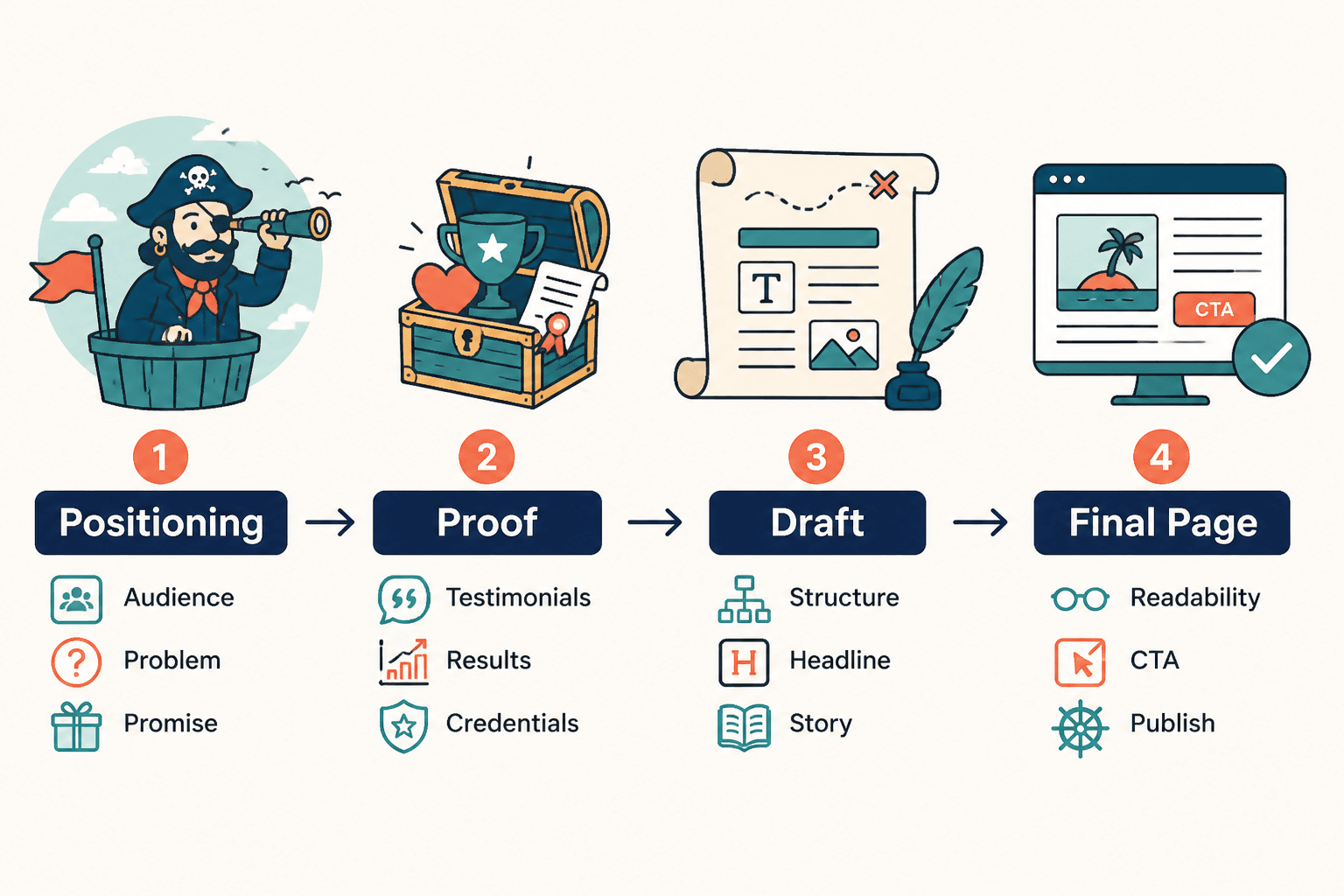
- Start with a planning doc and define your audience, promise, proof, and CTA.
- Choose an About page structure that fits your business model.
- Pull real proof from testimonials, client feedback, or past work.
- Draft the page in sections, not as one giant scroll of existential dread.
- Use an AI or rewrite tool to generate alternatives where the copy feels flat.
- Edit for clarity, scannability, and specificity.
- Build the page with clean layout and visible next steps.
- Review how people interact with it and improve from there.
That is the practical sequence. Not “open chatbot, ask for About page, regret everything later.”
What these tools cannot do for you
Even the best website tools and copy-planning tools for About Page Copy have limits.
- They cannot fix weak positioning
- They cannot invent meaningful proof from thin air
- They cannot tell you what your audience actually cares about if you have never listened
- They cannot make a generic business sound interesting without stronger ideas
- They cannot replace judgment, taste, or honesty
That is why the best results usually come from using tools to support your thinking, not outsource it entirely. The page still needs your actual perspective, your actual credibility, and a reason for someone to care.
About pages work better when they build trust with clarity instead of biography theater. A stronger through-line usually matters more than extra detail.