
Most people looking for the best thread tools and creator ops tools for X Threads are really looking for one of three things:
- a faster way to write threads
- a cleaner way to organize ideas
- a way to stop their content process from feeling like loose receipts blowing around a parking lot
That distinction matters, because no tool fixes bad thinking, weak positioning, or a thread with no point. But the right tool absolutely can help you capture better ideas, structure threads faster, repurpose stronger posts, and keep your content operation from turning into chaos with a login screen.
So this is not a “here are magical apps that will make you go viral” article. That genre is already crowded enough. This is a practical guide to the kinds of tools that actually help creators, consultants, coaches, writers, and solo operators publish better X Threads with less friction.
If you want stronger thread strategy first, start with the broader X Threads hub. If you want prompt-heavy help, also see best AI tools for X Threads, best templates and tools for X Threads, and best X Threads ideas and examples for creators.
To see how this fits into the wider strategy, open the parent guide.
What thread tools actually need to do
A good thread tool should do at least one job well. A great creator ops setup should do several jobs without making you feel like you need a project manager, a systems consultant, and two weeks off just to post online.
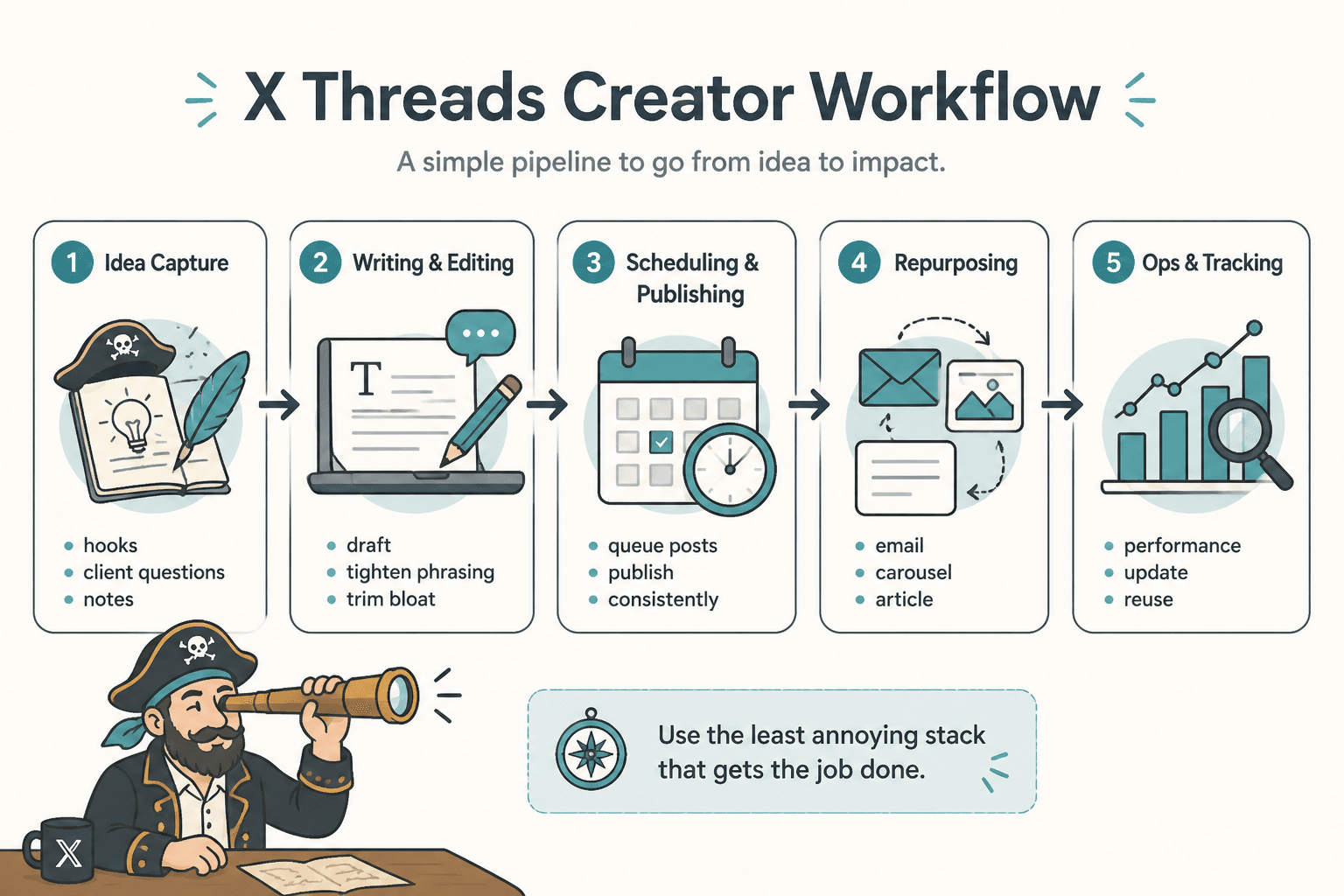
For X Threads, the useful jobs usually fall into six buckets:
- Idea capture: saving hooks, observations, examples, screenshots, and rough thread concepts
- Writing and structuring: turning one decent idea into a coherent multi-post thread
- Editing: tightening phrasing, checking flow, and trimming bloat
- Scheduling and publishing: getting posts out consistently without posting manually every time
- Repurposing: turning threads into emails, posts, carousels, articles, or vice versa
- Ops and tracking: knowing what you published, what worked, and what needs updating or reusing
The best setup is rarely one all-in-one tool. Usually, it is a small stack. One tool for thinking. One for writing. One for publishing. Maybe one for storage or tracking if your content volume is high enough to justify it.
That is the part people often miss. You do not need the biggest stack. You need the least annoying stack that still gets the job done.
The best thread tools by job, not by hype
If you shop for creator tools by feature list alone, you will end up with a lot of dashboards and not much momentum. It is better to choose tools based on the job they are supposed to do inside your thread workflow.
1. Idea capture tools
This is the underrated category. Most bad threads do not fail because the writer is untalented. They fail because the idea was grabbed too late, half remembered, or never developed past “this might be a good post.”
Good idea capture tools help you store things like:
- hook ideas
- contrarian opinions
- client questions
- tiny stories
- frameworks
- examples and screenshots
- winning posts worth expanding into threads
Look for tools that make it easy to:
- save ideas quickly from desktop or mobile
- tag by topic, audience, and content type
- search old notes fast
- turn notes into drafts without friction
Common good fits:
- Simple notes apps: great if you move fast and hate overhead
- Database-style workspaces: better if you manage lots of topics, content pillars, or reusable examples
- Read-later or clipping tools: useful if your thread ideas often come from articles, screenshots, or research
If your current capture system is “I’ll remember it later,” that is not a system. That is optimism wearing a fake mustache.
2. Thread writing and structuring tools
X Threads need more structure than single posts. Not more fluff. More structure.
A good thread writing tool helps you see:
- the opening hook
- the sequence of ideas
- where one post should end and the next should begin
- whether the thread builds momentum or just keeps restating itself in fresh clothes
Useful features here include:
- post-by-post drafting view
- character visibility
- drag-and-drop reordering
- thread preview
- saved templates
- version history or duplicate drafting
Some thread-specific tools are great for this. Some general writing tools can also work if you create a clean template. The key is that you can write in sequence and spot weak transitions before publishing.
If your thread draft lives as one giant paragraph in a random doc, you are making editing harder than it needs to be.
3. Editing and rewriting tools
This category helps if you already have ideas but your threads come out too long, too soft, too repetitive, or weirdly polished in that “corporate AI intern” way.
Good editing tools can help you:
- tighten sentence length
- cut repetition
- spot weak openings
- rewrite muddy transitions
- generate multiple hook options
- test stronger phrasing without rewriting from scratch
But there is an important line here. Editing tools can sharpen language. They cannot invent a point worth reading. If the thread says nothing interesting, no rewrite button is going to save it.
That is why editing tools work best after you have a real argument, lesson, story, or framework. Use them to tighten. Not to impersonate substance.
4. Scheduling and publishing tools
If you publish threads regularly, scheduling tools save more than time. They save mental load.
Instead of deciding every day what to post and when, you can batch write, queue threads, and leave yourself room to actually do your job.
Look for scheduling tools that support:
- thread scheduling
- easy editing after drafting
- draft queues
- calendar view
- post previews
- performance tracking if that matters to your workflow
The warning here is simple: scheduling tools are useful, but they can also encourage lazy batching. Threads written in bulk still need freshness, specificity, and timing awareness. A month of preloaded generic advice is still generic advice.
5. Repurposing tools
One of the best uses of creator ops tools is repurposing. A strong thread can become:
- an email
- a LinkedIn post
- a short article
- a carousel outline
- a lead magnet section
- a script for a video or reel
And the reverse is true too. Good repurposing tools help you turn long-form content, notes, calls, or newsletters into thread drafts worth refining.
The useful version of repurposing is adaptation. The lazy version is pasting the same content everywhere and pretending platform differences are a myth.
X Threads usually need more compression, sharper sequencing, and better post-by-post rhythm than content copied from other platforms. Tools can speed that up. They cannot do the judgment for you.
6. Creator ops and content management tools
This is where things get less shiny and more useful.
Creator ops tools are not sexy. They are just the reason you can still find your best thread from four months ago, know which hooks worked, track which ideas became offers, and avoid writing the same thread seven different ways by accident.
Useful creator ops systems often include:
- a content database
- a simple editorial calendar
- a swipe file
- performance notes
- an archive of published threads
- tagging by topic, audience, funnel stage, or offer
If you create content to support a business, this matters a lot. Your threads should not just exist to get likes. They should support your positioning, ideas, products, services, and trust-building over time.
What the best creator ops setup for X Threads usually looks like
You do not need a giant stack. For most creators, a clean setup looks more like this:
- Capture tool: for ideas, screenshots, hooks, and notes
- Drafting tool: for writing and structuring threads
- Scheduler: for queueing and publishing
- Content database: optional, but useful if you publish often or manage multiple offers
That is enough for most solo creators.
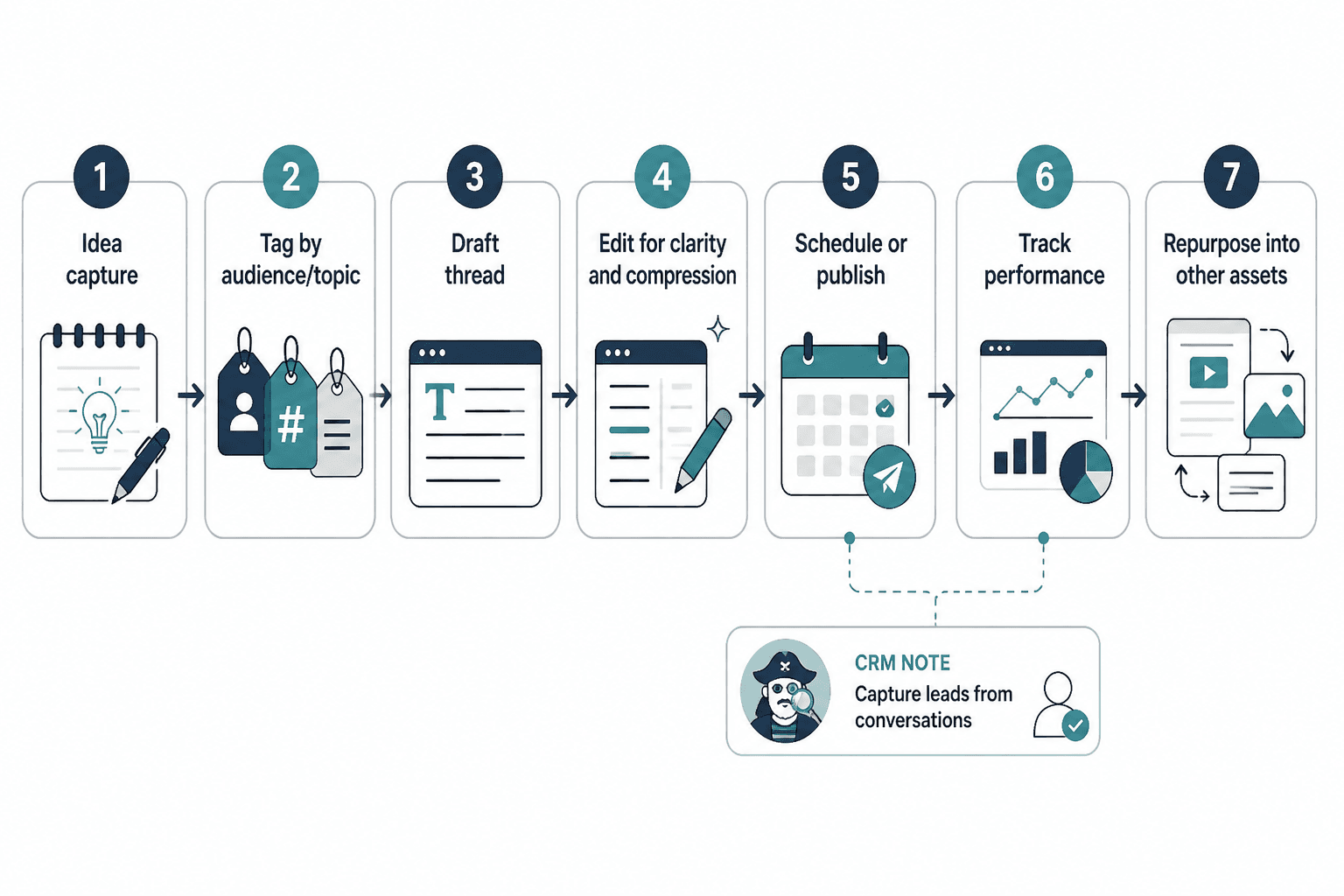
If you are a consultant, coach, or founder using X Threads to attract leads, you may also want a lightweight CRM or lead tracker connected to your content workflow. Not because every thread should become a sales machine, but because useful conversations should not vanish into the timeline forever.
In practice, your workflow might look like this:
- Save thread ideas from client calls, posts, replies, or notes
- Tag them by audience and topic
- Draft the thread in a structured writing tool
- Edit for clarity and compression
- Schedule or publish
- Track what performed well
- Repurpose the strongest threads into other assets
That is creator ops. Not glamorous. Very effective.
Features that matter more than brand names
People love asking, “What is the best tool?” Fair question. Usually the wrong one.
A better question is: what features actually matter for your workflow?
Here are the features worth caring about when choosing thread tools and creator ops tools for X Threads:
| Feature | Why it matters |
|---|---|
| Fast capture | You need to save ideas before they disappear |
| Post-by-post thread view | Helps you structure and edit clearly |
| Character awareness | Keeps each post tight enough to work on X |
| Tagging or categorization | Makes old ideas searchable and reusable |
| Templates | Speeds up recurring thread formats without making them robotic |
| Scheduling | Supports consistency and batching |
| Repurposing support | Helps extend the life of strong ideas |
| Archive and tracking | Prevents content loss and helps spot patterns |
| Low friction | If the tool is annoying, you will stop using it |
That last one matters more than people admit. The best tool on paper is useless if your brain avoids opening it.
Tools are useful here. They are useless here.
A little honesty saves a lot of disappointment.
What tools are genuinely good for
- capturing ideas before they vanish
- organizing topic libraries
- speeding up thread drafting
- testing multiple hook versions
- cleaning up phrasing
- scheduling content in batches
- repurposing good threads into other formats
- tracking published content and reusable assets
What tools cannot do for you
- give you taste
- replace a clear point of view
- fix weak positioning
- make boring ideas interesting
- understand your audience without decent input
- create trust from thin air
- turn vague thread ideas into sharp ones by magic
This is where people get weird. They buy a thread tool, then expect it to solve a strategy problem. But if your thread is vague, repetitive, and written for everyone, your issue is not software. Your issue is content judgment.
How to choose the right tool stack for your stage
The right stack depends on how much content you publish, how strategic your content is, and how much complexity you can realistically maintain.
If you are just starting with X Threads
Keep it light.
- one notes app for capture
- one drafting tool or simple thread composer
- optional scheduler if consistency is a struggle
Your focus should be learning what kinds of threads actually fit your voice and audience, not building a miniature content agency inside your laptop.
If you publish weekly and want better consistency
Add more structure.
- idea capture with tags
- thread templates
- scheduling calendar
- a simple archive of published threads
This is usually the sweet spot where creator ops starts paying off. You have enough volume to need a system, but not so much that it needs to become complicated.
If X Threads support your business directly
You need a more deliberate content ops setup.
- topic database tied to offers or services
- reusable proof and examples library
- workflow for draft, edit, publish, repurpose
- basic tracking for what leads to profile visits, replies, or conversations
- light lead tracking if threads drive inquiries
Not because you need to become hyper-optimized and joyless. Just because content that supports revenue should be managed like it matters.
Common mistakes people make with thread tools
Some of these are weirdly common.
- Buying tools before building a process. If you do not know how you want ideas to move from note to draft to post, the tool will not rescue you.
- Using AI to overpolish everything. Threads on X usually work better when they sound clear and human, not dipped in synthetic “thought leadership.”
- Saving ideas without tagging them. Congratulations, you made a digital junk drawer.
- Scheduling too far ahead. Some evergreen content works fine. But if every thread sounds detached from current conversations, your account can feel strangely lifeless.
- Tracking vanity metrics only. A thread with fewer likes but better replies, profile clicks, or qualified interest may be more useful for your business.
- Trying to automate your voice. Templates help. Full personality outsourcing does not.
A tool should reduce friction, not erase judgment. If it makes you publish faster but think worse, that is not a win.
A simple creator ops workflow for better X Threads
If you want something you can actually use this week, here is a practical workflow.
Step 1: Build three capture buckets
- Hooks: sharp openings, surprising claims, strong first-post ideas
- Proof: examples, screenshots, mini case studies, lessons from work
- Frameworks: step-by-step ideas, checklists, processes, breakdowns
This makes thread drafting much easier, because you are not inventing every piece from zero.
Step 2: Create 3 to 5 repeatable thread templates
Not formula prison. Just enough structure to reduce blank-page friction.
Examples:
- mistake → why it happens → fix → example
- strong opinion → argument → proof → takeaway
- step-by-step framework → common pitfall → next action
- before/after breakdown → lesson → CTA
If you need more help with formats, the related guides on templates and tools for X Threads and X Threads ideas and examples for creators will help.
Step 3: Write threads in batches, edit individually
Batching drafts is efficient. Batch-publishing untouched drafts is how people end up posting five threads that all sound like they were assembled in one sleepy afternoon.
Draft in batches. Edit one by one. Make sure each thread still has a point, a useful flow, and a decent ending.
Step 4: Track the right signals
For each thread, note things like:
- topic
- hook type
- format
- engagement quality
- profile clicks
- replies or conversations started
- whether it should be repurposed
You do not need an analytics bunker. You just need enough pattern recognition to stop guessing.
Step 5: Repurpose the winners
Strong threads deserve a second life.
Turn them into:
- a stronger pinned post
- a newsletter section
- a LinkedIn post
- a lead magnet outline
- a short article
- a client-facing resource
This is where creator ops earns its keep. You stop creating content once and losing it forever.
The bigger point is simple: clearer structure and clearer writing make the piece more useful. That is usually what makes the ending land better too.