
Most LinkedIn posts do not flop because the writer lacks expertise. They flop because the first line is sleepy and the formatting makes the whole thing feel like admin work.
That is the real job of hooks and formatting on LinkedIn. Not theatrics. Not fake mystery. Not turning every post into a dramatic monologue about “what nobody tells you.” Just make the right person stop, understand the point fast, and keep reading without friction.
If you are looking for the best templates and tools for LinkedIn hooks & formatting, you probably do not need more abstract advice about attention. You need things you can actually use: hook structures that do not sound embarrassing, formatting patterns that make posts easier to read, and tools that speed things up without sanding your voice into generic AI oatmeal.
That is what this gives you. Templates. Tool categories. Practical examples. A few warnings about what people keep doing wrong. And a cleaner way to build LinkedIn posts that look sharp without feeling overengineered.
For the main guide behind this topic, visit the parent guide.
What good LinkedIn hooks and formatting actually do
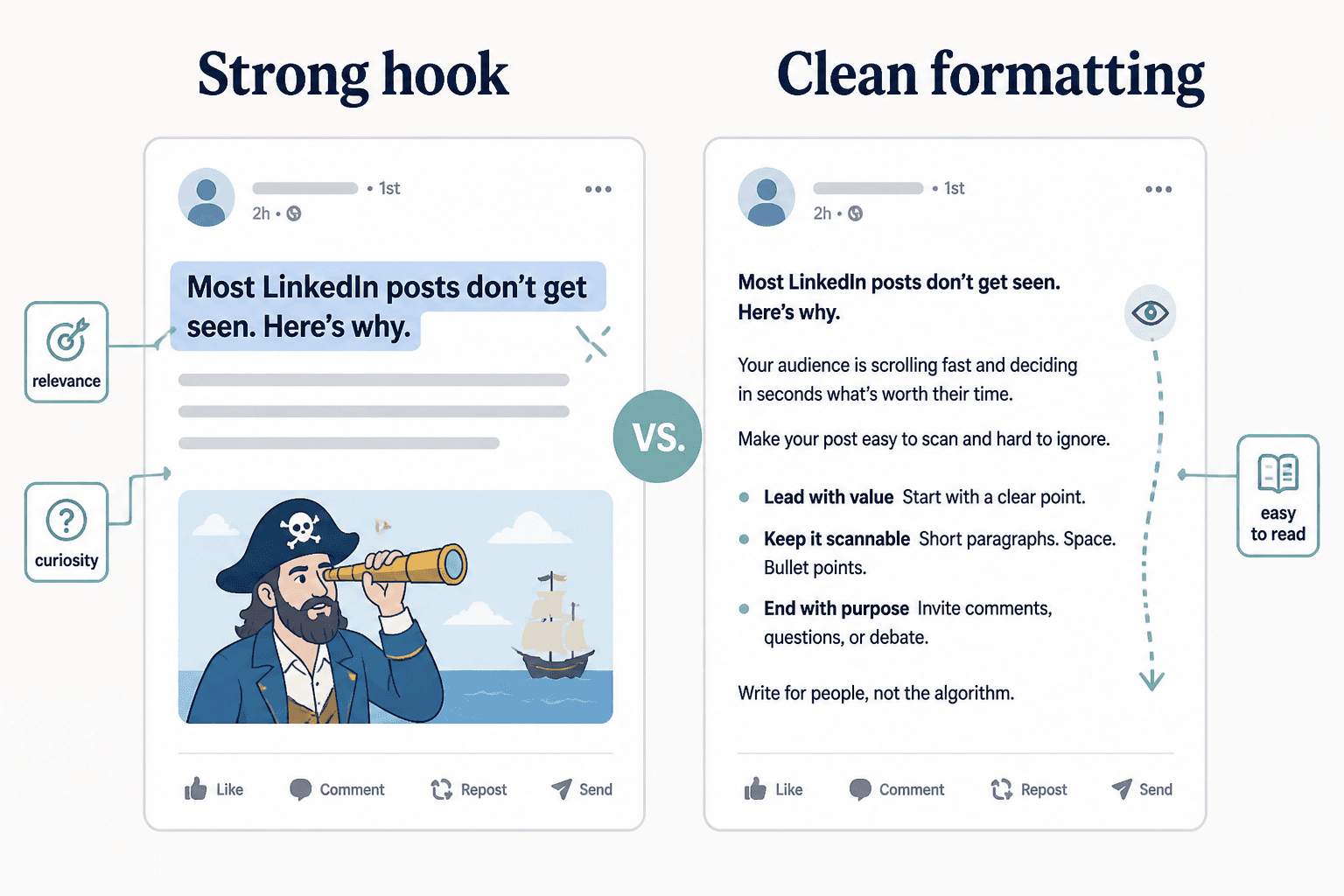
A good LinkedIn hook is not a magic phrase. It is a clear entry point into a useful idea.
A good format is not “add line breaks everywhere and pray.” It is structure that helps the reader move through the post with almost no effort.
When both are working, your post does three things fast:
- Signals relevance
- Creates enough curiosity to continue
- Makes the post feel easy to read
That sounds simple because it is simple. People just keep complicating it.
LinkedIn readers are scanning. They are busy, distracted, mildly skeptical, and one weak opening away from ignoring you. So your first line has to earn attention honestly, and your formatting has to reduce friction instead of adding performance art.
If you want broader guidance beyond this article, the main LinkedIn hooks and formatting guide is a useful companion piece.
The best LinkedIn hook templates
Templates are useful when they give you structure without forcing you to sound copied. That means the best ones are flexible, specific, and built around actual reader psychology rather than recycled “viral” formulas.
Here are the templates worth keeping.
1. The sharp opinion hook
Use this when you have a clear point of view and can back it up.
[Common advice] is overrated.
[Specific reason].
Example:
Posting every day on LinkedIn is overrated.
Posting clearly about the right problem matters more.
Why it works: it creates tension fast, but it is still grounded. It promises an actual argument, not just noise.
2. The mistake hook
Great for educational posts, audits, and client-facing content.
Most people think [wrong assumption].
The real problem is [actual issue].
Example:
Most people think their LinkedIn post needs more value.
The real problem is that the opening says nothing interesting.
This one works because it gives the reader that useful little sting: ah, that might be me.
3. The specificity hook
Specificity beats drama almost every time. It also makes you sound like a person who has seen the problem in the wild, not a content bot with posture.
If your [content asset] starts with [weak pattern],
you are probably losing readers before the useful part starts.
Example:
If your LinkedIn post starts with “I used to think…”
you are probably wasting the most important line in the post.
4. The contrast hook
This is one of the cleanest ways to create interest without clickbait.
[Thing people focus on] matters less than [thing that actually matters].
Example:
Post length matters less than opening strength.
Simple. Strong. No circus tricks required.
5. The mini-proof hook
Use this when you have evidence, results, or observed patterns worth sharing.
After reviewing [number] of [thing],
here is the pattern I keep seeing:
Example:
After rewriting dozens of LinkedIn openings,
here is the pattern I keep seeing:
This works especially well for consultants, coaches, writers, and service providers because it builds authority without chest-thumping.
6. The direct utility hook
Sometimes the best hook is just a very clear promise. Wild, I know.
Here is a simple way to [specific result]
without [common frustration].
Example:
Here is a simple way to make your LinkedIn posts easier to read
without turning them into weirdly spaced poetry.
If you want more hook examples you can adapt quickly, this companion article on simple LinkedIn first-line hook templates for busy creators is worth bookmarking.
The best formatting templates for LinkedIn posts
Formatting is where good ideas go to die if you get lazy.
Too dense, and the post feels like effort. Too broken up, and it looks like every sentence needs oxygen support. The goal is readable, not theatrical.
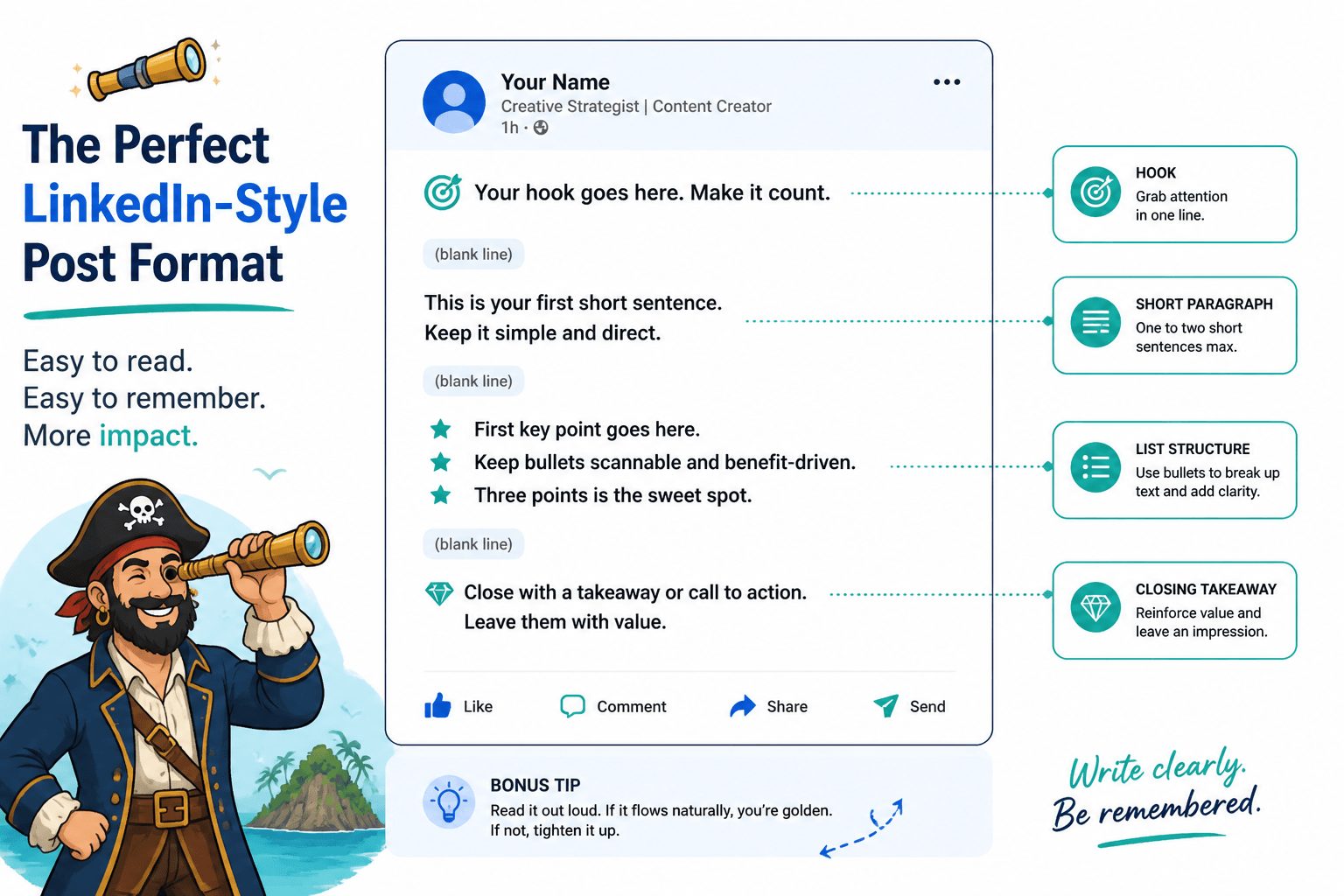
Template 1: The clean teaching post
Best for educational posts, lessons, frameworks, and process breakdowns.
- Strong first line
- One or two lines setting up the problem
- 3 to 5 short points
- Short close with takeaway or CTA
Example structure:
Your hook is not too short.
It is too vague.That is why useful posts get ignored.
Here is what usually fixes it:
• Lead with the point, not the warm-up
• Say something specific enough to matter
• Create contrast or tension early
• Make the next line earn the clickShort posts work when the idea is sharp.
Not when the writer just stopped early.
Template 2: The story-to-lesson format
Best for personal brands who want some personality without drifting into diary mode.
- Hook with the insight or tension, not the backstory
- Brief context
- What happened
- Lesson or takeaway
- Optional CTA
The common mistake here is starting too early. Readers do not need the weather report before the point arrives.
Template 3: The punchy opinion post
Best for sharper takes and positioning content.
- One-line opinion hook
- One-line explanation
- 2 to 4 short supporting lines
- Clean landing line
This format works because it respects pace. It moves quickly and gives the reader one argument to follow.
Template 4: The scannable list post
Best for practical tips, common mistakes, and quick wins.
Use this format:
- Hook
- One-line setup
- Numbered or bulleted points
- One-line conclusion
Do not overpack each bullet. If each one becomes a tiny essay, the post starts wheezing.
Template 5: The before-and-after rewrite post
Best for writers, editors, copywriters, consultants, and anyone teaching communication.
Structure:
- Weak example
- Why it fails
- Stronger rewrite
- Why the rewrite works
This is one of the most useful LinkedIn formats because it shows taste instead of merely claiming it.
For more swipeable examples in this lane, see LinkedIn hooks and formatting ideas and examples for creators.
What to avoid when using templates
Templates help with structure. They do not excuse laziness.
Here is where people go wrong:
- Using the same hook structure every time until every post feels cloned
- Copying “viral” templates built around fake suspense
- Adding line breaks after every sentence for no reason
- Using curiosity with no payoff
- Writing hooks that sound impressive but communicate nothing
- Formatting for aesthetics instead of readability
The real test is simple: does the post sound like you on a clear day, or like a content template wearing your name tag?
The best tools for LinkedIn hooks and formatting
There is no single perfect tool here, because the work is really three separate jobs:
- Generating and testing hook options
- Drafting and editing the post
- Formatting, scheduling, and managing workflow
That means the best templates and tools for LinkedIn hooks & formatting usually come from a small stack, not one magical app with branding confidence issues.
1. Hook generation tools
These are useful for variation, idea angles, and getting unstuck when every opening sounds the same.
What they are good for:
- Generating multiple first-line options fast
- Testing different angles for the same idea
- Turning one lesson into opinion, mistake, proof, or utility-led hooks
- Breaking out of your own repetitive phrasing
What they are not good for:
- Knowing which hook matches your actual audience best
- Giving you taste
- Understanding your positioning without good input
- Preventing generic language unless you edit aggressively
If you specifically want AI options for this part of the workflow, read best AI tools for LinkedIn hooks and formatting.
2. Writing and editing tools
This is where most people should spend more attention. Hooks are easy to obsess over. Editing is where the post gets good.
Useful writing tools help you:
- Draft without friction
- Keep reusable hook and post templates in one place
- Compare multiple versions side by side
- Tighten wording and remove throat-clearing
- Save swipe files of strong intros and formats
The best setup is often boring in the best way: one place to capture ideas, one place to draft, and one lightweight process for edits. Fancy software is optional. Clarity is not.
3. Formatting preview and scheduling tools
A post can read well in a document and still look awkward on LinkedIn. Preview and scheduler tools help you catch that before publishing.
They are useful for:
- Checking spacing and readability
- Planning post cadence
- Organizing drafts by topic or content pillar
- Repurposing one idea into multiple formats
- Reducing last-minute posting chaos
Just do not confuse scheduling with strategy. A mediocre post sent on time is still a mediocre post.
For tools in this bucket, check best writing tools and scheduler tools for LinkedIn hooks and formatting.
A simple tool stack that actually works
If you do not want a bloated system, use this three-part stack:
- Idea bank: a place to collect observations, phrases, post angles, and half-formed hooks
- Drafting space: a clean writing environment with saved templates
- Publishing layer: a preview or scheduler tool to check flow and queue content
That is enough for most creators, consultants, coaches, and solo founders. You do not need a content operating system built like a minor airport just to post one sharp idea a day.
A reusable workflow for stronger LinkedIn hooks and formatting
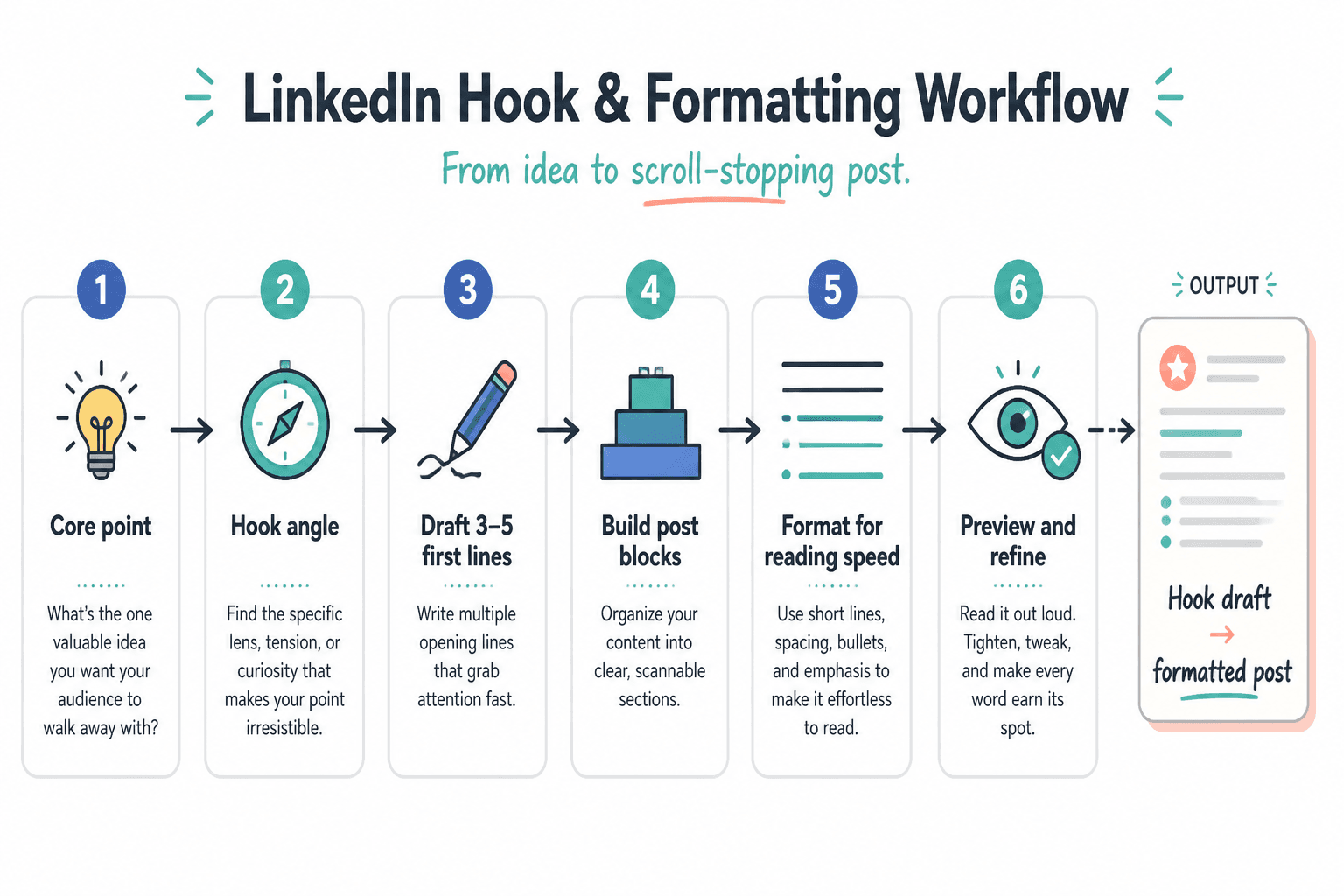
Tools matter less when the process is a mess. So here is a simple workflow you can repeat.
- Start with the point. What is the actual claim, lesson, warning, or insight?
- Choose the hook angle. Opinion, mistake, contrast, proof, specificity, or utility.
- Draft 3 to 5 first lines. Do not marry the first decent one.
- Build the post in blocks. Hook, setup, body, landing line, CTA if needed.
- Format for reading speed. Short paragraphs. Clean lists. No wall of text. No fake dramatic spacing.
- Cut the generic bits. Anything that sounds like filler, LinkedIn cosplay, or AI mush goes.
- Preview before posting. Make sure the flow works visually, not just conceptually.
That process is not glamorous. It is also why some people sound clear and others sound like they swallowed a course funnel.
Before and after: weak hooks and better rewrites
The easiest way to improve your eye for this is to look at weak openings and fix them.
Example 1
Weak: I used to think LinkedIn was just for job seekers, but over time I learned it can be a powerful platform for building your brand.
Better: LinkedIn gets better when you stop posting like you are applying for approval.
The rewrite is stronger because it has tension, a point of view, and fewer wasted words.
Example 2
Weak: Here is what nobody tells you about writing LinkedIn posts.
Better: Most LinkedIn posts do not fail in the middle. They fail in the first line.
The rewrite is more specific and less try-hard. “Nobody tells you” is usually a sign that many people have, in fact, told us.
Example 3
Weak: I am excited to share 5 tips for improving your formatting on LinkedIn.
Better: Bad formatting makes good LinkedIn posts look skippable.
The rewrite frames the problem in reader terms. Nobody cares that you are excited. A little harsh, maybe. Still true.
How to build your own hook and formatting template library
This part is underrated. Instead of constantly searching for “best hook formulas,” build a small private library from your own posts, client work, and examples you genuinely respect.
Create a simple document or database with sections like:
- Opinion hooks
- Mistake hooks
- Proof-led hooks
- Rewrite examples
- Formatting layouts that read well
- CTAs that feel natural
Then save examples in two versions:
- Blank structure: the template itself
- Filled example: how it looks with a real topic
This is much more useful than hoarding random screenshots of viral posts from people whose audience, business model, and writing voice have nothing to do with yours.
The bigger point is simple: clearer structure and clearer writing make the piece more useful. That is usually what makes the ending land better too.