
A draft sits open in one tab, the newsletter platform is waiting in another, the automation builder wants a rule nobody documented, and the subject line ideas are scattered across a notes app like a small administrative disaster. That is the usual subject line workflow: too many handoffs, not enough judgment, and a lot of software trying to act like it has taste. The fix is not a bigger stack. It is a lean system that gives each tool one job and stops the rest from freelancing.
This guide keeps the focus on useful AI tools for newsletter subject lines: tools that help you draft options, compare angles, check length or clarity, and test what actually gets opened. If you want the broader strategy behind the writing itself, start with the newsletter subject lines guide. If you want stronger examples before you bring in tools, use the subject lines ideas and examples page as your swipe file with standards.
What AI tools are actually doing in a subject line workflow
Good subject line tools do not magically create “better” copy. They reduce the number of annoying decisions between rough idea and send. That usually means one or more of these jobs:
- turning a topic or angle into several subject line options
- rewriting for clarity, brevity, curiosity, or specificity
- checking length, tone, and spammy phrasing
- suggesting variants for A/B tests
- helping you log what performed well so the next draft is less guessy
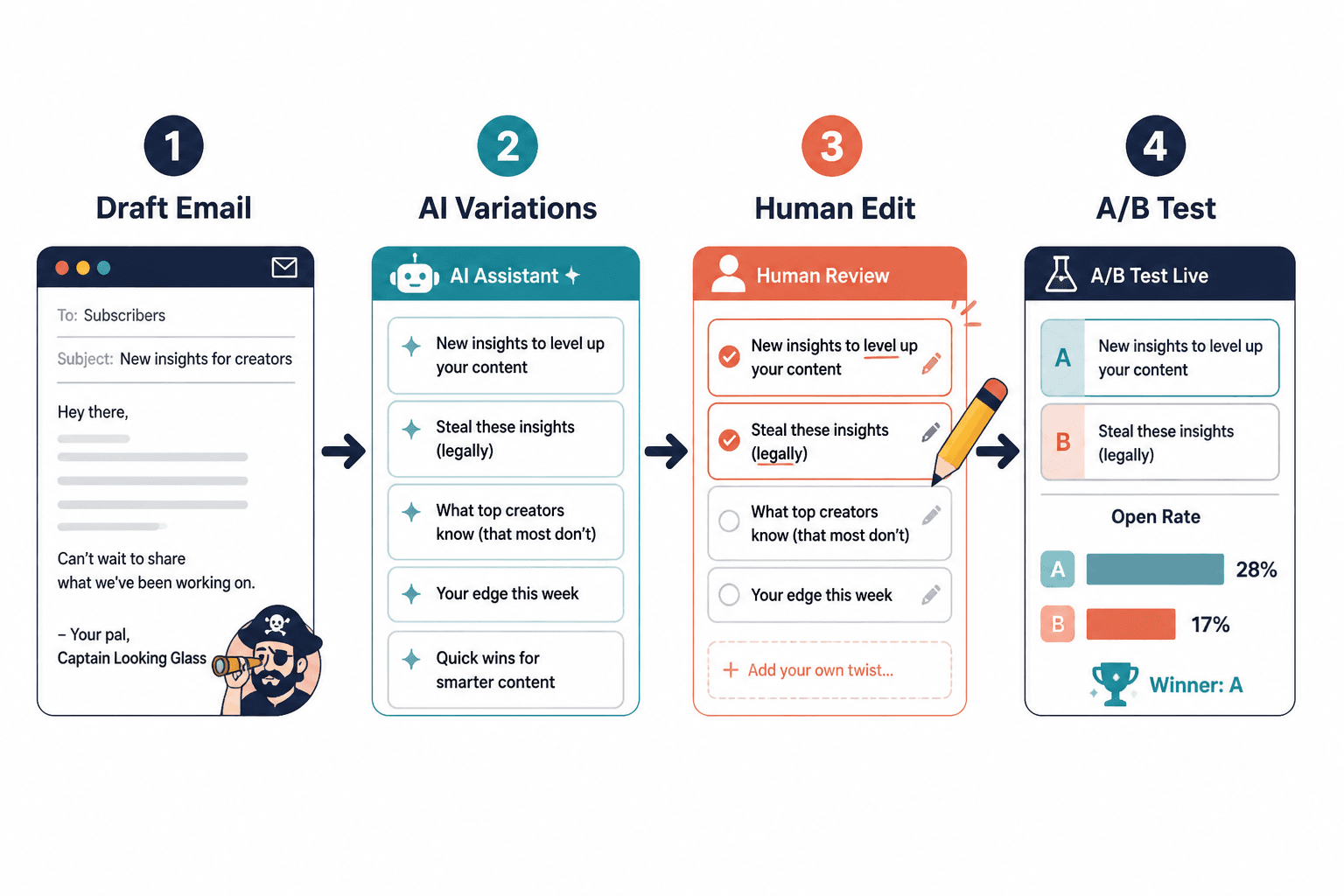
The useful version of AI is not “write it for me and I’ll hope for the best.” It is “give me ten decent starting points so I can pick one worth testing.” That distinction matters. It keeps the human in charge of the message and lets the tool handle the tedious first pass.
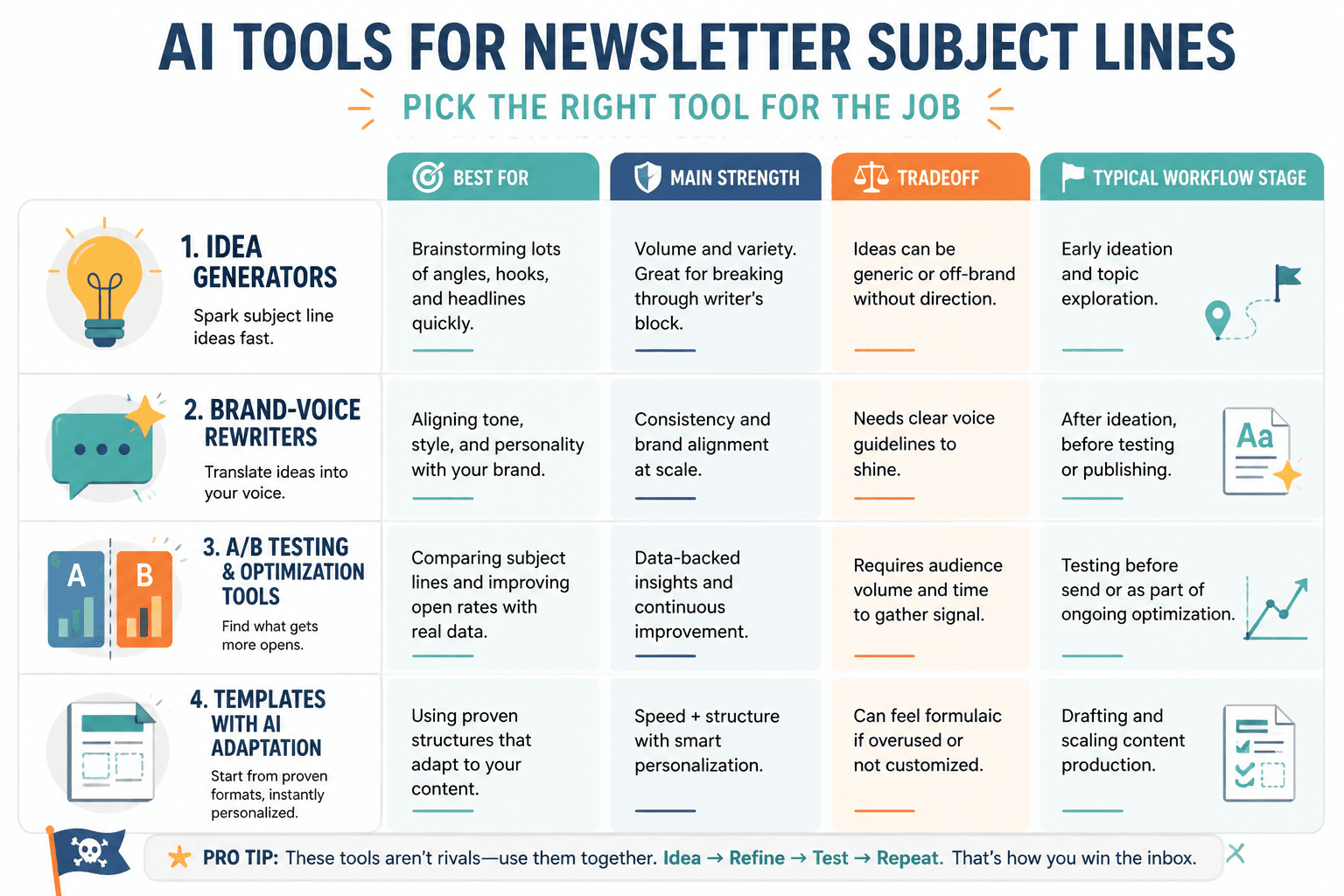
The main types of AI tools for newsletter subject lines
1. AI writing assistants
These are the tools people usually mean first: general-purpose assistants that can produce subject line variations from a prompt, a draft, or a campaign summary. They are best when you already know the message and need options fast.
Use them for:
- quick brainstorming
- tone changes, like sharper, calmer, or more direct
- shortening long subject lines without losing the point
- creating multiple angles from one idea
What they are bad at: reading your audience history, knowing which promises your list has already heard, and understanding brand nuance unless you spell it out. That is not a bug. That is the whole job description.
2. Subject line analyzers
An analyzer is useful when you want a second opinion on length, balance, or vague wording. Think of it as a lint roller for the copy, not a critic with a soul. It catches the obvious stuff: subject lines that are too long for mobile, too generic to earn a click, or too stuffed with punctuation to look trustworthy.
Use them for:
- spotting overlong lines that get cut off on mobile
- finding weak verbs or filler words
- checking whether the line sounds too promotional
- comparing several variants before testing
For the practical mechanics of testing and platform choices, the companion page on email testing tools and newsletter software for newsletter subject lines goes deeper.
3. A/B testing tools inside newsletter platforms
This is where subject line judgment meets actual evidence. A/B testing tools let you send two or more versions to small portions of your list, then roll out the winner. For subject lines, that is often the cleanest way to move from “sounds good” to “performed better.”
Use them for:
- testing one variable at a time, like benefit vs curiosity
- learning which tone your audience actually opens
- building a library of winning patterns
If you want the broader “how this turns into leads or sales” angle, the subject lines into more leads or sales article connects the open rate to the business outcome instead of treating it like a vanity stat with good lighting.
4. Newsletter platforms with built-in AI
Some newsletter platforms now include AI helpers directly in the writing flow. That can be useful when you want fewer tabs and fewer copy-paste mistakes. The main advantage is speed: draft, refine, test, send, review, all in one place.
Use them for:
- fast subject line drafts during campaign production
- keeping subject lines tied to the actual email draft
- reducing tool handoffs for solo creators or small teams
The downside is that built-in tools can be shallow if you treat them as the whole strategy. Convenient is not the same thing as thoughtful. A tidy interface can still produce forgettable subject lines.
How to choose the right tool by use case
Solo creator
If you are writing and sending the newsletter yourself, use the smallest workable stack. A general AI writing assistant plus your email platform’s built-in testing is usually enough. Add an analyzer only if you need help with length, clarity, or consistency.
- Best fit: one assistant for drafting, one platform for sending and testing
- Why: fewer handoffs, faster decisions, less software weather
Newsletter operator
If you manage regular campaigns, content calendars, or multiple audience segments, tool discipline matters more. You want reusable prompts, consistent testing rules, and a simple log of what worked.
- Best fit: assistant + analyzer + built-in A/B testing
- Why: enough flexibility to explore angles without losing your method
Team with approvals
If there are approvals, edits, and more than one opinion about “brand voice,” the best tool is the one that preserves context. Use AI to generate options, but keep the final selection tied to a brief that says what the email is trying to do.
- Best fit: collaborative platform features plus a shared testing log
- Why: subject lines stop becoming tiny committee crises
What makes an AI tool actually useful here
The best tool is not the one with the longest feature list. It is the one that helps you do three things reliably:
- Draft faster without flattening the angle
- Choose better by making options easy to compare
- Learn something from each send instead of starting over every time
That last part is where a lot of stacks fail. They generate copy, maybe even test it, and then the result disappears into the void. No notes, no pattern, no improvement. That is busywork with a dashboard.
A simple subject line workflow that stays sane
Here is a lean version that works for most newsletter setups:
- Write the email first and name the single point it is trying to make.
- Use AI to generate 5 to 10 subject line options.
- Trim the list to 2 or 3 lines that differ in angle, not just wording.
- Check length, clarity, and mobile truncation.
- Run an A/B test if your send volume supports it.
- Record the winner and the reason it won.
That workflow is boring in the best way. It keeps the creative part intact and removes the part where everybody pretends the inbox is a philosophy seminar.
Use AI without making the subject line generic
AI subject lines go bland when the prompt is vague. “Write a subject line for this newsletter” is how you get mush. Better prompts give the tool something to hold onto:
- the reader’s likely concern
- the single payoff
- the tone you want
- what not to sound like
For example, instead of asking for “engaging” subject lines, ask for lines that emphasize a practical benefit, use plain language, and avoid fake urgency. You will usually get better raw material and fewer heroic rewrites.
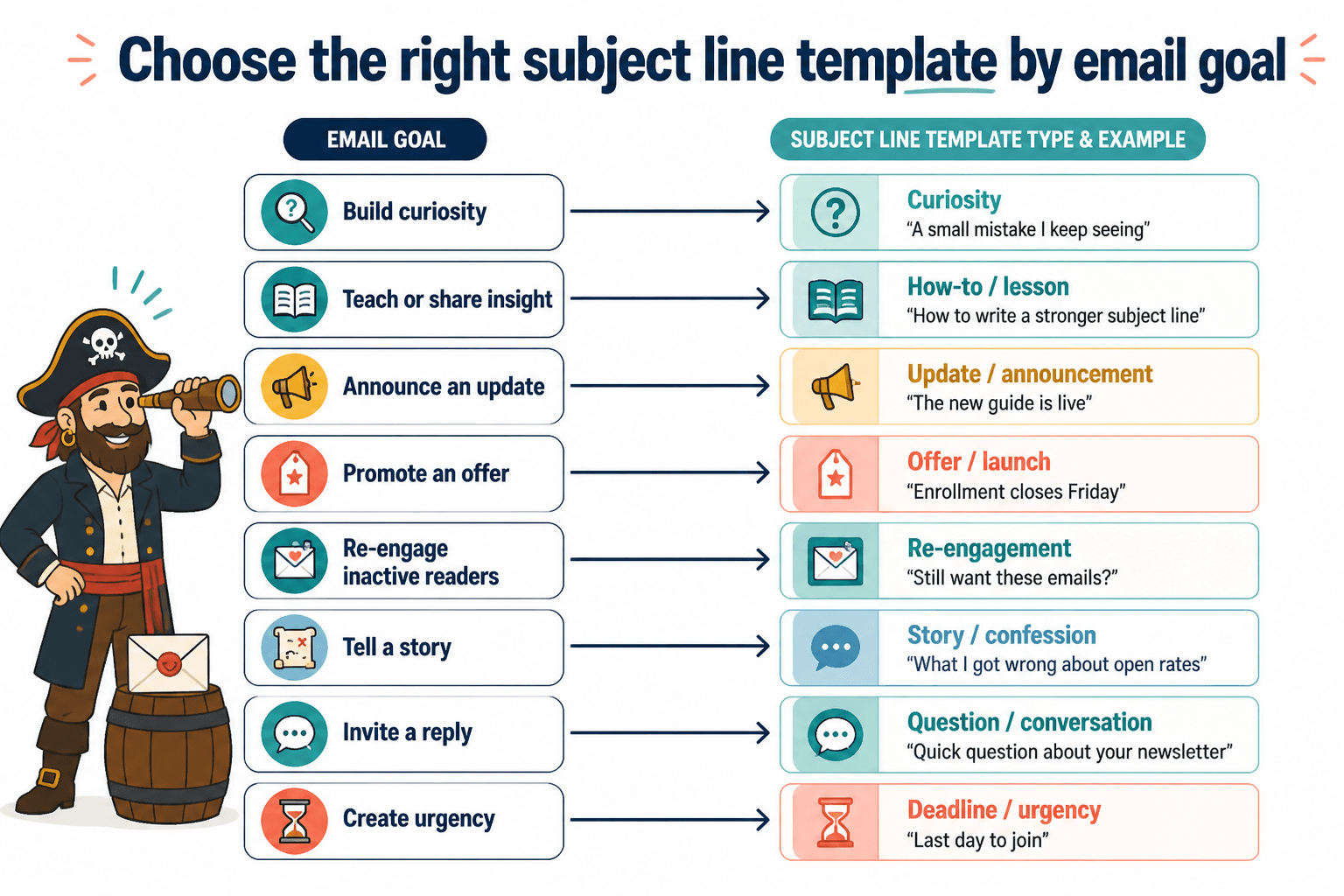
If templates help you think before you prompt, the companion article on newsletter subject line templates and tools is the natural next stop. Templates are useful because they give AI a shape to work inside instead of forcing it to invent one from fog.
Outbound sources worth trusting
For the mechanics behind deliverability, testing, and inbox behavior, it helps to lean on primary sources rather than marketing pages:
- Google Postmaster Tools help for deliverability-related guidance
- Mailchimp’s subject line resources for practical sending advice
- Klaviyo A/B testing documentation for testing structure and setup
Bottom line
The best AI tools for newsletter subject lines are the ones that reduce friction without taking over the thinking. Use AI to generate options, use analyzers to catch obvious problems, use testing to learn what your audience opens, and keep a simple log so the process gets sharper over time. The goal is not more software. It is fewer wasted drafts and a subject line system that does not need a rescue mission every Tuesday.