
Most people do not have a subject line problem. They have a testing problem disguised as a subject line problem.
They write one decent line, shrug, send it, and then act surprised when open rates wobble around like a shopping cart with one bad wheel. Then they go hunting for a “high-converting subject line formula” as if a magic bracket or emoji is going to rescue an email nobody was especially excited to open.
If you want better results, you need two things: better subject line judgment and better tools for testing what actually earns opens from your audience. That is where the right email testing tools and newsletter software help. Not because software is brilliant. Mostly because it helps you stop guessing so much.
This guide breaks down the best email testing tools and newsletter software for newsletter subject lines, what each type of tool is actually good for, what it will not do for you, and how to pick the setup that fits your size, workflow, and level of email nerdiness. If you write newsletters as a creator, coach, consultant, founder, or personal brand, this should save you from wasting time on fancy features you will never use.
If you want broader help on writing stronger subject lines first, start with this newsletter subject lines guide, then come back here for the tool stack.
If you want the bigger picture, start with the parent guide.
What makes a subject line tool actually useful
A lot of subject line tools sell the fantasy that software can “optimize” your email before your readers see it. Some can help. Some are basically confidence theater with a dashboard.
A useful tool should do at least one of these jobs well:
- Let you A/B test subject lines cleanly
- Show open-rate results in a way you can actually learn from
- Help you preview how subject lines appear across devices
- Support segmentation, so you are not testing across wildly mixed audiences
- Make it easy to save, reuse, and compare winning patterns
- Optionally help generate variations faster without sounding like machine-made soup
What it cannot do is more important than most marketers admit. No tool can:
- Fix a boring email
- Make people trust a weak brand
- Turn vague positioning into relevance
- Know your audience better than you do
- Guarantee opens just because a score says “92/100”
That last one matters. Subject line analyzers are often treated like gospel. They are not. They are pattern-checkers, not little email prophets.
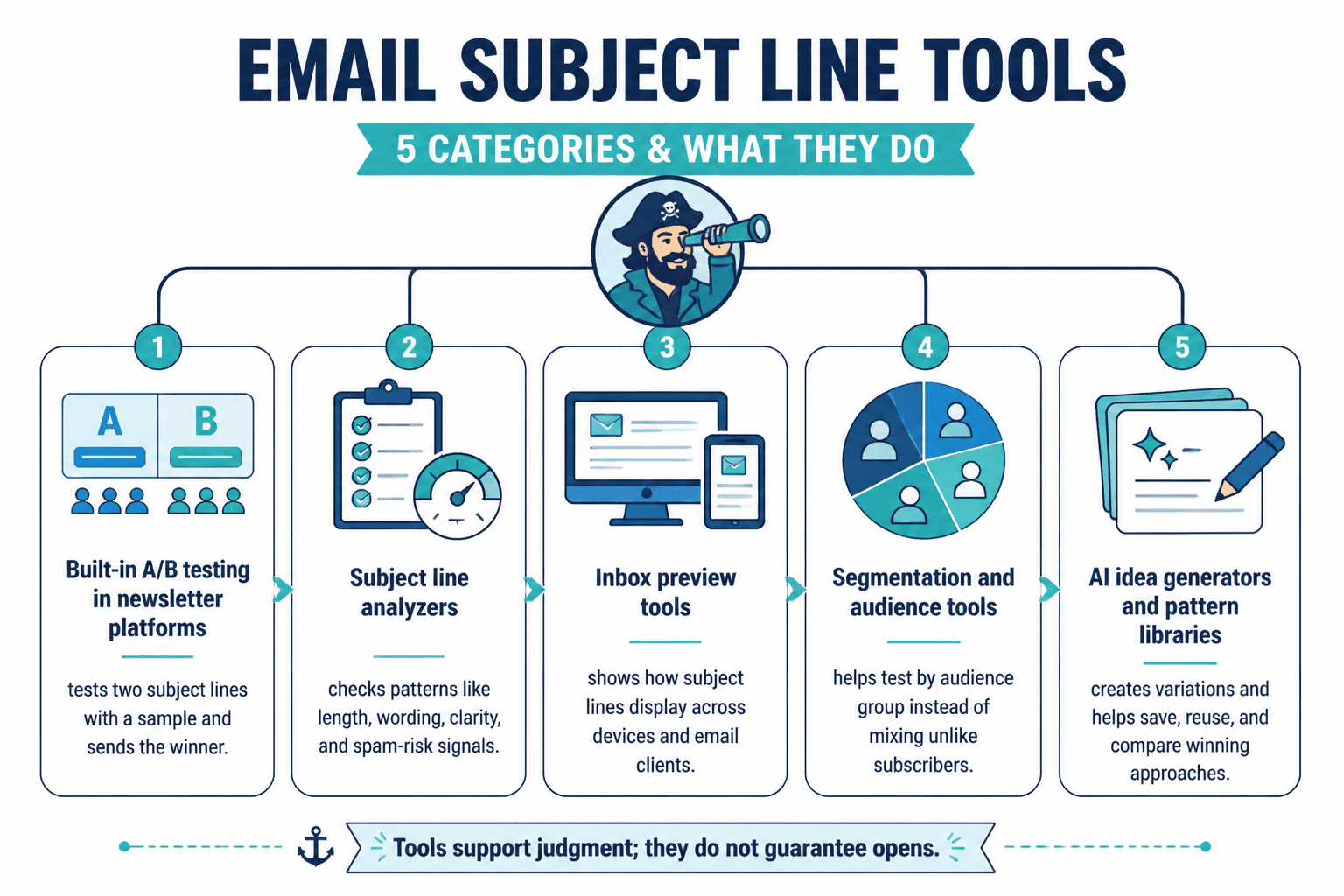
The main types of email testing tools and newsletter software for newsletter subject lines
You do not need every category. But you should know what each one is for before you start paying for six overlapping tools and calling it a system.
1. Built-in A/B testing inside newsletter platforms
This is the most practical place to start. Many newsletter platforms let you test two subject lines against a small sample, then send the winner to the rest of the list.
Good for:
- Real-world testing with your actual audience
- Fast comparisons between two strong options
- Simple workflows that do not require extra tools
- Small teams or solo creators who want less friction
Less good for:
- Deep analysis across lots of campaigns
- Complex multivariate testing
- Tiny lists where results are noisy
2. Subject line analyzer tools
These score your subject line based on patterns like length, emotional wording, clarity, urgency, preview behavior, or spam risk.
Good for:
- Generating variation ideas
- Spotting obvious length or wording issues
- Pressure-testing a draft before sending
- Training less experienced writers to notice common mistakes
Less good for:
- Predicting actual performance with precision
- Understanding audience nuance
- Replacing human taste
3. Inbox preview and deliverability tools
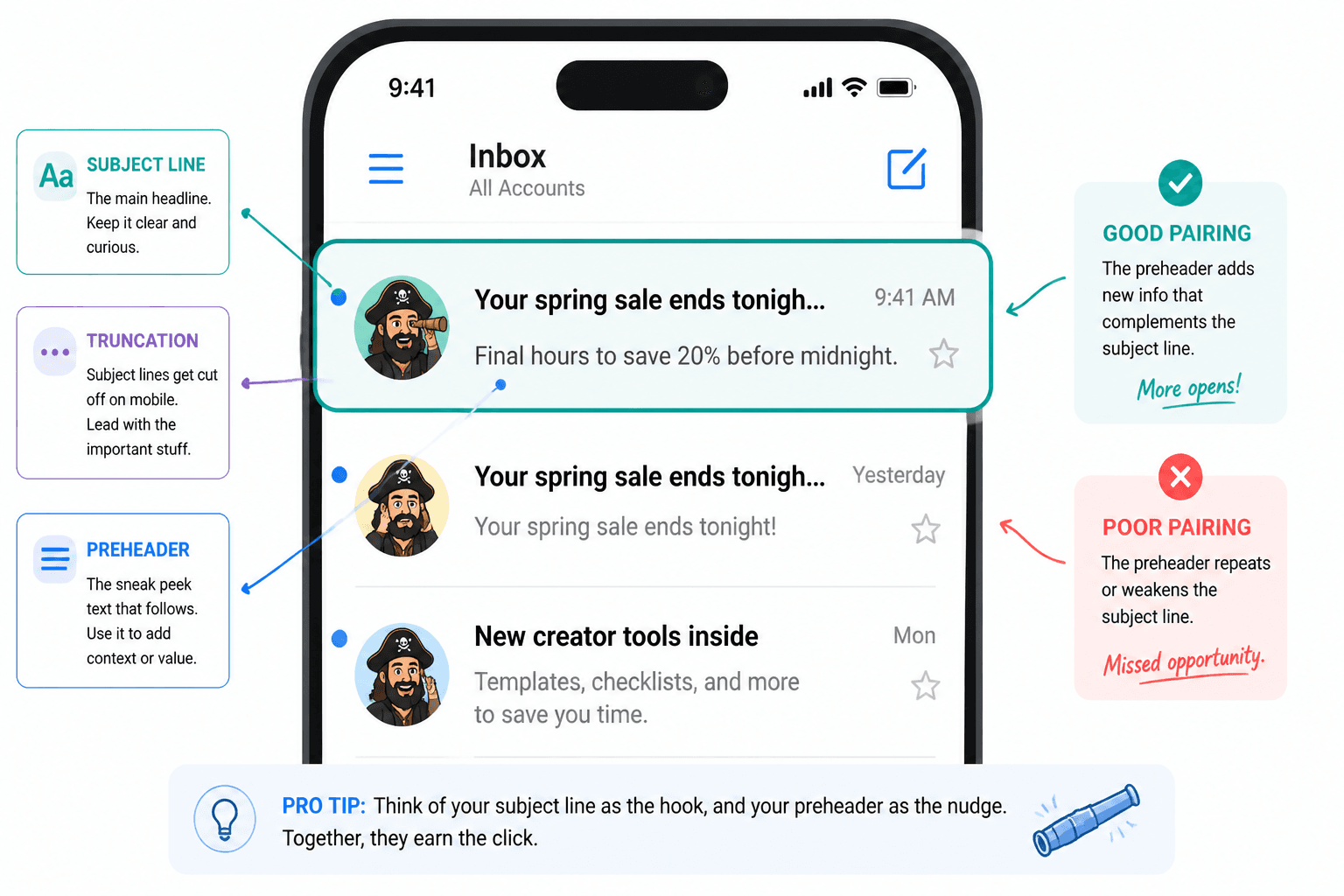
These show how your subject line and preheader might display across email clients and devices, and sometimes flag spam or rendering issues.
Good for:
- Checking truncation on mobile
- Improving first-impression presentation
- Reducing technical mistakes that hurt performance
Less good for:
- Actually telling you which angle is strongest
- Improving weak messaging
4. AI-assisted writing tools inside email workflows
These help brainstorm subject line options quickly. Useful, if you already know how to reject bad ideas. Dangerous, if you do not.
The problem is not speed. Speed is nice. The problem is that AI loves producing competent-sounding generic sludge, and subject lines do not have room for sludge.
If you want more on that angle, this guide on AI tools for newsletter subject lines is worth reading alongside this one.
Best newsletter software with built-in subject line testing
These are the platforms most creators and small businesses are likely to consider. The right choice depends less on which one is “best” in the abstract and more on how much testing power you actually need.
Mailchimp
Mailchimp is still one of the most familiar options for A/B testing. It is not always the sexiest tool in the room, but it gives you accessible testing for subject lines, from names, send times, and content variables depending on your plan.
Why it works for subject line testing:
- Easy A/B setup
- Solid reporting for open-rate comparison
- Good if you want one mainstream platform that does a lot
Watch out for:
- Pricing can climb as your list grows
- The interface can feel busier than necessary
- Not everyone needs all the extra features
Best for: creators and businesses that want dependable built-in testing without assembling a Frankenstack.
Kit
Kit is popular with creators for good reason. It is cleaner than some older email platforms and tends to fit personal brands, writers, and digital product sellers well.
Why it works for subject line testing:
- Creator-friendly workflow
- Clean writing and sending experience
- Useful automation and segmentation for more relevant testing
Watch out for:
- A/B testing features may feel lighter than enterprise tools
- If you want very deep experimentation, you may hit limits
Best for: creators, coaches, consultants, and solo businesses that want practical testing without turning email into an operations hobby.
ActiveCampaign
ActiveCampaign is stronger when you care about segmentation, automation, and behavior-based email journeys. For subject lines, that matters because better segmentation usually gives you better test data. Testing a broad mixed list often tells you less than people think.
Why it works for subject line testing:
- Strong automation and segmentation
- Useful if you want to test by audience type
- Good for more mature email systems
Watch out for:
- Steeper learning curve
- More tool than some solo creators need
- Can become overkill fast if your newsletter is fairly simple
Best for: consultants, service businesses, and brands with layered funnels and multiple audience paths.
MailerLite
MailerLite is one of the better picks for people who want decent email capability without paying enterprise-adjacent prices for features they will barely touch.
Why it works for subject line testing:
- Simple interface
- Good value
- Enough testing functionality for many smaller newsletters
Watch out for:
- Advanced testing and reporting may not satisfy power users
- Less ideal if your email setup is highly complex
Best for: newer creators, lean teams, and anyone tired of paying extra to access basic competence.
Beehiiv
Beehiiv is built with newsletter growth in mind, especially for media-style newsletters. If your newsletter is the product, not just a side channel, it becomes more interesting.
Why it works for subject line testing:
- Newsletter-centric workflow
- Useful for creators growing publication-style emails
- Better fit for media operators than general small business senders
Watch out for:
- Feature fit depends heavily on your business model
- Might be less relevant if your main focus is service-business automation
Best for: newsletter-first creators and publishers testing subject lines as part of broader audience growth.
HubSpot
HubSpot can absolutely handle email testing, but this is usually not where smaller creators should start unless they already live in the HubSpot ecosystem. It is strong, but expensive and broad.
Why it works for subject line testing:
- Integrated CRM and reporting
- Useful for larger businesses connecting email to sales systems
- Can support more sophisticated lifecycle analysis
Watch out for:
- Too much platform for many solo operators
- Cost can be hard to justify if you mainly want better subject lines
Best for: established businesses with serious CRM needs, not someone just trying to stop sending mediocre Tuesday newsletters.
Best standalone tools for testing and improving newsletter subject lines
Sometimes your sending platform is fine, but you want extra help before you hit send. That is where standalone analyzers and testing tools come in.
CoSchedule Headline Studio
Originally better known for headlines, it is also useful for email subject lines. It gives you scoring, word-balance feedback, and suggestions around clarity and engagement patterns.
Best use: idea shaping, quick scoring, and refining awkward drafts.
Not the best use: trusting the score more than your audience knowledge.
SubjectLine.com
A simple analyzer that checks things like deliverability signals, length, and wording. Handy for quick passes. It is not glamorous, but sometimes simple is enough.
Best use: spotting obvious technical or structural issues before sending.
Not the best use: assuming a high score means your subject line is actually interesting.
Touchstone-style predictive tools
Some tools focus on predictive scoring based on large datasets and engagement patterns. These can be useful if you send enough volume to justify more advanced optimization.
Best use: larger senders who want more data-backed guidance and already have disciplined testing processes.
Not the best use: tiny lists and casual newsletters where variance is too messy to support fake precision.
Litmus and Email on Acid
These are more inbox preview and QA tools than pure subject line testing tools, but they matter. If your subject line gets cut weirdly on mobile or your preheader sabotages the setup, you can lose opens before your brilliant copy has a chance.
Best use: checking subject line display, preview text pairing, and email-client rendering.
Not the best use: expecting them to teach you positioning or copy judgment.
How to choose the right subject line testing setup
You probably do not need “the best tool.” You need the least annoying setup that helps you make smarter sends consistently.
Here is the simple version:
| Situation | Best setup |
|---|---|
| Small creator newsletter, simple workflow | Newsletter platform with built-in A/B testing |
| Growing list, stronger content system | Built-in A/B testing plus a subject line analyzer |
| Complex funnels and segments | Advanced email platform with segmentation and testing |
| High-volume email program | Testing platform plus preview and deliverability tools |
| Very small list | Focus more on consistency and qualitative learning than over-testing |
If your list is tiny, this is worth saying plainly: your testing data will often be noisy. Very noisy. Running constant A/B tests on a tiny list can make you feel rigorous while teaching you almost nothing reliable.
In that case, you are often better off doing this instead:
- Write 5 to 10 subject line variations before each send
- Pick the strongest 2
- Use an analyzer lightly, as a check not a ruler
- Track patterns over time rather than obsessing over one campaign
- Look at opens alongside click quality, replies, and conversions
Because yes, open rates matter. But if your “best” subject lines pull opens from the wrong people or overpromise weak content, that is not really a win. It is just better bait.
What to test in subject lines besides the obvious
Most people test surface-level stuff like short versus long or question versus statement. That is fine. But stronger testing usually compares angles, not just formatting.
Here are the variables actually worth testing:
Angle
- Benefit-driven: “A simpler way to write weekly emails”
- Curiosity-driven: “The email tweak I stopped ignoring”
- Problem-driven: “Why your newsletter keeps getting polite silence”
- Specificity-driven: “3 subject line fixes that lifted opens”
Tone
- Direct and useful
- Conversational
- Slightly intriguing
- More personal
Specificity level
- Broad: “Better newsletter opens”
- Specific: “Why 7-word subject lines often work better”
Reader framing
- “How I…”
- “How you can…”
- “Why most creators…”
- “A better way to…”
Expectation setting
- Clear utility
- Open loop
- Strong opinion
- Practical takeaway
The point is not to become a spreadsheet goblin. The point is to learn what kind of promise your audience tends to respond to.
A simple workflow for testing newsletter subject lines without making it your whole personality
Here is a practical process that works for most creators and small businesses.
- Write the email first. Subject lines are packaging. Packaging works better when there is actually something in the box.
- Draft 8 to 12 subject lines. Not two. Two is usually just choosing between your first and second lazy idea.
- Create contrast. Do not make 10 tiny variations of the same mediocre line. Write different angles.
- Choose the best 2. One should be the “safe clear” option. The other can be the sharper alternative.
- Check preview behavior. See how the subject line and preheader appear together.
- Run an A/B test if your list size supports it.
- Log the result. Keep a simple record of topic, angle, tone, and outcome.
- Review patterns monthly. One campaign can lie to you. Patterns are harder to fake.
That logging step sounds boring because it is boring. It is also where the actual learning happens. The creators who improve fastest are usually not the ones using the fanciest tools. They are the ones noticing patterns without getting hypnotized by one lucky result.
If you want more practical structures, examples, and reusable prompts, this piece on templates and tools for newsletter subject lines can help tighten the workflow.
Common mistakes people make with subject line testing tools
Some mistakes are so common they deserve to be publicly shamed, gently.
- Testing weak options against weak options. If both versions are bland, the winner still will not help much.
- Overvaluing tiny differences. A tiny open-rate bump is not meaningful if the email itself underperforms.
- Ignoring audience fit. The best line is the one that attracts the right reader, not just any click.
Testing tools are helpful when they sharpen judgment, not when they replace it. Better options in usually leads to better performance out.