
Most newsletter subject lines do not fail because the writer lacks creativity. They fail because the process is sloppy.
People either wing it in 14 seconds, use the same tired formula every week, or ask a tool to spit out something “catchy” and then wonder why the result sounds like a coupon email from a brand with trust issues.
If you want better opens, you need two things: better templates and better tools. Not magic. Not a secret swipe file hidden in a guru basement. Just a repeatable way to write subject lines that are clear, interesting, and right for the email you are actually sending.
This guide covers the best templates and tools for newsletter subject lines, how to use them without sounding canned, and what each one is actually good for. Because a decent template can speed you up, and a decent tool can sharpen your options, but neither can save a weak idea wrapped in fake urgency.
If you need broader help with subject line strategy first, start with newsletter subject lines. If you want more category-level guidance on newsletters and email writing, you can also browse email newsletter writing resources.
If you want the bigger picture, start with the parent guide.
What makes a subject line template actually useful
A good template is not a fill-in-the-blank gimmick. It is a structure that helps you package the value of the email fast.
That means the best subject line templates usually do one of these jobs well:
- Highlight a specific benefit
- Create clean curiosity without sounding manipulative
- Signal a timely idea or update
- Frame a sharp opinion or tension
- Promise a concrete takeaway
- Make the email feel relevant to the reader’s current problem
Useful templates save time. Bad templates flatten your voice and make every email feel interchangeable. That is the difference.
A lot of people make the mistake of treating subject lines like tiny ad slogans. They are not. They are closer to packaging. Their job is to make the right reader think, “Yes, that sounds worth opening.” Clear beats clever more often than clever people like to admit.
Best newsletter subject line templates by use case
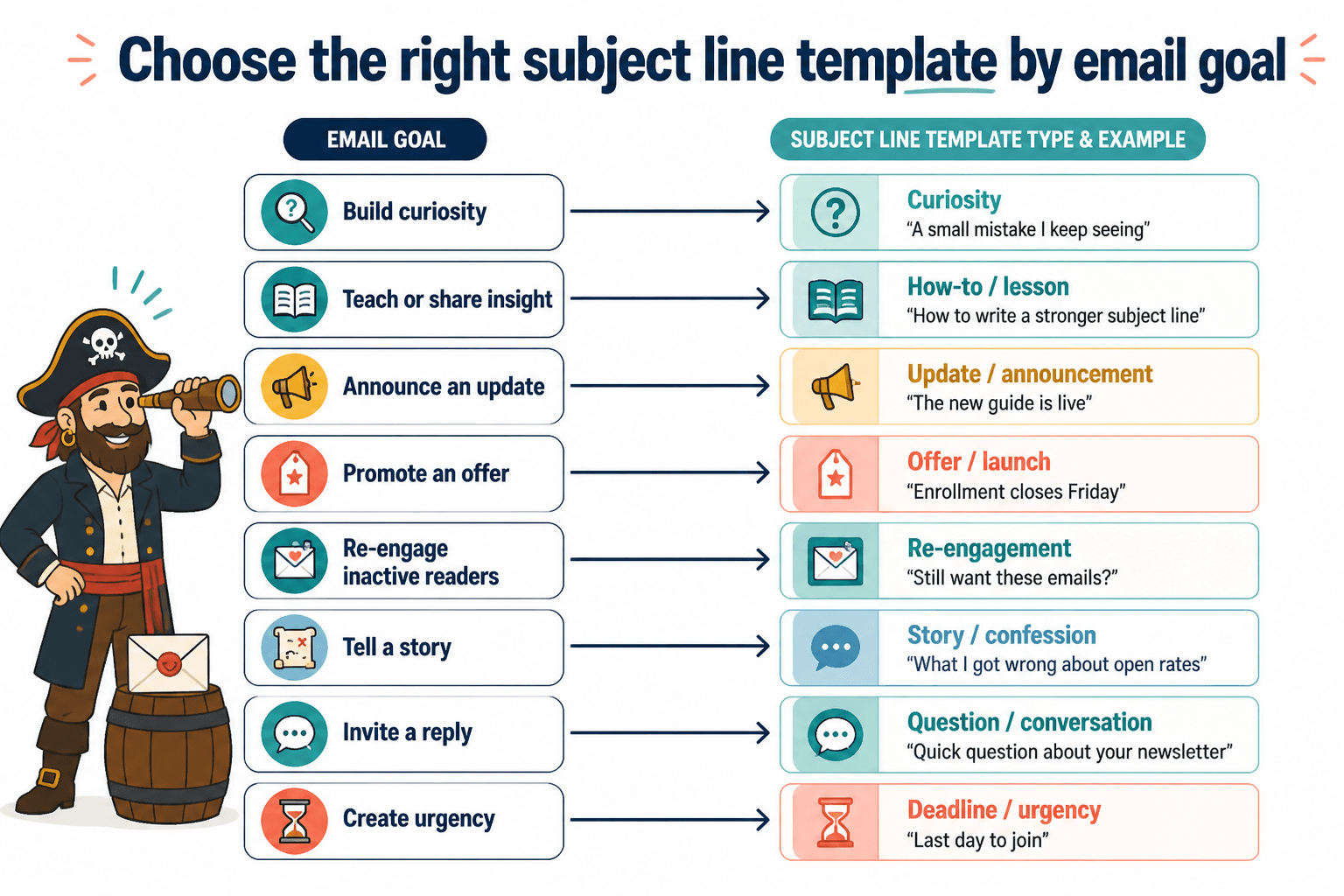
The best templates depend on what kind of email you are sending. A weekly creator newsletter, a sales email, and a curated roundup should not use the exact same subject line logic.
Here are the templates worth keeping.
1. The specific benefit template
Use this when the email teaches one useful thing.
- How to [get result] without [pain point]
- A better way to [do annoying task]
- [Number] ways to [solve specific problem]
- The simplest way to [desired outcome]
Examples:
- How to write faster without sounding rushed
- A better way to plan next week’s content
- 3 ways to make your emails less skimmable
- The simplest way to fix a weak CTA
This template works because it is honest. It does not play games. It tells the reader what they are getting.
2. The curiosity-with-boundaries template
Use this when the email contains an insight, story, or surprising lesson. The key is not getting too vague.
- The reason your [thing] is not landing
- I stopped doing this in my emails
- This tiny change improved [result]
- What most people miss about [topic]
Examples:
- The reason your welcome emails feel forgettable
- I stopped doing this in my newsletter intros
- This tiny change improved my click rates
- What most creators miss about email trust
Curiosity works when there is enough specificity to feel credible. “You will never believe this” belongs in the bin.
3. The sharp opinion template
Use this when your email makes an argument. Great for creators, consultants, and personal brands with an actual point of view.
- [Common advice] is overrated
- You do not need [popular tactic]
- The problem with [standard practice]
- Why I do not recommend [thing]
Examples:
- Open rate obsession is overrated
- You do not need a clever subject line every week
- The problem with “quick tip” newsletters
- Why I do not recommend fake urgency in email
This style can work beautifully if your opinion is earned and useful. If it is just noise in a blazer, people can tell.
4. The numbered takeaway template
Use this for curated emails, tactical lessons, frameworks, and process breakdowns.
- [Number] subject line ideas for [audience]
- [Number] mistakes costing you [result]
- [Number] ways to improve [thing]
- [Number] quick fixes for [problem]
Examples:
- 7 subject line ideas for busy creators
- 5 mistakes costing you email opens
- 4 ways to improve your newsletter hook
- 3 quick fixes for flat promo emails
Numbers are not automatically better, but they help set expectations fast. Just make sure the email delivers the count and the quality.
5. The problem-first template
Use this when the reader feels the pain point strongly enough to open on recognition alone.
- If your [thing] feels [bad outcome], read this
- Your [thing] is not weak. It is [real problem]
- Why your [thing] keeps getting ignored
- Still struggling with [problem]?
Examples:
- If your newsletter feels flat, read this
- Your subject line is not weak. It is unclear
- Why your emails keep getting ignored
- Still struggling with low open rates?
This one works because people open emails that feel immediately relevant. The trick is avoiding melodrama.
6. The audience-specific template
Use this when segmentation matters or when your niche is part of the appeal.
- For [audience]: [specific promise]
- If you are a [audience], this will help
- [Audience], stop doing this in your emails
- A subject line idea for [audience]
Examples:
- For coaches: a cleaner newsletter angle
- If you are a freelancer, this will help your email opens
- Consultants, stop hiding the point in your subject lines
- A subject line idea for solo founders
This can be very effective because relevance beats broadness. A smaller group of right-fit readers is better than a giant pile of people politely not caring.
7. The update or announcement template
Use this for launches, updates, new offers, changes, and behind-the-scenes progress notes.
- A quick update on [thing]
- What changed in [project or offer]
- [Thing] is live
- New: [offer, feature, issue, resource]
Examples:
- A quick update on the newsletter
- What changed in my content system
- The new guide is live
- New: subject line swipe file
Announcement subject lines work best when the audience already has some reason to care. “Big news” is not a strategy. It is a demand.
How to use templates without sounding templated
This is where people get clunky. They find a few decent templates, then proceed to sandblast all personality from the subject line.
The fix is simple. Keep the structure. Change the language.
Instead of treating templates like exact formulas, use them as prompts. Ask:
- What is the real point of this email?
- What would make the right reader care quickly?
- What phrase sounds natural for my voice?
- Can I make this more specific?
- Am I creating interest, or just withholding basic information?
For example, the template “The reason your [thing] is not landing” could become:
- The reason your newsletter intros feel flat
- Why your best email ideas still get ignored
- The real reason people do not click
Same structure. Different texture. Better fit.
Also worth saying: not every subject line needs to be hyper-original. Familiar structures are fine. Readers do not sit there handing out awards for poetic novelty. They open what feels relevant, trustworthy, and worth their time.
The best tools for newsletter subject lines
Now for the tools. Again, tools are helpers, not saviors. They can generate options, evaluate wording, test variations, and organize your process. They cannot tell you what your audience actually cares about unless you bring that to the table.
Here are the tool categories that are actually useful.
AI writing tools for draft variations
AI tools are useful for volume. If you already know the angle of your email, they can help you generate 20 subject line options fast.
Good use cases:
- Turning one email idea into multiple subject line angles
- Testing benefit-first vs curiosity-first approaches
- Shortening long subject lines
- Generating tone variations
- Rewriting stiff copy into something more human
Bad use cases:
- Asking for “the best subject line” with no context
- Publishing AI’s first suggestion
- Using bland outputs that sound mass-produced
- Expecting AI to understand your audience better than you do
If you want a full breakdown of this category, read best AI tools for newsletter subject lines.
Email platform testing tools
Your email platform matters more than people think because some tools make it easier to test, compare, and learn from past sends.
Useful platform features include:
- A/B subject line testing
- Performance history by campaign
- Segmentation options
- Preview tools for mobile and inbox display
- Saved drafts and reusable templates
These tools help you move from “I think this one sounds good” to “This style tends to work better for this list and this type of email.” That is a much healthier way to improve.
For software options and testing features, see best email testing tools and newsletter software for newsletter subject lines.
Swipe file and template storage tools
Sometimes the best tool is not fancy. It is just a place to save what works.
You can use a doc, notes app, spreadsheet, Notion database, Airtable, or whatever does not annoy you. The point is to store:
- Subject lines you have sent
- Open rates or relative performance
- Email type
- Audience segment
- Template category
- Notes on why it worked or did not
This is boring in the best way. Over time, it becomes your actual source of truth instead of random guesses and screenshots from other people’s newsletters.
Headline analyzers and scoring tools
These can be useful if you treat them as second opinions, not judges.
They are often decent at catching issues like:
- Length problems
- Vagueness
- Missing keywords or specificity
- Flat wording
They are much less reliable at understanding nuance, audience familiarity, trust, or brand voice. A subject line can score well and still feel like it was assembled in a lab by somebody deeply committed to mediocrity.
Inbox preview and character count tools
This category is underrated. Subject lines get cut off. Mobile matters. Preview text interacts with the subject line. Small formatting choices can affect how readable the email feels before it is even opened.
Use these tools to check:
- How the subject line appears on mobile
- Where truncation happens
- Whether the first few words carry enough meaning
- How the subject line and preview text work together
A subject line does not need to be tiny, but the first words should do real work.
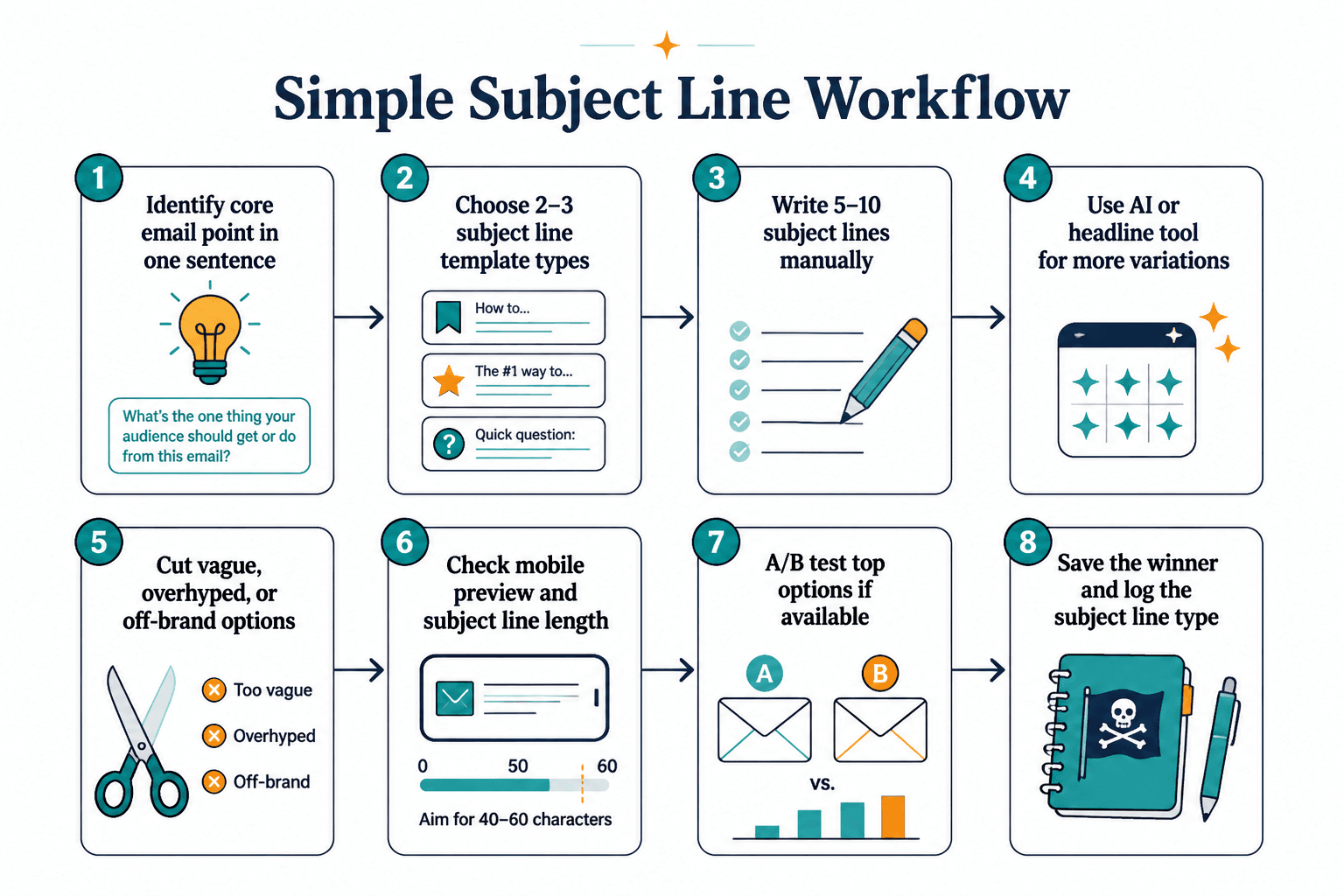
A simple workflow for using templates and tools together
Here is the process that keeps things useful without turning your writing routine into a strange little science project.
- Step 1: Identify the core point of the email in one sentence.
- Step 2: Choose 2 or 3 template types that fit the email goal.
- Step 3: Write 5 to 10 subject lines manually first.
- Step 4: Use an AI or headline tool to generate another batch.
- Step 5: Cut anything vague, overhyped, or off-brand.
- Step 6: Check mobile preview and length.
- Step 7: If your platform allows it, test top options.
- Step 8: Save the winner and log what kind of subject line it was.
This works because it combines human judgment with tool speed. You keep the taste. The tool helps with throughput.
Best template and tool combinations by newsletter type
| Newsletter type | Best template style | Best tool support |
|---|---|---|
| Weekly creator newsletter | Specific benefit, curiosity-with-boundaries, sharp opinion | Swipe file, AI variation tool, inbox preview |
| Curated links or roundup | Numbered takeaway, update, specific benefit | Template database, character count checker |
| Sales or promo email | Problem-first, audience-specific, update | A/B testing, segmentation, performance tracking |
| Thought leadership email | Sharp opinion, curiosity-with-boundaries | AI reframing tool, swipe file |
| Educational email sequence | Specific benefit, numbered takeaway | Automation platform, testing tools, saved formulas |
The point is not to marry one template forever. It is to match the structure to the job.
Common mistakes people make with subject line tools
There are a few repeat offenses here.
- Using tools before clarifying the email angle. If the email itself is fuzzy, the subject line options will be fuzzy in 19 slightly different ways.
- Choosing the cleverest line instead of the clearest one. Cleverness is fine. Confusion is not.
- Generating too many options with no filter. More ideas are not better if you cannot recognize quality.
- Ignoring audience fit. A subject line that works for ecommerce hype mail will not necessarily work for a trust-based creator newsletter.
- Relying on generic urgency. “Last chance” works only when there is an actual last chance and people already care.
- Never reviewing past performance. If you are not tracking what tends to work, you are just re-rolling the dice with extra tabs open.
One more thing: do not confuse open rate with quality in a vacuum. A spiky subject line can get the open and disappoint on the click. If your email promise and email content are out of sync, people notice.
Quick examples: weak subject lines vs better ones
Here is what this looks like in practice.
Weak: A few thoughts on email
Better: 3 email fixes that usually improve opens
Weak: Big update
Better: What changed in my newsletter strategy
Weak: This might help
Better: If your subject lines feel flat, try this
Weak: Newsletter #14
Better: Why clear subject lines usually beat clever ones
Weak: You need to see this
Better: The subject line template I use most often
The better versions are not flashy. That is kind of the point. They make a believable promise instead of trying to yank attention by the sleeve.
If you want the fastest starting point, use these 10 templates
- How to [get result] without [pain point]
- [Number] ways to [solve problem]
- The reason your [thing] is not [working outcome]
- What most people miss about [topic]
- [Common tactic] is overrated
- Why [topic] is harder than it looks
- A simpler way to [ongoing task]
- The [mistake] hurting your [result]
- Before you [next step], fix this part
You do not need all ten every time. You just need a few dependable starting structures that help you say something useful fast.