
Most people do not need “the best AI tool” for welcome emails.
They need a tool that helps them write faster without making the email sound like it was assembled by a very polite intern who has never met a human being.
That is the real problem with AI and welcome emails. The tools are not the hard part. The hard part is using them well enough that your first email feels clear, warm, on-brand, and actually useful. Not robotic. Not weirdly formal. Not stuffed with fake enthusiasm and six links nobody asked for.
If you are looking for the Best AI Tools for Welcome Emails, here is the practical version: the best tool depends on what you need help with. Drafting. editing. subject lines. segmentation. automation. repurposing. testing. workflow. Those are different jobs, and one tool rarely nails all of them.
This guide will help you pick the right kind of AI tool for your welcome emails, avoid the common mistakes, and build a workflow that saves time without flattening your personality. We will also cover where AI is genuinely useful, where it tends to produce beige sludge, and how creators can use it without sounding like they borrowed a SaaS funnel from 2021.
If you need the bigger strategy first, start with the welcome emails guide for creators who want better results. If you want the broader category around this, the email newsletter writing section and welcome emails hub are a better place to get the full picture.
If you want the bigger picture, start with the parent guide.
What makes an AI tool good for welcome emails
A good AI tool for welcome emails does not just spit out copy fast. Speed is cheap. What matters is whether the tool helps you produce an email that does four things well:
- Greets the subscriber like a person, not a lead score
- Sets expectations clearly
- Builds trust quickly
- Moves the reader toward one sensible next step
That means the best AI tools usually help with one or more of these jobs:
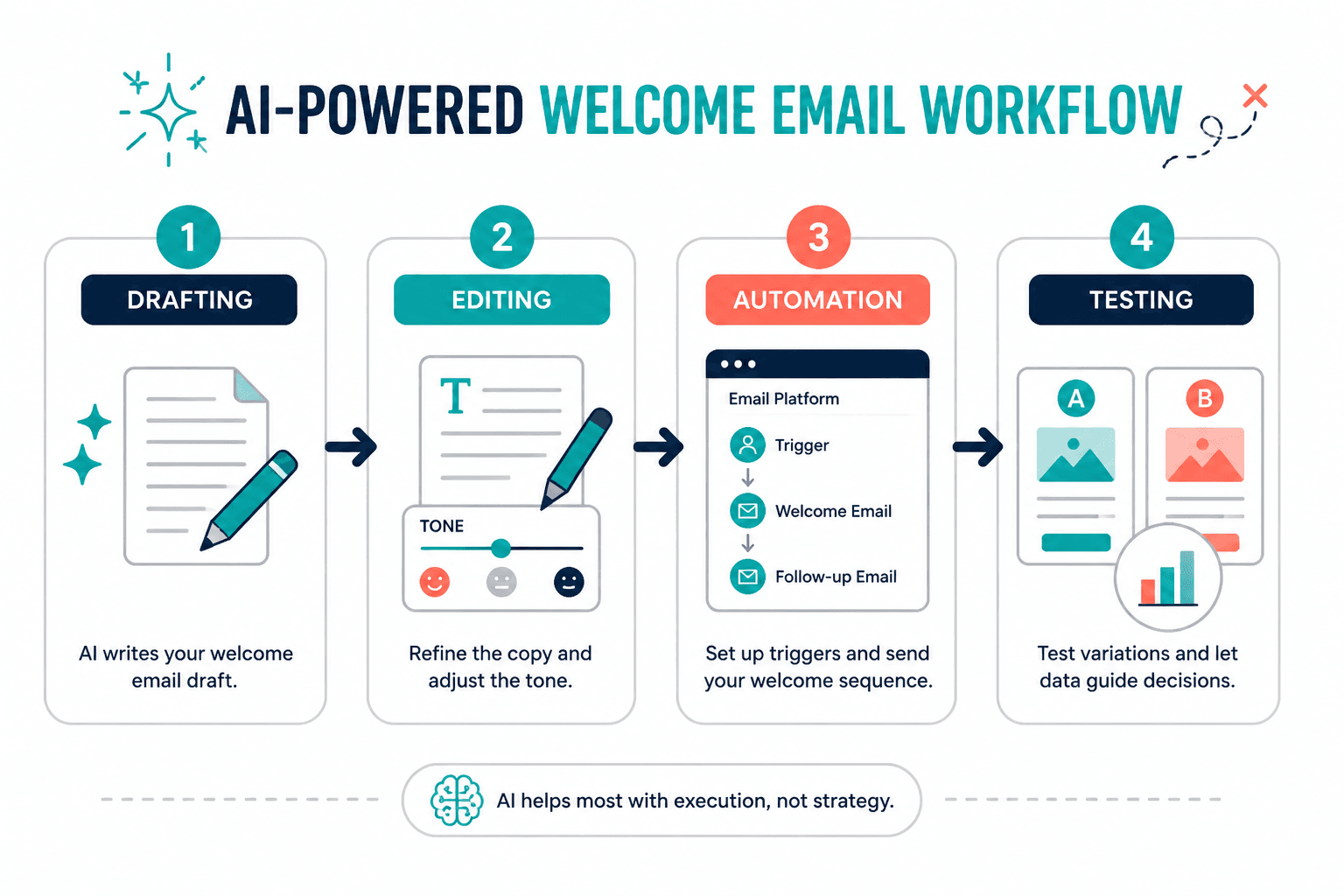
- Generating first drafts from a rough idea
- Rewriting stiff or generic copy
- Creating stronger subject lines and preview text
- Summarizing your offer, resource, or newsletter promise clearly
- Adapting tone for different audiences
- Building simple automated workflows inside your email platform
- Producing test variations without rewriting everything manually
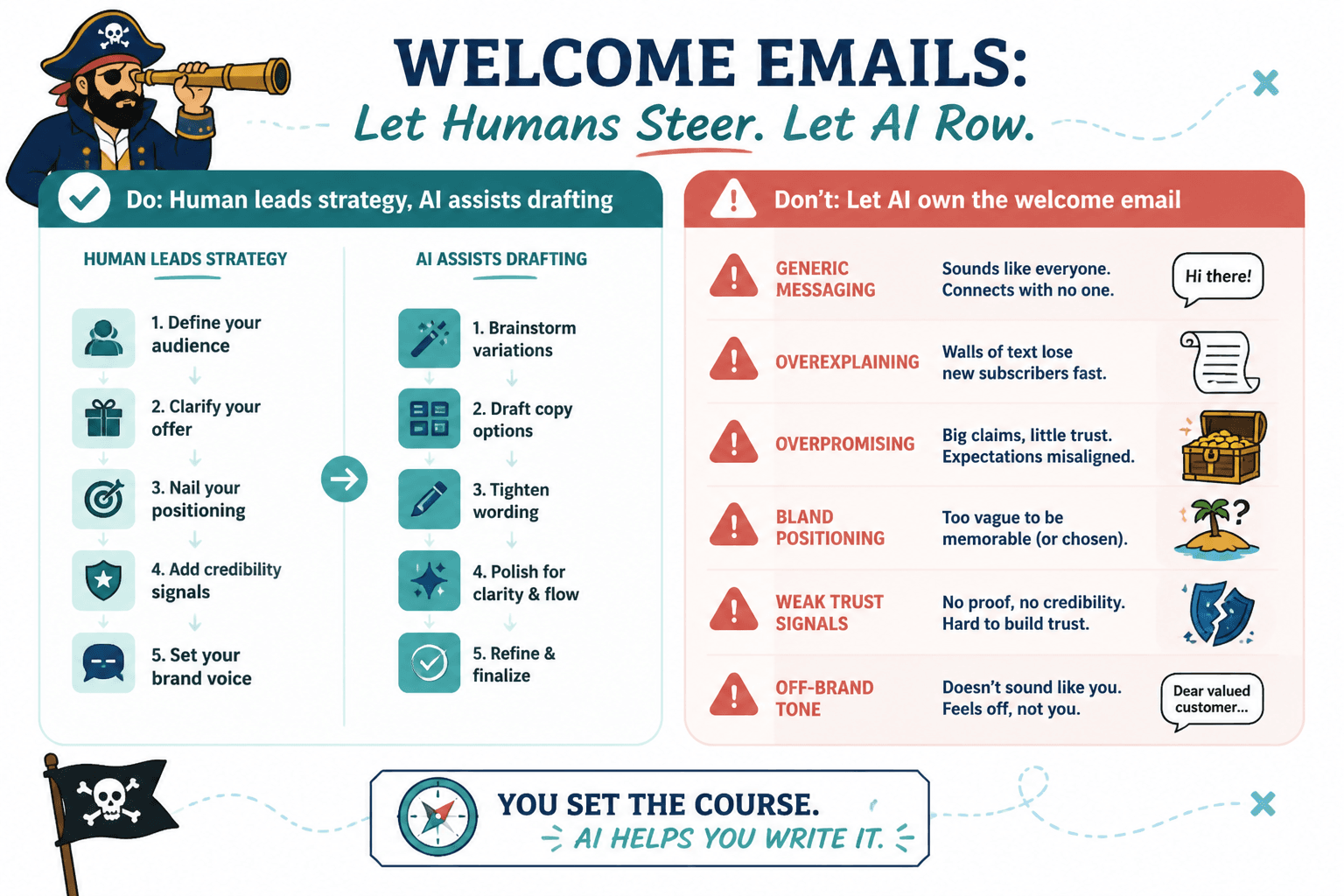
What they do not do well on their own is understand your audience deeply, know your positioning, or invent a strong welcome sequence from thin air. If your offer is muddy, your audience is vague, or your brand voice is all over the place, AI will not fix that. It will just produce faster confusion.
That is why creators often get disappointing results. They ask the tool to do strategic work when the tool is really better at drafting, shaping, and tightening. Give it a clear brief, and it can help. Give it mush, and it will return premium mush.
The main types of AI tools for welcome emails
If you are trying to find the Best AI Tools for Welcome Emails, it helps to stop thinking in terms of one winner and start thinking in categories. Different tools solve different bottlenecks.
1. General AI writing tools
These are the tools people usually mean first. They help with brainstorming, drafting, rewriting, and tone adjustments.
Best for:
- Writing a first draft quickly
- Generating welcome email angles
- Creating subject line options
- Rewriting bland copy into something cleaner
- Turning notes into a usable email structure
Not best for:
- Managing the whole automation setup
- Knowing your true voice without examples
- Making strategic decisions for you
This category is useful when you already know what the welcome email needs to do. It is much less useful when you are hoping the tool will magically figure out your audience, your sequence logic, and your brand tone while you stare at a blank screen and hope for mercy.
2. AI inside email platforms
Many email platforms now offer built-in AI features for writing subject lines, generating copy, improving deliverability-related structure, or setting up simple automations.
Best for:
- Fast drafting inside your actual workflow
- Building welcome automations faster
- Creating variants for A/B tests
- Keeping copy and automation in the same place
Not best for:
- Deep voice matching
- Strong editorial judgment
- Sophisticated rewrites
If you want a breakdown of software options on the automation side, read best email software and automation tools for welcome emails. That is where platform choice matters more than copy choice.
3. Editing and clarity tools
These tools help polish what you already wrote. They are less about generating fresh ideas and more about making your welcome email easier to read, tighter, and less awkward.
Best for:
- Shortening bloated copy
- Fixing clunky sentences
- Improving clarity and flow
- Removing repetition
- Catching vague or overly formal phrasing
Not best for:
- Creating a welcome strategy from scratch
- Producing strong positioning if the raw draft is weak
These are often underrated. A lot of welcome emails do not fail because the writer had no ideas. They fail because the email was one-third too long, slightly too polished, and just impersonal enough to feel off.
4. Template and workflow tools with AI features
Some tools are less about pure writing and more about helping you organize reusable welcome systems: templates, swipe files, workflow prompts, and modular email blocks.
Best for:
- Repeatable creator workflows
- Building welcome email libraries
- Reusing good structures across offers
- Keeping your messaging more consistent
Not best for:
- Inventing your voice
- Fixing weak positioning
If that sounds closer to what you need, see best templates and tools for welcome emails. Sometimes the issue is not writing speed. It is that you keep rebuilding the same email from scratch like a raccoon with Wi-Fi.
What the best AI tools actually help you do
Let’s get more specific. A welcome email has a few critical moving parts, and AI is more useful with some than others.
Subject lines and preview text
This is one of the better uses of AI, especially when you want several angles fast. You can feed the tool the purpose of the email, your tone, and the audience, then ask for options in different styles:
- Clear and direct
- Warm and personal
- Curiosity-based but not clickbaity
- Short and punchy
- Authority-driven
Just do not accept the first batch blindly. AI loves safe, average subject lines. Fine if your standards are low. Less fine if you want opens from actual humans.
Good AI can give you ten starting points in thirty seconds. It still takes human judgment to spot the one that does not sound like a bland corporate reminder.
First-draft structure
AI is useful for turning a rough brief into a basic welcome email structure. For example:
- Thank them for subscribing
- Remind them what they signed up for
- Introduce your angle or promise
- Share one useful resource or next step
- Set expectations for future emails
That skeleton is handy. The problem is that many AI drafts stop there and call it a day. You still need to add specificity, voice, and a reason for the reader to care. Otherwise the email says all the right things while somehow saying nothing at all.
Rewrites and tone adjustment
This is where AI often earns its keep. If you already wrote a decent draft but it feels too stiff, too long, too fluffy, or too formal, AI can help reshape it.
Useful rewrite prompts include:
- Make this sound more natural and conversational without becoming cheesy
- Cut 25 percent and keep the core message
- Rewrite this for creators and consultants, not enterprise buyers
- Make this warmer and clearer, but not overexcited
- Turn this into a short welcome email with one CTA
That last part matters. One CTA. Welcome emails get worse fast when AI starts “helping” by adding three offers, two social links, and a random productivity article. Calm down, machine.
Variation and testing
AI is also helpful when you want to test different versions of an email without manually rewriting every element. You can create variants for:
- Subject lines
- Opening lines
- CTA phrasing
- Tone level
- Length
- Audience segment emphasis
That said, do not test junk just because the tool made it quickly. Fast variation is useful only if the underlying message is good. More versions of a weak email are still weak emails. You just created them with impressive efficiency.
What AI tools are bad at in welcome emails
This deserves its own section because people expect too much from these tools, then blame the tool when the result feels hollow.
- They are bad at audience nuance without input. If your subscribers are not generic, your prompts cannot be generic either.
- They are bad at original positioning. AI tends to default to common phrasing and familiar claims.
- They are bad at trust by default. A welcome email needs credibility signals, useful context, and a distinct voice. AI does not naturally produce that well.
- They are bad at restraint. Left alone, many tools overexplain, overpromise, or overdecorate.
- They are bad at sounding like you unless you train them. And even then, check the draft. Always.
This is why the smartest use of AI in welcome emails is usually collaborative, not fully automated. You bring the strategy, audience understanding, and taste. The tool helps with speed, iteration, and cleanup.
How to choose the best AI tool for your welcome email workflow
Pick based on your bottleneck, not on hype.
| Your bottleneck | Best type of AI tool | What to look for |
|---|---|---|
| You stare at blank pages too long | General AI writing tool | Strong prompting, good rewrites, tone control |
| Your drafts sound stiff or bloated | Editing and clarity tool | Concise rewrites, readability help, style adjustments |
| You want all-in-one automation | Email platform with AI | Workflow builder, subject line help, sequence support |
| You repeat the same welcome setup across offers | Template or workflow tool with AI | Reusable systems, prompt libraries, modular content blocks |
| You want more testing without extra grunt work | AI drafting plus email platform AI | Fast variation, versioning, easy implementation |
Here is the simpler version:
- If your problem is writing, use a writing tool.
- If your problem is editing, use an editing tool.
- If your problem is automation, use an email platform.
- If your problem is consistency, use templates and systems.
Shocking, I know. But a lot of creators buy some shiny AI tool because the landing page promises “high-converting email copy in seconds,” when what they really need is a cleaner welcome sequence and a clearer promise.
A simple creator workflow for using AI on welcome emails
If you want AI to help without turning your email into generic soup, use this workflow.
Step 1: Write the raw human brief first
Before you open any tool, answer these questions in plain English:
- Who just subscribed?
- Why did they sign up?
- What do I want them to feel after this email?
- What one action should they take next?
- What should they expect from future emails?
- What do I definitely not want this to sound like?
This takes five minutes and saves you from feeding the AI vague sludge. The quality of your prompt is often just the quality of your thinking, written down.
Step 2: Ask AI for structure, not perfection
Use the tool to generate a few directions, not one sacred final draft. Ask for:
- Three subject line styles
- Two welcome email outlines
- A short version and a fuller version
- Different CTA phrasings
- Tone variations
This gives you material to work with, which is what AI is good at.
Step 3: Rewrite for specificity and voice
Now remove all the generic phrasing. Replace broad lines with real ones.
Weak AI line: “I’m so excited to have you here and can’t wait to share valuable insights with you.”
Better: “You signed up because you want welcome emails that do more than say hi and wave vaguely at your offer. Good. That is exactly what we are here to fix.”
Weak AI line: “Be sure to check out all the resources we have available.”
Better: “Start here: this guide will show you what a welcome email should actually do before you worry about polishing subject lines or automation settings.”
Notice the difference. The second version has a point. It knows what the reader cares about. It sounds like somebody thought about it.
Step 4: Use AI one more time for tightening
Once the draft sounds like you, use AI again to trim, clarify, or produce a few alternate subject lines. This second pass usually works better than asking for a perfect email from scratch.
Step 5: Put it into your automation and move on
The point is not to create a museum piece. It is to send a strong first email that welcomes people well and supports the rest of your funnel. Done is better than eternally “optimizing” sentence three because an AI tool suggested six other adverbs.
Features worth caring about when comparing tools
Ignore the grand promises. Look for these instead:
- Tone control: Can you steer the output toward your actual voice?
- Rewrite quality: Does it improve copy or just reshuffle it?
- Prompt flexibility: Can you give the tool useful context?
- Speed inside workflow: Does it save time where you actually work?
- Version generation: Can it create practical variants for testing?
- Email-specific usability: Does it handle subject lines, preview text, and CTAs well?
- Automation support: If built into an email platform, can it help with sequence setup, not just writing?
And here are the red flags:
- Everything sounds polished but interchangeable
- The output is full of filler and fake warmth
- It keeps defaulting to broad marketing cliches
- You cannot easily guide tone or audience
- It creates longer drafts when you need tighter ones
- It saves time drafting but creates extra cleanup work later
Best AI tool setup for different kinds of creators
For solo creators
You probably do not need a complicated stack. A general AI writing tool plus your email platform is often enough. The goal is to draft faster, clean up your copy, and send something good without disappearing into tool research for nine business days.
For coaches and consultants
Your welcome email needs to build trust quickly, so clarity and tone matter more than gimmicks. Use AI for structure and rewriting, but make sure you manually add proof, positioning, and a sane next step. Your subscribers should understand who you help and why you are worth listening to within one screen.
For service providers and freelancers
AI can help you turn your process into a reusable welcome system. This is especially useful if you have multiple lead magnets, niches, or onboarding paths. A template-driven setup tends to work well here because consistency matters more than cleverness.
For personal brands with multiple offers
The bigger point is simple: clearer structure and clearer writing make the piece more useful. That is usually what makes the ending land better too.
Welcome emails work best when they set expectations clearly and move the relationship forward without overperforming. Clarity and trust do more than extra cleverness.