
Most people overcomplicate blog updates.
They assume a post has to be torn down, rebuilt, expanded, re-keyworded, reformatted, and spiritually reborn before it can perform better. Sometimes, sure. But a lot of the time, that is not a smart refresh. It is a bloated one.
When Short Blog Rewrites & Refreshes Beat Long Ones usually comes down to one thing: the article is not deeply broken. It is just slightly outdated, slightly unclear, or slightly weaker than it should be in a few high-impact places.
That is good news, because small edits are faster, cheaper, easier to approve, and often more effective than dragging a decent post through a full rewrite it did not ask for.
This is about knowing when to make surgical edits instead of performing content open-heart surgery for fun. You will see when a short refresh is enough, what to change first, what not to touch, and how to avoid the very common mistake of making a solid article longer without making it better.
If you want the broader system behind updates, start with blog SEO writing, the blog article systems hub, or the main guide to blog rewrites and refreshes.
To see how this fits into the wider strategy, open the parent guide.
Why short refreshes often work better than long ones
A long refresh sounds impressive. It feels strategic. It gives everyone the comforting illusion that more effort must mean more improvement.
Not always.
A short refresh often wins because it respects what is already working. If the page already ranks decently, gets some clicks, has backlinks, or still answers the right question, the job is usually not to reinvent it. The job is to remove friction.
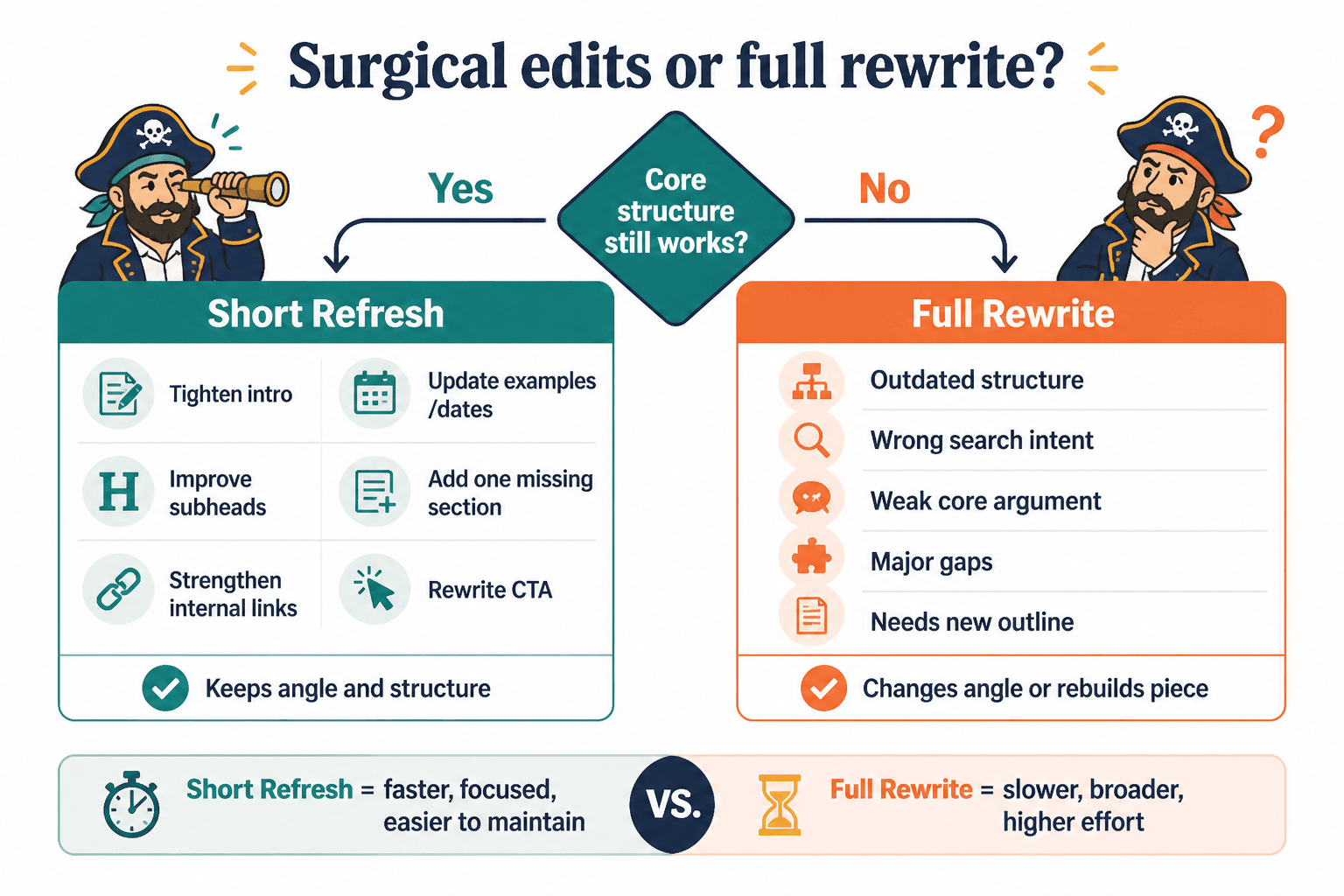
That could mean tightening the introduction, fixing stale examples, clarifying subheads, adding one missing section, improving internal links, refreshing dates, or rewriting a muddy CTA. None of that requires doubling the article length.
In fact, padding a post can create new problems:
- The main answer gets buried
- The article loses focus
- Useful scannability gets replaced with wall-of-text fatigue
- You dilute the original search intent
- Approval and publishing take longer than they should
- You create more things to maintain later
More words are not a strategy. They are a material. Use them when needed.
What a short blog refresh actually is
A short refresh is a targeted update to improve performance without changing the entire structure, angle, or core argument of the post.
It is not a lazy half-edit. It is a focused one.
Usually, that means working on the parts most likely to affect clicks, clarity, usefulness, and trust:
- Title or on-page headline
- Introduction
- Subheads
- Outdated facts, examples, or wording
- Thin or weak sections
- Internal links
- Call to action
- Formatting and readability
The core piece stays intact. You are improving the packaging, precision, and usability of what is already there.
If you need help doing that well, this guide on writing better blog rewrites and refreshes is the natural next step.
When short blog refreshes beat long ones
Here is the practical part. A shorter update usually beats a longer one when the page has a healthy foundation and only needs sharper execution.
1. The article is still relevant, just slightly stale
If the core advice still holds up but a few references, screenshots, dates, examples, or platform details feel old, do not rebuild the whole thing.
Swap the stale bits. Tighten any language that now sounds dusty. Add one fresh example if needed. Done.
This is common with platform guides, writing tips, tool roundups, and process posts. The framework may still be useful even if some details need a clean-up.
2. The structure is fine, but the clarity is weak
Some posts do not need more content. They need clearer content.
If the sections are in the right order and the article broadly answers the question, your fastest win may be rewriting confusing paragraphs, sharper subheads, better transitions, and more direct examples.
This is where people go wrong. They notice the article feels weak, then assume the fix is expansion. But weak does not always mean thin. Sometimes it just means vague.
And vague content gets worse when you add more vague content on top of it.
3. The post gets impressions but weak clicks
If a post is showing up but not earning enough clicks, the problem may sit near the top of the page experience rather than inside the whole article.
That often points to shorter updates like:
- Improving the title
- Strengthening the opening
- Matching the search intent more clearly in the first 100 words
- Making the promise of the article more obvious
You do not always need 1,200 new words. You may need a first paragraph that stops wandering around like it forgot why it came here.
4. The article already covers the main intent well
If the post already answers the reader’s actual question, adding more sections can weaken it. Search intent matters more than article ego.
For example, if someone wants a quick answer to when short refreshes are better than long ones, they probably do not need a sprawling history of content maintenance, a detour into editorial philosophy, and seven semi-related frameworks trying to justify your word count.
Give them the answer. Support it. Make it useful. Leave before you become annoying.
5. The article has authority you do not want to disrupt
Some pages already have decent traction. They may rank, earn backlinks, get shared, or convert quietly in the background. In those cases, a full rewrite can create unnecessary risk.
A smaller refresh lets you improve the page without changing its identity too much. This matters when the original framing is already doing something right, even if some details need improvement.
Think of it like editing a good sales page headline, not replacing the entire offer because one bullet point is tired.
6. You need speed across multiple pages
If you are updating a content library, short refreshes can be the only sane option.
Not every page deserves a full rewrite. Some pages just need 20 good minutes from someone who knows what they are doing. That is not careless. That is prioritization.
When you have dozens or hundreds of posts, quick wins matter. A shorter refresh workflow helps you improve more pages faster, especially when the problems repeat: stale intros, weak internal links, old examples, messy formatting, and lazy CTAs.
Signs a long refresh is probably unnecessary
If you are trying to decide between a short update and a major rewrite, these are good clues that the smaller move is enough.
- The topic is still relevant and the main angle still fits search intent
- The existing structure mostly makes sense
- The article has some traffic, rankings, or links already
- The weak spots are easy to identify
- The post feels dated, not broken
- The examples need updating more than the argument does
- The intro, headings, and CTA are weaker than the actual body
- The article is already long enough for the intent
That last one matters. If the post is already adequately comprehensive, do not add length just to feel productive. There is a difference between depth and accumulation.
What to change first in a short refresh
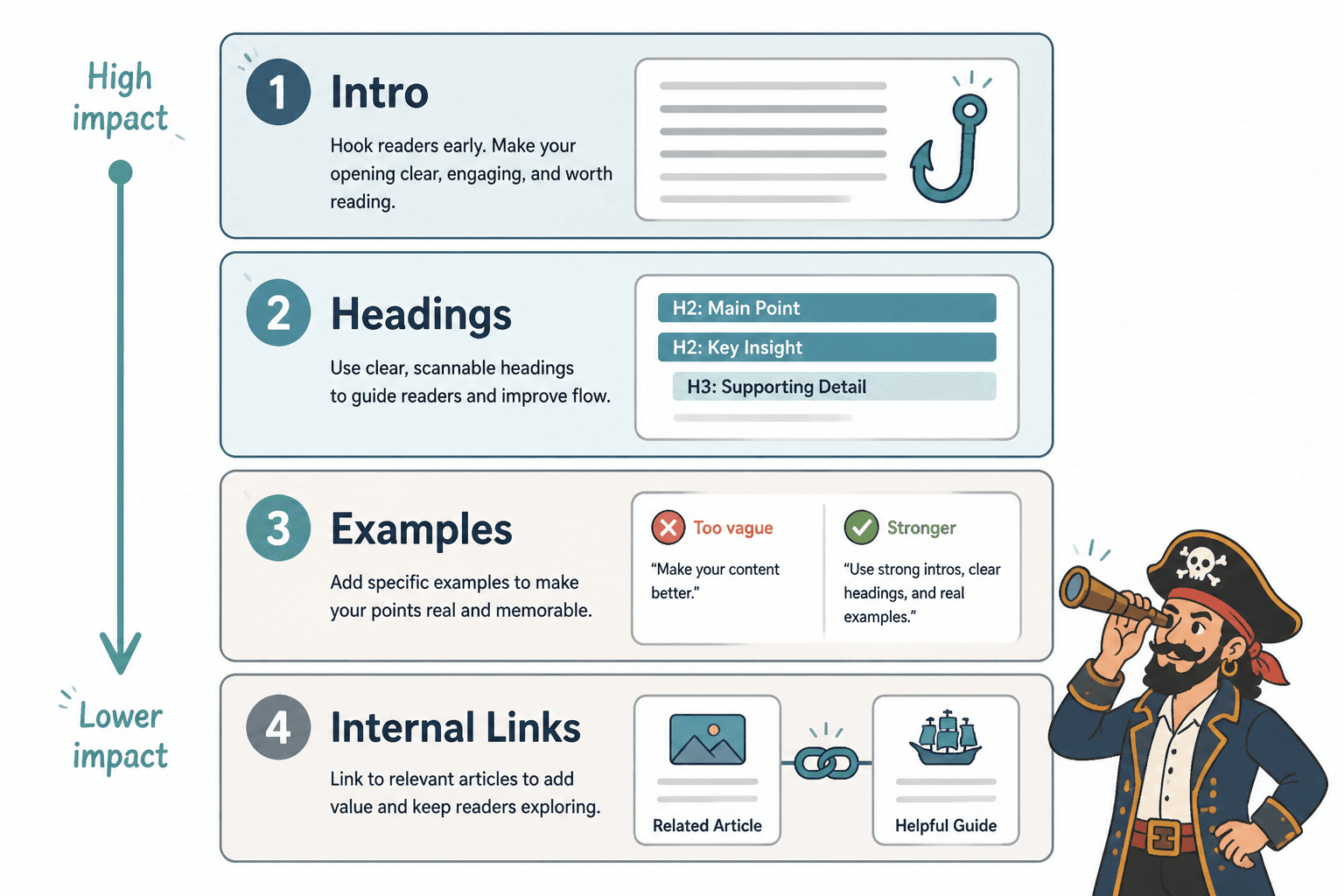
Short refreshes work best when you edit the highest-leverage elements first. Here is the order that usually makes the most sense.
1. The introduction
Bad intros waste more performance than people think.
If the opening is generic, slow, vague, or bloated with throat-clearing, the whole article feels weaker than it is. A tighter intro can improve clarity immediately without touching the rest of the piece much.
If the intro takes 150 words to start answering the question, it is not warming up. It is stalling.
2. The subheads
Subheads shape readability, scanning, and expectation. Weak subheads make useful content feel mushy.
Rewrite vague headings into specific ones that tell the reader what they will actually get. This is a small change with outsized impact.
| Weak subhead | Better subhead |
|---|---|
| Why This Matters | Why longer refreshes often waste time |
| Tips for Better Results | What to change first in a short refresh |
| Common Problems | Signs a long rewrite is probably unnecessary |
3. Outdated examples and references
Nothing dates a post faster than old examples pretending time stopped. If the examples no longer match the current reality of the topic, trust drops fast.
Update screenshots if needed, replace stale references, and remove anything that feels locked to a past version of the internet.
4. Thin sections with obvious gaps
This is where adding a little length can help. The trick is to fill the right gaps, not inflate every section equally like a content balloon animal.
If one section lacks examples, a short checklist, or a clearer explanation, add that. Do not assume every paragraph now deserves a cousin.
5. Internal links and next steps
A short refresh should also improve what the reader does next. That means better internal linking, stronger contextual pathways, and a cleaner CTA.
For this topic, that might mean linking readers to:
- how long blog rewrites and refreshes should be
- how to write better blog rewrites and refreshes
- clarity edit mistakes that hurt performance
- editing and SEO refresh tools for blog updates
That is not just good SEO housekeeping. It is good reader handling.
When a long refresh really is the better move
To be fair, short refreshes are not always enough.
A longer rewrite is usually justified when the article has deeper structural issues: wrong intent, weak positioning, outdated argument, major topical gaps, poor organization, or content that was never good in the first place. Some pages are not underperforming because they need polishing. They are underperforming because they are built badly.
If the piece misses what the reader actually wants, rambles, targets the wrong query, says the same thing three ways, or sounds like AI oatmeal poured into headings, then yes, a bigger rewrite may be the adult decision.
But that is the point: choose the size of the edit based on the problem, not on your urge to overwork the page.
A practical decision framework
Use this quick framework before you touch the article.
Choose a short refresh if:
- The main topic and angle are still right
- The page has some traction worth preserving
- The issues are mostly clarity, staleness, or formatting
- You can point to 3 to 6 specific fixes quickly
- The article already covers enough depth for the intent
Choose a long refresh if:
- The page targets the wrong reader or question
- The structure is messy or repetitive
- The article lacks major useful sections
- The original positioning is weak
- The content is so dated that patching it would be awkward
- The entire piece feels generic, thin, or unconvincing
If you are still unsure, start smaller. You can always expand later. It is much harder to un-bloat a post after a “quick refresh” somehow turned into a full editorial renovation with seven new sections nobody needed.
Short refresh examples that actually make sense
Here are a few realistic examples of what a short refresh looks like in practice.
Example 1: The post is useful, but the intro is dull
Before: The article opens with a broad paragraph about how blogging has changed over the years and why content matters for brands.
After: The intro gets rewritten to directly address the reader problem, explain when short refreshes beat long ones, and set up the practical framework.
Length change: Maybe 40 words shorter.
Impact: Better clarity, stronger intent match, less reader friction.
Example 2: The article has old examples
Before: The post references outdated platform behavior, old tool interfaces, or examples from years ago.
After: Replace 2 to 4 examples, update wording, and remove claims that no longer feel safe or current.
Length change: Roughly the same.
Impact: More trust, better usefulness, less “this feels old” energy.
Example 3: The article is decent, but hard to scan
Before: Long paragraphs, muddy subheads, and no obvious hierarchy.
After: Break up dense paragraphs, sharpen headings, add one table or bullet list, and improve transitions.
Length change: Slightly shorter or the same.
Impact: Better readability, more usable page experience, stronger extraction of value for scanners.
Example 4: The body is good, but the article goes nowhere
Before: Helpful article, weak ending, no internal links, no clear next step.
After: Add a cleaner conclusion, relevant internal links, and a CTA tied to the next logical question.
Length change: 100 to 200 extra words, max.
Impact: Better site flow, more engagement, less content dead-ending.
The mistake people make when they “refresh” a post
They add more before they diagnose less.
That is the whole problem.
Instead of asking, “What is this page failing at?” they ask, “What else can we put in here?” So the article gets a new section, then another, then a bloated FAQ, then some vaguely relevant tangent because someone thinks comprehensiveness is the same thing as quality.
It is not.
A good refresh starts with diagnosis:
- What is still working?
- Where does the page lose clarity?
- What feels stale?
- What is missing, if anything?
- What is getting in the reader’s way?
Then you edit to solve those things. Not to make the revision document feel expensive.
If clarity is your recurring issue, these clarity edit mistakes are worth reviewing before you touch another article.
A simple short-refresh workflow
If you want a repeatable process, use this:
- Read the article once without editing. Identify where it feels dated, slow, vague, or messy.
- Mark only the obvious issues first. Intro, headings, examples, gaps, links, CTA.
- Protect what already works. Do not rewrite solid sections just because you are in the document.
- Make the smallest edit that solves the problem. One sentence may be enough.
- Check flow and scannability. Break up clutter, tighten paragraphs, improve section labels.
- Add only necessary depth. If a section needs one example, add one example. Do not birth a mini ebook.
- Update internal links and next steps. Give the page a useful path forward.
The bigger point is simple: clearer structure and clearer writing make the piece more useful. That is usually what makes the ending land better too.