
Most LinkedIn posts do not fail because the idea is bad. They fail because the first line is sleepy, the formatting is messy, and the whole thing looks like a corporate memo trying to cosplay as a personal brand.
If your post does not earn the next click, the next line read, or the small moment of curiosity that makes someone pause, the rest barely matters. Harsh, yes. Also true.
This is where LinkedIn Hooks & Formatting: Scroll Stoppers Examples Creators Can Adapt Fast becomes useful in the real world, not just as a nice-sounding idea. You do not need louder posts. You need sharper openings, cleaner structure, and examples you can adapt without sounding like you stole them from a content bro with a ring light and an ego problem.
Here’s how to write LinkedIn scroll-stopper examples creators can adapt fast, without drifting into vague drama, fake authority, or formatting every sentence like it’s gasping for air.
For the main guide behind this topic, visit the parent guide.
What actually makes someone stop on LinkedIn
A LinkedIn scroll stopper usually does one of four things immediately:
- Names a problem the right person already feels
- Challenges an assumption they quietly believe
- Offers a useful payoff with real specificity
- Creates tension without sounding like clickbait sludge
That is it. Not magic. Not algorithm whispering. Just relevance, clarity, and a little tension.
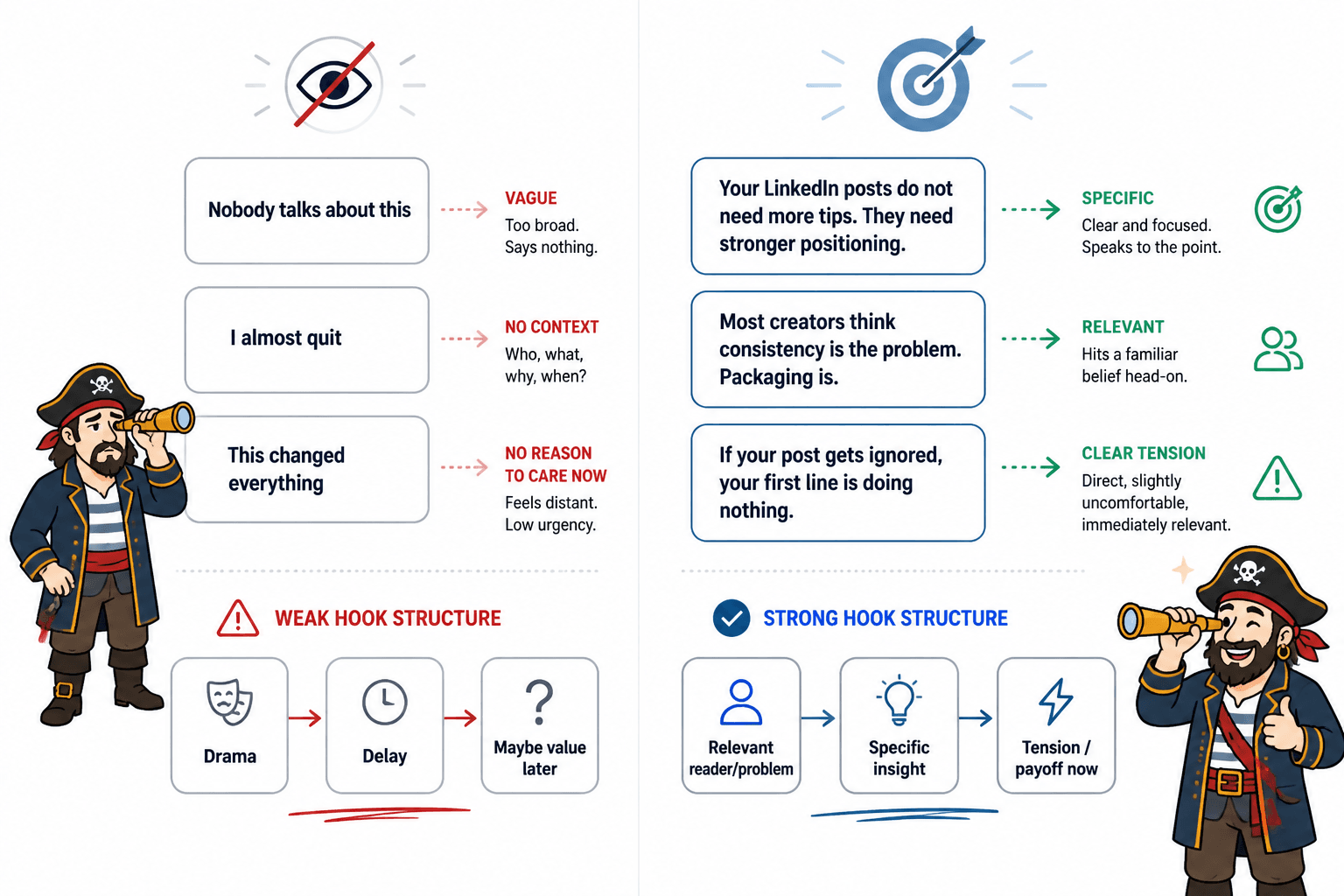
The mistake a lot of creators make is confusing “hook” with “tease.” They write first lines that sound dramatic but tell the reader nothing.
“Nobody talks about this.”
“I almost quit.”
“This changed everything.”
Those lines are not hooks. They are content vapor. They ask for attention before earning it.
A strong hook gives the reader a reason to care now. It does not beg them to trust that something interesting might eventually happen in paragraph six.
The 5 best types of LinkedIn hooks for creators
If you create content to build authority, leads, trust, or audience, these are the hook styles worth keeping in rotation.
1. The sharp problem hook
This works because it meets the reader where they already are.
Template: You are not struggling with [surface issue]. You are struggling with [real issue].
Examples:
- You are not struggling with content consistency. You are struggling with weak packaging.
- Your LinkedIn posts do not need more tips. They need stronger points of view.
- If your posts get polite silence, the problem probably is not your expertise. It is the first line.
This type of hook is solid for coaches, consultants, and service providers because it signals you understand the deeper issue, not just the obvious symptom.
2. The unpopular truth hook
This is useful when your audience believes something that is common, convenient, and slightly wrong.
Template: [Common advice] sounds smart. It usually backfires because [reason].
Examples:
- “Just be consistent” is lazy LinkedIn advice. Consistent boring content still loses.
- Posting every day is overrated if every post sounds like recycled workshop leftovers.
- Longer LinkedIn posts are not deeper by default. A lot of them are just slower.
Use this when you can back it up. If you are going to challenge common advice, do not stop at sounding bold. Give the reader a better way to think.
3. The specific payoff hook
This works well when the post is tactical and practical.
Template: [Number] ways to fix/improve/get [specific result] without [annoying thing].
Examples:
- 3 ways to make your LinkedIn posts stronger without sounding more aggressive
- 5 first-line fixes that make expert posts easier to read
- 4 formatting tweaks that make good ideas look less skippable
Yes, lists still work. No, they are not automatically lazy. They become lazy when the items are obvious, vague, or padded with filler nobody asked for.
4. The contrast hook
Contrast creates instant tension. It also helps readers understand the point faster.
Template: [Thing people assume] is not what gets [result]. [Other thing] does.
Examples:
- Polish is not what makes a LinkedIn post work. Clarity is.
- Being insightful is not enough. You also have to be readable.
- More words do not make you sound smarter. Better structure does.
This format is especially useful for creators writing about positioning, marketing, messaging, content strategy, sales, and audience growth.
5. The mini-proof hook
Proof gets attention because it promises something more concrete than opinion alone.
Template: I changed [specific thing]. Here is what happened / Here is what improved / Here is what I learned.
Examples:
- I rewrote one weak first line in a client post. The rest of the post finally got read.
- I cut 40% of the fluff from this post format. It became much easier to finish.
- I stopped opening LinkedIn posts with throat-clearing. Response quality improved fast.
You do not need to fabricate giant success claims here. In fact, please do not. Small proof is often more believable than chest-thumping nonsense.
Weak LinkedIn hooks vs better scroll stoppers
The easiest way to improve your LinkedIn hooks and formatting is to see what weak openings are doing wrong. Usually, they are too vague, too self-centered, or too slow.
| Weak hook | Why it fails | Better version |
|---|---|---|
| I used to think content was hard. | Too generic. No tension. No payoff. | I did not need more content ideas. I needed better angles. |
| Here’s what nobody tells you about LinkedIn. | Overused and suspiciously dramatic. | Most LinkedIn advice focuses on volume. Readability matters more than people admit. |
| I’m excited to announce my thoughts on posting. | Nobody is stopping for your excitement alone. | If your posts look tidy but get ignored, your opening is probably too safe. |
| Consistency is key. | Empty slogan wearing business shoes. | Consistent posting does not help much if every post opens like a webinar slide. |
| Personal branding matters more than ever. | Broad, tired, and instantly skippable. | A clear profile and a sharp first line will do more for your brand than another vague “thought leadership” post. |
If you want more first-line patterns, these simple LinkedIn hooks and formatting first-line templates for busy creators make a handy swipe file without pushing you into copy-paste robot mode.
Formatting matters more than people want to admit
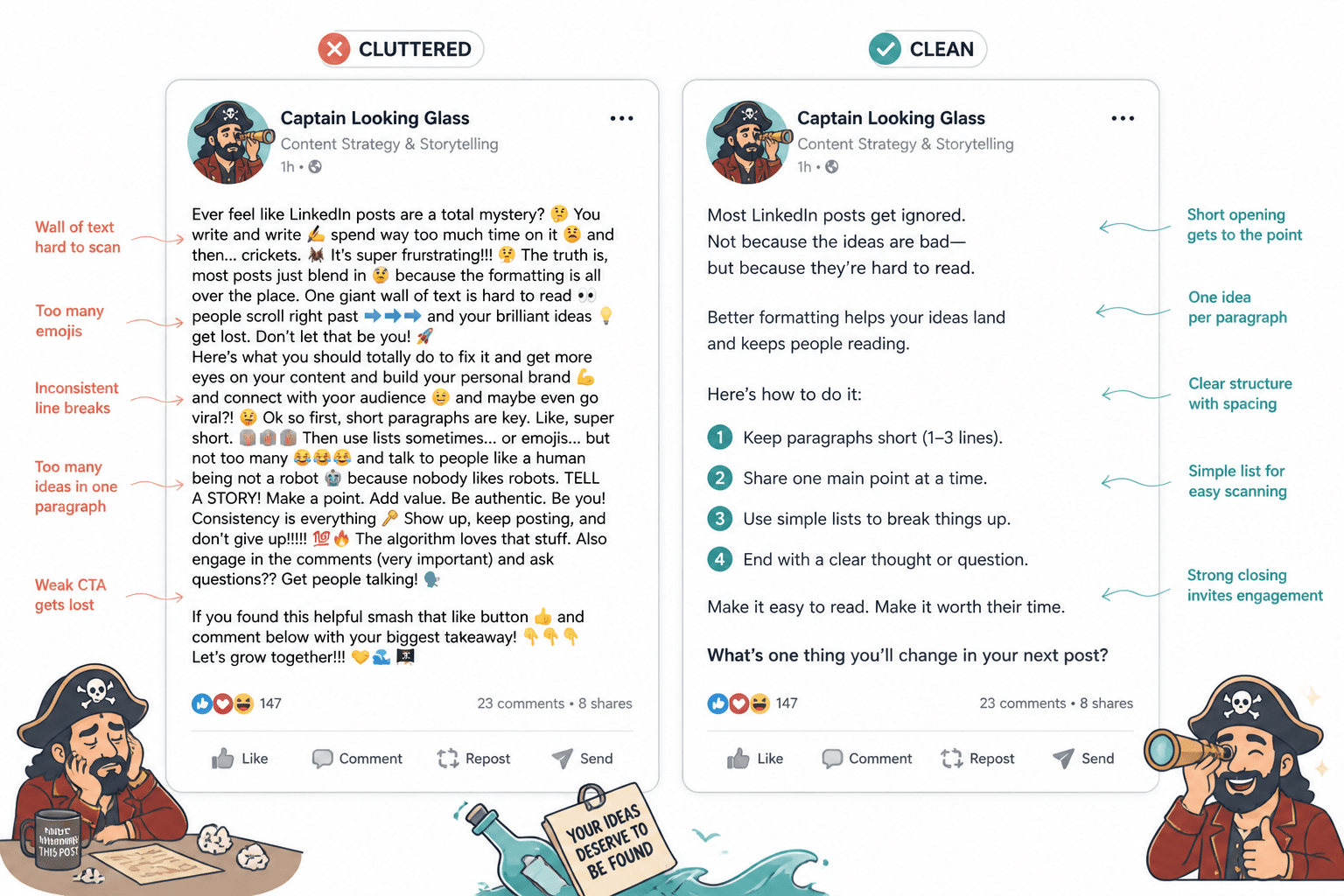
LinkedIn is not just a writing platform. It is a scanning platform. Readers make snap decisions based on shape before they commit to substance.
That means formatting is not decoration. It is delivery.
A good post can still underperform if it looks dense, chaotic, or exhausting. A decent post can get more reads than it deserves if the formatting makes it feel easy to enter. That does not mean formatting beats substance. It means substance needs help getting invited in.
What better LinkedIn formatting usually looks like
- A strong first line that can stand alone
- Short paragraphs, usually 1 to 3 lines
- Clean spacing between ideas
- One main point per section
- Occasional lists when they truly improve clarity
- A clear ending, not a limp fade-out
What bad formatting usually looks like
- A giant wall of text
- Every sentence on its own line for no reason
- Random emoji traffic cones everywhere
- Five ideas crammed into one post
- A first line that needs three more lines to make sense
- A CTA dropped in like an awkward networking pitch
The sweet spot is readable, not theatrical. You want structure that helps the point land, not formatting that screams, “Please notice my line breaks, I learned these from a ghostwritten carousel.”
A fast framework for writing LinkedIn scroll stoppers
If you want a repeatable process, use this simple 4-part structure.
1. Start with tension
Open with a problem, contrast, mistake, opinion, or result. Not your warm-up lap.
Weak: I have been thinking a lot about content recently.
Better: Most creators do not need more content ideas. They need fewer weak openings.
2. Build the idea fast
In the next few lines, explain why the point matters. Do not wander. The reader should know where this is going quickly.
Example: If the first line is vague, the rest of the post rarely gets a fair shot. People do not reject your expertise. They skip your packaging.
3. Add proof, examples, or specifics
This is where most posts either earn trust or collapse into opinion fog.
Use one of these:
- A quick example
- A before/after rewrite
- A short list of fixes
- A client or audience pattern you’ve noticed
- A concrete scenario
4. End with a clean next step
Your CTA does not need to sound like a marketing funnel in a trench coat.
Good options:
- Invite a relevant opinion
- Prompt reflection
- Point to a useful related resource
- Offer a simple next action
Examples:
- Worth checking your last 5 post openings against this.
- If your posts are useful but easy to skip, start with the first line.
- Want more examples like this? Read this LinkedIn hooks and formatting guide for creators who want better results.
12 LinkedIn scroll-stopper examples creators can adapt fast
These are built to be adapted, not copied word for word like a lazy tribute act. Swap in your niche, audience, and actual point.
- Your posts do not need more polish. They need more point.
- If smart people keep ignoring your content, the issue might be readability, not expertise.
- The fastest way to weaken a good LinkedIn post is to open it like a conference panelist.
- Most “thought leadership” posts are just safe observations wearing expensive shoes.
- You can be useful and still be ignored. That usually means the packaging is off.
- This one first-line mistake makes expert content feel instantly skippable.
- Creators spend too much time writing posts and not enough time sharpening openings.
- Good content does not always win on LinkedIn. Clear content usually does.
- If your post needs 6 lines before it gets interesting, it probably started too early.
- Most weak hooks are not too short. They are too empty.
- The goal is not to sound smarter on LinkedIn. The goal is to be easier to read.
- When a post flops, people blame the algorithm. Sometimes the first line just did nothing.
If you want more angle ideas tailored by niche, these LinkedIn hooks and formatting examples for coaches, consultants, and personal brands are useful when generic hook lists are starting to make your eye twitch.
The bigger point is simple: clearer structure and clearer writing make the piece more useful. That is usually what makes the ending land better too.