
Most people choose a website builder the way they choose takeaway when they’re tired: fast, slightly random, and based on whatever looked easiest five minutes ago.
Then they wonder why their homepage copy still feels off, conversions are flat, and updating one headline somehow turns into a small emotional event.
The problem usually is not just the copy. It is the setup around the copy. Some website builders make it easy to structure a sharp homepage, test ideas, and improve weak sections without breaking the whole page. Others are basically pretty cages. And CRO tools can help, but only if they support better decisions instead of feeding you a spreadsheet full of panic.
If you want the best website builders and CRO tools for Homepage Copy, the real question is this: which tools help you write clearer messaging, test it faster, and turn visitors into actual leads or buyers without needing a dev team and a prayer?
That is what this guide covers. Not the most overhyped stack. Not the one your favorite bro-marketer says is “crushing.” Just the tools that are actually useful if your homepage needs to explain what you do, who it is for, why it matters, and what someone should do next.
Want the broader roadmap? Start with the parent guide.
What matters most in a website builder for homepage copy
A lot of builder roundups obsess over design flexibility, animation, or app marketplaces. Fine. But if your homepage exists to sell, book calls, grow an email list, or qualify leads, your priorities should be simpler.
You need a builder that makes your copy easier to structure, edit, test, and support with proof. Because homepage copy is not decoration. It is positioning, clarity, trust, and conversion doing the heavy lifting together.
- Flexible page structure: You should be able to rearrange sections easily without fighting the layout.
- Fast editing: If changing a headline takes 14 clicks, your copy will stay mediocre longer than it should.
- Clean mobile control: Good homepage copy dies all the time on bad mobile layouts.
- Strong forms and CTAs: Your next step needs to be obvious and easy to use.
- Easy integration with CRO tools: Heatmaps, testing, forms, analytics, and user behavior tools should not feel bolted on with duct tape.
- Reasonable performance: Slow pages make every line of copy work harder.
If you are still shaping your messaging, simplicity matters more than endless customization. If you already have strong positioning and want tighter optimization, then testing and analytics become more important. The right tool depends on where your homepage is in its life cycle.
The best website builders and CRO tools for Homepage Copy
Here is the short version: no single platform is perfect for everyone. Some are better for creators and solo businesses who need speed. Some are better for service brands with custom conversion paths. Some are better if you care deeply about testing, segmentation, and optimization.
So instead of pretending there is one winner, here is the practical breakdown.
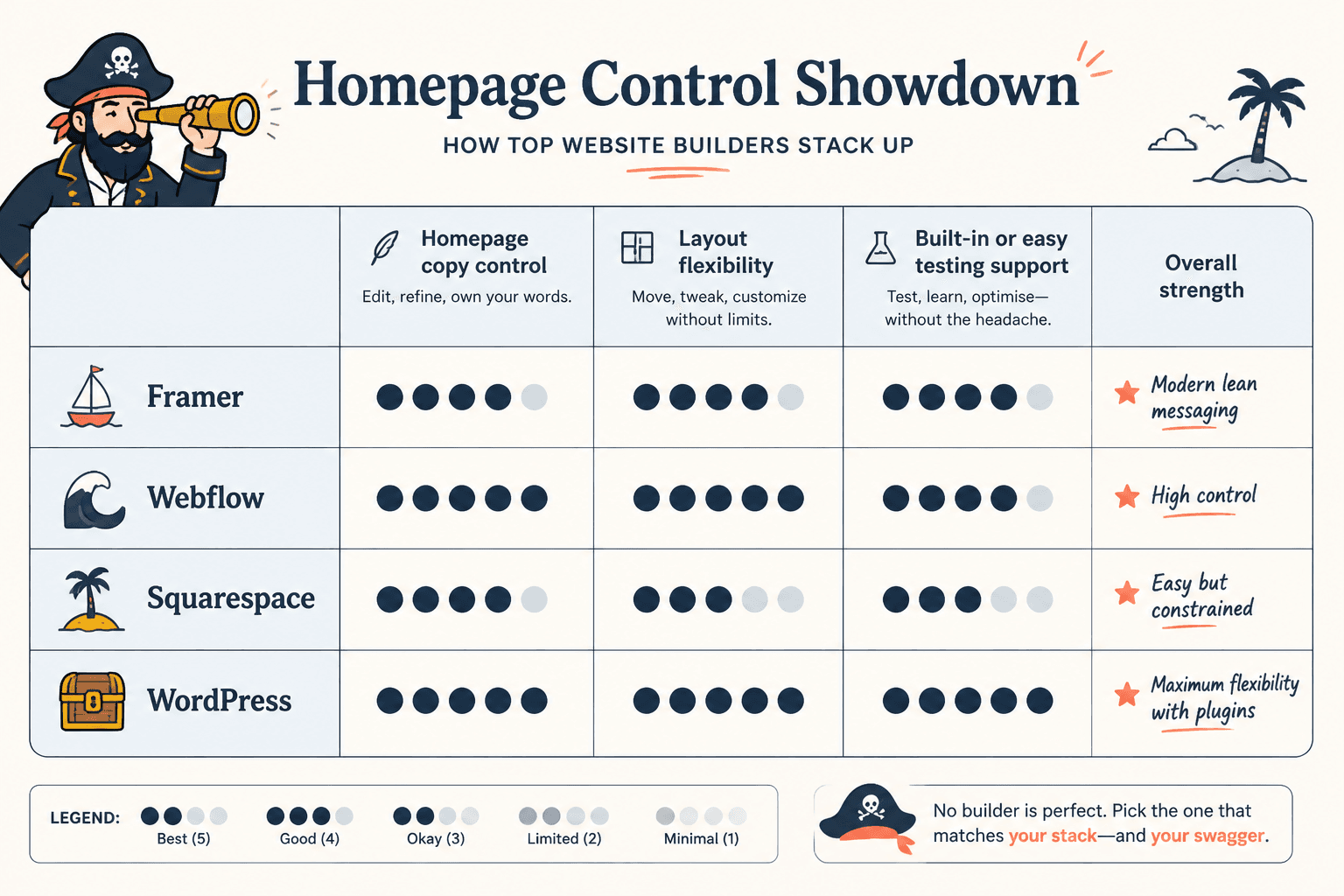
| Tool | Best for | Strength for homepage copy | Watch out for |
|---|---|---|---|
| Webflow | Custom service sites, brands, marketers | Excellent layout control and structured pages | Steeper learning curve |
| WordPress + page builder | Flexibility, content-heavy sites, SEO-minded brands | Strong content control and plugin ecosystem | Can get messy fast |
| Squarespace | Simple service sites, portfolios, creators | Easy to publish polished pages quickly | Less testing and layout freedom |
| Wix | Beginners who want control without code | Fast editing and decent section control | Can become cluttered |
| Framer | Modern brands, lightweight sites, fast iteration | Good for sharp, visually clean messaging | Not always ideal for deeper content structures |
| Hotjar | Behavior insights | Shows where copy is getting ignored | Insight without action is just expensive guilt |
| Microsoft Clarity | Free behavior tracking | Useful for scroll and click friction | Still needs interpretation |
| VWO or Optimizely | Serious A/B testing | Helps validate messaging changes | Overkill for tiny sites |
| Google Optimize alternatives | Testing and experimentation | Can improve headlines, CTAs, and page flow | Requires enough traffic to matter |
| Typeform / native forms / form tools | Lead capture | Better CTA follow-through | Fancy forms do not fix weak offers |
Webflow: best for control without full custom development
Webflow is one of the strongest options if homepage copy is a serious part of your sales process. It gives you enough control to build pages around your message instead of forcing your message to fit a rigid template.
That matters more than people think. Strong homepage copy often needs section order changes, cleaner proof blocks, a better CTA flow, and tighter spacing around key claims. Webflow handles that well.
- Great for custom hero sections and positioning blocks
- Easy to build cleaner visual hierarchy around copy
- Works well for service businesses, consultants, and premium personal brands
- Integrates well with forms, analytics, and behavior tools
The downside is obvious: it is not the easiest builder if you hate learning new systems. If you just need a homepage live next week and you are not picky, Webflow may feel like buying a chef’s knife to make toast.
WordPress with a solid page builder: best for flexibility and content depth
WordPress is still one of the most useful options if your homepage lives inside a broader content strategy. If you publish articles, resources, landing pages, or SEO content alongside your homepage, the ecosystem is hard to ignore.
For homepage copy, WordPress works best when you keep the setup clean. That means using a builder that lets you move sections easily, edit copy without friction, and maintain design consistency. If you turn your site into a plugin junk drawer, your homepage will eventually feel like one too.
- Excellent for content-rich businesses and SEO-focused sites
- Strong flexibility for homepage structure and internal linking
- Useful when pairing homepage copy with lead magnets, blog content, and service pages
- Works well if you want to connect your homepage to a larger authority-building system
If your homepage needs stronger messaging, it helps to pair it with sharper strategy, not just software. These related guides can help: homepage copy guide for creators who want better results, best homepage copy ideas and examples for creators, and best templates and tools for homepage copy.
Squarespace: best for simple sites that still need decent homepage messaging
Squarespace is good when you want a site that looks clean quickly and you do not need endless customization. For many creators, coaches, freelancers, and service providers, that is enough.
The catch is that homepage copy often needs more strategic structure than template-first platforms naturally encourage. You can still do good work in Squarespace, but you need to think harder about section order, hierarchy, and CTA placement because the platform will not save you from vague messaging.
- Good for portfolios, simple service sites, and lean offers
- Easy to keep pages visually polished
- Fine for straightforward homepage funnels
- Less ideal if you want constant layout experimentation
Wix: best for beginners who want speed and visual control
Wix has improved a lot. It is still easy to dismiss, usually by people who have not opened it in years, but for solo businesses it can be perfectly workable.
Its main advantage for homepage copy is fast editing. That matters. If you are actively refining your positioning, you want to test headline variations, move proof higher, shorten sections, and fix weak buttons without needing technical support every time.
The risk with Wix is clutter. Too much freedom in the hands of someone with six different offers and no homepage strategy gets messy fast. The platform is not the problem there. The copy is.
Framer: best for modern, lean sites with sharp messaging
Framer is a strong choice if your brand wants a cleaner, more modern site and your homepage copy is concise, confident, and well structured. It is especially useful for founders, consultants, and creators who do not need a giant site but do need a homepage that feels current.
Framer works best when the message is already pretty tight. If your offer is still muddy and you are hoping a stylish layout will fix that, no. That is not how this works. Nice typography does not count as positioning.
The CRO tools that actually help homepage copy improve
CRO tools are useful when they help you answer practical questions.
- Are people seeing the key message?
- Are they scrolling to the proof?
- Are they clicking the CTA you thought was obvious?
- Which section is creating friction?
- Does the shorter headline convert better than the clever one you were too proud of?
What CRO tools do not do is magically rescue a homepage with weak positioning, vague offers, and trust signals buried near the footer like a family secret.
Hotjar: best for heatmaps, scroll behavior, and user friction
Hotjar is useful for seeing where visitors stop, skim, rage-click, or quietly vanish. For homepage copy, that can reveal a lot.
- If people drop before your proof section, your top half may be too vague
- If they ignore your CTA, the offer or placement may be weak
- If they click non-clickable elements, your page may be visually confusing
- If they stop at a wall of text, well, there is your answer
Hotjar is especially helpful when you are trying to diagnose whether the issue is message clarity, section order, or page friction.
Microsoft Clarity: best free CRO behavior tool for smaller sites
If your budget is lean, Clarity is one of the easiest wins. Session recordings, click behavior, and scroll depth can tell you a lot about what your homepage is doing to real humans.
For creators and solo businesses, this is often enough to spot the obvious problems before paying for heavier testing tools. You do not need an enterprise stack to notice visitors are blowing past your headline and hovering over your testimonials.
A/B testing tools: best when you have enough traffic to learn something real
A/B testing sounds very serious and data-driven, which is probably why people love talking about it before they have enough traffic to make it useful.
Still, if your site gets meaningful volume, testing homepage copy can help you improve:
- Hero headlines
- Subhead structure
- CTA wording
- Proof placement
- Offer framing
- Short vs longer homepage versions
Tools like VWO or Optimizely are strongest for teams or businesses with enough visitors to validate changes responsibly. If your homepage gets 37 visitors a month, your best optimization tool is probably interviewing customers and rewriting your headline.
Form and lead capture tools: best for improving CTA follow-through
Your homepage copy can be excellent and still underperform if the next step is clunky. Native forms, embedded schedulers, or tools like Typeform can improve that handoff if used well.
The key is to match the CTA to intent. A homepage does not always need to push straight to a sales call. Sometimes the smarter move is an email opt-in, a low-friction inquiry form, or a resource that pulls the right people deeper into your funnel.
If you are still refining that system, it is worth reviewing the broader content and copy structure here: website conversion copy, homepage copy, and website core copy and homepage resources.
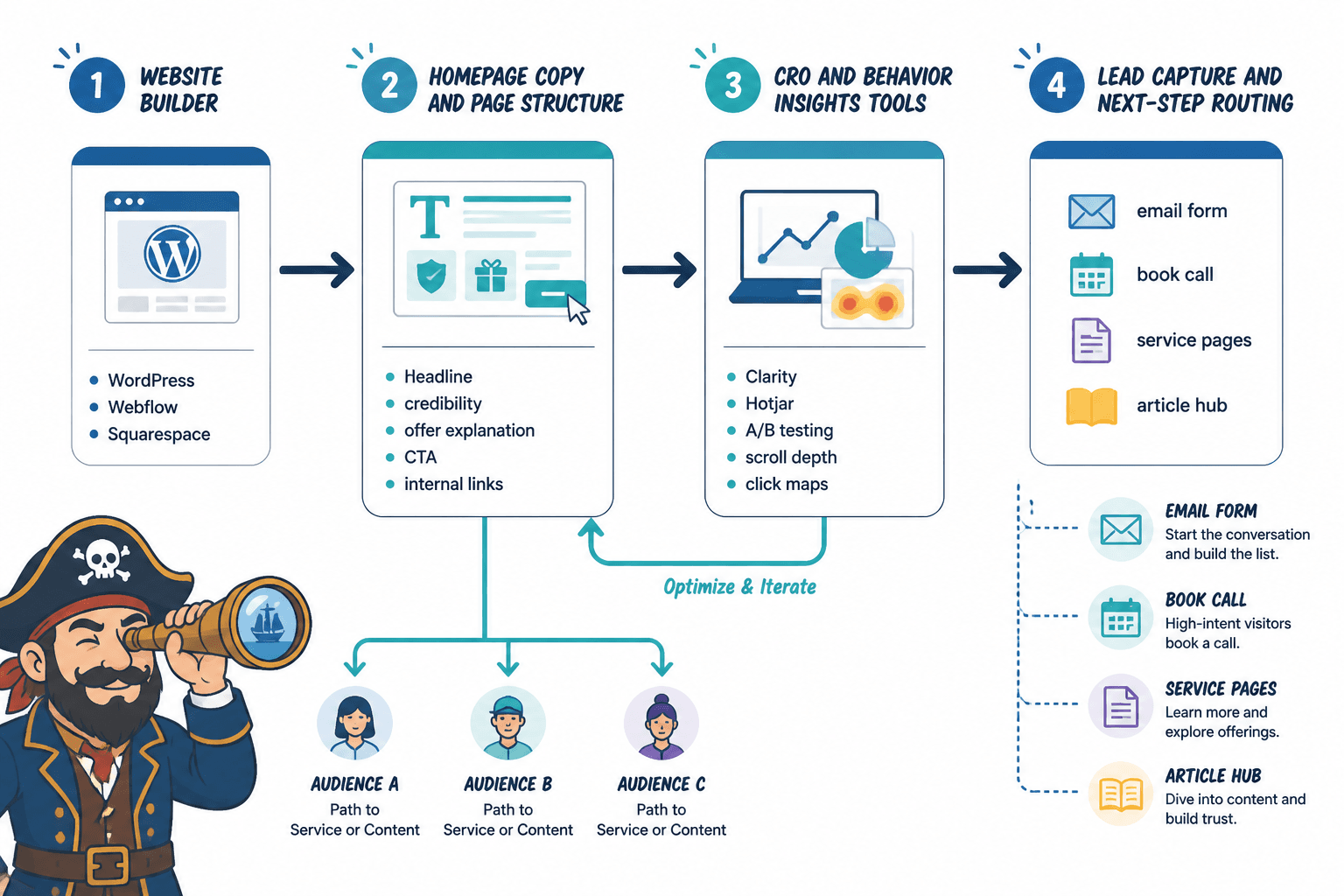
Best tool stack by business type
You do not need every tool. You need the right amount of infrastructure for your stage, traffic, and business model.
For creators, coaches, and solo service businesses
- Builder: Squarespace, Wix, or Framer
- CRO tool: Microsoft Clarity
- Lead capture: Simple form or booking tool
- Bonus support: best AI tools for homepage copy for brainstorming and draft cleanup
This setup works if your goal is a clear homepage, strong offer explanation, and one obvious next step. Keep it simple. Most small brands do not need complicated testing. They need better claims, stronger proof, and fewer words trying to sound premium.
For consultants, agencies, and authority-driven brands
- Builder: Webflow or WordPress
- CRO tool: Hotjar
- Lead capture: Consult form, booking page, or lead magnet
- Optional: Testing tool if traffic volume supports it
This works well when your homepage needs to establish credibility fast, explain a higher-value offer, and route people to different entry points based on intent.
For content-heavy businesses and SEO-focused sites
- Builder: WordPress
- CRO tool: Clarity or Hotjar
- Support tools: Internal linking, article content, reusable page templates
- Optional: A/B testing for major homepage decisions
If your homepage is one part of a broader content machine, WordPress usually gives you the most room to build authority around it. The homepage should not live in isolation. It should connect clearly to the rest of your messaging ecosystem.
How to choose the right stack for your homepage copy
If you are deciding between tools, do not ask which platform has the most features. Ask which setup makes your homepage easier to improve.
1. Start with your homepage goal
What is your homepage supposed to do?
- Book calls
- Grow an email list
- Sell one offer
- Route visitors to multiple services
- Build trust and qualify leads
Your answer changes the tool choice. A simple personal brand homepage needs less infrastructure than a service business with multiple offers and different audience segments.
2. Be honest about how often you will update copy
If you refine messaging often, choose a builder that is easy to edit. If your site rarely changes and your copy is already strong, deeper customization may matter more than speed.
This is where people make dumb decisions. They buy complexity they will never use, then avoid improving their homepage because the backend feels like filing taxes through a maze.
3. Match CRO tools to traffic reality
Do not build a Silicon Valley optimization lab around a homepage with barely any traffic. Use behavior tools first. Watch sessions. Check clicks. Improve the page. Then test bigger changes when traffic justifies it.
4. Prioritize clarity before testing
A homepage usually needs these basics before any serious optimization work:
- A clear headline
- A specific subhead
- An obvious audience
- Proof or credibility
- A simple CTA
- Logical section flow
If those are weak, no tool stack is going to save you. It will just give you better reporting on the underperformance.
Common mistakes when using website builders and CRO tools for homepage copy
Using a beautiful template with vague messaging
A polished homepage with soft, generic copy still converts like soft, generic copy. “We help brands grow” is not rescued by nicer spacing.
Adding CRO tools before fixing obvious copy problems
If your hero section is unclear, your offer is muddy, and your CTA says “Learn more,” you do not have a testing problem. You have a homepage problem.
Trying to optimize every tiny element too early
Big wins usually come from better positioning, stronger proof, cleaner offers, and more relevant CTAs. Not from testing button shades like your business depends on mauve.
Forgetting mobile readability
Homepage copy that looks elegant on desktop can become a cluttered scroll swamp on mobile. Always check section order, spacing, form friction, and CTA visibility on smaller screens.
Using AI to produce copy instead of sharpen it
AI tools can help with drafts, alternatives, and cleanup. They are useful for momentum. But they cannot invent strong positioning for you. If your homepage sounds polished but forgettable, that is often what happened.
For that side of the workflow, see best AI tools for homepage copy. Just do not hand the wheel to the oatmeal machine and act surprised when the page tastes beige.
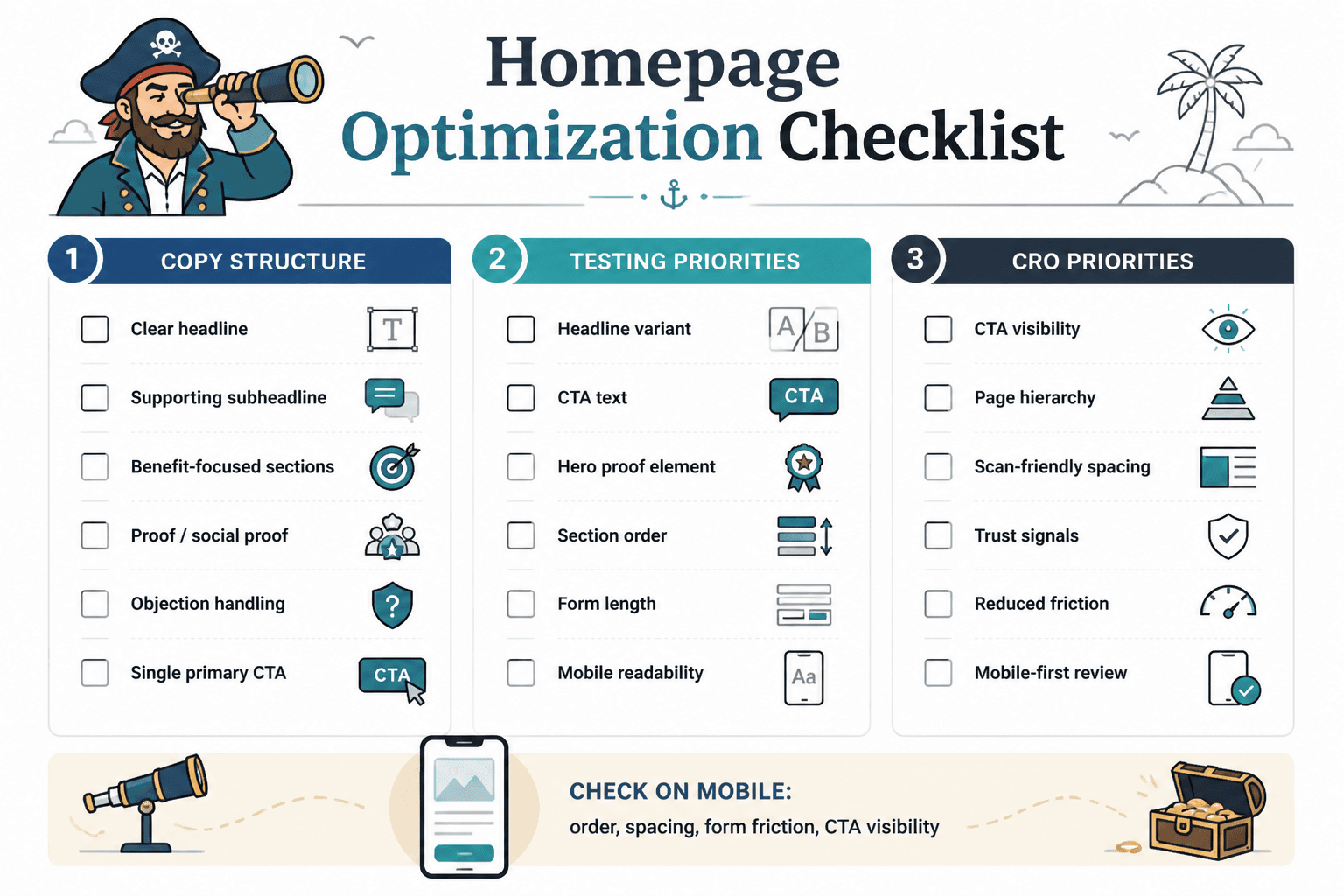
Homepage copy works best when the core promise is clearer and the next step is easier to understand. Simpler, sharper messaging usually does more work.