
Most LinkedIn articles do not fail because the writer lacks expertise. They fail because the article has no shape, no payoff, and no reason to exist beyond “I should probably publish more.”
That is why the best templates and tools for LinkedIn articles are not the ones that make you sound fancier. They are the ones that help you get clearer, structure your thinking, and publish something worth a professional reader’s time.
If you are writing LinkedIn articles to build authority, earn trust, and give your profile something more substantial than a pile of short posts, this guide will help. We are covering the templates that make article writing easier, the tool categories that actually help, and the stuff that people keep using even though it mostly produces polished mush.
LinkedIn articles can work very well when you have real ideas, useful experience, and something deeper to say than fits in a post. They are good for evergreen authority. They are good for search. They are good for showing how you think. But they need more than a decent headline and a prayer.
To see how this fits into the wider strategy, open the parent guide.
What makes LinkedIn articles different from LinkedIn posts
A LinkedIn post wins on speed. A LinkedIn article wins on depth.
Posts are usually about grabbing attention, starting a conversation, or making one useful point fast. Articles are better for building authority around a topic, showing your process, teaching a framework, explaining a contrarian view, or giving readers something they may actually return to later.
That means your article needs stronger structure than a post does. It also needs a better reader payoff. Nobody opens a LinkedIn article hoping for a stretched-out post with subheadings slapped on top. They want a clear argument, useful examples, and something worth stealing for their own work.
If you need a broader foundation first, this guide on LinkedIn articles is a solid companion piece.
The best templates and tools for LinkedIn articles start with the right job
People talk about “best tools” like there is one magical app that takes your rough thought, sprinkles SEO glitter on it, and turns it into authority. There is not. Tools are useful, but they need a job.
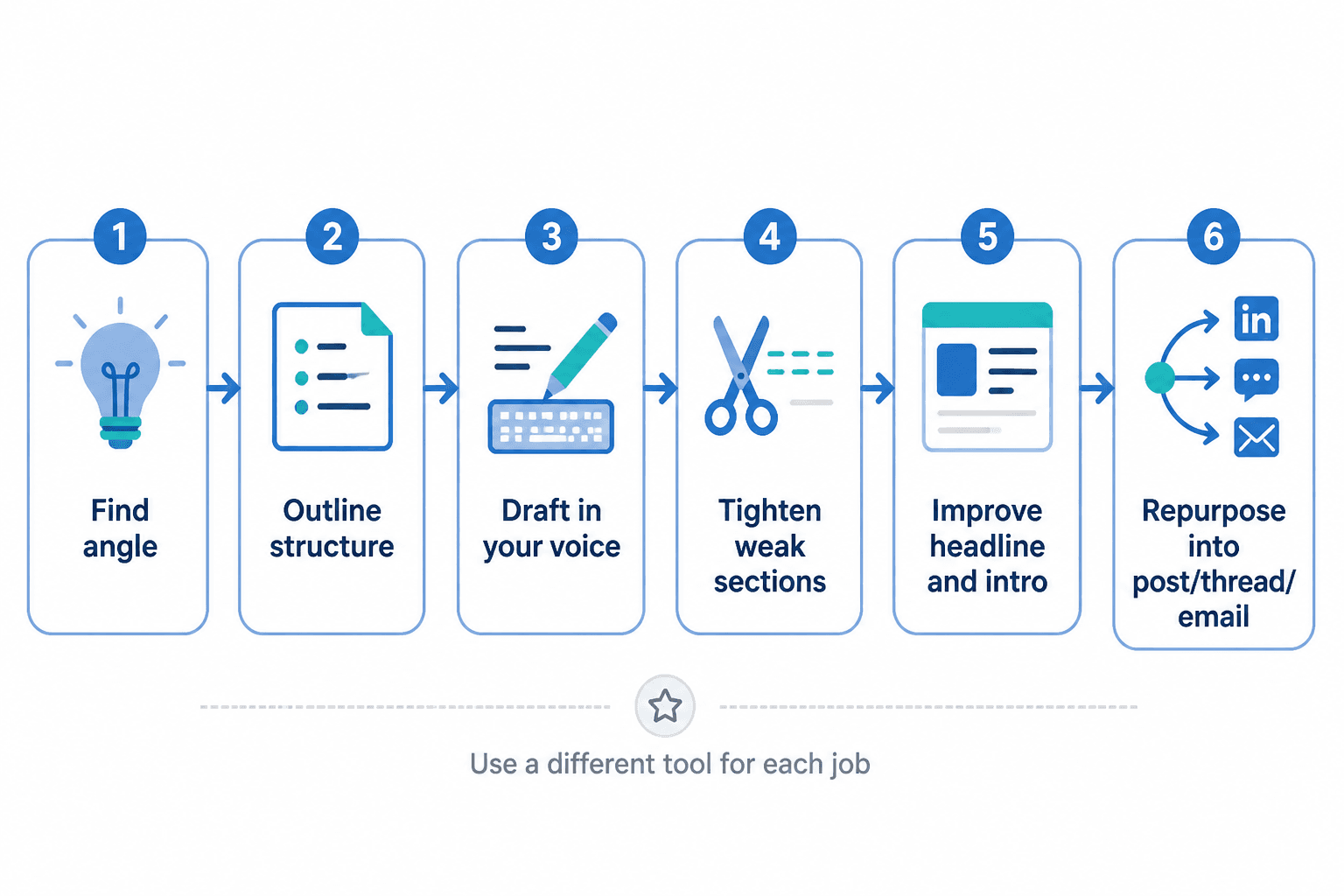
For LinkedIn articles, the main jobs usually look like this:
- Finding a worthwhile angle
- Structuring the article before you ramble
- Drafting faster without flattening your voice
- Tightening weak sections
- Improving headlines and intros
- Keeping examples, notes, and research organized
- Repurposing articles into posts, threads, or emails
That is the lens to use. If a tool helps with one of those jobs, great. If it mostly helps you generate 1,800 words of plausible beige content, less great.
Best LinkedIn article templates that actually make writing easier
Templates are useful when they give you structure without turning your article into a copy-paste zombie. Good templates create momentum. Bad ones create generic “thought leadership” that sounds like everyone swallowed the same webinar.
Here are the most useful templates for LinkedIn articles, with when to use them and what each one is good for.
1. The problem → mistake → fix template
This is the most reliable template for practical authority articles. It works especially well for coaches, consultants, strategists, marketers, and service providers.
- Opening: Name the problem your audience keeps dealing with
- Section 1: Explain the common mistake or lazy assumption
- Section 2: Show what actually works instead
- Section 3: Break the fix into steps, examples, or principles
- Ending: Give a clear next action or perspective shift
Best for: educational articles, myth-busting articles, practical how-to pieces
Example angle: “Why Your LinkedIn Articles Sound Smart But Do Not Build Trust”
2. The framework template
If you have a method, process, or repeatable way of solving something, use a framework article. This is one of the strongest formats for authority because it turns your expertise into a named, structured idea readers can remember.
- Opening: Describe the challenge and why most advice misses the point
- Section 1: Introduce the framework
- Section 2: Explain each part clearly
- Section 3: Show the framework in action with an example
- Ending: Tell readers how to apply it
Best for: consultants, founders, coaches, specialists with a clear process
Why it works: It gives your article shape and gives readers language to remember you by.
3. The before → after → lesson template
This one works beautifully when you are teaching through transformation. Not fake “I went from broke to six figures by believing in myself” nonsense. Actual professional change.
- Opening: Show the original situation or weak version
- Section 1: Break down what was not working
- Section 2: Show the improved version or approach
- Section 3: Explain the principles behind the improvement
- Ending: Encourage the reader to audit their own version
Best for: rewrite articles, positioning articles, content examples, client education
4. The opinion-with-proof template
LinkedIn is full of opinions. Most are undercooked. If you have a sharp point of view, this template helps you make it useful instead of merely loud.
- Opening: State the opinion clearly
- Section 1: Explain why this matters
- Section 2: Give proof, examples, patterns, or observations
- Section 3: Address nuance or common objections
- Ending: Leave readers with a practical implication
Best for: contrarian takes, industry commentary, trust-building thought leadership
The key is proof. A strong opinion without substance is just dressed-up posting.
5. The expert guide template
If someone searches for a topic and lands on your article, this format gives them a full answer. It is broader than a quick how-to but still practical.
- Opening: Define the real challenge in plain English
- Section 1: Explain the fundamentals
- Section 2: Cover the key components or decisions
- Section 3: Give examples, mistakes, and best practices
- Ending: Point to a next step, resource, or related article
Best for: evergreen topics, search-friendly authority content, pillar-style article ideas
If you want more idea starters, these guides can help: LinkedIn article ideas and examples for creators and LinkedIn article examples for coaches, consultants, and personal brands.
A practical LinkedIn article template you can reuse
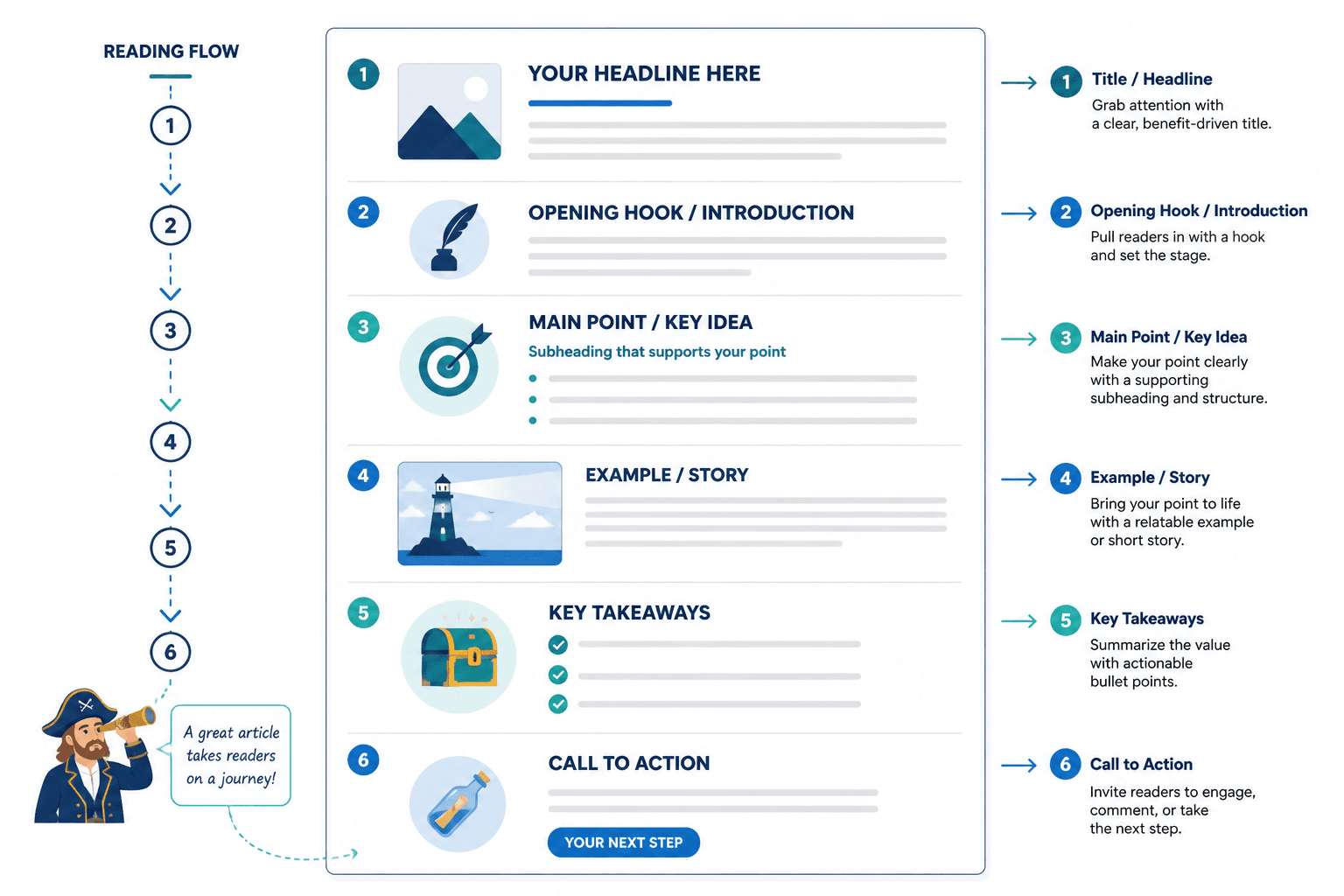
Here is a clean, flexible structure that works for most educational LinkedIn articles:
- Hook the real problem
Open with the friction, bad assumption, or costly mistake. - Make the angle clear
Explain what the reader will understand or do better by the end. - Set up the core point
Name the big idea, framework, or argument. - Break it into 3 to 5 useful sections
Each section should earn its place. - Add examples
Use mini case examples, rewrites, scenarios, or practical applications. - Address a common objection or nuance
This makes the article sound like it came from experience, not a prompt. - End with a next step
Give the reader something to do, consider, or read next.
Simple is good. You do not need an avant-garde content structure. You need a useful one.
Best tools for LinkedIn articles by category
The best templates and tools for LinkedIn articles are usually a stack, not a single product. One tool for capturing ideas. One for drafting. One for polishing. Maybe one for SEO or repurposing if that fits your workflow.
Here is the practical breakdown.
Writing and drafting tools
These help you turn a rough idea into a first draft faster. They are useful for outlining, rewriting clunky sections, generating headline options, and helping you get unstuck.
- Best for: outlines, first drafts, rewrites, headline testing, paragraph tightening
- Use carefully for: voice, examples, positioning, nuance
- Common mistake: publishing the first AI-smoothed draft without putting your own thinking back into it
If you want tool-specific recommendations, see best AI tools for LinkedIn articles.
AI drafting tools are good at helping you move. They are bad at deciding what is worth saying. Important difference.
SEO and research tools
These help you choose better topics, shape article angles around real search intent, and spot related phrases people care about. That matters if your LinkedIn article is also meant to support authority outside the platform or feed your broader content engine.
- Best for: topic research, phrase clustering, related questions, headline direction
- Use carefully for: blindly stuffing keywords into a professional article
- Common mistake: making the article sound like an SEO intern got hold of your keyboard
For more on that side of the stack, check best AI writing tools and SEO research tools for LinkedIn articles.
Note-taking and idea capture tools
A lot of article writing problems begin before the writing. You had a decent idea three days ago, half an example in a client call, and a useful phrase in your notes app somewhere between grocery reminders and a dentist appointment.
Good note tools help you capture article seeds, examples, proof points, and half-built frameworks before they vanish. This matters more than people think. Strong LinkedIn articles often come from collected observations, not one heroic sit-down session.
- Best for: idea banks, swipe files, rough article outlines, examples
- Use carefully for: over-organizing instead of publishing
- Common mistake: building a majestic second brain and never writing the article
Editing and clarity tools
These are useful after drafting. Their job is not to make you sound smarter. Their job is to help you sound clearer.
- Best for: tightening long sentences, spotting repetition, cleaning up awkward phrasing
- Use carefully for: preserving your natural voice and rhythm
- Common mistake: over-editing until the article sounds sterile and oddly corporate
If a sentence becomes cleaner but less human, that is not always an upgrade.
Repurposing tools
Once you have written a strong article, you should not use it once and then abandon it like a houseplant after a busy week. A good article can become several posts, quote snippets, email sections, thread ideas, and profile resources.
- Best for: turning one article into short posts, summaries, quote posts, and newsletters
- Use carefully for: keeping the repurposed versions specific to each platform
- Common mistake: copying article paragraphs directly into posts and calling it a strategy
That broader content workflow is part of what makes article writing worth the effort in the first place.
A simple tool stack for most LinkedIn article writers
You do not need ten subscriptions and an unnecessarily spiritual relationship with your productivity system.
For most creators, consultants, and personal brands, a practical stack looks like this:
| Job | What you need | What good looks like |
|---|---|---|
| Idea capture | Notes app or knowledge tool | Easy to save observations, examples, and draft headlines |
| Drafting | Writing doc plus optional AI support | Fast outlining, rough drafting, rewrite help |
| Editing | Clarity or grammar tool | Cleaner phrasing without flattening voice |
| Research | SEO or topic research tool | Better angles, better questions, stronger search fit |
| Repurposing | Content workflow tool or manual system | Article turns into posts, emails, and supporting content |
That is enough. The best system is the one you will actually use more than twice.
How to use AI tools for LinkedIn articles without sounding like AI in loafers
AI can absolutely help with LinkedIn articles. It can help you brainstorm angles, build an outline, find missing sections, generate headline variations, and tighten ugly sentences. That part is real.
What it cannot do well on its own is create authority from thin air. It cannot know which opinion you can actually defend. It cannot supply lived client patterns you never bothered to collect. It cannot fix weak positioning. And it definitely cannot stop you from publishing a respectable-looking article that says almost nothing.
The better way to use AI here is as a drafting partner, not as the author. Feed it your raw thoughts, your proof points, your examples, your framework, your audience, your point of view. Then make it help you organize, trim, and sharpen. That is miles better than asking for “a professional LinkedIn article on personal branding” and receiving a very polished bowl of oatmeal.
Good uses of AI for LinkedIn articles
- Turning messy notes into a rough outline
- Generating 10 headline options with different angles
- Rewriting a clunky section more clearly
- Summarizing an article into post ideas
- Spotting places where the article needs examples or transitions
Bad uses of AI for LinkedIn articles
- Writing the full article from one vague prompt
- Using generic examples with no proof
- Publishing obvious AI phrasing without editing
- Relying on fake confidence instead of actual expertise
- Assuming longer means better because the draft looks complete
What to look for in a LinkedIn article template or tool
If you are choosing between templates, prompts, workflows, or software, judge them by this shortlist:
- Does it help you get specific?
- Does it improve structure?
- Does it make your article more useful?
- Does it preserve your voice?
- Does it support examples and proof?
- Does it help you publish consistently without lowering quality?
If the answer is mostly “it helps me produce more words,” that is not enough.
Common mistakes when using templates and tools for LinkedIn articles
Templates and tools are supposed to reduce friction. Used badly, they just automate mediocrity a little faster.
Using a template as a substitute for an idea
A template can shape a thought. It cannot create one. If your angle is weak, the article will still be weak, just more neatly arranged.
Writing broad, waffly articles
“Everything you need to know about personal branding” is usually code for “I am about to explain nothing with incredible range.” Narrower is better. Specificity builds authority.
Over-editing until the article loses its pulse
Clean is good. Bloodless is not. If your article sounds like it was approved by three middle managers and a compliance bot, something went wrong.
No examples, no proof, no texture
Readers trust specifics. Show the bad version. Show the better version. Explain what changed. Give an example from actual work, or at least a realistic scenario. Do not just make polished claims and hope your subheadings do the heavy lifting.
Forgetting the article needs a next step
A LinkedIn article should not just stop. It should land. That does not mean a grim sales pitch. It means giving readers a next action, a related piece to read, or a reason to visit your profile.
A repeatable workflow for writing better LinkedIn articles
If you want consistency without sounding mechanical, use a repeatable workflow instead of trying to reinvent your process every time.
The bigger point is simple: clearer structure and clearer writing make the piece more useful. That is usually what makes the ending land better too.