Most people looking for the best templates and tools for landing pages are really trying to solve a messier problem: they want a page that converts without spending three days fighting a builder, six hours rewriting a headline, and one small emotional breakdown choosing between 47 nearly identical templates.
Fair. That is usually the actual situation.
The good news is you do not need the prettiest landing page stack on the internet. You need a template that matches your goal, a tool that does not make you hate your own business, and copy that sounds like a capable human instead of a startup intern who swallowed a marketing glossary.
This guide will help you choose landing page templates and tools that are actually useful for creators, coaches, consultants, solo founders, and service businesses. We’ll cover which kinds of templates work best, what each tool category is good for, what they cannot fix, and how to avoid building a sleek little conversion graveyard.
If you want more foundational guidance first, start with the broader landing pages hub. If you are deciding specifically between software options, this pairs well with best landing page builders and testing tools for landing pages and best AI tools for landing pages.
For the full path around this topic, head to the parent guide.
What “best” actually means for landing page templates and tools
The best templates and tools for landing pages are not the ones with the most animations, the cleanest dashboards, or the loudest fans on YouTube.
The best ones help you do three things well:
- Match the page to one clear conversion goal
- Build and edit the page without unnecessary friction
- Support stronger copy, proof, and structure instead of distracting from them
That is the bar.
A gorgeous template with weak structure is still weak. A fancy AI page generator cannot rescue a vague offer. And a builder packed with advanced features is not “better” if you only need a sharp lead magnet page and a thank-you page.
Tools can reduce friction. They cannot create clarity on your behalf.
The main types of landing page templates worth using
If a template does not match your goal, you end up stuffing the wrong page full of awkward sections and hoping nobody notices. They usually notice.
Here are the main template types that actually matter.
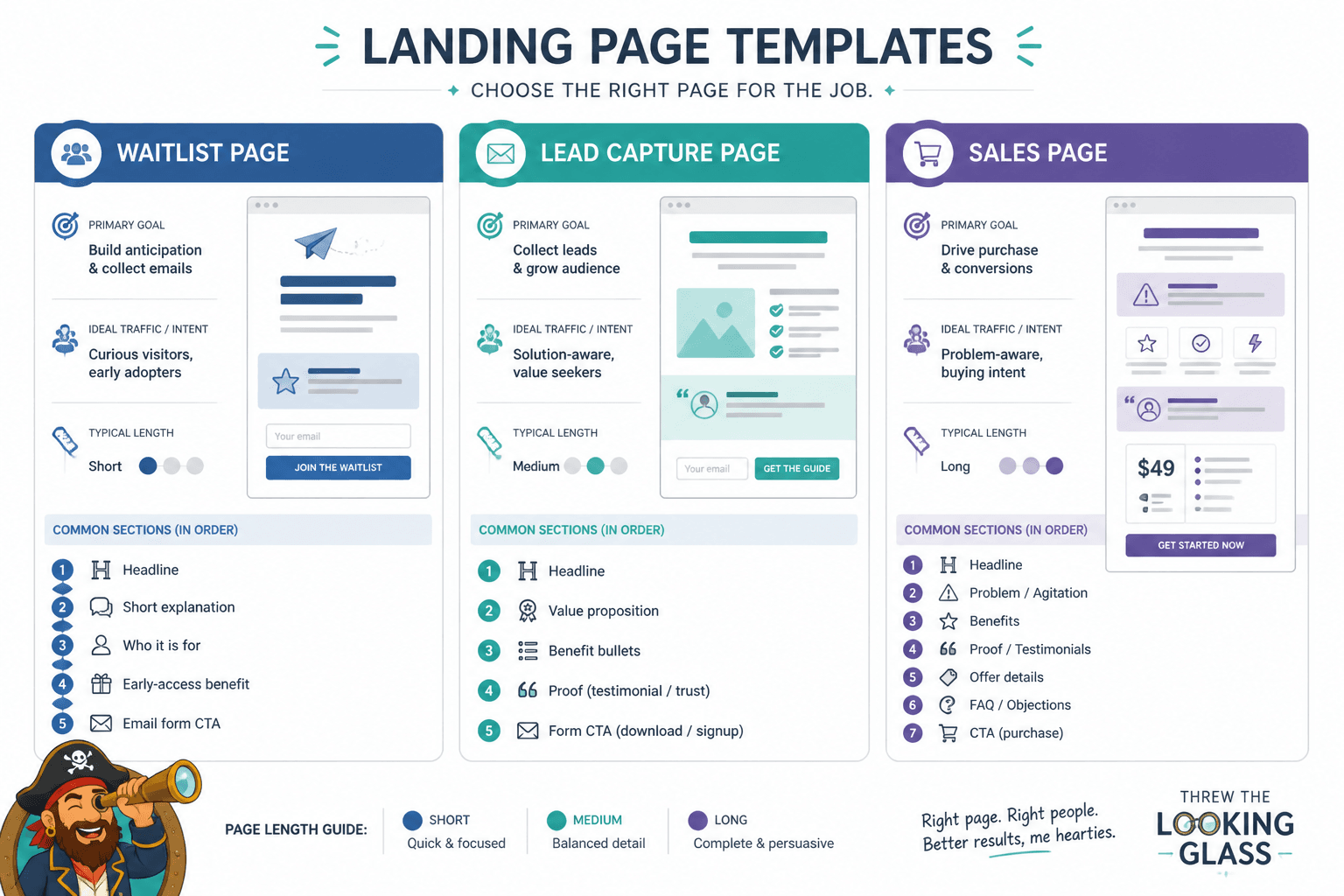
Lead magnet landing page templates
Use these when the goal is simple: get the email address in exchange for a useful free resource.
Good lead magnet templates usually include:
- A direct headline with a clear outcome
- A short subhead explaining who it is for
- A visual or mockup of the resource
- 3 to 5 bullets on what they get
- A simple opt-in form
- Light proof or credibility
What they do not need: nine sections of throat-clearing, a founder manifesto, and a slider showing every Canva asset you have ever made.
Service booking landing page templates
These work for consultants, freelancers, and coaches offering calls, audits, retainers, intensives, or done-for-you services.
The best service templates usually include:
- A sharp promise without hype
- A clear explanation of the problem you solve
- Who the service is for and not for
- Proof, outcomes, testimonials, or examples
- A short process section
- A booking CTA that feels low-friction
This is where weak templates often fall apart. They leave too much room for vague “transform your business” nonsense and not enough room for trust.
Product or offer launch landing page templates
Use these for courses, workshops, memberships, mini-products, digital downloads, and short promotional campaigns.
You usually want sections for:
- The offer and outcome
- What is included
- Who it is for
- Objection handling
- Proof
- Pricing or enrollment
- FAQ
These templates need more persuasion structure than lead magnet pages, but they still should not read like a hostage note from the 2018 webinar era.
Waitlist or prelaunch landing page templates
These are ideal when the offer is not fully open yet, but you want to test interest, collect demand, or warm up potential buyers.
The cleanest waitlist pages are usually short. Explain what is coming, who it is for, why it matters, and what people will get by joining early.
Sales page style landing page templates
These are longer, denser, and more conversion-focused. They can work well if the offer needs more explanation or the price point is higher.
But length is not the advantage by itself. Useful detail is. Plenty of long templates are just padded with recycled claims and decorative suffering.
If you want inspiration for what these can look like in practice, check out best landing pages ideas and examples for creators.
What a good landing page template should include
You do not need a template with more sections. You need one with the right sections in the right order.
At minimum, a solid template should make room for:
- A headline with an actual promise: not a vague aspiration, not a slogan, not “welcome to the future of growth”
- A subhead that adds clarity: who it is for, what it helps with, or why it matters
- A primary CTA: one clear next step
- Proof: testimonials, case snippets, credibility markers, examples, screenshots, results, or client logos if relevant
- Specific benefits: not generic features dressed in nice fonts
- Objection handling: answer the obvious doubts before the reader leaves
- Scannable formatting: readable sections, clean spacing, and no giant text bricks
If a template buries the CTA, skimps on proof, or prioritizes visual drama over clarity, it is not helping you. It is just pretty sabotage.
For a deeper look at one of the most neglected sections, read simple landing pages proof sections templates for busy creators. A lot of pages do not have a traffic problem. They have a trust problem wearing a traffic costume.
Best tools for landing pages by category
There is no one perfect landing page tool. There are categories of tools that solve different problems. That distinction matters, because people keep buying software for the problem they wish they had, not the one currently ruining their page.
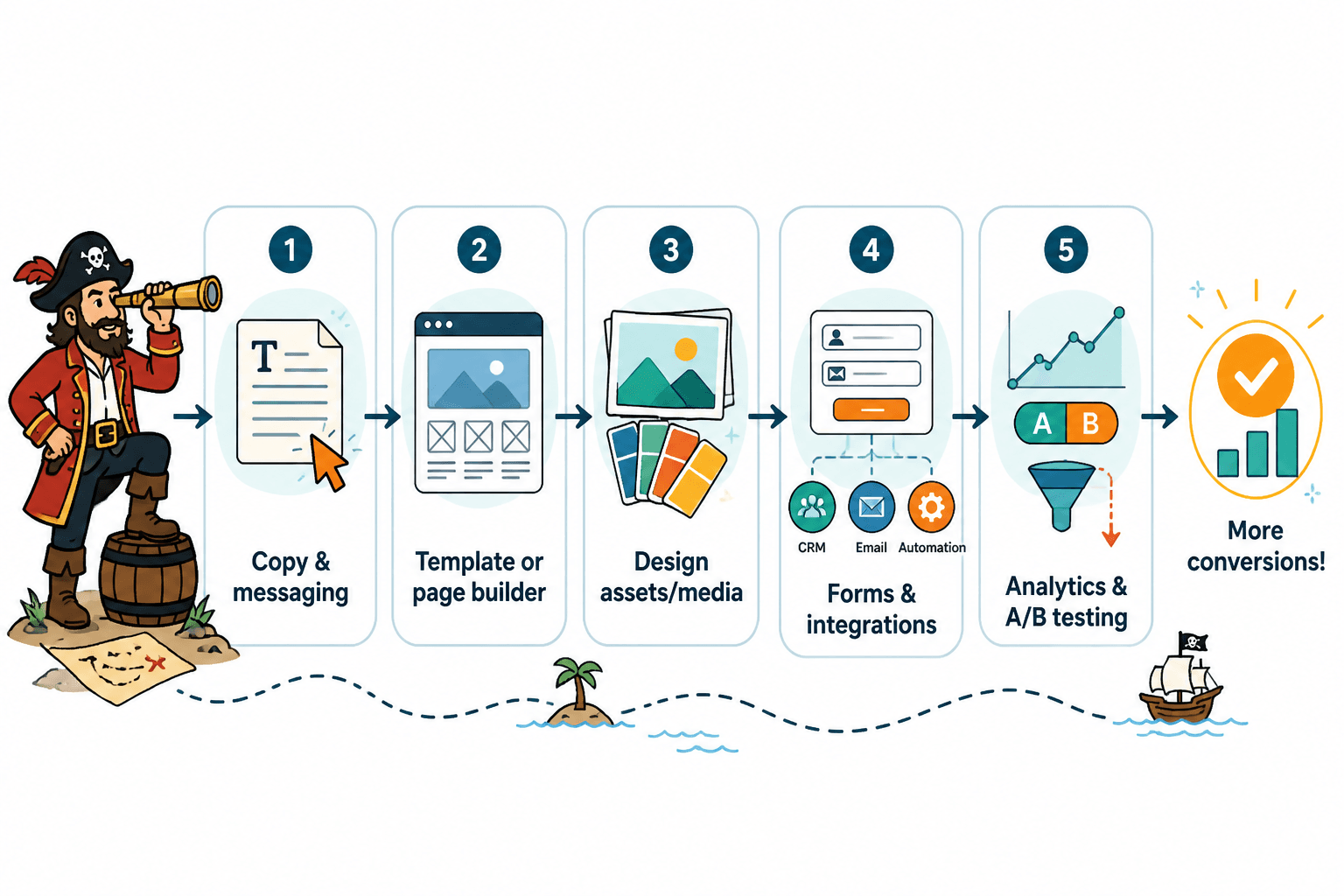
1. Landing page builders
These are your main page creation tools. They handle layout, forms, mobile responsiveness, buttons, sections, and publishing.
They are best for:
- Building pages quickly without custom code
- Using drag-and-drop editing
- Deploying campaigns fast
- Creating repeatable page systems
They are not best for:
- Writing your positioning
- Choosing your offer angle
- Inventing proof you do not have
If you need the full breakdown on builder choices and testing support, go to best landing page builders and testing tools for landing pages.
2. Copy and AI drafting tools
These can help you brainstorm headlines, outline sections, draft variants, tighten bullets, or repurpose existing messaging into a cleaner structure.
They are useful for:
- Generating rough first drafts faster
- Testing multiple headline approaches
- Rewriting clunky sections
- Speeding up idea iteration
They are not useful for:
- Knowing your audience better than you do
- Making generic copy persuasive
- Replacing taste, judgment, or strategy
Use them as drafting assistants, not as tiny overconfident creative directors. For more on that category, see best AI tools for landing pages.
3. Design and mockup tools
These help with visual assets: ebook covers, screenshots, comparison visuals, section icons, diagrams, and polished brand elements.
They are especially useful when your template expects some visual support but you are not trying to become a full-time designer in the process.
Just do not overdo it. Landing pages rarely fail because they lacked one more tasteful gradient blob.
4. Form, CRM, and email integration tools
These matter more than people think. A landing page is not just a page. It is part of a path.
You may need tools that connect your page to:
- Email list software
- Lead capture systems
- Booking tools
- CRM workflows
- Thank-you page or nurture sequences
If your page converts but the follow-up experience is messy, delayed, or confusing, the page is not really working. It is just collecting friction one lead at a time.
5. Analytics and testing tools
These help you see what users are doing, where they drop off, which variants perform better, and whether your assumptions are wrong. Which, to be fair, happens a lot.
Use these for:
- A/B testing headlines or CTAs
- Watching conversion rates by page version
- Spotting weak sections or drop-off points
- Learning what visitors actually respond to
Do not use them as an excuse to obsess over button shades while your offer is still vague. Some testing is smart. Endless tinkering is just procrastination with charts.
How to choose the right landing page template
Here is the simpler way to choose a template without disappearing into design purgatory.
Start with the conversion goal
Pick one:
- Email opt-in
- Call booking
- Product sale
- Waitlist signup
- Application
- Event registration
If your page is trying to do four of these at once, the template is not the main issue.
Match the template to the complexity of the offer
Simple offer, simple page.
Higher price, more objections, more explanation needed? Then use a longer template with sections for proof, process, objection handling, and FAQs.
The mistake is using a tiny squeeze-page template for a nuanced consulting service, or using a giant sales-page template for a one-page checklist download. Both feel wrong because they are wrong.
Check whether the template supports proof well
This is an underrated filter. Some templates are all hero section and vibes. Nice for Dribbble. Less nice when you need a real client to trust you with money.
Look for flexible proof sections that can include:
- Testimonials
- Mini case studies
- Numbers with context
- Examples of work
- Credibility markers
Choose editability over novelty
It is better to have a template you can update quickly than one that looks dazzling but becomes a nightmare every time you want to change a section, swap a CTA, or fix mobile spacing.
That matters even more if you publish often, test variations, or sell multiple offers.
A practical landing page template stack for most creators and service businesses
You do not need 20 templates. Most people can get a lot done with a small, repeatable stack.
A practical setup often looks like this:
- One lead magnet template for newsletter growth, free guides, checklists, or resource downloads
- One service page template for calls, retainers, consulting, or coaching offers
- One simple sales page template for workshops, products, or short launches
- One thank-you page template for next steps, upsells, or deeper nurturing
That is enough for most personal brands and small businesses to build a clean funnel system without turning the back end into an archaeological dig.
If you need a wider strategic view beyond this article, the broader conversion copy content under website conversion copy and landing pages is worth browsing next.
Common mistakes when picking landing page tools
Some mistakes are so common they should come pre-installed.
- Choosing based on aesthetics alone: if the template is beautiful but weak at conversion structure, that beauty is mostly decorative
- Buying advanced software too early: if you do not yet know your offer, audience, or message, a more powerful platform will not save you
- Using AI to skip thinking: fast is useful, but not if it produces interchangeable sludge
- Ignoring mobile experience: a page that breaks on mobile is quietly losing people while you admire the desktop version
- Overstuffing the page: more sections does not mean more persuasion
- Underusing proof: plenty of pages explain the offer but never prove the thing works
This is where a short human edit usually beats another tool. Tighten the promise. Cut the filler. Add proof. Make the CTA obvious. Repeat.
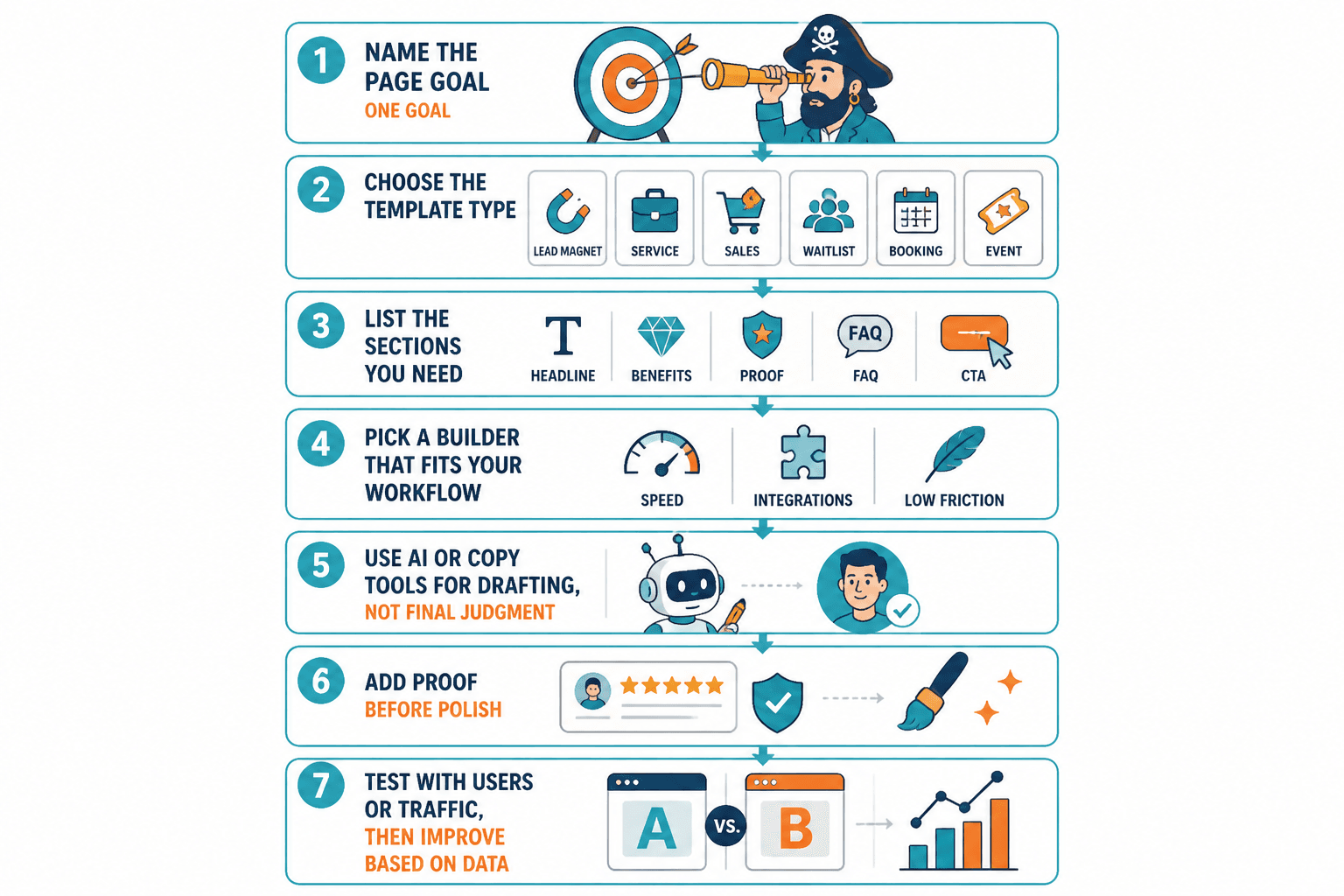
A simple process for choosing the best templates and tools for landing pages
If you want a cleaner decision process, use this:
- Name the page goal. One goal. Not six.
- Choose the template type. Lead magnet, service, sales, waitlist, booking, or event.
- List the sections you actually need. Headline, benefits, proof, FAQ, CTA, and so on.
- Pick a builder that fits your workflow. Fast editing, easy integrations, low friction.
- Use AI or copy tools for drafting, not final judgment.
- Add proof before polish. Trust usually beats decoration.
- Test the page with real users or traffic. Then improve what the data and responses actually show.
That process is not glamorous. It is just effective, which is much better.
Quick FAQ
The bigger point is simple: clearer structure and clearer writing make the piece more useful. That is usually what makes the ending land better too.
The bigger point is simple: clearer structure and clearer writing make the piece more useful. That is usually what makes the ending land better too.