
Most blog posts do not need to be replaced. They need to be rescued.
That matters because a full rewrite is slow, annoying, and often unnecessary. A solid refresh can tighten the hook, fix weak sections, improve search intent, update stale examples, and make the whole thing more useful without turning your week into an editorial hostage situation.
If you are looking for the best templates and tools for blog rewrites and refreshes, the goal is not to find some magical machine that spits out brilliance. It is to build a cleaner process. One that helps you spot what is broken, decide what is worth saving, and rewrite faster without producing bland AI soup.
Here is how to do that with templates that actually help, tools that are worth your time, and a workflow that does not make every update feel like starting from zero.
For the main guide behind this topic, visit the parent guide.
What makes a blog rewrite or refresh actually worth doing
Before tools, templates, prompts, or checklists, you need one basic filter: is this post worth fixing?
A rewrite or refresh is usually worth it when the topic still matters, the post has some existing traffic or authority, the structure is salvageable, or the core idea is good but badly packaged. If the topic is dead, the angle is weak, and the post says the same beige thing as 400 others, no tool is going to save it. That is not a refresh problem. That is a content strategy problem.
Good rewrite candidates usually have one or more of these issues:
- The intro is slow or generic
- The search intent shifted
- The examples are outdated
- The headings are vague
- The post ranks but does not convert
- The post is useful but clunky
- The CTA is weak, buried, or weirdly salesy
- The writing sounds like it was filtered through three rounds of corporate rinse water
If that sounds familiar, good. It means you probably do not need to burn the whole thing down.
For a broader system behind this kind of work, it helps to pair this article with blog rewrites and refreshes and the wider blog article systems hub.
The four templates that make rewrites faster
You do not need 27 templates. You need a few good ones that remove decision fatigue and stop you from editing in circles.
The best templates and tools for blog rewrites and refreshes usually support four jobs: audit, rewrite, optimization, and repurposing. That is it. Everything else is decoration.
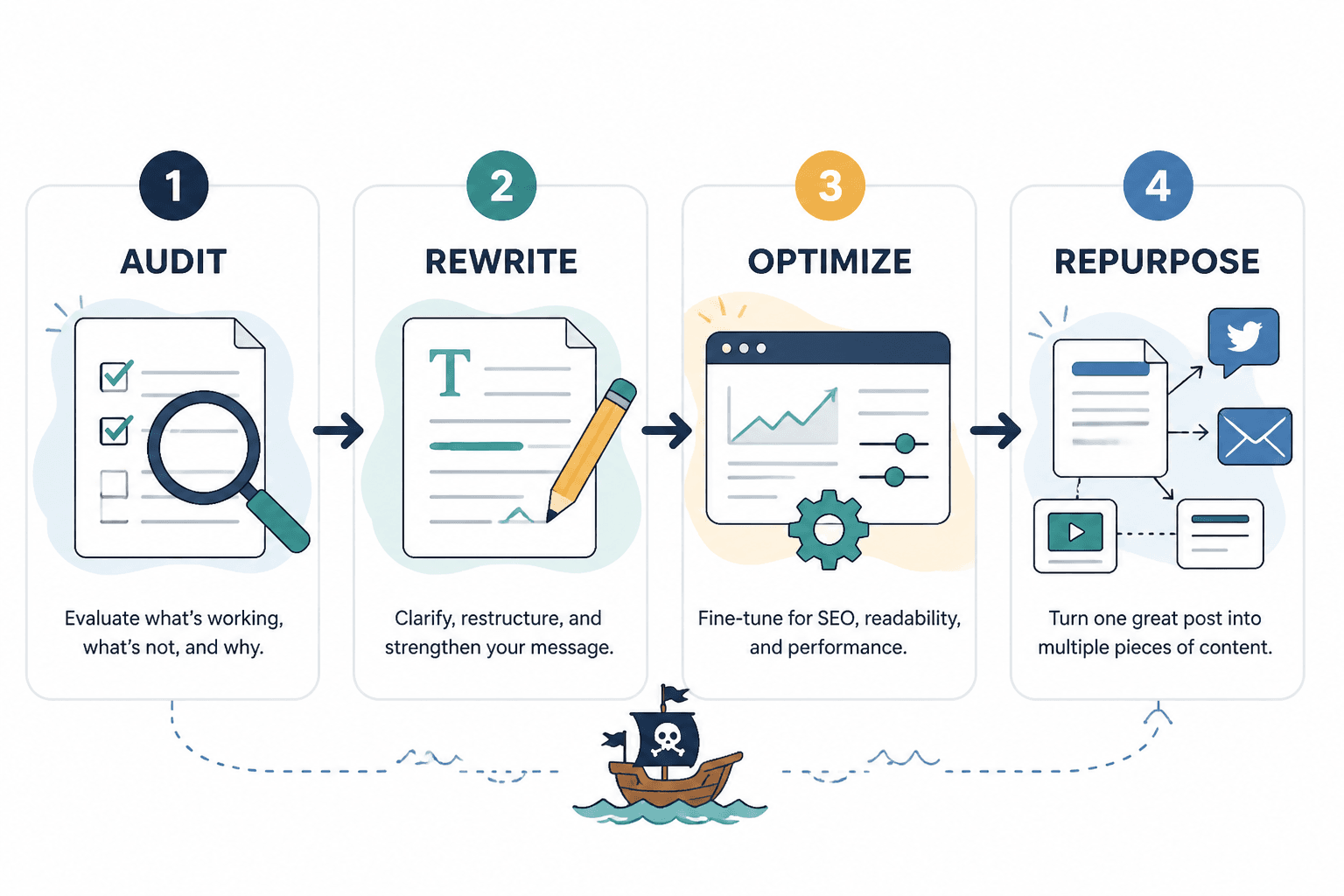
1. The rewrite audit template
This is the one that saves you from random editing. Before touching the draft, diagnose it.
| Section | What to check | What to decide |
|---|---|---|
| Topic fit | Is the topic still relevant and aligned with current audience needs? | Keep, re-angle, or retire |
| Search intent | Does the post still match what readers want when they search? | Adjust angle or structure |
| Intro | Does the opening quickly name the problem and promise value? | Rewrite if slow or vague |
| Structure | Do headings guide the reader clearly? | Reorder, merge, or cut sections |
| Examples | Are examples current, specific, and useful? | Update or replace |
| Depth | Is the post thin, repetitive, or bloated? | Add proof or tighten |
| CTA | Is there a clear next step? | Improve placement and wording |
Simple version you can reuse:
- Post title:
- Main keyword or topic:
- Current goal: traffic, leads, authority, conversions, repurposing
- What still works:
- What feels weak:
- What is outdated:
- What is missing:
- What should be cut:
- Rewrite level: light refresh, partial rewrite, full rewrite
- Updated CTA:
This takes maybe ten minutes. It can save you an hour of meandering edits.
2. The section-by-section rewrite template
Once the audit is done, rewrite one section at a time. Not because that is sexy. Because it works.
Use this format:
- Original heading:
- Purpose of this section: explain, prove, compare, teach, transition
- Main point in one sentence:
- What is wrong with the current version: vague, repetitive, outdated, weak example, too long
- What the new version must do:
- Updated version:
This template is boring in the best possible way. It forces clarity. It also keeps you from rewriting a paragraph five times before realizing the section should have been deleted entirely.
3. The hook and intro refresh template
A lot of blog posts do not have a content problem. They have an opening problem.
If the intro starts with scene-setting fluff, broad statements, or sleepy throat-clearing, readers bounce before the good part shows up. Which is rude, but understandable.
Use this intro template:
- Call out the real problem: what is going wrong right now?
- Name the common mistake: what do people keep doing instead?
- Shift the frame: what actually matters here?
- Promise the payoff: what will the reader be able to do after this?
Example:
Weak intro: Blog updates are an important part of maintaining an effective content strategy in a changing digital environment.
Better intro: Most blog posts do not stop performing because the topic failed. They fade because the post got stale, vague, or quietly outclassed. A smart refresh fixes that faster than writing a new article from scratch.
If you want more angle and intro ideas specifically for busy creators, this is a useful companion: simple blog rewrites and refreshes hook rewrites templates for busy creators.
4. The refresh-and-repurpose template
A good rewrite should not just improve the article. It should create assets.
After refreshing a post, pull out:
- Two to five social post ideas
- One email angle
- One lead magnet mention if relevant
- Updated profile or service page links
- A stronger CTA variation
Use this simple repurposing template:
- Main takeaway from article:
- Most quote-worthy line:
- Best example or case point:
- One social post:
- One email intro:
- One CTA to test:
This matters more than people think. A refresh is not only maintenance. It is content extraction.
Best tool categories for blog rewrites and refreshes
Tools are useful when they support judgment, not replace it. That distinction is where a lot of people go off the rails.
The best templates and tools for blog rewrites and refreshes tend to fall into five categories. You probably do not need the fanciest option in each one. You need something reliable enough that you will actually use it.
AI drafting and rewrite tools
These are best for first-pass rewrites, section rewrites, headline variations, summary compression, and idea expansion. They are not best for final voice, strong opinions, or nuanced positioning unless you guide them properly.
Use AI tools for things like:
- Generating alternate intros
- Rewriting bloated paragraphs into clearer language
- Pulling out key points from older drafts
- Creating multiple heading options
- Turning notes into a first structured outline
Do not use them as an excuse to accept the first polished-sounding paragraph they spit back at you. A lot of AI-generated rewrite output sounds competent in the same way hotel lobby art looks expensive. Smooth, harmless, forgettable.
For a deeper breakdown, read best AI tools for blog rewrites and refreshes.
Editing and clarity tools
These tools help you tighten language, catch repetition, improve readability, and remove mush. They are less flashy, more useful, and often better at making a post feel human than another layer of generation tools.
Good uses include:
- Spotting long, tangled sentences
- Catching repeated words and phrases
- Improving flow and scannability
- Checking grammar without writing like a robot
- Flagging sections that need simplification
Editing tools are especially useful after a heavy rewrite, when the draft has become structurally better but stylistically patchy.
You can pair this article with best editing tools and SEO refresh tools for blog rewrites and refreshes if you want the more technical cleanup side.
SEO and content optimization tools
These help you evaluate whether a post still matches search intent, covers the topic well enough, uses sensible structure, and targets useful related terms. That said, use them like instruments, not scripture.
Useful jobs for SEO refresh tools:
- Comparing your post against current top-ranking patterns
- Finding missing subtopics
- Checking on-page structure
- Refreshing title tags and meta ideas outside the draft process
- Identifying cannibalization or overlap between posts
What they cannot do is tell you if your article is actually good. Search coverage is not the same thing as reader value. Plenty of posts are technically optimized and emotionally dead on arrival.
Research and source organization tools
These are underrated. A lot of weak rewrites happen because the writer does not have examples, updated stats, customer language, or source material ready. So they pad. Or they generalize. Or they write another sentence that says almost nothing with full confidence.
Use research tools and systems to store:
- Competitor article notes
- Customer questions
- Examples and screenshots
- Internal linking opportunities
- Old post performance notes
- Reusable rewrite prompts
This is one of those unglamorous categories that quietly improves everything.
Workflow and content management tools
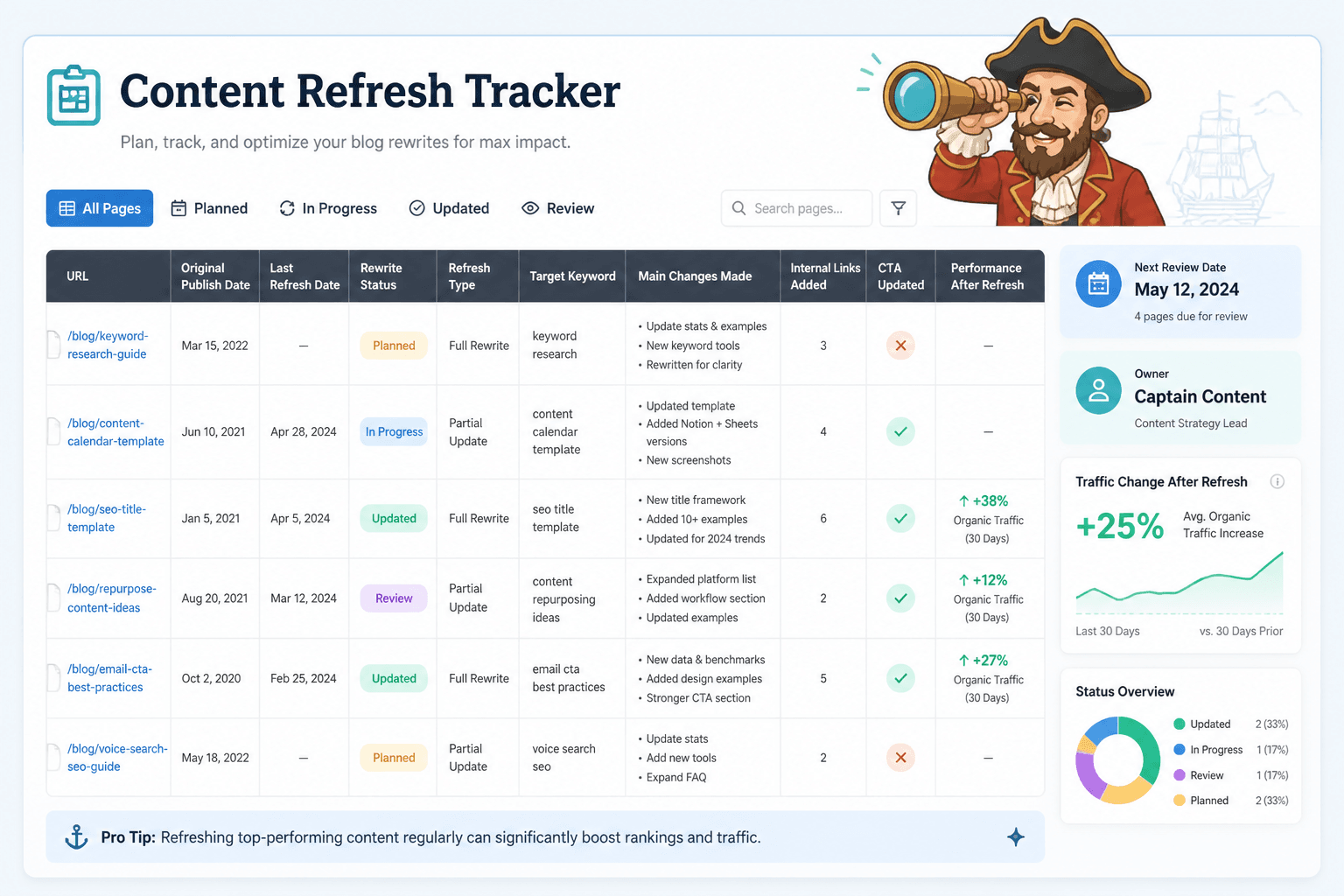
If you refresh content regularly, you need some way to track what was updated, when, why, and what happened after. Otherwise every quarter turns into a scavenger hunt.
Useful things to track:
- URL
- Original publish date
- Last refresh date
- Refresh type
- Target keyword or angle
- Main changes made
- Internal links added
- CTA updated
- Performance after refresh
Spreadsheet, notion board, editorial calendar, project tool, does not matter much. The point is to stop guessing.
A practical stack: what to use for each stage
You do not need one tool. You need the right tool for the right stage.
| Stage | Best tool type | Main job |
|---|---|---|
| Audit | Checklist template + analytics + SEO research tool | Decide what to fix and why |
| Rewrite | AI drafting tool + section template | Speed up first-pass rewriting |
| Edit | Clarity and grammar tool | Tighten language and flow |
| Optimize | SEO refresh tool + internal link review | Improve structure, intent, and discoverability |
| Repurpose | Content extraction template | Turn refresh into multiple assets |
| Track | Spreadsheet or project manager | Monitor changes and outcomes |
This is the kind of stack that keeps you practical. No worshipping at the altar of a shiny tool you barely use. No pretending a prompt library is a content strategy.
A simple blog refresh workflow you can actually repeat
If your current process is “open old post, stare, tweak a few lines, get distracted,” here is a better one.
Step 1: Choose the right post
Start with posts that have existing traffic, backlinks, relevance, or business value. Low-potential junk does not become strategic because you gave it a cleaner subheading.
Step 2: Run a quick audit
Use the audit template above. Figure out whether the post needs a light refresh, partial rewrite, or major rebuild.
Step 3: Rewrite the opening first
This sharpens your angle before you spend time polishing body sections that may need to change anyway.
Step 4: Fix structure before polishing sentences
Move sections. Merge duplicates. Cut weak fluff. Add missing sections. Then edit. Sentence-level cleanup too early is how people spend twenty minutes improving a paragraph they should have deleted.
Step 5: Update examples, proof, and specificity
This is often where the real lift happens. Better examples make a post feel current and credible fast. They also reduce the generic tone that so many refreshes accidentally introduce.
Step 6: Improve internal links and CTA
Do not waste the refresh by leaving the article disconnected. If someone liked this post, where should they go next?
Natural next reads for this topic include best blog rewrites and refreshes ideas and examples for creators and the broader blog SEO writing section.
Step 7: Extract reusable content
Pull social ideas, email snippets, or lead-in points from the refreshed article while it is still fresh in your head. Future you will not be more organized. Let us be serious.
What good rewrite templates do that generic prompts do not
Here is the mistake: people ask for “a prompt to rewrite this article” when what they really need is a decision framework.
A generic prompt might give you alternate wording. A good template helps you answer the bigger questions first:
- What is this article trying to do?
- What still works?
- What is dragging it down?
- What kind of refresh does it need?
- What should stay in your voice instead of being machine-smoothed into blandness?
This is why templates matter even if you use AI heavily. They preserve intent. They stop the draft from becoming technically tidy and strategically useless.
And yes, occasionally you should absolutely take a paragraph and ask a tool to rewrite it three ways. But that only works if you already know what that paragraph is supposed to accomplish. Otherwise you are just spinning the slot machine harder.
Common mistakes when using tools for blog refreshes
- Refreshing based on boredom instead of data: You are tired of the post. The audience may not be.
- Doing sentence edits before structural edits: This wastes time and creates Franken-drafts.
- Accepting AI phrasing that sounds polished but says less: Smooth is not always better.
- Adding keywords without improving usefulness: Search engines are not your only audience, and readers can smell filler.
- Leaving old examples in place: A new intro does not hide stale substance.
- Forgetting internal links: A refreshed post should help the wider site, not sit there alone in a nice shirt.
- Not updating the CTA: If the post is better but the next step is still weak, you left value on the table.
One more: over-refreshing.
Not every post needs to double in length, gain six new sections, and become an “ultimate guide.” Sometimes the right move is a better intro, a sharper subheading structure, cleaner examples, and one strong CTA. Done. Walk away.
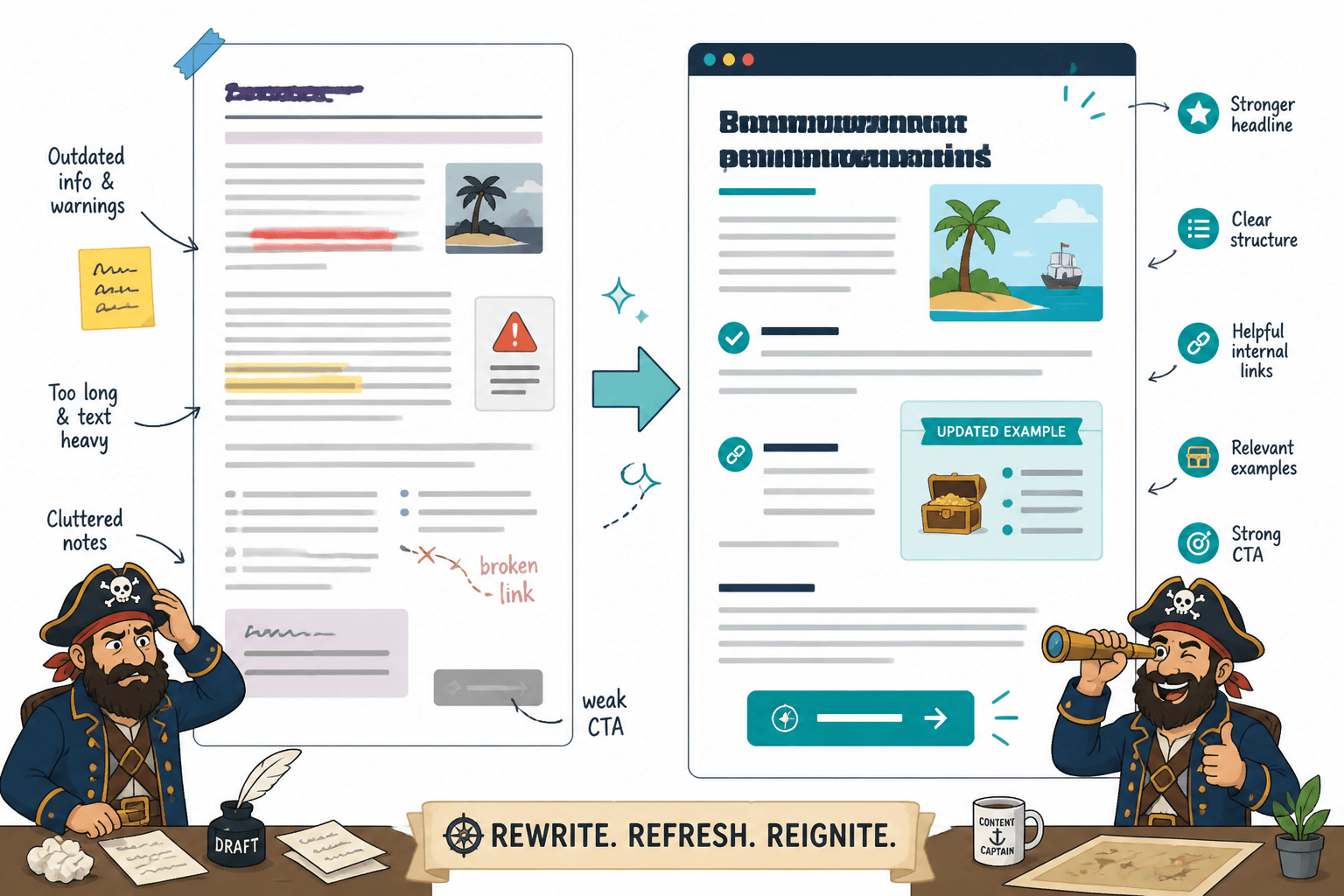
Simple templates you can copy into your workflow today
Quick refresh template
The bigger point is simple: clearer structure and clearer writing make the piece more useful. That is usually what makes the ending land better too.
Better rewrites and refreshes make the article clearer, more current, and easier to act on. A sharper update usually beats a bigger but messier rewrite.