
Most website bios are trying so hard to sound credible that they forget to sound clear.
You get the usual mess: vague positioning, three job titles fighting in one sentence, a soft-focus promise about “empowering” people, and absolutely no reason to trust the person behind the page. It reads polished enough. It also reads like nobody in particular should care.
If you want the best templates and tools for website bio and profile copy, the real goal is not to find a magic sentence starter. It is to build a bio that tells the right person, quickly: who you help, what you help with, why you are believable, and what they should do next.
That is what this guide covers. You will get practical bio templates, tool categories that actually help, and a cleaner way to write profile copy for websites without sounding like a conference brochure in human form.
If you want the bigger picture, start with the parent guide.
What good website bio and profile copy actually needs to do
A bio on your website is not there to tell your life story unless your life story is directly doing sales work. For most creators, coaches, consultants, freelancers, and personal brands, your bio has a simpler job:
- Make your role clear
- Show who you are for
- Explain the outcome you help with
- Back it up with proof or specificity
- Add enough personality to feel human
- Point people toward a next step
That is it. Not a memoir. Not a TED Talk audition. Not a fog machine made of adjectives.
A lot of people get stuck because they think bio copy should sound elevated. It should not. It should sound useful. There is a difference. “Trusted transformational guide for ambitious visionaries” sounds elevated. It also says almost nothing. “I help consultants turn vague expertise into clear offers and cleaner website copy” is far less glamorous and far more effective.
If you want a broader foundation first, this guide on bio and profile copy for websites is a strong place to start.
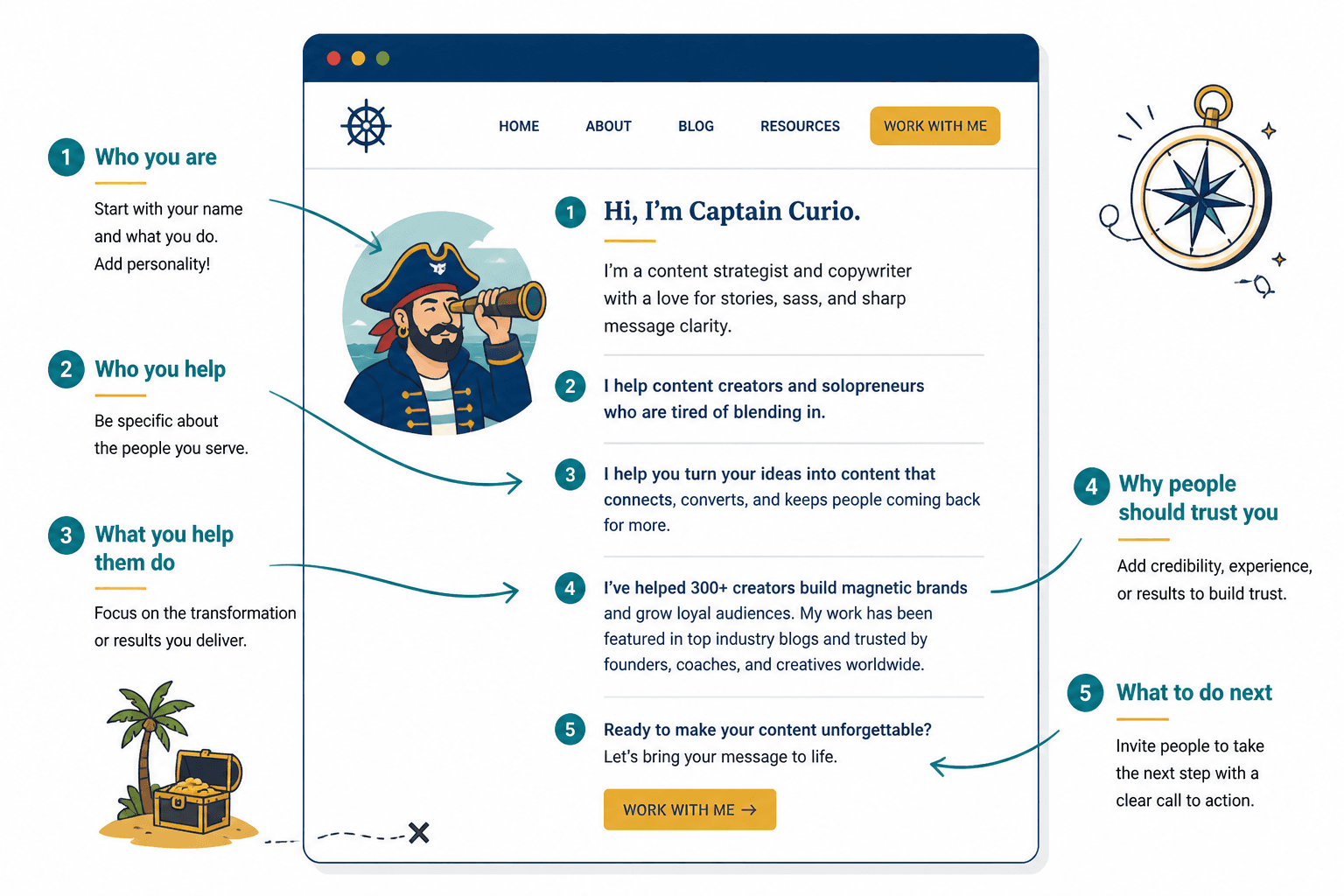
The easiest structure to use before you touch any tool
Before templates. Before AI. Before you start reorganizing commas like they are the real problem. Use this five-part structure.
- Who you are — your role or identity in plain English
- Who you help — the audience, niche, or type of client
- What you help them do — the result, shift, or problem solved
- Why people should trust you — proof, experience, method, or results
- What to do next — book, browse, read, apply, inquire, download
That structure works on About pages, homepage profile sections, team pages, speaker pages, service pages, and personal brand sites. You can expand or compress it depending on space, but the bones stay the same.
Best templates for website bio and profile copy
Templates are useful when they give you structure. They are not useful when they turn your site into a copy-and-paste parade of the same five phrases.
Here are the ones worth using.
1. The clear expert template
Best for consultants, strategists, specialists, and service providers who want straightforward credibility.
I help [audience] do [specific result] without [common frustration]. With [experience, method, or proof], I focus on [core specialty].
Example:
I help small service businesses turn messy messaging into clear website copy without sounding like a template factory. With 8 years in brand strategy and conversion copy, I focus on positioning, homepage messaging, and sales pages that actually make sense.
Why it works: it says what you do, who it is for, and why you are credible in two sentences. No scented candles. No vague ambition words.
2. The personality-plus-proof template
Best for coaches, creators, personal brands, and founders where trust depends partly on the person.
I’m [name], a [role] who helps [audience] [result]. My work combines [approach/style] with [proof or background]. If you want [specific outcome], you’re in the right place.
Example:
I’m Maya, a career coach who helps senior professionals make smarter job moves without rewriting their entire personality for LinkedIn. My work combines sharp positioning with recruiter insight from 10+ years in talent strategy. If you want a stronger professional story and better opportunities, you’re in the right place.
This one gives you a little more room to sound like an actual person. Helpful, as long as “personality” does not become “three paragraphs of decorative backstory.”
3. The founder bio template
Best for solo founders and business owners whose identity is tied to the company.
[Name] is the founder of [business], where they help [audience] [result]. Their work is known for [approach or differentiator], and has helped clients/customers [proof or outcome].
Example:
Jordan Lee is the founder of Draftwell Studio, where he helps coaches and consultants build sharper websites that sound like them and sell more clearly. His work is known for clean positioning and zero-fuzz messaging, and has helped clients simplify offers, improve conversions, and stop hiding behind vague copy.
Good for more formal profile placements, media pages, and speaker bios too.
4. The short homepage bio template
Best for those compact profile sections where you only get a few lines.
I help [audience] [result] through [service, method, or specialty]. [Proof or differentiator].
Example:
I help online experts turn loose ideas into clear offers and cleaner website copy through strategy, messaging, and conversion-focused content. 100+ projects in, I still think clarity beats cleverness most days.
That second sentence is where you can add a bit of voice. Not chaos. Just voice.
5. The audience-first template
Best when your niche is the strongest trust signal.
For [audience] who want to [goal], I provide [service or offer] that helps them [result]. My background in [proof] shapes a process that is [differentiator].
Example:
For private practice therapists who want websites that feel credible without sounding cold, I provide brand messaging and copy strategy that helps them attract better-fit clients. My background in healthcare content shapes a process that is practical, compliant-aware, and refreshingly low on jargon.
Useful when your audience cares deeply that you understand their world.
6. The “why this work” template
Best when your story matters, but only because it connects directly to your expertise.
After [relevant experience/problem], I started helping [audience] [result]. Now I use [approach/expertise] to help clients [specific outcome].
Example:
After years of watching smart founders bury good offers under bloated messaging, I started helping service businesses simplify what they say and how they sell. Now I use positioning strategy and conversion copy to help clients sound clearer, look sharper, and waste less traffic.
This works well when the origin story adds context. If it does not, skip it. Not every bio needs a “my journey” section. Sometimes the journey is just you doing your job well.
How to choose the right bio template
Pick based on what needs the most help:
- If people do not understand what you do, use the clear expert or short homepage template.
- If people need to trust you before they buy, use personality-plus-proof.
- If your niche matters a lot, use audience-first.
- If you are the face of the business, use the founder bio.
- If your background explains your method, use why this work.
What you do not need is five competing angles in one bio. Trying to sound strategic, warm, credible, premium, relatable, visionary, and disruptive all at once is how you end up sounding like nothing in particular.
Best tools for website bio and profile copy
Tools can help a lot here. Just not in the way people hope. The best ones speed up thinking, organize inputs, sharpen drafts, and help you test variations. They do not magically invent positioning or make generic offers interesting.
So instead of pretending there is one perfect tool, here are the categories that actually matter.
AI drafting tools
Useful for generating rough options, rewriting clunky sentences, compressing long bios, and testing different tones.
Best use cases:
- Turning notes into first drafts
- Creating short, medium, and long bio versions
- Rewriting stiff copy in plainer English
- Generating alternate openings and CTAs
Bad use case: asking AI to write your entire bio from one lazy prompt and then acting surprised when it sounds like a networking event brochure.
If you want more on that, read best AI tools for bio and profile copy for websites and best AI writing tools and site builders for bio and profile copy for websites.
Voice and clarity editing tools
These help trim fluff, tighten sentences, and spot readability problems. They are especially handy if your draft sounds overly formal or stuffed with abstract language.
Use them for:
- Cutting sentence bloat
- Reducing jargon
- Improving rhythm and readability
- Checking if your bio is doing too much
Just do not let “readability” flatten your personality into tax-form oatmeal.
Research and message-capture tools
Sometimes the problem is not writing. It is that you do not have good raw material. Research tools help you gather testimonials, client language, offer notes, audience pain points, and proof points so your bio has something real to say.
Helpful inputs include:
- Frequently used client phrases
- Common objections
- Desired outcomes
- Specific results or milestones
- Repeated compliments about your style or process
A bio gets much easier to write when you stop guessing what matters and start using language your audience already uses.
Template and snippet libraries
These are underrated. A good snippet bank lets you save versions of your intro, proof line, CTA, one-liner, and audience statement so you are not rewriting from scratch every time you update your site, speaker sheet, or author page.
Save reusable pieces like:
- One-line bio
- Homepage profile bio
- Long About page intro
- Media bio
- Speaker bio
- Short CTA lines
- Proof statements
This is one of those simple systems that makes you look much more organized than you feel. Useful.
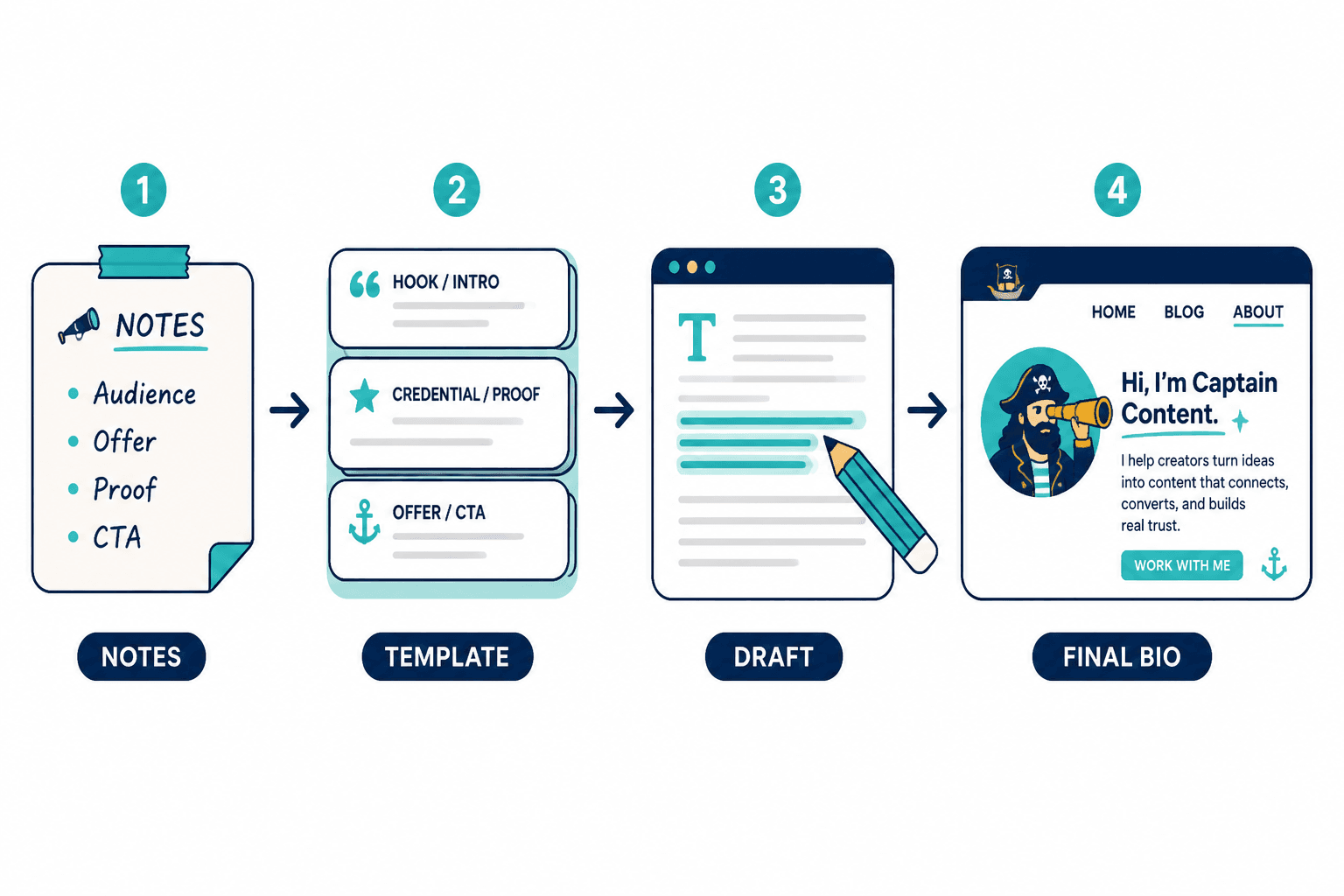
A practical workflow for using templates and tools without ruining the copy
Here is the process that tends to work best.
1. Gather inputs first
- Who you help
- What you help them do
- What makes your approach different
- Proof, credentials, results, or experience
- The next action you want readers to take
If you skip this and open an AI tool first, you are asking software to compensate for unclear thinking. It will try. It will not do it well.
2. Pick one template
One. Not three stitched together like a copywriting quilt.
Draft fast. Do not over-edit yet. You are building structure before style.
3. Use a tool to generate variations
Ask for:
- A shorter version
- A warmer version
- A more direct version
- Three alternative proof lines
- Two better CTA endings
This is where tools shine. Not as ghostwriters. As variation engines.
4. Cut anything vague
Delete phrases like:
- passionate about helping
- empowering others to
- unlock potential
- results-driven professional
- mission is to inspire
- dynamic leader with a proven track record
These phrases are not evil because they are common. They are bad because they rarely carry useful information.
5. Add one line of proof
This could be years of experience, number of clients served, media features, sector expertise, past roles, notable outcomes, or a strong differentiator in your process.
Specificity is doing a lot of the heavy lifting here.
6. Check the next step
If someone likes your bio, what should they do next?
- Read your services page
- Book a consultation
- View case studies
- Join your newsletter
- Browse your work
No CTA means your bio stops right when it should start helping the business.
Before-and-after bio fix
Here is what this looks like in practice.
Before:
Hi, I’m Rachel, a passionate entrepreneur and coach dedicated to helping ambitious women step into their power, gain clarity, and create aligned success in business and life. Through my unique framework and heart-centered approach, I empower my clients to unlock transformation and thrive.
After:
I’m Rachel, a business coach for women building service-based businesses that need clearer offers, stronger boundaries, and a saner growth plan. My coaching blends offer strategy, messaging, and decision support so clients can grow without turning every week into a small fire. If you want a business that works better and feels less chaotic, start here.
The second version is not “better” because it is harsher. It is better because it says something. Audience. Problem. Approach. Outcome. Personality. Next step. Done.
What the best templates and tools for website bio and profile copy will not fix
Worth saying plainly: no template or tool can rescue bad positioning.
If you cannot explain who you help, what problem you solve, or why your offer matters, your bio will stay muddy no matter how many rewrites you run. Tools can sharpen language. They cannot invent clarity from thin air.
They also will not fix:
- An offer nobody understands
- Trying to target everyone
- A site with no useful CTA
- Proof-free claims
- A brand voice that changes every paragraph
So if your bio still feels off after using templates and tools, the issue may not be the wording. It may be the strategy underneath it.
For more examples, check bio and profile copy for websites examples for coaches, consultants, and personal brands. And if your drafts keep sounding polished but weirdly lifeless, read how to write bio and profile copy for websites without sounding salesy or robotic.
The bigger point is simple: clearer structure and clearer writing make the piece more useful. That is usually what makes the ending land better too.