
Picking the best newsletter platforms and template tools for newsletter sections and formats is not really about shiny features. It is about one much less glamorous question: can this thing help you publish a newsletter people can actually read, recognize, and return to?
A lot of creators choose a platform because it promises growth, monetization, referrals, or some charming little dashboard graph. Then they sit down to write and realize the editor fights them, the templates are stiff, the formatting is weird, and building repeatable sections feels like assembling IKEA furniture with one screw missing.
If your newsletter has regular sections like a quick intro, main idea, curated links, tools, case studies, recommendations, prompts, or CTAs, your platform matters more than people admit. So do your template tools. The wrong setup makes every send feel like starting from scratch. The right one gives you structure without making everything sound like it came from a beige corporate robot.
Here’s how to choose tools that make newsletter sections and formats easier to build, easier to repeat, and easier to improve over time without turning your writing process into admin cosplay.
If you want the bigger picture, start with the parent guide.
What actually matters in newsletter platforms for sections and formats
Most platform roundups obsess over subscriber limits, pricing tiers, and monetization add-ons. Fair enough. Those matter. But if your real problem is creating a newsletter that feels consistent, readable, and useful, you need to look at a different set of things.
For newsletter sections and formats, the important stuff is usually boring on paper and extremely important in practice.
- Editor flexibility: Can you create repeatable section structures without the formatting breaking every five minutes?
- Saved templates: Can you duplicate a newsletter format fast, or are you rebuilding headers, spacing, and CTA blocks every week?
- Plain-text versus designed email options: Some newsletters work better looking like a personal note. Others need a little more visual structure.
- Content blocks: Useful if you run recurring sections like “3 links,” “tool of the week,” “client lesson,” or “what I’m testing.”
- Archive quality: If your emails also live as web pages, the formatting should not look tragic outside the inbox.
- Ease of reuse: Can you turn one format into many issues without friction?
- Collaboration and workflow: Helpful if you work with an assistant, editor, or content team.
- Audience-fit: Does the platform suit your style, business model, and publication rhythm?
That last one gets ignored a lot. A solo creator sending one sharp weekly essay and a consultant sending segmented client updates do not need the same tool stack. And a platform built for media-style newsletters is not automatically the best fit for a coach, freelancer, or founder building trust with a smaller but more relevant list.
In other words, do not choose your newsletter platform like you are auditioning for a startup bro documentary. Choose it based on how you actually write.
The best newsletter platforms and template tools for newsletter sections and formats
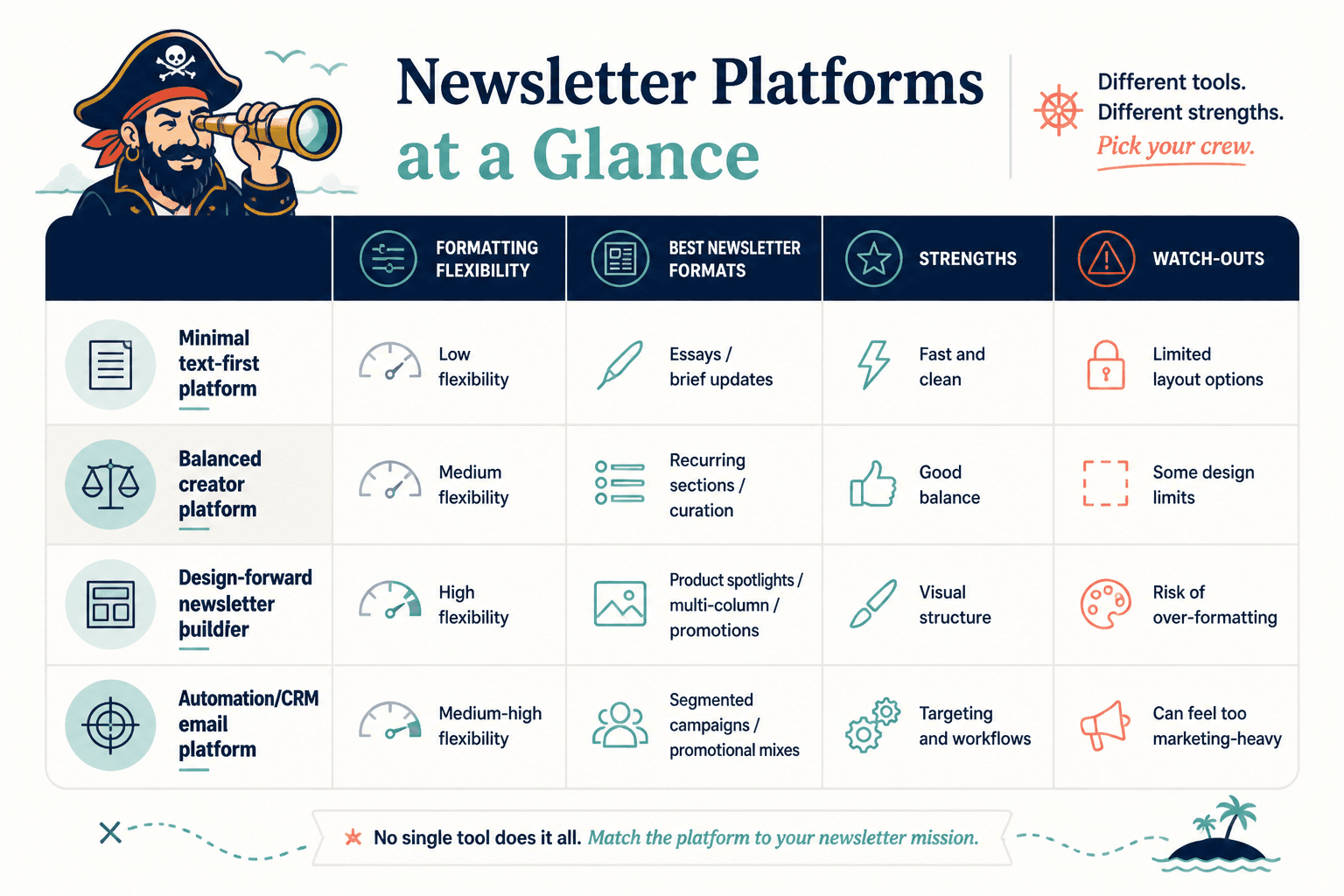
There is no one perfect platform. Annoying, I know. But there are clear winners depending on what kind of newsletter structure you want to run.
| Platform or tool | Best for | Strength with sections and formats | Main drawback |
|---|---|---|---|
| Beehiiv | Media-style newsletters, recurring sections, growth-focused creators | Strong newsletter builder, reusable structure, good for modular content | Can feel a bit platform-led if you just want simple personal emails |
| ConvertKit | Creators selling offers, simple recurring formats, automations | Clean writing flow, easy repeatable sends, useful forms and funnels | Less visually rich if you want heavier designed layouts |
| Substack | Writers who want simple publishing with minimal setup | Very easy to publish consistent editorial formats | Limited design control and template flexibility |
| MailerLite | Creators and small businesses wanting more design control | Good block editor for recurring sections, decent template options | Can tempt people into overdesigning basic newsletters |
| Kit-style doc templates in Notion or Google Docs | Planning newsletter sections before sending | Excellent for drafting repeatable structures and editorial workflows | Not the sending platform itself |
| Canva | Visual header assets and simple recurring graphic elements | Useful for branded section dividers and promo graphics | Easy to overdo and make emails feel bulky |
| Airtable or Notion | Newsletter content systems and reusable section libraries | Great for storing prompts, recurring blocks, and issue planning | Needs setup discipline to be useful |
Now let’s get more specific, because “best” gets useless fast without context.
Best newsletter platforms by newsletter style
1. Beehiiv for structured, repeatable newsletter sections
Beehiiv is strong when your newsletter has recurring blocks and a slightly more publication-style feel. If you want sections like editor’s note, featured insight, links, tools, resources, sponsor mention, and CTA, it handles that better than platforms that are basically just “email but with a send button.”
It is especially useful if you want your newsletter archive to look clean on the web too. That matters more than people think. A good archive helps with authority, repurposing, and discoverability, especially if your newsletter ideas have evergreen value.
- Best for weekly or multi-section newsletters
- Useful for creators building an editorial product
- Good if your newsletter has consistent issue architecture
- Works well if you care about both inbox and web presentation
Where Beehiiv can be less ideal is if you want an ultra-minimal, personal, plain-text style and do not care much about publication features. Then it can feel like more machine than you need.
2. ConvertKit for creators who need simple formats plus business utility
ConvertKit is one of the better choices if your newsletter is part content engine, part sales system. It is useful for coaches, consultants, freelancers, and solo founders who want repeatable email formats without getting trapped in over-designed newsletter land.
The real appeal here is balance. You can keep emails simple, build reusable structures, connect forms and automations, and still write like a human. For many creators, that is a better setup than choosing a platform that is brilliant at publishing but awkward at actually supporting the business side.
- Best for simple recurring sections and creator offers
- Good for plain-text or lightly formatted newsletters
- Strong if your newsletter feeds lead magnets, launches, or nurture flows
- Useful when your format needs consistency more than fancy design
If your newsletter depends on highly visual modular layouts, ConvertKit may feel a bit restrained. But honestly, restraint is often doing you a favor.
3. Substack for writers who want low friction and a strong editorial habit
Substack is still a good option if your main goal is to write regularly and publish with very little setup. If your newsletter format is mostly intro, argument, lesson, and soft CTA, it works fine.
It is less powerful as a template system, though. You can absolutely create repeatable sections, but not with the same flexibility you get from more creator-business-oriented platforms. So if your newsletter is basically an ongoing column, Substack makes sense. If it is a carefully structured content asset with recurring modules, less so.
- Best for essay-first newsletters
- Works well for simple recurring editorial formats
- Great for building a writing habit fast
- Less ideal for custom workflows and modular formatting
4. MailerLite for more visual section design
MailerLite is a solid option if you want stronger layout control for recurring newsletter sections. You can create blocks more visually, which helps if your format includes featured resources, product spotlights, multi-column curation, or branded content chunks.
The catch is also the feature. More design freedom gives people more ways to make a mess. A lot of newsletters do not need banners, boxes, icons, color strips, and six font treatments. They need a better idea and cleaner structure.
- Best for visually structured newsletters
- Good for recurring content blocks and promotions
- Useful for brands wanting a bit more design polish
- Risk: over-formatting a newsletter into oblivion
Use the design features lightly. Your newsletter is not trying to become a tiny website with self-esteem issues.
Best template tools for planning newsletter sections and formats
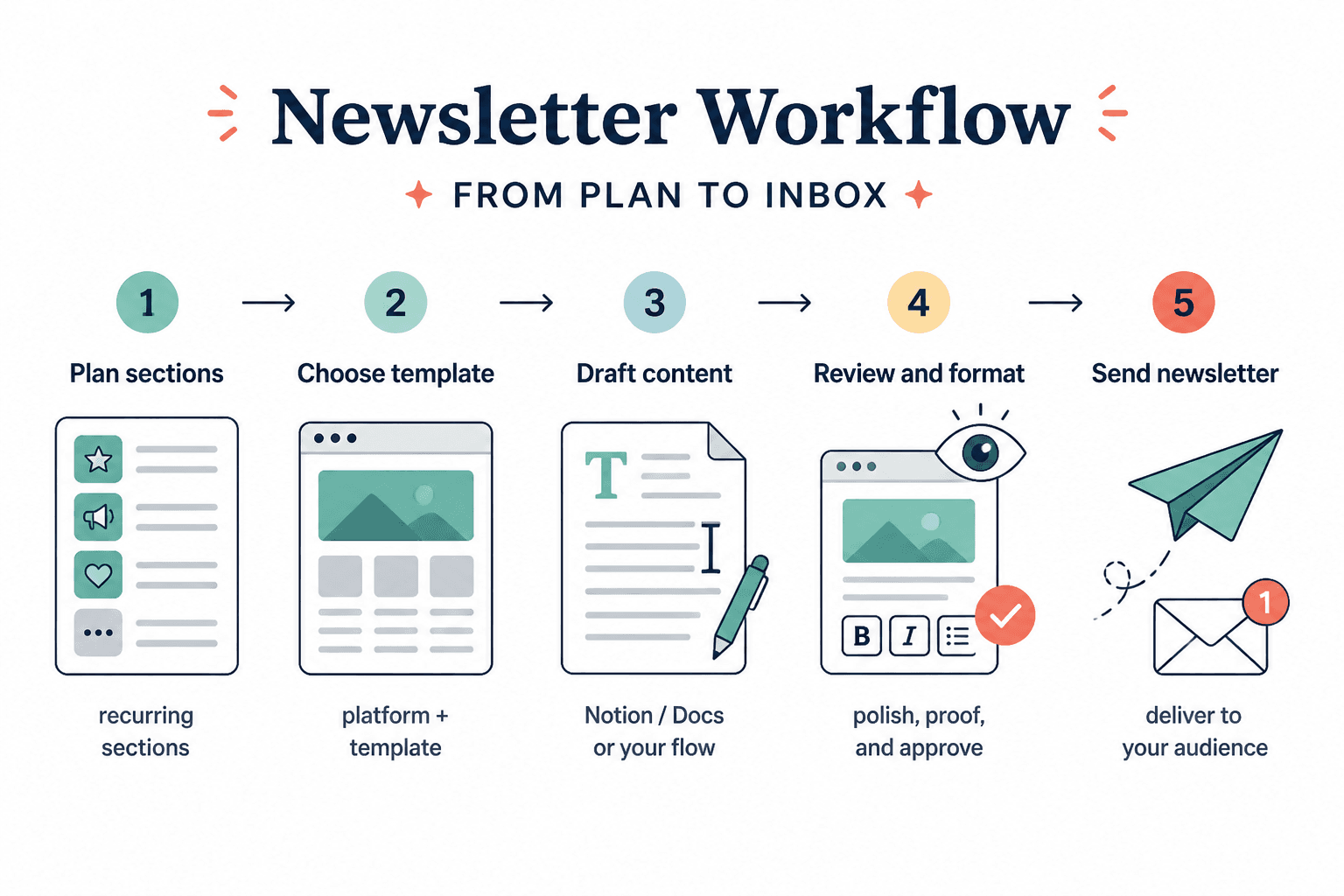
The sending platform matters, but your template tool often matters just as much. This is where your issue structure gets planned, refined, stored, and reused. If every newsletter starts from a blank page, that is not a creativity problem. That is a systems problem.
Notion for editorial systems and reusable issue frameworks
Notion is excellent if you want a content operating system for your newsletter. You can create templates for different issue types, maintain a bank of recurring sections, store swipe-worthy intros, and track which formats actually perform well.
This works especially well if you alternate between formats, like:
- Weekly personal note
- Curated links issue
- Deep-dive teaching issue
- Sales issue
- Case study issue
- FAQ issue
Notion is not magic, obviously. If you overbuild it, congratulations, you now have a very elegant procrastination machine. But used simply, it is one of the best tools for keeping newsletter sections consistent.
Google Docs for writers who just want speed
Google Docs is underrated here. It is not fancy. Good. Fancy is often where useful workflows go to die.
A simple Docs template can handle most newsletter structures beautifully. You can keep a master issue template with recurring headers, reminders for CTA placement, and notes for balancing section length. For many writers and consultants, that is enough.
- Best for low-friction drafting
- Easy to duplicate and adapt
- Good for collaboration and editorial comments
- Ideal if your format is mostly text-first
Airtable for content libraries and recurring blocks
Airtable works well if your newsletter has repeatable components that you want to mix and match. Think quote bank, curated links library, examples database, CTA variants, product mentions, prompts, topic tags, and audience pain points.
It is especially useful once your newsletter becomes a real content system rather than a weekly improvisation session. If that sounds too intense right now, that is fine. You probably do not need Airtable on day one. But if your newsletter is growing into an asset library, it starts making a lot more sense.
Canva for light visual templates, not full email writing
Canva can help with recurring visual pieces like section headers, issue covers, promo graphics, or lead magnet callouts. It is useful if your newsletter brand has a stronger visual identity and you want that to show up in a controlled way.
But do not try to solve a weak newsletter format with graphics. If your sections are muddled, no tasteful rectangle is coming to save you.
How to choose the right setup for your newsletter format
The easiest way to choose is to stop asking, “What is the best newsletter platform?” and start asking, “What kind of newsletter am I actually building?”
Here is a simpler way to decide.
If your newsletter is mostly personal writing with a repeatable shape
- Best platform: Substack or ConvertKit
- Best template tool: Google Docs
- Why: You need speed, consistency, and a clean writing flow more than visual complexity
If your newsletter has recurring editorial sections
- Best platform: Beehiiv
- Best template tool: Notion
- Why: You want a structured issue format, reusable blocks, and a clean archive
If your newsletter supports offers, funnels, or lead generation
- Best platform: ConvertKit
- Best template tool: Notion or Google Docs
- Why: You need writing plus forms, automation, and business utility without too much visual clutter
If your newsletter is more design-heavy or promotional
- Best platform: MailerLite
- Best template tool: Canva plus Notion
- Why: You need content blocks, visual presentation, and a bit more design control
The point is not to build some flawless stack on your first try. The point is to create a setup where recurring sections are easy to produce and hard to mess up.
What a good newsletter section template actually looks like
A lot of people say they need a template when what they really have is a vague wish to feel less chaotic on Tuesdays. Fair. But a useful template is more specific than “Intro, body, CTA.”
For recurring newsletter sections and formats, a practical template often includes:
- Issue type: teaching, curated, story-led, case study, promo, roundup
- Subject line angle: curiosity, specificity, usefulness, opinion, urgency
- Opening type: observation, mistake, tension, bold claim, mini-story
- Main section blocks: repeatable chunks with clear purpose
- Transition lines: little bridges so the issue does not feel stitched together
- CTA type: reply, click, read, buy, book, share
- Length guidance: not rigid word count, just useful boundaries
Here is a simple example for a creator newsletter:
Template:
1. Sharp opener with one problem or idea
2. Main lesson with one example
3. Quick “what this means in practice” section
4. Recommended tool, article, or resource
5. Soft CTA to reply, read, or explore offer
And here is one for a more curated, media-style issue:
Template:
1. Editor’s note
2. One featured insight or essay
3. Three useful links with commentary
4. Tool or template recommendation
5. Community prompt or question
6. CTA or next-step link
The best template does not make every issue identical. It just removes the dumb decisions that waste energy.
Common mistakes when choosing newsletter tools
This is where people quietly sabotage themselves.
- Choosing for growth features before writing features: If the editor is annoying, you will not publish consistently enough for growth tools to matter.
- Overvaluing design: Most newsletters need clearer sections, not more decoration.
- Ignoring archive quality: If your newsletter also lives on the web, ugly formatting hurts authority.
- Starting without a repeatable issue format: Your platform cannot rescue structural chaos.
- Using too many tools too soon: A sending platform plus one planning tool is usually enough at first.
- Confusing templates with good writing: Templates help with consistency. They do not create taste, clarity, or interesting ideas.
That last point matters a lot. Tools can help you move faster, stay consistent, and reduce friction. They cannot make a vague newsletter useful. They cannot give your sections a point. And they definitely cannot fix a newsletter that reads like someone dumped a mildly organized thought salad into an inbox.
A simple stack that works for most creators
If you do not want to overthink this, here is a very workable setup for most creators, coaches, consultants, and personal brands.
- Platform: ConvertKit or Beehiiv
- Drafting template: Google Docs or Notion
- Section library: Notion or Airtable
- Visual support: Canva only if needed
That is enough to create recurring sections, maintain consistency, test formats, and improve the newsletter over time without building a content stack that needs its own project manager.
If you want more help shaping the actual structure of your emails, the broader email newsletter writing section is a good place to keep going. You can also explore the deeper newsletter writing guides and this core guide on newsletter sections and formats.
For related practical reads, these should help:
- Best AI Tools for Newsletter Sections and Formats
- Best Templates and Tools for Newsletter Sections and Formats
- Best Newsletter Sections and Formats Ideas and Examples for Creators
- Newsletter Sections and Formats Guide for Creators Who Want Better Results
Best picks by creator type
If you want the short version, here it is.
Newsletter structure works best when each section has one clear job and supports the main point of the issue. Simpler formats usually outperform busier ones when the writing stays sharp.