
Most people using AI images in their business make one very fixable mistake: they treat the image like the asset, when really it is just the attention device.
A polished mockup, carousel graphic, concept visual, ad creative, or lead magnet cover can absolutely help. But if the funnel behind it is weak, the image just becomes decorative frosting on a stale cupcake. Looks nice. Sells poorly.
The best funnel ideas to pair with AI image use cases are the ones that match the job the image is doing. Some images are there to stop the scroll. Some are there to explain. Some build credibility. Some make an offer feel more tangible. And some quietly help a buyer imagine the result before they have paid you a cent.
That is the real game here. Not “use AI images more.” Use them with a funnel that makes the attention go somewhere useful.
This article will show you which funnel types actually pair well with different AI image use cases, where people usually overcomplicate things, and how to build a cleaner path from visual content to leads, trust, and sales. If you are creating content, selling expertise, or trying to turn your image workflow into something more than random posting, this is where it gets practical.
To see how this fits into the wider strategy, open the parent guide.
Why AI images need a funnel in the first place
AI images can do a few things really well:
- Make abstract ideas easier to grasp
- Make content look more finished
- Create visual consistency faster
- Give offers a more tangible feel
- Help social posts compete for attention
- Support storytelling, examples, and teaching
What they cannot do is create intent from nothing. They do not fix weak positioning. They do not rescue a boring offer. They do not magically convince someone to trust you because you generated a nice-looking visual in twelve seconds.
So the question is not just, “What AI image should I make?” It is, “What should happen after someone sees it?”
That is where funnels matter. A funnel is simply the path from attention to next step. Not some bloated diagram with seventeen automations and a smug webinar in the middle. Just a clear sequence that moves the right person from curiosity to action.
If you want a broader foundation first, it helps to read the AI image use cases guide and the wider AI writing tools and workflows hub if you want the bigger ecosystem around these content systems.
Start with the use case, not the funnel fantasy
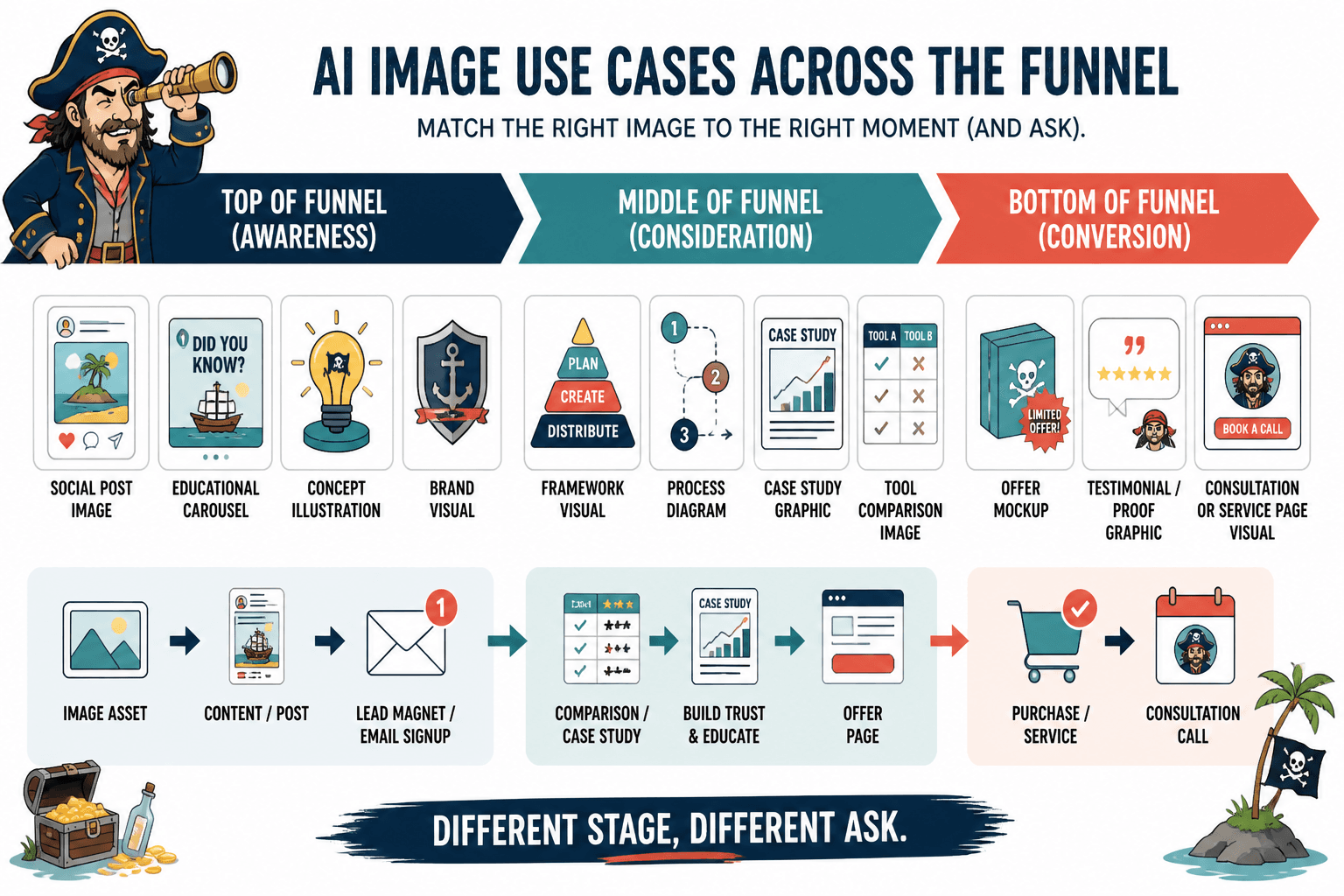
Before picking a funnel, identify what kind of AI image use case you are working with. Because a visual used in a social post should not feed into the same next step as a visual used in a landing page or a lead magnet.
Here is the simple breakdown.
| AI image use case | Main job | Best funnel direction |
|---|---|---|
| Social post visuals | Stop scroll and clarify idea | Post to profile to lead magnet or newsletter |
| Lead magnet covers and diagrams | Make resource feel real and usable | Content to opt-in to nurture |
| Sales page visuals | Increase clarity and perceived value | Traffic to offer page to purchase or call |
| Case study graphics | Show proof and process | Content to case study to consultation |
| Tool comparison images | Simplify decisions | Search or content to comparison to offer |
| Brand visuals for authority content | Build consistency and recognition | Content to article to email list or service page |
The best funnel ideas to pair with AI image use cases depend on this alignment. If the image is doing a top-of-funnel job, do not shove it into a hard sales sequence too early. If the image is helping someone evaluate a solution, do not waste that attention on a vague “follow for more.”
Different stage, different ask.
Funnel idea 1: Social post image to lead magnet
This is one of the cleanest and most reliable options for creators, coaches, consultants, and service businesses.
You create an AI image that makes a content point faster or more clearly. That image supports a post. The post earns attention. The post points people to a relevant free resource. The free resource gets the opt-in. Then the nurture sequence does the heavier trust-building work.
Best for
- Educational carousels
- Concept illustrations
- Framework visuals
- Branded quote-style graphics with actual substance
- Simple process diagrams
Simple flow
- Social post with AI image
- Strong caption or post body
- CTA to a related lead magnet
- Email nurture sequence
- Soft pitch to service, offer, or call
Why it works
The image does not need to sell the whole business. It just needs to make the post easier to notice and understand. Then the lead magnet captures the people who want more depth.
This works especially well when the lead magnet expands on the image’s promise. If the post visual shows a 3-step framework, the lead magnet might include the full checklist, examples, prompts, templates, or implementation guide.
Example
- AI image use case: A simple branded diagram showing “3 content mistakes that make your offer look generic”
- Post angle: Explain each mistake briefly
- CTA: Get the full worksheet to fix your positioning
- Funnel result: Attention becomes an email lead, not just a polite like
If you want to push this further, pair it with the ideas in how to turn AI image use cases into more leads or sales. That is the missing piece for people generating visual content and then wondering why it is not doing much commercially.
Funnel idea 2: Educational image carousel to newsletter signup
This one is underrated because it looks less dramatic than a big funnel build. But for many creators and consultants, it is better.
If you are already publishing useful ideas regularly, AI-generated visuals can help package those ideas into tighter, more scannable educational posts. That makes them ideal for feeding a newsletter funnel, especially when your newsletter is where your deeper authority lives.
Best for
- Creators building long-term trust
- Consultants with a strong point of view
- Coaches who sell through authority and clarity
- Writers and educators with repeatable frameworks
Simple flow
- Carousel or visual post
- Reader clicks profile or CTA link
- Newsletter signup page
- Weekly useful emails
- Offer mentioned naturally over time
This is a good fit when the buying cycle is not instant. Which, honestly, is most expertise-based businesses. People usually need repeated proof that you are thoughtful, useful, and not just another person recycling internet paste.
A newsletter gives your AI-image-supported content somewhere to mature. The post gets attention. The newsletter builds the relationship. That sequence tends to outperform premature pitching, especially for higher-trust offers.
Funnel idea 3: AI concept visual to webinar, workshop, or mini training
Some AI image use cases are great for explaining complex ideas visually. That makes them useful for getting the right people into a deeper teaching environment like a live workshop, recorded mini class, or webinar that does not feel like a hostage situation.
If your business sells strategy, implementation, coaching, or advisory work, this funnel can work well because the image acts as the curiosity and clarity hook. It helps people quickly understand the concept they will learn more about.
Best for
- Visual frameworks
- Before-and-after process graphics
- Concept comparisons
- Workflow maps
- “This versus that” educational visuals
Simple flow
- Post or article featuring AI image
- CTA to free workshop or training
- Registration page
- Training delivers real value
- Offer for call, program, or service
Key note: the training has to actually teach something. If the whole thing is just a forty-minute preamble to “book a call,” people will feel it. They are not stupid. They are just busy.
The AI image here helps reduce friction because it gives shape to the promise. A title alone might sound vague. A strong visual showing the actual framework or transformation path makes the training feel more concrete.
Funnel idea 4: AI image-backed case study to consultation
If you sell services, strategic help, or done-for-you work, case studies are one of the best things you can publish. And AI images can support them surprisingly well when used carefully.
No, do not fabricate fake client screenshots or fake proof. That should not need saying, but here we are. What AI images can do is help visualize the process, the problem, the system, or the contrast between before and after in a cleaner way.
Simple flow
- Social post or article introduces a case study
- AI visual supports the explanation
- Reader clicks to full case study
- Case study ends with consultation CTA
- Qualified lead books call
This works because the image is supporting proof, not replacing it. The actual conversion driver is still the substance of the case study: what changed, how you approached it, what the obstacles were, and why the outcome matters.
If you want this to perform, make sure the consultation CTA matches the buyer’s stage. Something like “See if this approach fits your business” usually works better than sounding like you are lunging from behind a potted plant with a Calendly link.
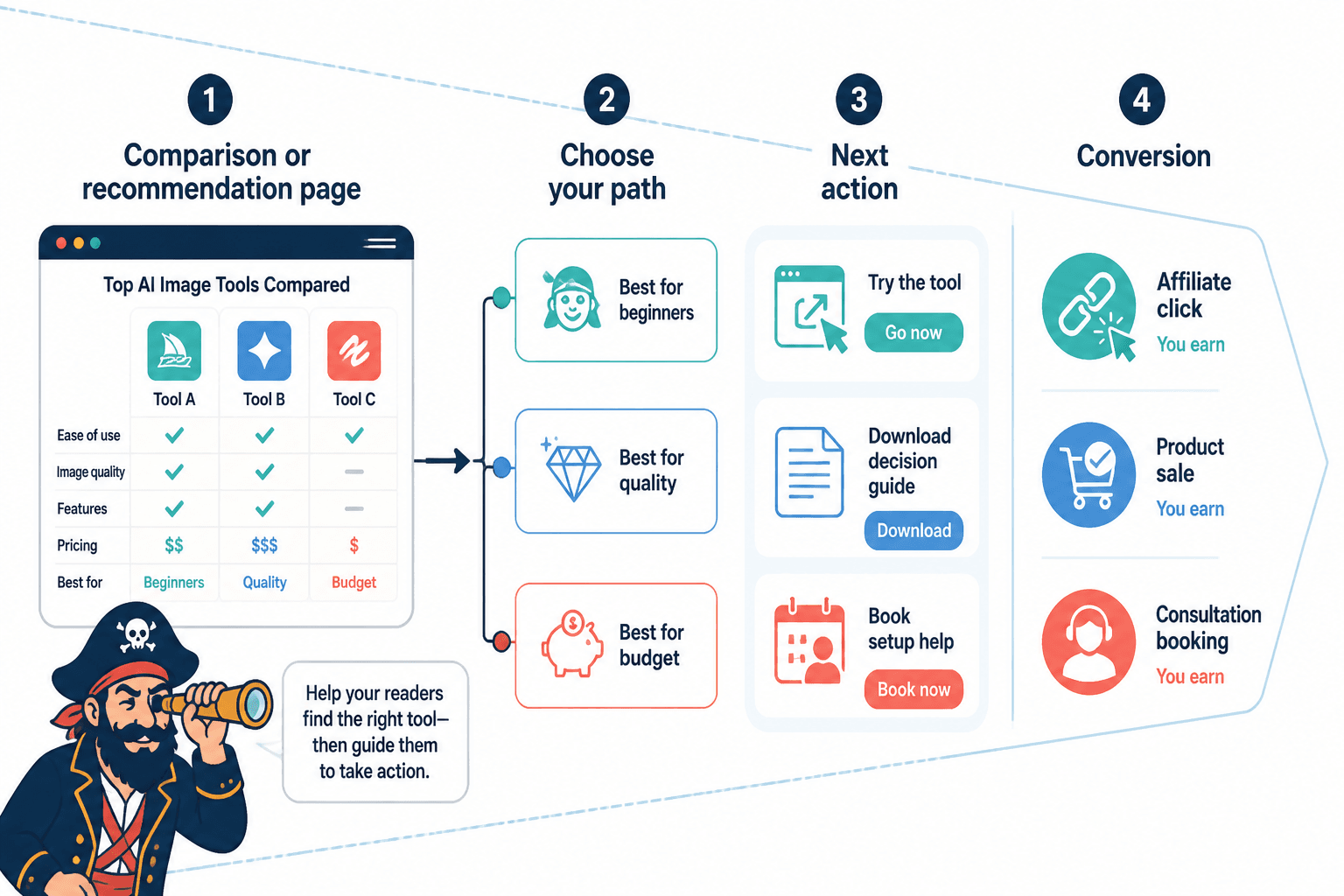
Funnel idea 5: AI comparison graphics to affiliate, product, or service decision funnel
This is especially useful if you write about tools, workflows, creative processes, or implementation options. Comparison content already attracts high-intent readers. Add clear visual support, and the decision becomes easier to act on.
AI images can help create:
- Tool comparison charts
- Use case maps
- Workflow visuals
- Feature-category graphics
- Decision-path diagrams
Simple flow
- Search-friendly article or post
- Visual comparison included
- Reader clicks into comparison or recommendation page
- Clear next step to tool, template, or service
- Conversion through affiliate link, product sale, or consultation
This works because the reader already has intent. They are not just browsing for vibes. They are trying to choose.
That means your funnel should not meander. If someone is looking at an AI image tool comparison or use case breakdown, give them a clean next action: try the category that fits, download the decision guide, or book help choosing the right setup.
For that angle specifically, how to use AI image tool comparisons in a creator funnel is worth reading alongside this.
Funnel idea 6: Lead magnet visuals to email nurture to low-ticket offer
This is a strong play if you sell templates, prompt packs, mini products, audits, or starter resources.
One of the best uses of AI images is making a digital product or lead magnet feel more real. Covers, mockups, interior preview graphics, workflow illustrations, and dashboard-style concept visuals can all increase perceived usability when the underlying thing is actually useful.
Simple flow
- Content promotes a useful free resource
- AI visuals make the resource feel tangible
- Email signup
- Nurture emails deliver quick wins
- Low-ticket offer solves the next problem
This funnel works because it respects buyer psychology. People opt in for something specific. They get proof you are useful. Then they are offered a small next step that feels related, not random.
Where people ruin this is by making the visual look polished while the product itself is thin. The prettier the mockup, the more annoyed people get when the thing inside is fluff. So if you use AI images to dress up a resource, make sure the resource earns the outfit.
Funnel idea 7: AI portfolio visuals to profile funnel
If you are a designer, strategist, brand consultant, marketer, creator, or service provider, your AI image use cases can also support a profile-based funnel.
This is useful when the content itself is not trying to sell hard. Instead, the visual content earns interest, and the profile handles the next step. That next step could be a lead magnet, newsletter, inquiry page, or booking page.
Simple flow
- Visual post shows thinking, taste, or process
- Reader checks profile
- Profile explains who you help and how
- CTA leads to offer or signup page
- Lead or client action happens off-post
This is especially helpful if your content style is more authority-building than overtly conversion-focused. The post attracts. The profile qualifies. The CTA channels.
It sounds simple because it is. And simple usually beats “we built a seven-layer funnel using six tools and now no one knows where to click.”
Funnel idea 8: Search article with AI visuals to related offer
This is one of the better long-term plays if you publish articles on your site or platform. AI images can support educational articles by making examples clearer, breaking up dense explanation, and increasing the usability of step-by-step content.
Then the article itself becomes the top of the funnel.
Simple flow
- Search-friendly article answers a specific question
- AI visuals improve clarity
- Internal links move reader deeper
- Article CTA points to a relevant offer, resource, or email signup
- Reader takes next step
This works particularly well for evergreen use case content. If someone is searching for ways to use AI images in content, branding, offers, or lead generation, they are already problem-aware. Your job is to give them a useful answer and a logical next move.
That is why internal linking matters here. Related resources like best ways to use AI image use cases as a creator and AI image use cases guide for creators who want better results help extend the path instead of making every article fend for itself.
How to choose the right funnel for your AI image use case
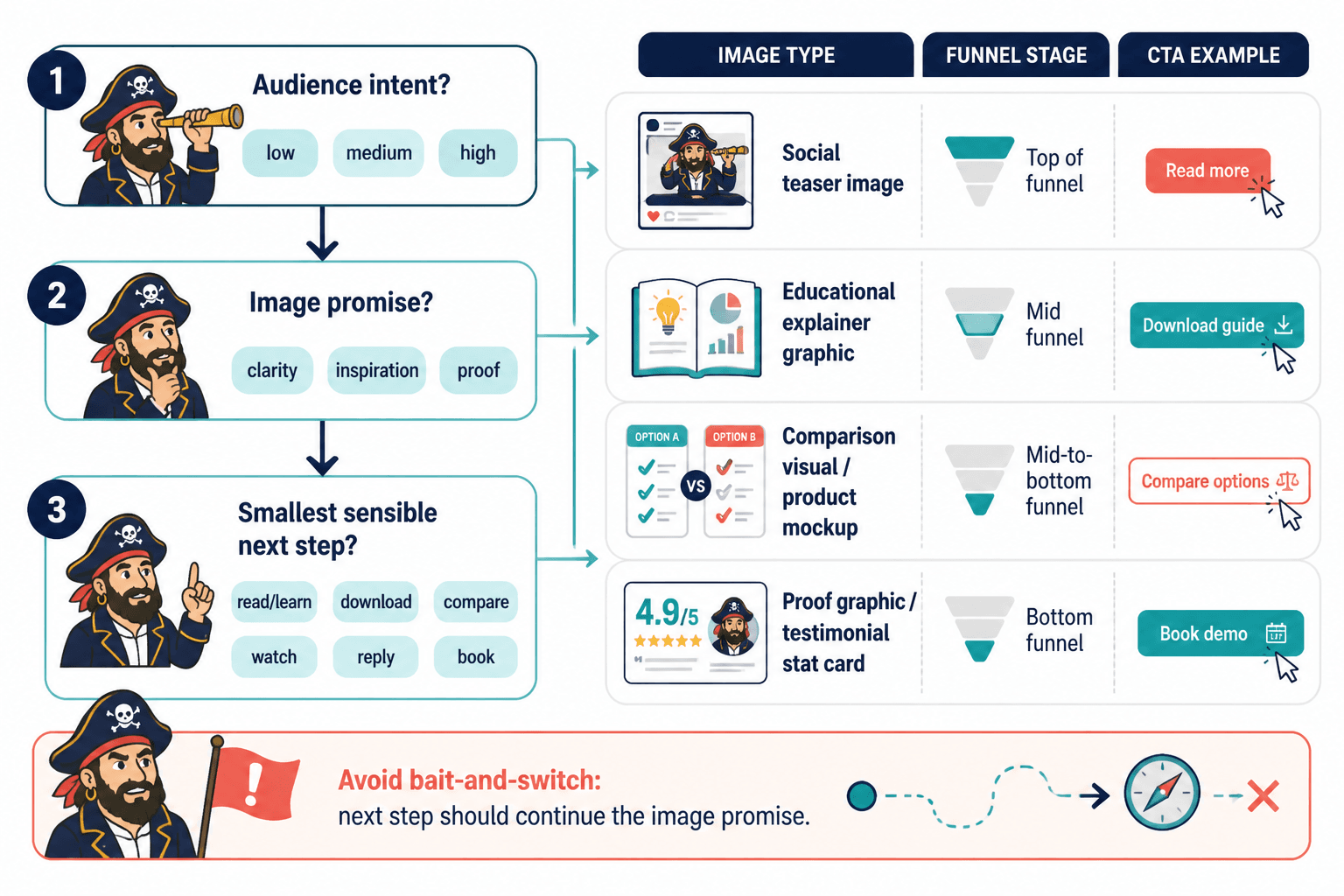
If you are not sure which funnel to pair with your images, use these four questions.
1. What is the image actually helping someone do?
Is it helping them notice, understand, compare, trust, imagine, or decide?
That answer tells you the stage of the funnel.
2. What level of intent does the viewer have?
A social scroller has lower intent than someone reading a comparison article. Do not give both the same CTA and expect elegance.
3. What is the smallest sensible next step?
Usually, the right next step is not “buy now.” It is join, read, download, reply, compare, watch, or book.
4. Does the next step match the promise of the image?
If your image promises clarity, the next step should deepen clarity. If it promises inspiration, the next step should turn that into a usable idea. If it promises proof, the next step should show evidence.
Good funnels feel like continuation. Bad funnels feel like bait-and-switch in nicer fonts.
Common mistakes when pairing AI images with funnels
A lot of funnel friction does not come from the image or the platform. It comes from mismatch.
- Using top-of-funnel visuals with bottom-of-funnel asks: A curiosity-driving social image should not jump straight to “apply now” unless the audience is already warm.
- Making the image prettier than the offer: If the thing behind it is weak, the nice visual just raises expectations you cannot meet.
- No clear next step: The post ends, the article ends, the viewer shrugs, and nothing happens.
- Too many next steps: Download this, read that, book here, subscribe there. Pick one primary action.
- Using images as filler: If the visual adds no clarity, no proof, and no emotional pull, it is decoration.
- Forgetting audience fit: A cool visual style is not the same as relevance. Your audience cares about their problem, not your prompt wizardry.
There is also a subtler mistake: people assume the funnel has to be elaborate because AI feels technical. It does not. Many of the best funnel ideas to pair with AI image use cases are almost boringly straightforward. Post. Click. Resource. Email. Offer. That is enough when the alignment is good.
A simple framework: Attention, clarity, proof, next step
If you want a reusable way to build funnels around AI images, use this four-part structure:
- Attention: Use the image to earn the pause
- Clarity: Use the caption, page, or article to explain the point
- Proof: Show why your idea, process, or offer is credible
- Next step: Give one relevant action
That sequence works for social posts, articles, lead magnets, comparison pages, case studies, and product previews. It keeps the image in the role it should have: important, but not magical.
What funnel should most creators start with?
If you are a creator, coach, consultant, solo founder, or service provider using AI images regularly, start with one of these:
- Social post image to lead magnet
- Educational visual to newsletter signup
- Case study visual to consultation
- Search article with visuals to related offer
Why these?
Because they are simple, practical, and realistic to maintain. They do not require a giant team, a paid traffic budget, or an embarrassing amount of software for what is essentially “helpful content leading somewhere useful.”
Once that is working, then you can add more layers: segmentation, retargeting, product ladders, workshop funnels, comparison funnels, or low-ticket tripwires if you really must call them that.
FAQ
What is the best funnel for AI-generated social images?
Usually post to lead magnet or post to newsletter. Social visuals are often best at earning attention, not closing the sale.
Can AI images help with lead generation?
Yes, if they improve clarity, perceived value, or click-through. Not if they are just there to look busy.
Should I use AI images on sales pages?
Yes, if they support understanding, demonstrate the offer, or make abstract results more tangible. No if they make the page feel generic or fake.
Do I need a complex funnel for AI image use cases?
No. In most cases, a simple path with one clear next step works better.
What is the biggest mistake people make here?
Using attractive visuals without a relevant next action. Attention with no path is just decoration.
Use the image to open the door, not pretend it is the whole house
The best funnel ideas to pair with AI image use cases are not the flashiest ones. They are the ones that make sense.
If your image helps someone understand a problem, lead them to a deeper resource. If it helps them compare options, move them toward a decision page. If it supports proof, send them to a case study or consultation. If it makes a resource feel tangible, use it to drive opt-ins and low-friction sales.
That is the real standard: does the next step feel like the natural continuation of the visual?
When the answer is yes, your AI images stop being random content accessories and start doing actual business work. Which is a much better use of your time than generating beautiful nonsense and hoping the algorithm feels generous.